

If you’re looking for the best free digital marketing tool to start and grow your business, this guide will help you find the right options quickly.
From creating content and managing your blog to reaching the right audience and tracking performance, the tools you use can make a big difference. The right setup saves time, reduces guesswork, and lets you focus on what works.
Without reliable tools, marketing can feel confusing and slow. You may struggle to understand your audience, measure results, or scale your efforts. That’s why using proven tools is one of the smartest ways to move forward faster.
I’ve put together a list of 10 free digital marketing tools that can help you build, manage, and grow your business without spending money up front.
Whether you’re just starting out or looking to improve your current strategy, these tools will give you a solid foundation.
Let’s go through the list and find the ones that fit your needs.
Free Internet Marketing Tools
1. Canva
A company valued at USD 40b with over 65 million users in 190 countries and over 7 billion designs created, Canva is one of the most popular graphic design tools today.
In Canva’s early days, it didn’t have all the bells and whistles of Adobe Illustrator, PicMonkey, or Photoshop.
However, as time passed and Canva added more features, it became a go-to graphic design tool.
Canva is a complete design tool for beginners, intermediate designers, and professionals.
Unlike Adobe Photoshop, Canva has a lower learning curve, making it easier for beginner graphic designers to use.
Canva is more than an image design tool; you can use it for everything from PDFs to prints to infographics. You can design anything visually using Canva.
Here is an overview of what you can do with Canva:
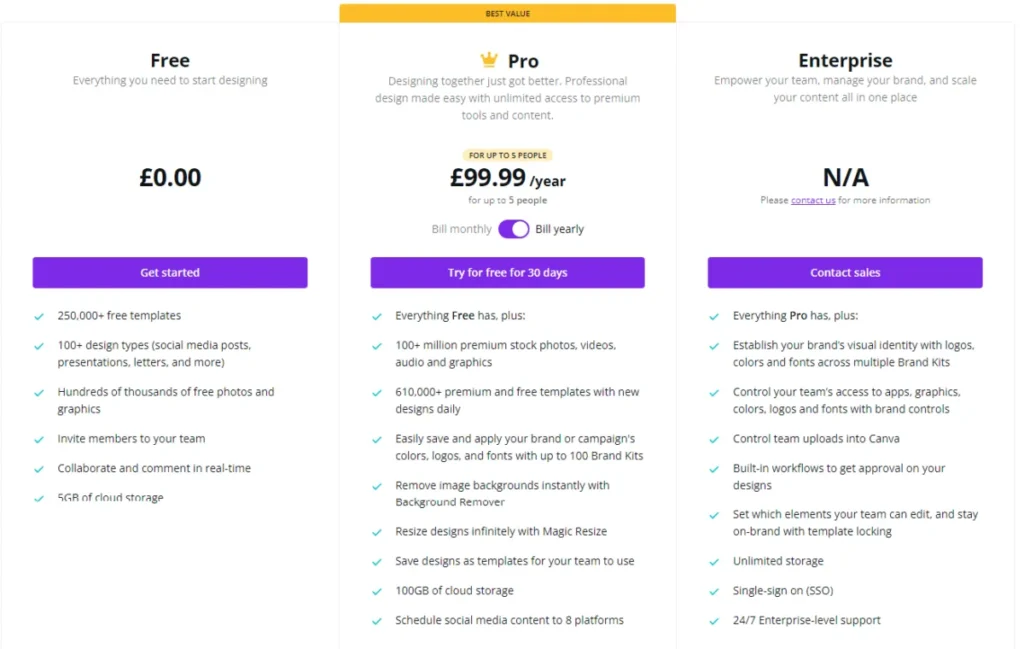
Canva Pricing
Canva is generously priced to make it affordable for businesses of any size, budget, and experience.
A forever-free plan lets you create stunning images, but with limited design features.
The free plan gives you access to 250,000 design templates, 100+ design types, 5GB of storage, and collaboration and team member features.
The Pro Plan offers more design features and a complete set of design libraries.
It gives you access to over 100 million premium stock photos, videos, audio, and graphics. 610,000 premium and free templates, with more added daily. And 100GB of storage space.
Contact a sales rep if your business needs the Canva enterprise solution.
Check out the pricing page for a complete breakdown of what’s in each Canva plan.
There is a Pro plan for $12.95 per month and an annual billing of £99.99 per year for up to 5 people.
2. SEO PowerSuite
No matter what type of online business you run, you need search engine traffic to reach your full potential. Without organic search traffic, most business websites will struggle to generate revenue.
Optimizing your website for strong search visibility isn’t guesswork; you need an SEO tool to simplify every step.
SEO tools make SEO easier, boost productivity, and support data analysis and research.
Many SEO software programs support specific SEO tasks; SEO PowerSuite is one of the most comprehensive search engine optimization tools.
SEO PowerSuite is developed to help you start, manage, and complete every aspect of an SEO task without needing another SEO tool.
Used by over 3 million users and tested by 500,000 SEO experts and business owners, SEO PowerSuite is undoubtedly a proven SEO tool.
SEO Powersuite comes in four separate desktop-based SEO tools:
Each of these four toolkits handles a specific aspect of an SEO task and complements the others to make a complete, all-in-one SEO tool.
To understand how SEO Powersuite can help your business grow, how each toolkit works, and what SEO tasks you can do with them, read my extensive SEO Powersuite review here.
SEO Powersuite Pricing
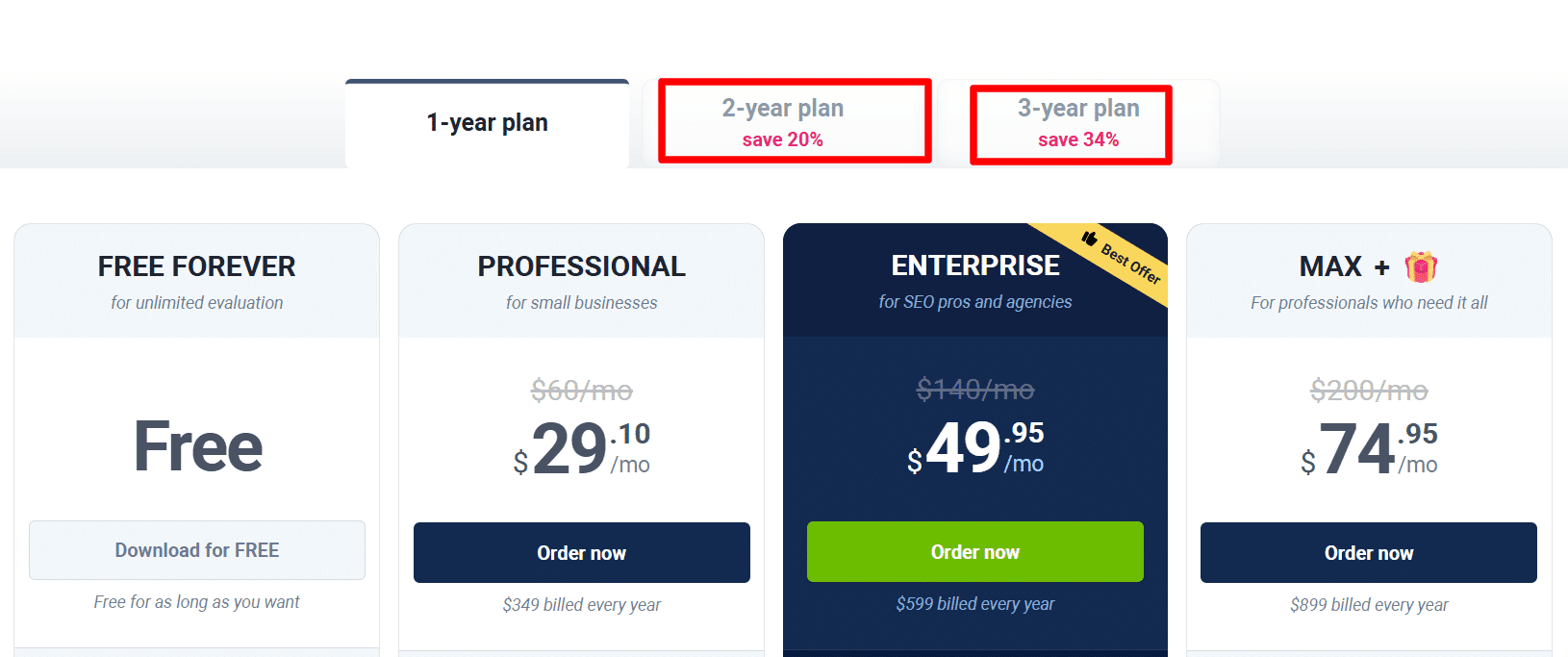
If you run a simple blog with limited SEO needs, the free SEO Powersuite version might just be all you need. You can access the download page from here and use it as long as you desire.
The Professional or Enterprise version is for marketers with extensive SEO needs, in-house SEO professionals, agencies, and large businesses with a strong online presence.
Here are the SEO Powersuite pricing details:
If you want to test the full SEO PowerSuite Enterprise version without risking anything, take advantage of the 14-day trial offer exclusive to my audience.
3. WP Rocket

Note: This tool on this list doesn’t offer a free plan. However, it has a 14-day money-back guarantee. So, if you’re unhappy with the product’s performance, you can request a refund.

Nobody wants a slow web page.
The faster people can find what they’re looking for on your website, the better the engagement and revenue.
If an e-commerce site’s checkout page takes longer to load, customers will be frustrated and abandon their carts. A one-second delay in page loading time reduces customer satisfaction by 16%.
If these page speed stats are not scary enough, consider that 47% of consumers expect a page to load in 2 seconds or less, and Google now uses page speed as one of its ranking factors.
While there are a few ways to improve page speed on a WordPress blog, the easiest and most proven method is to install WP Rocket.
This plugin does all the heavy lifting so you can focus on what matters to your business growth.
If your website is built on WordPress, you need a speed-optimization and caching plugin like WP Rocket.
As the 6th most popular among the top 1 million WordPress plugin developers, WP Rocket stands above competitors such as W3 Total Cache, WP Super Cache, and Comet Cache.
I reviewed the plugins in a previous post on this blog; you can find them here.
It is a detailed review of how WP Rocket can significantly improve page speed, performance, user experience, and overall business growth.
WP Rocket Pricing
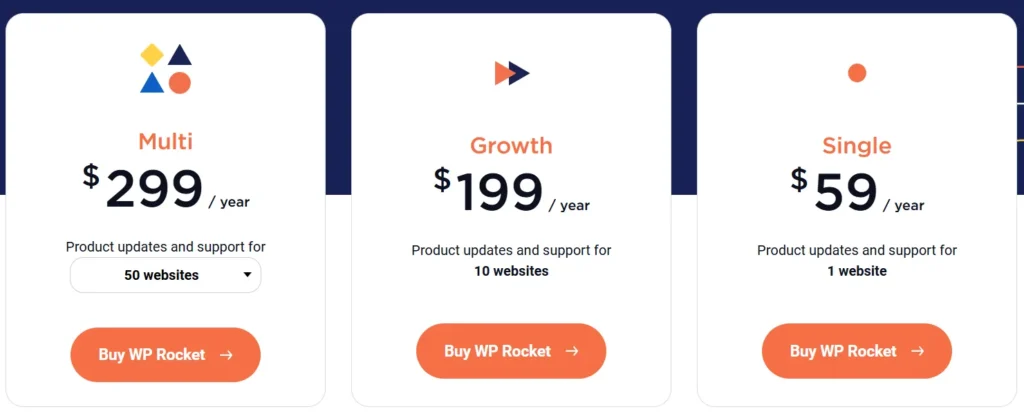
Given the importance of page speed to online business and the immediate impact WP Rocket has on speed optimization, WP Rocket is fairly priced.
Below are the WP Rocket Pricing details:
4. WP Forms

There are many WordPress contact forms, but only a few make form creation easier—WPForms is one of those. It is the best WordPress contact form builder I have ever used.
You can read my review here.
WPForms is more than your everyday contact form builder. It has many features that help businesses grow, manage, and build better customer relationships.
Whatever your need for an online form, you can do it with the WPForms Pro plugin. What you can do with WPForms is only limited by your imagination and creativity.
You can create any WordPress contact form with WPForms:
The plugin comes with hundreds of contact form templates you can use, and a host of conditional logic add-ons to further fine-tune the form behavior. This gives you total control over how your contact form responds to users’ input.
Watch the video below for an overview of how WPForms can help your business grow.
WPForms Pricing
WPForms has four standard versions and pricing for businesses of different sizes, budgets, and needs. Depending on your WPForms needs, the WPForms pricing for each plan is below.
NOTE:
All WPForms prices below include a 50% discount offer today only. So, if you act now, you’ll get 50% off any WPForms license.

5. Awario
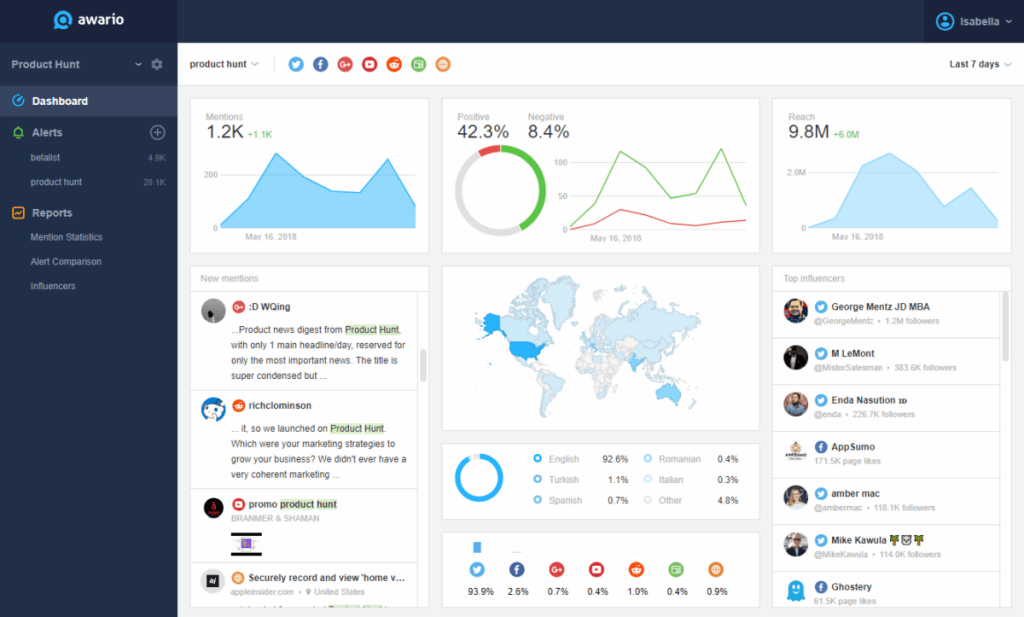
Brand monitoring is integral to today’s marketing strategies, especially for brands that leverage social media for business growth.
Awario is a brand monitoring and social media marketing tool that tracks mentions, identifies influencers, conducts competitive analysis, finds business opportunities, and engages audiences.
Awario is not the first or only marketing tool of its kind, but it is one of the best in the industry.
You can monitor brand mentions or keywords on various platforms – Twitter, Facebook, YouTube, Reddit, Instagram, Websites/blogs, etc.
The advanced filtering option makes the tool one of the most efficient in the industry.
You can filter search queries by country, language, keywords, date, domains, platforms, negative keywords, etc.
You can engage with mentions from your feed as you do on most social media platforms. This lets you jump into discussions that matter to your business without leaving the app.
If you love or have used Mention before, you’ll find Awario a better social media marketing listening tool.
Awario gives you unlimited historical data, unlimited keywords per alert, and white-labeling in the Enterprise plan.
Awario Pricing
Currently, Awario has three standard pricing plans. Each plan has different monthly quotas and data limits.
There are also limitations on the number of users, alerts, stored mentions, monthly mentions, and projects.
Awario offers a generous 7-day free trial plan. You don’t need to enter credit card details to sign up for the free trial period. And you can cancel anytime you wish.
Below is the pricing table for the standard Awario plan.
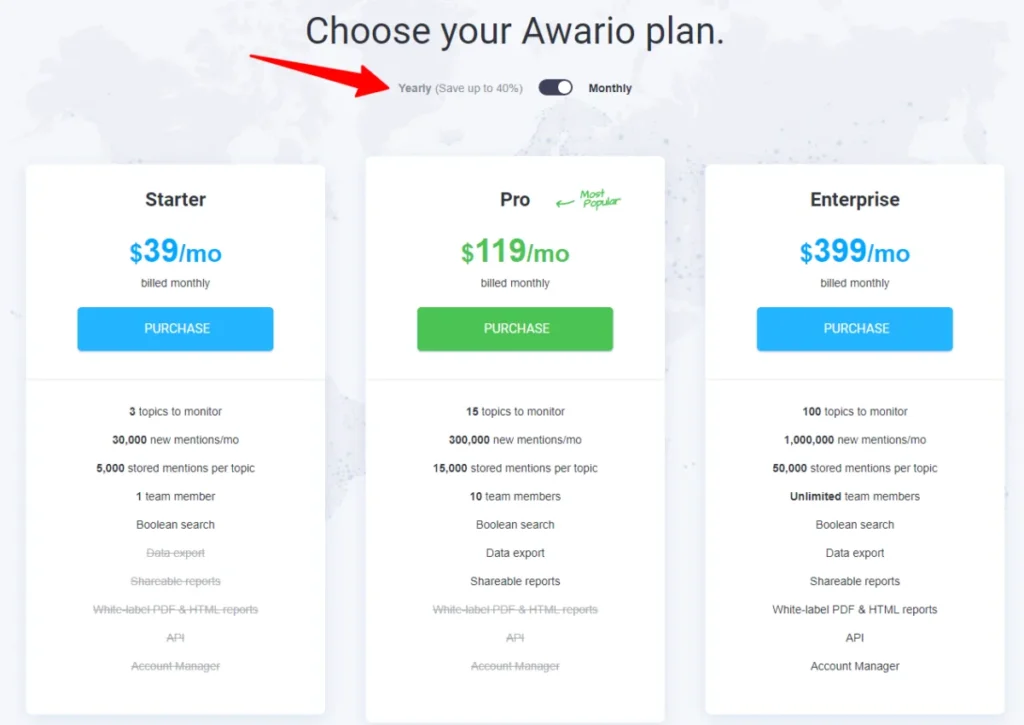
Note: If you subscribe to a yearly plan, you’ll get a 40% discount. That’s two months of free Awario usage.
6. RafflePress
Building an email list is hard, I must admit.
However, combining other email list-building strategies with a giveaway contest can be much easier.
Running a giveaway to grow your business has never been easy until RafflePress changed the game.
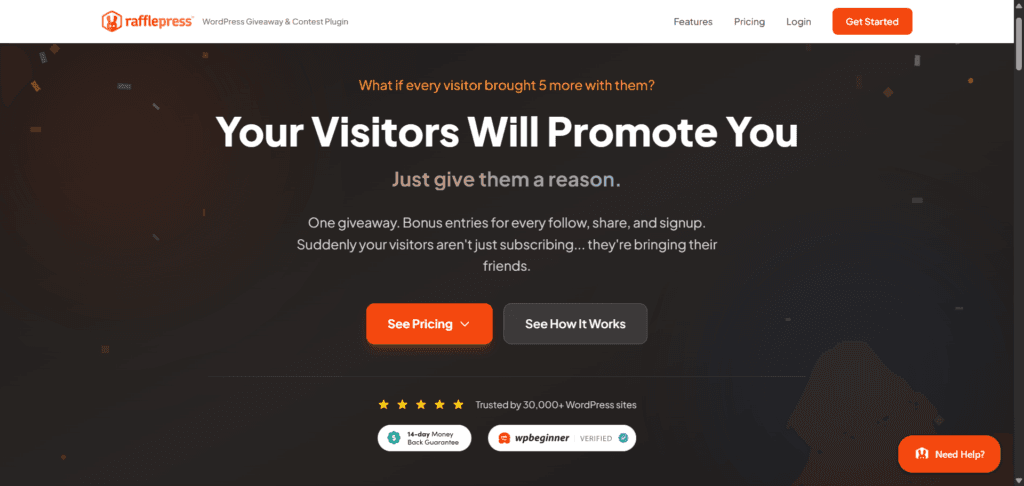
Though not the first WordPress giveaway plugin, RafflePress is a game-changer for many marketers who leverage contests for business growth.
RafflePress is a powerful WordPress plugin that lets you run successful giveaway contests of any kind.
You can create a contest or giveaway within minutes and integrate it with your email marketing services or social media platform to collect leads immediately.
RafflePress includes a user-friendly drag-and-drop form builder, even for beginners. Also, it includes built-in fraud detection to filter out spam entries from your contest.
RafflePress Pricing
RafflePress offers a free plan that lets you run contests, but it includes limited giveaway features and tools. The free RafflePress Lite version might just be all you need.
You can download it for free today from the WordPress plugin directory website.
The paid version starts at $49 per year.
You can purchase RafflePress at an affordable price today through the link below. If you act now, you’ll get RafflePress at a 20% introductory price.
Below is the breakdown of RafflePress’s four standard pricing licenses.

Each plan comes with different giveaway features, tools, and installation limits.
The Plus plan allows RafflePress to be installed on 1 website only. The Pro plan allows you to install RafflePress on up to 3 websites, while the Growth license allows up to 20 installations across websites.
In the RafflePress Ultimate Plan, you can install the plugin on unlimited websites.
No restrictions, and you get all the benefits, features, and tools from the other licenses.
7. Semrush
This tool needs no introduction, except for anyone new to internet marketing who’s reading about Semrush for the first time.
Semrush is a household name in the SEO space. An all-in-one marketing tool that lets you do SEO, content marketing, competitive analysis, keyword research, analysis, and social media promotion all in one place.
Over 10 million users worldwide use Semrush, and it is one of the few tools that has helped marketers achieve top-10 rankings on Google.
Semrush offers over 40 tools for SEO, content marketing, keyword research, analysis, SERP position tracking, PPC advertising, social media marketing, and management, so you don’t need other tools.
This lets you run every aspect of online marketing through Semrush – gather marketing intelligence, research and analysis, SEO insight, run and manage paid ads, create and optimize new content, build links, do keyword research, social media marketing, etc.
Semrush Pricing
Semrush has a forever-free plan that gives you access to a limited number of daily search queries. As a free Semrush user, you can also create and manage just one project.
So you can use Semrush for free for as long as you want, but if you take full advantage of the SEO tool and get access to more tools and features, here is the pricing per subscription plan:

8. OptinMonster
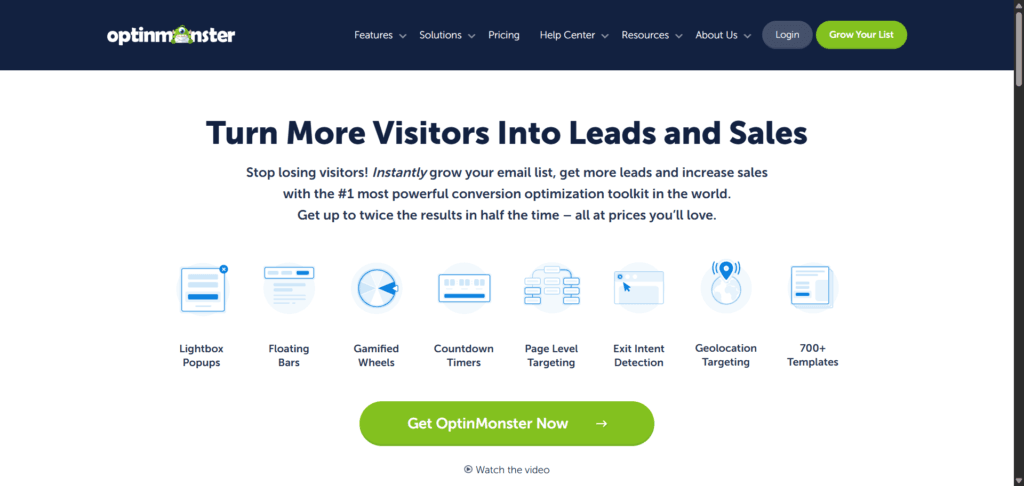
The most powerful lead generation and conversion optimization WordPress plugin. OptinMonster is the lead generation of choice for millions of blogs.
If you want to be aggressive about building your email list, you can never go wrong with OptinMonster.
OptinMonster lets you turn abandoned website visitors into email list subscribers, reduce cart abandonment, increase sales and traffic, and boost conversion.
The plugin offers many lead-generation features that let you capture email subscribers across your entire website.
You can use:
…to build your email list faster, boost sales, and increase conversion and traffic.
OptinMoster works in three simple steps…
First, create an irresistible offer your audience will love. Something relevant to your audience’s interests in exchange for an email address.
Your offer needs to look professional. To do that, OptinMonster offers a pre-built drag-and-drop template to create any type of offer you want.
Next, personalize your offer to target the right audience’s interests.
OptinMonster offers powerful targeting and segmentation tools that let you reach the right audience at the right time. This helps increase conversions and boost engagement.
Lastly, OptinMonster analytics features let you see and analyze what works and what does not. So you can fine-tune your offer in real time and A/B test every aspect.
Check out the OptinMonster review here or visit the website below.
OptinMonster Pricing
OptinMonster offers a forever-free plan for beginners that lets you create one campaign with limited targeting options and a simple template.
You can download it from WordPress.org.
You can start with this and grow your audience along the way. But the Optin Monster Pro version is ideal if you want to take your marketing to the next level and build your email list fast.
Below are the four tiers of Optin Monster paid licenses and plan features.
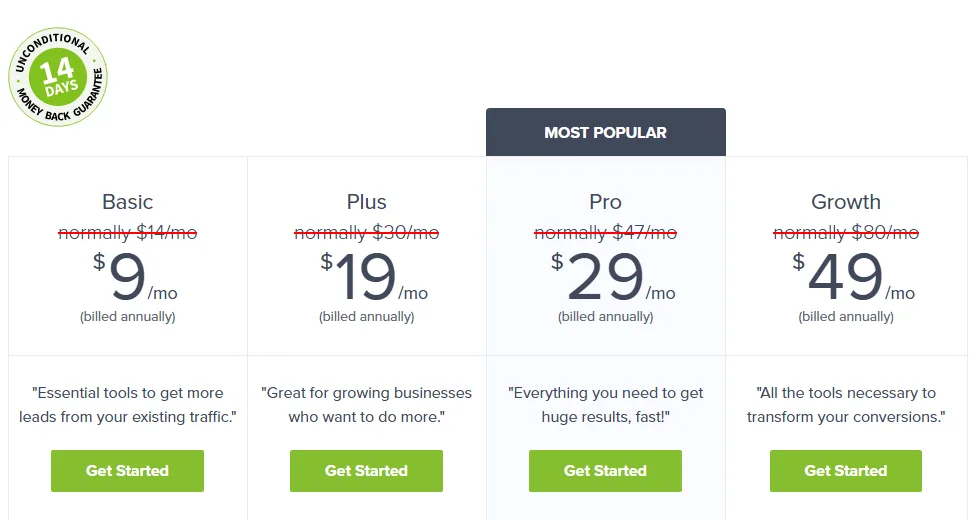
The Basic plan allows you to use Optin Monster on one website only and is ideal for low-traffic websites with up to 2,500 page views. If you want to use Optin Monster on 2 separate sites and have up to 10,000 page views, the Plus plan is perfect.
The Pro plan allows you to install the plugin on up to 3 separate websites with up to 25,000 page views. It includes more features and targeting options.
For marketers focused on email list building, conversion, growth, sales, and revenue, the OptinMonster Growth Plan is the right choice.
Check out the full features and tools for each plan here.
9. BuzzSumo
BuzzSumo is a big data content analysis tool for serious marketers.
If you want to ride on winning content strategies, you don’t need any other tool.
The more you dig into what makes content go viral, the better you understand your audience and uncover competitors’ content strategies.
Buzzsumo lets you uncover top-performing content in your niche based on social shares, links, and other metrics. So you can create or replicate content that outperforms your competitors.
You can use it to research popular content in your niche, get new content ideas, and find top marketers/influencers to help promote the content.

When you enter your content topic into the tool, it will return a list of the top-performing posts on the web. The search result page looks like this:
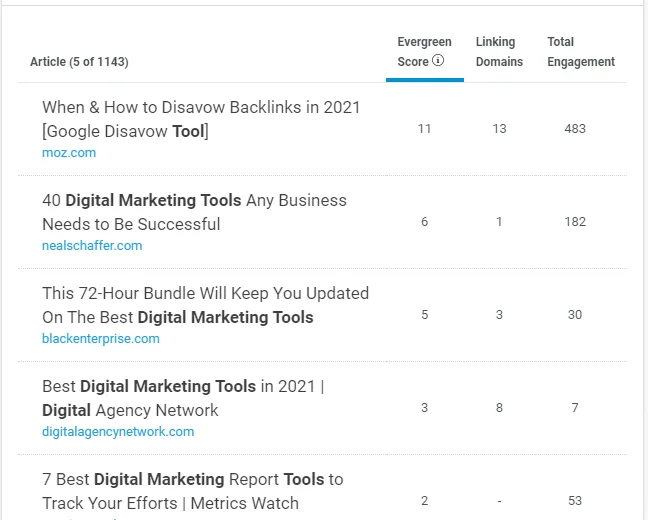
On the results page, you’ll find more helpful information to analyze and use to create better content that ranks.
Here, you can see the top-ranking pages for the content topic you enter. This is useful information for analyzing top-ranking SERP pages.
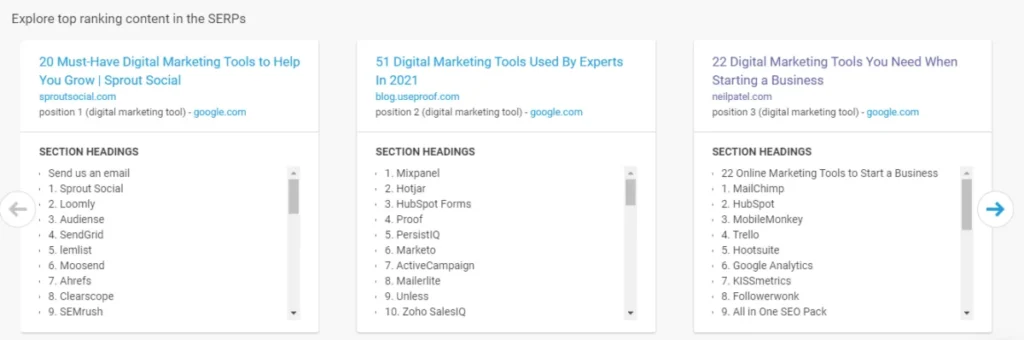
Just below this section, you’ll find detailed information on the best-performing content length. Content length is an important discussion in online marketing.
You need to know which content length performs best for each niche topic. Some blog topics perform better when articles reach a certain length.
The content analysis tool in this section reveals what content length performs best for your seed niche topic.
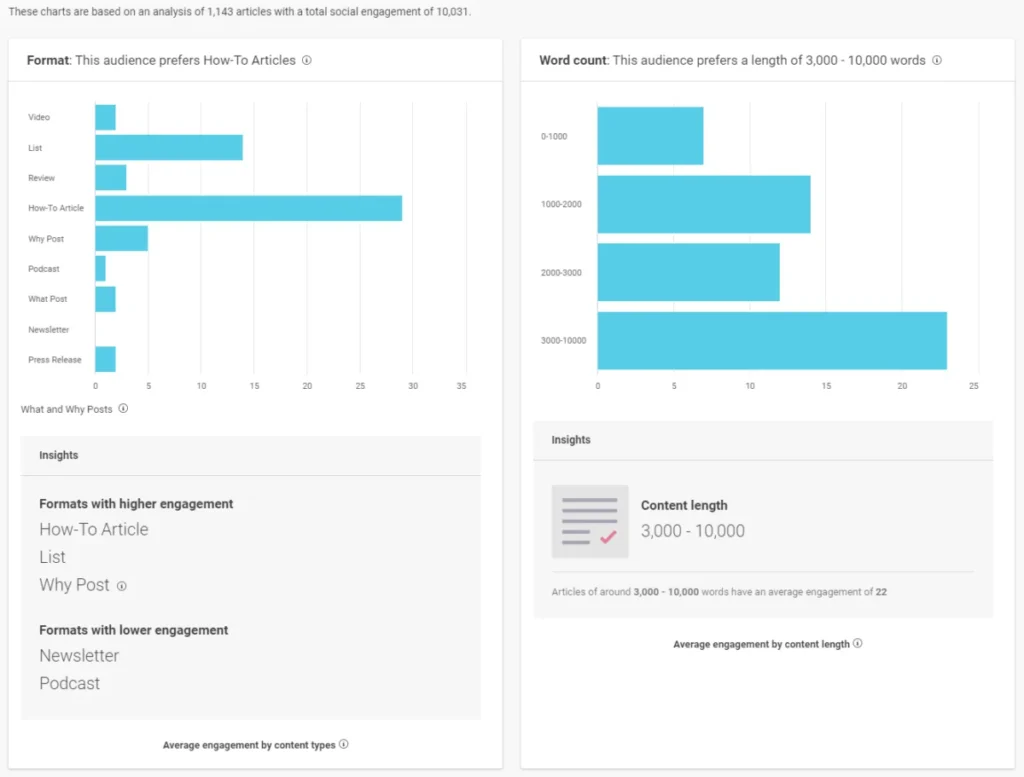
As I said earlier, this is a big deal for serious content marketers, and if you’re one, I’d recommend trying BuzzSumo today.
BuzzSumo Pricing
You can use BuzzSumo for free for as long as you want; you don’t need to subscribe to a paid plan.
However, if you want more features and marketing tools and need to analyze the data behind viral content, try one of the paid plans below.
Alternatively, you can try BuzzSumo’s full features with a 30-day free trial.
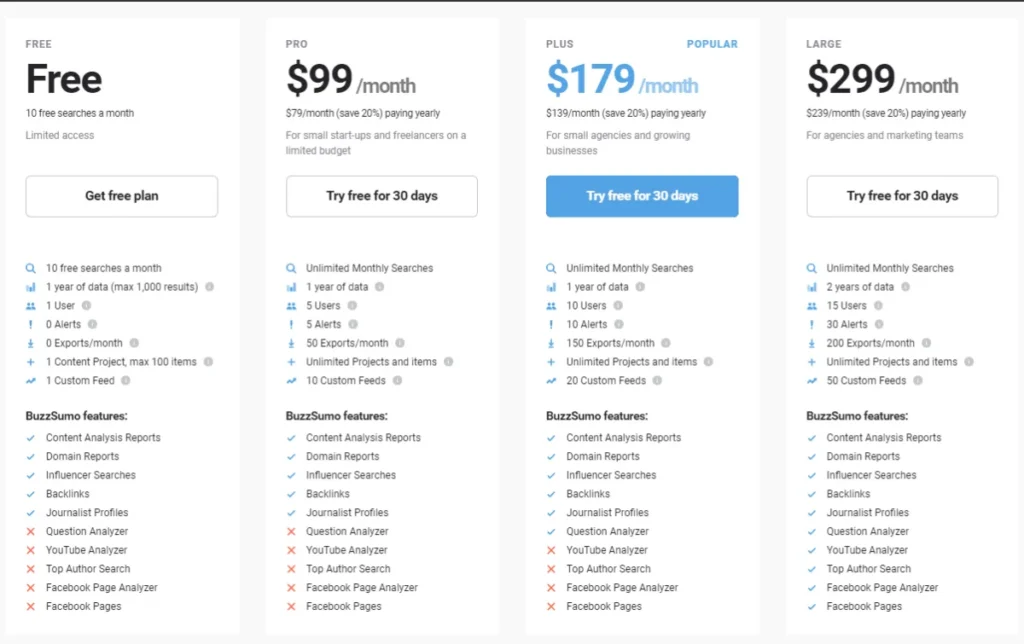
Note: If you subscribe to a yearly plan, you’ll save 20%.
10. GetResponse Email Marketing

Email marketing is an essential part of successful online marketing.
Apart from SEO, email has the second-highest ROI.
If you’re not doing email marketing to grow your business, it’s time to rethink your marketing strategies.
Many email marketing service providers exist today, and GetResponse is an industry veteran.
Founded in 1998 by Simon Grabowski, GetResponse is more than just an email marketing company. GetResponse offers complete marketing tools to grow, nurture, and build a successful online business.
From email marketing, Webinars, Facebook Ads, Shop, Marketing Automation, and Sales Funnel to eCommerce tools…everything you need to start, grow, and maintain a successful business is with GetResponse.
GetResponse Pricing
The basic plan allows access to 1,000 email contacts and costs $12.30/month.
The GetResponse Plus plan, which offers more features, costs $40.18/month for a list of 1,000. The Professional plan, with a list.

Note: The prices quoted above are for annual subscription plans. If you subscribe to a monthly plan, you pay a bit more.
Summary…
Most of the free digital marketing tools mentioned in this post offer paid versions. If you subscribe to the free plan and find the tool helpful, you can upgrade to a paid plan.
But remember, don’t buy or subscribe to any tool unless you’re convinced it is what your business needs and you can afford it.
Some tools offer a forever-free plan, while others offer a limited-time trial offer.




Hello Samshudeen,
These are some of the best tools that help you to grow your business online. I am also using it on my blog. Thanks for bringing them under one post.
Regards,
Vishwajeet Kumar
Hi, Vishwajeet,
Good to read from you after a long time, how are you doing? Thanks for reading through.
Thanks for sharing these tools, very helpful for digital marketers as well as small business owners.
Glad you find the list helpful.
Thanks for providing this free tools list. It’s very helpful for me especially canva because now I am at a beginner level thanks for this valuable blog.
Hi, Adam,
Good to read you’re now a designer with the help of Canva. Let me know if you need further help. Thanks.
HI Shamsudeen,
I love Canva and the pricing is great for this amazing tool. I have tried some of the others for FREE but the pricing can be steep especially for the SEO tools – BuzzSumo looks interesting though, thank you for these reviews.
Hi, Lisa,
Good to read from you today, and thanks for stopping by. Canva is a great tool that is worth every cent you pay for it. I use it regularly. Thanks, Lisa.
Hi,
Thanks for sharing such a useful and nice post. I really enjoy your post
You’re welcome, Hema.
Hey Shamsudeen,
Aadarsh this side. You have shared an excellent content piece and introduced great digital marketing tools for small business owners. You have presented each tool in an impressive way along with their key features and every necessary details that are true enough to understand. Your all the listed tools are helpful, has their own specific function and effective for business, as using these tools will surely give good advantages and boost productivity level.
Canva is really an amazing tools that helps user for creating super quality images, photo-collage images, presentation, banners, logos, videos, posters and much more things. your all the suggested tools are essential and will provide you an amazing user-experience. Every-time i gain new ideas while scrolling through your blog post, as your blog is a knowledge-house and acts like a knowledge-booster for me.
After going through this complete guide i gain ideas and am sure that this post will surely help lots of people, readers, markets and especially small business owners for choosing the perfect one.
Very informative and keep sharing more similar post.
Thanks,
-Aadarsh
Hi, Aadarsh,
Thanks for the insightful comment, I appreciate your time here and the support – thanks for the share.
Sure, Canva is one of the go-to image editor software today along with the likes of Adobe. As a digital marketer, making use of tools can help simplify complex task, saves time, increase productivity, performance and skills.
Thanks once again, Aadarsh.
Hi Shamsudeen,
It was a great resource! I completely agree with your list. All the tools you share will definitely help small business owners. I loved how you put Canva on top. Since design is a big factor in the modern age, Canvas has become an essential tool to have. I recently started using it myself, and I cannot recommend it enough. Glad to see this on your list. I loved all the other options as well, and I appreciate you taking the time and curate this list.
Hi, John,
Thanks for reading through. I’m so glad you find some helpful tools from the list. Canva is one of the go-to image editing software today. No doubt, a list like this will be incomplete without mentioning Canva.
Thank you.
All these tools are so useful for marketing, thanks for this article.
Hey Shamsudeen,
An informative blog to read. The tools listed are a must for anyone who is starting on digital marketing. I am a digital marketing executive at Mysore. Write a blog mentioning more tools. Looking forward to read more.
Hi, Nishanth,
Thanks for reading through the list. I’m so glad you find some helpful tools.
There are many marketing tools which are very helpful for small business owner for the digital marketing . It is right to have the right tools to move the online business forward in the digital market. And having the right tools and the right knowledge is great what you told
Thanks, Al Shiraz,
Glad you find the content helpful.
I am only familiar with SEMrush. All other tools are new to me. This article is really informative for all who focus on digital marketing. Thanks for sharing.
Shamsudeen, your article is resourceful, I use many of your recommended tools but I will try those that am not using, thanks so much.
Hi Richard,
Good to hear from you today. I’m glad you found some helpful tools on the list. Thanks for your time here.
Hello, Shamsudeen
Canva is a terrific tool, and the price is excellent. I’ve tried a few of the others for free, but the prices can be high, especially for SEO products. BuzzSumo, though, is intriguing; I appreciate the evaluations.