

If you’ve been thinking about upgrading your hosting, now is the perfect time to do it for less.
Cloudways is offering an exclusive deal: 40% off 4 months of hosting, plus free unlimited migration services, when you use our promo code on this page. That means you can test-drive premium cloud hosting at a fraction of the regular price.
Cloudways stands out because it lets you choose from top providers like DigitalOcean, AWS, and Google Cloud while handling all the technical setup.
You get a fast, secure, scalable hosting environment without managing servers yourself.
Features like one-click backups, staging environments, and pay-as-you-go pricing make it a favorite for bloggers, agencies, and businesses that want performance and flexibility without the stress.
This limited-time Cloudways promo code ends on 31 October, so it’s best to grab it while it’s still active.
NOTE:
This Cloudways offer is valid for new customers who sign up for the free trial and later upgrade to a paid plan. It is not available to existing customers with an active Cloudways subscription. To qualify, you must also sign up via this page for the 40% off first 4 months hosting plan and unlimited free migrations.
Activating the 40% Cloudways Promo Code
First, Cloudways offers five cloud service providers to choose from for your server.
Purchase any plan and get 40% off your first 4 months’ invoice. The discount applies when you upgrade from a trial to a paid plan.
Follow the instructions below to apply the discount code during sign-up.
First, use this link to visit Cloudways’ official sign-up page. You will be redirected to the promotional page for this specific offer.

Next, click the “Grab This Deal” button on this page to begin your Cloudways free trial. You will be directed to the sign-up form page, as shown below.
NOTE:
The 3-day free trial period also applies from the link above. So, you’re killing two birds with one stone. Also, you MUST click the button to qualify for the 40% offer.
On this page, correctly fill in your name, email address, and other details.
If you follow the link on this page, you don’t need to enter the promo code “TREAT26” manually. It automatically fills in on the page, as shown in the image below.
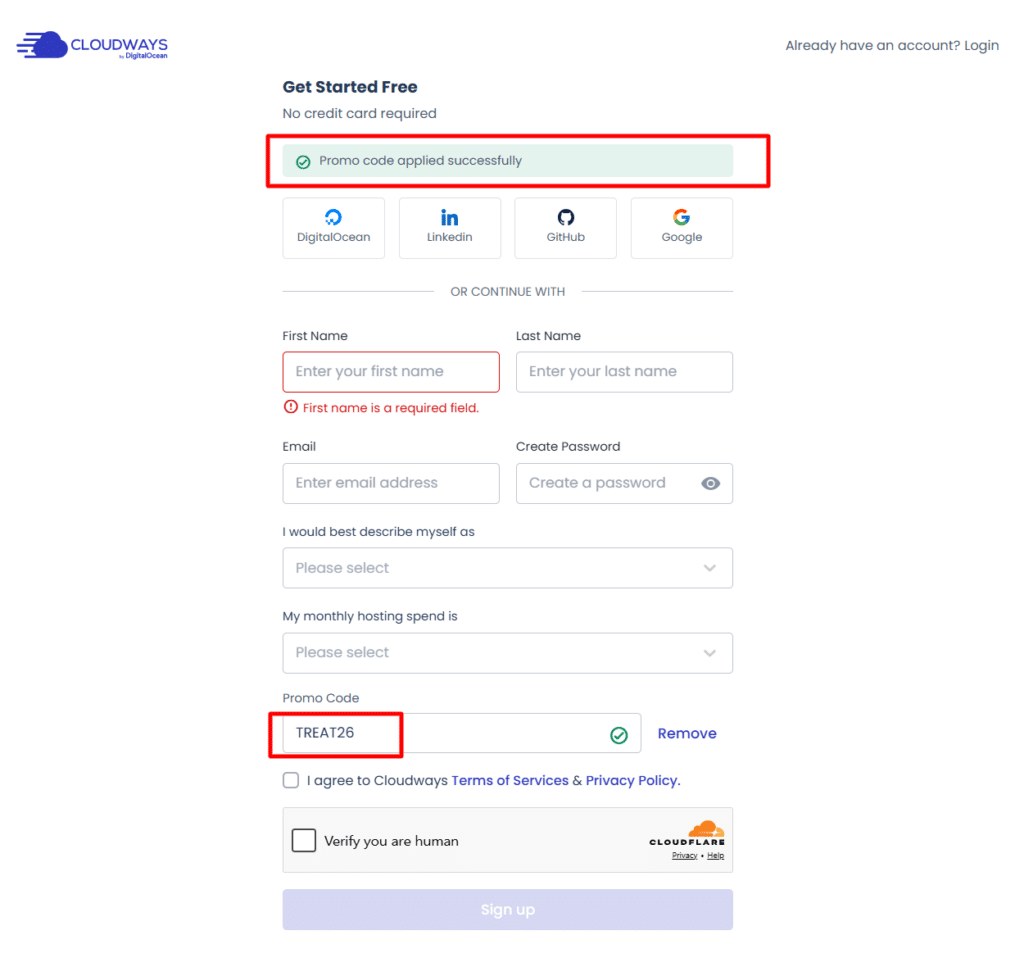
Check the “terms of service” box to agree to the Cloudways Terms of Service and confirm you’re not a robot (check the Cloudflare security verification box). Next, click the “Sign up” button, as shown in the image above.
Upon successful completion of the form, you will be redirected to your user account dashboard.
An activation email will also be sent to your email address for account confirmation. For security purposes, please also confirm the mobile number associated with your Cloudways account.
The 40% discount on your first four-month invoice will apply when you upgrade from the free trial to a paid plan.
Beyond WordPress: What Else Cloudways Offers Now
Cloudways is no longer only a place to park a WordPress blog. Here is what the lineup looks like today, and since TREAT26 is sitewide, you can apply the discount to whichever hosting plan fits your project.
Cloudways Flexible
This is the classic managed cloud hosting setup Cloudways was known for. You choose your cloud provider (DigitalOcean, Vultr, Linode, AWS or Google Cloud), pick a server size and deploy WordPress, WooCommerce, Magento, Laravel or custom PHP apps.
Plans start at $11 per month and run on Hybrid or the newer NGINX-based Lightning Stack server.
Unlimited websites per server, vertical scaling, staging, cloning and a built-in firewall are part of the package. It is the best fit for bloggers, small businesses and developers who want control without server headaches.
Cloudways Autonomous
Autonomous is fully managed WordPress and WooCommerce hosting built on Kubernetes, designed to autoscale during traffic spikes.
Cloudways guarantees a 99.9% uptime SLA and includes Cloudflare Enterprise CDN, Object Cache Pro and unlimited offsite backups.
Paid plans start at $99 per month and include a 3-day free trial. This one targets busy stores, course sites and publishers that cannot afford downtime during launches or sales.
Cloudways Velocity
Velocity is managed Node.js hosting. You connect a Git repository, and it detects your framework and deploys. It supports Next.js, Remix, React, Astro, Express, Fastify, Angular and n8n, among others.
Pricing is flat and monthly, starting at $20 for the Starter plan, with persistent servers instead of serverless functions. That means no cold starts and no surprise usage-based billing. It’s still in public preview, though, so expect some changes.
Managed AI Agent Hosting (OpenClaw and Hermes)
If you want to run your own AI agent without babysitting a server, Cloudways now hosts two: OpenClaw, which is geared toward task automation and multi-app workflows, and Hermes, which focuses on persistent memory and long-term learning.
You bring your own API keys from providers like OpenAI, Anthropic or Google, so LLM costs stay with your provider.
Subscriptions run from Scout at $9.99 per month to Swarm at $79.99 per month. Each agent gets a dedicated instance, daily backups and managed SSL. Cloudways’ managed AI Agent has no free trial.
Cloudways Copilot
Copilot is an AI assistant that watches your servers and applications, flags problems such as disk issues, web stack failures and 5xx errors and offers a one-click SmartFix. SmartFix actions need your approval before they run.
Plans are credit-based and start at $3.99 per month.
AI Website Builder
Currently in public preview, this tool generates a complete WordPress or WooCommerce site from a single prompt, usually in a few minutes.
You can edit with AI prompts, a visual editor or code, then deploy to your Cloudways server. Access is waitlist-based, and the preview is free, with 20 AI credits per site each month.
Hosting for Agencies
Cloudways also has a dedicated agency offering with partner program benefits and tools like client billing and reporting. This pairs well with unlimited free migrations when you onboard client sites.
Features You Get on Cloudways
Who Should Use This Coupon?
Cloudways Hosting Price
Cloudways offers a straightforward, convenient billing structure while keeping costs low. It uses a pay-as-you-go model, so you pay only for the hosting resources you used the previous month.
One thing to note about Cloudways is that you don’t have to sign a long-term hosting contract, unlike other web hosting companies. Cloudways offers month-to-month billing, so you can manage your marketing budget wisely.
An invoice for hosting resources used last month will be emailed during the first week of the following month.
You have a few days to pay this invoice and any outstanding bills. If you are unable to pay the bill on time, you can contact Cloudways to request an alternative payment method.
Here are the entry-level hosting prices for the five cloud service providers on Cloudways.
| Plan | RAM Size | CPU Size | Storage | Bandwidth | Price |
|---|---|---|---|---|---|
| DO1GB | 1GB | 1 Core | 25GB | 1TB | $11/mon – $0.0153/hr |
| Vutrl 1GB | 1GB | 1 Core | 32GB | 1TB | $14/mon – $0.0194/hr |
| Lin1GB | 1GB | 1 core | 25GB | 1TB | $14/mon – $0.0194/hr |
| AWS Small | 2GB | 2 Core | 20GB | 2GB | $38.56/mon – $0.0536/hr |
| GCE Small | 1.75GB | 1 Core | 20GB | 2GB | $37.45 – $0.0520/hr |
NOTE:
Subscribe to any Cloudways hosting plan above today and save 40% on your first 4 months of invoicing. This special offer covers all cloud servers, including Google Cloud and Amazon Web Services.
FAQs
Who Can Sign Up for Cloudways Using the Coupon Code?
This offer is valid for new Cloudways customers who sign up for a free trial account and upgrade to a paid plan on any of the five cloud server providers.
Can I Use More Than One Cloudways coupon?
No, customers can not use more than one coupon to redeem the 4-month 40% offer. Using more than one coupon may flag your account for fraudulent activity and even result in its permanent suspension.
I am an Existing Customer. Can I use the Coupon?
Existing Cloudways customers cannot use the coupon to pay invoices. The offer and coupon are valid only for customers upgrading from a trial to a paid account.
How Can I Redeem the 40% Discount?
Enter the promo code in the signup form when opening an account. You will see the field where you can enter the code. Follow the instructions in this guide to ensure you do not miss out.
What else does Cloudways offer besides WordPress hosting?
Cloudways now covers Flexible managed hosting for WordPress, WooCommerce, Magento, Laravel and PHP, Autonomous autoscaling hosting for WordPress and WooCommerce, Velocity for Node.js apps, managed AI agent hosting with OpenClaw and Hermes, Copilot for AI-assisted server monitoring and an AI Website Builder in public preview.
Alternatively, you can check other ongoing web hosting promo offers from popular web hosts.
Conclusion…
Cloudways has built a reputation as a reliable, beginner-friendly cloud hosting platform that doesn’t compromise on performance.
With this limited-time deal of 40% off for four months, you can get fast load times, flexible cloud providers, and hassle-free server management at a much lower cost.
Whether you’re running a blog, an eCommerce store, or managing client projects, this discount gives you enough time to test the platform and see how it fits your needs without paying full price upfront.
Since the offer ends on October 31, acting quickly ensures you don’t miss out on the savings.
If you’ve been waiting for the right moment to try Cloudways, this promotion is it. Take advantage of the deal today and start building on a hosting platform designed to grow with you.




20% is less, it has to be at least 40%
Oh! Sandeep,
Thanks for the suggestion, we will look into that. For the main time, let’s get this going.
This is a fantastic post for anyone interested in Cloudways! The promo codes and discounts outlined are super helpful for saving on a top-tier hosting platform. I like how the article explains the benefits of Cloudways, making it easier to see why it’s a great choice for web hosting. The tips on how to apply the promo codes are clear and easy to follow. Thanks for sharing such a valuable resource!
Glad you like it.