

Ask most SEO professionals what it takes to rank on Google, and you’ll get the same answer: build backlinks. More links, better links, links from authoritative domains. Without them, the argument goes, you’re invisible.
There’s enough truth in that to make it convincing. Backlinks are a confirmed Google ranking signal and always have been.
But the framing that backlinks are a prerequisite for organic traffic is where the advice falls apart for most bloggers. Because the reality is more nuanced and more useful.
Google doesn’t rank pages based on who has the most links. It ranks pages based on which result best serves the searcher’s intent.
Backlinks are one signal in that evaluation (a significant one), but they’re not the only one. And for specific types of content, in specific keyword environments, they’re not even the decisive ones.
The evidence is in your own Google Search Console. Pull up your search queries, and you’ll find pages ranking on page one for terms you never actively built a single link to.
They got there through relevance, topical depth, search intent alignment, content freshness, and on-page structure. Those are signals you control entirely, without any outreach campaigns, link exchanges, or paid placements.
This post is built around that reality. It covers nine tactics for increasing organic traffic without active link building.
Strategies that work particularly well for new blogs establishing authority, existing blogs recovering from algorithm updates, and any blogger who doesn’t have the time, team, or domain authority to run a meaningful link-building campaign right now.
A note on what this post doesn’t promise: it won’t help you rank for head terms like “SEO tools” or “make money online.”
Those keywords are dominated by sites with years of accumulated link equity, and no on-page strategy closes that gap without link support.
What this post will help you do is build consistent, compounding organic traffic from keywords where relevance and content quality are the decisive factors, and there are far more of those keywords than most marketers realize.
Let’s get into it.
Tactic 1: Build Topical Authority Through Content Clusters
Of all the tactics on this list, this one produces the most significant organic traffic growth for low-authority sites. And it’s the one most marketers skip because it requires upfront planning rather than just writing and publishing.
Here’s the core idea:
Google doesn’t evaluate your pages in isolation. It evaluates your site’s overall expertise on a topic.
A single post about “keyword research for bloggers” tells Google you wrote one piece on keyword research.
Ten interconnected posts covering every angle of keyword research — tools, process, long-tail vs. short-tail, for different niches, common mistakes, GSC data analysis — tell Google your site is a genuine resource on that topic.
That’s topical authority, and it’s one of the strongest ranking signals available to a site with a limited backlink profile.
This is why two sites can target the same keyword, and the lower-authority site sometimes outranks the higher one. If the lower-authority site has deeper topical coverage, Google sees it as the more complete and trustworthy resource for that subject.
How to Build a Content Cluster
The structure is straightforward. Pick one of your core topics and map it into two levels:
The internal links between these pieces are what create the authority signal.
When Google crawls your pillar page and follows links to 10 well-written supporting posts — all topically consistent and linking back — it reads the entire cluster as a single coherent knowledge base.
That collective signal carries more weight than any individual page could on its own.
A Practical Starting Point
If you already have published content, you may have the raw material for a cluster without realizing it.
Go through your archive and identify posts that cover related subtopics, even loosely. Add internal links connecting them, identify which post is best positioned as the pillar, and update that post to link out to every relevant supporting piece.
This exercise alone (reorganizing existing content into a cluster structure without writing a single new word) can move rankings on pages that have been sitting dormant for months.
Google re-crawls the updated internal links and re-evaluates the pages in the context of the cluster rather than in isolation.
For new content, plan the cluster before writing the first post. Map out six to eight subtopics, identify the pillar, and publish supporting posts consistently until the cluster is complete.
A half-built cluster produces weaker results than a fully developed one. The authority signal compounds as the cluster fills out.
PRO TIP!
The key constraint to keep in mind: topical authority works within a defined subject area.
A blog that covers keyword research, hosting reviews, WordPress plugins, and affiliate marketing in equal measure doesn’t build deep authority in any of them. The tighter your topical focus, the faster authority accumulates, and organic traffic follows.
Tactic 2: Target Long-Tail, Low-Competition Keywords
This is the most direct path to page-one rankings without backlinks, and it’s been the foundation of organic growth for independent bloggers since Google started rewarding relevance over raw authority.
The principle is simple. Broad, high-volume keywords such as “SEO tips,” “keyword research,” and “best hosting” are dominated by high-authority domains with years of accumulated link equity.
A new or low-authority blog competing for those terms is fighting a battle it can’t win in the short term, regardless of its content quality.
But the long tail of search, the thousands of specific, lower-volume queries that branch off those head terms, is a different competitive landscape entirely.
Long-tail keywords are longer, more specific queries. They have lower search volume but also lower competition, clearer intent, and higher conversion rates.
A searcher typing “best web hosting for a food blog with low traffic” knows exactly what they want.
The content that answers that specific question precisely will rank, even on a site with modest authority, because the pool of pages specifically targeting that exact query is small.
Why Long-Tail Works Without Backlinks
The reason long-tail keywords are winnable without backlinks comes down to the structure of competition. Most high-authority sites optimize for head terms and let their general authority passively carry them into long-tail rankings.
They’re not specifically targeting “how to do keyword research for an affiliate blog under 1,000 monthly visitors”. They’re just ranking for it incidentally because they rank for “keyword research.”
That passive ranking is beatable. A page specifically built around that long-tail query with a title that matches it, an introduction that addresses it directly, and content that answers it comprehensively can outperform a generic page that happens to contain those words.
Specificity beats authority at the long tail, and that’s the window a low-backlink site can climb through.
How to Find the Right Long-Tail Keywords
Google Search Console is your first stop. Pull your existing search queries and look for long-tail variations you’re already ranking for on pages two and three.
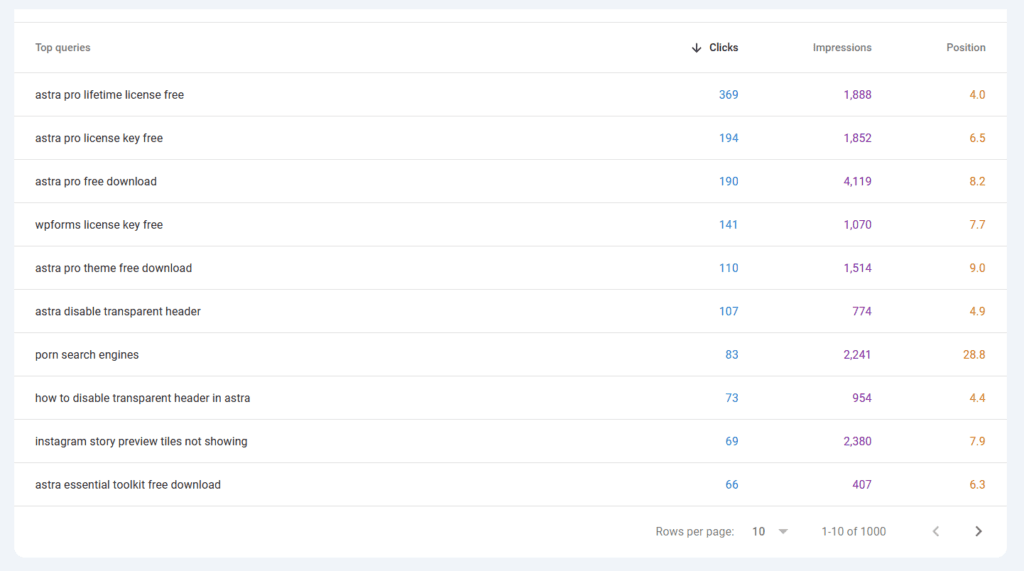
These are keywords Google has already associated with your content; you’re just not ranking high enough to earn the clicks. A targeted content update on the page those queries are landing on can push them to page one without any link building at all.
Google autocomplete and People Also Ask reveal the specific language real searchers use. Search your primary topic in Google and note every autocomplete suggestion and PAA question.
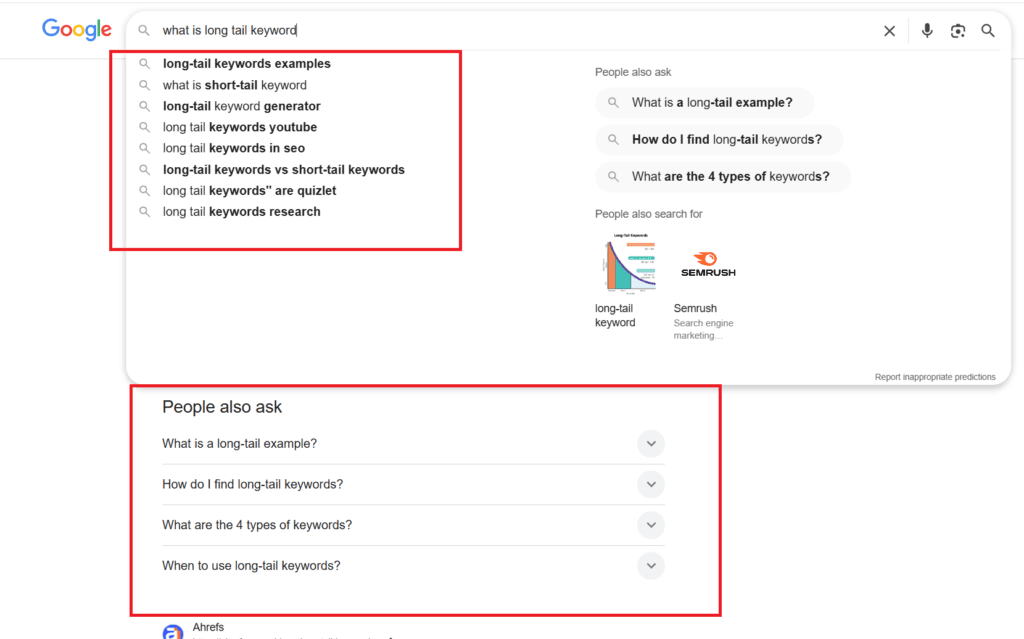
These are real queries with real search volume, and they’re the foundation of a long-tail keyword list that reflects actual searcher behavior.
CPC (Cost Per Click) as a quality filter. Not all long-tail traffic is equally valuable.
A keyword with 200 monthly searches and a $4 CPC is worth far more to a revenue-focused blog than one with 800 monthly searches and a $0 CPC.
Before committing to a long-tail search term, check the CPC in Google Keyword Planner or a tool like Rank Tracker.
Low volume plus a meaningful CPC is the combination to prioritize. It signals commercial intent in a space where competition is thin.
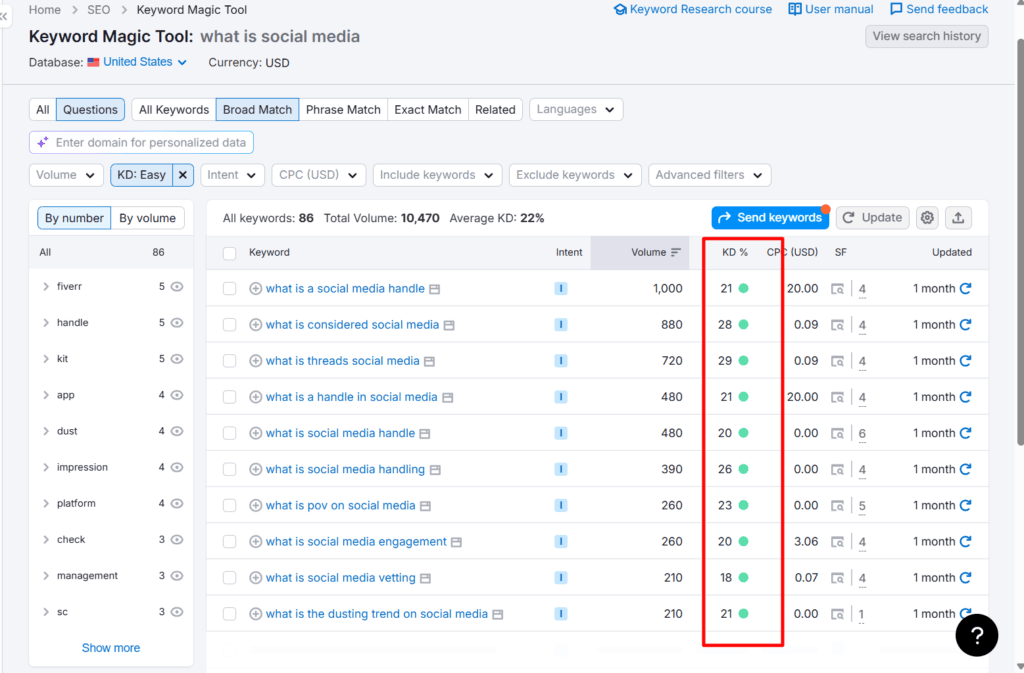
Keyword difficulty under 30. Most SEO tools score keyword difficulty on a 0–100 scale.
For a site with a limited backlink profile, target keywords with difficulty scores under 30. These are terms where the top-ranking pages have modest authority, meaning a well-optimized, specific piece of content can compete on merit.
The Right Way to Target Long-Tail Keywords
One common mistake is treating long-tail keywords as an excuse to publish thin content.
The logic goes:
Low competition means less effort is needed. That’s wrong, and it’s one of the reasons thin long-tail content got hit hard by the Helpful Content Updates.
A long-tail keyword should be targeted with the same depth and quality you’d bring to a competitive term. The difference is that you’re going deep on a narrow topic rather than broad on a wide one.
A 1,200-word post that fully answers “how to drive organic search traffic without building backlinks” — with specific tactics, a step-by-step process, and real case studies — outperforms a 3,000-word generic website traffic guide for that specific query every time.
Write for the specific person asking the specific question. That’s what makes long-tail content rank — and stay ranked — without backlinks propping it up.
Tactic 3: Optimize for Search Intent, Not Just Keywords
Ranking for a keyword and satisfying the searcher are two different things, and Google has gotten very good at distinguishing between them.
Search intent is the underlying goal behind a query. It’s not just what the searcher typed; it’s what they’re actually trying to accomplish.
A page that ranks for a keyword but doesn’t match what the searcher intended to find gets clicked, read for 10 seconds, and abandoned.
Google registers the following signals: low dwell time, immediate bounce-back to the SERP, and gradual demotion of the page in favor of results that keep searchers satisfied.
This means you can have a well-written, technically optimized page with a reasonable backlink profile and still lose rankings to a weaker site that simply understands the searcher’s intent better.
Intent alignment is a ranking factor that operates independently of authority, and for low-backlink sites, it’s one of the most powerful levers available.
The Four Intent Categories
Every search query falls into one of four intent categories, and your content needs to match the right one:
Knowing which category your target keyword falls into tells you exactly what type of content to produce.
Writing an informational how-to guide for a transactional keyword, or a product pitch for an informational query, is an intent mismatch that suppresses rankings, regardless of how well the page is otherwise optimized.
How to Read Intent From the SERP
The most reliable intent signal is the search results page itself.
Google has already done the intent analysis. The pages it ranks on page one are the clearest possible signal of what it believes searchers want for that query.
Before writing or updating any page, run the target keyword in Google and analyze the top five results:
What content type dominates?
If the top results are all listicles, write a listicle. If they’re all step-by-step guides, write a step-by-step guide.
If they’re comparison pages, write a comparison. Producing different content types for the same query fights Google’s intent classification, and you’ll lose.
What angle dominates?
Look at the titles.
The angle that appears most consistently in top results is the angle the searcher population expects. Match it, then outperform it.
What does the content actually cover?
Click through to the top two or three results and scan the headers. The subheadings indicate which subtopics Google considers essential for full intent satisfaction.
Any subtopic that appears consistently across the top results is something your page needs to address.
What format does the content use?
Tables, step-by-step numbered lists, comparison charts, definition boxes, and FAQ sections. These formats appear in top results because they serve that intent well. Match the format to the intent.
The Intent Mismatch Traffic Leak
Intent mismatch is one of the most common yet underdiagnosed reasons a page ranks but generates no traffic, or traffic that immediately bounces.
A page ranking at position 6 for “best SEO tools for bloggers” with a 0.4% CTR almost certainly has an intent-mismatch problem.
The searcher sees the title, expects a curated comparison of tools with clear recommendations, and clicks through to find a general article about why SEO tools matter.
They hit the back button in seconds. Google reads the signal, and the page slowly drops.
The fix isn’t a technical one; it’s a content restructuring. Rewrite the page to deliver what the searcher expects based on what the SERP shows.
Update the title to reflect the comparison format. Add a clear recommendation section. Build the content around helping the reader make a decision, not on explaining the topic in general.
For many pages already sitting on page two or three, intent realignment alone, without any new backlinks, is enough to move them to page one.
Google rewards the page that best satisfies the query, and if you’ve identified a mismatch and fixed it, you’ve removed the most significant obstacle between your current position and the one you’re targeting.
Tactic 4: Update and Optimize Existing Content
If your blog has been active for more than a year, your fastest path to more organic traffic isn’t publishing new posts; it’s improving the ones you already have.
This is counterintuitive for most bloggers. The instinct is always to produce more content.
But an established archive full of posts ranking positions 4–20 represents a traffic opportunity that new content can’t match on the same timeline.
Those pages are already indexed, already associated with relevant keywords, and already in Google’s evaluation framework.
Pushing them from position 8 to position 3 requires far less effort than building a new page from zero to position 3 and yields results weeks sooner.
Google tracks content freshness as a ranking signal. A post last updated two years ago, competing against one updated last month, is at a structural disadvantage, even if the older post was originally stronger.
More critically, outdated content fails to signal E-E-A-T in ways that suppress rankings, regardless of other signals: outdated statistics, deprecated tools, screenshots of interfaces that no longer exist, and advice that doesn’t reflect how platforms currently work.
These aren’t just credibility problems for readers; they’re ranking problems with Google.
Which Posts to Prioritize
Not every post in your archive deserves equal effort on updates. The posts worth prioritizing are the ones with the clearest gap between their current performance and their potential.
Open Google Search Console and filter your pages by impressions. Look for three patterns:
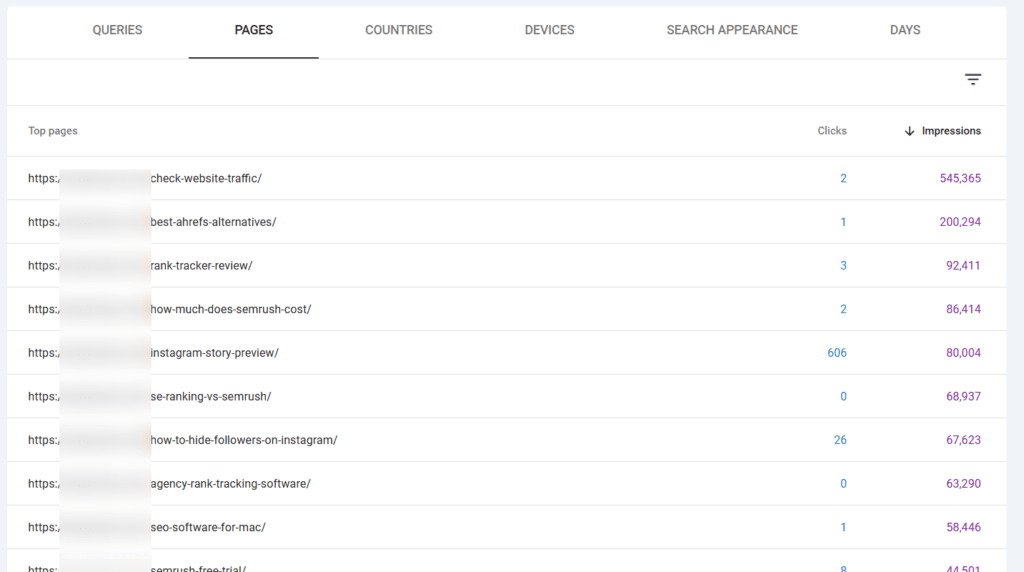
Positions 4–15 with meaningful impressions but low clicks. These pages are on page one or close to it; Google has already validated their relevance.
The gap between their current position and the top three is almost always due to content quality or freshness, not authority.
These are your highest-priority update targets because the ranking improvement from a solid update can be dramatic and fast.
Pages with declining impressions month over month. A page that was generating 2,000 impressions six months ago but now generates 800 is losing ground to fresher, more comprehensive content.
The decline will continue unless you intervene. A content update resets the freshness signal, prompting Google to re-evaluate the page.
Pages ranking for keyword variations you didn’t target. GSC often surfaces queries that your page ranks for that you never explicitly optimized for. These are content gaps and subtopics the page implies but doesn’t fully address.
Adding a dedicated section for each high-impression unintentional keyword turns passive, partial rankings into deliberate, stronger ones.
The Update Process
A content update that actually moves rankings is more than a light edit. Here’s what a thorough update covers:
Rewrite the introduction.
The opening paragraph is the first thing both Google and readers evaluate.
It needs to include the primary keyword naturally within the first 100 words, reflect the current state of the topic, and immediately establish why this post is worth reading over the alternatives currently ranking above it.
Audit every claim, statistic, and recommendation. Replace outdated figures with current ones.
Remove references to tools that have changed significantly or no longer exist. Update screenshots to show current interfaces.
Any claim that’s no longer accurate is a credibility signal to both readers and Google that the content is stale.
Expand thin sections and close content gaps.
For each keyword variation the page ranks for in GSC, check whether the content directly and substantively addresses it.
If a query is generating impressions but the page only mentions the topic in passing, add a focused section that answers it properly.
A page that addresses twelve related subtopics comprehensively outperforms one that addresses eight of them shallowly.
Rewrite subheadings to target secondary keywords.
Generic subheadings — “Key Features,” “Why It Matters,” “What You Need to Know” — contribute nothing to search visibility.
Rewrite them as specific, keyword-aligned phrases that mirror how searchers phrase related questions. These also become featured snippets, PAA triggers, and relevance signals.
Update internal links in both directions.
Add links from the updated page to newer related content you’ve published since the original post date.
Then go into two or three existing posts that are topically related and add contextual internal links pointing back to the updated page.
Internal link updates send Google a clear signal to re-evaluate the page in the context of your current content structure.
Update the publish date and request re-indexing.
Change the published date to reflect when the substantial update was made, not just a cosmetic edit.
Then submit the URL via Google Search Console’s URL Inspection tool to put it in the priority crawl queue.
Updated rankings typically appear within three to seven days of the indexing request, significantly faster than waiting for Google’s natural recrawl schedule.
The Compounding Effect
Unlike new content, which starts from zero and takes months to accumulate ranking signals, updated content builds on an existing foundation.
An already-indexed page with some ranking history responds to improvements faster than a new page because Google already has a baseline to update rather than having to evaluate a new page from scratch.
Run a consistent update cycle: review your top 20 pages by impressions monthly, identify the two or three with the most room for improvement, and update them thoroughly.
Over six months, this habit generates more cumulative traffic than publishing six new posts would, because each update amplifies existing authority rather than dividing it further across an expanding archive.
Tactic 5: On-Page SEO — The Non-Negotiables
On-page SEO is the closest thing to a direct conversation with Google. Every element — title tag, meta description, header structure, URL, image alt text, internal links — is a signal you control completely and can optimize without any external dependencies.
No outreach, no waiting for someone else to link to you, no domain authority required.
For a site with a limited backlink profile, on-page SEO is the primary lever. Getting it right doesn’t guarantee rankings; nothing does, but getting it wrong makes every other tactic on this list less effective.
A page with strong topical authority, great content, and perfectly matched search intent still underperforms if its on-page signals are weak or contradictory.
Here’s what actually moves rankings in 2026.
Title Tag
Your title tag is the single most important on-page ranking signal after the content itself. It tells Google what the page is about and whether to show it to the searcher.
Two requirements that are non-negotiable: the primary keyword must appear in the title, and it should appear as close to the beginning as naturally possible.
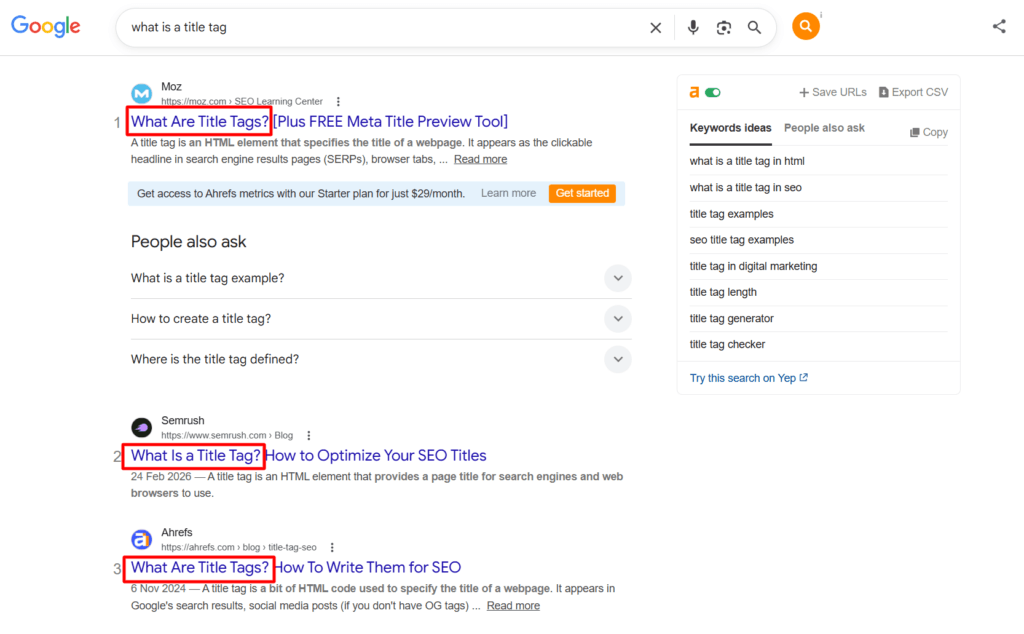
Front-loaded keywords register more strongly as relevance signals than keywords buried at the end of a long title.
PRO TIP:
Keep your title under 60 characters to prevent truncation in search results, and write it as copy rather than a label.
“How to increase organic traffic without backlinks (2026 Guide)” does more work than “Organic traffic tips for bloggers”. The first title is specific; it includes the keyword, signals the year for freshness, and tells the searcher exactly what they’re getting.
One common mistake worth avoiding is writing the title for the keyword and ignoring the click.
Your title competes with nine other results on the same page. It needs to earn the click, not just match the query.
Specificity, a clear benefit, and a fresh angle consistently outperform generic titles even when the keyword match is the same.
Meta Description
Meta descriptions are not a direct ranking signal, but they’re a significant CTR signal, and CTR (Click-through-rate) influences rankings indirectly.
A well-written meta description on a page ranking position 5 can outperform the position 3 result in clicks if it better communicates the value of clicking through.
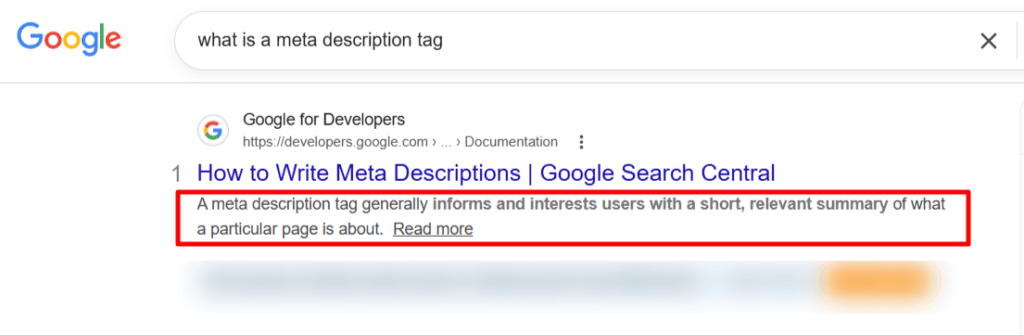
Write every meta description as a pitch, not a summary. The searcher has already seen the title and knows the topic. The meta description needs to answer the question: why should I click this result instead of the others?
Lead with the outcome, the specific angle, or the credibility signal that makes your result the best choice. Keep it under 160 characters and end with an implicit or explicit CTA.
What to avoid: restating the title in different words, such as “In this post I will show you,” and generic descriptions that could apply to any post on the same topic.
Generic meta descriptions produce generic CTRs.
Header Structure
Headers — H1, H2, H3 — serve two functions simultaneously: they structure content for readers and communicate topical organization to Google.
A post with clear, logical, keyword-aligned headers is easier to crawl, easier to understand, and more likely to generate featured snippets and PAA appearances.
The H1 is your post title — one per page — that matches or closely echoes the title tag.
H2s are your main section headings. Each one should describe the section’s topic specifically enough that a reader scanning only the headers would understand the post’s complete structure.
H3s are subsections within each H2.
The keyword alignment rule: where a natural, search-aligned alternative to a generic heading exists, use it. “What You Need to Know About Traffic Without SEO” becomes “How to Drive Blog Traffic Without SEO.”
The second version is a search query. The first is a chapter title. Only one of them generates featured snippet appearances.
Avoid skipping header levels — don’t jump from H2 to H4 — and avoid using headers purely for visual formatting. Every header should reflect a genuine content section, not just break up a wall of text.
URL Structure
Clean, descriptive, keyword-inclusive URLs are a minor but confirmed ranking signal and, more importantly, a CTR signal.
A URL visible in the search result that clearly describes the page content builds trust and increases click-through.
The rules are simple: include the primary keyword, use hyphens, not underscores, remove stop words where natural, keep it as short and as accurately descriptive as possible, and never include dates in evergreen post URLs.
A date-stamped URL is a liability to content freshness. It signals to both readers and Google that the content may be outdated, regardless of when it was last updated.
Image Optimization
Images are a missed SEO opportunity on most blogs. Every image has two optimization points that are often overlooked: the file name and the alt text.
The file name should describe the image content with keywords; for example, “increase-organic-traffic-without-backlinks.jpg” is a relevant signal. “IMG_4847.jpg” is not.
PRO TIP!
Rename image files before uploading, not after.
Alt text serves two purposes: it describes the image to screen readers for accessibility, and it tells Google what the image depicts for image search indexing.
For example, “Screenshot showing Google Search Console performance report filtered by organic search” is correct. “organic traffic GSC performance report SEO increase traffic” is keyword stuffing.
Write alt text as a natural description that includes the relevant keyword where it fits, not as a list of keywords.
Compress every image before uploading. Uncompressed images slow page load times, and page speed is a ranking signal. Tools like ShortPixel or Imagify handle this automatically inside WordPress.
Keyword Placement
The primary keyword should appear naturally in five locations: the title tag, the first 100 words of the introduction, at least one H2 subheading, the meta description, and the conclusion.
Beyond those five placements, use semantic variations and related terms rather than repeating the exact keyword phrase.
Google’s understanding of topical relevance in 2026 is sophisticated enough to recognize synonyms, related concepts, and semantic context.
A page that covers a topic comprehensively, using natural language that includes the range of terms a knowledgeable person would use when discussing that subject, ranks better than a page that repeats the exact keyword at a calculated density.
Write as an expert writes, not as someone who has counted keyword occurrences.
Schema Markup
Schema markup is structured data added to your page’s HTML that helps Google understand specific content types, including articles, FAQs, how-to guides, reviews, and more.
It doesn’t directly improve rankings, but it unlocks rich snippets in search results — expanded displays that take up more SERP real estate and consistently improve CTR.
For blog content or a review site, two schema types are immediately worth implementing: Review schema on posts with a standalone review, and Article schema on all editorial posts.
Both are supported natively by Rank Math. You can enable them in the schema tab of the Rank Math meta box on each post. No coding required.
The Review schema, in particular, is a no-backlinks shortcut to more SERP visibility.
A page with Review schema and first-hand experience of the products or services can frequently trigger rich snippets in search results, improving click-through rate and driving traffic directly.
Tactic 6: Win SERP Features Without Backlinks
SERP features, such as featured snippets, People Also Ask boxes, and AI Overviews, are some of the most valuable real estate in Google search results.
They appear above or alongside traditional organic rankings; they command disproportionate attention, and, critically for this post, they are won through content structure and relevance, not link authority.
A site with 50 backlinks can win a featured snippet over a site with 5,000 if its content is structured better for the specific query. That’s not an edge case; it’s how SERP features work.
Google pulls the best-formatted, most directly relevant answer regardless of who wrote it. For low-authority sites, this is one of the most accessible traffic opportunities available.
Featured Snippets
A featured snippet is the boxed result that appears at the top of the SERP. Sometimes called “position zero”, it directly answers a query without requiring the searcher to click through.
While it reduces clicks for some queries, appearing in the snippet box significantly increases brand visibility and still drives meaningful traffic for longer, more detailed queries, where the snippet answers the surface question but the full post answers everything beneath it.
Google pulls featured snippets in three main formats: paragraphs, numbered lists, and tables. The format it chooses depends on the query type:
Paragraph snippets are triggered by definition and explanation queries— such as “what is,” “how does,” and “why does.” The format Google prefers is a concise, direct answer of 40–60 words in a single paragraph, immediately following an H2 that mirrors or echoes the question.
The paragraph should answer the question completely without preamble. No “great question,” no “in this section we will discuss.” Just the answer, stated directly.
Numbered list snippets are triggered by process and step queries — “how to,” “steps to,” “ways to.” The winning format is a clean, numbered list under an H2 that mirrors the query, with each step as a concise, actionable sentence.
Google often truncates lists beyond eight items and shows a “More items” link — don’t pad your list to chase more steps; make each step substantive.
Table snippets are triggered by comparison and data queries — “X vs Y,” “pricing for,” “comparison of.”
A properly formatted HTML table with clear column headers and concise cell content is all that’s required technically. The content needs to be the most complete and accurate comparison available for that specific query.
To identify your featured snippet opportunities, search your target keywords in Google and note which queries already have a snippet.
If the current snippet source is a weaker page than yours — thinner content, less specific answer, older data — that snippet is winnable with a better-formatted response.
Add the correctly formatted answer block to your page, reindex, and monitor its position in GSC over the next two weeks.
People Also Ask
PAA boxes appear on almost every informational SERP and often take up more visible space than the traditional blue links beneath them.
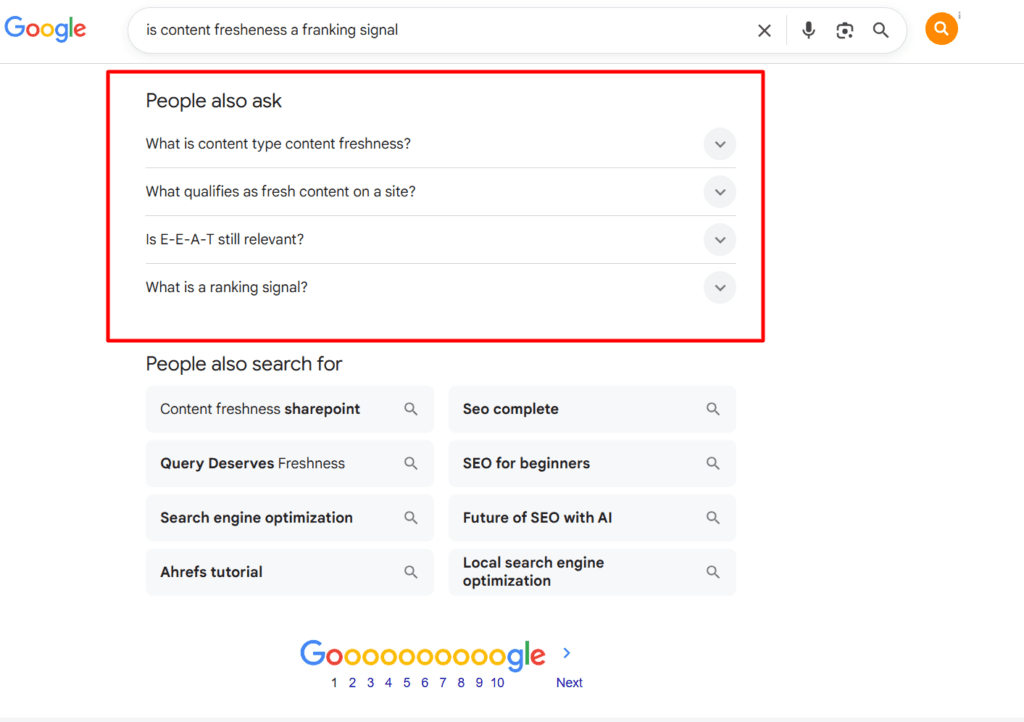
Each PAA question is a mini-featured snippet opportunity, and winning multiple PAA positions from a single post is achievable with the right structure.
PRO TIP!
Before writing or updating a post, run the target keyword in Google and record every PAA question that appears, including the questions that expand when you click existing ones, which surface additional layers of related queries.
These questions are real search queries with real demand, and they reveal exactly what else people want to know about your topic.
Add each relevant PAA question as an H3 subheading within the appropriate section of your post, followed by a concise 40–60-word direct answer.
The answer should stand alone. It should fully address the question without requiring the reader to have read the surrounding content. Then expand beneath the answer with the fuller explanation, examples, and context.
This structure serves three purposes simultaneously: it makes the post more useful for readers who scan by question, it targets additional long-tail keyword variations within the same post, and it gives Google clearly formatted answer blocks to pull into PAA results.
A post with 10 well-structured PAA-format Q&As can appear in multiple PAA positions for the same query, driving traffic from searchers who never scroll past the traditional organic results.
AI Overviews
Google’s AI Overviews appear at the top of results for an increasing share of queries, particularly for informational and how-to searches.
They generate the overview’s content by synthesizing information from multiple sources, and the sources cited within the overview are linked and visible to searchers.
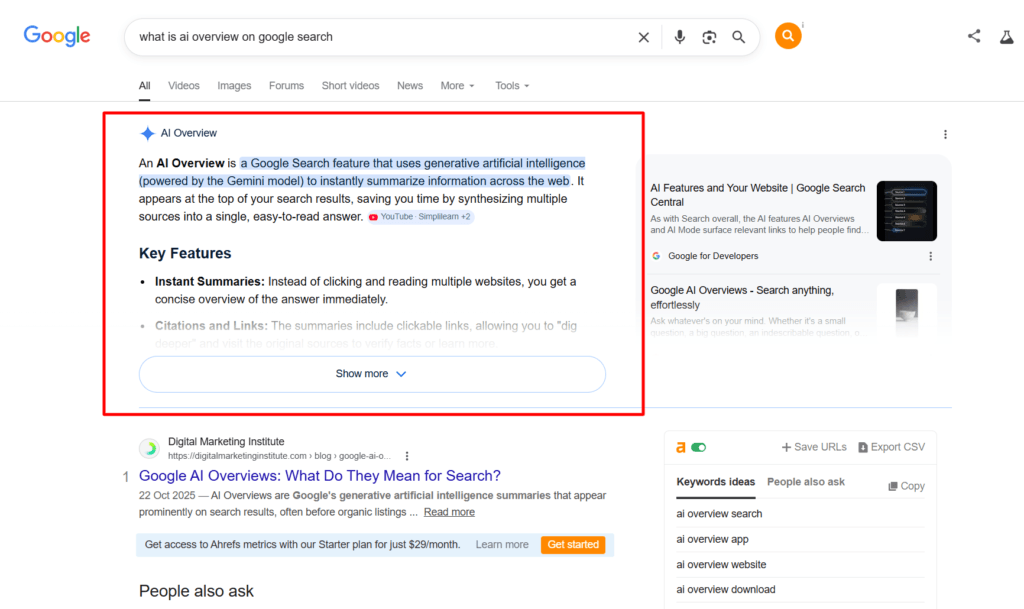
Being cited in an AI Overview doesn’t guarantee a click. The overview answers the question directly for many searchers.
But it drives brand familiarity and generates a meaningful volume of clicks from searchers who want more depth than the overview provides, as well as from those who explicitly click through to verify or explore the cited source.
The content characteristics that increase the likelihood of being cited in an AI Overview are consistent across the queries where they appear:
Direct, structured answers.
AI Overviews pull from content that answers questions explicitly and early, not content that builds to an answer through narrative. Lead with the answer, then support it with explanation and context.
Original first-hand perspective.
Google’s systems are increasingly capable of distinguishing content written from personal experience from content that synthesizes third-party information.
Posts with specific personal data, named examples, and firsthand observations appear in AI Overviews at a higher rate than generic aggregation content.
Credible, cited data.
Where your content references statistics or research, cite the source. AI Overviews draw on content that demonstrates evidentiary grounding — claims backed by sources carry more weight than unsupported assertions.
Clear heading structure.
Content with logical H2/H3 organization that reflects the question-and-answer structure of the query is easier for Google’s AI to parse and excerpt.
Walls of unstructured text rarely make it into AI Overviews, but well-organized, section-by-section content consistently does.
One important caveat: AI Overviews are still evolving, and their appearance varies significantly by query type, location, and search context.
Don’t optimize exclusively for AI Overview inclusion at the expense of satisfying the full range of searchers who arrive via traditional organic results.
The structural characteristics that earn AI Overview citations — direct answers, firsthand expertise, credible data, clear organization — are the same characteristics that produce strong traditional rankings.
Optimizing for one reinforces the other.
Tactic 7: Optimize for Core Web Vitals and Page Experience
Page experience is the only ranking factor on this list that has nothing to do with your content and everything to do with how it’s delivered.
Google has confirmed page experience signals as ranking factors, and while they rarely override content quality on their own, they act as a tiebreaker between pages that are otherwise equally relevant and well-structured.
For low-authority sites competing without a backlink advantage, that tiebreaker matters.
Two pages targeting the same keyword with similar content depth and intent alignment — the one with better page experience metrics consistently outranks the one with worse ones.
It’s the marginal advantage you can control entirely without external dependencies.
Core Web Vitals — What They Measure and Why They Matter
Core Web Vitals are Google’s standardized set of page experience metrics. There are three:
Largest Contentful Paint (LCP): measures how quickly the largest visible element on the page, usually the hero image or the main heading, loads for the user.
Google’s threshold for a good LCP score is under 2.5 seconds. Above 4 seconds is classified as poor.
LCP is the most directly connected to perceived page speed; it’s what the user experiences as “the page loaded.”
Interaction to Next Paint (INP): Replaced First Input Delay in 2024, measures how quickly a page responds to user interactions such as clicks, taps, and keyboard input.
A good INP score is under 200 milliseconds. Poor responsiveness here signals a page with heavy JavaScript execution that blocks interaction, a common problem on WordPress sites running multiple plugins with front-end scripts.
Cumulative Layout Shift (CLS): measures visual stability; how much the page layout shifts during loading.
A score under 0.1 is good. Layout shifts above that threshold create a disorienting experience where the page appears to jump as elements load, such as images without defined dimensions, ads that push content down, and web fonts that swap in after the page renders.
CLS issues are often least visible to site owners and most frustrating for readers on slow connections.
How to Check Your Current Scores
Google PageSpeed Insights is the most direct tool to test. Paste any URL to get a real-world performance report that shows your Core Web Vitals scores alongside specific recommendations for improvement.
The report separates lab data from field data. Field data is what matters for rankings, as it reflects actual user experience rather than a controlled test environment.
Google Search Console also surfaces Core Web Vitals data at scale under the Experience section. It shows which pages on your site have poor, need improvement, or good scores, so you can prioritize fixes where they’re most needed rather than auditing every page manually.
The Fixes That Move the Needle
Image optimization is the highest-impact fix for most WordPress blogs. Uncompressed images are the single most common cause of poor LCP scores.
Every image should be compressed before uploading — ShortPixel and Imagify both handle this automatically — and served in WebP format, which delivers the same visual quality at significantly smaller file sizes.
Set explicit width and height attributes on every image to prevent CLS-related layout shifts during load.
Lazy loading for below-the-fold images prevents the browser from loading images the user hasn’t yet scrolled to, reducing initial page load time and improving LCP.
WordPress has supported native lazy loading since version 5.5. It’s applied automatically to images using the standard WordPress image block. For custom HTML images, add the loading=”lazy” attribute.
A caching plugin is non-negotiable for WordPress blogs. WP Rocket, LiteSpeed Cache, and W3 Total Cache all reduce server response times, enable browser caching, and minify CSS and JavaScript — all of which improve LCP and INP scores.
The specific settings that produce the best results vary by hosting environment, but enabling page caching, browser caching, and Gzip compression are the baseline for every installation.
Defer non-critical JavaScript to prevent render-blocking scripts from delaying the page’s initial display.
Most caching plugins handle this with a “Defer JS” or “Delay JavaScript Execution” toggle. But always test after enabling it, as aggressive JS deferral can break interactive elements like navigation menus, comment forms, and table-of-contents plugins.
Eliminate unnecessary plugins. Every active WordPress plugin adds HTTP requests and potentially front-end scripts, which can slow page load.
Audit your plugin list annually and deactivate anything that isn’t actively contributing value. The performance cost of five redundant plugins — each adding a small overhead — compounds into a meaningful LCP penalty on shared hosting.
Host your fonts locally rather than loading them from Google Fonts. External font requests add a network round-trip to every page load.
Downloading your fonts and hosting them on your own server, using a plugin like OMGF, or doing it manually via your theme eliminates that round-trip and improves both LCP and CLS by reducing font-swap layout shifts.
The Hosting Foundation
Every optimization above operates within the constraints of your hosting environment. A well-optimized WordPress installation on slow shared hosting will still have mediocre Core Web Vitals scores.
Server response time, measured as Time to First Byte (TTFB), is the baseline on which all other performance improvements build.
If your TTFB consistently exceeds 600ms on a tool like SpeedVitals or GTmetrix, no amount of plugin optimization will produce good LCP scores.
The fix at that point is a hosting upgrade. You need to move to a managed WordPress host with server-level caching, or to a cloud hosting provider where you control server resources more directly.
For bloggers on a budget, shared hosting is the one performance investment worth prioritizing above all others. A faster server reduces the ceiling on how much optimization is required across every other metric.
Mobile Performance Is the Priority
Google indexes and ranks the mobile version of your site, not the desktop version. Core Web Vitals scores are evaluated separately for mobile and desktop, and it’s common for a site to pass on desktop and fail on mobile.
Always check mobile scores first in PageSpeed Insights, and prioritize mobile performance fixes before desktop ones.
Mobile performance issues are usually amplified versions of desktop ones — larger images hit harder on mobile connections, JavaScript execution is slower on mobile processors, and layout shifts are more disruptive on smaller screens.
Fixing the mobile score typically improves the desktop score as a byproduct.
Tactic 8: Leverage Google Search Console Data Actively
Google Search Console is the most powerful free SEO tool available, and the most consistently underused.
Most bloggers check it occasionally to confirm their pages are indexed, glance at the traffic graph, and close the tab. That’s leaving the majority of its value untouched.
Used actively and systematically, GSC tells you exactly which pages Google is showing to searchers, which keywords are generating impressions without clicks, which pages have indexing problems, and where your highest-opportunity content updates are.
No third-party tool has access to this data. It comes directly from Google, which means it’s the most accurate picture of your site’s search performance available.
For a site growing organic traffic without building backlinks, GSC isn’t just useful; it’s the operational foundation of the entire strategy.
Every tactic on this list produces better results when it’s informed by what GSC is telling you.
The Performance Report — Your Primary Dashboard
The Performance Report is where most of your actionable data lives. Open it and switch the date range to the last three months. It’s the default in most cases.
Enable all four metrics: Total Clicks, Total Impressions, Average CTR, and Average Position.
The queries tab shows every keyword your site is appearing for in Google search. Sort by impressions — not clicks — and scan down the list. You’re looking for three patterns:
High impressions, low CTR, high position (1–5): These pages are ranking well but not earning clicks. The content is relevant enough for Google to show it, but the title tag or meta description isn’t compelling enough to earn the click.
These are your CTR optimization targets. A title rewrite alone can double the traffic from a page in this position within weeks.
High impressions, low CTR, middle position (6–20): These pages are ranking but not prominently enough to generate meaningful clicks.
The fix here is a content update, deeper coverage, better alignment with intent, and stronger internal linking to push the position into the top five, where click-through rates increase dramatically.
Moderate impressions, high position (1–3), low clicks: these are often SERP feature situations — a featured snippet or AI Overview is answering the query and reducing click-through.
Use the search appearance filter to confirm, then adjust your strategy for that keyword. You can optimize for the snippet citation rather than the traditional organic click.
The pages tab shows the same data organized by URL rather than keyword.
Switch to this view and sort by impressions. Click into each of your top 20 pages to see the specific queries driving impressions for that page.
This is where you find the unintentional keyword rankings that signal content gaps worth closing.
Identifying Your Fastest Traffic Wins
Here’s the specific workflow to run monthly using the Performance report:
Filter pages by position — set a custom range of 4 to 15. These are pages on page one or near it.
Now sort by impressions. The pages at the top of this filtered list — high impressions, positions 4–15 — are your fastest traffic opportunities.
They’re already close to where clicks happen. A focused content update targeting the specific queries they rank for can move them into the top three within two to four weeks of re-indexing.
For each page in this group, click through to see the query breakdown. Look for keywords where the page ranks in positions 4–8, with 100+ impressions and under 5% CTR.
These are the exact queries to optimize the page around. Add them to subheadings, expand the relevant sections, update the meta title to include the primary query variant, and re-index.
The URL Inspection Tool
The URL Inspection tool is the fastest way to notify Google of a content update.
After updating any page, paste the URL into the inspection tool, verify Google can access the page, and click Request Indexing.
This puts the updated page in Google’s priority crawl queue.
Make re-indexing a mandatory final step in your content update workflow. It’s sixty seconds of effort that consistently accelerates the ranking impact of every update you make.
The Coverage Report
The Coverage report shows which pages on your site Google has indexed, which it has excluded, and why.
For most blogs, the excluded pages are intentional — noindexed tag pages, admin pages, and duplicate content pages. But sometimes pages you want indexed are buried in the excluded list and have been inadvertently blocked.
Check this report quarterly. Look specifically for “Crawled — currently not indexed” — pages Google has crawled but chosen not to include in the index.
This classification typically means the page was assessed as thin, low-quality, or too similar to other indexed content.
If the page should be indexed, improve the content and resubmit. If it shouldn’t, add a noindex tag deliberately and stop wasting crawl budget on it.
Also check for “Discovered — currently not indexed”. These are pages Google knows about but hasn’t yet crawled. For important pages in this state, use the URL Inspection tool to request that they be crawled and indexed directly.
The Search Appearance Filter
In the Performance report, the Search Appearance filter lets you separate your traffic data by result type — Web results, AI Overviews, Image Search, Video Search, and others.
This filter became significantly more useful as AI Overviews became more visible in SERP.
Use it to identify which of your pages are already being cited in AI Overviews and how much traffic those citations are driving.
If a page is cited in AI Overviews but receives low click volume, it’s a signal that the Overview is fully answering the query.
Adjust your strategy for that page toward transactional or deeper informational angles that the AI Overview doesn’t satisfy.
Conversely, if a page is generating strong traditional organic traffic for queries where AI Overviews appear on the same SERP, monitor its performance month over month.
AI Overview expansion into that query space will compress click-through rates, and the page may need to be repositioned around more specific or transactional angles to maintain its traffic contribution.
Building a Monthly GSC Review Habit
The difference between bloggers who consistently grow organic traffic and those who plateau isn’t usually the quality of their content; it’s whether they make decisions based on data or intuition.
A thirty-minute monthly GSC review of its performance report, coverage report, Core Web Vitals, and search appearance surfaces the specific actions that will move your traffic metrics in the following month.
Run it on the same day each month, document the findings, and act on the top 2 or 3 opportunities before the next review.
Over six months, this habit produces a compounding advantage. Each month’s updates build on the previous month’s improvements.
Pages that were sitting at position 12 move to position 6. Pages at position 6 move to position 2.
The traffic curve bends upward, not because of a single dramatic action, but because of consistent, data-informed incremental improvements that accumulate faster than any competitor who isn’t watching the same data.
Tactic 9: Publish E-E-A-T Content Google Can’t Ignore
E-E-A-T — Experience, Expertise, Authoritativeness, and Trustworthiness — is Google’s framework for evaluating whether a piece of content deserves to rank.
It was introduced as E-A-T in 2018 and expanded with the additional “Experience” component in 2022, specifically to reward content written by people with firsthand knowledge of the topics they cover.
For low-authority sites, E-E-A-T is the most significant opportunity on this list because it’s the one dimension where a small independent blog can genuinely outperform a high-authority site producing content at scale without firsthand expertise.
A large media site publishing AI-assisted or outsourced content about “best hosting for bloggers” written by someone who has never set up a WordPress site cannot demonstrate the same Experience signal as a blogger who has been running WordPress sites for ten years, has firsthand TTFB benchmarks, real support transcripts, and live performance data.
Google’s systems are increasingly capable of detecting that difference, and increasingly inclined to reward the firsthand source over the high-authority aggregator.
That gap is your competitive advantage.
Here’s how to build it deliberately into every piece of content you publish.
Experience — Show Your Work
The Experience component specifically rewards content that demonstrates the author has direct, firsthand knowledge of the topic, not just research about it.
The clearest signals of Experience in practice:
Personal data and real results.
Specific numbers from your own experience carry more E-E-A-T weight than any generic claim.
“I grew organic traffic by 87% in 90 days by updating existing content” is an Experience signal. “Many bloggers report significant traffic growth from content updates” is not.
Where you have personal results, such as traffic numbers, conversion rates, test outcomes, and income figures, put them in the post explicitly.
Vague claims and general statements read as secondhand knowledge regardless of how confidently they’re written.
Original screenshots and documentation.
Screenshots of your own Google Search Console, your own analytics, your own tool dashboards. These are firsthand evidence that you’re writing from direct experience rather than researching from other people’s accounts.
They’re also one of the clearest signals to Google’s quality evaluators that the content comes from someone who has actually done the thing they’re describing.
Specific named examples.
Generic examples, like “a blogger in the finance niche,” “an e-commerce site with high traffic”, can signal that the author is constructing hypothetical cases.
Specific named examples like a real tool you’ve used, a real site you’ve analyzed, a real campaign you’ve run signal firsthand knowledge.
Where you can name the example without compromising privacy or competitive positioning, name it.
Honest acknowledgment of limitations and failures.
Content that presents only successes reads like marketing. Content that documents what didn’t work, where the approach has limits, and what conditions the advice applies to and doesn’t read as the account of someone who has genuinely done the work.
The “What Didn’t Work” section in a case study is an E-E-A-T signal, while generic how-to guides don’t include failure sections because they’re not written from experience.
Expertise — Demonstrate Depth, Not Breadth
Expertise is demonstrated through the depth and accuracy of the content: whether the author shows command of the nuances, edge cases, and current developments in the topic rather than surface-level familiarity.
In practice, Expertise signals look like this: using precise terminology correctly, addressing the objections and edge cases a knowledgeable reader would raise, citing original research rather than secondary summaries, and covering the topic at a depth a beginner couldn’t have written.
The most common expertise failure in blog content is what might be called “accurate but shallow”. Content that’s not wrong, but doesn’t go beyond what a few hours of research would produce.
Google’s quality guidelines describe this as content that provides “little to no original information, reporting, research, or analysis”. It is technically accurate, but does not add value beyond what already exists.
The counter to this is depth with specificity. Instead of “use long-tail keywords to improve your rankings,” write a section that explains exactly why long-tail keywords are winnable without backlinks, provides the specific CPC filter to apply, identifies the keyword difficulty threshold that’s realistic for a low-authority site, and gives a concrete example of the research process.
That’s Expertise knowledge applied to a specific situation with enough depth to be genuinely useful.
Authoritativeness — Build the Author Signal
Authoritativeness is the hardest E-E-A-T component to build without backlinks. It’s largely determined by how Google perceives the author and the site within the broader information ecosystem.
But there are on-site signals that contribute meaningfully.
A strong, detailed author bio on every post is the starting point. The bio should establish relevant credentials and experience not as a list of titles, but as a brief narrative that explains why this author is qualified to write about this topic.
“Shamsudeen Adeshokan has been blogging since 2012 and has built two monetized WordPress blogs from scratch, with firsthand experience in SEO, affiliate marketing, and content strategy” is an authoritativeness signal.
“Shamsudeen is a blogger and digital marketer” is not.
A dedicated author page linked from every post bio gives Google a centralized source of author information to evaluate. Include a photo, a bio with specific credentials, links to social profiles and professional accounts, and ideally links to notable published work or media mentions.
Google cross-references author information across multiple sources. A consistent, detailed author presence across your blog, LinkedIn, and other platforms strengthens the authoritativeness signal for every post in which the author’s name appears.
An About page that tells the full story. Your site’s About page is a primary E-E-A-T signal for the domain itself.
It should document the site’s founding, its specific focus, the author’s relevant experience and background, and what makes this site’s perspective on its topics worth trusting.
Thin or generic About pages are a trust deficit. They signal that the site owner hasn’t committed to transparency about who is behind the content.
Trustworthiness — Remove Every Reason to Doubt
Trustworthiness is the foundation on which the other three components stand. Google’s quality guidelines describe it as the most important E-E-A-T component because Expertise and Authority are meaningless if the content can’t be trusted to be accurate and honest.
The trust signals that matter for blog content:
Accurate, up-to-date information. Every factual claim should be verifiable, and anything that changes over time — pricing, platform features, statistics, policies — should be reviewed and updated regularly.
A post with outdated pricing tables or deprecated tool screenshots is a trust liability that suppresses rankings regardless of how well-written the surrounding content is.
Transparent affiliate and sponsorship disclosures. FTC-compliant disclosure at the top of every post containing affiliate links, not buried in a footer disclaimer, signals editorial honesty.
Google’s quality evaluators look for this. More importantly, readers who see a clear, upfront disclosure trust the recommendations more, not less, because the transparency signals that the author isn’t hiding the relationship.
Citing sources for claims. Link to the primary source for every statistic, research finding, and third-party claim in your content. Not to aggregator posts that cite the original research, but to the original research itself.
Source citations are a trust signal that distinguishes content written with evidential care from content that makes claims without support.
HTTPS, privacy policy, and contact information. These are basic but confirmed trust signals.
Every site should be served over HTTPS, have a current privacy policy, and provide a genuine way for readers to contact the author.
The absence of any of these is a trust deficit that Google’s quality evaluation framework explicitly flags.
The Practical Compound Effect
E-E-A-T isn’t a checklist you complete once; it’s a standard you apply consistently across every piece of content you publish.
The compounding effect builds over time: a site with twelve posts that all demonstrate firsthand experience, genuine expertise, clear authorship, and transparent sourcing develops a domain-level E-E-A-T signal that begins to lift even its weaker pages.
This is the mechanism by which a low-authority site can compete with a high-authority one, not by matching its backlink profile, but by being demonstrably more trustworthy and expert on its specific topics than the high-authority site that covers those topics incidentally.
Google’s direction since the Helpful Content Updates has been unambiguous: it wants to surface content written by people who know what they’re talking about, from direct experience, for readers who actually need the information.
That description fits an independent expert blogger more naturally than it fits a large content operation producing hundreds of posts a month across dozens of topics. Use that advantage deliberately.
What Won’t Work Without Backlinks
Honesty is part of E-E-A-T, and an honest post about growing organic traffic without backlinks has to tell you where the strategy stops working.
The nine tactics in this guide are not a universal solution. They work within specific keyword environments and competitive conditions.
Outside those conditions, the absence of backlinks is a genuine ceiling on what’s achievable, and knowing where that ceiling is saves you from spending months optimizing content for rankings you can’t win without authority you don’t yet have.
Highly Competitive Head Terms
“SEO tools,” “web hosting,” “make money online,” “keyword research” — these head terms are controlled by domains with years of accumulated link equity, editorial authority, and brand recognition.
The pages ranking in the top five for these terms have thousands of backlinks from high-authority domains.
No amount of topical depth, intent alignment, or E-E-A-T investment closes that gap without a corresponding investment in backlinks.
Content quality gets you in front of Google’s evaluation, but link authority is what tips the evaluation in your favor when every competitor has strong content too.
The workaround isn’t to abandon these topics; it’s to approach them through the long tail and build your way toward the head terms over time.
Rank for “best SEO tools for affiliate blogs under $50/month” first. Accumulate the topical authority and organic link signals that come with that ranking. Then move up the keyword difficulty curve with the authority you’ve earned.
Informational Queries Dominated by Authority Sites
Some informational queries are effectively locked, not because the content is hard to produce, but because the sites occupying page one are so authoritative across so many topics that Google defaults to them for any general informational search.
Search “how does SEO work” or “what is a backlink”, and the results are almost entirely Moz, Ahrefs, Semrush, Backlinko, HubSpot, and Search Engine Journal.
These sites rank because Google has evaluated them as authoritative sources on the topic category at a domain level, not because any individual page on those queries is irreplaceable.
For these queries, the practical reality is that the top five positions are not accessible without comparable authority, which requires both time and link building.
The better strategic choice is to treat these queries as awareness-stage targets at best and to prioritize your optimization efforts toward the commercial and specific informational queries, where the competitive field is narrower.
Keywords Where Every Top Result Has Hundreds of Linking Domains
Before investing significant time optimizing for any keyword, check the backlink profiles of the pages currently ranking in the top five using a tool like Ahrefs, SE Ranking, or Moz.
Look at referring domains and the number of unique sites linking to each page.
If every top-five result has 200+ referring domains and your page has only five, on-page optimization won’t bridge that gap.
The competition has an authority advantage that no amount of content improvement can overcome at that scale. This isn’t discouraging; it’s filtering.
Knowing this before you invest the optimization effort redirects that effort toward keywords where the competitive field is actually winnable.
The keyword difficulty scores in most SEO tools are built around this calculation. They estimate how many backlinks are typically required to rank competitively for a given keyword.
For the tactics in this post to work without active link building, stick to keywords with difficulty scores under 30 and top-ranking pages with fewer than 50 referring domains.
That’s the environment where content quality and relevance can genuinely outperform link authority.
Brand-Adjacent and Navigational Queries
Queries where searchers are looking for a specific brand, such as “Ahrefs review,” “Semrush pricing,” “WP Rocket coupon”, are won by a combination of brand authority, affiliate SEO, and link equity.
The top results for these queries are almost always either the brand’s own pages or high-authority affiliate sites with significant domain authority and dedicated link profiles.
For a low-authority site with limited backlinks, ranking for brand-adjacent queries is achievable at the long-tail level — “WP Rocket vs LiteSpeed Cache for beginners” is more accessible than “WP Rocket review.”
But the primary head queries around major brands are heavily contested and require link authority to compete at the top of the page.
Conclusion
Organic traffic without backlinks isn’t a workaround or a shortcut; it’s a content-first approach to SEO that prioritizes the signals you control entirely over the ones that depend on other people’s decisions.
The nine tactics in this guide — topical authority, long-tail targeting, intent alignment, content updates, on-page SEO, SERP features, Core Web Vitals, GSC data analysis, and E-E-A-T content — all operate within your direct control.
None of them requires outreach, negotiation, payment, or waiting for someone else to act. Applied consistently, they compound into organic traffic growth that builds on itself month over month.
The ceiling on this approach is real — highly competitive keywords require link authority to crack, and this guide is honest about where that boundary sits.
But for most independent blogs focused on building authority in a defined niche, that ceiling is well above where most bloggers currently rank.
There is significant traffic available on the right side of the keyword difficulty curve, and the tactics in this guide are what get you there.
Start with your existing content. Run the GSC review, identify your positions 4–20 opportunities, and update the two or three pages with the highest impression counts and clearest content gaps.
Re-index them. Watch what moves. Then build the topical clusters around your strongest topics and let the compounding begin.



[ Smiles ] Writing in-depth articles do help a lot. Google loves beefy articles. Plus, in-depth articles are usually of great value to the reader.
Splendid blog post!
Hi Renard,
Good to have you here with us, hope you’re not disappointed with the look of things here? Thanks for stopping by.
Hey Shamsuden,
Bloggers are striving to get more organic traffic. You have mentioned some great points here. The best point is to create the useful content.
The search engine likes the quality. Though the SEO factor is also important but still, the quality is at the top.
Sharing on social media increases the chances to come in the search results more.
An informative post indeed.
~Ravi
Hi Ravi,
Thanks for coming, nice having you here always.
Hope you do enjoy your stay and learn one or two from reading this piece. Thank you.
Hey Shamsudeen,
This was an epic post!
You hit the nail on a lot of questions that many bloggers, especially beginners, want to know the answer to.
I thing I learned that you mentioned is about the fetch and rendet feature in the Google search console. I didn’t know you could give Google a nudge to index your new post.
Also picking the keywords that rank well is vital to get organic traffic. I use keyword planner a lot and I plan on using Long Tail Pro. Have you use this before ?
Thanks for sharing! Have a great weekend!
Hi Sherman,
Nice having you here.
Yes, you can give the spiders a call to index your pages faster if you don’t want to wait for them to visit at their own time. I use this service a lot especially when am writing on time-sensitive information like affiliate product one-time-offer, summer sales offer etc.
I haven’t try Long tail pro, but I have tested SEMRush and could tell is one great tool for marketing.
Thanks Sherman, good to see you here.
Hi Shamsudeen,
#1 is so simple and powerful! Fabulous tips bro. Write useful content to see a spike in organic traffic. I set aside a few hours to write and edit posts before publishing. Give readers something to chew on. Let em feast on your content smorgasboard 😉 Give em what they want to see the organic nature of traffic all us bloggers LOVE. Just do a super job and you will see immediate, and long term, returns, without having to kill yourself on promotion. Thanks for sharing!
Ryan
Hi Ryan,
Yes #1 is so simple and common sense but we seems to forget it when optimizing for search visibility thinking is all about links. Thanks for stopping by Ryan.
Very well written and very informative article. Thanks for sharing.
Cheers!
Gaurav
You’re welcome.
Hey,
You have been described well, I have blogging on part time basis, but most time was been busy with other works. I came to your blog from twitter site and landed to read your article. Do you think we wont get backlinks fast and does our articles will be ranking all the time.
I am not sure that we will be ranked in top without backlinks, so far from your post Google plus one can do for some rankings.
Hi Suresh,
No doubt about it, without links, a web page will always struggle to rank in the search engines. However, though base on your industry, there would ever be some keywords that will be easier to rank for even for web pages with little backlinks.
All you need to do is research thoroughly your industry and you’ll find the hidden Jem.
Thanks for visiting, hope you enjoy your stay?
Hi Shamsudeen,
It is an awesome post you have nailed it. I liked to read this post and going to share it with my friends.
However, there is one thing I would like to suggest it to focus on readability. Keep your paragraph one or two lines it will improve your post’s readability.
Otherwise, everything was perfect.
Thanks,
Umesh Singh
Hi Umesh,
Happy to read you love to share this with your loved ones, thanks for that. I read your suggestion and will take to your advice.
Thanks for the visit, nice having you here.
Hi Adeshokan,
I do not blog as much as I used to, because I focus my efforts on several other areas to bring me more business, but keeping those point in mind still work.
~Sylviane
Hi Sylviane,
Thanks for coming, blogging less to focus on other activities that could possibly bring more client is a good thing. Let the truth be told, is all about return on investment.
Thanks Sylviane, nice having you here.
Awesome article. I agree that publishing blog posts often and writing in-depth articles are a great way to improve your website. Writing enticing headlines is also a good technique in getting click-throughs in search results.
Hi Adam,
Good to see you here, thanks for your input.
Have a nice weekend.
Outstanding!! Really helpful blog, I’ll try these best steps to gain more organic traffic. Thanks for posting and keep sharing such amazing blog.
You’re welcome Shweta. Good to see you here.
This is really a nice piece, very detailed. Traffic is very important, as without it, the article is a waste. Thanks for taking your time to write this useful piece.
Have a nice week ahead.
Hi Dawatech,
Glad you find the information useful, have a good day.
Hi Shamsudeen, what free tool can I use to generate low competition keywords?
Hi Adeniyi,
Try http://keyword.io/ I use it together with Google Keyword planner. Another useful keyword tool is https://ubersuggest.io/ They both work great, but mostly, I use Keyword.io.
Hey Shamsudeen,
I am really impressed with this amazing guide that you have shared.
Sorry for late reply in Linkedin.
I am just amazed by your writing style and really guide to increase organic traffic.
Thanks
Oh Satya,
No worries. Thank you for coming. I sincerely appreciate your visit. Thanks a lot.
Awesome blog Shamsudeen!!!!!
It helps me to increase organic traffic.
Thank You!!!!!
Thank you K,
Nice to having you here, thanks.
Hi Shamsudeen!
Very informative post you shared with us!
Yes, content is always king what we know. Now days,, we have to face a lot of competition as lot’s of sites are starting out every moment. We have to target low competitive and long tail keywords to bet them, you said rightly! Doing on page SEO correctly we can achieve ranking without having backlink,. Great tactic!
Anyway, thanks for an useful post!
Keep it up!
Happy blogging.
Hi Minhaj,
Long time my friend. How has being over there? hope you’re doing just fine. Thanks for sharing your thought with the community.
Yes, friend! After Very long time! Though, i was a regular reader of cybernaira and commented a lot, my friend, but now i can’t 😀
I always try to get connected with like minded people as like you in the blogging sphere.
Actually i was so busy with some of my project! Still, i am busy with new 3 project upcoming in new year 2017 😀
I fell good that you still remember me, such a small blogger 😀
Anyway, keep me in your prayer always!
Hope you are also doing well my friend!
Happy blogging!
Oh, and,
Advance Happy New Year 2017 😀
Hi Minhaj,
Good to hear from you again, thanks for stopping by. You’re always remembered here and will always be.
I wish you good luck in your new projects come 2017. Thank you.
Hello Shamsudeen!
As we hear sometimes that, without backlink we can not able to rank our site on the first page of Google. But it is not completely true, we have to agree that!
Yes, i am getting good results by optimizing content and targeting low competitive keyword. Some of my keywords are ranking top on the SERPs without a single backlink!
Anyway, thanks for sharing.
Hi Aysha,
The keyword in your comment is “targeting low competitive keyword”.
Yes, that’s true. You can go for some low competitive search phrases and rank better even if your webpage has little relevant links to it, but for many of the highly search and competitive keyword phrases (especially in the online marketing niche) this may not be same.
Thanks for sharing your view.
Hello Shamsudeen,
Actually most of times i have heard that Backlinks are the most important factor to rank a website and get traffic, but over the years, i have learned that getting traffic is not about backlinks, actually it is all about Content.
If we are writing content that helps users, solves their queries, then sooner or later we will start getting readers, as Google love love sites that provide good user experience..
And considering that, yo have mentioned many points that can add to good User experience.
So, very well explained points.
Regards,
Katty
Hi Katty,
Thanks for your awesome contribution.
Yes, good useful content is the starting line to drive engage traffic and retain readers. However, links have its own place too in improving search visibility which can not (at least for the moment) be overlooked or ignored.
Thank you Katty, glad you enjoy your reading.
Hello Shansudeen this is my first visit on your blog, Impressive. That you got a lot of followers.
The article was really interesting, Since most companies are moving towards organic traffic its is important to produce high-quality content tailored to meet the pain points of target audience. Deciding on an enticing headline and a captivating image will definitely increase the click through rate.Consistency with out compromising quality also plays an important role getting ranked in SERP.
Thanks Sunny,
Good to have you here…hope you enjoy stay.
Consistency without sacrifice quality is of utmost important towards achieving success. We need to find the balance in between. Thanks for your awesome contribution.
Cool
Update regularly, is the key for a finance blogger like me. And detailed in depth article is also important as you mentioned it. Thanks
Thanks Harish,
Glad you find the information useful. Hope to see you some other time.
Just what I need as my blog was only created yesterday, thanks for sharing this helpful piece Shamsudeen
You’re welcome, Ayinde. Glad you find the information timely and very useful.
Quite an in depth article I must say. Learnt some key things
Thanks Anthony,
Glad you enjoy your time here.
Thanks Mr Adesokan for this insightful write up. i have been trying to build an online business too and I must confess content may just be the king here of all the points you raised. Raising useful content for proper engagement is very important.
Hi Sam,
Thanks for your contributions, and Goodluck on your online business. Thanks.
I’m a new in blogging, so I know about Importance of backlinks. I doing blog commenting and active in social media only Facebook and Twitter. Is these two ways is enough for me??
Hi Sir, thanks for this guide. I have noted some key points that I’d love to work on over the weekend. I appreciate your work Mr Adeshokan.
Thanks Segun, Glad you find the information useful. Hope to see always have you around here.
Adeshokan Shamsudeen thanks for sharing this information
You’re welcome.
Glad you like it.
I am looking for this type of information from long time. I want to increase my organic traffic. Thanks for this information.
Excellent writeup. Glad to be here and reading all these tips. I gained a lot. Thanks for sharing all these tips.
Glad you find the information useful, thanks for coming.
This is a great guide, thanks for the tips Shamsudeen.
Nice Posts. Thanks for the sharing with us.
Hi,
Glad you like the information.
Wow! What a detailed post.
Like you said in tip #1, useful content is the most important SEO strategy.
Without asking for it, people would link to a useful post.
Thanks for sharing.
Thanks Kay,
Glad you find the information useful.
Interesting article, You may need to update because Google Plus is no more active
Thanks Usman,
Thanks for the pointing that out, I will update as soon as possible. Hope to see you around some other time.
Hello Adeshokan,
Am happy to visit your blog once again after many months or years.
I found this piece very informative as getting organic traffic to website is one of the hardest thing to achieve in a blog except one knows the secret in the game.
I’ve learnt to always drag the web crawlers to my site than waiting for them.
Thanks
Hi Joseph,
Good to have you here again after a very long time. And thanks for your input here. I’m so glad you find this piece informative and educative as well.
Thanks, hope to have you around some other time soon.
Hi Shamsudeen Adeshokan,
I came to know an important point here that google+ sharing engages more organic traffic than any other social shares.
Thanks for sharing.
thanks for sharing it’s really helpful.
This is a great article and has helped me immensely on certain things which I was struggling with. Thank you!
Glad you find this useful, Aakash.
Perfect keyword based content can really do magic here.. Your points for organic is really amazing. Hope for the next one.
Thanks Bella,
Good to read you like the content.
Nice Post SHAMSUDEEN. This type of information is quite hard to find. You have compiled the data so beautifully.
Thanks for the sharing with us. It’s a boon to pro and beginners.
Thanks Raaj,
Glad you find it helpful.
Hi cybernaira,
A great informative useful content written that helps me. I will follow what you written in all of the articles but mainly I got learned the keywords targeting tips that was awesome. I am a Youtuber on “Job for foreigners” and “Visa” relates topics and now I can implement what you’ve shared and will come again and again for new things that I could learn too. Thanks
Thanks, Abdur,
I’m glad you find this post helpful.
Hey Shamsudin,
This was an epic post!
Very helpful specially for beginner and a half. I really benefited a lot from your post. No doubt your tips were amazing. Hope you will benefit people by sharing more such mind blowing posts, thank you very much
Thanks, glad you like it.
You have shared good tips on increasing the traffic to the website. Thanks for sharing these secret tips.