

When I first started learning about SEO, I was overwhelmed by how much there was to figure out.
From keyword ideas to backlinks to content optimization, it felt like I was trying to solve a puzzle without knowing where the pieces went.
That’s when I came across Surfer SEO.
Surfer SEO is like having a guide showing what search engines want to see. It helps you create content that not only ranks but connect with readers.
In this Surfer SEO review, I’ll share my honest thoughts and experiences about the tool, its features, pricing, and even some alternatives, so you can decide if it fits your needs correctly.
If you’ve ever felt stuck trying to figure out SEO content, this might be the SEO tool that changes everything.
SurferSEO

Surfer SEO is a cloud-based, data-driven on-page SEO tool that analyzes top-ranking pages to deliver actionable content optimization recommendations — covering keyword usage, content structure, NLP terms, internal linking, and page speed. Standout features such as Content Editor, Auto-Optimize, and Topical Map make it a strong choice for content creators and marketers serious about ranking.
Price: 49
Price Currency: USD
Operating System: Web
Application Category: BusinessApplication
4.1
What Is Surfer SEO?
Surfer SEO is a cloud-based, on-page SEO tool that optimizes content to rank higher on search engines.
It works by analyzing the top-ranking pages for your seed keyword and identifying the factors contributing to their success, such as keyword usage, content length, headings, and page speed.
By breaking down these elements, Surfer SEO provides clear, data-driven recommendations tailored to your content.
This SEO tool simplifies search optimization by eliminating the guesswork. Instead of relying on outdated practices, Surfer SEO provides actionable insights backed by real-world results.
Whether you’re a writer, marketer, or content strategist, it helps you create content that aligns with search engine priorities while staying valuable to your audience.
Let’s dive deep into the SEO Surfer review.
How Surfer SEO Works
Surfer SEO analyzes the Google SERP for a search query and provides data-driven recommendations to improve content.
The tool uses natural language processing (NLP) and machine learning algorithms to identify the most important related keywords, formatting, and content structure to include in a post.
Surfer SEO helps users write better content that ranks higher in Google by reverse-engineering on-page SEO ranking signals.
Surfer SEO tools provide valuable insights but should be used as guidance rather than mandates, as content quality ultimately depends on the writer’s judgment and creativity.
User Experience and Interface
One of the things that sets Surfer SEO apart is its user-friendly design. Whether you’re a beginner or an experienced SEO professional, the platform is easy to navigate. The dashboard is clean, organized, and intuitive, with all the SEO tools you need easily accessible.
When you first log in, you’re greeted with an overview of your ongoing projects, so you can quickly jump into your work without searching through endless menus.

Each tool within Surfer SEO—whether it’s the Content Editor, Keyword Research Tool, or SERP Analyzer—has a simple layout that’s easy to understand, even if you’re new to SEO.
The platform also offers helpful tutorials and customer support to guide you through more advanced features.
Overall, Surfer SEO’s interface is straightforward, allowing users to focus on improving their content rather than getting lost in complicated tools.
However, I know you are not here to read the Surfer SEO review just to learn about the interface or its standout features, but to see how it can help you achieve better search engine visibility, improve organic traffic, and conversions.
So, the rest of this SEO Surfer review will deal with that. Let’s jump in…
Surfer SEO Content Editor
Truly, Surfer SEO has several tools; its Content Editor is the main reason Surfer is what it is today.
So, a significant part of this Surfer SEO tutorial will be about the Content Editor tool. Because let’s face it: content optimization is why many people subscribe to the Surfer SEO plan.
The SEO Surfer Content Editor isn’t your everyday editor like WordPress Gutenberg, Google Docs, or Microsoft Word. It’s more than just a typing pad; it is a powerful on-page SEO tool that lets you write SEO-optimized content with speed and science.
The Content Editor uses the SERP correlation study to suggest on-page content optimization tips to increase your blog post visibility in search.
First, you connect your site to SEO Surfer’s Content Audit tool, select the target country, and create a Content Audit. Surfer SEO’s Content Audit tool analyzes the site pages (post and page type).
This is where the magic begins – it scans the pages and suggests quick wins. These pages give you the most significant opportunity to rank higher with minimal effort.
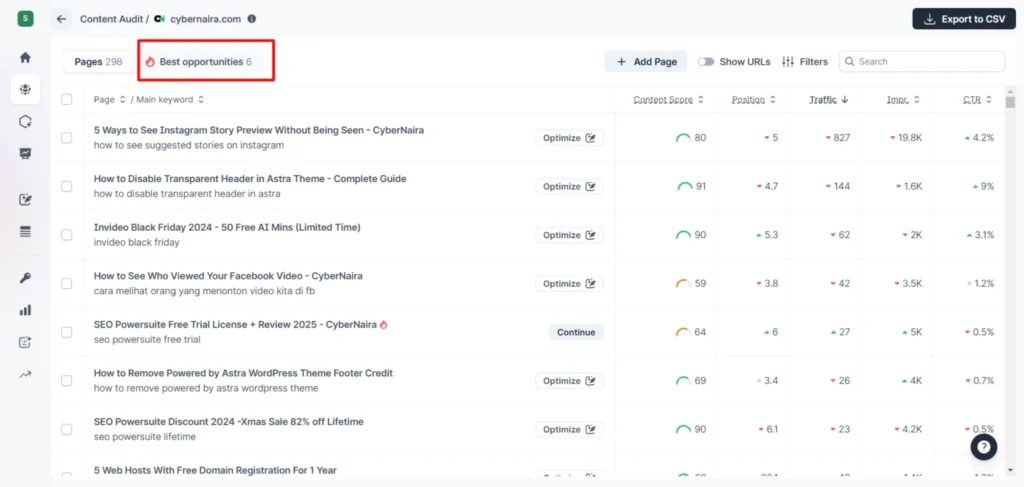
You should start with these pages unless you have a specific reason to optimize a different page and improve the content score. The best opportunities pages will likely get you more organic traffic in less time.
A few things to note about the Content Audit tool:

PRO TIP!
You can open a blank Content Editor to write new content. This uses 1 Content Editor credit. You use one credit each time you write in SEO Surfer’s Content Editor. So, you should learn to economize your credit for optimal use.
Click “Optimize” to open a page in the Content Editor and let the real magic begin. You have two options for improving the content quality: manually applying the recommendations or using Surfer’s Auto-Optimize features.
Surfer SEO Auto-Optimize automatically applies necessary on-page SEO signals to your content, such as relevant NLP terms, missing topics, content structures, headings, etc. These optimizations are based on the top-ranking page in Google SERP.
And not just adding words, Surfer SEO also automates the internal linking process. It scans the domain where you want to publish the content for relevant inbound links and automatically adds them. This saves you time and effort and helps you optimize for topical relevance.
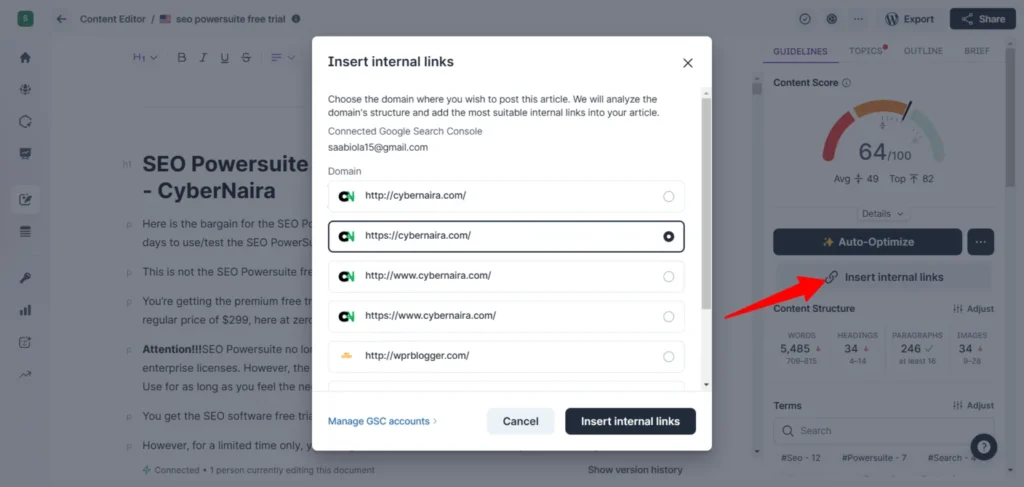
This feature is a game-changer in the SEO industry. Adding internal linking is among the most challenging tasks for many SEOs, especially for large sites. But with Surfer SEO’s insert internal linking feature, you can add relevant inbound links in one click.
During my first 30 days using Surfer SEO, I noticed that combining your SEO experience with Auto-Optimize worked best. You need the best of both worlds to fully utilize Surfer’s latest Autoptimize feature and improve your content scores for maximum search visibility.
Depending on the results of the content analysis, I might manually update it with the suggested keywords and recommendations, or use Auto-Optimize.
For example, Surfer SEO suggests I reduce the SEO Powersuite free trial article from a massive 5k+ words to under 1k. As a curious marketer, I need proof.

So, I Googled the page’s target search phrase and reviewed the first three ranking positions. Here are the Google (US, New York) SERP results for the exact search phrase “SEO Powersuite Free Trial.”
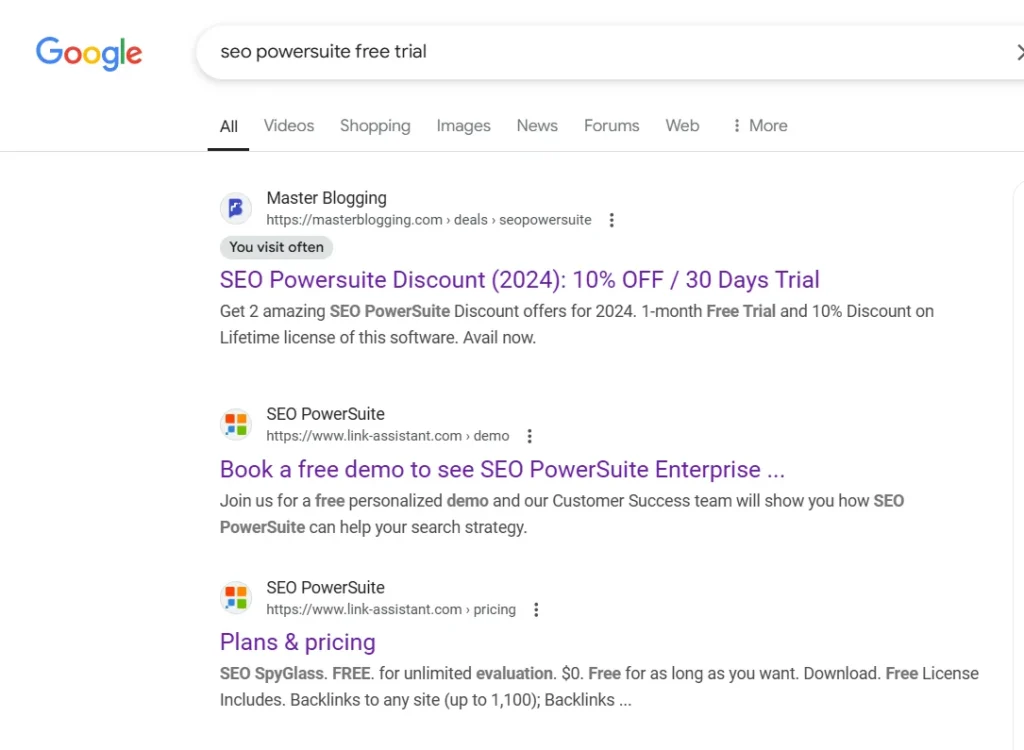
Then I use the Detailed SEO Extensions for Google Chrome to quickly check each page’s word count.

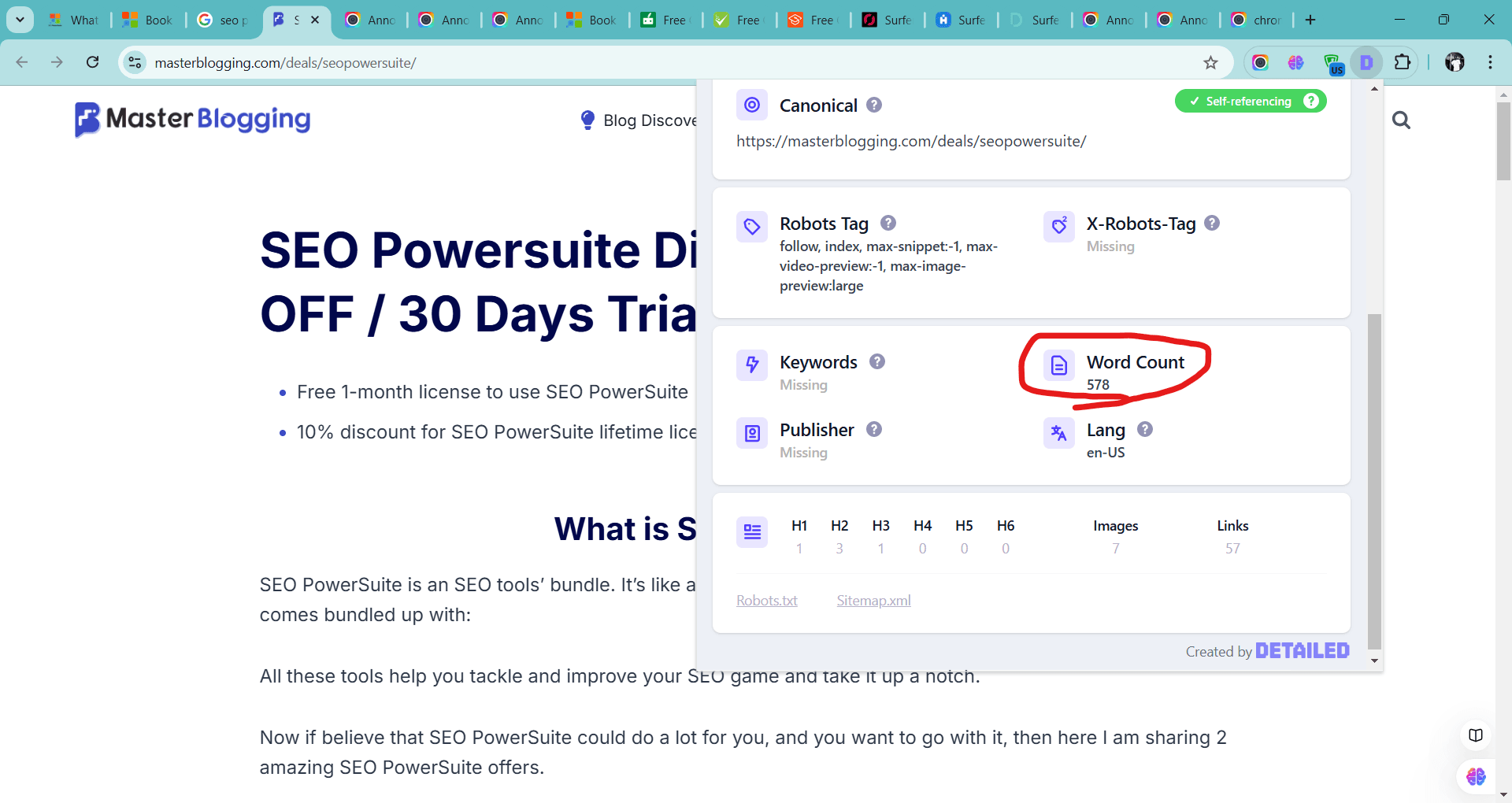
As you can see, Surfer SEO is correct about those suggestions based on the current SERP competitors for the target keyword. The number one position web page has 507 words, while the number two has just 220 words.
In this case, you need to use your SEO knowledge to determine what to remove and keep.
As of the time this Surfer SEO review is written, Auto-Optimize doesn’t rework content to reduce its length. It can only be optimized by adding more words, sections, etc.
That’s why you need to use your SEO content creation expertise, along with Surfer SEO’s automation features, to update your blog post for higher rankings.
Let’s analyze a different scenario with a content gap, missing natural language processing terms, poor content structure, missing backlinks, etc. This is where Surfer SEO is most beneficial and offers the best value for money.
Here is a post I need to optimize. According to this Surfer SEO optimization report, the content length should be between 3.2k and 3.7k, with more headings (30-82), images, and NLP terms. The content score is 58, indicating that further optimization is needed to improve the SEO score and compete in SERPs.

Instead of wasting time researching missing topics, terms, and entities to cover in the post, I use Auto-Optimize, which automatically fills the content caps, NLP terms, headings, etc.

At approximately 20 seconds, the content scores increased to 73, with 1,258 more words added, 4 extra subheadings added, and more NLP phrases.
Surfer SEO’s Auto-Optimize is a valuable content optimization tool for updating existing content, filling topic gaps, covering more data points, and improving overall content quality.
However, as impressive as it looks, you must review the Auto-Optimize outputs to ensure the content improves readability.
Because I have found a few instances where missing phrases/keywords are forced or don’t make sense in the paragraph. The content might feel fragmented, with abrupt shifts between ideas that break the logical progression or are out of context.
Read the content below.

The word technology event has no meaning or relevance in the buildup to that particular paragraph.
On average, this happens 2 out of 100 times when I use Auto-Optimize, which I don’t think should be a big concern for anyone, especially if you review the content before publishing.
On the bright side, I could show hundreds of examples that ideally make sense and improve content quality, context, and search intent.
However, attempting to do that would make our Surfer SEO review excessive and overwhelming.
Anyway, here’s one of those examples.
Note Surfer’s Auto-Optimize generated the sentence in green to include the missing NLP term. I think that perfectly makes sense and improves the sentence.

I encourage you to take advantage of the Surfer SEO 7-day money-back guarantee. This is the only way you can test the powerful features and see the magic firsthand, as well as how it can benefit your business growth.
Key features within the Auto-Optimize report panel, such as the Adjustment timeline, are worth attention. This option makes navigating the entire article easy and lets you quickly find what has been added to the page.

Navigate the panel to review optimized paragraphs and the added H tag section.
Surfer also detects broken links within the content and will notify if any are found. Likewise, you can compare and restore the original content if you dislike the Auto-Optimize generation.
I think that’s one of the ways you take control of the optimization process.
Other fantastic features of Surfer SEO Content Editor include Google Docs, WordPress integration, and Ask Surfy, an AI writing assistant. With its Google Docs integration, you can write in the app and optimize with Surfer SEO’s on-page optimization tool guidelines.
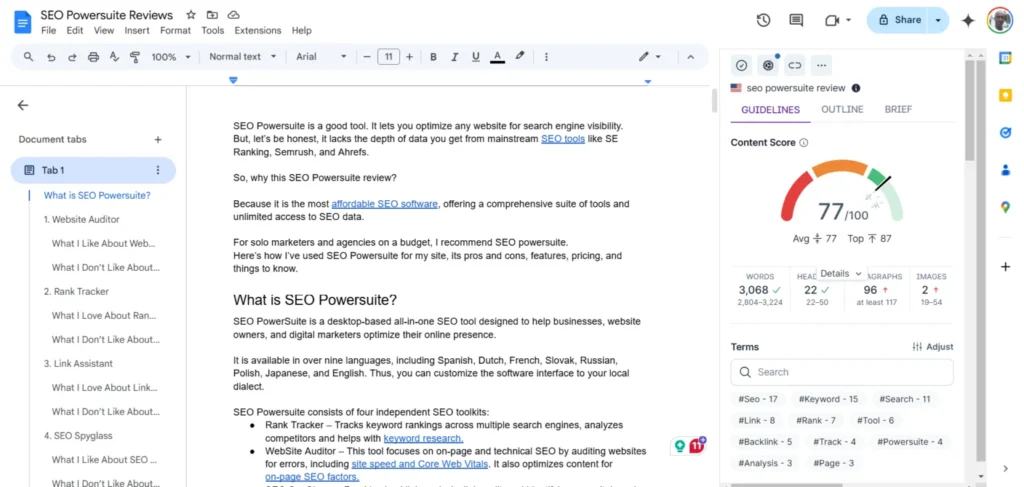
Likewise, the Surfer SEO WordPress plugin allows you to use Surfer SEO directly in WordPress and optimizes blog posts based on its content-optimization guidelines.

NOTE:
Note: You can write your content in the Surfer SEO content editor tool and export it directly to WordPress – save it as a draft, pending, publish, private, or set as a future post. The option also lets you set other post options, like tags, titles, meta descriptions, and the post author.
Ask Surfy is a nifty AI writing companion that relieves stress and helps you complete most writing tasks. You can ask it anything related to the content, which will generate a response based on your prompt.
For example, you can use Ask Surfy to rephrase, expand, simplify, or change the tone of a paragraph, sentence, or word. Ask Surfy is your AI chatbot; the possibilities are endless.
Topical Map
Surfer SEO Topical Map is a time saver and an SEO hack. With it, you can quickly build authority in a particular niche or topic by identifying content gaps and topic areas where you have strong search visibility or presence, and get a list of potential topic clusters to dominate the industry.
You don’t need to do anything special; Surfer SEO automatically reviews your domain and suggests a list of keyword clusters or content gaps with high-ranking potential.
There are a few reasons why this SEO tool is a good one:
The visual Map is beneficial; it provides a holistic view of your content clusters in a single diagram. Here, you can see which content you have covered and not covered, as well as the quick wins.

However, since this is an honest and unbiased Surfer SEO review, I would be more open about assessing the tool.
I noticed that not every topic suggestion actually makes sense. Also, you might have already covered some of the topics in your content. For instance, I have covered the topic the Topical Map suggests I write about.
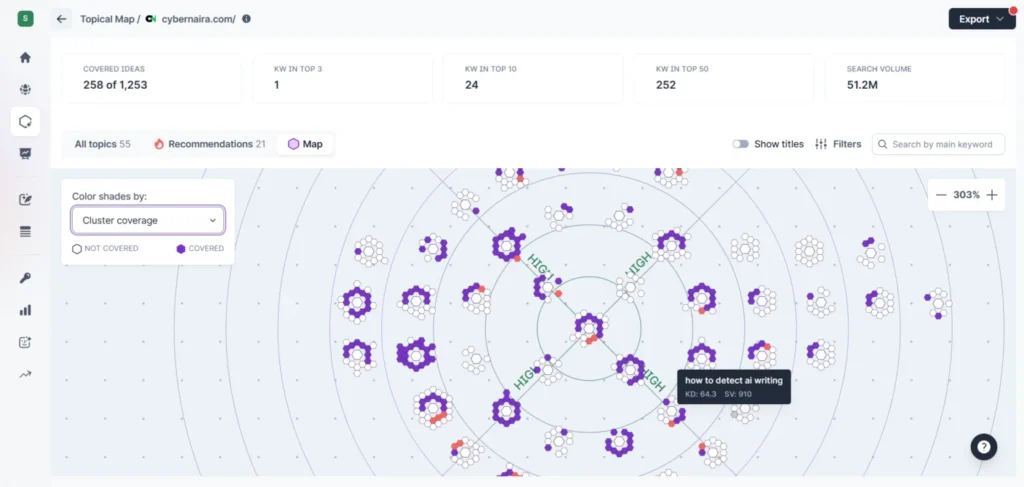
Here is the blog post with mostly identical key phrases.

Aside from these cons, Topical Map is a fantastic tool.
I love how it breaks each topic cluster into easy-to-understand content clusters. This makes it easy to learn which content belongs to a particular topic cluster and helps increase your topical coverage.
Plus, it suggests titles and focus keywords, eliminating the need for brainstorming.
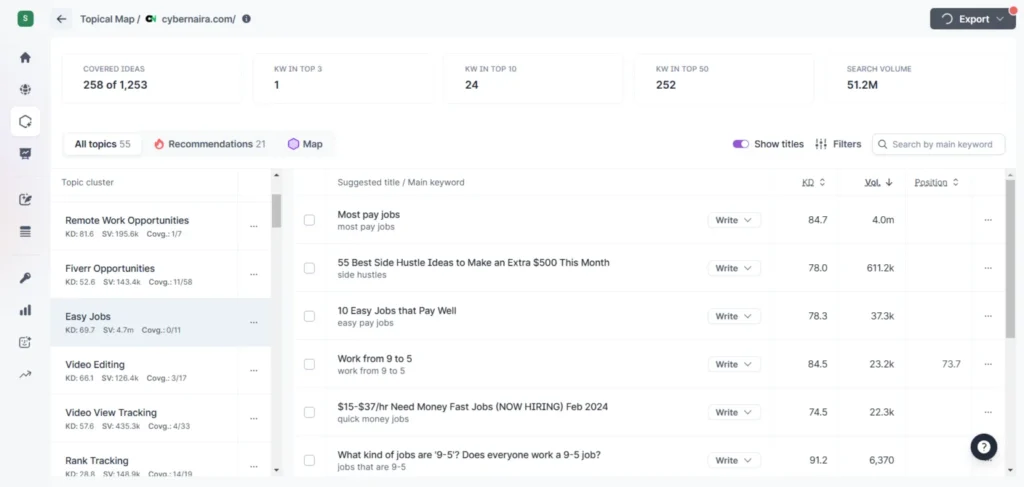
Topical Map also prioritizes the list based on the content idea score, making it easier to work on the most relevant topic that could yield significant results.
Click the “write” drop-down menu if you find a topic that interests you and aligns with your SEO strategy. You can write using Surfer AI or yourself with the Content Editor. Each option would cost you one credit.
If you would like my honest opinion about SEO Surfer’s Topical Map tool, I would say that it is a great tool for skipping the content research process, increasing content coverage, and dominating the search engine result pages.
This is the right SEO tool if you’re struggling with writer’s block, you’re a content planner, or you want to scale content publication while staying true to your core niche topic.
Audit
The Audit Tool extends the Surfer’s Content Editor functionality by enabling deeper content analysis and pinpointing areas for improvement.
You can use it to analyze your site content on a page-by-page basis. You get a detailed optimization report categorized by suggestions:
Click the Show Details button to reveal the SEO suggestions in each report.

Personally, I love the Internal Link audit section. It lets me quickly find inbound link opportunities to improve the topical relevance coverage of the analyzed URL. Surfer SEO not only suggests these pages but also shows the text fragment where the link should be added.
You can reload the report if you have applied the recommendations.
To see the link placement suggestions, hover over the red exclamation.
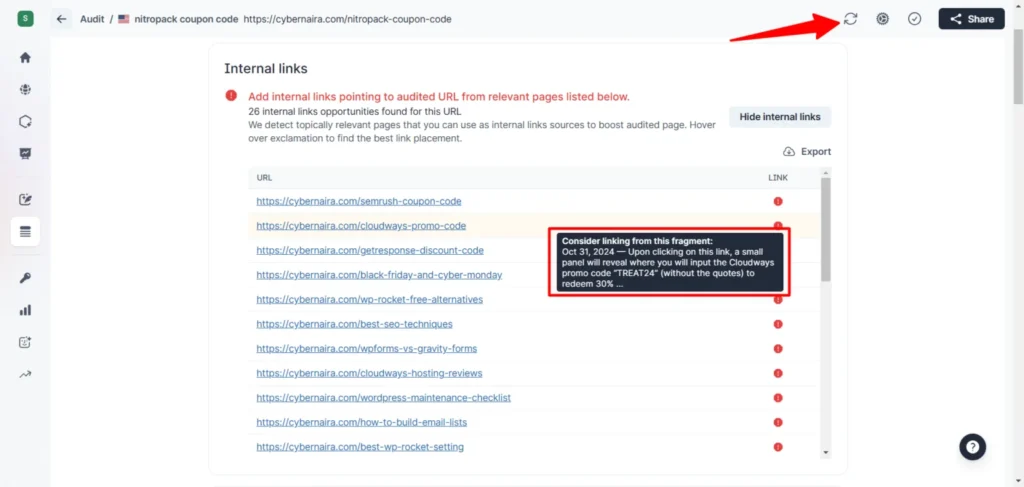
This is a powerful tool, seriously.
Once you add the link, reload the page using the reload icon in the image above. The red exclamation turns green if the link has been added.
There are other helpful suggestions on this page you might want to review, such as terms to use, speed performance, content length, structure, etc.
Some of these suggestions are based on competitors’ ranking pages for the given keywords. You should pay attention to the details to maximize your ranking potential.
For example, this page’s Partial keywords suggest between 3.58 and 8.14 per 100 words based on the competitor’s analysis of search results.

However, some of these suggestions may be out of context. You should use your basic SEO knowledge to review the recommendations and decide what to keep and what to discard.
One cool feature is the option to refine the competitor list, which is the basis for the Audit report. The Audit lets you refine the list of competitors it uses to analyze your page against over 500 ranking signals.
This option or control might be good if you want to exclude a specific competitor or page from contributing to the Audit report.

Another helpful section in the Audit report is the Time to First Byte and Loading Time reports. These reports let you see whether page speed and performance contribute poorly to the page’s ranking or help it improve.

Surfer SEO has done so much to help small business owners and SEOs create content that ranks. Instead of guessing or blindly optimizing your site pages, it gives you a proven path, a data-driven formula, and foolproof optimization tips for higher ranking.
SERP Analyzer
SERP Analyzer is another helpful tool in the Surfer SEO platform. It speeds up the content research process and gives you a visual representation of the SERPs for a given keyword.
For example, while writing this Surfer SEO review blog post, I entered the keyword in the SERP Analyzer tool to get valuable insights into what Google wanted.
At a glance, it shows that the top 10 ranking positions average 3.3k words, 161.1 partial keyword counts, 4.2 keyword counts, and a keyword ratio of 0.00109, all in the content body.
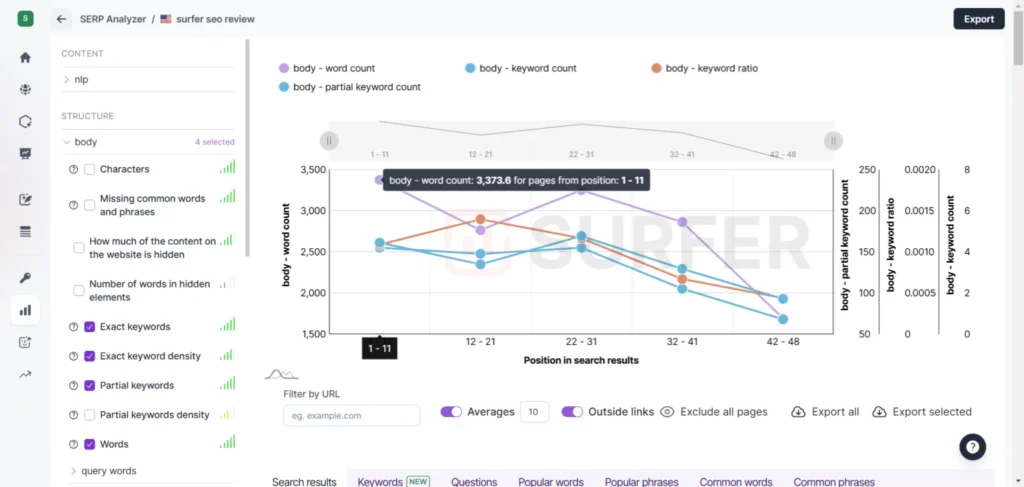
The reports include many SEO metrics, such as page speed, structured data, the number of content items in the above-the-fold area, query terms, image ALT text, headings, meta descriptions, paragraphs, link data, NLP, etc.
Others include common words, phrases, questions, popular words and phrases, etc, shared by top competitors’ pages.
You can drill into any of these metrics to see how competing pages used them in their content. This lets you create content from a clear perspective and with more data points.
However, these extensive reports might be overwhelming for some users and not really serve their purpose. You should learn to make the best of it and focus on what matters to your strategies and experience level.
If you’re creating new content, use Surfer SEO SERP Analyzer to review the search results, analyze the related keyword ideas, know what contributes to ranking factors, analyze top pages, and create content that aligns with search interest.
But, I honestly think using Content Editor with Auto-Optimize provides a quicker and more straightforward process, especially for beginners, and if you want to save time creating SEO-optimized content.
SERP Analyzer is more beneficial for SEO professionals and content planners, offering valuable insights into what makes content rank.
Keyword Research & Reports & AI Humanizer
Keyword Research Tool
While you can do search phrase analysis in Surfer SEO, it is not the best tool. Many dedicated keyword tools are better than SEO Surfer for analyzing search term metrics.
I once used its keyword research tool, but didn’t find much value. It lacks depth and rich data reports compared to popular tools like Ahrefs Keyword Explorer, Rank Tracker, Semrush Keyword Magic, or SE Ranking Keyword Tool.
Case in point: I entered the query “Surfer SEO review” into the Surfer tool. Here is the report.
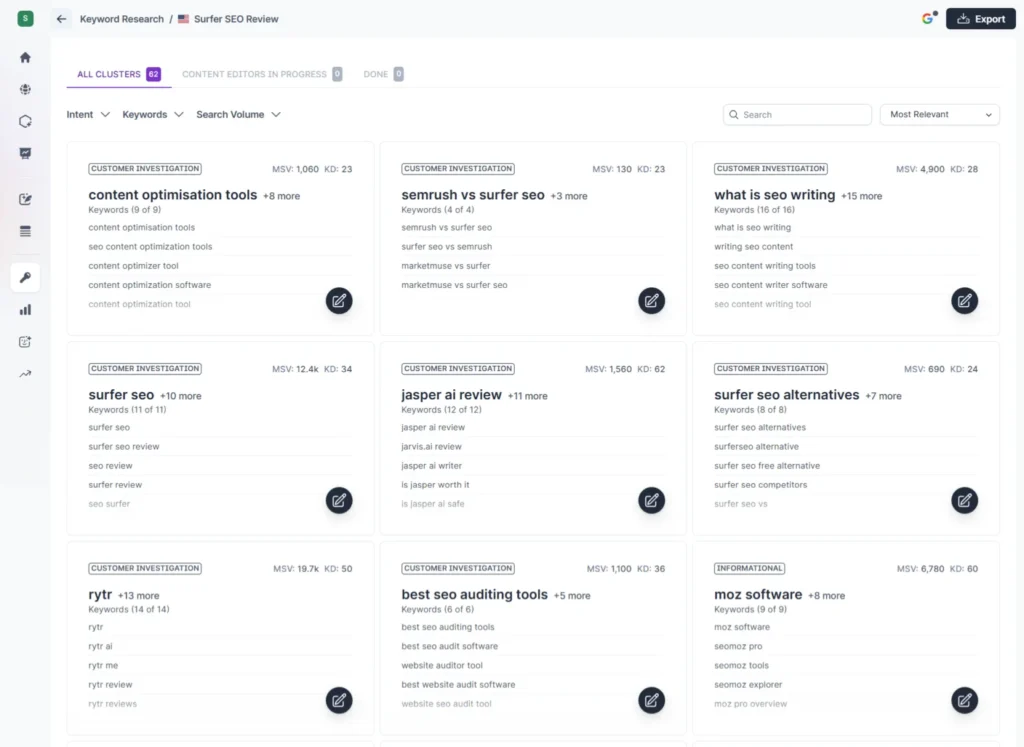
Though the interface is cool and well structured, and the queries are grouped by search intent, the report isn’t helpful to my needs. It didn’t focus on the seed keyword, which is the SEO Surfer review.
Several irrelevant key phrases/clusters in the reports do not align with the main topic.
I don’t think you’ll need the SEO Surfer keyword research tool.
Report
The Surfer SEO report section is another helpful feature; its usage depends on your needs. It integrates with Google Search Console and pulls Google search click data directly.
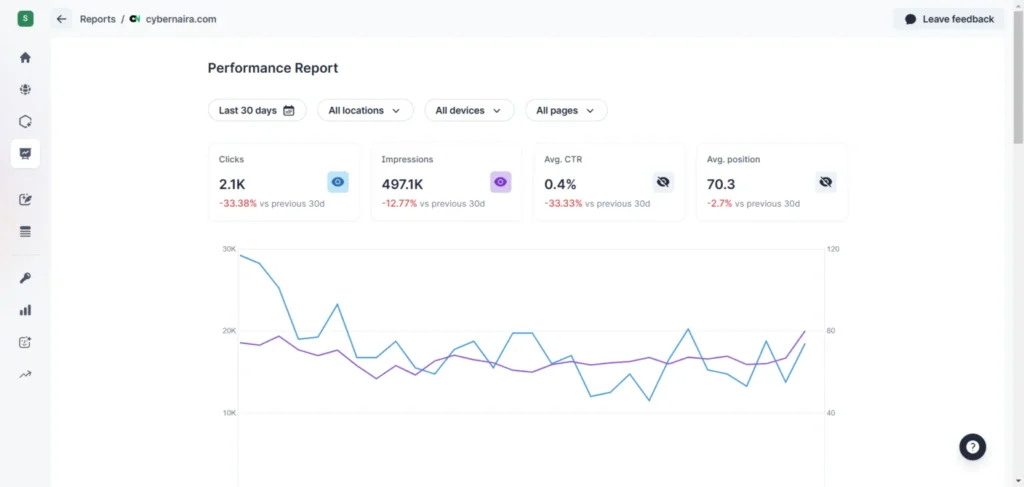
However, this section of the report isn’t my favorite. Down the page, you can see an overview of your last 30-day performance for top-growing pages and keywords.
The recommendations section is the real deal, showing you suggested pages that need optimization and new topic suggestions.

AI Humanizer
Aside from these tools, Surfer SEO now has an AI Content Humanizer and an AI Detection tool. This tool automatically checks your content for AI patterns and rewrites it to make it more human-readable and friendly.
To humanize your AI content, you can choose the tone of voice or add a custom tone.

I have used the AI Humanizer and can say it worked.
Rank Tracker
With its Rank Tracker tool, you can also track relevant keyword ranking positions in Surfer SEO, which sets you up for an additional $17 for 200 tracked keywords.
However, there are better and more affordable options if tracking keyword position is your priority.
Rank Tracker from SEO Powersuite is one option that offers more control, value, and features. For $179 yearly, you can use it for keyword analysis and competitive research and track unlimited search query positions in any search engine or locality.
Surfer SEO Pricing & Plans
Surfer SEO has revamped its pricing structure and now offers four standard plans, all billed yearly:
A QUICK NOTE:
These rates reflect annual billing. Monthly billing is available at a slightly higher rate.
Surfer SEO also offers a 7-day money-back guarantee for new users to test the platform risk-free. This allows you to explore core features and learn whether they fit into your content marketing plan and SEO strategies.
While Surfer SEO pricing may seem steep for some, its value in time-saving and data-driven insights can easily justify the cost, especially for businesses looking to grow their organic traffic.
Best Practices for Using Surfer SEO
Following best practices for using the tool is essential to getting the most out of Surfer SEO. Here are some tips to help you optimize your content effectively:
By following these best practices, you can unlock the full potential of Surfer SEO and improve your website’s search visibility, drive more traffic, and increase conversions.
Surfer SEO Alternatives
While Surfer SEO is a top choice for many, other tools on the market offer similar features.
Here’s a quick look at a few alternatives:
Website Auditor
While its primary focus is on technical SEO audits, Website Auditor includes a content optimization module that lets you optimize existing and new content within the app.
It works similarly to Surfer SEO’s data-driven content optimization tool. You also get suggestions like NLP terms, word clouds, average word counts, FAQs, etc. However, it’s not as feature-rich as Surfer SEO, and the depth of analysis and data is incomparable.
But if the Surfer SEO subscription exceeds your budget, Website Auditor is a good Surfer SEO alternative.
Frase IO
If you’re particularly interested in content creation, Frase IO might be worth considering. It’s an AI-powered content tool that helps generate content outlines and ideas, similar to Surfer’s Content AI.
However, Frase IO focuses more on content research and generation, making it a strong contender for writers.
RankMath Content AI
Rank Math Content AI is another solid alternative to Surfer SEO, despite its limited capabilities and features. It integrates directly with WordPress, making it easier to create SEO-optimized posts in your WordPress Gutenberg editor.
One of Rank Math Content AI’s fantastic features is the built-in prompt templates. This saves you time and helps you write powerful AI prompts that generate high-quality content.
Like Surfer SEO, Content AI analyzes your content to provide personalized suggestions, including headings, images, word counts, and relevant search terms to include.
Each alternative brings something unique, so choosing the right one depends on your needs. However, Surfer SEO’s focus on content optimization and ease of use makes it a strong contender, especially if you want to improve your on-page SEO.
Pros and Cons of Surfer SEO
Like any tool, Surfer SEO comes with its strengths and weaknesses. Here’s a quick look at what users like and don’t like about the platform:
Pros
Cons
Conclusion
Surfer SEO is an excellent tool for optimizing existing content, new content, and overall on-page SEO elements. Its data-driven insights, AI-powered features, and user-friendly design make it appealing to content creators, marketers, and businesses.
While the pricing may be a barrier for some, its value in terms of time-saving and optimization is hard to beat.
Surfer SEO is worth considering if you’re serious about ranking higher on SERP and improving your content’s performance.
Whether you’re just starting out or already have an established online presence, this tool can help you improve your SEO efforts.




This is a great introduction! It effectively sets the stage for readers who might be struggling with SEO. I like how you describe Surfer SEO as a guide—it makes it relatable and easy to understand. Looking forward to your insights on its features and pricing!