

96.55% of websites (according to an Ahrefs study) receive zero traffic from Google. Zero clicks, zero impressions, nothing.
If you’ve been blogging for a while and your posts feel invisible, you’re in the majority, not the exception. The problem usually isn’t effort. It’s the process.
Writing a blog post that ranks on Google, keeps readers engaged, and drives real results (conversions, leads, social shares) takes more than sitting down and typing.
It requires a repeatable process: knowing who you’re writing for, what they’re searching for, and how to deliver the answer better than the 10 results already sitting above you in the SERPs.
I’ve been blogging since 2012, and the difference between posts that flop and posts that pull steady traffic years later almost always comes down to decisions made before writing, not after.
That’s what this guide covers – every step, from finding the right topic and keyword to structuring your post, writing a headline that earns clicks, optimizing for SEO, and hitting publish with confidence.
Let’s get into it.
1. Know Your Target Audience
Every blog post you write is a conversation. And like any conversation, it only works if you know who you’re talking to.
This is the step many bloggers rush through or skip entirely. They have a topic idea, open a text editor and start writing.
The result is content that feels generic, speaks to no one in particular, and struggles to rank because it doesn’t clearly solve a particular person’s specific problem.
Before you write a single word, you need to answer one question: Who is this post for?
Not “bloggers” or “online marketers.” That’s too broad. Get specific.
Are you writing for someone who just launched their first WordPress blog and has no idea how to structure a post? Or for an intermediate blogger who’s publishing regularly but can’t figure out why their content isn’t ranking?
Your answer changes everything. Your tone, your examples, your depth, the tools you recommend, and the problems you address.
How to define your target reader
Start with these three questions:
If you already have an audience, even a small one, use them as your reference point.
Look at the comments on your existing posts. Check what questions your readers ask via email or social media.
Browse relevant Facebook groups, Reddit threads, tweets, and Quora questions around your topic.
The language your audience uses to describe their problems is the exact language you should use in your post.
Audience clarity improves everything downstream.
When you know exactly who you’re writing for, keyword research becomes easier – you’re looking for terms that person would search.
Your headline becomes sharper – you’re speaking directly to their frustration or desire. Your introduction hooks faster because you’re describing a situation they recognize.
Think of it this way:
A post written for everyone competes with everything. A post written for a specific reader with a specific problem competes with far less and converts far better.
2. Find Your Topic + Search Intent
Having a topic idea is easy. Having the right topic idea, one that your target audience is actively searching for and that you have a realistic chance of ranking for, is a different skill entirely.
This is where many bloggers make their first costly mistake. They write about what they find interesting rather than what their audience is actively looking for.
The result is well-written content that no one finds because no one was searching for it.
Start with what your audience is already asking.
The best topic ideas don’t come from thin air; they come from your audience. Here’s where to look:
Understand search intent before you commit to a topic
Finding a topic isn’t enough. You need to understand why someone is searching for it.
This is called search intent, and Google takes it seriously.
There are four types of search intent:
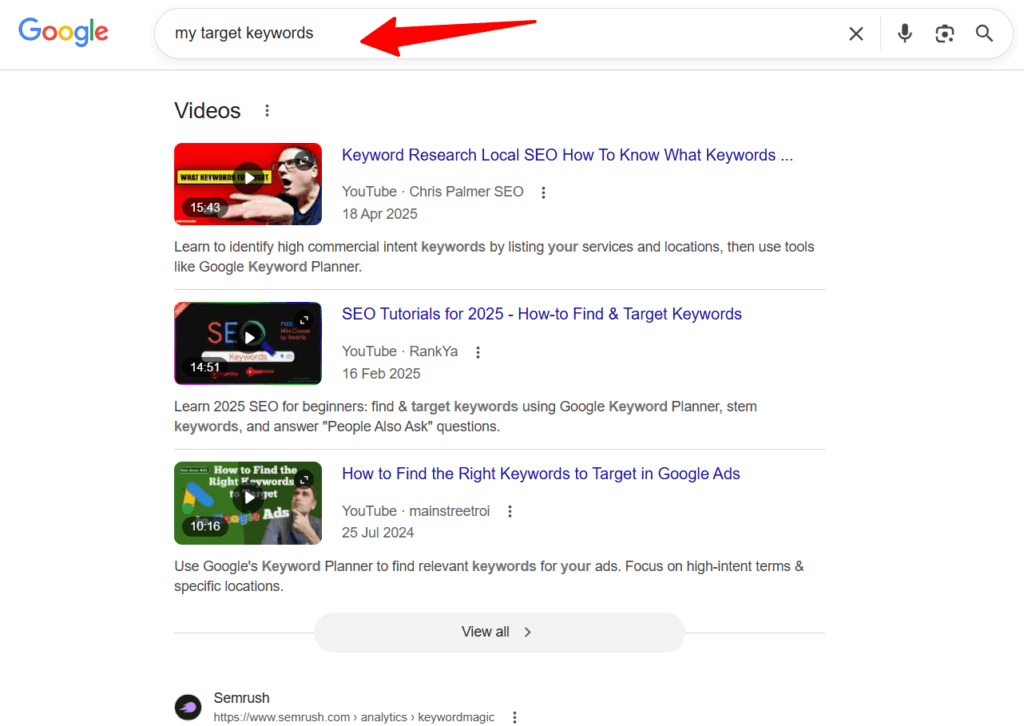
Before you write, Google your target keyword and study the top 10 results. Ask yourself: what type of content is Google already rewarding for this search?
If the top results are all step-by-step guides, Google has decided that’s what searchers want, and you should match that format.
If you write an opinion piece when the SERP is full of listicles, you’re fighting the algorithm instead of working with it. If Google is ranking videos above blog content, consider creating a YouTube video version of the same content.
Match your topic to your content goal
Not every post needs to chase a high search volume.
A focused post targeting a low-competition, high-intent keyword will often outperform a broad post chasing a competitive term.
Ask yourself:
If the answer to all three is yes, you have a topic worth investing time in.
3. Keyword Research
Once you have a topic idea with clear search intent, the next step is to find the exact keyword phrase your target audience uses in Google.
This is what connects your content to the people searching for it.
Keyword research isn’t about stuffing your post with as many search terms as possible. It’s about understanding the specific language your audience uses, finding a keyword you can realistically rank for, and identifying related terms that help Google fully understand what your content covers.
Start with a seed keyword
A seed keyword is a broad term related to your topic. For example, if your topic is about writing blog posts, your seed keyword might be “how to write a blog post.”
You plug this into a keyword research tool and let the data guide you toward more specific, rankable variations.
Keyword research tools to use
You don’t need to spend a fortune on tools to do solid keyword research. Here are reliable options at different budget levels:
What to look for in a keyword
When evaluating a keyword, focus on three things:
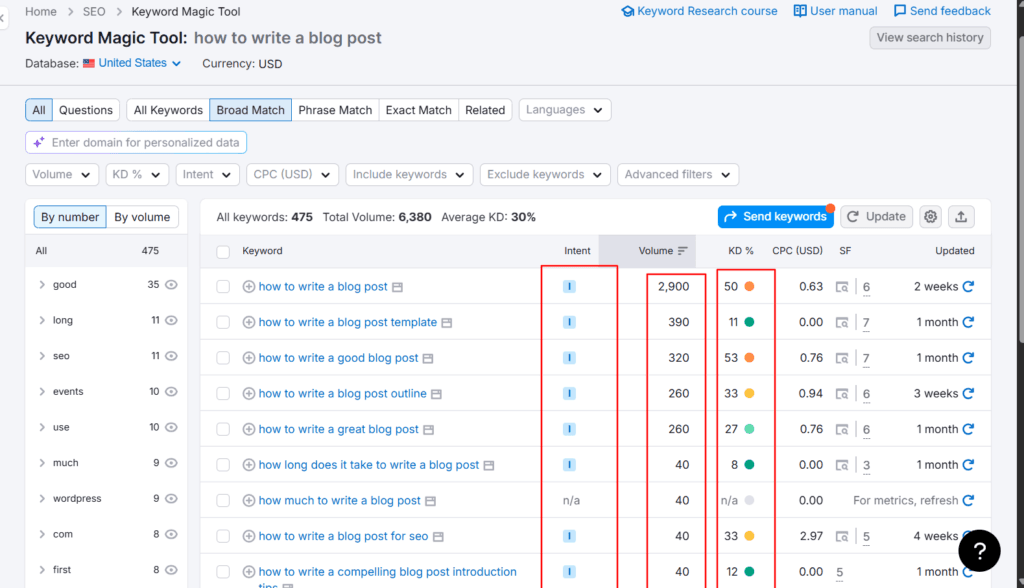
Don’t ignore long-tail keywords
Long-tail keywords are longer, more specific phrases. For example, “how to write a blog post that ranks on Google” instead of just “how to write a blog post.”
They typically have lower search volume but much lower competition, attracting readers who know exactly what they want.
A well-targeted long-tail keyword often converts better than a high-volume broad term.
Find your primary and secondary keywords
Your post should be built around one primary keyword – the main search term you want to rank for.
But alongside it, identify 4 – 6 secondary keywords: related terms, synonyms, and variations that naturally belong in the content.
These help Google understand the full scope of your post and improve your chances of ranking for multiple related searches.
For example, if your primary keyword is “how to write a blog post,” secondary keywords might include “blog post structure,” “how to write a blog introduction,” “blog writing tips,” and “SEO blog post checklist.”
Don’t force these in; write naturally, and they’ll fit where they belong.
Analyze the SERP before you move on
Before leaving keyword research, spend five minutes studying the top results for your primary keyword.
Note:
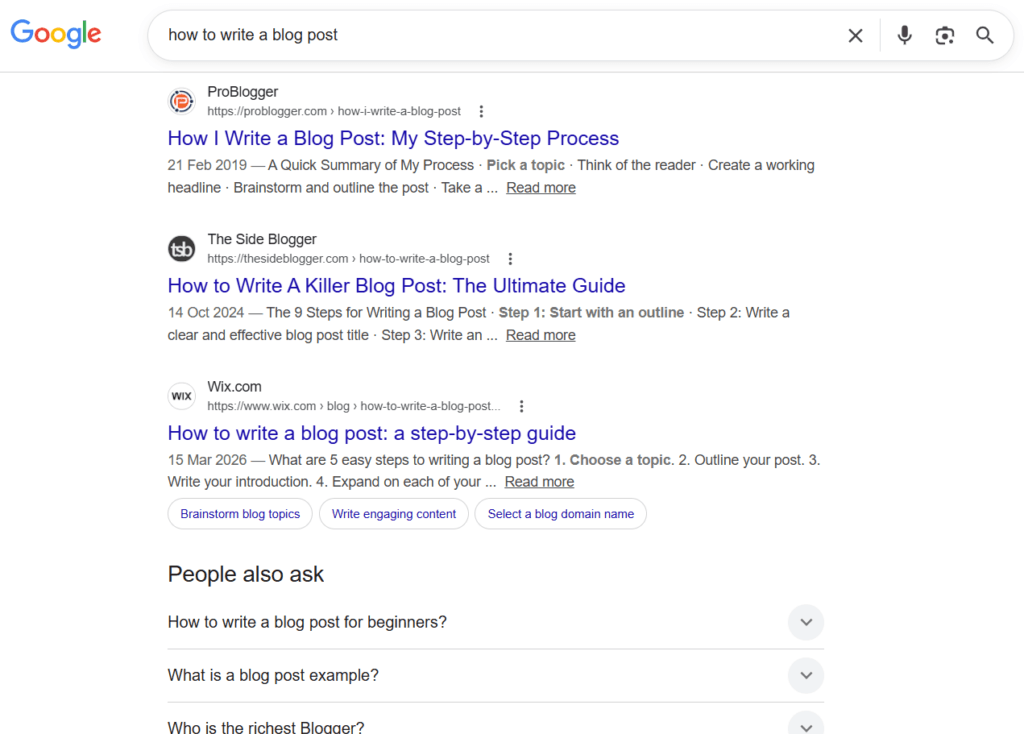
This SERP analysis directly informs your content outline, which is exactly what we’re building next.
4. Create Your Content Outline
Most bloggers skip this step and pay for it later.
They start writing, lose direction halfway through, repeat themselves, miss key subtopics, and end up with a post that feels scattered.
An outline solves all of that before it starts.
Think of your content outline as the architectural blueprint of your post. You wouldn’t build a house without one.
The same logic applies here.
Why outlining matters more than ever
Google’s ranking systems have gotten much better at evaluating content comprehensiveness.
A post that covers a topic thoroughly – addressing the main question, related subtopics, and common follow-up questions – signals topical authority.
An outline ensures that comprehensiveness is intentional, not accidental. It also makes the writing process dramatically faster.
When you map out every section before you start, you’re not staring at a blank page, wondering what comes next. You’re simply filling in a structure you’ve already built.
How to build your outline
Start by going back to your SERP analysis from the keyword research step. Open the top 3 – 5 ranking posts for your primary keyword and study their structure:
Use this research to draft your section headings. At a minimum, your outline should include:
Order your sections logically
The sequence of your sections matters. A reader should be able to move through your post in order and have each section build naturally on the one before it.
For how-to and step-by-step content, chronological order is usually best.
Don’t cover “how to optimize your post for SEO” before you’ve covered “how to write your first draft.”
Ask yourself: if a reader follows this outline from top to bottom, do they have everything they need to achieve the result the title promises?
If any section feels out of place or any important step is missing, fix it in the outline, not mid-draft.
Keep your outline flexible
An outline is a guide, not a cage. As you write, you’ll discover things that belong in the post that you didn’t think of during the outline phase.
That’s fine; add them. The outline prevents unintentional omissions of important sections and the aimless drift that kills long-form posts.
Tools to help you outline faster
Once your outline is solid and your research is done, you’re ready to write. And that starts with the one element that determines whether anyone reads the rest of your post at all.
5. Write a Compelling Headline
Your headline is the single most important line in your entire post.
It determines whether someone clicks your result in Google, whether your post gets shared on social media, and whether a reader who lands on your page stays or hits the back button.
You can write the most thorough, well-researched post on the internet, but if the headline doesn’t earn the click, none of that work gets seen.
David Ogilvy put it bluntly:
On average, five times as many people read the headline as read the body copy. When you have written your headline, you have spent eighty cents out of your dollar.
That was true in print advertising. In the age of Google, social feeds, and shrinking attention spans, it’s even more true today.
What must a strong headline do?
A good blog post headline has to accomplish four things simultaneously:
Proven headline formulas that work
You don’t need to reinvent the wheel every time. These headline frameworks consistently perform well across blogging niches:
None of these is universally superior. The best choice depends on your topic, your audience’s level of awareness, and the competing headlines already in the SERP.
Study what’s already ranking and find the gap. If every competitor uses a numbered list format, a strong how-to guide headline might stand out.
Practical headline writing tips
Lead with the keyword where possible. Google gives more weight to keywords that appear early in your title tag.
For example, “How to Write a Blog Post: A Step-by-Step Guide” performs better in search than “A Step-by-Step Guide on How to Write a Blog Post”, even though they say the same thing.
Keep the title tag under 60 characters. Google truncates title tags in search results around the 60-character mark.

If your headline is longer, make sure the most important part – keyword and benefit – appears in the first 60 characters.
Write at least 5 headline variations before choosing one. Your first headline is rarely your best.
Force yourself to write multiple versions, changing the angle, format, and emphasized benefit. Then evaluate which one is sharpest.
Don’t finalize your headline before writing the post. Write a working title to guide your draft, then revisit the headline after the post is complete.
By then, you’ll have a clearer sense of the post’s strongest angle and be able to craft a headline that truly reflects it.
A note on H1 vs. title tag
In WordPress, your post title serves as both the page’s H1 and the title tag in search results.
Keep them identical or nearly identical. Significant differences between the two send mixed signals to Google about what your post is actually about.
6. Write a Strong Introduction
If your headline earns the click, your introduction earns the read.
Most readers make the decision to stay or leave within the first few seconds of landing on your page. They skim the opening lines and ask one question, consciously or not: Is this worth my time?
A weak introduction – one that starts with a dictionary definition, rambles about background history, or drowns in generic encouragement – answers that question with a no.
A strong introduction does three things quickly: it hooks the reader, confirms they’re in the right place, and gives them a compelling reason to keep scrolling.
The anatomy of a strong blog introduction
1. The hook
Your opening line should stop the scroll. It needs to create an immediate reaction – recognition, curiosity, or a mild jolt of tension.
There are several reliable ways to open:
What you should never do is open with “In this post, I’m going to talk about…” or a definition pulled from the dictionary. These are trust signals in reverse.
They tell the reader you’re not confident enough to lead with value.
2. Agitate the problem
After the hook, briefly expand on the problem or situation. One to two sentences is enough.
This is where you show the reader you understand their experience, not just the surface-level symptom, but the underlying frustration.
When a reader feels understood, they trust the writer. When they trust the writer, they read on.
3. Introduce the solution
Transition from the problem to what this post delivers. Be specific.
Don’t say “I’ll share some tips.” Say “I’ll walk you through a 12-step process – from picking the right keyword to hitting publish – that I’ve used to write posts that still pull organic traffic years after publication.”
Specificity does two things: it sets clear expectations, and it signals genuine depth.
Vague promises attract clicks and lose readers. Specific promises attract the right readers and keep them.
4. Establish credibility (briefly)
One or two lines of credibility go a long way, especially for a topic like this, where the internet is flooded with generic advice.
You don’t need to write a full bio. A single line that grounds your advice in real experience is enough.
Something like: “I’ve been blogging since 2012 and have written posts that rank on the first page of Google across multiple competitive niches.”
That’s it. Brief, specific, earned.
5. The preview (optional but useful)
For long-form, step-by-step guides, a brief preview of what the post covers helps readers know what to expect and encourages them to read the full guide rather than skimming for a single section.
Keep it to one or two lines. This is a signpost, not a table of contents. Keep it tight.
6. Keep your introduction brief
A blog introduction should rarely exceed 150–200 words for most posts.
Long-form guides can stretch slightly further, but the principle holds: get to the point faster than feels comfortable.
Every sentence in your introduction should earn its place. If a line doesn’t hook, agitate, inform, or build trust – cut it.
One practical test
When you’ve written your introduction, read just those opening paragraphs and ask: if this were all a reader saw, would they know exactly what this post is about, who it’s for, and why it’s worth their time?
If the answer is yes, your introduction is doing its job.
7. Write Your First Draft
At this point, you have a defined audience, a validated keyword, a clear search intent, and a solid outline. Now comes the part most people overthink: actually writing the post.
Here’s the only rule that matters for your first draft: start writing and don’t stop to perfect.
Your first draft is not the finished post. It’s not even close. Its only job is to get your ideas out of your head and onto the page in roughly the right order.
Editing, tightening, and polishing come later. If you try to do both at the same time (write and edit simultaneously) you’ll slow to a crawl, second-guess every sentence, and either abandon the post halfway or spend three times longer than necessary finishing it.
Give yourself permission to write badly. Every good post started as a rough one.
Write in Google Docs, not the WordPress editor
Skip the WordPress editor for drafting. Write in Google Docs instead.
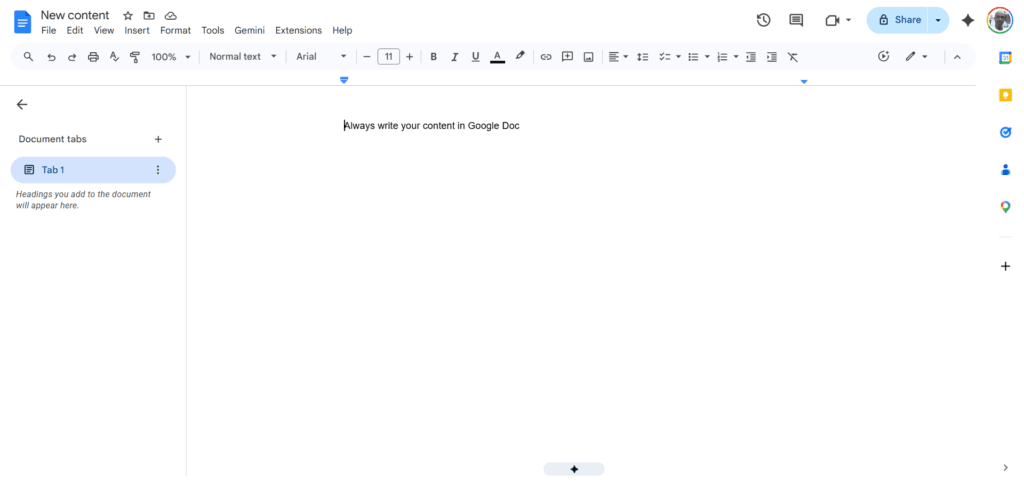
The WordPress editor introduces friction; it can lag on longer posts, formatting decisions interrupt your flow, and you’re one accidental click away from losing unsaved work.
Google Docs keeps you focused on the words. It’s distraction-free, auto-saves constantly, and integrates with every major writing tool you’re likely using – Grammarly for grammar checks, Semrush’s SEO Writing Assistant for on-page guidance, and Hemingway for readability.
When the draft is complete and polished, you move it into WordPress.
Write in multiple sessions, not one marathon sitting
Don’t pressure yourself to finish a long-form post in one sitting. It rarely produces your best work.
Writing in focused sessions – tackling two or three sections at a time – keeps your thinking sharp and your energy consistent throughout the post.
Between sessions, your brain continues processing what you’ve written. You’ll often return to a section with a clearer idea of how to open it or a better example you didn’t think of the first time around.
Some writers call this “sleeping on it.” Whatever you call it, it works.
Follow your outline – don’t improvise the structure
Stick to the outline you built. Resist the urge to go off-script mid-draft, especially if you’re still building your writing discipline.
I learned this the hard way. When I first started blogging, I never wrote outlines.
I didn’t understand the value; it felt like extra work before the real work. So I’d open a blank document and just start writing, following whatever direction felt natural in the moment.
The result was almost always the same: articles that stalled halfway through, content that jumped between ideas without a clear thread, and posts that didn’t build logically from one point to the next.
Readers could feel that lack of structure, even if they couldn’t name it.
Outlining changed everything. Once I started mapping the structure before writing posts, they became easier to finish, faster to write, and noticeably more coherent.
The outline is the decision you make once, so you don’t have to keep making it mid-sentence.
When you follow your outline, each section has a defined purpose and a clear place in the larger sequence. You’re not wondering what comes next; you’re simply executing a plan you already built.
Practical tips for writing your draft
On word count
Don’t chase a word count target. Write until you’ve fully answered the question your post promises to answer – no more, no less.
A 1,500-word post that completely solves a specific problem outperforms a 4,000-word post padded with filler every time.
That said, competitive informational keywords often require depth and comprehensiveness to rank. Let your SERP analysis guide the expected length, not an arbitrary number.
8. Add Multimedia the Right Way
A blog post is no longer just words on a page.
Today’s readers expect a mix of text, visuals, and occasionally video, not because it looks nice, but because the right multimedia makes complex information easier to understand, breaks up long stretches of text, and keeps readers engaged long enough to reach your conclusion.
Google pays attention to that engagement. Posts that keep readers on the page longer send positive signals that the content delivers value.
But multimedia done poorly – stock photos that add nothing, random images dropped between paragraphs, blurry screenshots – can hurt more than help.
The goal isn’t to decorate your post. It’s to enhance it.
Types of multimedia and when to use each
Screenshots
For tutorial content, how-to guides, and any post that walks readers through a process, screenshots are non-negotiable. They eliminate ambiguity.
Instead of telling a reader to “click the settings menu,” you show them exactly what it looks like. This is especially important for beginner audiences who may not be familiar with the tools or interfaces you’re referencing.
Keep your screenshots clean and focused.
Crop tightly to show only what’s relevant. If necessary, annotate with arrows or highlights to draw the reader’s eye to the specific element being discussed.
Tools like Snagit, Awesome Screenshots, or even Canva’s free annotation features work well for this.
PRO TIP!
I use Awesome Screenshot for all tutorial screenshots on this blog. It is a simple browser extension that lets you capture, record, and annotate with illustrations. Download it from your browser’s extension marketplace.
Original images and graphics
Wherever possible, use original visuals over stock photos. Stock images are generic, overused, and add no real information value.
An original graphic – a simple comparison table, a process diagram, a visual summary of the post’s key steps – adds genuine value that a stock photo never can.
Canva is the most accessible tool for creating original blog graphics without a design background. Use it for featured images, section dividers, infographics, and custom illustrations.
Keep your visual style consistent across posts – same fonts, same color palette, same general aesthetic – so your blog develops a recognizable look over time.
Videos
If your post covers a process that’s easier to show than to describe, embedding a video significantly increases the content’s value.
It also increases time on page, which is a positive engagement signal.
You don’t need a professional studio setup. A clear screen recording app with voiceover, such as VEED or InVideo, is enough to explain the steps for most tutorial content.
Record it, upload it to YouTube, and embed it in the post using the standard embed code. This also gives your content a presence on YouTube, a second search engine in its own right, without any additional writing effort.
Infographics
For data-heavy or process-heavy content, infographics condense complex information into a scannable visual format.
They’re also highly shareable on social media and Pinterest, which extends the reach of your post beyond organic search.
Keep them simple – one clear idea per infographic, not a wall of information crammed into one image.
Where to place multimedia in your post?
Placement matters as much as the multimedia itself. Follow these principles:
Optimize every image before uploading
Unoptimized images are among the most common causes of slow page load times, and slow pages hurt both user experience and search rankings.
Before uploading any image to WordPress:
Write alt text for every image – use AI to speed it up
This is a continuation of the previous tip.
Alt text serves two purposes: it tells search engines what the image depicts, and it describes the image to visually impaired readers using screen readers. Both matter: one for SEO, one for accessibility.
For every image you upload, you need three things filled in in WordPress: the alt text, the image title, and, ideally, a descriptive file name before upload (covered above).
Writing this manually for every image in a long post is tedious. A practical workaround is to use an AI tool.
You upload the image, paste a prompt specifying what you need (alt text, image title, or a URL suggestion), and fill in the returned metadata directly in WordPress. It’s still a manual process, but it handles the writing for you in seconds.
Enable Rank Math’s Image SEO module and configure the settings as a safety net.
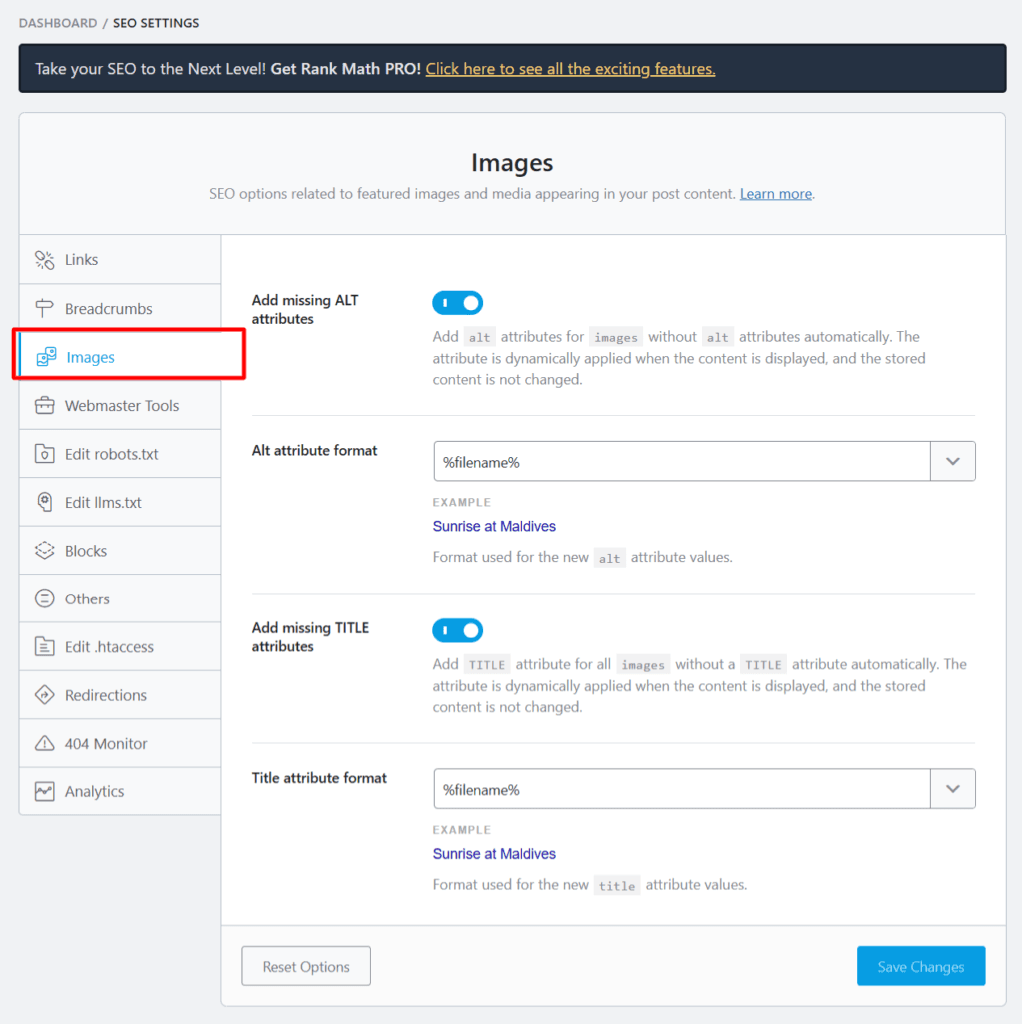
For any image that slips through with empty alt text, Rank Math automatically falls back to your custom settings as the alt and title attributes – not ideal, but far better than leaving it completely empty.
If you want to fully automate this workflow, a few options are worth exploring:
9. On-Page SEO Optimization
Writing a great post is half the job. Making sure search engines can find it, understand it, and rank it is the other half.
On-page SEO is everything you do within the post itself to improve its chances of ranking.
It doesn’t require technical expertise or expensive tools. It requires attention to a checklist of specific elements, most of which take less than five minutes each to get right.
Primary keyword placement
Your primary keyword needs to appear in specific locations to send clear relevance signals to Google.
These are non-negotiable:
Meta description
Your meta description is the short snippet that appears below your title in Google search results.
Google doesn’t always use what you write; it sometimes generates its own. However, writing a strong one improves your click-through rate when it does appear.
Keep it between 150–160 characters. Lead with the primary keyword or the core benefit.
Make it specific enough to stand out from competing results and accurate enough to match what the post actually delivers.
Write it like a mini-advertisement for the post, not a summary, but a reason to click.
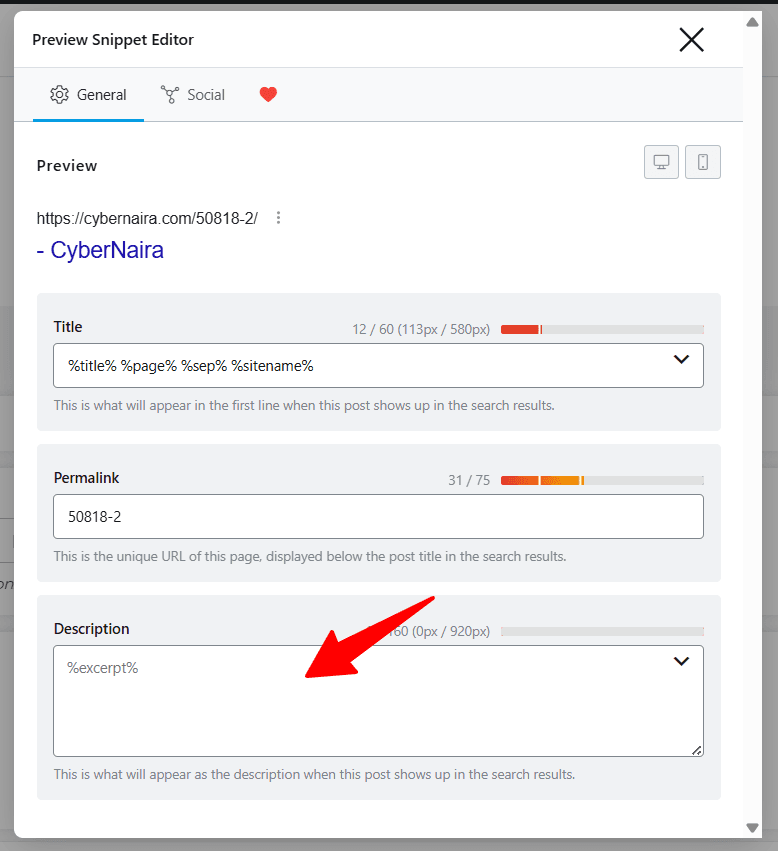
Rank Math makes this straightforward. You can write and customize the meta description, then see a preview before hitting publish.
Header structure (H1, H2, H3)
Use heading tags as intended: for a logical hierarchy, not as a formatting tool to make text bigger.
A clean header structure helps Google understand your content’s architecture and helps readers navigate a long post without getting lost.
Secondary keywords and semantic terms
Alongside your primary keyword, your post should naturally include the secondary keywords you identified during research – related terms, synonyms, and variations.
You don’t place these deliberately; you write comprehensively, and they appear on their own. If they don’t, something is missing from your content.
Google’s understanding of language has evolved far beyond exact keyword matching. It reads for topical depth.
A post about “how to write a blog post” that never mentions “outline,” “search intent,” “headline,” or “meta description” signals shallowness, even if the primary keyword appears twenty times.
Internal linking
Every post you publish should link to at least two or three other relevant posts on your blog.
Internal links do three things:
Link naturally; anchor text should describe what the linked post is about, not generic phrases like “click here” or “read more.”
If you’re writing about keyword research, link to your dedicated keyword research post using anchor text like “keyword research for bloggers”, not “this post.”
External linking
Link out to authoritative, relevant external sources where appropriate.
Citing a credible study, a tool’s official documentation, or a well-known industry resource adds credibility to your content and signals to Google that your post is well-researched.
PRO TIP!
Don’t be afraid to link out; keeping all links internal at the expense of credible sources is a mistake many bloggers make.
Set external links to open in a new tab so readers aren’t pulled away from your post entirely. Again, Rank Math has a one-time setting for this.
URL structure
Beyond including your keyword, keep URLs:
Once a URL is set and the post is indexed, avoid changing it. If you must change it, set up a 301 redirect from the old URL to the new one immediately.
Page title tag length
Keep your title tag under 60 characters to prevent truncation in search results.
Rank Math shows you a live preview of how your title and meta description appear in Google; use it.
A truncated title tag loses the end of your headline in the SERP, which often means losing the benefit statement you worked hard to craft.
Featured image
Every post needs a featured image. It appears at the top of the post, in social media previews when the post is shared, and in Google Discover cards.
Use an original or well-chosen image that’s relevant to the post topic, properly compressed, and has descriptive alt text filled in (as covered in the previous section).
Schema markup
For most blog posts, Rank Math automatically handles basic schema markup.
For how-to posts, ensure the HowTo schema is enabled. It can generate rich results in Google that display your steps directly in the SERPs, significantly increasing visibility and click-through rate.
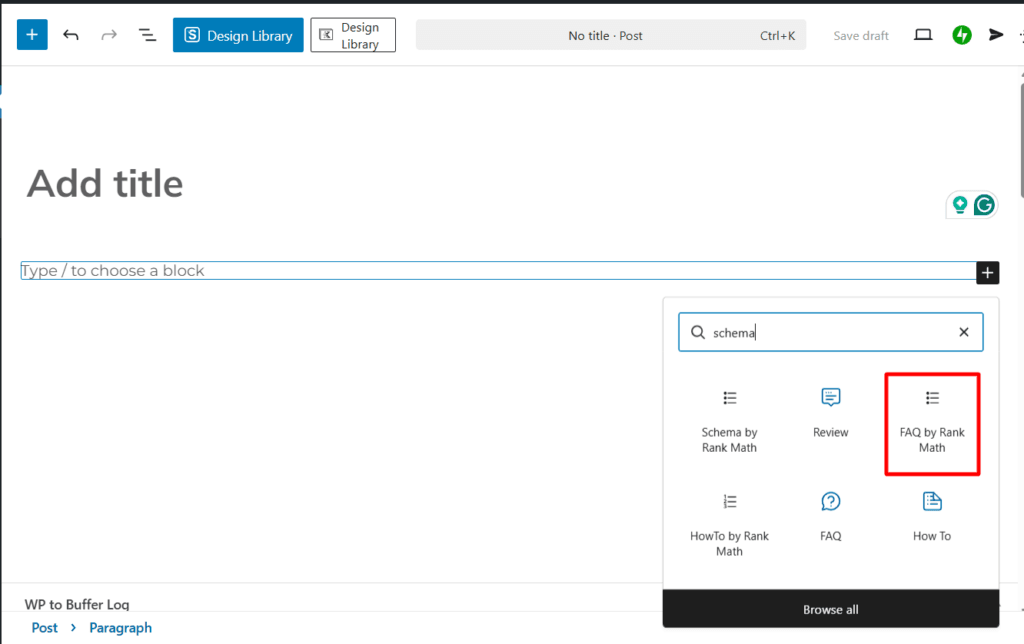
For FAQ sections, enable the FAQ schema so your questions and answers are eligible to appear as expanded results beneath your listing.
For the FAQ schema, Rank Math has a dedicated FAQ Gutenberg block, so you don’t need to set it up. It’s integrated.
10. Edit and Refine
Writing the first draft means you’ve done the hard part. Editing is where you turn that draft into something worth publishing.
Many bloggers underestimate this step. They do a quick read-through, fix a few typos, and hit publish.
The result is content that’s technically complete but noticeably rough – awkward sentences, repetitive points, weak transitions, and sections that overstay their welcome.
Readers notice even when they can’t articulate why. They just stop reading.
Editing is not proofreading. Proofreading catches errors. Editing improves the writing itself – the clarity, the flow, the structure, and the impact.
They’re separate tasks, and both are necessary.
Step away before you edit
Before editing anything, close the document and step away for at least a few hours.
Overnight is better. When you’ve just finished writing, your brain reads what it intended to write, not what’s actually on the page.
Distance resets that. When you return to the draft with fresh eyes, you’ll catch problems you were completely blind to an hour earlier.
Edit in passes, not all at once
Trying to fix everything in a single read-through is inefficient. You’ll miss things and fatigue quickly.
Instead, edit in focused passes, each one looking for something specific:
Pass 1 – Structure and flow
Read the post from top to bottom and evaluate the big picture. Ask:
Fix structural problems first. There’s no point polishing the sentences in a section you might move or cut entirely.
Pass 2 — Clarity and concision
Go sentence by sentence and cut ruthlessly. This is the pass where good posts become great ones.
For every sentence, ask: Does this add something, or is it just taking up space?
Specific things to eliminate:
A useful benchmark: if cutting a sentence doesn’t change the meaning of the paragraph, cut it.
Pass 3 – Readability
Blog readers don’t read linearly; they scan first, then read the sections that interest them.
Your post needs to work for both the scanner and the careful reader.
Check:
Run the draft through the Hemingway Editor (hemingwayapp.com). It highlights overly complex sentences, excessive adverbs, and passive voice, and gives you a readability grade.
Aim for Grade 7–8 for most blogging audiences, clear and direct without being simplistic.
Pass 4 – Grammar and spelling
This is the proofreading pass. Run the post through Grammarly to catch grammar errors, punctuation mistakes, and spelling issues.
Read it once more yourself after Grammarly catches most things, but not everything, and it occasionally suggests changes that alter your intended meaning.
Pay particular attention to:
Pass 5 – Links and formatting
A final technical check before moving to the pre-publish checklist:
Read it out loud
After all five passes, read the entire post out loud. This is the most effective editing technique most bloggers never use.
Your ear catches what your eye misses – an awkward rhythm, a sentence that’s technically correct but sounds unnatural, a transition that feels abrupt.
If you stumble reading it, your reader will stumble too. Fix it.
Know when to stop
Editing has a point of diminishing returns. At some stage, you’re not making the post better; you’re just making it different.
When you’ve completed all five passes and the post reads cleanly and confidently from start to finish, stop editing and move forward.
A good post published today beats a perfect post you never published.
11. Pre-Publish Checklist
You’ve written the post, added multimedia, optimized for SEO, and edited until it reads cleanly. Before you hit publish, run through this checklist.
It takes less than ten minutes and saves you from the embarrassing – and sometimes costly – mistakes that slip through when you go straight from editing to publishing.
Work through each item in order. Don’t skip sections because you’re confident you covered them during writing.
This checklist exists precisely because writers are always most blind to their own oversights.
Content
SEO
Multimedia
Formatting and readability
Technical
Final read
If every box is checked, you’re ready to publish.
12. Publish and Promote
Hitting publish is not the finish line. It’s the starting gun.
A post that sits unnoticed in the first days after publication sends weak engagement signals to Google – low clicks, no shares, no backlinks.
Getting early traction matters. It tells search engines the content is relevant and worth surfacing to more people. Promotion is how you manufacture that early momentum before organic search kicks in.
The good news: you don’t need to promote the content everywhere. You need the right places.
The channels where your specific audience actually spends time.
Submit to Google Search Console immediately
The first thing to do after publishing is to log in to Google Search Console and request indexing for the new post URL.
Don’t wait for Google to discover it on its own. That can take days or weeks for newer blogs.
Submitting it manually via the URL Inspection tool or using the Rank Math Instant Indexing tool (within WordPress) places it in the indexing queue immediately.
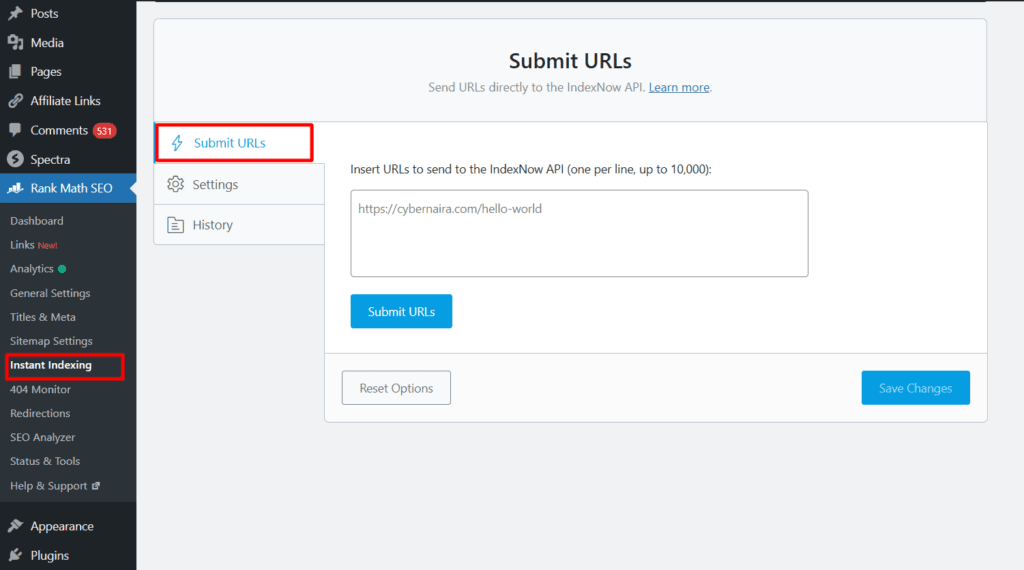
This takes 30 seconds and is the single highest-leverage action you can take right after hitting publish.
Share on your social media channels
Distribute the post across your active social media profiles within the first 24 hours of publication.
Don’t share the same copy-pasted link across every platform. Instead, adapt the framing for each:
Adapt the message to the platform. The same post can be framed differently for each audience without having to write entirely new content each time.
Email your list
Your email subscribers are your most engaged audience. They opted in specifically to hear from you.
Sending a broadcast to your list within 24–48 hours of publishing drives immediate traffic, generates early engagement signals, and reminds subscribers that your blog is actively producing valuable content.
Keep the email short. Introduce the post with one or two sentences that speak directly to the reader’s problem, then link to the full article.
Plain-text emails consistently outperform heavily designed HTML templates in click-through rate. Your subscribers want to hear from you, not from a newsletter template.
Build internal links from existing posts
Go back to your older published posts and add internal links pointing to the new post where relevant.
This does two things: it passes existing page authority to your new post, and it helps Google discover and index the new content faster by following links from already-crawled pages.
This is one of the most underused post-publish tactics in blogging. It costs nothing, takes 15 minutes, and has a measurable impact on how quickly a new post gains traction in search results.
Repurpose the content
A well-researched long-form post contains enough material to fuel multiple pieces of content across different formats and platforms.
Don’t let it live only as a blog post:
Each repurposed piece drives a new audience back to the original post and extends the reach of work you’ve already done.
Be patient with organic search
Even a well-optimized, thoroughly promoted post rarely ranks on page one overnight.
For competitive keywords, it can take three to six months (sometimes longer) for a post to reach its full ranking potential. This is normal.
What you can control is the quality of the post, the strength of your on-page SEO, the consistency of your internal linking, and the effort you put into early promotion.
Do those things well and let Google do its job. Track the post’s performance in Google Search Console (impressions, clicks, average position) and revisit it in three to six months to assess whether it needs updating, expansion, or additional internal links.
Promotion isn’t a one-time event either.
Reshare strong posts periodically, especially after updating them, and continue building internal links to them as you publish new related content.
Use WP to Buffer to automate sharing old posts as you update them in WordPress. Jetpack handles sharing new posts across your connected account perfectly.
Blogs that compound traffic over time treat every published post as a long-term asset, not a one-week campaign.
Read my blog promotion checklist for a deeper insight into outreach, community sharing, and content repurposing strategies.
FAQs
How long should a blog post be?
There is no universally correct answer, but a useful rule of thumb is this: write until you’ve fully answered the question your post promises to answer, then stop. Padding a post with filler to hit an arbitrary word count hurts readability and reader trust.
How often should I publish new blog posts?
Consistency matters more than frequency. Publishing one well-researched, thoroughly optimized post per week is significantly more effective than publishing four rushed, shallow posts in the same period. Google does not reward volume; it rewards quality and relevance. Start with a publishing schedule you can maintain without sacrificing post quality. For most individual bloggers, one solid post per week is a realistic and effective target. As your process becomes faster and more efficient over time, you can increase frequency, but never at the expense of the standard you’ve set.
Should I use AI to write my blog posts?
AI writing tools can meaningfully speed up parts of the blogging process, such as generating outline ideas, drafting section summaries, writing meta descriptions, suggesting headline variations, and identifying content gaps. Used well, they save time on the mechanical parts of writing and free you to focus on the parts that require genuine expertise and original thinking.
AI cannot replace first-hand experience, original insight, or an authentic voice. Google’s helpful content guidelines explicitly reward content that demonstrates real expertise and genuine value to the reader.
A post written entirely by AI – without your perspective, your examples, and your editorial judgment – tends to be technically complete but forgettable. Use AI as a tool that accelerates your process, not one that replaces your thinking.
What is the best time to publish a blog post?
For SEO purposes, the time of day you publish has no direct impact on search rankings. Google indexes content based on crawl frequency and internal linking, not publish time. Timing does matter for social media distribution and email open rates. For social sharing, mid-morning on weekdays, particularly Tuesday through Thursday, tends to generate stronger engagement across most niches.
For email broadcasts, Tuesday and Wednesday mornings consistently show above-average open rates across industries. Test these with your own audience over time, as your specific readership may behave differently from general benchmarks.
Conclusion
Writing the perfect blog post isn’t a single act. It’s a process. And like every process, it gets faster, sharper, and more instinctive the more you repeat it.
You now have the complete framework: know your audience, validate your topic, research your keyword, build your outline, craft a headline that earns clicks, write an introduction that holds attention, draft with focus, add multimedia that enhances rather than decorates, optimize for search, edit with discipline, and promote with intent.
Every step connects to the next. Skip one, and the rest of the process feels it.
But here’s what no checklist can give you, and what matters more than any single tactic in this guide:
Write every single day.
PRO TIP!
The gap between a blogger who struggles to finish posts and one who consistently publishes great content isn’t about talent. It’s repetition.
The more you write, the more you read other people’s work, and the deeper your industry knowledge grows, the better your writing becomes. Not gradually. Measurably.
Knowledge shapes your writing ability in ways that no tool, template, or optimization trick ever will.
Every great blogger you admire started exactly where you are now. The difference is they kept writing when it felt pointless, kept publishing when nobody was reading, and kept refining their process until the results became inevitable.
That’s the real secret to writing the perfect blog post. Not a formula, but a habit.
Now close this guide and go write something.


Thank you for the detailed article. Our blog’s about digital products, and it’s quite difficult to diversify the writing styles. We just wander with “how to” and “top list” posts, and have a few “Q&A” posts. Could you give us some specific tips to improve the content about digital products?
Hi Chole,
You’ve got some pointers already reading through the post above. Thanks.
How to write the perfect blog post in 2020. This article is timely and educative. Blogging is not about writing topics but solving a problem. Thanks for sharing
Hi Dickson,
Thanks for stopping here and commenting, I appreciate your time here.
Another piece of great informational content! Thanks for sharing the content. I have thoroughly enjoyed reading this post and would like to read more such blog posts from your end.
Hi Peter,
Thank you, and glad you find the information useful. Have a nice day.
Hi Shamsudeen,
Glad to be here again.
You well presented a post on how the produce a perfect blog post
Those tips are very important to check when you write a post for your readers.
I looked very much the advice goodness in the post.
Am error free content is very important to get the attention of our readers, if s post filled with lot of spelling, and grammatical errors no doubt there readers will ignore the post to read further. I fully agree with you, as you said “don’t stop at taking another look at your already published content even after weeks, month and years of publishing. You may be surprised to see what has gone through without noticing.’
I experienced this and later fixed a lot of such as errors.
I found this post curated on they pages of BizSugar and I upvoted and commented.
Keep writing
Have a great weekend.
Phil
Hi Phillip,
Thanks for coming, and for reading through the post. Your comment is valuable and helpful to the community.
Yes, reviewing already published content is a very good practice. An ongoing one for that matter. As a writer, we grow and gather more experience the more we write, so it’s safe to say our today’s work will be better than yesterday.
Thanks, Phillip, nice having you here.
I was looking for this type of post and I came by your post and read the full article very carefully that I would never miss a single technique. Honestly, you shared the awesome techniques with us. Thank you, man.
Nice. Keep it up the good work. After a lot of search in google now I get it form you. Need new blogs like this. I will share with my friend circle also regarding this topic. Thanks again.
Good Article. Thanks for sharing this valuable information.
Thanks Prakash, you’re welcome.
This really helpful for the beginners .Thank you for sharing this post with us.
Hi Vishwajeet,
Glad you like it. Thanks for coming.
Hi Vishwajeet,
Glad you like it. Thanks for coming.
This really helpful for the beginners. Thank you for sharing this post with us. Have a nice day.
https://www.edsoft.us/
Glad you like the post, Mamatha.
really a very useful information given by you. i learned lot of useful information about how to write perfect blog post from this site. article is nicely explained and easy to understand. thanks for sharing this valuable information with us. keep your good work.
Yeah your post is awesome. Post writing in 2020 alot of modification . In past it was all just vomit out what you know . But Now you can’t do that. Nice article i just loved and i already follow some tips.
Thanks Krishna,
All the best for the tips you’re following.
Hi,
Writing a blog post doesn’t mean you have started writing anything because you want to write. Blog writing required a lot of research and planning considering your audience and Google needs.
BTW, you have explained almost everything which anyone must have to taken care before start content writing.
Thanks for providing detailed content about how to write a perfect blog post that our audience loves to read.
Hi, Archana,
Thanks for your contribution, I appreciate your time here. Hope to read from you more often.