WP Engine and Cloudways are two of the industry’s most popular web hosts.
But, as good and reliable as they are, several differences set them apart. One is a better choice for specific marketing needs and use cases.
Both web hosts offer robust security features, easy scalability, and powerful server stacks. It’s important to understand which web host best suits your hosting needs, considering budget, features, and technical knowledge.
In this WP Engine vs Cloudways comparison, I dig into their core hosting services, server infrastructure, performance, support, pricing, and security to equip you with the knowledge you need to make an informed decision.
Target Audience and Area of Expertise
Before comparing Cloudways with WP Engine, it’s important to determine which web host aligns with your needs. Most web hosts tailor their hosting services to a specific audience segment, such as businesses or individuals.
Their hosting services, support team, and starting pricing structure are tailored to their target audience. This is why this WP Engine and Cloudways review will kick off with a discussion of their main hosting benefits.
WP Engine
WP Engine is focused on managed WordPress hosting. The service is dedicated to the WordPress and WooCommerce ecosystems, making it an ideal option for businesses looking for a WordPress-only web host.
Based on the services it offers and price points, WP Engine is not an ideal web host for beginners; it is better suited to mid-size SMBs and large businesses that need enterprise hosting solutions.
WP Engine boosts expertise in optimizing the WordPress platform for peak performance and security. The expert-level support system and its custom EverCache™ make WP Engine a top choice for large marketing teams, web development agencies, and Fortune 500 companies.
Cloudways
Cloudways offers managed cloud hosting solutions for a range of applications, including WordPress, PHP, Magento, Laravel, WooCommerce, and custom web development projects. This flexibility caters to a broader audience, including developers and users comfortable with a more technical environment.
It is more geared toward businesses that need to host multiple websites within a single hosting account, access team collaboration tools, optimize server stacks, manage hosting, and receive priority support.
Cloudways is better suited to beginners due to its pricing structure and easy-to-use dashboard. It gives you more control over billing and server configuration.
However, the platform will benefit advanced users and businesses, including agencies, SMBs, developers, eCommerce store owners, e-learning platforms, and enterprises.
Pricing and Payment Models
Price and billing structure are determining factors when choosing the right web host. You don’t want to settle for a web host that doesn’t align with your marketing budget and expense plan.
Here, I look at how WP Engine and Cloudways make billing and payment structures convenient for their customers.
WP Engine
WP Engine offers tiered pricing plans with hosting costs that vary based on the included features and the amount of traffic allowed.
While their plans offer excellent value, they may be more expensive than Cloudways, especially for entry-level plans with lower traffic volumes.
Here is a detailed list of WP Engine plans and prices.
| Plan | Traffic-Limits | Price | Storage | Bandwidth |
|---|---|---|---|---|
| Startup | 1 Site (25k Monthly Visits) | $40/month | 10 GB | 50GB |
| Professional | 3 Sites (75k Monthly Visits) | Start at $600/month | 15GB | 125GB |
| Growth | 30 Sites (400k Monthly Visits) | $77/mon | 20GB | 200GB |
| Scale | 3 Sites (75k Monthly Visits) | $194/mon | 50GB | 500GB |
| Custom | Premium Solution | Start at $600/mon | Contact Sales | Contact Sales |
Note: These WP Engine plans are promotional offers that include four months of free hosting on the first-year invoice. Subsequent hosting renewals will be charged at the regular price, which is higher than the quoted amount above.
Cloudways
Cloudways adopts a pay-as-you-go pricing model based on your chosen server, added services, and monthly resource usage. This can be more cost-effective for smaller websites with lower traffic, as you only pay for the resources you utilize.
However, for high-traffic websites, costs might exceed those of WP Engine’s predefined plans. Still, it offers a more transparent approach to hosting billing.
One of Cloudways’ advantages over WP Engine is the unlimited website installations. Your hosting plan is not capped at a specific number of sites. What matters is your server storage size and resource usage.
For instance, if the combined resource usage (CPU, bandwidth, and RAM) is within the server’s specification limits, you can have unlimited sites on DigitalOcean with 50GB of storage and 1 TB of bandwidth.
On the other hand, WP Engine limits sites to 30 in its 50GB Scale plan, with a maximum traffic limit of 400k.
Cloudways has several hosting plans, making it difficult to list them here. However, here are the entry-level plans for each cloud hosting service provider.
| Plan | RAM Size | CPU Size | Storage | Bandwidth | Price |
|---|---|---|---|---|---|
| DO1GB | 1GB | 1 Core | 25GB | 1TB | $11/mon – $0.0153/hr |
| Vutrl 1GB | 1GB | 1 Core | 32GB | 1TB | $14/mon – $0.0194/hr |
| Lin1GB | 1GB | 1 core | 25GB | 1TB | $14/mon – $0.0194/hr |
| AWS Small | 2GB | 2 Core | 20GB | 2GB | $38.56/mon – $0.0536/hr |
| GCE Small | 1.75GB | 1 Core | 20GB | 2GB | $37.45 – $0.0520/hr |
Note: These prices are for Cloudways’ entry-level plans on all its cloud service providers. They also apply to standard servers; premium servers are slightly higher.
Performance Optimization and Hosting Features
WP Engine
WP Engine is built on an NGINX server stack, with other components, such as Varnish, Memcached, and Object Cache, optimized for WordPress-specific hosting environments. This makes it unmatched by an average shared hosting server.
One powerful performance feature is WPEngine’s proprietary caching technology, EverCache™, which delivers blazing-fast hosting speeds for websites on its servers.
According to WP Engine testing, EverCache™ technology is optimized for WordPress caching and boosts page speed by 40%.
It doesn’t matter whether your website receives 20k visitors a day or 15k page views in a few minutes; performance never slows down. WPEngine EverCache™ ensures your site remains responsive and fast for all visitors.
WP Engine also offers daily automatic and on-demand backup; you can restore backup data for up to 40 days.
Cloudflare free CDN (Content Delivery Network) is integrated with WP Engine hosting as part of your hosting features.
The features include Cloudflare Polish, which automatically optimizes WordPress images using lossless or lossy compression and converts them to WebP for supported web browsers.
WP Engine also offers free SSL certificates and serves all assets from the Cloudflare CDN edge, reducing the number of HTTP requests to the origin server and improving server response times.
To further protect your site and ensure performance stability, WP Engine offers Smart Plugin Manager, which automatically runs a Visual Regression Test on recent updates to check for compatibility issues.
This plugin checks if a recent update hurts site performance. However, I learned that it is a separate purchase costing $100 per year.
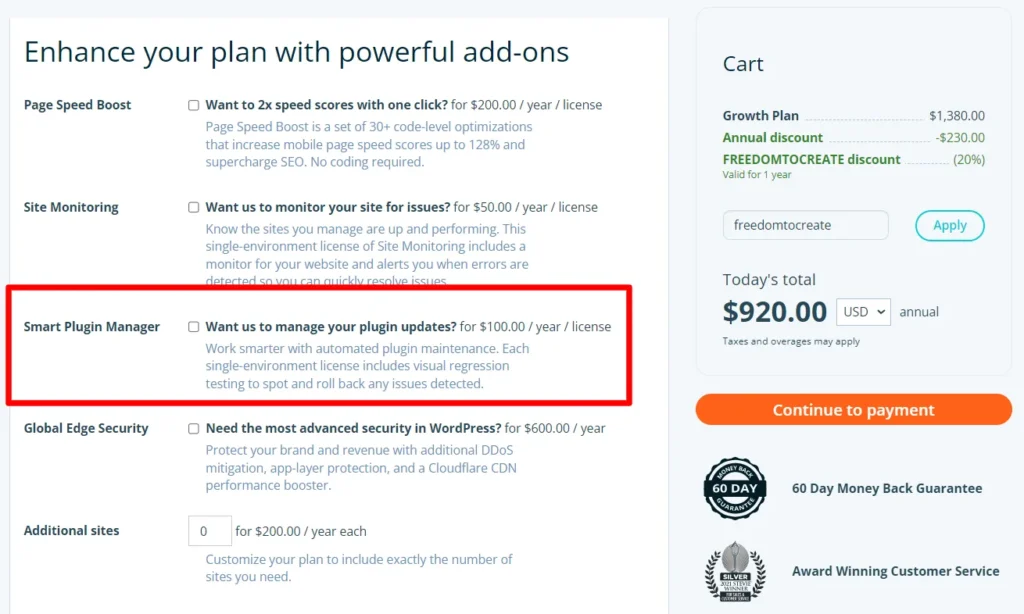
In fact, WP Engine offers several add-on options, including Page Speed Boost, Site Monitoring, Genesis Pro, and Global Edge Security.
So, you might want to consider additional costs when purchasing a plan.
Another important point is that WP Engine guarantees a 99.99% SLA for sites on its premium isolated servers. This might not be available for most WP Engine sites hosted on its shared hosting environments.
Let’s look at how Cloudways optimizes its hosting server for optimized performance.
Cloudways
Cloudways offers a set of server stacks that power its hosting infrastructure, delivering an optimal user experience.
Debian 11, nicknamed Bullseye, is the foundational OS on which all other components run.
In addition, Cloudways uses Apache and NGINX servers, PHP-FPM, and MariaDB, and runs the following optimization services: Memcached, Redis, Object Cache Pro, and Varnish to provide a well-balanced, optimized web server.
PRO TIP:
Object Cache Pro is a premium WordPress plugin that costs $95 per month but is included with your Cloudways hosting. Thanks to the Cloudways + Object Cache Pro partnership, you don’t pay extra to enjoy the benefits of Object Cache Pro’s cache performance.
You can choose from five cloud service providers: DigitalOcean, Vultr, Linode, Google Compute, and Amazon Web Services (AWS). You can also select a provider that best suits your needs in terms of pricing, geographic location, application, data centers, and desired features.
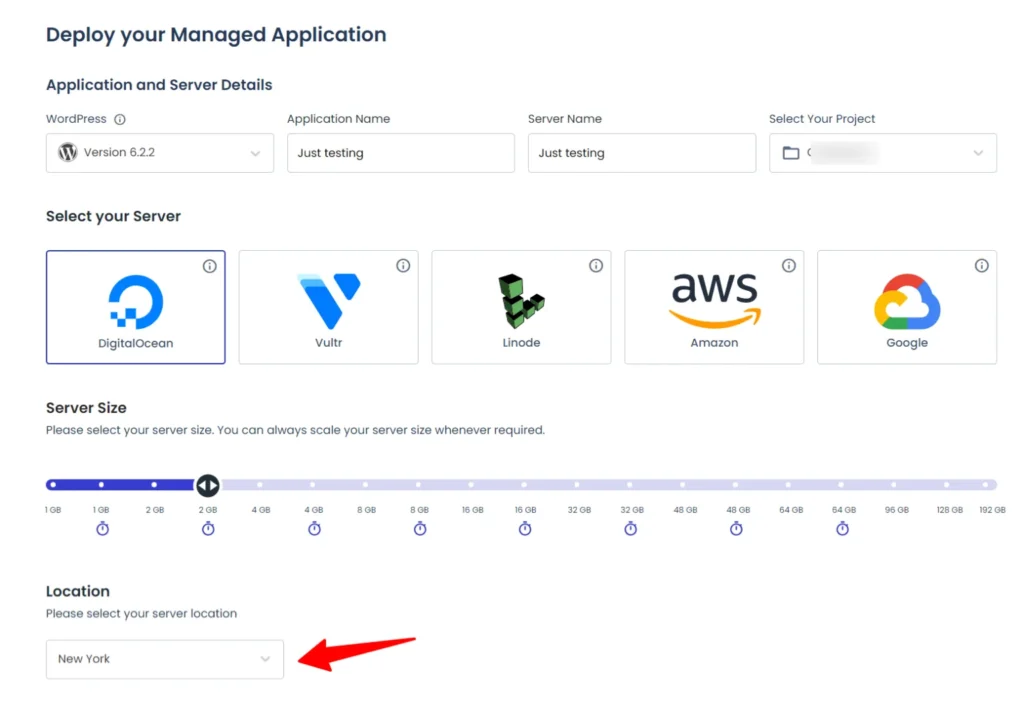
This variety means Cloudways has more server locations and hosting options than WPEngine, which only provides Google Cloud, Microsoft Azure, and Amazon Web Services.
PRO TIP:
Server location availability in Cloudways depends on the cloud provider you choose. At the time of writing, Linode had 23 server locations, while DigitalOcean had 9.
Like WP Engine, Cloudways offers one-click application installation, automated and on-demand backups, and a dedicated cache plugin, Breeze.
But this plugin is not as powerful as other popular options, such as WP Rocket and NitroPack. You may want to test different options for better performance and website speed.
However, Cloudways’ integrated Cloudflare Enterprise add-on (which improves TTFB and reduces latency, loading times, and bandwidth costs) delivers better performance than WP Engine.
With its Cloudflare Enterprise add-ons, you have access to performance and security features, such as Polish and Mirage (image and mobile optimization).
Cloudflare performance features also include 200 edge networks, Scrapeshield, DDoS protection, Argo Smart Routing network, bot traffic protection, WAF, and SSL certificates, all for just an extra $4.99 per month.
PRO TIP:
The price is reduced to $1.99 per month if you host 25 or more websites with Cloudways and are connected to Cloudflare Enterprise add-ons.
This ensures that your website is secure, uses the best technology, and is optimized for performance, regardless of where your visitors come from.
Regarding performance, WP Engine and Cloudways are at the top of their game.
WP Engine uses SATA SSDs and a free CDN and Nginx extensions, providing faster website performance. It also uses multiple caching mechanisms, such as Varnish, Memcached, and Redis, as well as built-in cache functions.
But Cloudways beats WP Engine thanks to its NVMe storage, especially on high-frequency servers. This type of storage makes it faster to retrieve and process data than the SSD storage used by WP Engine.
NVMe (Non-Volatile Memory Express) storage is generally faster than SATA SSD drives, reduces latency, uses fewer CPU cycles, and is recommended for gaming because it can transfer data to/from storage up to 5 times faster than SATA SSD drives.
Cloudways servers will generally perform better than WP Engine WordPress hosting servers. Cloudflare Enterprise CDN, used by Cloudways, ensures your website loads faster, improves time to first bytes and server response time, and resolves Core Web Vitals issues.
Both web hosts make it easy to scale hosting resources during peak performance periods.
Ease of Use
WP Engine
WP Engine emphasizes a user-friendly interface that simplifies website management tasks. Their intuitive dashboard and streamlined functionalities suit beginners and users with limited technical knowledge.
WP Engine handles server management and technical complexities, allowing users to focus on creating and managing their WordPress content.
Since WP Engine focuses on WordPress sites, efforts have been made to ensure the platform and custom control panel are tailored to WordPress’s functionality.
Cloudways
Cloudways offers a user-friendly interface, too, but managing server resources might require a slightly steeper learning curve than WP Engine.
While basic functionality is straightforward, users comfortable with server administration and technical configuration can leverage Cloudways’ features for greater control and customization.
Beginners familiar with the traditional cPanel interface will need a few moments to adjust to the Cloudways interface and server and domain management tools.
WP Engine and Cloudways provide server management and administration via SSH and SFTP tools such as FileZilla.
You can effectively manage website files, plugins, and database queries.
Security Measures
In terms of security, WP Engine and Cloudways provide airtight protection at both the server and application levels, ensuring your WordPress website is fully secure.
At a minimum, you have a free SSL certificate from Let’s Encrypt, dedicated firewall protection (Cloudways also uses Fail2ban), a malware scanner, and suspicious traffic and bot protection.
Both web hosts ensure regular OS and software updates, as well as automatic updates for WordPress core, themes, and plugins.
Since both Cloudways and WP Engine use Cloudflare CDN, your website is fully protected against DDoS attacks, with multi-layer mitigation—layers 3, 4, and 7—eliminating malicious bots and traffic.
However, WP Engine might have a slight edge in security because of its WordPress-specific platform. Its security features are tailored to the WordPress ecosystem.
But that’s not on Cloudway’s part; its robust security features, partnerships, Cloudflare integration, use of Fail2ban, and up-to-date PHP version ensure your website is not vulnerable to attack.
Cloudways and WP Engine let you enable two-factor authentication, which provides additional security measures against unauthorized access to your account.
Customer Support
On several occasions, I have engaged with WP Engine customer care reps, mainly to inquire about product offerings and hosting features.
The support is very responsive, dedicated, and always ready to provide helpful answers to my queries.
But that is just as a potential customer.
One thing that puts WP Engine ahead of Cloudways in customer support is its focus on WordPress and expert-level experience.
The WP Engine team eats, breathes, and sleeps WordPress all day. They know the WordPress ecosystem like the back of their hand.
This could be an advantage for WP Engine’s support over Cloudways’, which is more diverse and answers support and technical questions for several content management systems.
This could be a factor to consider if you require in-depth assistance with WordPress functionality or troubleshooting issues.
However, as a Cloudways user I use WordPress, the support has been excellent. There is no sign of inefficiency or insufficient knowledge of the WordPress platform. Whenever I contact Cloudways support for help, my issues are resolved promptly and efficiently.
Cloudways offers 24/7 online support, help guides, blog posts, tutorials, and videos.
WP Engine offers phone calls.
Cloudways doesn’t offer phone support, but it can schedule appointments by phone. After completing the form, you can schedule a call with the Cloudways sales team.
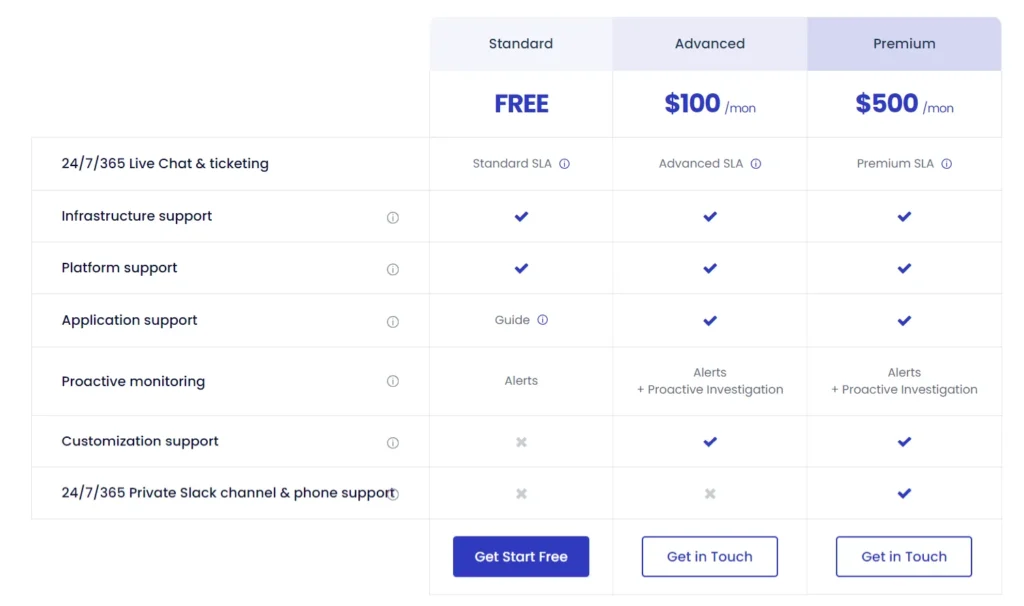
There is more to Cloudways support that you must know. Cloudways offers three levels of support: Standard, Advanced, and Premium.
Standard support is free and available for all users; the Advanced support add-on ($100/mon) and the Premium support add-on ($500/mon) offer extra and priority support for server-level and application troubleshooting and inquiries. Learn more about Cloudways’ support levels here.
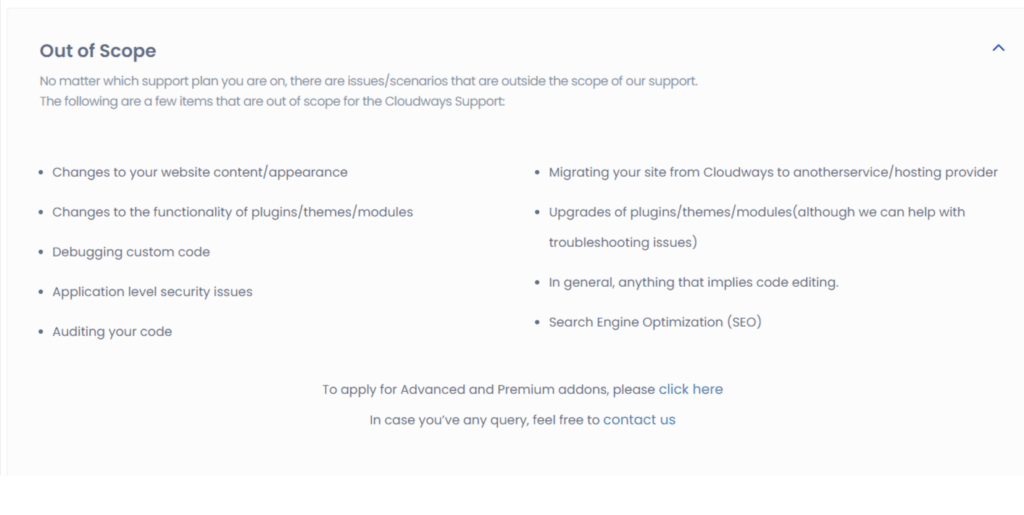
While on the page, go through the “Out of Scope” section, which explains situations where Cloudways support is not intended, no matter your support level.
WP Engine extends chats and phone support to users on the Professional, Growth, and Scale plans. The startup plan limits support access to online chats only.
Scalability and Future Growth
WP Engine and Cloudways’ infrastructure is designed to scale seamlessly as website traffic grows.
They offer upgrade options to accommodate increased traffic volume and ensure your website maintains optimal performance in high-traffic periods.
Both hosts can scale your server resources vertically (increasing processing power and RAM) or horizontally (adding more servers) based on your website’s needs.
This allows for granular control over your hosting environment.
So, even if your business gets a few thousand visitors, a sudden spike to several thousand hits daily or within a few minutes can cause your server to automatically scale up resources to handle the high traffic volume.
But you need to be aware of the extra charges that apply when you exceed your bandwidth and traffic limits.
According to Cloudways, you need to check the hourly rate for your specific server.
On its part, WP Engine charges $2 per 1,000 visitors over your allowed limit.
In summary, your business is protected against sudden growth and scalability issues. WP Engine and Cloudways are reliable web hosts for scalability and future growth.
Additional Considerations Between WP Engine and Cloudways
Free Trials and Money-Back Guarantees
WP Engine does not offer a free trial for its hosting plans, but it does have a 60-day money-back guarantee, which provides some peace of mind if you’re unsatisfied with its service.
Cloudways offers a free 3-day trial with no credit card required. You can sign up for free and try the platform.
However, unlike WPEngine, there is no money-back guarantee after the trial period. I guess that’s why there’s a free trial offer.
The two options offer WP Engine more advantages and reasons to subscribe to its hosting plan.
For some users, Cloudways’ three-day free trial may not be enough to test drive the platform. WP Engine’s 45-day money-back guarantee window gives you more peace of mind over your purchase.
45 days is more than enough to test the hosting plan and make your decision.
Staging
You can deploy your application to a test hosting environment for development, debugging, or testing updates to your website and application.
A staging environment is available on both Cloudways and WP Engine.
Domain Name Management
Cloudways and WP Engine do not provide domain name registration services. You must register your domain name with a domain registrar such as Namecheap, Hostinger, HostPapa, or HostGator.
Then configure DNS to point to your hosting server with either of the two web hosts.
Free Migration
WP Engine offers manual and automated plugin migration from any web host to its platform. You can move your site to WP Engine with one click and resume your business within minutes of completing the process.
Check the page for more in-depth details on the automated migration tool and the do-it-yourself process.
Cloudways also offers a seamless migration process via its WordPress Migrator plugin. I used this plugin to migrate from Namecheap to Cloudways, and the experience was excellent. It takes only a few minutes to move the entire WordPress database.
However, you can request your first and only free migration from Cloudways support. Subsequent migration requests need payment, but I advise using the free WordPress migration plugin. The process is easy.
Plugin Restrictions
Before subscribing to WP Engine, review its list of disallowed WordPress plug-ins. WP Engine is known for banning certain plugins from its hosting environment.
Also, some server modules and functions are disabled. This means that some plugins, while not restricted, might not work correctly with the WP Engine platform.
Since using Cloudways, I have never heard of any plugin restrictions. This is another advantage of Cloudways over WP Engine if you demand plugin flexibility and control.
Most WordPress plugin functions, such as email, marketing, security, design and WooCommerce, work perfectly with the Cloudways platform.
Ideally, Cloudways is the preferred choice for exploring WordPress beyond the hosting platform’s rules.
Focus on Environmental Sustainability
If environmental responsibility concerns you, consider that WP Engine has made significant strides in using renewable energy to power its infrastructure.
Cloudways also offers some eco-friendly options depending on the cloud provider you choose.
Conclusion – Choosing Between WP Engine vs Cloudways
Ultimately, the best choice between WP Engine and Cloudways depends on your needs and priorities.
Here’s a quick recap to guide your decision.
Choose WP Engine if you prioritize a user-friendly experience and top-tier performance optimized for the WordPress ecosystem.
Your website requires robust security features and automatic updates, and you value exceptional 24/7 customer support from WordPress experts.
On the other hand, consider Cloudways if you’re a developer, agency, or SMB, or if you’re comfortable with a more technical hosting environment and want greater server control.
You’re on a budget and require a pay-as-you-go pricing model for a smaller website or a more transparent billing option.
If you need cloud hosting for applications beyond WordPress and require flexibility, choose a provider that meets your business needs.
By carefully considering the factors outlined in this in-depth comparison, you can make an informed decision and select the managed WordPress hosting provider that empowers your website to thrive in the ever-evolving digital landscape.