

If you’ve been searching for an honest Verpex hosting review from someone who actually uses it – not a reviewer who signed up yesterday for an affiliate commission – you’re in the right place.
I hosted two WordPress sites on Verpex: WPrBlogger.com (since 2022) and CyberNaira.com (migrated in late February 2026). Both sites are no longer with Verpex. I have moved them out.
Why? I’ll share everything I found out, the good, the bad, and things I found later that led to rewriting this Verpex hosting review article. The real performance data, uptime records, support experiences, and an honest breakdown of what Verpex does well and where it falls short.
Let’s get into it.
Verpex

An honest, revised review of Verpex hosting based on 3 months hosting CyberNaira.com and 3+ years on WPrBlogger.com. Covers real origin server TTFB data, swap and disk resource issues, and measurable SEO impact including deindexed pages, backed by Ahrefs and Google Search Console data
Price: 10
Price Currency: USD
Operating System: Linux, Windows, macOS
Application Category: BusinessApplication
3.1
Worth noting:
Most of what I’m sharing here comes from my 3-month stint hosting CyberNaira.com on Verpex. WPrBlogger.com has been on Verpex since 2022, but I haven’t paid much attention to its server performance, so it doesn’t feature prominently in the data below. Hosting CyberNaira there, though, opened my eyes to what server performance has actually looked like all along.
What Is Verpex Hosting?
Verpex is a web hosting company that positions itself as a premium yet affordable option for WordPress sites.
It offers shared hosting, cloud hosting, WordPress hosting, OpenClaw, and reseller plans built on LiteSpeed servers with high-end NVMe SSD storage.
Unlike many budget hosts that cut corners on infrastructure, Verpex uses enterprise-grade hardware across all shared plans, at least on paper. More on how that held up in practice below.
It offers data centers across 9 regions. This includes US East and West, Canada, Singapore, Australia, London, India, Central Europe, and South America. This gives you the flexibility to choose a server location closer to your ideal audience.
Verpex Plans and Pricing
As mentioned above, Verpex offers several hosting types. Each of these hosting types has three-tier pricing plans. However, I’m on the Plus plan for WordPress hosting, so I will focus on that in this Verpex hosting review.
Here’s what makes the Plus plan pricing interesting:
Important note on storage:
The 100GB on the Plus plan sounds generous, but by default, backups are stored directly on the server. Depending on your database size, running multiple backups without cleaning them up can fill that space faster than you expect.
There’s also a broader resource issue tied to this, which I cover in detail further down.
The $0.99 entry offer is genuinely useful if you want to test the service before committing. The $10/month renewal price itself is competitive on paper: NVMe storage, LiteSpeed servers, free migrations, and a bundle of free Pro plugins (covered below).
For comparison, I was previously on Pressable, which costs significantly more ($25/month for the Signature1 plan).
Performance: Real TTFB Data from SpeedVitals
I need to walk something back here.
When I first published this Verpex review, I reported a 57ms average TTFB for CyberNaira.com on Verpex, pulled from a SpeedVitals test, and called it “elite territory” for a shared hosting plan.
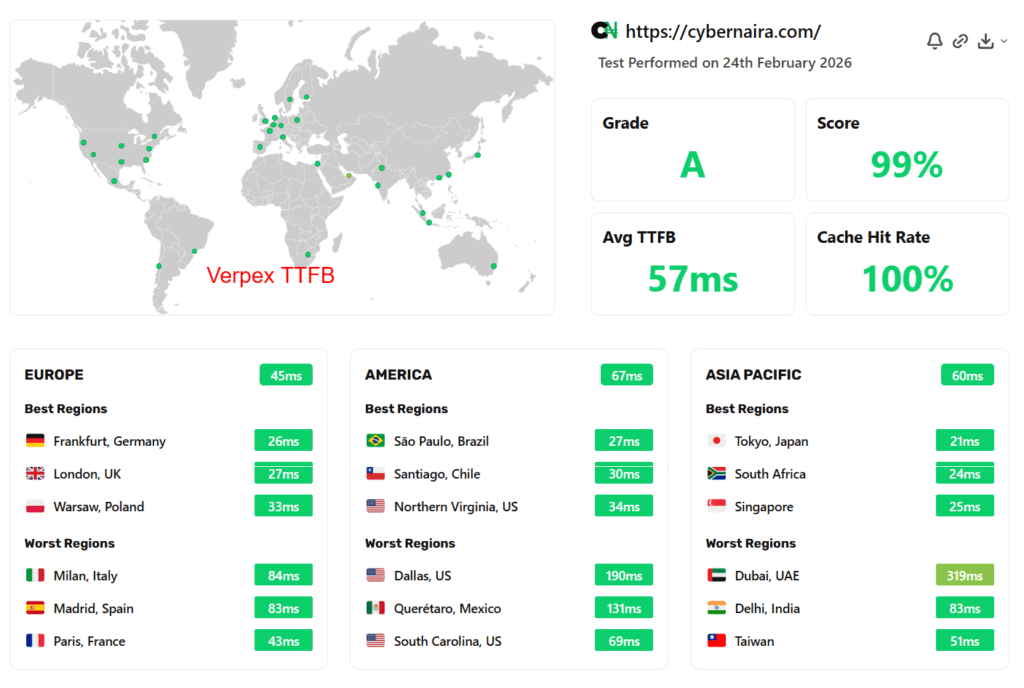
That number was accurate but also misleading, and I want to correct it properly rather than quietly edit it away.
That 57ms figure only reflects what happens when Cloudflare sits in front of the origin with Tiered Cache Topology (Smart Tiered Cache) active. In that setup, most requests never touch the Verpex server at all.
Cloudflare’s edge network serves the cached response, so what I measured was Cloudflare’s cache performance, not Verpex’s actual server speed. The origin server itself tells a very different story.
What the origin server actually does
Once you strip away the CDN layer and look at how fast the Verpex server itself responds, the numbers are not good.
Across CyberNaira.com, WPrBlogger.com, and CentDecoded.com (also hosted on Verpex at the time), I consistently saw origin TTFB averaging around 1,400ms. That’s not a one-off spike.
It showed up repeatedly in Ahrefs Site Audit crawls, where most pages returned TTFB values above 1,400ms, which Ahrefs flags as too slow.
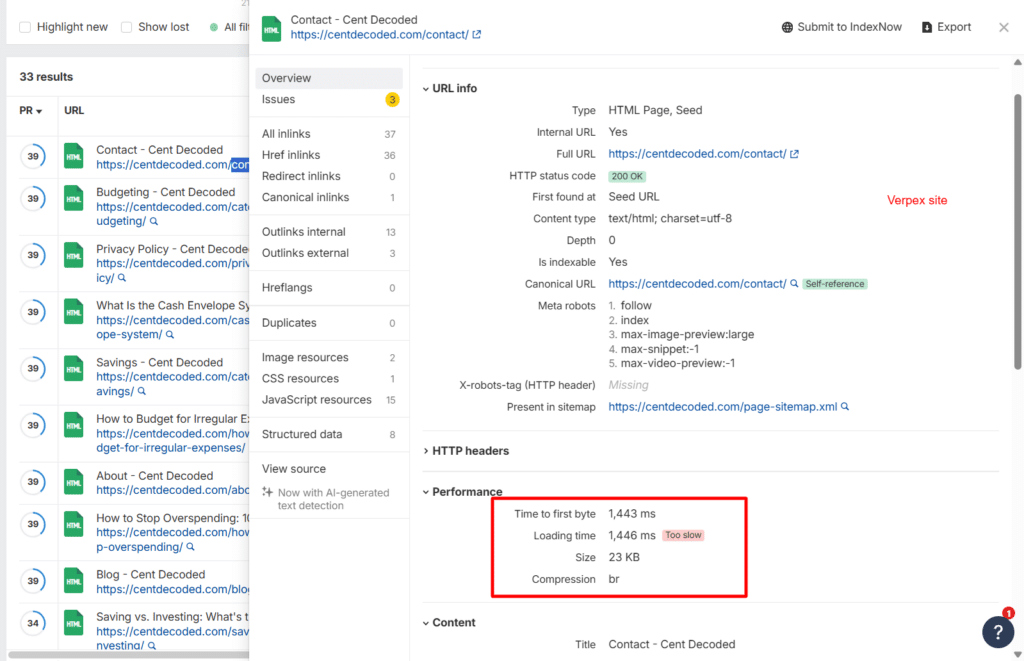
What made this worse is that it wasn’t just a Cloudflare blind spot. Even when Ahrefs’ crawler hit URLs through Quic.Cloud CDN or through Cloudflare, a large share of edge locations still returned a cache MISS.
When the cache missed, the request fell through to the slow origin. So the CDN was doing a lot of heavy lifting to mask a server-side problem, and it wasn’t fully succeeding.
Why this matters more than a number on a test
A TTFB test from a single tool, run once, from cached edge locations, is not a reliable way to judge a host’s real performance. I made that mistake the first time around.
The more honest measure is what Google’s own crawler experiences when it fetches your pages directly, since that’s largely uncached, origin-facing traffic.
I’ll get into what that looked like in Search Console further down, because it’s a big part of why I’m revising this review of Verpex shared hosting at all.
Regarding the technical setup, Verpex runs LiteSpeed servers with Redis object caching. The stack itself is sound. The bottleneck lies at the server resource level, which the next section covers.
The Swap and Disk Overcrowding Problem
This is the part I left out of the original Verpex hosting review entirely, and it’s arguably more important than the TTFB numbers above, because it’s likely the actual cause of them.
Over the months I ran CyberNaira specifically on Verpex, I regularly checked server resource usage and saw a pattern that didn’t go away: swap usage consistently between 80% and 94%, with peaks as high as 98.89%.
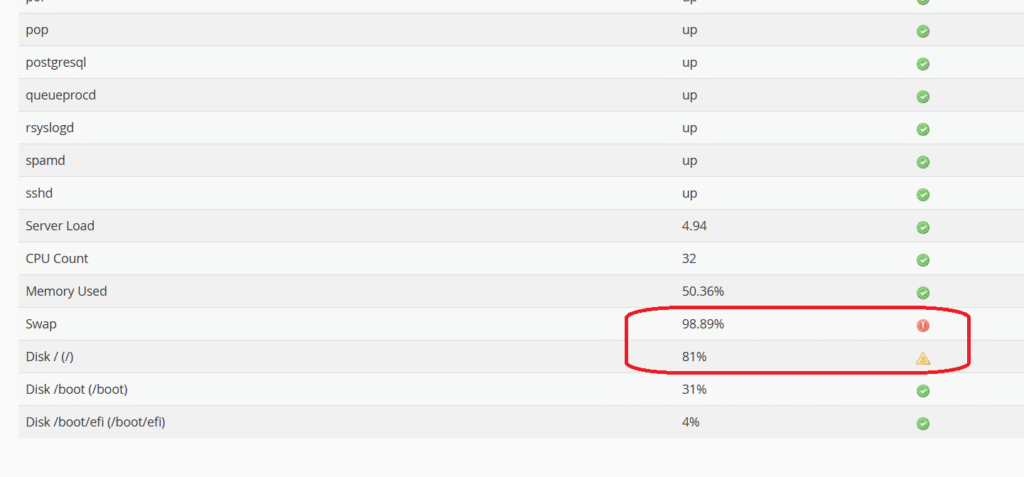
Alongside that, disk usage remained above 80% for extended periods, separate from the backup-storage incident described above.
Swap is what a server falls back on when it runs out of physical RAM. It’s meant to be an occasional safety net, not a steady state. When a server is living in swap most of the time, every request has to wait on disk-speed memory access instead of RAM-speed access, and that shows up directly as slow TTFB.
This lines up with what I measured through Ahrefs and SpeedVitals: the 1,400ms-range origin response times weren’t a fluke or a one-time misconfiguration. They were consistent with a server that was resource-constrained at the infrastructure level, not just occasionally busy.
To be clear about what I don’t know: I can’t say with certainty whether this was a shared-resource contention issue specific to the server I was on, a broader capacity problem across Verpex’s shared plans, or something else entirely.
I didn’t get visibility into that from the outside. What I can say is what I observed directly and repeatedly: high swap, high disk usage, and slow origin response times, all occurring together.
SEO and Indexing Impact
This is the section that convinced me a correction was necessary to my previous version of this Verpex review, not just a footnote.
What happened during the Verpex hosting period
While CyberNaira.com and WPrBlogger.com were both hosted on Verpex, Google deindexed 42 pages on CyberNaira.com and 22 pages on WPrBlogger.com within the same 3-month period. These weren’t low-value pages either; they were a mix of established content that had been indexed and ranking for years.
After I migrated both sites off Verpex to Cloudways (Vultr High Frequency, Nginx), without touching, editing, or resubmitting a single page, they all returned to the index. No content changes. No manual reindex requests beyond the standard crawl.
The only variable that changed was the hosting infrastructure.
NOTE:
I want to be careful here. I can’t prove that Verpex’s server performance directly caused the deindexing. Google doesn’t publish a causal link between origin response time and index removal, and there could be other contributing factors I’m not aware of.
What I can say is what happened, in sequence, on servers I control: pages dropped out of the index during the period of consistently slow origin TTFB on Verpex, and came back once that variable was removed.
The crawl stats tell the same story
Google Search Console’s crawl stats back this up with harder numbers.
While CyberNaira.com was on Verpex, average response time in crawl stats sat around 1,330ms.
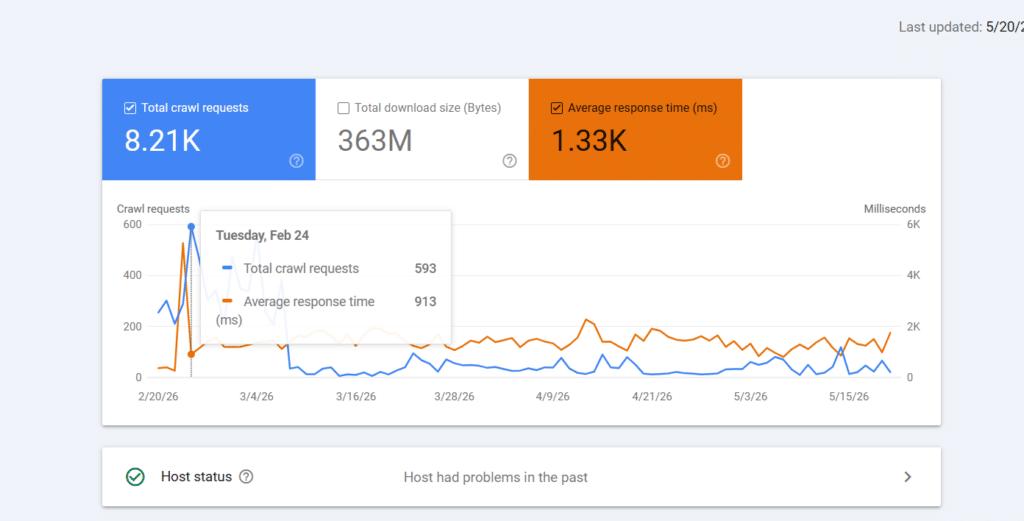
Since moving to Cloudways, average response time has stayed well below that on both sites, and hasn’t gone above these thresholds since the migration:


Neither site has crossed those numbers since the switch. That’s not a one-time improvement; it’s been the sustained baseline.
The click and impression drop
I also compared CyberNaira.com’s Search Console performance for the 3 months on Verpex against the prior 3 months on Pressable:
| Metric | Previous 3 months (Pressable) | Last 3 months (Verpex) |
|---|---|---|
| Total clicks | 1.63K | 657 |
| Total impressions | 1.41M | 1.01M |
| Average CTR | 0.1% | 0.1% |
| Average position | 51.5 | 50.8 |
That’s a drop of roughly 970 clicks, close enough to call it a loss of nearly 1,000 clicks over the quarter. Impressions dropped by around 400K as well.
The same caveat applies here as with deindexing: correlation isn’t proof of causation. Traffic to CyberNaira has also been affected by the broader rollout of Google’s AI Overviews, which I mentioned earlier in this review as the actual reason I left Pressable in the first place.
I can’t cleanly separate how much of this decline came from that industry-wide shift versus how much came from Verpex’s server performance and the deindexing event.
What I can say is that the timing lines up, and average position actually held steady, even improving slightly, which suggests the drop in clicks and impressions is more tied to pages dropping out of the index entirely than to a ranking decline.
Support Experience: Tickets vs. Live Chat
Verpex offers both ticket-based support and live chat. Here’s my honest experience with both.
Support Ticket Response time in my experience: approximately 3 minutes. That’s fast for a ticket system.
However, 3 minutes feels like a long time when your site is down.
Live Chat: This is where Verpex earns its reputation. When CyberNaira.com went down with an HTTP 500 error, I first opened a support ticket, waited a few minutes, then switched to live chat.
The chat opens with an AI assistant (named Orbi) for initial triage. After requesting a human rep, I was transferred to a support agent.
The rep immediately asked for the domain, ran independent checks on the server side, reviewed wp-config, and suggested deactivating all plugins as a troubleshooting step. He then independently verified that the site was accessible before closing the session.
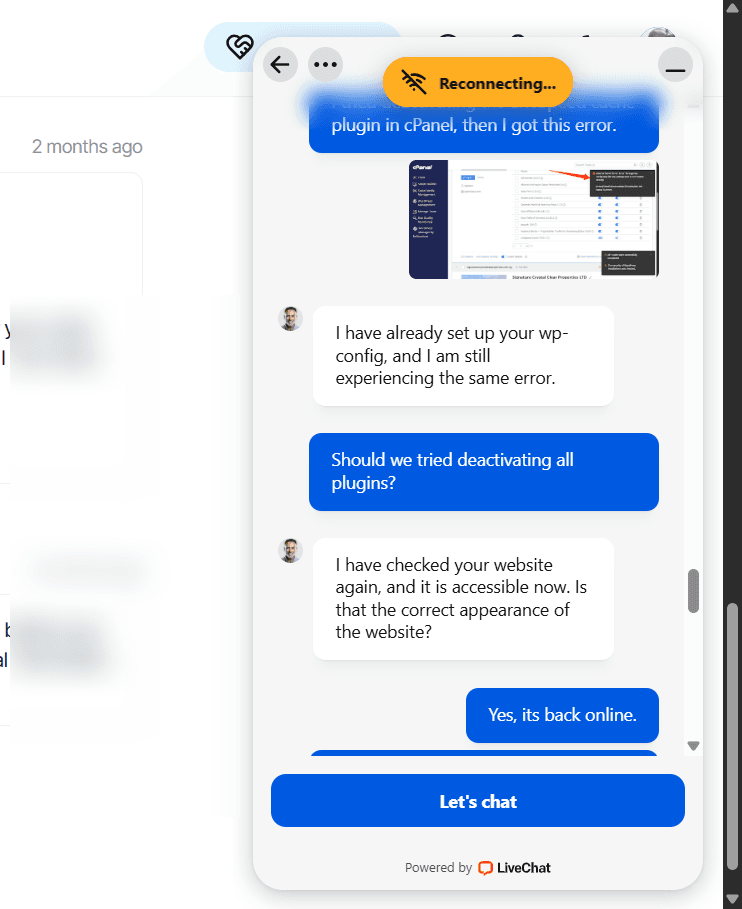
The entire troubleshooting flow was collaborative. He handled the server side while guiding me through the steps on my end. The site was back online within the session.
My takeaway:
Use tickets for non-urgent questions. Use live chat the moment your site is down. The live chat team is responsive, knowledgeable, and effective under pressure.
Onboarding and Migration
The sign-up process was smooth with one exception: payment verification.
After completing my order, the Verpex system flagged it for a routine review before activation. I received a support ticket from their team confirming they hadn’t received the invoice payment and asking me to verify it had been processed on my end.
Once I confirmed, they handled the rest and promptly activated the account.
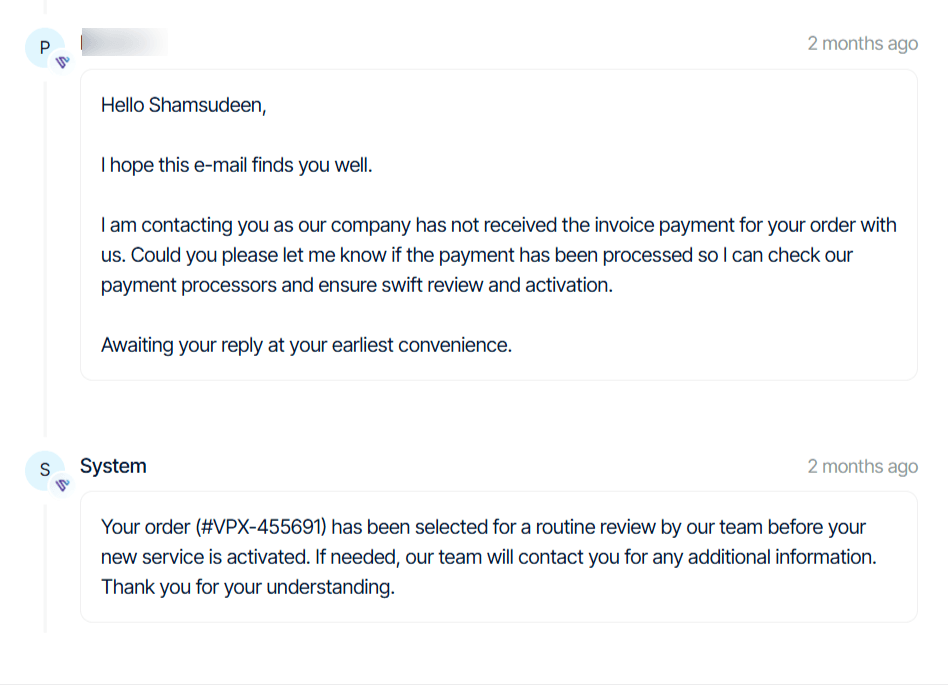
This is clearly an anti-fraud or payment processor check, not a sign of anything wrong. It added a minor delay but was straightforward to resolve. Worth knowing if you’re signing up for the first time and expecting instant activation.
Migration was handled entirely by Verpex’s team. No forms to fill out. I opened a support ticket, submitted my WP Admin credentials, and they took care of everything, completing the migration within an hour.
Next, they gave me a preview link to browse the site and ensure everything works as expected before changing the DNS to the Verpex server’s IP address.
That’s about as frictionless as it gets.
Control Panel and Features
Verpex uses cPanel, the industry standard most WordPress users are already familiar with.
Inside cPanel, you get access to Softaculous and WP Toolkit — WordPress management tools that lets you manage updates, cloning, staging, and security from one dashboard.
Free Pro Plugins via Softaculous
Here’s something I don’t see mentioned in most Verpex review posts: when you access WordPress through Softaculous (Verpex’s app installer), you get a bundle of Pro plugin licenses at no extra cost.
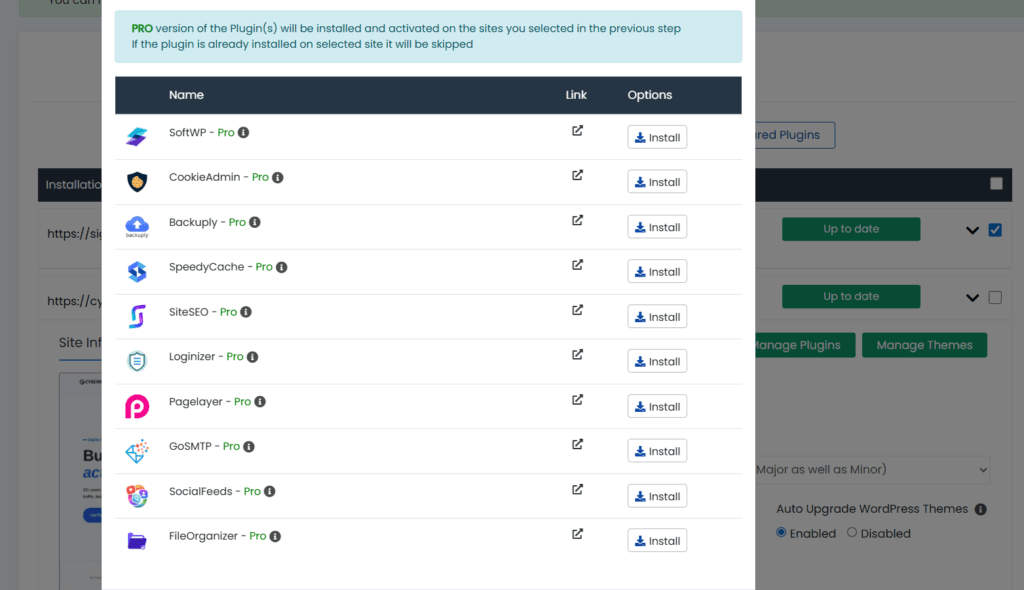
The bundle includes:
That’s 10 Pro plugins included with your hosting plan. Even if you don’t use all of them, having Backuply Pro, SiteSEO Pro, and Loginizer Pro alone would typically cost you extra on other hosts. For a budget hosting plan, this is a significant value addition.
The Storage Pain Point (An Honest Warning)
Verpex offers NVMe storage with generous allocations, but there’s a catch worth understanding before you sign up.
Backups are stored directly on the server by default. If you run automated backups and don’t actively manage them, those files can accumulate quickly and push you over your storage quota.
This is exactly what happened to me with CyberNaira.com. My cPanel statistics showed disk usage at 118.89GB against a 97.66GB limit – 121.74% capacity, flagged with a warning icon.
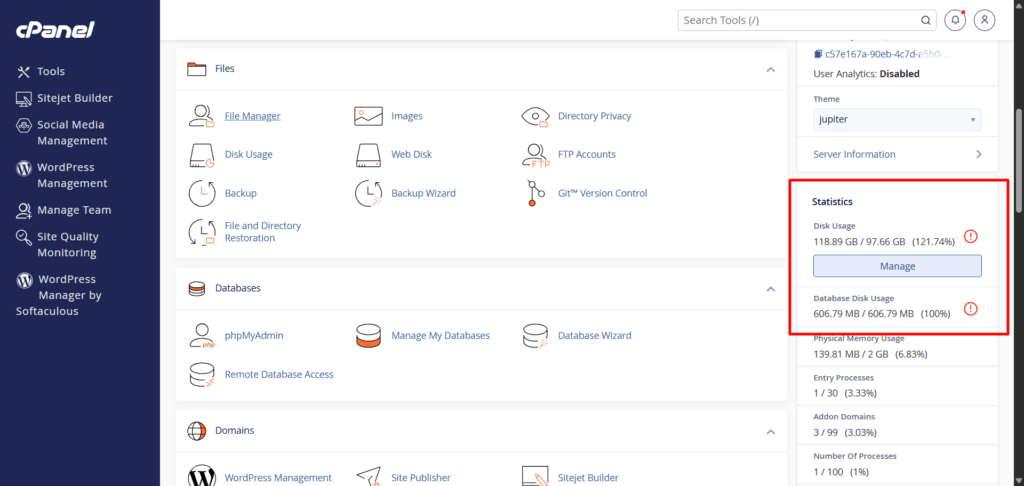
Three backups sitting on the server were the culprit. The site first stopped publishing posts, then eventually went offline with an HTTP 500 error.
The fix was straightforward once the support rep identified the issue, but the downtime lasted approximately one hour – an uncomfortable reminder to monitor storage actively.
The solution:
Either store backups externally (cloud storage like Google Drive or Dropbox), schedule automatic cleanup of old backup files, or upgrade to a higher storage plan if you’re running multiple sites or large databases.
This isn’t a dealbreaker. It’s a management habit. But it’s something Verpex could communicate more prominently during onboarding.
What I Like About Verpex
What Could Be Better
FAQs
Is Verpex good for WordPress?
Verpex is a mixed answer depending on what you need. It runs LiteSpeed servers with NVMe storage and Redis object caching, which is a solid technical foundation, and you get access to a genuinely useful bundle of Pro plugins. Where it falls short is origin server resource capacity, which affected real-world TTFB and, in my case, indexing.
Is Verpex reliable?
Verpex is reliable in some respects and inconsistent in others. Uptime has been strong. On WPrBlogger.com, I’ve recorded only 9 downtime alerts over 3+ years, each lasting around 3 minutes. Support, especially live chat, is fast and competent when something does go wrong.
Where reliability breaks down is origin server performance. Average TTFB on the server itself ran around 1,400ms, tied to swap usage consistently between 80-94% (peaking at 98%) and disk usage above 85%.
So, reliable in terms of staying online and getting support when needed. Less reliable in terms of consistent origin performance, which matters more for SEO-dependent, monetized sites than raw uptime does.
Does Verpex offer free migration?
Yes. Verpex handles migrations at no extra cost. You open a support ticket, share your credentials, and their team completes the migration, typically within an hour.
What control panel does Verpex use?
Verpex uses cPanel with WP Toolkit included. This lets you manage your WordPress site effectively on the server. It also provides access to 10 Pro plugin licenses through Softaculous at no additional cost.
What is the price of the Verpex Plus plan?
The Plus plan starts at $0.99 for the first month and renews at $10/month. It includes 100GB NVMe storage, unmetered bandwidth, and unlimited email accounts.
Is Verpex cheap?
Yes, in terms of price. Whether it’s cheap relative to value depends on how much your site depends on consistent origin performance and indexing stability. For low-stakes sites, the price-to-feature ratio is strong. For monetized, SEO-dependent sites, the origin performance issues covered in this review are worth weighing against the low cost.
Is Verpex Good? My Honest Verdict
I owe you a more complete answer than the one I gave the first time.
Verpex’s support team is genuinely excellent. The onboarding was smooth. The pricing is competitive. The Pro plugin bundle is real value. None of that has changed, and none of it should be dismissed.
But the performance story I told originally was incomplete in a way that mattered. A 57ms TTFB reading was real, but it reflected Cloudflare’s edge cache, not what the Verpex server itself could do.
The uncached reality was closer to 1,400ms, tied to swap usage that regularly ran at 80-94% and peaked at 98%, as well as disk overcrowding. That’s not a rounding error or a bad day; it showed up consistently across independent tools and across two of my sites.
For a content-driven, monetized site where indexing and crawl health directly affect income, that’s a meaningful risk, not a minor inconvenience.
Verpex might still work for you if you have a low-traffic personal site, a portfolio, or something where occasional slow origin response doesn’t carry real financial or SEO consequences, and where you’re not relying on a CDN to hide server-side weaknesses.
For anyone running a monetized, SEO-dependent, or traffic-sensitive site, where consistent origin performance and indexing stability matter, check out top-tier web hosts like WP Engine, Pressable, and Cloudways.
I’m lowering my Verpex rating from the original 4.1 to 3.1. The support experience alone would justify a higher score, but I can’t in good conscience rate a host highly when the core infrastructure showed sustained resource strain that lines up with real, measurable SEO harm.
If Verpex resolves the swap and disk issue at the infrastructure level, I’ll revisit this rating.




It’s been running smoothly for two years, since all services, like live chat, have been AI-powered, and technical support is even mediocre.
Imagine my reseller package being down for 5-6 hours due to a “cPanel/WHM” update.
Because Verpex guarantees 99.99% uptime, I personally guarantee 99.9% uptime to my clients. When downtime occurs, I promise compensation.
Verpex, on the other hand, is just a bunch of lies about its 99.99% guarantee. DON’T be fooled!
I, a loyal user for two years, haven’t even gotten a response to any discussion about compensation!
As of today, as I write this review, all my clients have moved to services other than this lying VERPEX!
Loyal customers for 2 years have not responded regarding the 99.99% server UP TIME guarantee
Hi Mazia,
I appreciate sharing your Verpex exprience with the community. It help otter make informed decision. I will be revisiting this post as I experience more of the support and the overall platform stability.
Thanks.