

On-page SEO is the foundation of everything else you do in search. You can build backlinks all day, but if the page itself isn’t optimized, you’re fighting an uphill battle.
Google needs clear signals to understand what your page is about, who it’s for, and whether it deserves to rank. On-page SEO is how you send those signals.
This on-page SEO checklist walks you through every step, from keyword research before you write a single word to the page experience signals that influence rankings after you hit publish.
Follow it for every piece of content you want to rank, and you’ll have done everything within your control to give that page the best shot at the top of the SERP.
Let’s get into it.
Phase 1: Before You Write
On-page SEO doesn’t start in your WordPress editor. It starts before you write a single word. The decisions you make here, what keyword to target, what intent to satisfy, what the top-ranking pages are doing, shape everything that follows.
1. Identify Your Focus Keyword
Every page needs a primary keyword, the core phrase you want that page to rank for.
This isn’t guesswork. Use a keyword research tool to find a term with real search volume, manageable competition, and clear relevance to what you’re writing about.
A few things to keep in mind when picking your focus keyword:
Your focus keyword becomes the anchor for every other optimization decision on the page.
2. Analyze Search Intent
Ranking for a keyword means nothing if your content doesn’t match what searchers actually want when they type that phrase. That’s search intent, the why behind the query.
Google groups intent into four types:
Before you write, search your target keyword and look at what’s ranking. Are the top results blog posts, product pages, comparison articles, or videos?
That tells you the dominant intent, and your page needs to match it. If Google is ranking “best of” listicles for your keyword and you write a single product review, you’re fighting the intent signal, not working with it.
3. Study the Top-Ranking Pages
Before you open a blank document, spend 15–20 minutes analyzing the SERP. Look at the top 5–10 results for your target keyword and ask:
This isn’t about copying what’s ranking; it’s about understanding the content standard you need to meet or exceed. The pages at the top of Google have already been vetted by millions of search queries.
They tell you exactly what searchers expect to find.
Phase 2: Page Structure and HTML
This is where most on-page SEO guides stop: a few notes about title tags and meta descriptions, and they call it done. But page structure goes deeper than that.
These are the HTML elements Google reads first when it crawls your page, and getting them right sets the context for everything in your content.
4. Write a Click-Worthy Title Tag
Your title tag is the single most important on-page SEO element. It tells Google and searchers what your page is about, and it’s the first thing people see in the SERP before they decide whether to click.
A well-optimized title tag:
PRO TIP
Google rewrites title tags that it deems a poor match for the query. The best defense against that is writing a title that accurately reflects your page’s content and naturally includes the focus keyword.
5. Optimize Your URL Slug
Your URL is a small but meaningful on-page signal. Keep it clean, short, and keyword-rich.
Best practices:
Most WordPress SEO plugins let you customize the URL slug, including title and meta description, in their settings. If you use Rank Math, the customization is shown below.
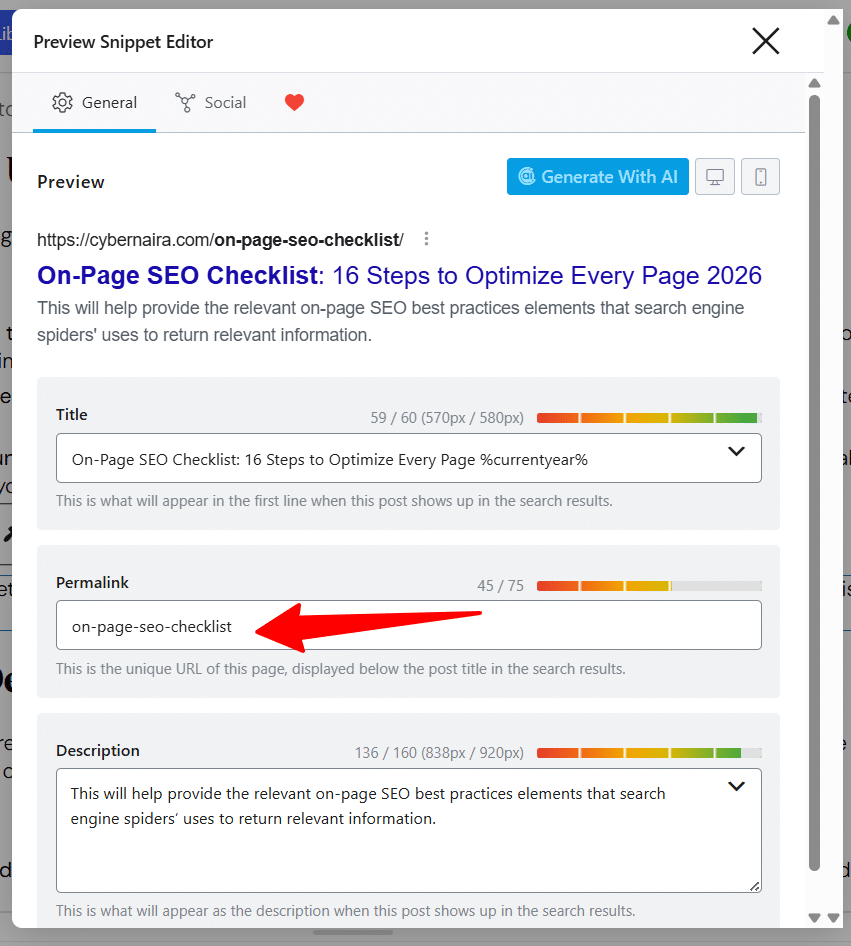
6. Write a Meta Description That Earns the Click
Meta descriptions are not a direct ranking factor. Google has confirmed this multiple times. But they directly influence click-through rate, which matters. A compelling meta description is ad copy for your page.
Write it to:
Like title tags, Google sometimes rewrites meta descriptions when it thinks yours doesn’t match the query well enough. Writing a description that accurately mirrors your page content reduces how often that happens.
7. Structure Your Headings Hierarchically
Heading tags — H1 through H6 — do two jobs: they help users scan your content, and they give Google a structural map of your page. Both matter.
The rules are straightforward:
8. Add Schema Markup
Schema markup is structured data you add to your page’s HTML to help Google understand your content at a deeper level and display it more richly in search results.
Featured snippets, FAQ accordions, review stars, how-to steps, and breadcrumbs in the SERP are all driven by schema.
For bloggers and content marketers, the most useful schema types are:
If you’re on WordPress with Rank Math, most of this is handled automatically or through a simple toggle in the post editor.
You don’t need to hand-code anything, but you do need to make sure it’s turned on and configured correctly for each post type.
Phase 3: Content Optimization
This is where your page either earns its ranking or loses it. Page structure tells Google what your content is about; content optimization is the proof.
It’s not about hitting keyword density targets or gaming word counts. It’s about writing content that thoroughly covers the topic, speaks the language of your audience, and gives Google every reason to trust your page as the best result for the query.
9. Place Your Focus Keyword Strategically
Keyword placement still matters, not because Google is counting occurrences, but because strategic placement reinforces topical relevance at the points where Google pays the most attention.
The non-negotiable placements:
PRO TIP
Avoid forcing the keyword into sentences where it reads awkwardly, or repeating it so often that it disrupts the reading experience.
Modern Google search is far better at understanding context than it was five years ago. If you’re writing thoroughly about a topic, keyword placement takes care of itself for the most part; you’re just making sure the anchors are in the right spots.
10. Use Semantic Keywords and Related Terms
Pages don’t rank for just one keyword; they rank for multiple related terms. Google’s understanding of language means it recognizes when a page comprehensively covers a topic, and rewards it by ranking that page for dozens of related terms you never explicitly targeted.
Semantic keywords are the terms, phrases, and concepts that naturally appear in content about your topic.
If you’re writing about on-page SEO, terms like “meta description,” “title tag,” “search intent,” “internal links,” and “crawlability” should appear naturally throughout the content, not because you stuffed them in, but because a thorough treatment of the topic requires them.
How to find them:
Writing with semantic depth doesn’t just help rankings; it signals to readers that you actually know the subject, which builds trust and reduces bounce rate.
11. Match Content Depth to the Topic
Word count is a byproduct of thoroughness, not a target to hit. That said, content depth (not an arbitrary number) is a real ranking factor. Thin pages that skim the surface rarely outrank comprehensive ones for competitive keywords.
The right length for any given page is the length it takes to fully answer the searcher’s question without padding. For some topics, that’s 800 words. For others, it’s 5000.
The SERP tells you what Google currently considers sufficient. Look at the average length of the top 5 results for your keyword and use that as your benchmark.
What content depth actually means in practice:
12. Build Internal Links Into the Page
Internal linking is one of the most underused on-page SEO tactics among bloggers.
It does three things: passes PageRank between your pages, helps Google discover and understand your site structure, and keeps readers moving deeper into your content.
Every new piece of content you publish should:
Think of internal links as votes your own site casts for its own pages. The more relevant internal links a page has pointing to it, the more important Google treats it within your site’s structure.
13. Optimize Every Image on the Page
Images are often the biggest missed opportunity in on-page SEO. Most bloggers upload an image, give it a generic filename, and move on. When done right, image optimization improves rankings, page speed, and accessibility all at once.
For every image:
Phase 4: E-E-A-T and Page Experience
This is one of the phases in on-page SEO checklists you shouldn’t skip. Because it is one of the ranking signals that separates pages that rank and hold their position from pages that briefly appear in the SERP and slide back down.
E-E-A-T (Experience, Expertise, Authoritativeness, Trustworthiness) isn’t a single ranking factor you can implement.
It’s a collection of signals across your page and site that tell Google whether your content comes from someone who actually knows what they’re talking about, and whether your site is a trustworthy place to send searchers.
So, how do you add EEAT signals to your post?
14. Add Clear Author and Experience Signals
Since Google’s Helpful Content updates, authorship and first-hand experience have become significantly more important, especially in competitive niches.
Google wants to know who wrote the content and whether that person has genuine experience with the subject.
On a practical level, this means:
15. Link Out to Authoritative External Sources
Outbound links to reputable, relevant sources are a trust signal that most bloggers ignore out of fear of sending traffic away from their site. That fear is largely unfounded. Citing credible sources doesn’t dilute your page; it strengthens it.
When you make a factual claim, back it up with a link to a primary source: a Google Search Central document, an original case study, an official product page, or a well-established authority in your space.
A few guidelines:
NOTE:
WordPress editor insert link feature has a checkbox for “open in new window”, nofollow, or set as sponsored. Use it each time you add external/internal link to your post.
16. Audit Your Core Web Vitals
Core Web Vitals are Google’s page experience metrics — Largest Contentful Paint (LCP), Interaction to Next Paint (INP), and Cumulative Layout Shift (CLS).
They became an official ranking signal in 2021, and while they’re unlikely to override strong content and backlinks, they can be the tiebreaker between two otherwise comparable pages.
You don’t need a perfect score, but you do need to be in the green:
Check your scores in Google Search Console under the Core Web Vitals report, or run a page through PageSpeed Insights for a per-page breakdown.
Fix the issues that are failing before you worry about squeezing marginal gains on pages that are already passing.
Your On-Page SEO Checklist at a Glance
Before you hit publish on any page, run through these 16 steps:



Hello adeshokan, this is sachin i am a new blogger and an engineering student, i have a blog which provides free ebooks for engineering students and to prepare for academic competitions. I want to increase my Domain authority and page authority. Hence, I request you to please guide me and visit my blog best iitjee preparation books and let me know if you find some issues like appearance, performance etc. Waiting for your reply
Sachin
Hi Sachin,
I’ll surely attend to your request, but it might take some days for me to do so. Thank you, and glad to see you find this place useful.
A very informative website, I appreciate each of your major points.
It seemed like an article particularly great for those just beginning to know information about SEO Optimized (like I am).
Thanks so much for sharing your wealth of knowledge.
You’re welcome, Boyd and glad you find it useful.
Couldn’t agree more with the point you stated as “Depth of Content”. No matter what techniques and tools you use to increase your SEO, you’ll never get the results if your content game is not that strong to compete with other websites. Thank you for this piece of content. Looking forward to reading more blogs from you.
Hi Ouriken,
Thanks for your insightful comments, and glad you find the information useful. Do have a great day.
Thank you for this blog. This blog really helped me in getting complete information about on-page SEO and how it works.
Along with on-page SEO, off-page SEO is equally important in order to rank the website on the first page of the search engine.
Thanks Neha.
Glad you find the information useful and thanks for reading through
Yoast is great for the on-page SEO stuff.
Still getting a handle on how to do internal linking the best way, as well as how to use LSI keywords in the content.
Hi Jesse,
Yes, Yoast is the ideal WordPress SEO tool for on-page optimization. You can use the premium version of Yoast to manage internal links. I think that’s more an easy way to go.
Thanks.
all the tools are very helpful. my question is any new trick or change in 2021 for on-page SEO?
Hi Praveen,
Trick? I don’t know of any before and not even now. But for a change, maybe in the way links are built and what is you think is ethical or not. Thanks for reading through.
Great collection of tips for SEO and SEO can impact on the performance of website.
Thanks Jack,
Glad you like it.
As always brilliant stuff packed with lots of helpful tips. Thanks for all the hard work you’ve been doing while teaching us how to do SEO the right way, it’s greatly appreciated.
Hello, Shamsudee! I really like SEMrush. It has a plethora of tools from keyword research, keyword manager, rank tracking, backlink, and keyword gap analysis, SEO audits, directory listing management (fairly new), social media, and PPC management. It also has a very visually pleasing interface with great manual and automated reporting too! Thanks for the post! Regards
Hi Nardi,
Yes, SEMrush is a very useful tool with over 45 marketing tools for your everyday SEO and content marketing tasks. I’ve been using it too for some time and really love it. Thanks for reading through, Nardi.
This is an article with very good quality content that I have read, and the attached images are also good quality, hope you will share more next time.
Thank you for the great article. It helped a lot in optimizing my articles. Yost tis good but I am not sure whether its premium version worth it or not.
Hi Imran,
Yoast premium gives you a lot to optimize your content for better on-page search visibility.
If you have the money, go for it.
Thank you.
The information of this article is the A1 category. I really appreciate your writing.
Hello, SHAMSUDEEN ADESHOKAN
Thank you for sharing good knowledge and information it is very helpful to me. SEMrush is the best tool to do SEO. I use it only for competition and keyword research.
Hi Prashant,
For many SEO professionals, SEMrush is by far their #1 Seo tools, just like you.
I use it for keyword research and competitive analysis too.
Thanks for reading through.
SEO is very important for every website. This information is really very helpful. Thanks for sharing this.
Hi Ridzi,
Thanks for reading through, hope you enjoy your stay…
This is such a well-structured article, you have explained the importance of SEO and then how to use it in a meaningful and insightful way. Thank you for the information about Yoast SEO plugin, It is really helpful. Really commend your efforts for providing tips with real value. Keep up the good work.
Thanks, Shruthi,
I’m glad you find it helpful.
i m a seo beginner that’s why i always find article to read to know some information and it’s also the best article which i think i get knowledge from there also i understand one new thing from this artile that is Co-occurrence. thank you
Hey Barkha,
Glad you learn something new here. Thanks.
Hey there, this is a great explanation regarding On-page SEO. I realized it is not easy, some blogs give an automated solution, but it takes knowledge how to analyze properly. Thank you Shamsudeen, this post was very helpful.
Glad you liked it, you’re always welcome.
Hey,
This guide help me to understand about on-page strategy. This post tell me about complete on-page seo factors and also tell about how to perform seo on wordpress by using yoast.
Thanks for Guidance.
Thanks Ashwdeep,
Glad you learn something new here.
Hii,
This is Best Place to improve your website ranking visibility. This article is completely explains about advance on-page seo strategy which assist me improving my website ranking on search engine result pages.
Thanks a lot.
Thanks, Ashwdeep,
Glad to read this has helped you achieve better SEO result. Thanks.
Great SEO tips. As we know that how SEO is important for health of the website.
These tips will boost everyone’s sites seo.
Thanks, Jone, glad you like it.
Hey Shamsudeen,
Thanks for the tips man. I really like your SEO tips list and appreciate your efforts in sharing this with us. Keep the good work man! 😀
Hi, Rishi,
Thanks for reading through it, and glad you like it.
Hi SHAMSUDEEN……..
Thanks for the tips.SEO is very important for every website. On-page SEO, off-page SEO are equally important to rank the website on the first page of the search engine. Really appreciate the way you have written and explained.
Hi, Sandeep,
Thanks for reading through and sharing your thought with us. I’m glad you find it helpful.
Site improvement, or SEO, is a procedure utilized by numerous organizations to help support themselves in Google’s hunt page rankings. The nearer you are to the top, the better the opportunity potential clients will discover you.
Responsive plan can assist with SEO in light of the fact that Google, as referenced, offers inclination to sites that are versatile agreeable. In blend with other SEO factors, responsiveness can help give you a major lift in internet searcher results.
Hello, Thank you so much for information about on page SEO 7 advance guide to a better SEO optimized pages. And Your content article was very unique and important for us.
Hi, Aadil,
It feels good to read you find the contents unique and important…thanks for coming.
Hi,
Thanks a lot for this great content. It really helped me understand SEO better.
Great Job!
Hi, Shamsudeen thanks for your sharing. Those tips will guided more SEO beginners rank their websites well. 🙂