Every keyword research tool you come across promises to be the best. The most accurate data, the biggest database, and the smartest insights.
But here’s what nobody tells you: the best keyword research tool is not the one with the most features or the highest-rated review on Google. It’s the one that fits your workflow, your budget, and your specific SEO goals.
I’ve been blogging since 2012. In that time, I’ve used more keyword tools than I care to count. Some became permanent fixtures in my workflow. Others were expensive lessons in what not to buy.
This guide is built on that experience.
In this article, I cover 14 of the best keyword research tools available today — free and paid, browser extensions and desktop software, beginner-friendly and agency-grade.
You’ll learn what each tool does well, where it falls short, and exactly who it’s best for.
Most tools on this list I’ve tested personally and use regularly. A small number — SpyFu and Moz — are included based on thorough research and strong community reputation rather than hands-on experience.
With that out of the way, let’s get into it.
What is a Keyword Research Tool?
A keyword research tool is software that helps you discover, analyze, and prioritize the search terms your target audience types into search engines like Google, Bing, and YouTube.
But it goes deeper than just finding keywords.
The right keyword tool surfaces critical data points that shape your entire content strategy:
Without this data, content creation is largely a matter of guesswork. You might write a 3,000-word article targeting a keyword that gets 10 searches a month, or spend months trying to rank for a term so competitive that only Forbes and HubSpot occupy the first page.
Keyword research tools remove that guesswork and replace it with data-driven decisions.
If you’re an affiliate marketer specifically, keyword tools are even more critical to decision-making. Because not every keyword that drives traffic drives revenue.
Knowing the difference between an informational keyword and a commercial intent keyword, and finding the ones your competitors haven’t fully exploited yet, is what separates a blog that earns from one that just attracts visitors.
For SEO agencies, keyword tools are the foundation of every client deliverable. From initial site audits to content strategies to monthly ranking reports. The tool you choose determines the quality of insights you work with.
And the quality of your insights determines the quality of your results.
Browser Extension Tools
Browser extension keyword tools work directly inside your search engine results page. Install the extension, perform a search on Google, and keyword data appears alongside your results — search volume, CPC, keyword difficulty, and related terms — without leaving the browser.
One example of such a tool is the Ubersuggest Chrome extension. This simple tool gives you more than keyword data; it provides SEO metrics, including backlink count, domain authority, estimated traffic, and overall organic traffic for each ranking page.
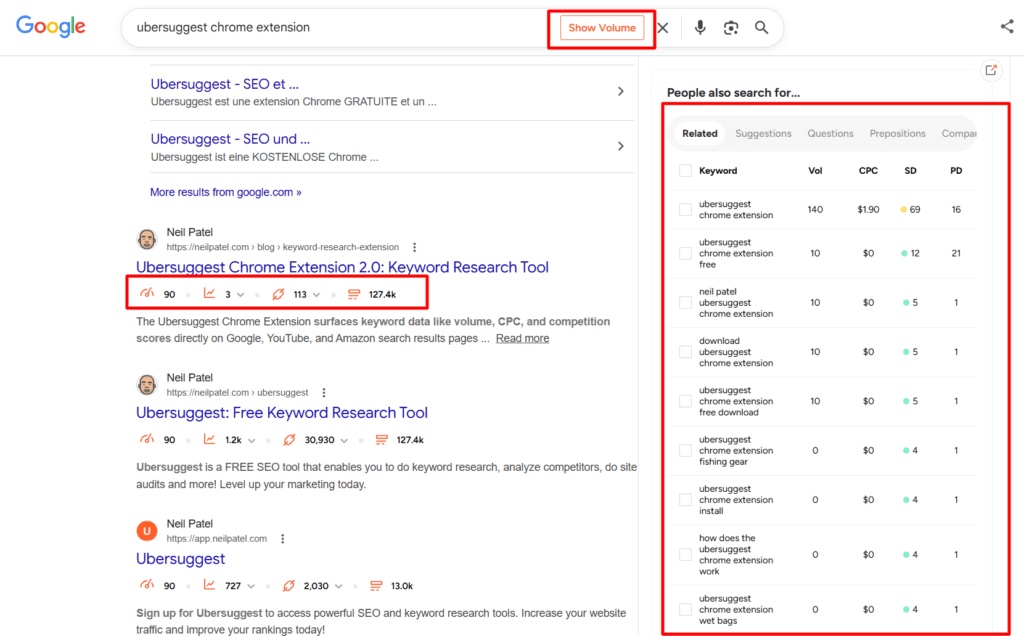
The biggest advantage of a browser extension keyword tool is convenience. There’s zero workflow disruption. You research keywords the same way you browse the web.
For quick keyword validation, on-the-go content ideation, or checking search metrics while reviewing competitor pages, browser extensions are hard to beat.
The tradeoff is data depth. Browser extensions are built for speed and simplicity, not comprehensive analysis.
You won’t get advanced filtering, keyword clustering, or competitor gap analysis from a browser extension alone. Think of them as a complement to your primary keyword tool, not a replacement.
Tools in this category on this list: Ubersuggest Chrome extension, Answer the Public.
SaaS and Cloud-Based Platforms
SaaS keyword tools are full-featured platforms you access through your browser via a monthly or annual subscription. This is where most serious keyword research happens, and where most of the tools on this list live.
Cloud-based platforms offer the most comprehensive keyword data, the most advanced filtering and analysis features, and the best collaboration capabilities for teams and agencies.
You get everything from keyword gap analysis and competitor research to SERP feature tracking and rank monitoring, all in one dashboard.
The tradeoff is cost and complexity. Premium SaaS tools like Semrush and Ahrefs run anywhere from $129 to $500 per month.
Even mid-range options like SE Ranking and KWFinder require a recurring subscription. And with so many features available, you can feel overwhelmed before finding your feet.
Tools on this list in this category: Semrush, SE Ranking, Ahrefs, KWFinder, SERPstat, Ubersuggest, SpyFu, and Moz.
Desktop Software
Desktop keyword tools are installed directly on your computer rather than accessed through a browser.
They typically operate on a one-time purchase or annual license model rather than a recurring monthly subscription. This makes them significantly more cost-effective over time.
The standout advantage of desktop software is the combination of power and affordability.
You get enterprise-level keyword research, competitor analysis, and rank tracking capabilities without the monthly billing cycle that adds up quickly with SaaS tools.
The tradeoff is accessibility. Desktop tools require the software installed on each machine you use.
There’s no purely browser-based experience and no mobile access.
That said, SEO PowerSuite addresses the collaboration limitation directly through its built-in cloud storage feature, which lets you save projects online and access them from any computer your team uses.
For distributed teams, this removes the single-machine constraint that traditionally made desktop software impractical for collaborative workflows.
Tools on this list in this category: Rank Tracker from SEO Powersuite.
Free and Google-Native Tools
Google builds and maintains several free tools that provide direct insight into search behavior. And every SEO should use at least one of them, regardless of which paid tool they subscribe to.
Google-native tools have one advantage that no paid tool can match: they pull data directly from the source.
When Google Keyword Planner shows you search volume data or Google Search Console shows you what keywords your site ranks for, that data comes straight from Google’s own index.
The tradeoff is that these tools are deliberately limited in scope. Google Keyword Planner was built for advertisers, not SEOs — search volumes are bucketed into broad ranges rather than exact numbers, and there’s no keyword difficulty scoring or competitor analysis.
Google Search Console shows you your own data, but nothing about competitors. Google Trends shows relative popularity but no absolute search volume. Used alongside a paid tool, Google’s free suite is invaluable. Used on its own, it leaves significant gaps.
Tools on this list in this category: Google Keyword Planner, Google Search Console, and Google Trends.
What to Look For in a Keyword Research Tool
With 14 tools on this list and dozens more on the market, knowing what separates a genuinely useful keyword tool from a flashy one with mediocre data is half the battle. Here’s what actually matters.
Keyword Database Size and Freshness
The size of a tool’s keyword database determines how many search opportunities it can surface for you. A tool with a small or outdated database will miss keywords your competitors are already targeting.
Semrush’s 28.3 billion keyword database and Ahrefs’ comparable index, 28.7 billion, set the industry benchmark, but database size alone doesn’t tell the full story.
Freshness matters just as much. A large database populated with stale data will mislead your content strategy just as badly as a small one.
Search Intent Classification
Search intent, whether a keyword is informational, navigational, commercial, or transactional, is arguably the most important data point a keyword tool can give you.
Targeting a keyword without understanding its intent is one of the most common and costly SEO mistakes.
If someone searching for a keyword wants a definition and you publish a product comparison, you will not rank, regardless of how well-optimized your content is.
Look for tools that classify intent clearly and accurately, not just as an afterthought feature.
Keyword Difficulty Methodology
Most keyword tools have a keyword difficulty score, but not all of them calculate it the same way.
Some base it purely on the domain authority of ranking pages. Others factor in backlink profiles, content relevance, the presence of SERP features, and click-through rate distribution.
Understanding how your tool calculates difficulty helps you interpret the score accurately and set realistic ranking expectations.
A keyword with a difficulty score of 96% means something very different in Semrush than it does in KWFinder, even when targeting the same location database.


Competitor Keyword Gap Analysis
One of the highest-value use cases for any keyword tool is discovering keywords your competitors already rank for that you don’t.
Keyword gap analysis short-circuits the content ideation process. Instead of guessing what to write about, you get a data-backed list of proven topics your audience is already searching for.
Not every tool does this well. Prioritize tools that offer robust gap analysis if a competitive content strategy is central to your workflow.
SERP Features Tracking
Modern Google search results are dominated by SERP features, including featured snippets, People Also Ask boxes, image packs, local packs, video carousels, AI overview, and more.
A keyword tool that only tracks traditional organic rankings is giving you an incomplete picture of the opportunity landscape.
The best tools show you which SERP features are triggered by your target keywords and whether your content is currently capturing any of them. This gives you clear optimization targets beyond just ranking position.
Rank Tracking Integration
Keyword research and rank tracking are two sides of the same coin.
Researching keywords without tracking how your content performs for those keywords after publishing is like running a race without checking your time.
Some tools handle both under one roof — Rank Tracker and SE Ranking being strong examples. Others focus purely on research and require a separate tool for tracking.
Neither approach is wrong, but knowing whether your chosen tool covers both, and how well it does, shapes your overall tool stack and budget.
Export and Workflow Compatibility
The best keyword research session is only as useful as what you do with the data afterward.
These workflow details seem minor until you’re managing dozens of content projects simultaneously and realize your tool creates friction instead of removing it.
Pricing Model Fit
Finally, consider not just what a tool costs today but what it will cost as your needs grow.
SaaS tools with monthly subscriptions scale in price as you add more keywords, projects, or users. What starts at $65 a month can easily become $200 a month as your agency grows.
Desktop tools like Rank Tracker offer a fixed annual cost regardless of how many keywords or websites you track. Free tools cost nothing but may limit your data quality.
Match the pricing model to your growth trajectory, not just your current budget.
The 14 Best Keyword Research Tools in 2026
Finding the right keyword research tool comes down to three things: the quality of data it provides, how well it fits your workflow, and whether the price justifies the value for your specific use case.
To make this guide as useful as possible, I’ve organized the 14 tools into three tiers.
Tier 1 contains my top two recommended tools, based on firsthand experience, value for money, and fit for the blog’s core audience.
Tier 2 covers notable tools worth serious consideration depending on your budget and goals.
Tier 3 covers free, Google-native, and specialized tools that complement your primary keyword tool.
Important:
Most tools on this list are full SEO platforms. Their pricing covers an entire suite of features, including site auditing, rank tracking, backlink analysis, content tools, and more.
You are not paying for a keyword research tool alone. Keyword research is one feature within a broader platform.
The only exception on this list is Rank Tracker, which is purpose-built for keyword research and rank tracking.
Keep this in mind as you compare prices. The higher cost of a platform like Semrush reflects the full breadth of what you’re getting, not just keyword data.
Tier 1 — Featured Tools
1. Rank Tracker (SEO Powersuite)
If I had to recommend one keyword research tool to a marketer who wants serious SEO capability without a serious monthly bill, Rank Tracker from SEO Powersuite would be it. And it has been in active use on my own sites for nearly a decade.
Rank Tracker is a desktop-based SEO tool that combines deep keyword research functionality with robust rank tracking in a single application.
Unlike most SaaS tools that charge you monthly for access, Rank Tracker operates on an annual license model. This means you pay once per year and track as many keywords across as many websites as you need without hitting arbitrary limits.
What makes Rank Tracker stand out for keyword research specifically is the sheer variety of research methods available.
Most tools give you one or two ways to find keywords; typically a seed keyword search and maybe a competitor analysis feature. Rank Tracker gives you 24 distinct keyword discovery methods, including:

Each method surfaces different types of keywords, and together they give you a more complete picture of the opportunity landscape than most single-method tools can match.
Another capability worth noting that most rank trackers can’t match is that Rank Tracker lets you check positions as deep as the top 1,000 search results, giving you a level of SERP visibility into competitive landscapes that no SaaS alternative on this list offers.
The keyword gap feature deserves specific mention.
Enter your domain alongside up to five competitors (40 in the Enterprise license) domains, and Rank Tracker surfaces every keyword your competitors rank for that you currently don’t.

It filtered the report by search volume, keyword difficulty, expected traffic, CPC, and more.
If you’re building content strategies around proven topics, this single feature alone justifies the tool.
Rank Tracker’s competitor research module adds another dimension.
You can enter any competitor domain and pull their top 100 ranking keywords, estimated organic traffic, top pages, and SERP visibility data.
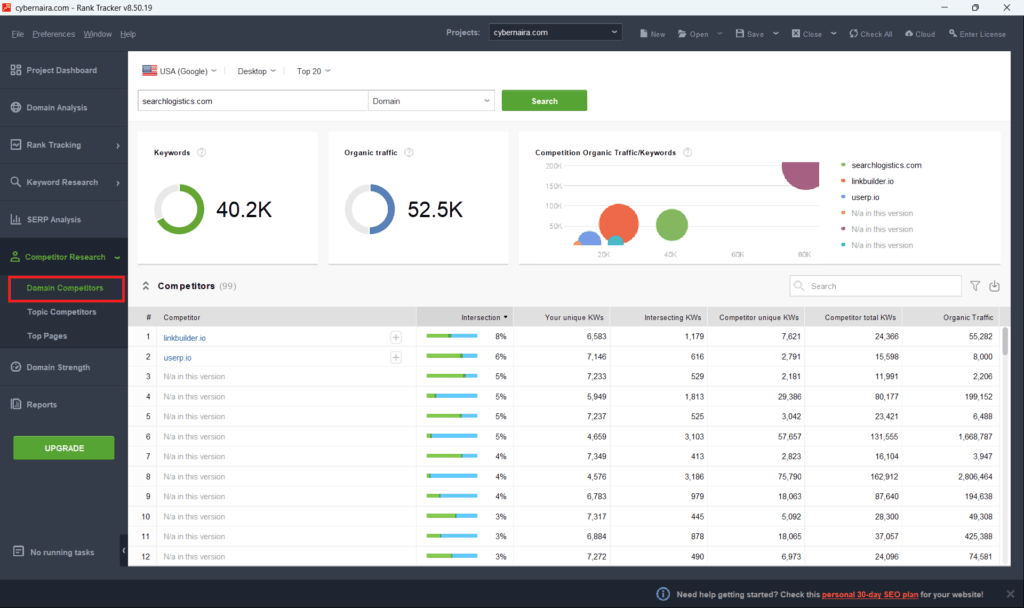
Combined with the keyword gap analysis, you have a complete blueprint of what’s working in your niche before you write a single word.
The rank tracking side of the tool is equally strong. It covers over 597 search engines, tracks rankings separately for mobile and desktop, supports local SEO tracking, integrates with Google Search Console, and offers customizable reporting.
For agencies on the Enterprise license, branded white-label reports are available for client delivery.
Best for:
Bloggers, affiliate marketers, and budget-conscious SEOs who want desktop-level power without monthly SaaS pricing. Also strong for agencies that prefer a one-time annual cost over recurring subscriptions.
Honest limitation:
Rank Tracker requires installation on each machine you use and has no mobile app. Real-time browser-based access like that offered by SaaS tools isn’t available.
However, SEO PowerSuite’s built-in cloud storage lets you save and sync projects online, so team members can access the same projects from different computers without manually transferring files.
For most agency teams, this effectively solves the collaboration problem. If your team needs a fully browser-based workflow with nothing to install, SE Ranking remains the cleaner fit.
Pricing:
For a complete breakdown of every feature, see my full Rank Tracker review.
2. SE Ranking
SE Ranking has quietly become one of the most well-rounded SEO platforms on the market. For agencies and growing SEO professionals, it’s arguably the best balance of features, data quality, and pricing available today.
Unlike Rank Tracker’s desktop model, SE Ranking is a fully cloud-based SaaS platform. This means your data is accessible from any device, team members can collaborate in real time, and client reports can be automated and delivered on a schedule.
For agency workflows specifically, accessibility is a significant operational advantage.
SE Ranking’s keyword research module covers the core bases well — seed keyword research, keyword suggestions across 188 geo databases, search volume, keyword difficulty, CPC data, and search intent classification.
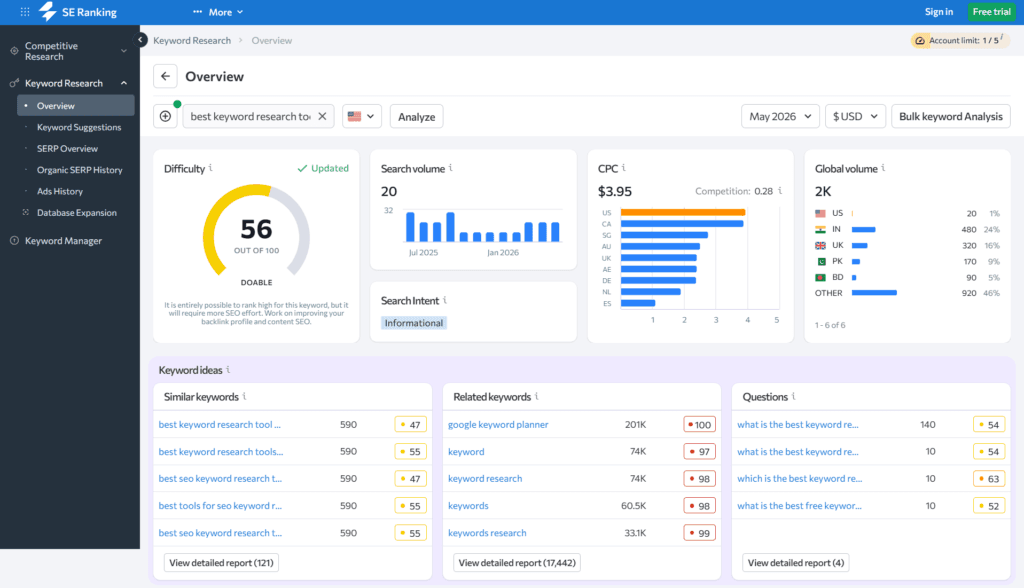
But where SE Ranking particularly shines is in combining keyword research, rank tracking, and competitor analysis under one roof.
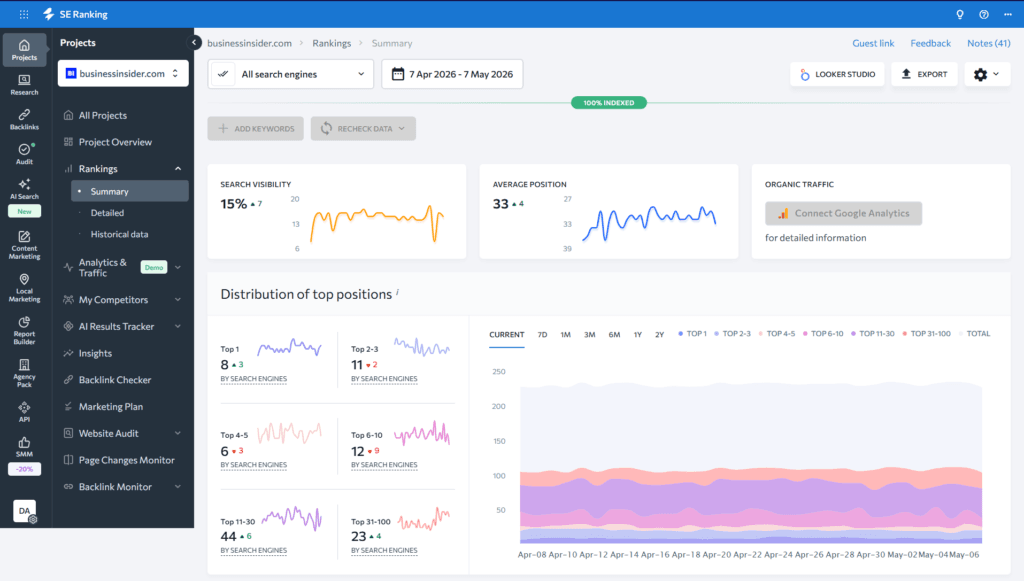
The rank tracker is one of the most reliable on the market.
You get daily ranking updates across Google, Bing, Yahoo, and YouTube, with the ability to segment by location, device type, and language for granular local or international SEO tracking.
The ranking dashboard shows you visibility trends, average position changes, and keyword distribution across the top 3, top 10, and top 100 positions — giving you and your clients a clear picture of SEO progress over time.
SE Ranking has also significantly expanded its AI search capabilities.
Beyond AI Overview tracking, it now offers a full AI Search Toolkit that monitors brand visibility across ChatGPT, Gemini, Perplexity, and Google AI Mode. Tracking not just traditional rankings but how your brand and content are referenced across the major AI platforms, reshaping search.
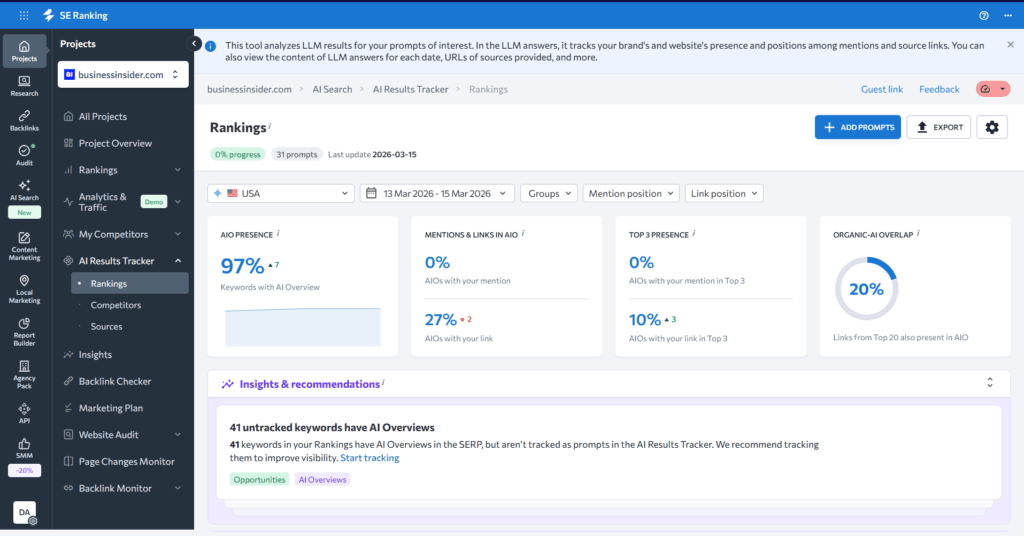
For agencies managing brands that care about visibility in the evolving AI search landscape, this is a forward-looking capability few competitors offer at this price point.
The keyword gap tool is clean and actionable.
Enter your domain alongside competitors, and SE Ranking surfaces missing keywords, shared keywords, and unique keyword opportunities with clear filtering options.
White-label reporting is available via the Agency Pack add-on, allowing agencies to deliver branded PDF reports to clients with their own logo and company details.
Best For:
SEO agencies managing multiple clients, freelance SEOs who need reliable rank tracking and reporting, and growing blogs that have outgrown basic tools and need a scalable all-in-one platform.
Honest limitation:
SE Ranking can feel feature-heavy for a solo blogger who just needs to find keywords and track a handful of rankings.
The interface is clean, but the sheer volume of tools available can create a learning curve for users who aren’t yet comfortable with SEO workflows.
Start with the rank tracker and keyword research modules and expand from there.
Pricing (annual billing):
Tier 2 — Notable Tools
The tools in this tier are serious, well-established platforms that deserve consideration depending on your budget, goals, and specific use case.
Some are industry benchmarks. Others offer a compelling value proposition for specific audiences.
None of them are bad choices. They simply serve different needs than the Tier 1 recommendations or come with tradeoffs worth understanding before committing.
3. Semrush Keyword Magic Tool
There is no honest conversation about keyword research tools that doesn’t include Semrush. It is the industry benchmark.
The tool everything else is measured against, and the Keyword Magic Tool is its crown jewel.
I’ve used Semrush for years, and the data quality and depth it provides are genuinely in a class of its own.
The Keyword Magic Tool sits on a database of over 27.8 billion keywords across 142 geo databases. A number that isn’t marketing fluff.
When you enter a seed keyword, the breadth of results, variations, questions, and related terms it surfaces is unlike anything else on this list.

What separates the Keyword Magic Tool from competitors is the combination of database size and filtering sophistication.
You can filter your keyword results by:
All simultaneously.
For content marketers building large-scale topic clusters or agencies running comprehensive keyword audits, this level of filtering control saves hours of manual sorting.
The question modifier feature is particularly powerful for content marketers.
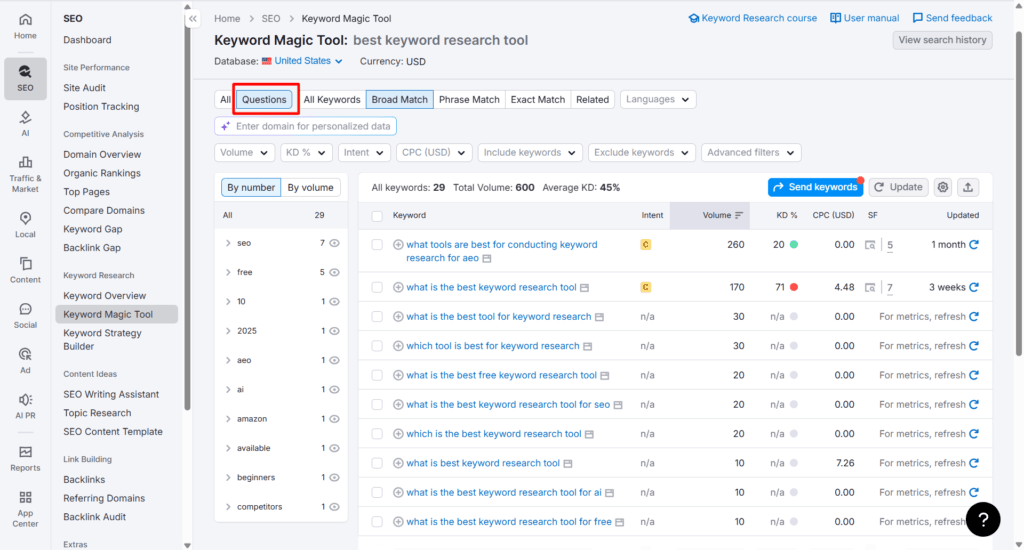
Filtering your keyword results to show only question-based queries instantly surfaces the exact language your audience uses when searching for solutions, which is the foundation of high-converting informational and commercial content.
Keyword grouping and clustering are other standout capabilities.
The Keyword Magic Tool automatically organizes related keywords into thematic groups and subgroups, making it significantly easier to plan content that can rank for multiple related terms rather than targeting one keyword per article.
Beyond keyword research, Semrush’s broader platform covers competitor analysis, backlink auditing, site audit, position tracking, content optimization, AI visibility tracking, and PPC research — making it a genuinely comprehensive platform for teams that need everything under one roof.
Best for:
Enterprise SEOs, large content teams, serious affiliate marketers with substantial budgets, and agencies that need the most comprehensive keyword and competitor data available.
Honest take:
Semrush is the most powerful tool on this list, but also the most expensive.
For most small business owners, Rank Tracker and SE Ranking cover the vast majority of keyword research use cases at a fraction of the cost.
Semrush is worth the investment when you’ve exhausted what more affordable tools can offer, or when your business revenue justifies the premium.
Pricing (annual billing):
4. Ahrefs Keywords Explorer
Ahrefs is the closest competitor to Semrush at the premium end of the market. And for keyword research specifically, many SEO professionals actually prefer it over Semrush for one reason: click data.
What makes Ahrefs Keywords Explorer genuinely distinctive is the clicks metric.
Most keyword tools show you search volume — how many times a keyword is searched per month. Ahrefs goes a step further and shows you estimated clicks — how many of those searches actually result in a click through to a website.
This distinction matters more than it might seem at first glance.
Many high-volume keywords are dominated by SERP features — featured snippets, knowledge panels, People Also Ask boxes — that answer the searcher’s question directly on the results page without requiring a click.
Targeting a keyword with 10,000 monthly searches sounds ideal until you discover that 7,000 of those searches result in zero clicks because Google answers the question in the SERP itself.
Ahrefs’ click data gives you a more realistic picture of actual traffic potential before you invest in creating content.

The parent topic feature is another strength worth noting.
For any keyword you research, Ahrefs identifies the broader parent topic that the keyword belongs to. This helps you determine whether to target a keyword as a standalone article or fold it into a broader piece of content that can rank for multiple related terms simultaneously.
Keyword difficulty scoring in Ahrefs is widely considered among the most accurate in the industry, calculated based on the backlink profiles of top-ranking pages rather than just domain authority.
The platform has also expanded significantly with AI-powered features — including AI keyword clustering, AI search intent analysis at scale, and SERP comparison tools — making it an increasingly strong choice for teams that want data and AI-assisted workflow in one place.
Best for:
Established SEOs and content teams that need premium-quality keyword data and value click metrics and backlink-based difficulty scoring over raw database size.
Honest limitation:
Ahrefs is expensive, and the free plan lets you evaluate the tool, but not enough to build a full keyword strategy around.
The Starter plan at $29/month offers limited access as a low-commitment entry point, but full keyword research capabilities require a paid subscription starting at $129/month.
Pricing:
5. KWFinder by Mangools
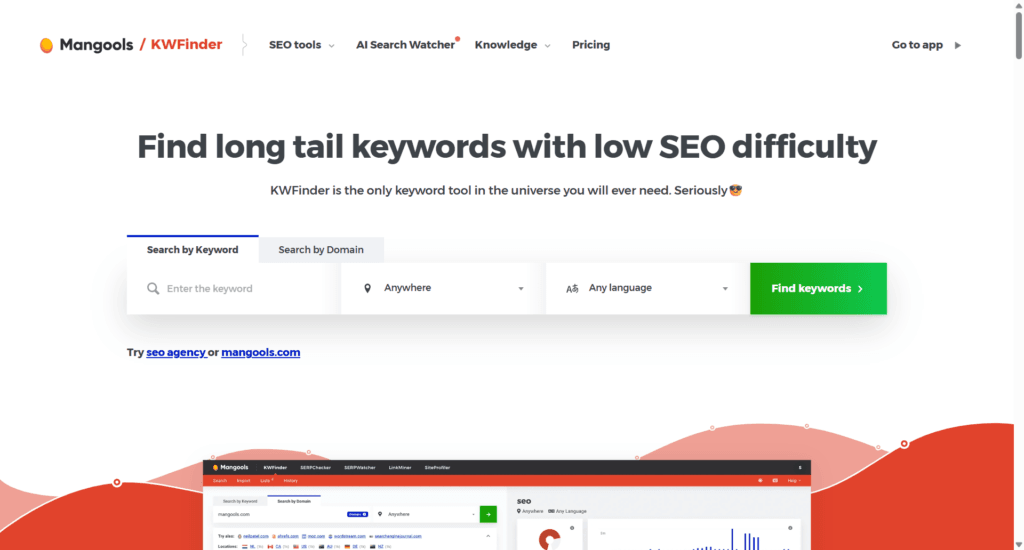
KWFinder occupies a sweet spot that many keyword tools miss. Genuinely solid data depth at a price point that doesn’t require enterprise-level budget justification.
If you have outgrown free keyword tools but aren’t ready to commit to the pricing of Semrush or Ahrefs, KWFinder is a natural next step.
I’ve used KWFinder as part of the broader Mangools suite, a collection of five interconnected SEO tools that together cover keyword research, SERP analysis, rank tracking, backlink analysis, and site auditing.
The suite approach means KWFinder’s keyword data connects directly with Mangools’ other tools, creating a reasonably complete SEO workflow at a mid-range price.
KWFinder’s standout strength is its accuracy in scoring keyword difficulty. The tool is widely regarded among SEO professionals as one of the most reliable difficulty scores available.
Particularly at the lower end of the difficulty range, where it excels at identifying genuinely achievable ranking opportunities for newer or lower-authority websites.
If finding low-competition keywords with commercial intent is your core use case, KWFinder handles it well.
The interface deserves mention because it genuinely sets KWFinder apart from more complex platforms.
Everything is clean, logically organized, and visually intuitive. The SERP analysis panel appears directly alongside your keyword results, showing the top-ranking pages for each keyword along with their domain authority, backlink count, and estimated traffic.
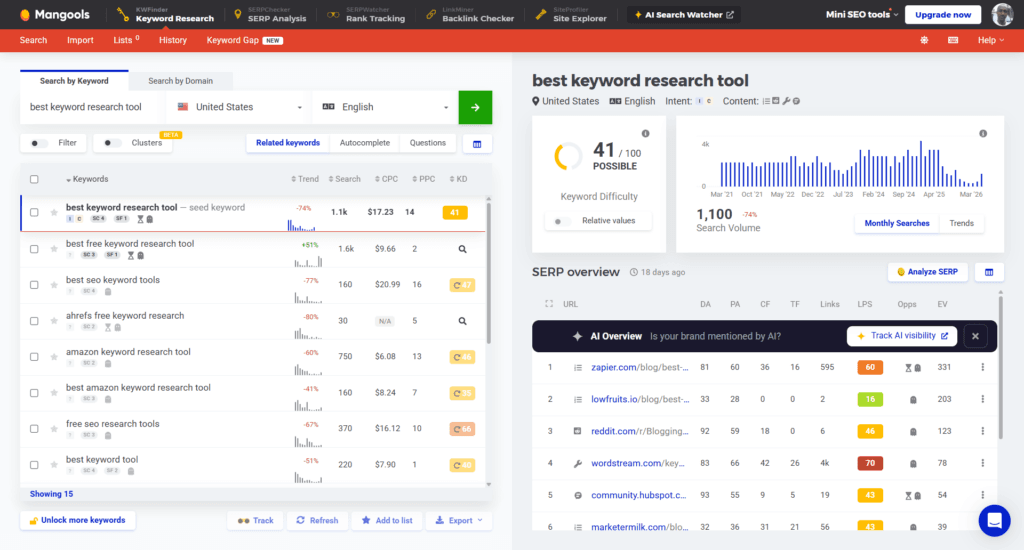
This gives you an immediate competitive picture without switching between tools or tabs.
Local keyword research is another area where KWFinder performs well, allowing you to filter keyword data by specific country, region, or city across over 65,000 supported locations.
Best for:
Marketers who want reliable keyword data and accurate difficulty scoring at a mid-range price. Also a good fit for SEOs who find Semrush and Ahrefs overwhelming and prefer a cleaner, more focused interface.
Honest limitation:
KWFinder’s database sits at around 2.5 billion keywords, significantly smaller than Semrush’s 27.8 billion or Ahrefs’ comparable index.
For most marketing use cases, this isn’t a problem, but for large-scale enterprise keyword research or highly competitive niches, the database limitations become more apparent.
Pricing (annual billing, includes AI Search Watcher PRO):
6. SERPstat
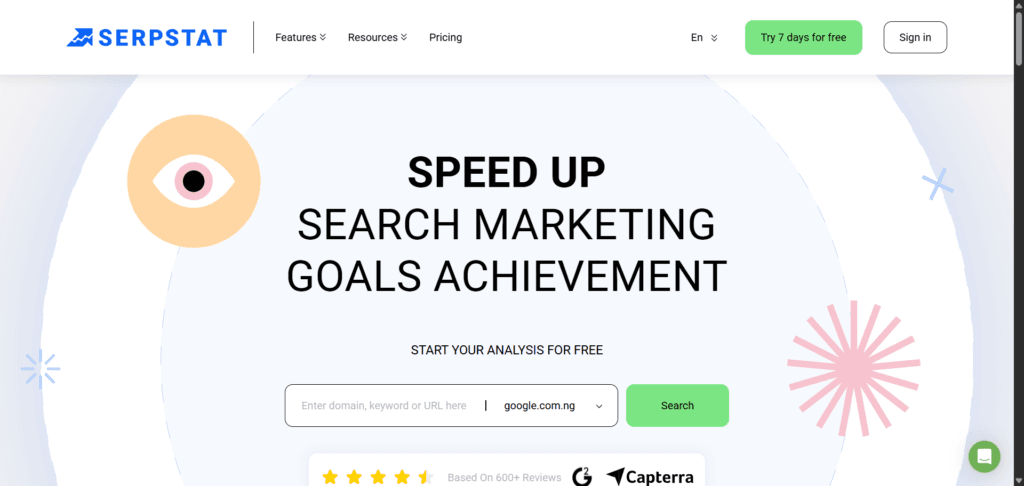
SERPstat is an all-in-one SEO platform that covers keyword research, rank tracking, competitor analysis, site auditing, and backlink analysis. It is one of the most comprehensive mid-range options on this list.
SERPstat delivers solid functionality across all its core features at a competitive price.
Where SERPstat particularly stands out is its browser extension. Unlike most browser extensions that are stripped-down versions of their parent platform, the SERPstat SEO checker extension provides a surprisingly deep on-page SEO analysis of any webpage you visit.


It covers meta tags, header structure, internal and external links, image data, page speed insights, structured data, keyword performance, and PPC keywords — all accessible with a single click without leaving the page you’re analyzing.
The keyword research module covers the core bases — search volume, keyword difficulty, CPC, related keywords, and competitor keyword data across a database of over 7 billion keywords spanning 230 countries.
SERPstat’s missing keywords feature is particularly useful. It identifies search terms that competing pages rank for that your analyzed page doesn’t rank for, surfacing optimization opportunities directly at the page level rather than just the domain level.
PPC keyword data adds value for marketers running paid campaigns alongside organic SEO. It shows you the paid keywords competitors are bidding on and the ad copy they’re using, which doubles as commercial intent intelligence for organic content strategy.
Best for:
SEOs who want an all-in-one platform at mid-range pricing, value a powerful browser extension for on-page competitive analysis, or run combined PPC and SEO campaigns that benefit from integrated paid and organic keyword data.
Honest limitation:
SERPstat’s keyword database, while large, is smaller than that of direct competitors, and data accuracy in less competitive or non-English markets can be inconsistent.
The interface has improved significantly, but still feels less polished than KWFinder or SE Ranking at a similar price point.
Pricing (annual billing):
7. Ubersuggest
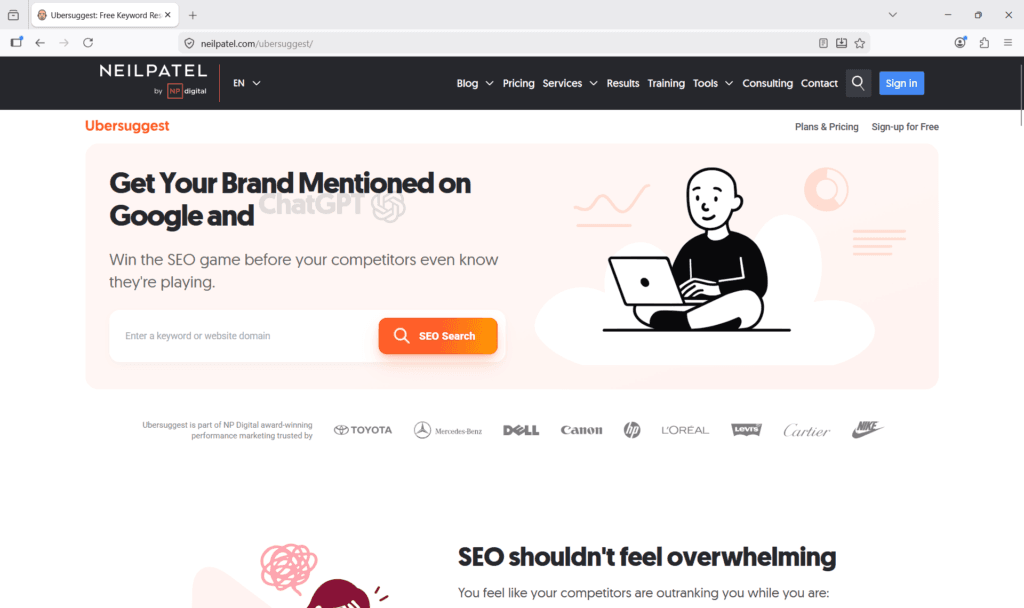
Ubersuggest is Neil Patel’s keyword research tool. If you’re just starting out, it’s one of the most accessible entry points into keyword research available today.
I’ve used Ubersuggest both as a browser extension and as a standalone platform, and it delivers genuine value at the price point it occupies.
The interface is clean and beginner-friendly, the data is reliable enough for early-stage keyword research, and the Chrome extension integrates smoothly into Google search results, showing volume, CPC, and competition data directly in the SERP.

Where Ubersuggest genuinely earns its place is in keyword ideation.
Enter a seed keyword, and Ubersuggest generates a solid list of keyword suggestions, question-based queries, prepositions, and comparison keywords. It gives content creators a broad pool of topic ideas.
The tool has also added AI Search Visibility tracking across ChatGPT and Gemini, which is a meaningful addition for monitoring your brand presence beyond traditional Google rankings.
The paid platform extends this with site audit functionality, competitor traffic analysis, backlink data, and content ideas based on top-performing competitor pages.
Best for:
Beginners and budget-conscious bloggers who need a free starting point for keyword research before investing in a paid tool. Also useful as a browser extension complement to any primary tool on this list.
Honest limitation:
Ubersuggest’s data depth doesn’t match Semrush, Ahrefs, Rank Tracker, or even KWFinder.
Search volume accuracy can be inconsistent, keyword difficulty scores are less reliable in competitive niches, and the free plan has daily search limits that quickly become frustrating for active keyword researchers.
Most intermediate SEOs outgrow it relatively fast.
Pricing (monthly, with “Save 70%” promotional pricing currently active):
Note:
Ubersuggest frequently runs promotional pricing. Check the current pricing page for the latest rates before subscribing.
8. SpyFu (Research-based)
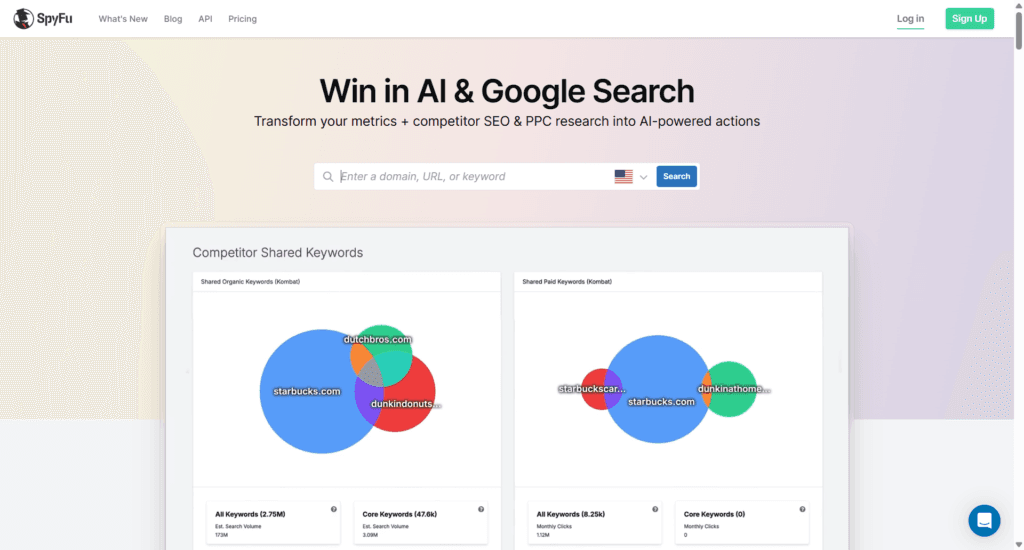
SpyFu occupies a unique position on this list. It’s less of a traditional keyword research tool and more of a competitor intelligence platform built around keyword data.
If understanding what your competitors have done historically in both organic and paid search is central to your SEO strategy, SpyFu deserves serious attention.
SpyFu’s defining capability is historical keyword data. While most keyword tools show you where competitors rank today, SpyFu shows you where they’ve ranked over time, in some cases going back over a decade.
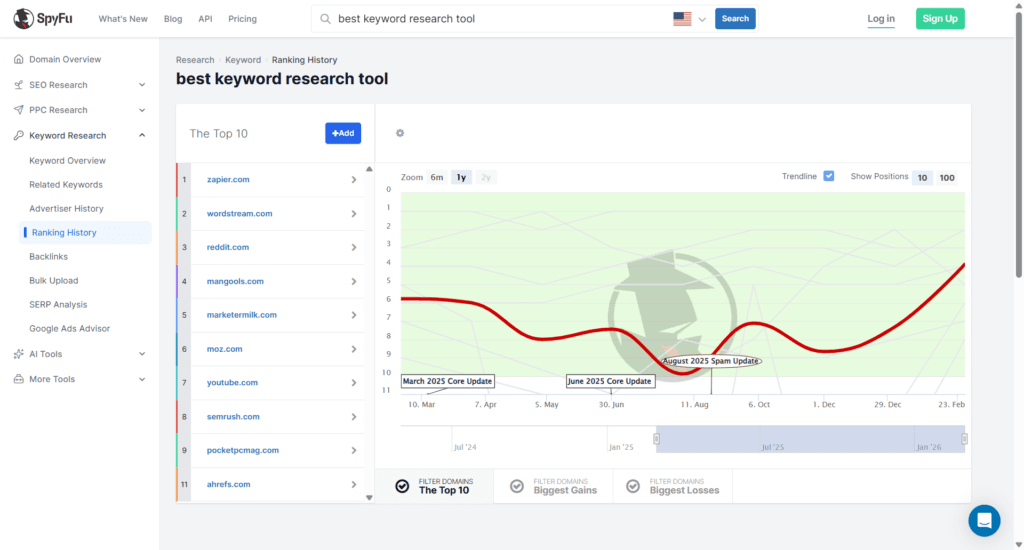
You can see every keyword a competitor has ever ranked for organically, every Google Ad they’ve ever run, and every ad variation they’ve tested.
For competitive niches where understanding long-term strategy patterns matters, this historical depth is unmatched by any other tool on this list.
The competitor PPC analysis is particularly valuable if you run paid traffic alongside organic content.
Seeing which keywords a competitor has consistently bid on over months or years is strong commercial intent intelligence.
SpyFu’s higher-tier plans now also include AI tools — RivalFlow for content improvement suggestions and ChatGPT integration to pull SpyFu data directly into AI workflows.
Best for:
SEO marketers focused heavily on competitor keyword intelligence, PPC advertisers who want to understand competitor ad strategies, and agencies building comprehensive competitive analysis deliverables for clients.
Honest limitation:
SpyFu works best as a specialist competitor-intelligence layer alongside a broader keyword-research platform, rather than as a standalone solution.
Pricing:
9. Moz Keyword Explorer (Research-based)
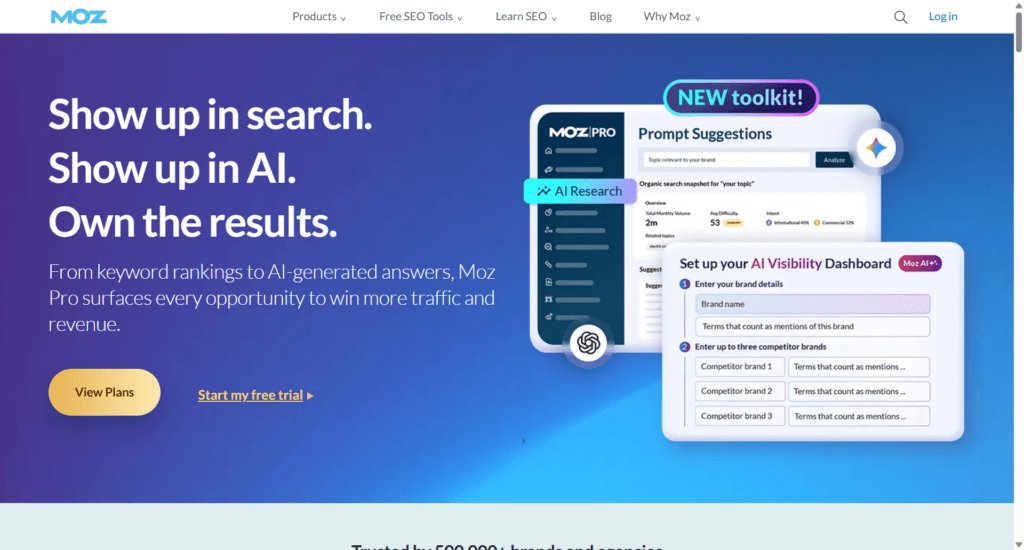
Moz was one of the original authorities in the SEO tools space. For many SEOs who came up in the industry during the 2010s, it was the first professional tool they ever used.
I used Moz myself during that period, though the company has changed hands since, and the current product reflects significant evolution from what I experienced firsthand.
Moz Keyword Explorer’s most distinctive feature is its Top Suggestions and Questions card.
Top suggestions generate a list of keywords relevant to your seed keyword. Groped by search intent, Difficulty score, Organic CTR, monthly volume, relevance, and SERP analysis.
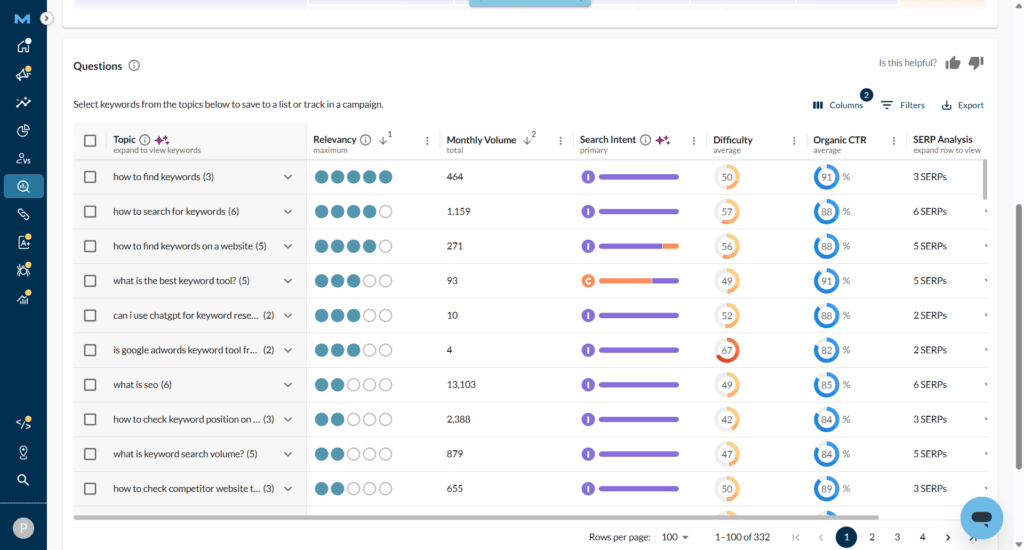
The relevance score is the most useful for clustering keywords into a single semantically related bucket.
Click the Question card to see a list of search phrases users are asking. These are questions that are relevant to and extend your main keyword.

For a content-driven website, these features are particularly helpful for discovering question-based search phrases in your niche.
The platform has also invested significantly in AI and GEO features. Medium and Large plan subscribers get AI Visibility Dashboards and tracked AI prompts to monitor brand presence on ChatGPT and Gemini — reflecting Moz’s push into the AI search monitoring space alongside traditional SEO.
Best for:
SEOs already embedded in the Moz ecosystem who use Domain Authority as a core metric in their workflow, and teams that value a single prioritization score over granular data filtering.
Honest take:
Moz has lost significant market relevance in recent years as Semrush and Ahrefs have pulled further ahead.
It remains a legitimate tool but is no longer a first recommendation for most use cases. If you’re starting fresh today, there are stronger options at every price point on this list.
However, it might be a good free keyword research tools if you don’t mind the monthly 10-search-query limit. Use the free plan together with Rank Tracker and the Ubersuggest free plan, and you get a solid keyword tool for your entire marketing campaign.
Pricing (monthly):
Tier 3 — Supporting Tools
The tools in this tier are free, Google-native, or specialized. Every one of them belongs in your keyword research workflow, regardless of which paid tool you use as your primary platform.
None of them replaces a dedicated keyword research tool. All of them make your overall keyword strategy stronger when used alongside one.
10. Google Keyword Planner

Google Keyword Planner is where most SEOs begin their keyword research journey — and where many eventually realize they’ve outgrown it.
I’ve used Google Keyword Planner extensively, particularly in the early years of running CyberNaira, and it delivers genuine value within the boundaries of what it was built to do.
The critical thing to understand about Google Keyword Planner is that it was designed for Google Ads advertisers, not organic SEO professionals.
That distinction shapes everything about how the tool works and what it can and cannot tell you.
The core advantage Google Keyword Planner holds over every other tool on this list is data provenance.
When it shows you keyword data, that data comes directly from Google’s own advertising platform. There’s no estimation layer, no third-party data modeling, no extrapolation from a sampled index.

For understanding broad search demand and validating whether a niche or topic has meaningful search activity, that directness is genuinely valuable.
CPC data is particularly reliable and useful for marketers. High CPC keywords indicate strong advertiser demand, which typically correlates with strong commercial intent and purchasing behavior.
Best for:
Absolute beginners validating a niche before investing in paid tools, PPC advertisers who need reliable CPC data, and any SEO using it as a free complement to a more comprehensive primary tool.
Honest limitation:
Google Keyword Planner’s search volumes are displayed as broad ranges rather than specific numbers on accounts without active ad spend.
There’s no keyword difficulty scoring, no competitor organic data, no SERP analysis, and no rank tracking.
As a standalone keyword research tool for SEO, it leaves too many gaps to rely on exclusively past the beginner stage.
A brief note on Microsoft Bing Keyword Planner — if your audience or niche has meaningful Bing traffic, Microsoft’s equivalent tool serves the same function for Bing search data.
Worth a look for completeness, but for most businesses whose traffic is overwhelmingly Google-sourced, it’s a secondary consideration at best.
Pricing:
Free.
11. Google Search Console
Google Search Console is the most underutilized free keyword tool available to any website owner. If you’re not actively mining it for keyword insights, you’re leaving significant optimization opportunities on the table.
I use Google Search Console regularly alongside paid tools, and the data it provides serves a fundamentally different purpose than any other tool on this list.
While every other keyword tool helps you find keywords to target, Google Search Console shows you exactly which keywords your site already ranks for, and more importantly, where you’re close to breaking through to higher positions.
The Performance report is where the keyword intelligence lives. It shows you every search query that has triggered an impression or click to your site in Google Search, alongside four metrics for each query: total clicks, total impressions, average click-through rate, and average position.

The most actionable use case is identifying high-impression, low-click-through keywords — queries where your page appears frequently in search results but rarely gets clicked.
This pattern typically indicates either a weak title tag and meta description that don’t compel clicks, or a SERP position just outside the high-CTR range where a targeted optimization push could significantly increase organic traffic without creating new content.
Search Console data is also invaluable for discovering keywords you rank for that you didn’t intentionally target. This reveals content gaps, unexpected audience interests, and natural internal linking opportunities across your site.
Best for:
Every SEO and business, regardless of experience level or tool stack.
Google Search Console is non-negotiable. It’s the only tool on this list that shows you real, first-party data about your own site’s actual search performance.
Pricing:
Free.
12. Google Trends
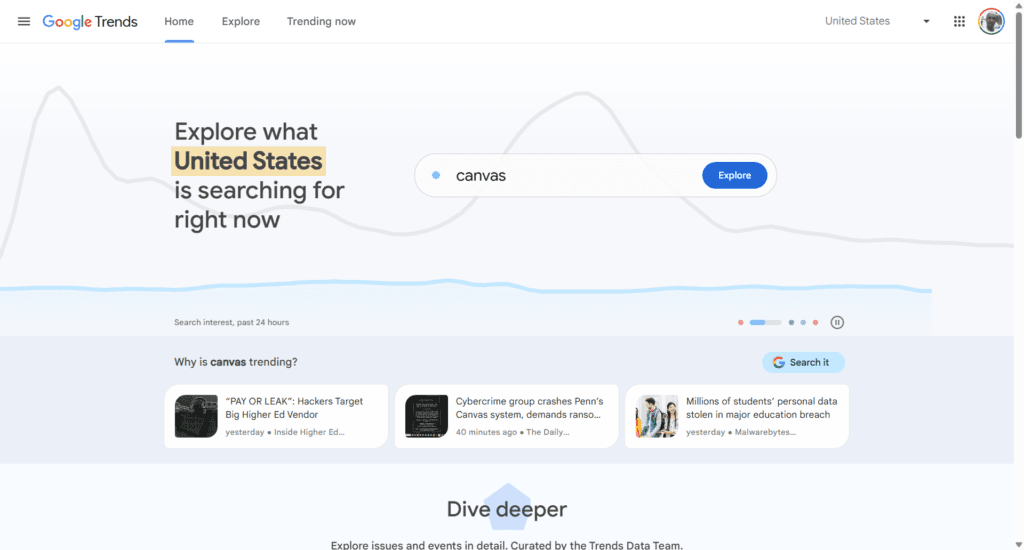
Google Trends is a tool most SEOs know about but relatively few use systematically. It represents a genuine competitive advantage for those who do.
I’ve referenced Google Trends directly in my keyword research workflow for affiliate marketing, particularly for planning seasonal content strategies.
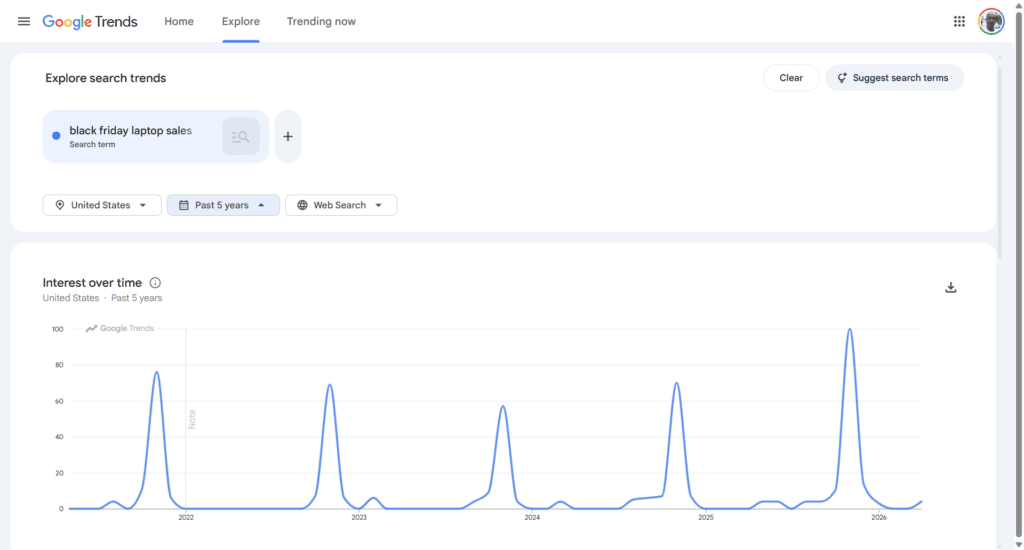
The tool does something no other keyword research tool on this list does as well: it shows you how search interest in a keyword changes over time, relative to its own peak popularity.
The core use case for marketers is seasonal keyword planning. Many niches have predictable seasonal search patterns — Black Friday deals, holiday gift guides, tax season software, summer travel gear, and back-to-school products.
Google Trends lets you see exactly when search interest for these topics begins to rise each year, how high it peaks, and how quickly it falls off, giving you a data-backed content publishing calendar rather than a guessed one.
Beyond seasonal content, Google Trends is useful for identifying rising topics before they become mainstream keyword opportunities.
The “rising queries” feature surfaces search terms that are gaining momentum, meaning lower competition today but growing search volume ahead.
Best for:
Businesses planning seasonal content, bloggers wanting to identify rising keyword opportunities before they peak, and any content strategist who wants to align publishing timing with actual search demand patterns.
Honest limitation:
Google Trends shows relative search interest, not absolute search volume.
Always cross-reference Trends data with search volume figures from a primary keyword tool to get the full picture.
Pricing:
Free.
13. Answer The Public
Answer The Public has undergone a significant transformation. What started as a simple question-mapping tool built around Google search queries has evolved into a multi-platform search intelligence and AI content tool — covering Google, AI models, YouTube, TikTok, and Shopping in a single research workflow.
Recently, I used Answer The Public, and the gap between the old and current versions is substantial.
The original value proposition — mapping the questions people ask around any topic — is still there and still works well. But the platform around it has expanded into territory no other tool on this list occupies at its price point.
The visual research map now covers four distinct data sources simultaneously — Search Engines, AI Models, Social Media (YouTube and TikTok), and Shopping.
Enter any keyword, and you get a complete picture of how that topic is being searched across every major platform where your audience spends time, not just Google. For content strategists planning multi-channel content, this cross-platform visibility in a single view is genuinely useful.

The AI Prompts section is the most significant new addition. It surfaces the actual prompts people type into ChatGPT and Gemini related to your keyword. Complete with sentiment analysis and brand mention data showing which brands AI models reference in their responses.
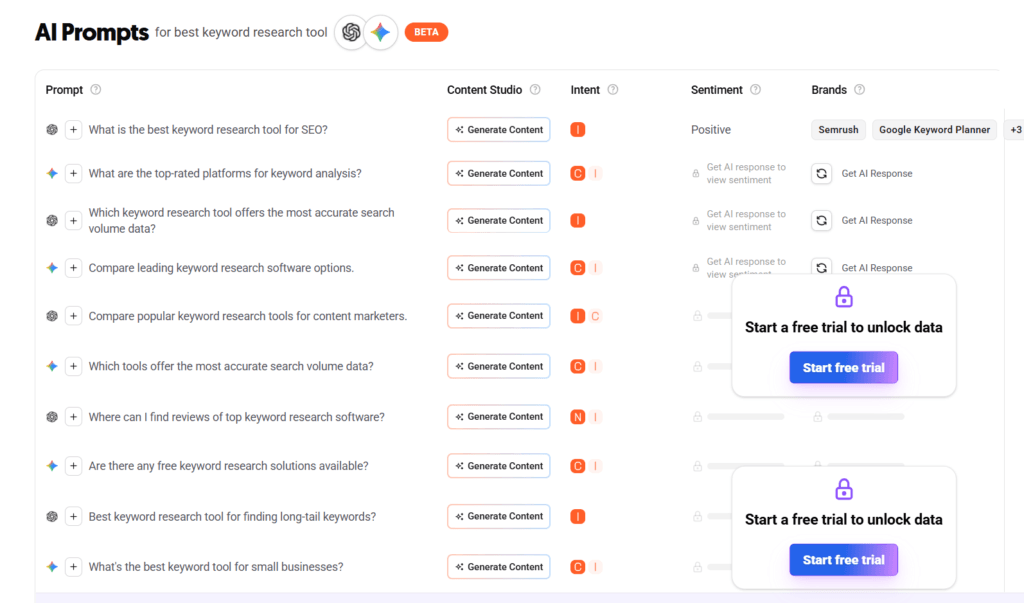
This is direct GEO and AEO intelligence. If understanding how your content topic surfaces in AI search environments is part of your content strategy — and it should be — Answer The Public now gives you that data at the most accessible price point on this list.
The Content Studio is another meaningful addition. A new AI content creation layer that lets you generate articles directly from your keyword research, optimized for AI traffic from ChatGPT, Google, and Claude.
Each plan includes monthly AI article credits (3 on Starter, 11 on Growth, 30 on Business), with WordPress publishing built in. For bloggers who want to move from keyword research to content creation without switching tools, this closes that workflow gap.
The traditional strengths are still intact. Organic search modifiers — questions (What, Which, Who, How), prepositions, and comparisons — are organized clearly with volume and CPC data alongside each term.
People Also Ask integration pulls real Google PAA questions directly into the research interface. Social Media keyword data covers YouTube and TikTok specifically, surfacing platform-specific content angles your audience is actively searching for.
And the Shopping section surfaces purchase-intent queries. This is particularly useful for affiliate marketers researching commercial keyword opportunities.
Best for:
Content strategists and bloggers who want multi-platform keyword intelligence covering Google, AI models, YouTube, TikTok, and Shopping in one tool.
Particularly valuable for anyone building a GEO or AEO content strategy, the AI Prompts section with sentiment analysis is the most accessible entry point into AI search intelligence on this list. Also, a strong fit for affiliate marketers who want to understand purchase intent and comparison queries at scale.
Honest limitation:
Answer The Public is not a deep keyword research platform in the traditional sense. It doesn’t match Semrush, Ahrefs, or Rank Tracker for keyword difficulty scoring, competitor gap analysis, or rank tracking.
It works best as a content ideation and multi-platform intelligence layer alongside a primary keyword tool, not as a standalone replacement for one. The free version is extremely limited, but serious use requires a paid plan.
Pricing (billed yearly):
14. Keyword Surfer (Chrome Extension)
Keyword Surfer is Surfer’s free Chrome extension. With over 700,000 daily users, it’s one of the most widely used browser-based keyword tools available today.
What makes it stand out from other browser extensions is the volume and usefulness of the data it surfaces directly in your Google search results, without requiring you to open a separate tool.
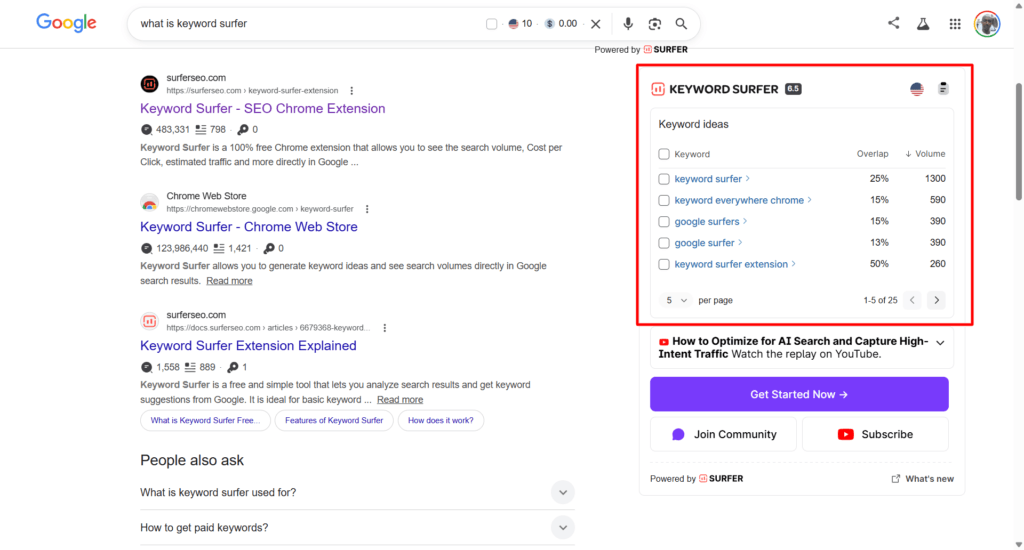
For each search you perform, Keyword Surfer shows you the search volume and CPC for your query, a full list of related keyword ideas with their own search volumes and overlap scores, estimated organic traffic for each URL ranking in the results, and the word count of competing pages. All visible without leaving the SERP.
One standout feature is the number of times your searched keyword actually appears in the ranking page. This is a very useful SEO content analysis feature for planning your own strategy.
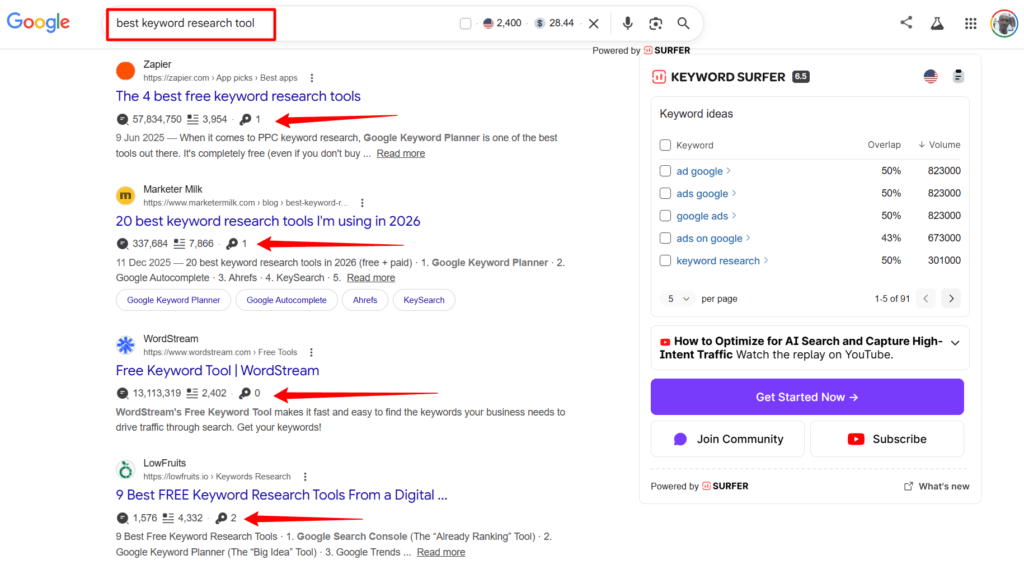
However, it considered the exact word, not your keyword variation or its plural.
The keyword collections feature lets you save keywords into organized folders and export them as CSV files — turning a passive browsing session into a structured keyword research workflow.
Data is available across 70+ countries, making it genuinely useful for international keyword research at no cost.
It’s worth noting that Surfer’s paid platform includes a built-in keyword research tool for subscribers, but the extension is the primary keyword tool most users will encounter, and it’s completely free regardless of whether you subscribe to Surfer’s paid plans.
Best for:
SEO professionals and content creators who want quick keyword data while browsing without switching between tools, researchers who want a zero-cost browser-based research layer to complement their primary keyword tool, and anyone who wants to quickly check competitor page metrics and keyword opportunities in real time.
Honest take on Surfer’s paid platform:
Surfer is primarily a content optimization platform — its Content Editor, AI writing assistant, and topical mapping tools are where it genuinely excels.
The built-in keyword research tool on paid plans is a supporting feature, not a comprehensive keyword research solution.
If you’re using SurferSEO for content optimization, the extension handles your keyword needs at zero cost. If you need deep keyword research capabilities, use a dedicated keyword tool from this list alongside it.
Pricing:
NOTE:
Discovery, Standard, Pro, and Peace of Mind are Surfer paid plans for access to the platform’s core features – Content Editor, Topica Map, Ask Sufy, SERP Analyzer, AI Humanizer, and more.
Which Keyword Research Tool is Right for You?
Every tool covered in this guide is a legitimate option for the right person in the right situation.
But “the right person in the right situation” is doing a lot of work in that sentence. The biggest mistake most people make when choosing a keyword research tool for SEO is picking based on popularity or marketing rather than fit.
Here’s a straightforward breakdown of which tool matches which situation. Find yours and start there.
You’re a blogger or affiliate marketer on a tight budget:
Start with Rank Tracker’s free plan. It gives you meaningful keyword research capability, including competitor analysis and keyword gap functionality, without spending a dollar.
Use it alongside Google Keyword Planner and Google Search Console to cover your bases completely for free.
When your site starts generating consistent revenue and you’re ready to invest in your tool stack, upgrade to Rank Tracker Professional at $179 per year.
At that price point, no SaaS tool on this list comes close to matching the features you get per dollar spent.
You run an SEO agency managing multiple clients
Your decision comes down to one question: do you need an all-in-one SEO platform, or just the best possible keyword rank-tracking and reporting tool?
If you need all-in-one keyword research, competitor analysis, site auditing, and rank tracking under one cloud-based roof, SE Ranking is your strongest option at this price tier.
It handles everything an agency needs, scales cleanly as your client roster grows, and delivers white-label reporting that presents professionally to clients.
For larger agencies with budgets for the industry’s best data, Semrush covers everything and then some, but be clear-eyed about the cost as your project count and tracked keyword volume grow.
You want the most comprehensive keyword database available
Semrush, no contest. 27.8 billion keywords, the most sophisticated filtering on the market, and the industry benchmark for data quality.
If your content strategy operates at scale and you need the deepest possible keyword intelligence, Semrush is the answer.
If Semrush’s pricing is a stretch, Ahrefs is the closest alternative. For some use cases, particularly those where click data and backlink-based difficulty scoring matter most, Ahrefs is a better choice.
You want premium data quality without premium pricing
KWFinder by Mangools hits a sweet spot that’s easy to overlook.
The keyword difficulty scoring is among the most accurate on the market. The interface is genuinely enjoyable to use, and the pricing is significantly more accessible than that of other competitors on this list.
For marketers who have outgrown free keyword research tools and want reliable paid data without a major budget commitment, KWFinder is the natural upgrade path.
You rely heavily on free tools and aren’t ready to pay yet
Build a free stack that covers the core bases. Use Google Keyword Planner for initial keyword discovery and CPC data, and Google Search Console for understanding what you already rank for.
Google Trends for seasonal and rising keyword intelligence, Ubersuggest for quick SERP-level keyword data and AI prompt visibility, and Answer The Public for content ideation and question-based keyword discovery.
This free keyword tool combination won’t match the depth of a paid tool, but it gives you enough to build and execute a legitimate content strategy before you’re ready to invest in a paid platform.
Competitor keyword research is your primary focus
Rank Tracker’s Keyword Gap tool is the most cost-effective option for systematic competitor keyword analysis.
For deeper historical competitor intelligence — particularly if PPC competitor analysis is part of your workflow — SpyFu adds a dimension no other tool on this list matches.
You run PPC campaigns alongside organic SEO
Semrush handles this workflow better than anything else on this list. SpyFu is worth adding as a specialist layer if competitor PPC intelligence is a priority.
You’re focused on content ideation and topic clustering
Answer The Public as your ideation and multi-platform intelligence starting point.
It surfaces question-based and AI prompt-driven content angles across Google, AI models, YouTube, TikTok, and Shopping simultaneously, feeding those ideas into whichever primary tool you use for volume and difficulty validation.
At $6.66/month on the Starter plan, it’s the most affordable entry point for AI search intelligence on this list.
You create seasonal or trend-driven content
Google Trends is non-negotiable as a permanent addition to your workflow.
Combine it with the commercial intent filtering in your primary keyword tool to identify which seasonal keywords have the highest revenue potential.
You’re already using Surfer for content optimization
Keep using it for what it does well — on-page content optimization after your keyword is selected.
The free Keyword Surfer extension handles your browser-based keyword needs at zero cost.
Add Rank Tracker or SE Ranking as your dedicated keyword research layer for deeper analysis.
How to Get the Most Out of Any Keyword Research Tool
Owning the right keyword research tool is only half the equation. How you use it determines whether it transforms your content strategy or sits underutilized in a browser tab.
These principles apply regardless of which keyword tool you choose from this list.
Start With Search Intent, Not Search Volume
Search volume is the metric most people look at first. And it’s the one that misleads most often.
A keyword with 50,000 monthly searches sounds far more attractive than one with 500, until you realize the high-volume keyword is driven by informational intent, while your content is built to convert.
Before you evaluate any other metric for a keyword, ask one question: What does the person searching this term actually want?
The answer determines whether that keyword can serve your goals, because no amount of search volume compensates for a mismatch between your content and the searcher’s intent.
Most tools on this list now classify intent directly; use that classification as your first filter, not an afterthought.
Use Keyword Gap Analysis Before You Plan New Content
Before you plan your next content batch, run a keyword gap analysis against your two or three closest competitors.
The result is a ready-made list of proven topics. Keywords that real searchers are already using, that competitors have already validated with their own rankings, and that your site isn’t yet targeting.
You skip the guesswork entirely and go straight to a prioritized list of opportunities grounded in real competitive data.
Run it quarterly at a minimum. Use it as the foundation of your content calendar rather than a supplementary research step.
Cluster Keywords Before You Write
Before you write any piece of content, pull the full list of related keywords around your primary target and group them by search intent and semantic similarity.
Keywords that share the same intent and address the same core question belong in the same article.
Keywords that represent meaningfully different questions belong in separate pieces that link to each other.
This keyword clustering approach does two things simultaneously:
Don’t Ignore Low-Volume Keywords With High Commercial Intent
A keyword with 200 monthly searches and strong transactional intent will generate more revenue than a keyword with 20,000 monthly searches and pure informational intent.
The 200-search keyword attracts people who are actively evaluating options and ready to make a decision.
When you evaluate keyword opportunities, filter by CPC alongside search volume — high CPC is a reliable proxy for commercial intent.
PRO TIP!
Prioritize the overlap: keywords with meaningful search volume, high CPC, and commercial or transactional intent.
That intersection is where commercial intent content earns.
Cross-Reference Two Tools for High-Competition Keywords
No keyword tool is perfectly accurate. For low-competition keywords where you’re making relatively low-stakes content decisions, one tool’s data is sufficient.
For high-competition keywords where you’re about to invest significant time and resources into content that needs to rank, relying on a single data source introduces unnecessary risk.
When a keyword represents a major content investment — a pillar article, a comprehensive review, a high-stakes affiliate post — cross-reference the data from your primary tool against a second source before committing.
Google Search Console and Google Keyword Planner are free cross-reference points available to everyone.
Track What You Target
Every keyword you consciously target in a piece of content should be tracked from the moment that content is published.
Without rank tracking, you have no feedback loop. You can’t identify which content needs optimization, which keywords you’re close to breaking onto page one for, or which pieces are significantly underperforming relative to their potential.
For a practical walkthrough on finding and acting on competitor keyword opportunities, see Methods to Find Competitors’ Keywords Using Rank Tracker.
Conclusion
The keyword research tool market is crowded, noisy, and deliberately confusing. Every platform claims to be the most accurate, the most comprehensive, and the best value.
After 14 years of blogging and affiliate marketing, the truth I keep coming back to is simpler than the marketing suggests:
PRO TIP!
The best keyword research tool is the one that matches where you are right now, what you’re trying to accomplish, and what you can realistically sustain in your workflow and budget.
If you’re an affiliate marketer, agency, SEO or business owner, building a content-driven business on a sensible budget, Rank Tracker is where I’d point you first.
The free plan gives you more than most paid tools offer at the entry level. The Professional license at $179 per year is the best value proposition in this entire list.
I’ve used it for nearly a decade, and it remains a permanent fixture in my SEO workflow.
If you run an agency or manage SEO for multiple clients and need a cloud-based all-in-one platform with reliable rank tracking, white-label reporting, and scalable pricing, SE Ranking is the strongest recommendation at its price tier.
It handles everything an agency workflow demands without the bloated pricing of enterprise platforms.
Start with the tool that fits your current situation. Use it consistently and deeply rather than switching between platforms in search of marginal improvements in data.
Build the feedback loop between your keyword research and your rank tracking so every content decision you make is informed by real performance data from your own site.
The keyword research process matters more than the tool you use to execute it. Get the process right, and almost any tool on this list will serve you well.