

Most SEO advice follows the same script: publish more content, build more links, wait longer.
I ignored all of it and grew CyberNaira’s organic traffic by 87.23% in 90 days without publishing a single new post.
No new articles. No link-building campaign. No social media push. Just a systematic audit of what was already on the site, a smarter approach to keyword research, and a disciplined process of updating existing pages.
The traffic growth brought more than just vanity metrics; it generated affiliate sales.
One page went from 1 affiliate sale in the previous 3 months to 6 in 90 days. Another converted two additional sales from a keyword I’d been sitting on without fully optimizing for.
These weren’t massive numbers, but they were proof that the process worked, and more importantly, that it was repeatable.
What made this organic traffic case study different from typical content optimization advice is one specific step most people skip: filtering keywords by commercial value before deciding which ones to target.
Not all traffic is worth chasing. A keyword with 5,000 monthly searches and zero buyer intent is less valuable to an affiliate blog than a keyword with 500 monthly searches and a $12 CPC.
That distinction (traffic volume versus traffic quality) is what the workflow in this article is built around.
This is a real experiment, run on a real blog, with real screenshots and real sales data. The methodology is documented step by step so you can apply it to your own site.
I’ve also added a 2026 update at the end covering what’s changed since the experiment and how the same process holds up in today’s SEO environment.
If you’ve got an existing blog with published content that isn’t performing as well as it should, this is the most efficient SEO investment you can make right now.
Section 1: The Starting Point: Running a Full Site Audit
Before touching a single piece of content, I ran a complete technical audit of the site using SEO PowerSuite’s Website Auditor.
This step is non-negotiable. Optimizing content on a technically broken site is like painting a house with a cracked foundation. The paint won’t save it.
The audit surfaced more issues than I expected on a blog I thought was in decent shape. Here’s what it found, and more importantly, how I decided what to fix and what to leave alone.
What the Audit Found
A broken 404 setup.
This was the most significant find. I had set up a custom 404 error page years earlier and completely forgotten about it.
The problem:
That page wasn’t returning an actual 404 HTTP status code. To Google’s crawler, those dead-end pages looked like live content, which meant the crawl budget was being spent on pages that should have signaled “nothing here.”
Fixing the status code was a one-time technical change with lasting benefits for crawl efficiency.
Pages with missing or empty meta descriptions.
A significant number of posts had no meta description.
While Google often writes its own snippets, leaving meta descriptions empty means you’ve handed Google full control over how your content appears in search results.
For affiliate pages where the snippet needs to communicate value and drive the click, that’s a conversion problem, not just an SEO problem.
Title tags that were too long.
Several pages had titles that exceeded 60 characters, so they were truncated in search results.
A truncated title isn’t just aesthetically wrong; it cuts off the part of your headline that might have contained the most compelling keyword or value proposition.
Broken images and empty alt tags.
Not a major ranking factor in isolation, but a signal of content quality and a missed opportunity for image search visibility.
Empty alt tags on a blog that covers SEO tools — where product screenshots are common — meant those images were contributing nothing to topical relevance.
Resources restricted from indexing.
The audit flagged several pages that were blocked from crawling. Some were intentional, such as admin pages, thank-you pages, and tag archives I’d deliberately excluded.
But a few were pages I’d noindexed during an earlier site cleanup and never re-evaluated. Worth checking, even if you don’t change them.
The More Important Skill: Knowing What Not to Fix
Website Auditor, like any SEO auditing tool, will return a long list of issues. If you chase every flag, you’ll spend weeks on technical fixes that move the traffic needle by nothing.
Here’s the filter I applied: does fixing this issue directly affect how Google crawls, indexes, or ranks my pages?
Using that question, I ignored:
This is outdated thinking. Linking out to authoritative, relevant sources is a sign of a well-researched piece, not a liability. I left every intentional dofollow external link in place.
Low word count warnings on certain pages.
The auditor flagged several short pages. But short pages that serve a clear, specific purpose, such as a tools page, a resources list, a contact page, don’t need padding to satisfy an arbitrary word count threshold.
Context matters more than length.
Duplicate meta description warnings across tag and category pages. These were already noindexed. Fixing meta descriptions on pages Google never sees is wasted effort.
The principle is simple:
Prioritize issues that affect crawlability, indexability, and click-through rate on pages that actually drive or could drive organic traffic. Everything else is optional.
One Honest Observation
After spending several hours working through the audit and fixing the priority issues, I re-ran the Website Auditor to verify the changes and check for anything I’d missed.
The on-page health score improved, but traffic didn’t move. Not immediately. Not even after a few weeks.
This is the part most SEO audit posts skip. Technical fixes are table-stakes; they remove obstacles, but they don’t generate traffic on their own.
You’re clearing the path. The traffic comes from what you do next. Which is where the keyword research process came in.
Section 2: The Keyword Strategy: Filtering for Profit, Not Just Traffic
This is the section that actually moved the numbers.
Many content optimization tips stop at Google Search Console: pull your existing search queries, find the keywords you’re ranking for on page two, and work them into your content.
That approach works, but it optimizes for traffic volume rather than traffic quality. For an affiliate blog, those are two very different targets.
A keyword with 8,000 monthly impressions and pure informational intent (someone researching how something works) will send traffic that reads and leaves.
A keyword with 800 monthly impressions and strong commercial intent (someone comparing options, seeking a discount, or ready to download) drives traffic that converts.
The second keyword is worth ten times more to the business, even though it looks smaller on paper. The workflow I used separates those two categories before you spend a single hour updating content.
Step 1: Pull Your Existing Search Queries from GSC
Open Google Search Console and navigate to Search Results under the Performance tab. Set the date range to the last three months.
Filter by page, your top 20 pages by impressions.
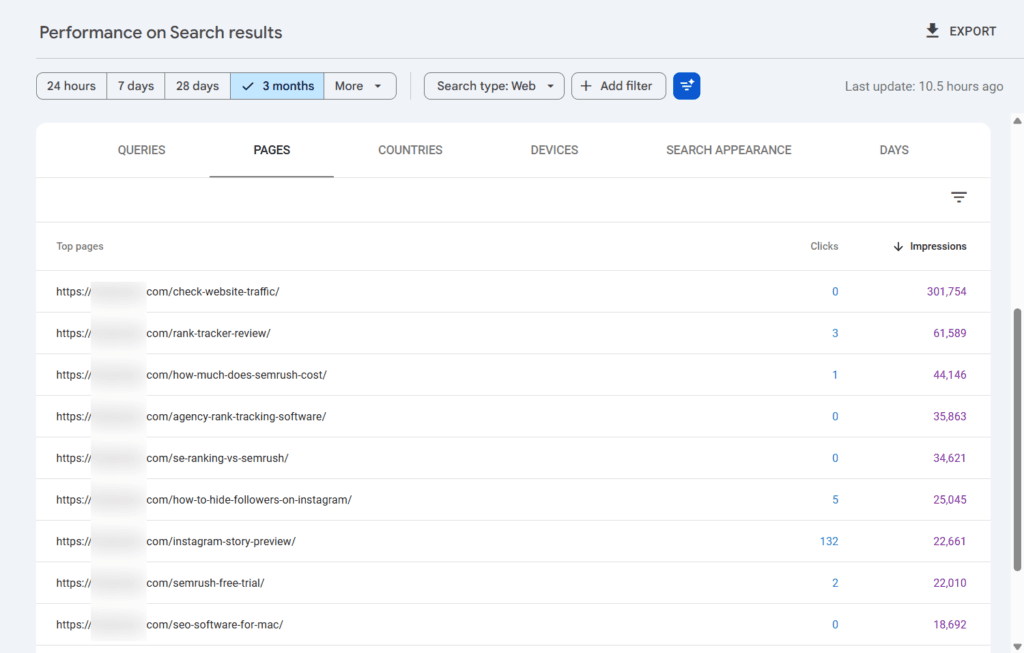
For each page, export the queries it’s already ranking for. These are search terms Google is already associating with your content.
You’re not guessing at relevance; Google has already told you what topics it connects to your page. That’s a significant head start over starting keyword research from scratch.
NOTE:
At this stage, you’re looking for queries where your page ranks 4–20 with meaningful impressions but low clicks.
These are pages Google finds relevant enough to show, but not strong enough to rank at the top, where clicks happen. They’re your optimization targets.
Step 2: Run Those Queries Through a Keyword Research Tool: Don’t Just Paste Them Into Your Content
Here’s where the workflow diverges from standard advice.
Instead of immediately updating the page with the GSC queries you’ve found, take each query into a keyword research tool. I used SEO PowerSuite’s Rank Tracker to run a full keyword analysis.
The goal is to understand the commercial value of each keyword before committing to it. For each query, I evaluated four data points:
CPC (Cost Per Click).
This is the single most reliable signal of commercial intent available in keyword data. CPC reflects what advertisers are willing to pay to appear for that keyword.
A keyword with a $0.10 CPC is informational — advertisers don’t pay much because the searcher isn’t buying.
A keyword with a $4–20 CPC means advertisers are competing for that audience because they convert. For an affiliate blog, you want to target the latter.
Keyword Difficulty.
How competitive is the keyword? A high-value keyword you can’t realistically rank for in the next 90 days isn’t worth optimizing for right now.
Filter for keywords where your current position and domain authority give you a realistic path to the top five.
Search Volume.
Not the primary filter, but relevant in combination with the others. A keyword with high CPC and low difficulty but zero search volume isn’t worth targeting either.
Look for the intersection of commercial intent, achievable difficulty, and sufficient volume.
Google Trends curve.
Before finalizing a keyword, check its trend direction.
A keyword in decline is a shrinking opportunity, even if the current volume looks reasonable. A keyword trending upward means the traffic you earn compounds over time as the topic grows.
For evergreen revenue-focused content, you want stable or rising trend curves, not seasonal spikes or downward slopes.
What This Looked Like in Practice
The first keyword I ran through this process was “SEO PowerSuite free license“. A query appears in my GSC data for an existing affiliate review page.
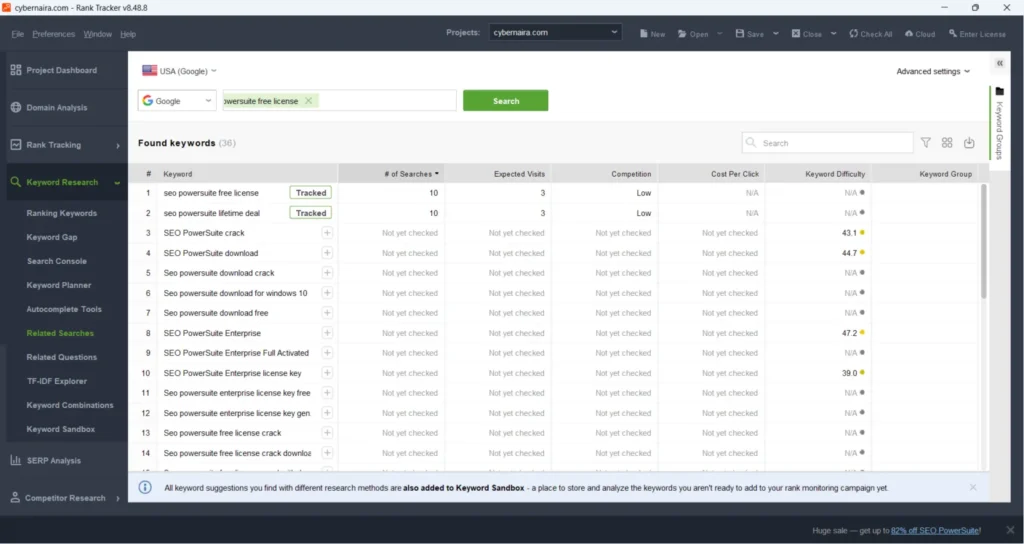
The Rank Tracker analysis showed a low CPC. The search intent was clear: someone looking for free software. They’re not buyers.
Optimizing heavily for that keyword would bring in traffic that reads the page and leaves without converting.
I noted it, but didn’t make it the primary optimization target for that page.
The more valuable queries on that same page were those with higher CPC signals — terms indicating the searcher was evaluating the product rather than trying to avoid paying for it. Those became the optimization focus.
The second keyword I analyzed was “WP Rocket coupon” — pulled from GSC data for a separate affiliate page.
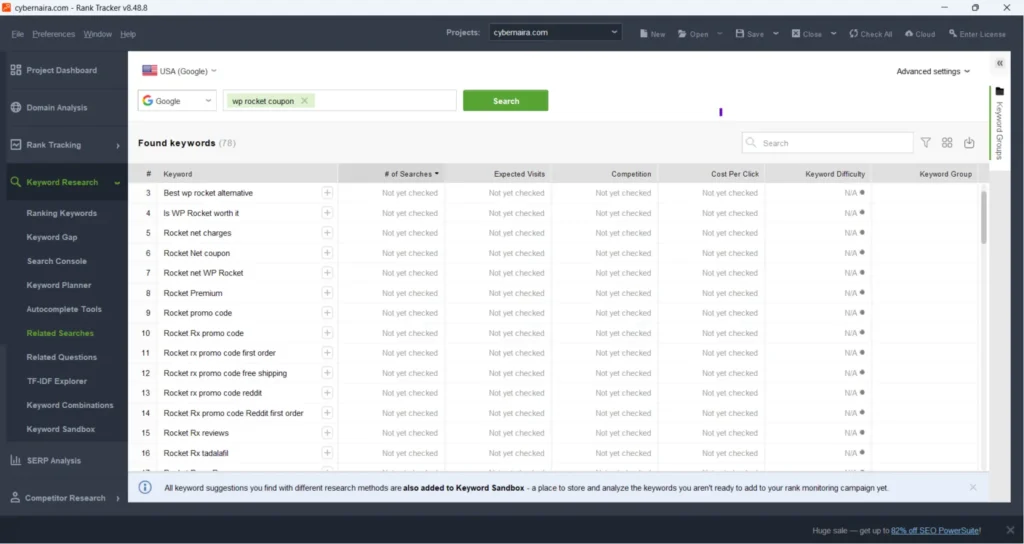
The CPC was meaningful. The search intent was transactional — someone actively looking for a discount before purchasing.
Keyword difficulty was manageable given the page’s existing position. The trend curve was stable. That’s the combination worth targeting.
Updating that page with supporting keywords around that core intent led directly to two affiliate sales in the following month.
The Decision Framework in Plain Terms
After running through this process across multiple pages, the criteria that determined whether a keyword was worth targeting came down to this:
A keyword is worth optimizing for when its CPC (Cost-Per-Click) reflects buyer or evaluator intent.
A difficulty level that your current rankings make achievable, stable or rising trend data, and enough volume to move the needle on impressions and clicks.
A keyword is not worth optimizing for, regardless of volume, when the CPC is near zero, the intent is purely informational, and there’s no realistic conversion path for your monetization model.
Running this filter before updating a single page saved hours of work on content changes that would have driven traffic but generated no revenue.
It also concentrated the optimization effort on the pages and keywords most likely to impact the bottom line, which is why the affiliate sales followed the traffic growth so quickly.
Section 3: The 20% Rule: Which Pages Did the Work
Here’s something that surprised me when I reviewed the data at the end of the 90 days.
CyberNaira had 75 published posts at the time of this experiment. Of those 75, roughly 15 — about 20% — were responsible for nearly all of the organic traffic growth. The remaining 80% contributed almost nothing to the numbers that moved.
This isn’t a CyberNaira anomaly. It’s one of the most consistent patterns in content marketing, and it has a name: the Pareto distribution.
On most blogs, a small minority of pages drive the overwhelming majority of organic traffic. The rest exist, get crawled, consume index budget, and deliver little in return.
Understanding which 20% your blog is built on — and why — is more valuable than any tactical SEO advice, because it tells you exactly where to concentrate your effort.
What the Top Pages Had in Common
When I looked at the 15 pages driving the growth, they shared several characteristics that the underperforming 80% didn’t.
They targeted specific, search-ready queries. The top-performing pages weren’t written around broad topics; they were written around specific questions or problems that searchers actually type into Google.
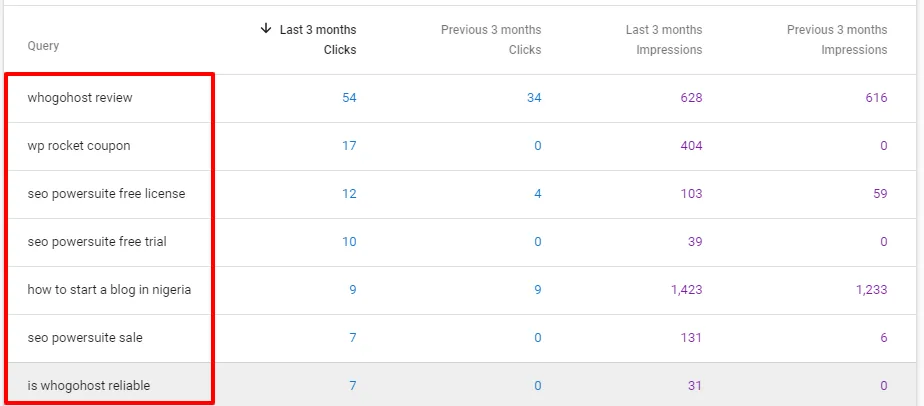
“SEO PowerSuite sale,” “WP Rocket coupon,” “WhoGoHost review” — these are queries with clear, identifiable intent.
The underperforming pages tended to be broader, more generic, or written around topics the audience cared about but didn’t search for in those exact terms.
They had commercial or strong informational intent. Every page in the top 20% was either a review, a comparison, a coupon/discount page, or a how-to guide tied to a specific tool/product or outcome.
These formats attract searchers who are mid-funnel or further along — people evaluating options, seeking validation, or ready to take action.
The bottom 80% leaned heavily toward awareness-stage content: general blogging tips, broad SEO concepts, motivational posts about consistency and mindset. Useful, but not traffic-generating in any meaningful volume.
They were already ranking — just not at the top. None of the high-growth pages were new.
They were existing pages that Google had already associated with relevant queries — sitting at positions 5–20 with impressions accumulating but clicks lagging.
The optimization process didn’t introduce them to Google; it pushed them up the rankings Google had already tentatively assigned them.
They had a clear affiliate or monetization connection. This matters for prioritization.
Of the 15 pages that drove growth, the ones I optimized most aggressively were the ones with the highest revenue potential — affiliate review pages, discount pages, and comparison posts.
Traffic to those pages converts. The how-to guides drove impressions and readers; the commercial pages drove sales.
How to Find Your 20% Right Now
You don’t need to guess which pages are in your top 20%. The data is sitting in Google Search Console.
Open your Performance report and sort pages by clicks, not impressions. Impressions show you what Google is willing to show. Clicks show you what’s actually earning attention.
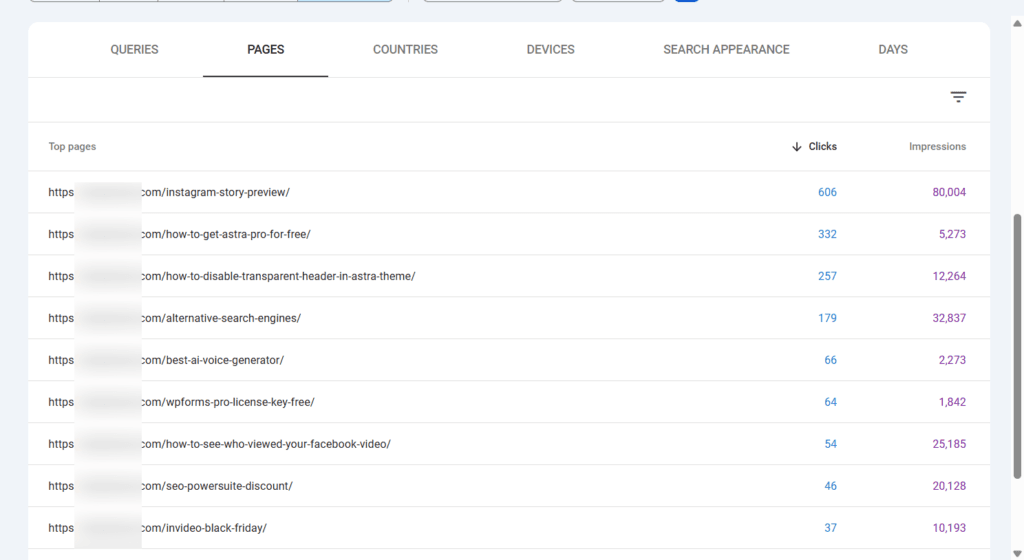
The pages at the top of your clicks list — even if the numbers feel modest — are your proven performers. They’ve earned Google’s trust for specific queries and the searcher’s click. Those are the pages worth doubling down on first.
Then look one level deeper: the pages with high impressions and low clicks. These are your hidden assets — pages Google is already showing to thousands of searchers, but that aren’t compelling enough to earn the click consistently.
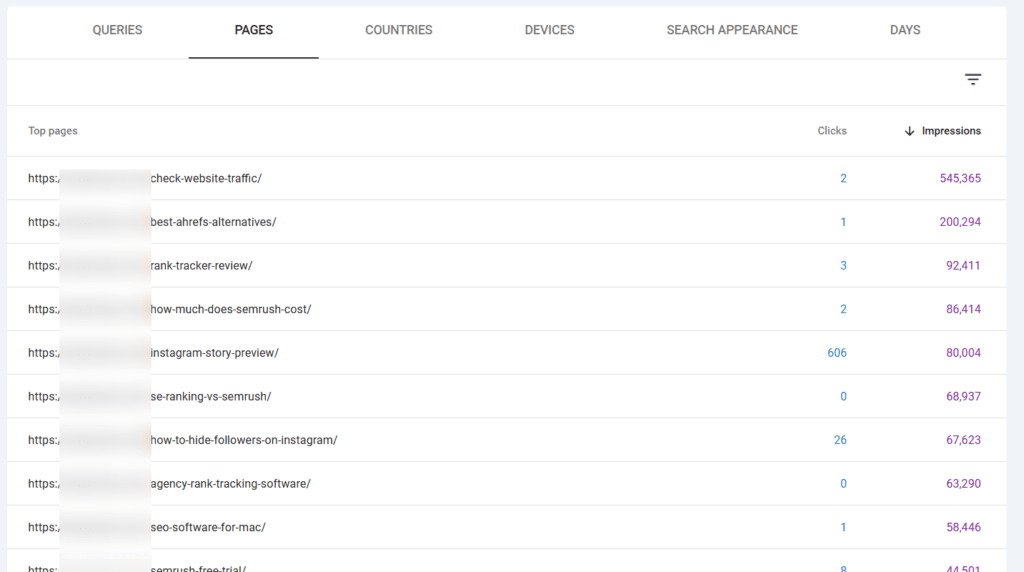
They almost always have one of two problems: a weak title tag and meta description, or a ranking position that’s close to page one but not quite there. Both are fixable without creating new content.
The pages with low impressions and low clicks are a different category entirely. Before investing optimization effort there, ask whether the page targets a keyword anyone is actually searching for.
Many of them don’t. They’re written around topics the author found interesting, not queries with search demand. Those pages are candidates for consolidation, not optimization.
The Practical Takeaway
Before planning your next content calendar, run this exercise: open GSC, pull your top 20 pages by clicks, and identify the three to five with the most room to improve — either in ranking position or CTR. Those are your optimization priorities.
Everything else is secondary until those pages are performing at their ceiling. A blog with 200 published posts doesn’t need post 201; it needs its best 20 posts to rank where they’re capable of ranking.
That shift in focus, from content production to content performance, is the single mindset change that made the 90-day results possible.
Section 4: The Content Update Process
Finding the right keywords is only half the work. The other half is knowing exactly where and how to integrate them into existing content without making the page feel like it’s been keyword-stuffed by a 2012 SEO plugin.
This section documents the exact update process I applied to each page — what changed, where it changed, and the logic behind each decision.
Start With the Meta Title and Description
Before touching the body content, I updated the meta title and meta description on every page I was optimizing. This is the highest-leverage change you can make to an existing page, and it’s the most consistently overlooked.
Here’s why it matters so much:
Your meta title is what Google displays in search results. If you’re ranking position 6 for a valuable keyword but your title doesn’t speak directly to that keyword’s intent, searchers skip you for a result that does.
You can earn a ranking without earning the click, and a click is what actually matters.
For each page, I rewrote the meta title to naturally include the primary keyword, front-loaded the most important information, and kept it under 60 characters to prevent truncation.
For commercial pages — reviews, discount pages, comparisons — I added specificity: the product name, the year, and a value signal where possible.
Meta descriptions got the same treatment. I stopped writing them as summaries of what the post contains and started writing them as pitches for why the searcher should click.
The searcher’s job is to decide between ten results. Your meta description is your 160-character argument for why your result is the right one.
Update the Introduction to Reflect the Target Keyword
The opening paragraph of a blog post carries disproportionate SEO weight. It’s one of the first things Google’s crawler reads to understand what the page is about — and it’s one of the first things a reader scans to decide whether to keep reading.
For every page I updated, I rewrote the introduction to naturally include the primary keyword and at least one closely related secondary keyword within the first 100 words.
Not forced. Not repeated. Just naturally. The way you’d naturally use those terms if you were explaining the topic to someone out loud.
I also tightened introductions that were taking too long to get to the point.
A blog post introduction that spends three paragraphs explaining why the topic matters before saying anything useful loses readers immediately. Short, direct, and keyword-present in the opening paragraph.
Add or Rewrite Subheadings to Target Secondary Keywords
Subheadings — H2s and H3s — are among the most underused SEO assets in existing content.
They tell Google how a page is structured and what subtopics it covers. They also create the entry points for featured snippets and People Also Ask boxes.
For each page, I reviewed every subheading against the list of related keywords I’d identified in Rank Tracker.
Where a subheading was generic — “How It Works,” “Key Features,” “Our Thoughts” — I rewrote it to include a specific keyword phrase that matched how searchers would actually phrase that question.
For example, a subheading like “What You Get With the Free Plan” becomes “What Does SEO PowerSuite’s Free Version Include?” — which is closer to an actual search query and more likely to trigger a PAA appearance.
I didn’t stuff every subheading with keywords. I updated the ones where a natural, search-aligned alternative existed. Since the original subheading was already descriptive and specific, I left it as is.
Expand Thin Sections With Keyword-Relevant Content
This is where the additional paragraphs came in, but with a specific purpose rather than just adding words for length.
For each target keyword and its semantic variations, I determined whether the existing page adequately addressed that topic.
In most cases, there were gaps: a keyword the page was ranking for in GSC that wasn’t directly addressed in the content, only implied. A searcher landing on the page would have to hunt for the answer rather than finding it immediately.
For each gap, I added a focused section — one to three paragraphs — that addressed that specific query directly. The writing matched the existing tone and style of the page.
It wasn’t appended to the bottom; it was inserted in the logical position where a reader would expect to find that information.
This matters because Google doesn’t just check whether a keyword appears on a page; it evaluates whether the page actually answers the query comprehensively.
A page that mentions a term without substantively addressing it ranks lower than one that treats the term as a topic.
Update Internal Links
Every page update included a review of internal links, both those pointing to the updated page and those linking out from it.
For inbound links:
I identified two to three related posts on the site that could naturally link to the page being updated, and added or strengthened those internal links with anchor text that included the target keyword.
Internal links from topically related pages are one of the fastest signals you can send Google about a page’s relevance.
For outbound links: I updated any internal links that pointed to outdated or irrelevant pages, and where the content referenced tools or tactics, I linked to the most relevant deep resource on the site rather than a generic category page.
For outbound links:
I updated any internal links that pointed to outdated or irrelevant pages, and where the content referenced tools or tactics, I linked to the most relevant deep resource on the site rather than a generic category page.
Re-index Immediately After Every Update
After completing each page update, I used the URL Inspection tool in Google Search Console to request re-indexing. Don’t skip this step.
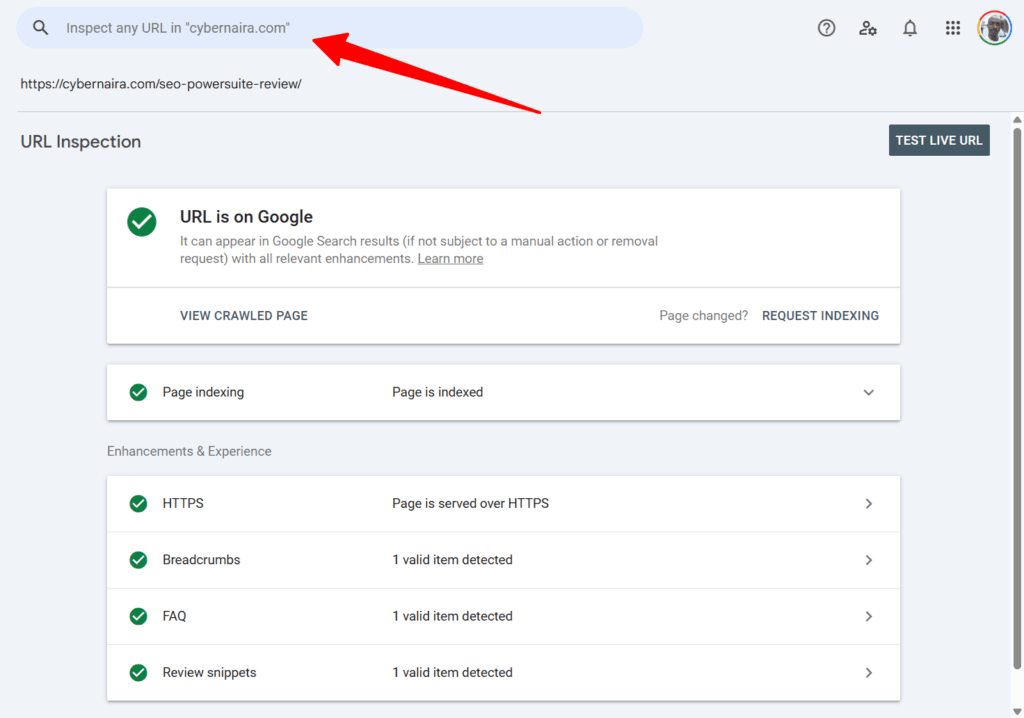
Google crawls on its own schedule, which can mean days or weeks before updated content is re-evaluated. A manual re-index request puts the page in the priority crawl queue.
In most cases, I saw updated rankings within three to seven days of submitting the request, significantly faster than waiting for natural recrawl.
The process is straightforward: paste the updated URL into the URL Inspection tool, check that Google can access the page, and click Request Indexing.
What I Didn’t Do
I didn’t rewrite pages from scratch unless the existing content was genuinely poor.
Full rewrites are time-consuming and risky. You can inadvertently remove content that was contributing to rankings you weren’t aware of.
Targeted updates are lower risk and, in most cases, equally effective.
I didn’t add keywords in unnatural positions to hit a target density. Keyword density as a metric died a long time ago.
The goal is topical completeness — does the page address the topic well? — not keyword frequency.
And I didn’t update every page on the site. The process was applied only to the pages identified in the GSC analysis as having commercial value and realistic ranking potential.
Spreading the effort thin across 75 posts would have produced nothing. Concentrating it on 10–12 pages produced measurable results within 90 days.
Section 5: The Results — Traffic and Sales
Numbers without context are just numbers. Here’s what the data showed, what it meant, and what it didn’t mean.
Search Impressions
The first signal came from Google Search Console impressions. The metric that shows how often your pages appeared in search results, regardless of whether anyone clicked.
Over the 90-day experiment period, total SERP impressions increased from 69,800 to 92,300 — a gain of 22,500 impressions. That’s a 32% increase in the frequency with which CyberNaira’s pages appeared in Google search results.
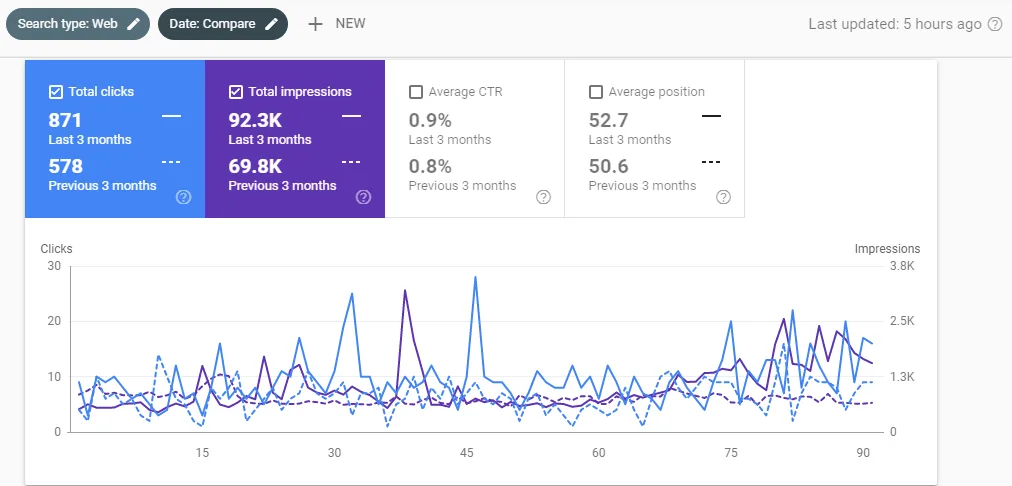
Impressions alone don’t pay the bills. But this number mattered as a leading indicator; it confirmed that the keyword optimizations were working.
Google was associating the updated pages with more search queries, indicating the content was perceived as more topically relevant and comprehensive than before the updates.
Organic Traffic
The Google Analytics report told the more important story: an 87.23% increase in organic search traffic over the same 90-day period compared to the previous three months.
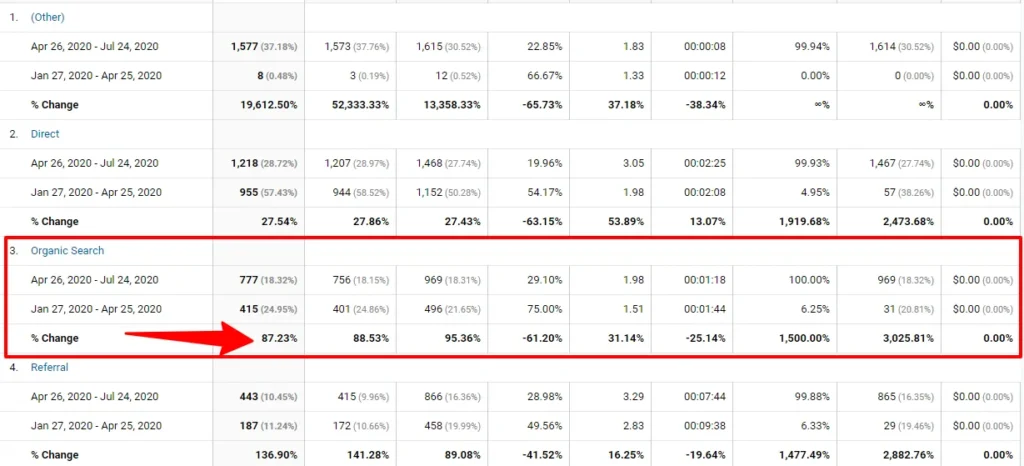
To be clear about what this means in practice: roughly double the number of visitors arriving from Google search. Not from new posts, from the same pages that existed before, updated with a more intentional keyword strategy.
One observation from the data: organic traffic growth didn’t happen in isolation. Direct traffic increased by 27.54% over the same period, and referral and social traffic also improved.
This is a pattern worth understanding. When a site’s organic visibility increases, Google starts seeing it as more authoritative overall, which tends to lift performance across channels.
More organic traffic signals stronger user engagement signals, which feed back into rankings, which drive more traffic. The compounding effect is real.
Affiliate Sales: Where the Traffic Translated to Revenue
This is the number that validated the entire approach.
SEO PowerSuite review page: In the three months before the experiment, it generated 1 affiliate sale. In the 90 days following the keyword optimization, it generated six, including 3 sales in a single month.
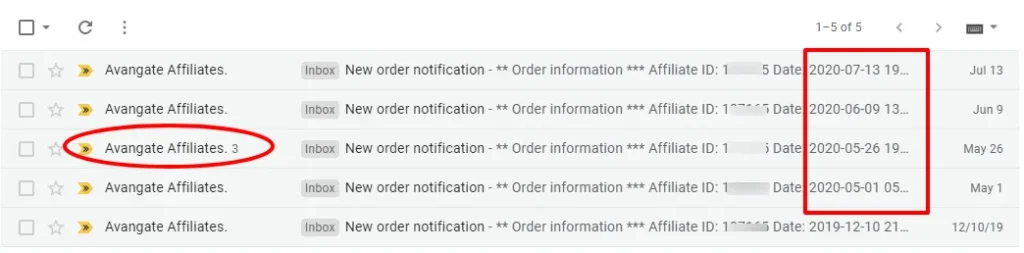
The change wasn’t a redesign, a new offer, or a traffic surge from a viral post. It was the same page, now ranking for higher-commercial-intent keywords and attracting visitors in evaluation mode rather than research mode.
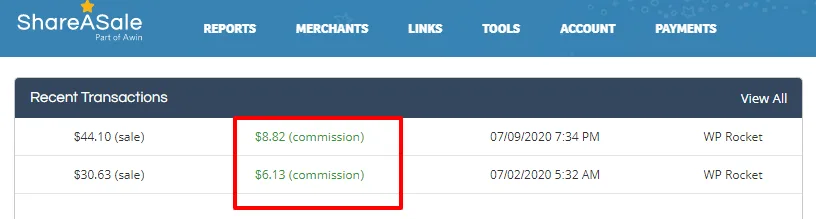
The keyword targeting shift, from broad WP Rocket queries to transactional discount and coupon queries, changed the quality of traffic the page received.
NOTE:
These aren’t life-changing numbers on their own. But they demonstrate something more important than the sales figures themselves: the revenue impact of traffic quality versus traffic volume.
Both pages received more traffic after the optimization. But the revenue moved because the new traffic was different — more intent-aligned, closer to the purchase decision, more likely to click an affiliate link.
A page optimized for commercial intent earns more than its traffic increase would suggest. That’s the core lesson the affiliate data reinforced.
Honest Context on the Numbers
These results came from a blog with 75 published posts, an established domain active since 2012, and pages already in Google’s index with some existing ranking history.
A brand-new blog running the same process would see different timelines — technical fixes and keyword updates take longer to register on a site with no prior ranking signals.
The 87.23% figure is also a percentage, not an absolute traffic number. A 87% increase from a small baseline is a different outcome than the same percentage from a large one.
The value of this experiment isn’t the specific number; it’s the methodology that produced it, which scales with whatever traffic level you’re starting from.
What the percentage does confirm: the process works, it works within a 90-day window, and it works without creating a single piece of new content.
Section 6: What Didn’t Work
Most case studies stop at the results. This one doesn’t, because what failed during the experiment is as instructive as what succeeded.
Technical Fixes Alone Did Nothing to Traffic
This was the first lesson, and the most important one to internalize before starting any SEO experiment.
After spending several hours running the site audit, fixing the 404 status code issue, correcting meta descriptions, updating title tags, cleaning up broken images, and re-running the audit to verify the changes, traffic didn’t move.
Not the following week. Not the following two weeks.
The on-page health score in the Website Auditor improved. The technical errors were resolved. And Google continued sending the same traffic it had been sending before.
This isn’t a knock on technical SEO. Those fixes were necessary and contributed to the foundation on which later improvements were built.
But technical SEO removes obstacles; it doesn’t create momentum. A site with no crawl errors and no compelling content ranks for nothing. The fixes cleared the path. The keyword work is what drove the traffic down.
If you’re planning to run this process on your own site, don’t make the mistake of expecting technical improvements to show up in your traffic dashboard.
Run the audit, fix the priority issues, and move immediately to content optimization. The results come from the second phase, not the first.
Optimizing for High-Volume, Low-Intent Keywords
Early in the keyword research phase, I identified several queries in GSC with substantial impression counts. The instinct was to optimize for those first — more impressions meant more potential traffic.
The Rank Tracker analysis quickly put an end to that approach. Several of the highest-impact queries had near-zero CPCs, indicating purely informational intent with no commercial value.
Optimizing the page for those keywords would have increased traffic without increasing revenue and possibly diluted the page’s relevance to the higher-intent keywords already converting.
The lesson:
Impression volume is a distraction if you’re running a monetized blog that doesn’t depend on AdSense. CPC is the filter. deep impressions plus low CPC means you’re attracting researchers, not buyers
For an affiliate site, that traffic doesn’t move the income needle regardless of how much of it you generate.
Trying to Rank Pages Against Their Natural Ceiling
Not every page in the experiment responded to optimization. A handful of pages that looked promising in GSC — decent impressions, middle-of-page-two positions — didn’t move despite keyword updates, meta rewrites, and re-indexing requests.
Looking back, the common thread was competitive keyword difficulty that exceeded what the individual pages could overcome without significant link equity.
The pages targeted keywords, with the top five results dominated by high-authority domains with hundreds of backlinks pointing to those pages. Content updates alone couldn’t bridge that gap.
This is an important constraint to accept before starting: keyword optimization works best on pages where the gap between your current position and the top five is primarily a content and relevance problem, not a link authority problem.
When the gap is authority-driven, content optimization is at best a partial solution.
Spreading Effort Across Too Many Pages at Once
Early in the process, I started optimizing more pages simultaneously than was practical. The result was a lot of shallow updates — a few keyword insertions here, a subheading tweak there. This didn’t produce meaningful improvements on any individual page.
The shift that changed the outcome was the concentration of effort. Fewer pages, updated more thoroughly.
A page that gets a complete treatment — meta rewrite, introduction rewrite, subheading optimization, content expansion, internal link additions, and re-indexing — outperforms ten pages that each get one or two surface-level changes.
Depth of optimization on a small number of high-potential pages beats shallow optimization spread across your entire archive.
This is the same 20% principle applied to the work itself — concentrate your effort where the return is highest and resist the temptation to touch everything at once.
Section 7: 2026 Update — Does This Still Work?
The experiment documented in this article was run in 2020. The SEO landscape has changed significantly since then. Google’s algorithm, the search results page itself, and the competitive environment all look different.
This section addresses what’s changed, what hasn’t, and how to apply the same methodology in the current environment.
The Core Process Is Still Valid
The fundamental workflow — site audit, fix technical issues, extract GSC data, filter keywords by commercial value, update existing pages, re-index — works in 2026.
The logic behind it hasn’t changed because the underlying principle hasn’t changed: Google rewards pages that are technically sound, topically comprehensive, and aligned with search intent.
Those three things were true in 2020, and they’re true now.
The tools are still relevant, too. Google Search Console remains the most accurate source of keyword data for your own site. No third-party tool has access to the query-level data it provides.
The Rank Tracker CPC and difficulty analysis is still a sound way to filter commercial value before committing optimization effort to a keyword.
What has changed is the context in which those tools operate. Applying the same process without accounting for current conditions produces weaker results than it would have five years ago.
What’s Changed — And What It Means for This Process
Google’s Helpful Content System has raised the bar on content depth and first-hand experience.
The Helpful Content Updates rolled out between 2022 and 2024 specifically targeted content written primarily for search engines rather than readers. Sites that had optimized heavily for keywords without demonstrating genuine expertise took significant ranking losses.
For this methodology, the implication is that content updates now need to go deeper than keyword insertion.
When you expand a section to address a keyword gap, the expansion needs to reflect real knowledge and experience — not generic filler padded with target phrases.
Google’s systems are increasingly capable of distinguishing between content that addresses a topic because the author knows it, and content that addresses a topic because a keyword tool said so.
If you’re updating a product review page, the expansion should come from firsthand use of the product. If you’re updating a how-to guide, the additional sections should reflect steps you’ve actually taken.
E-E-A-T — Experience, Expertise, Authoritativeness, Trustworthiness — is no longer an abstract framework. It’s a practical filter on what content changes will actually produce ranking improvements.
AI Overviews are changing which keywords are worth targeting.
Google’s AI Overviews now appear at the top of results for approximately 40% of informational queries, reducing click-through rates by answering the question directly on the page.
This reinforces the commercial intent filter from Section 2, but goes further.
In 2026, the keyword priority hierarchy looks like this: transactional and commercial investigation queries (reviews, comparisons, discount pages, tool evaluations) are your highest-value targets.
AI Overviews rarely appear for these because they require subjective judgment and first-hand assessment.
Informational queries that require comprehensive, experience-backed answers are still worth targeting because Google tends to cite sources rather than fully replace them.
Pure definitional or factual queries — “what is X,” “how does Y work” — are increasingly answered without a click and are lower priority for traffic-generation purposes.
Run your GSC keyword list through this filter before deciding what to optimize for. The CPC signal from Rank Tracker still works, but layer the AI Overview likelihood on top.
GA4 has replaced Universal Analytics. The Google Analytics interface in the original screenshots no longer exists.
Universal Analytics was sunset in July 2023 and replaced with GA4, which reports traffic data differently — sessions, engaged sessions, and engagement rate have replaced sessions, pageviews, and bounce rate as the primary metrics.
The workflow is the same; you’re still looking for organic traffic trends by page and comparing before/after periods. But the navigation path and the metric names differ.
In GA4: Reports → Acquisition → Traffic Acquisition, then filter by the Session default channel group = Organic Search. For page-level data: Reports → Engagement → Pages and Screens, with the same organic filter applied.
GSC now surfaces more actionable data than it did in 2020.
The Search Console Performance report has become significantly more useful since the experiment was run.
The Insights tab now proactively surfaces content opportunities. The Search appearance filters let you separate performance on AI Overviews, web results, and image results independently.
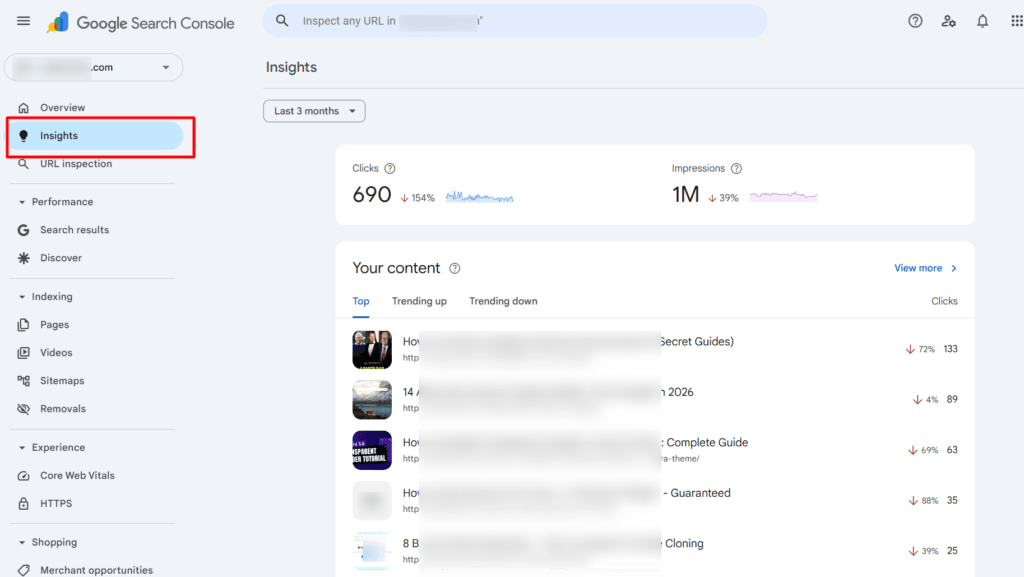
And the date comparison feature makes before/after analysis more straightforward than in the older interface.
One addition worth using that wasn’t available in 2020: the GSC keyword data now includes more granular position tracking.
When you identify a keyword stuck at position 8–15, you can track it week by week after an optimization without needing a third-party rank tracker for basic monitoring.
Use Rank Tracker for the profitability analysis and GSC for ongoing position monitoring after updates.
The competitive environment is more saturated, which makes this approach more valuable, not less.
AI-generated content has flooded search results since 2022. A significant portion of it is technically optimized but experientially thin, written around keyword patterns without firsthand knowledge behind it.
Google’s systems are actively working to demote it, but the sheer volume means competition for rankings has increased across most niches.
The counterintuitive result:
Content that demonstrates genuine first-hand experience now stands out more clearly than it did in 2020, precisely because so much of what it’s competing against doesn’t.
An existing page on your site — written from personal experience, updated with current keyword targeting and deeper content — has a structural advantage over AI-generated competition that can’t replicate your direct experience with the products and tactics you cover.
The methodology in this article was designed to optimize real content for real commercial intent. In 2026, that combination will be more differentiated than it was five years ago.
What to Add to the Process in 2026
Two additions to the original workflow that reflect current conditions:
Check for AI Overview presence before prioritizing a keyword.
For any high-impression query you’re considering optimizing for, run a live Google search and note whether an AI Overview appears.
If it does and your page is purely informational, factor in a lower expected CTR even if you rank well. Reprioritize toward queries where AI Overviews are absent or limited.
Add an E-E-A-T audit to your content update checklist.
For each page you update, ask: Does this page demonstrate that the author has direct experience with this topic? Is there firsthand data, personal results, original screenshots, or a named author with verifiable expertise?
If the answer is no, the content update should include at least one of these elements — not as decoration, but as substantive proof of experience that makes the content worth ranking above alternatives that lack it.
Conclusion
Three lessons from this experiment are worth carrying into your own SEO work.
First: existing content is an underused asset. Most bloggers default to publishing new posts when traffic stalls.
The faster, more efficient path, especially for blogs with an established archive, is to make what you already have perform better.
The 90-day results in this experiment came entirely from pages that already existed. New content wasn’t the constraint. Optimization was.
Second: traffic quality beats traffic volume every time.
The affiliate sales didn’t come from the highest-impression pages; they came from the pages optimized for commercial intent.
Third: concentration outperforms coverage. Shallow updates spread across 50 pages produce nothing. Deep, systematic updates on 10–12 high-potential pages produce measurable results within 90 days.
The tools used in this experiment — Website Auditor for the technical audit, Rank Tracker for keyword profitability analysis, Google Search Console for query data, and the URL Inspection tool for re-indexing — are all still part of my active SEO workflow in 2026.
The process has been refined since the original experiment, but the core sequence hasn’t changed because the underlying logic remains sound.
If you want to run the same process on your site, SEO PowerSuite offers the Website Auditor and Rank Tracker in a single package, with a free plan to get started.



Yeah! Shamsudeen, that’s a nice post. I also tried SEO Powersuite too and it works pretty fine because I was able to know some SEO blunders that held my website from ranking.
After fixing the errors, I researched for a good keyword that was easy for me to rank for and I started getting traffics and now I have more keywords ranking in search engine.
Now I am encouraged to work hard because the result is obvious.
Many of us are not sure if their website is working or not. SEO Powersuite will help you.
Thanks Ikenna,
I’m glad to read you also find SEO Powersuite very helpful SEO tools. Thanks for your valuable input and for sharing your experience here.
Nice post. it’s helpful for me.
Hey! Shamsudeen
Looks good, having useful information it’s help me lot.
Thank you for sharing this Shamsudee.
Hey Shamsudeen,
That’s a nice post. Thanks for sharing the important details.
SEMrush is the best tool to do SEO. I use it only for competition and keyword research.
Hi Ashutosh,
Glad to read you also find SEMrush a helpful SEO tool. Thanks for reading through.
Well said, useful blog! The only problem is whenever i tr to implement all these it doesn’t works. Will try these this time. Thanks Shamsudeen!
Hi Sambit,
Let me if this works for you this time, thanks for reading through.
Thanks, this article was helpful
You provided a great piece of informaiton about Organic Search Traffic thanks
Glad you find the post useful, Habib.
Hi Shamsudeen, i also tried Website Auditor it is really working effectively but the information you shared in this post was also very large and contains all the stuffs i want, thanks for sharing the information.
Hi Ketty,
Glad to read you find something you want in this post, I’m happy to have helped in one way or the other. Thank you.
What other keyword tool can I use sir?
Hi Abubakar,
Rank Tracker is good, or you can start with the Google keyword planner. Like Google keyword planner, Rank Tracker also have a free plan. Hope this helps?
Hi Shamsudeen,
I really felt where good by reading these article we can gain more knowledge about traffic as these article was very helpful for me.
Thank you shamsudeen
Hi Kasturi,
Thanks for reading through. Good to read you again more knowledge after reading this.
See you other times.
Traffic is very important for each & every website. It is very necessary to improve organic search results. This post is very helpful. Thank you for posting.
Hi Ridzi,
Thanks for reading through, glad you liked it.
Hii,
Great blog post!
This is Awesome blog post about how to improve organic search traffic. This blog helps me to increase my website organic traffic.
Thanks a lot for posting content for free.
Thanks for sharing this insight, personally I love doing my SEO with google tools like trends.google for keyword research, and search console for my site analysis more than depending on third party.
Hi, John,
Glad to read you find this post helpful, also love the Google SEO and keyword tools mentioned here. Thanks.
A wonderful article which is very useful and if we follow these guidelines, I am sure we will rank our website higher in SERP. Thank you for publishing this blog.
This is a well detailed content for anyone who wants to grow their website
Hi, Joe,
Thanks for reading through, glad you like it.
Thanks this article is helpful