

If you’ve been waiting for the right time to buy WP Rocket, its 2026 Black Friday sale gives you a good reason to stop waiting.
WP Rocket is offering up to 60% off its WordPress caching and performance optimization plugin during its Black Friday and Cyber Monday promotion. You can save 40% on a one-year license or 60% on a three-year license.
The promotion runs from November 5 through December 2, 2026.
Plus, every discounted license includes free access to Rocket Insights, WP Rocket’s built-in performance monitoring and optimization guidance tool.
Whether you manage one WordPress blog, several client websites, or hundreds of websites, there’s a license that fits your needs.
Here are the important details:
WP Rocket Black Friday Deals 2026: Pricing and License Comparison
WP Rocket currently offers five license options, ranging from a single-site license to a plan covering up to 500 websites.
You can choose between a one-year subscription with 40% off or a three-year license with 60% off.
Here’s a breakdown of the promotional prices.
3-Year License: Save 60%
The three-year license offers the biggest discount during this year’s WP Rocket Black Friday sale.
Instead of paying the regular monthly equivalent, you get 60% off and lock in the promotional rate for three years.
| License | Websites | Regular monthly equivalent | Black Friday price |
|---|---|---|---|
| Single | 1 | $5.00 | $1.95/mo |
| Plus | 3 | $10.00 | $3.91/mo |
| Multi | 50 | $25.00 | $9.79/mo |
| Multi | 100 | $33.33 | $12.99/mo |
| Multi | 500 | $50 | $19.59/mo |
All three-year licenses are billed upfront for the full 36-month period. Monthly prices are equivalent rates, not monthly installment payments.
The three-year deal is particularly attractive if you manage multiple WordPress websites or run an agency.
For example, the 500-website license costs just $19.59 per month when calculated over three years. That’s a significant saving compared with purchasing individual licenses for multiple websites.
1-Year License: Save 40%
If you don’t want to commit to three years, you can choose a one-year license and still enjoy a 40% discount.
Here are the promotional prices:
| License | Websites | Regular monthly price | Sale price |
|---|---|---|---|
| Single | 1 | $5.00 | $3.00/mo |
| Plus | 3 | $10.00 | $6.00/mo |
| Multi | 50 | $25.00 | $15.00/mo |
| Multi | 100 | $33.33 | $20.00/mo |
| Multi | 500 | $50.00 | $30.00/mo |
One-year licenses are billed annually. The monthly prices above are equivalent rates.
Which WP Rocket Black Friday License Should You Buy?
Your choice depends on how many WordPress websites you manage and how long you intend to use the plugin.
Here’s my recommendation:
If you already know you’ll use WP Rocket for the next three years, I’d recommend taking advantage of the 60% discount.
You get a much lower monthly equivalent and avoid paying the higher one-year promotional rate every year.
WP Rocket Features You Get With Your License
WP Rocket has grown beyond a basic WordPress caching plugin.
It now combines caching, file optimization, media optimization, database cleanup, CDN integration, and performance monitoring in one dashboard.
Here are some of its most important features.
1. Automatic Page Caching
Page caching is one of WP Rocket’s most important features.
Without caching, WordPress typically processes PHP scripts and queries the database whenever someone visits a page. This takes time and consumes server resources.
WP Rocket creates static HTML versions of your website pages and serves those cached versions to visitors instead of processing every request from scratch.
This reduces server processing time and helps your website respond faster.
WP Rocket automatically enables page caching after activation. You don’t need to configure complicated settings to benefit from it.
2. Cache Preloading
Cache preloading ensures visitors receive cached versions of your website pages before they visit.
WP Rocket can automatically rebuild your cache after you publish or update content.
It also supports sitemap-based cache preloading, allowing the plugin to discover and prepare pages listed in your XML sitemap.
This is particularly useful for content-heavy websites that publish articles frequently.
3. CSS and JavaScript Optimization
Large CSS and JavaScript files can slow your website, especially when browsers must process unnecessary resources before displaying page content.
WP Rocket provides several options to optimize these files.
You can:
These options help reduce render-blocking resources and improve loading performance.
However, be careful when enabling file optimization features. Some themes and plugins may depend on particular CSS or JavaScript files to function correctly.
Test your website after changing these settings to avoid breaking important features.
4. Lazy Loading for Images, Videos, and Iframes
Images, videos, and embedded content can increase page size and loading time.
WP Rocket’s LazyLoad feature delays loading offscreen images and other supported media until visitors scroll close to them.
This reduces the amount of content the browser needs to load immediately.
You can apply LazyLoad to:
WP Rocket also provides critical image optimization to detect and prioritize important above-the-fold images.
This helps avoid lazy-loading the main image responsible for your Largest Contentful Paint (LCP).
5. Automatic Lazy Rendering
Automatic Lazy Rendering is another useful performance feature.
It lets the browser prioritize rendering elements visitors can currently see, rather than rendering everything on a page immediately.
This can help improve responsiveness and reduce unnecessary rendering work. It’s particularly useful for pages with complex layouts and multiple content sections.
6. Database Optimization
Over time, your WordPress database accumulates unnecessary information.
This may include:
WP Rocket includes database optimization tools that help you clean up these records and optimize database tables.
You can clean up manually or schedule automatic database maintenance.
Before running database cleanup, always maintain a recent backup of your website.
7. Browser Caching and GZIP Compression
WP Rocket configures browser caching so returning visitors can reuse previously downloaded website resources. This reduces the need to download the same files repeatedly.
It also supports GZIP compression, which reduces the size of supported files transferred between your server and visitors’ browsers.
Together, these features help improve website loading speed and reduce unnecessary resource transfers.
8. CDN Integration and RocketCDN
If your website serves visitors from different countries, a content delivery network (CDN) can help reduce latency.
A CDN distributes website resources across multiple servers, allowing visitors to download files from locations closer to them.
WP Rocket supports third-party CDN integration, including Cloudflare. It also provides RocketCDN, its own content delivery network.
A key addition to the current offer is RocketCDN access for three pages, with unlimited bandwidth across 10 edge locations.
This is a useful extra for website owners who want to improve content delivery without configuring a separate CDN service for those pages.
9. Rocket Insights: Built-In Performance Monitoring
Rocket Insights is one of the notable additions to the WP Rocket experience.
It’s a built-in performance hub that helps you monitor important website pages and understand what needs improvement.
Rather than simply enabling optimization settings and hoping they work, you can use Rocket Insights to:
The best part is that Rocket Insights is included free with your WP Rocket license. You don’t need to purchase a separate performance monitoring subscription to access it.
10. eCommerce Optimization
WP Rocket also supports popular WordPress eCommerce setups.
If you operate a WooCommerce store, you don’t want caching to interfere with shopping cart functionality, customer sessions, or checkout processes.
WP Rocket automatically excludes sensitive eCommerce pages from caching to help prevent these problems.
This allows you to improve website performance without compromising the shopping experience.
11. Cloudflare, Varnish, and Sucuri Integration
WP Rocket provides add-ons that make it easier to integrate your caching setup with other performance and security services.
Supported integrations include:
You can manage these integrations from the WP Rocket dashboard instead of configuring everything manually.
This is particularly helpful if you already use Cloudflare or another supported service to manage website performance and security.
Why Should You Buy WP Rocket During Black Friday?
There are several reasons to consider purchasing WP Rocket during this year’s Black Friday promotion.
You Get a 60% Discount
The most obvious reason is the price reduction.
A 60% discount on a three-year license makes WP Rocket considerably cheaper than purchasing the same license at its regular price.
If you’re planning to use the plugin for several years, this is a good opportunity to reduce your website maintenance expenses.
You Don’t Need Advanced Technical Skills
WP Rocket is designed for WordPress users who want better website performance without spending hours configuring complicated caching settings.
Most core optimizations apply automatically after activation.
You can also customize individual settings as your technical knowledge improves.
It Helps Improve Core Web Vitals
Website performance is an important part of the user experience.
Google uses Core Web Vitals to evaluate aspects of website loading performance, responsiveness, and visual stability.
WP Rocket includes several optimization features that can help improve these metrics.
For example:
However, WP Rocket cannot guarantee a particular PageSpeed Insights score or Core Web Vitals result.
Your hosting environment, website design, images, third-party scripts, and other technical factors also influence performance.
It Works With Popular WordPress Themes and Plugins
Compatibility is important when choosing a caching plugin.
You don’t want a performance optimization tool that breaks your website’s design or interferes with other plugins.
WP Rocket is designed to work with popular WordPress themes, plugins, and hosting environments.
It also supports common eCommerce and multilingual WordPress setups.
You Get Professional Support
Every paid WP Rocket license includes access to customer support and product updates for the duration of its active license.
If you experience configuration problems or need help troubleshooting an issue, you can contact the WP Rocket support team through your account.
This is useful, particularly if you’re not comfortable troubleshooting caching and optimization problems yourself.
How to Claim the WP Rocket Black Friday Discount
You don’t need a special coupon code to claim the 2026 WP Rocket Black Friday offer. You can get the promotional pricing through the official pricing page by clicking through our affiliate links.
Follow these steps:
Step 1: Visit the WP Rocket Black Friday offer page.
Click here to visit the official WP Rocket pricing page.

Step 2: Choose your license duration.
You’ll see two options: one-year and three-year licenses. Select the three-year option for the maximum 60% discount.
Choose the one-year option if you prefer a shorter commitment.
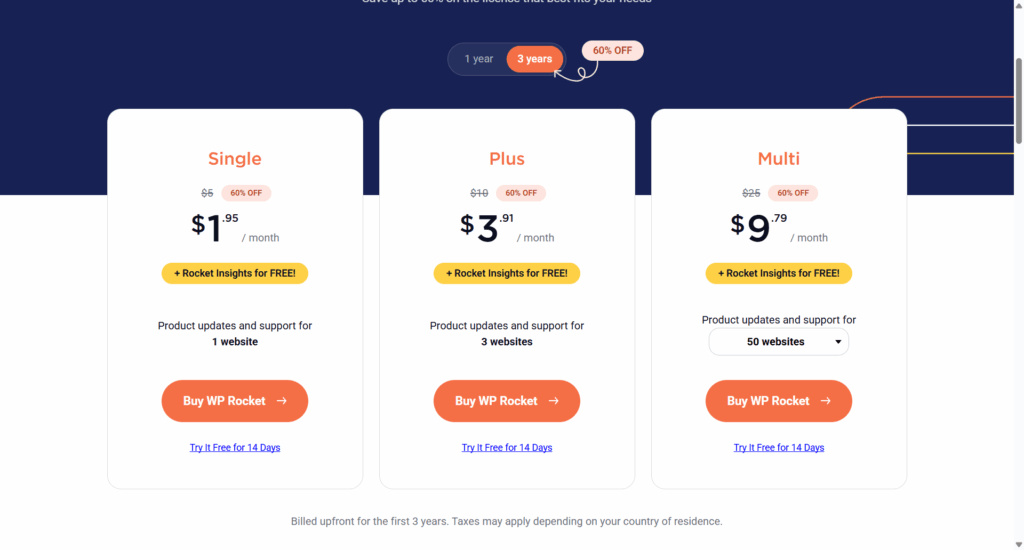
Step 3: Select your preferred license.
Choose the plan that matches the number of WordPress websites you manage.
For example, select Single for one website, Plus for three websites, or one of the Multi licenses if you manage more websites.
Step 4: Complete your purchase.
Follow the checkout instructions and enter your customer and payment information.
Review the final price before placing your order. The corresponding discount reflectes in the promotional pricing automatically
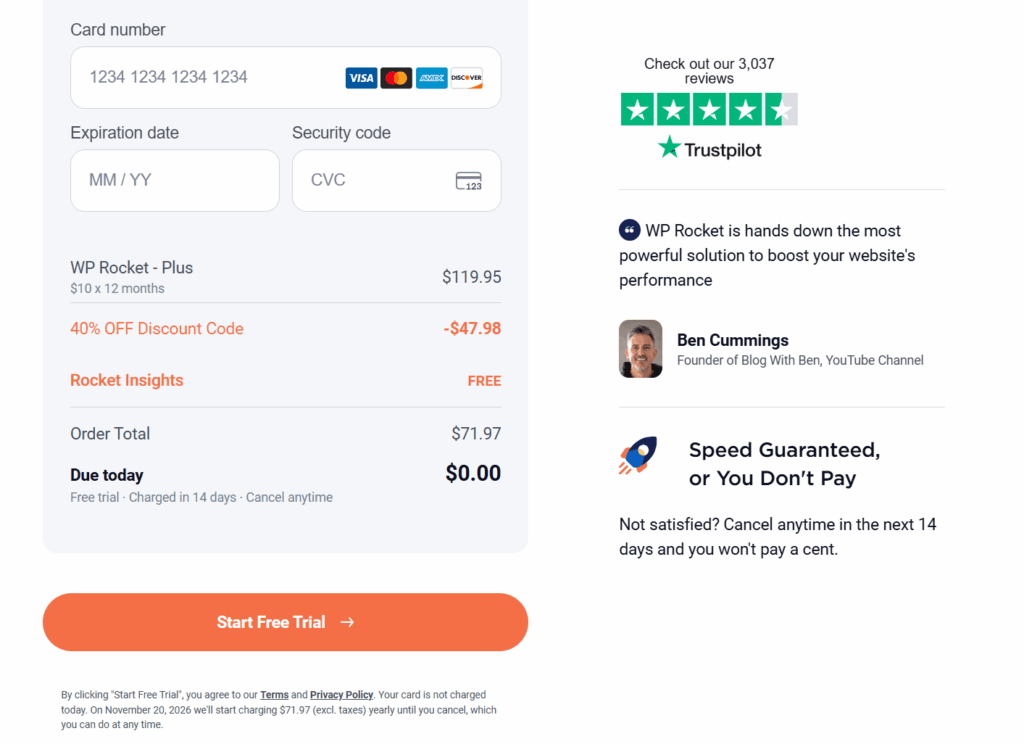
Once your purchase is complete, you’ll receive instructions on how to access and download WP Rocket. This needs you to log into to your WP Rocket account dashboard, and download the plugin in a Zip file.
Step 5: Install and activate WP Rocket.
Log in to your WordPress dashboard, navigate to Plugins, and upload the WP Rocket plugin you download earlier in the Zip file.
Activate it. WP Rocket automatically confirm license in the background, no need to enter license key. Your website will start benefiting from WP Rocket’s automatic optimization settings.
Does WP Rocket Offer a Free Trial?
Yes. WP Rocket currently offers a 14-day free trial, allowing you to test its performance optimization features before committing to a paid license.
You can install the plugin, activate it, and evaluate how it performs on your WordPress website. The trial is free for 14 days.
One important thing to understand is that the trial requires a payment method. You won’t be charged, and you will get a reminder before the trial ends.
If you don’t want to continue, just cancel before the trial expires to avoid being charged.
WP Rocket Black Friday Sale: Frequently Asked Questions
Final Verdict: Is the WP Rocket Black Friday Deal Worth It?
If you use WordPress and want an easier way to improve your website’s loading performance, WP Rocket is worth considering.
Its automatic caching, CSS and JavaScript optimization, LazyLoad, database cleanup, cache preloading, and Rocket Insights features make it a useful performance optimization tool.
The 2026 Black Friday promotion makes the purchase even more attractive.
You can save 40% on a one-year license or take up to 60% off a three-year license.
I recommend the three-year option if you already know you’ll keep using WP Rocket. The lower monthly equivalent makes it the better long-term value.
However, if you only want to test the plugin or aren’t ready for a longer commitment, the one-year option still gives you a respectable 40% discount.
Don’t wait until the last minute. The promotional offer ends on December 2, 2026.



Thank you for the sale update on WP Rocket. I was already subscribed to their Single Site License but needed the 3-Site License. Thanks to your update, I saved 25% of my money.
Good to read that, Yasar.
I’ve been using the plugin for some time, WP Rocket has been one of the best investments I’d made recently.
Thanks.
Great article! I’ve been thinking about getting WP Rocket for my personal website, and Black Friday seems like the perfect time. Do you know if there are any active coupons or extra discounts available right now? Would love to grab the best deal possible. Thanks!
Hi, Tasnim,
There’s no active discount or coupon for WP Rocket currently. I’ll update this post when one is available.
Thank you.