Thinkific subscription is straightforward on the surface – three plans, clear monthly prices, no transaction fees. Simple enough.
But dig a little deeper, and the picture gets more interesting. There’s a surcharge from the payment processor that might catch you off guard.
The free plan is gone. And some features you’d expect on entry-level plans are locked behind higher tiers.
None of this means Thinkific is a bad deal. Far from it. But walking in with the full picture saves you from surprises down the road.
This guide breaks down every Thinkific pricing plan and fee – Basic, Start, Grow, and Plus – including what you get, what’s missing, and who each plan actually suits.
I’ll cover all the fees (including the ones Thinkific doesn’t exactly advertise upfront), and help you figure out which plan makes sense for where you are in your business.
By the end, you’ll know exactly what Thinkific will cost you, not just the headline price, but the real number.
Thinkific Pricing Plans (Full Breakdown)
Thinkific currently offers four plans: Basic, Start, Grow, and Plus. The first three have fixed public pricing on both monthly and annual billing.
Plus is an enterprise-level plan with custom pricing you negotiate directly with the Thinkific sales team.
Here’s the full picture at a glance:
| Plan | Monthly | Annual (per month) | Annual savings |
|---|---|---|---|
| Basic | $54 | $40 | $173/yr |
| Start | $109 | $82 | $330/yr |
| Grow | $219 | $164 | $660/yr |
| Plus | Custom | Custom | — |
Now let’s go through each plan in detail.
Basic Plan – $54/month (or $40/month billed annually)
Basic is Thinkific’s entry-level paid plan and a solid starting point if you’re launching your first course or testing the platform with a small audience.
You get unlimited courses, one community, five coaching and webinar sessions, five digital downloads, landing pages, email automation, and instant access to your revenue as it comes in.
You have access to 1 course admin account. A custom domain is also included, so your course site looks professional from day one.
What I like about Basic is that the unlimited courses allowance removes the ceiling that holds back many entry-level plans on competing platforms. You’re not forced to upgrade just because your catalogue grows.
That said, Basic has some meaningful gaps. No certificates, no assignments, no Zoom integration, no memberships, and no payment plans for students.
If any of those are important to your course business – and for most creators, they will be eventually – you’re looking at the Start plan.
Best for:
Beginners launching their first online course, creators testing Thinkific before committing to a higher-tier plan, or anyone who primarily sells standalone courses without subscriptions or live integrations.
Start Plan – $109/month (or $82/month billed annually)
Start is where Thinkific’s feature set opens up significantly, and for most active course creators, it’s the plan that makes the most practical sense.
On top of everything in Basic, you get:
You can also create and sell course bundles, which is a meaningful revenue lever once you have multiple products.
The CSS/HTML access is worth calling out specifically. It gives you real design control over your course site, not just colour pickers and template options, but actual code-level customisation.
That matters if you’re running a branded learning business rather than a generic course site.
One thing Start doesn’t include is advanced analytics. You’ll get the basics, but deeper reporting is reserved for Grow.
Bulk student emailing is also absent at this tier.
Best for:
Creators who are past the launch stage and building a real course business, especially those selling subscriptions, running live coaching, or needing a more professional site design.
Grow Plan – $219/month (or $164/month billed annually)
Grow is built for established creators and small teams who need more operational control and deeper data.
The standout additions over Start are:
The white-label capability (removing Thinkific’s branding from your course site) is a significant step up if you’re selling to corporate clients or running an academy where your own brand needs to be front and centre.
The API access also opens the door to custom integrations beyond what the App Store offers.
The Thinkific price jump from Start to Grow ($82/month on annual billing) is real, and it’s only worth making if you’re actively using the analytics, need the extra admin accounts and B2B tools, or have a specific need for white-labelling.
Don’t upgrade just because your revenue is growing; upgrade when you hit a specific limitation.
Best for:
Established course creators, small teams, and businesses running branded academies that need white-labelling, deeper reporting, and multi-admin support.
Thinkific Plus – Custom pricing
Plus is Thinkific’s enterprise tier, designed for large organisations, companies running internal training, or high-volume course businesses with complex requirements.
It includes everything in Grow, plus:
Companies like Shopify, Samsung, and Hootsuite have used Thinkific Plus for employee training and customer education programs.
Pricing is negotiated with Thinkific’s sales team based on your specific needs and scale.
Best for:
Enterprise teams, large organizations running internal learning programs, or high-volume course businesses that have outgrown the standard plans.
Thinkific Fees – What They Don’t Advertise Upfront
Thinkific’s headline claim is “0% transaction fees,” and technically, that’s accurate.
Thinkific doesn’t take a cut of your course sales. But that doesn’t mean selling on Thinkific is free. And this is where many creators get caught off guard.
Here are all the fees you need to know about.
The Platform Transaction Fee (0%) – What It Actually Means
When Thinkific says no transaction fees, they mean Thinkific itself won’t deduct a percentage from your sales. You keep 100% of what students pay, before payment processing costs.
This is genuinely a strong position compared to platforms like Teachable, which charges up to 7.5% on lower-tier plans.
But Thinkific’s % figure only tells part of the story, because the payment processor you use introduces its own costs, and on Thinkific, that choice matters more than you might realise.
The Stripe/PayPal Surcharge
This is the one that catches creators out.
If you connect your own Stripe or PayPal account to Thinkific instead of using their built-in payment system (TCommerce), Thinkific applies an additional surcharge on every transaction.
The rate depends on your plan:
| Plan | Surcharge (own Stripe/PayPal) |
|---|---|
| Basic | 5% per transaction |
| Start | 2% per transaction |
| Grow | 1% per transaction |
| Plus | 0% |
Stack that on top of Stripe’s standard 2.9% + $0.30 per transaction, and the real cost adds up fast:
| Plan | Stripe fee | Thinkific surcharge | Total per transaction |
|---|---|---|---|
| Basic | 2.9% + $0.30 | 5% | ~7.9% + $0.30 |
| Start | 2.9% + $0.30 | 2% | ~4.9% + $0.30 |
| Grow | 2.9% + $0.30 | 1% | ~3.9% + $0.30 |
To put that in real numbers. If you’re on the Basic plan and doing $3,000/month in course sales through your own Stripe account, that 5% surcharge alone costs you $150 per month, or $1,800 per year. On top of Stripe’s standard processing fees.
That’s not a hidden fee in the legal sense. Thinkific does disclose it. But it’s not prominently surfaced during signup, and many creators only discover it on their first payout.
The surcharge currently applies to creators in the US, Canada, the UK, and the EU. It applies to your first $1 million in annual sales through third-party processors, after which Thinkific waives it.
The fix is straightforward: switch to TCommerce, Thinkific’s built-in payment processor, and the surcharge disappears entirely. More on that below.
TCommerce – How It Eliminates the Surcharge
TCommerce is Thinkific’s native payment and selling system, powered by Thinkific Payments.
Using it instead of your own Stripe or PayPal account removes the surcharge and replaces it with a standard processing fee in line with what Stripe charges anyway, around 2.9% per transaction, depending on your location and payment method.
Beyond just avoiding the surcharge, TCommerce unlocks a suite of selling tools that aren’t available with third-party processors:
TCommerce availability depends on your country.
If you’re based in a country outside the supported regions, you’ll use Stripe or PayPal directly. The surcharge won’t apply to you either, since it’s currently limited to the US, Canada, UK, and EU.
Standard Payment Processing Fees
Regardless of whether you use TCommerce or your own Stripe/PayPal, standard payment processing fees apply to every transaction.
These are charged by the processor, not Thinkific:
These are industry standard and unavoidable across virtually every course platform.
Cross-Border Fee
Thinkific is a Canadian company. If your card is issued outside the US, your bank or card network (Visa, Mastercard, or Amex) may charge a small cross-border or international transaction fee on your monthly Thinkific subscription.
This is typically under $1 and appears separately on your statement. Thinkific doesn’t charge this fee; your card issuer does.
Mobile App Add-On – $199/month
Thinkific offers a branded mobile app that lets your students access your courses on iOS and Android under your own branding.
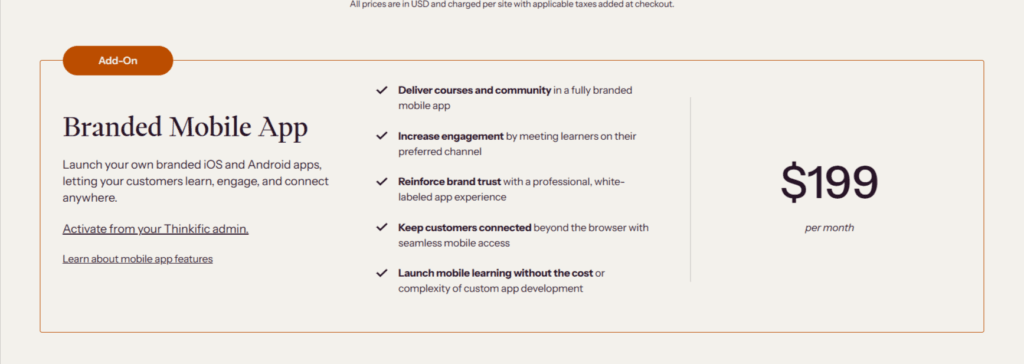
It’s a premium add-on, not included in any standard plan, and at $199/month on top of your existing plan fee, it’s a high extra cost.
On the Start plan ($99/month), adding the mobile app brings your total to $298/month.
On Grow, it’s $398/month. It’s worth it if your audience primarily learns on mobile and a branded app experience is a genuine business differentiator for you.
It’s not worth it if you’re just ticking a box.
Video Bandwidth Limits
Each plan also caps how much video your students can actually watch per month, not just how much you can upload.
| Plan | Video bandwidth |
|---|---|
| Basic | 100 GB/mo |
| Start | 200 GB/mo |
| Grow | 400 GB/mo |
| Plus | Starting at 7,500 GB/mo |
This is measured in student viewing, not storage, so it scales with how many people watch your videos and how often, not how many videos you’ve uploaded.
For most creators with a modest student base, this won’t be an issue. But if you’re teaching video-heavy courses (think hours of HD lessons) and building an audience quickly, it’s worth keeping an eye on, especially on Basic.
Thinkific doesn’t advertise what happens if you exceed the cap prominently at signup, so if your course is primarily video and your student count is growing fast, factor this into which plan you start on.
Third-Party App Costs
Thinkific’s App Store has 80+ integrations, and many of them are free.
However, some premium integrations, such as email marketing tools, advanced analytics, and specific CRM connections, carry their own subscription fees charged directly by the app provider.
These aren’t Thinkific fees, but they’re real costs to factor into your total platform spend.
The Real Cost Summary
Here’s what Thinkific actually costs per month at $3,000/month in course revenue, depending on how you set it up:
| Setup | Plan fee (annual) | Processing fees | Monthly total |
|---|---|---|---|
| Basic + TCommerce | $40 | ~$87 (2.9%) | ~$127 |
| Basic + own Stripe | $40 | ~$237 (2.9% + 5% surcharge) | ~$277 |
| Start + TCommerce | $82 | ~$87 | ~$169 |
| Start + own Stripe | $82 | ~$147 (2.9% + 2% surcharge) | ~$229 |
| Grow + TCommerce | $164 | ~$87 | ~$251 |
The takeaway is simple:
If you’re in a supported country, use TCommerce. The surcharge on Basic alone makes TCommerce the obvious financial choice at any meaningful revenue level.
The 10,000 Student Cap
Here’s something that doesn’t get enough attention in most Thinkific pricing and fees articles: all three standard plans (Basic, Start, and Grow) share the same 10,000 student limit.
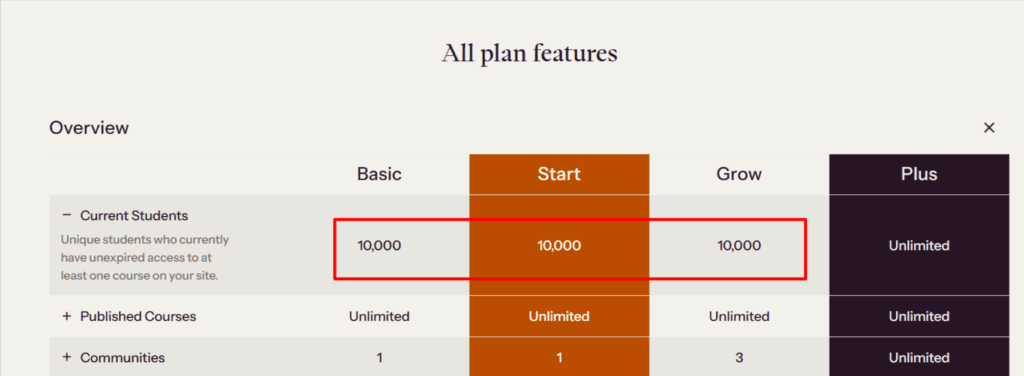
Not 10,000 per plan, but 10,000 total, across your entire Thinkific account.
What the Cap Actually Covers
The 10,000 limit counts unique students who currently have unexpired access to at least one course on your account, not a lifetime total of everyone who has ever enrolled.
That’s a meaningful distinction. It means the cap tracks your active student base at any given moment, not a running tally that only grows. Students whose access has expired, who were part of a time-limited free trial, or who were removed from a course don’t permanently count against your ceiling.
That said, “unexpired access” can still add up faster than expected if you’re running an active free course as a lead magnet. Anyone with ongoing (non-expiring) access to that free course counts toward your total for as long as their access remains active.
What Happens When You Hit the Cap
Once you reach 10,000 students, you can no longer enrol new students on your standard plan.
To continue, you’d need to upgrade to Thinkific Plus, which offers unlimited students. At custom enterprise pricing, that’s a significant jump from the $149/month Grow plan.
There’s no mid-tier option between Grow and Plus for creators who only need the student cap lifted. It’s either stay under 10,000 or move to enterprise pricing.
Should This Concern You?
For most creators reading this, the honest answer is no, not yet.
If you’re on Basic or Start and you’re building your audience from scratch, 10,000 enrolled students is a significant milestone that will take time to reach.
But it’s worth knowing about for two reasons:
First, it affects how you structure your free content, particularly if you offer free courses with permanent (non-expiring) access as a lead-generation tool.
If you’d rather not have that free audience count against your paying-student headroom, consider setting an expiry window on free course access or gating your lead magnet through an email sequence or downloadable PDF instead.
Second, if you’re already running an established course business with a large existing audience and you’re evaluating Thinkific for the first time, factor the cap into your platform decision.
Moving platforms once you’ve built a student base is painful. Better to know the ceiling before you’re close to it.
Thinkific Free Trial – What You Get and What’s Changed
If you’ve done any prior research on Thinkific, you may have come across mentions of a free plan – a permanent, no-credit-card tier that lets you build and sell one course indefinitely without paying a subscription fee.
That plan no longer exists.
Thinkific discontinued its free forever plan in early 2024 and replaced it with a time-limited free trial across all paid plans. It’s an important change worth understanding before you sign up.
What the Free Trial Includes
Thinkific currently offers a 30-day free trial on the Basic, Start, and Grow plans.

The trial gives you full access to whichever plan you select. It is not a stripped-down demo, but the complete feature set of that tier.
That means if you start a trial on the Start plan, you get certificates, memberships, Zoom integration, unlimited webinars, and everything else that comes with the Start plan for 30 days before paying anything.
This is genuinely useful. It gives you enough time to build your course, test the checkout flow, set up your community, and get a real feel for how the platform performs under your actual workflow, and not just a surface-level look at the dashboard.
The $49 Pre-Authorisation Hold
One detail that surprises some people: Thinkific requires a credit card to activate the free trial, and places a $49 pre-authorization hold on your card at signup.
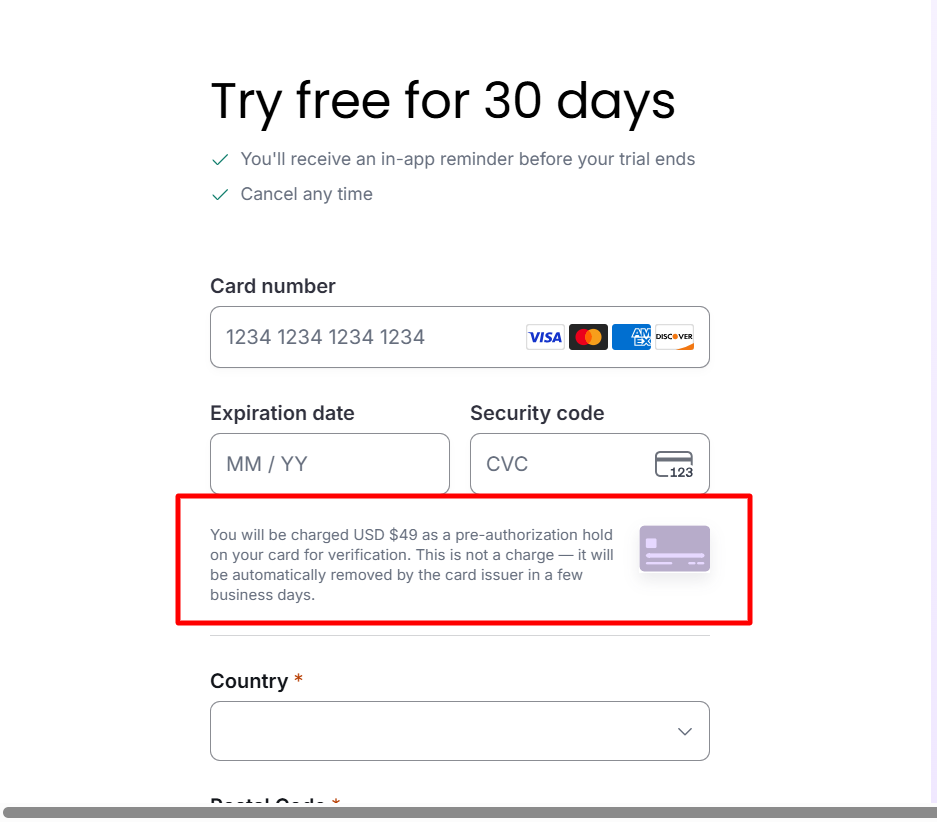
This is not a charge. It’s a temporary authorization that verifies your card is valid and active.
The hold is automatically reversed, typically within a few business days, and you won’t be billed anything during the trial period as long as you cancel before it ends.
If you don’t cancel before the trial expires, Thinkific automatically charges you for the first month (or year, if you selected annual billing at signup).
The practical advice here is simple:
Set a reminder two or three days before your trial end date to review your account and decide whether to continue or cancel. Don’t leave it until the last day.
If you want a deeper walkthrough of the trial, including a step-by-step setup guide, I’ve covered it in detail in the Thinkific free trial guide.
Which Thinkific Plan Should You Choose?
By now, you have the complete picture of Thinkific pricing and fees. The question is which plan actually fits where you are and where you’re headed.
The honest answer is that most creators end up on one of two plans, and here’s how to think through the decision.
Choose Basic If…
Bottom line:
Basic is the right starting point if your course model is straightforward and you’re not yet dependent on live coaching, subscriptions, or certificates.
Choose Start If…
Bottom line:
Start is the right plan for most active course creators who are serious about building a course business.
Choose Grow If…
Bottom line:
Grow is for established course businesses with a real team and branding needs. Don’t upgrade until you have a concrete reason — not just growing revenue.
Choose Plus If…
Bottom line:
If you’re asking whether you need Plus, you almost certainly don’t — yet. Creators who need Plus generally know it before they start evaluating.
How Thinkific Pricing Compares to Competitors
Thinkific doesn’t exist in a vacuum. If you’re evaluating it seriously, you’re probably also looking at Teachable, Mighty Networks, Kajabi, or LearnDash.
Here’s how the pricing and fee structures compare with those of other online course platforms you might consider.
The Comparison Table
| Thinkific | Teachable | Mighty Networks | Kajabi | LearnDash | |
|---|---|---|---|---|---|
| Starting price | $40/mo | $29/mo | $49/mo | $143/mo | $199/yr |
| Annual discount | 25% | ~33% | ~15% | ~20% | N/A |
| Transaction fees | 0% | 0%–7.5% | Yes (all plans) | 0% | 0% |
| Free plan | No (trial only) | No (trial only) | No (trial only) | No (trial only) | No |
| Free trial | 30 days | 14 days | 14 days | 14 days | 30-day money-back |
| Unlimited courses | All plans | All plans | Limited | Plan dependent | All plans |
| Certificates | Start+ | Pro+ | No | All plans | Add-on |
| Memberships | Start+ | Pro+ | All plans | All plans | Add-on |
| Email marketing | Basic (limited) | All plans | Limited | All plans | Plugin required |
| Built-in website | Yes | Yes | Yes | Yes | No (WordPress) |
| Community tools | Start+ | Limited | All plans (core focus) | All plans | Plugin required |
| Student cap | 10,000 (standard) | Unlimited | Unlimited | Unlimited | Unlimited |
Thinkific vs. Teachable
These two are the most direct competitors and the comparison that many course creators end up making.
On paper, Thinkific’s Basic plan is slightly costlier at $40/month than Teachable’s $29/month Starter plan.
But the more important difference is transaction fees.
Teachable charges up to 7.5% on its Starter plans, meaning at $3,000/month in revenue on Teachable’s Basic plan, you’re paying $225/month in platform fees on top of your subscription.
Thinkific charges 0% in platform fees regardless of plan.
PRO TIP!
That fee structure makes Thinkific the better financial choice for you at low to mid revenue levels, even accounting for the Stripe surcharge if you don’t use TCommerce.
Once you’re generating consistent course revenue, Thinkific’s cost advantage over Teachable’s Starter plan is substantial.
Where Teachable has an edge is in its email marketing tools, which are more developed natively than Thinkific’s Basic plan offering.
If email sequences and automation are central to your course marketing strategy and you don’t want to rely on third-party integrations, that’s worth factoring in.
Thinkific vs. Mighty Networks
Mighty Networks and Thinkific are often compared, but they’re built around fundamentally different priorities. Understanding that difference makes the choice straightforward.
Mighty Networks is a community-first platform. It was built to bring people together around shared interests, with courses added later as a secondary feature.
If your primary product is an engaged, interactive community – think spaces, member discussions, live events, and social networking – Mighty Networks is purpose-built for that experience.
Thinkific is a course-first platform. Community features exist and are genuinely useful.
However, the core of the product is structured learning — curriculum design, student progress tracking, assignments, certificates, and a clean course delivery experience.
On pricing, Mighty Networks starts at $49/month for its Community plan, which puts it at the same entry point as Thinkific Basic.
However, Mighty Networks charges transaction fees on all subscription tiers. This will eat into your revenue in a way that Thinkific’s 0% platform fee structure doesn’t.
As you move up the tiers, Mighty Networks can get significantly more expensive. Particularly at the pro level, where pricing is custom and geared toward established creators who want branded mobile apps and full white-labeling.
PRO TIP!
The practical decision comes down to what sits at the center of your business model. If the course is the core product and the community is a supporting element, Thinkific is the better fit.
PRO TIP!
If community engagement is the main event and courses are supplementary, Mighty Networks makes more sense.
For a full breakdown of how both platforms compare on features, pricing, and use cases, the Thinkific vs. Mighty Networks comparison covers everything you need to make the right call.
Thinkific vs. Kajabi
Kajabi and Thinkific serve different buyers, and the pricing reflects that.s
Kajabi plan starts at $143/month and $179/month for monthly billing (three times Thinkific’s Basic plan).
It positions itself as an all-in-one platform that replaces your course host, email marketing tool, website builder, sales funnel builder, and community platform simultaneously.
If you’re currently paying for all of those tools separately, Kajabi’s total cost can be competitive. If you’re not, it can be expensive.
Thinkific takes a more modular approach. It handles courses, communities, and payments well, and integrates with the marketing and email tools you already use.
You’re not locked into a single ecosystem, but you are responsible for assembling and managing your stack.
QUICK QUESTION
The practical question is whether you want a single platform that does everything at a premium price, or a best-in-class course platform that integrates with your existing tools at a lower entry cost.
For many online educators starting out or running focused course businesses, Thinkific’s approach is the more cost-effective path.
Kajabi becomes more compelling once you’re running a full online business with multiple revenue streams that benefit from tight native integration.
Thinkific vs. LearnDash
LearnDash is a fundamentally different type of product. It’s a WordPress plugin, not a hosted platform.
That difference shapes everything about the pricing comparison.
LearnDash starts at $199/year for a single-site licence, which looks dramatically cheaper than Thinkific’s plans at first glance.
But that $199 doesn’t include hosting, a domain, a WordPress theme, or any of the additional plugins you’ll likely need to replicate what Thinkific gives you out of the box.
Once you factor in managed WordPress hosting, a premium theme, and the essential add-ons, a fully functional LearnDash setup typically costs $400–$700/year.
And that’s before your time investment in setup and ongoing maintenance.
LearnDash offers complete ownership and control.
Your courses live on your own WordPress site. You’re not subject to any platform’s student caps or feature gates. And you’re not dependent on a SaaS company’s pricing decisions.
For technically capable creators who are deeply invested in the WordPress ecosystem, that trade-off is worthwhile.
For everyone else, especially creators who want to focus on teaching rather than managing infrastructure, Thinkific’s hosted simplicity is worth the premium over LearnDash’s headline price.
The Bottom Line on Competitors
Thinkific sits in a strong middle ground. It’s more affordable than Kajabi, more generous on transaction fees than Teachable, and less technically demanding than LearnDash.
It’s not the cheapest option in every scenario, and it’s not the most feature-complete all-in-one platform.
However, for creators whose primary product is online courses and who want a professional, scalable platform without the complexity of building their own infrastructure, Thinkific’s pricing holds up well against the field.
FAQs
My Verdict: Is Thinkific Worth it?
Thinkific is a well-built, professionally priced course platform that delivers real value for the right buyer.
The Stripe surcharge and the student cap are legitimate frustrations, and the Basic plan overpromises slightly for what it actually delivers as a complete course business setup.
But on the Start plan with TCommerce, the combination of 0% platform fees, strong course tools, community features, and a generous free trial makes it one of the most compelling options in the mid-market.
If you’re ready to build a serious course business and you want a platform that grows with you without locking you into an all-in-one ecosystem at a premium price, Thinkific is worth your time.
Start with the 30-day free trial on the Start plan. Build your first course, test the checkout flow, and see how it fits your workflow before you commit to anything. That’s the lowest-risk way to find out if Thinkific is the right platform for you.