

In this in-depth GetResponse review, I’ll walk you through how you can use it to build your email list fast. The tools, features, and ease of use. Also, I’ll do my best to answer some of the questions on your mind.
Let me guess: you want answers to the following questions:
If these are true, don’t worry. Today, I will answer all these questions in this GetResponse review.
After reading through, you can decide whether GetResponse is what your business needs.
Without wasting any of your time, let’s dive in…
GetResponse

Discover the pros and cons of GetResponse in this in-depth review, based on its features, pricing, and effectiveness as an email marketing, automation, workflow, and content monetization platform for content creators.
Price: 15.6
Price Currency: USD
Operating System: Web
Application Category: BusinessApplication, Marketing Software
4.08
Why GetResponse? My Email Marketing Experience
Since I started online in 2012, I have used close to a dozen email marketing service providers. Due to cost and a very tight marketing budget, I usually find myself moving from one provider to another.
Exporting my list now and then.
Looking for free email marketing service providers out there? But the truth is, I never found one with the right marketing tools to build my list faster.
That’s the reality of free email marketing services…
Free email marketing solutions usually come with limited services and marketing tools to help you build engaged subscribers faster. Free marketing tools are not an option if you’re serious about your online business.
Granted, they’re good to start the journey, but go for premium service and tools as soon as you have money. This is how you build your online business faster and start seeing significant growth.
During this period, I have tried the following email marketing solutions:
- MailChimp.
- ConstantContact.
- Sendinblue.
- MailerLite.
- MadMini
- GetResponse.
- BenchmarkEmail.
- EmailOctopus.
- ConvertKit.
Note: My assessment of all these email marketing services is based on their free plan or, better yet, a free trial period. GetResponse appeals the most, is affordable, and provides more tools to help build, manage, and grow my business better.
So, let’s begin…
What is GetResponse?
If you’re new to online marketing, you might wonder what GetResponse is.
GetResponse is an email marketing service solution founded in 1998 by Simon Grabowski. The domain GetResponse.com was registered in 1998 by the founder and the CEO.
This application allows you to create a mailing list and capture users’ data, such as names, email addresses, phone numbers, date of birth, gender, etc. You can then use this data to personalize your marketing message and improve conversion.
GetResponse allows you to create beautiful newsletters for your subscribers. Create email autoresponders whose messages are triggered based on predefined events. Capture user data for advanced marketing intelligence.
And not just that.

Whether your website is built with Joomla, PrestaShop, Drupal, WordPress,. etc, you can use the GetResponse email solution. It integrates with all the major blogging and e-commerce software.
You can also enable web forms on your Facebook Business page to capture new subscribers. It makes it easy to find and collect new subscribers.
It also makes it easy to track and measure marketing performance by analyzing clicks, open rates, delivery rates, spam score ratios, user engagement, A/B testing, etc.

However, these are just the basics of GetResponse’s email marketing services. Recently, GetResponse has gone beyond the basics and shifted to a more all-in-one marketing tool.
By providing other marketing services like webinars, Facebook ads, surveys, landing pages, automated sales funnels, and selling your product with GetResponse,
GetResponse has gone beyond traditional email marketing; it is now an all-in-one marketing tool.
As you can see, GetResponse is not your average email marketing service provider. Yet, it is affordable when compared to other competitors.
Read on to find the list of GetResponse Pricing below.
How to Use GetResponse to Grow Your Business
Unlike many free email marketing service providers, GetResponse offers tools to help you grow faster.
These tools are developed to make building your subscriber base easier and faster.
In this GetResponse Review, let’s take each of these tools one after the other. But first, if you’re new to email marketing, this video tutorial on getting started from GetResponse might be helpful.
GetResponse Sign-Up Process – Getting Started
The GetResponse signup process is straightforward. No complex signup process is involved.
First, visit this link to navigate to the GetResponse website.
On this page, click the “Sign up free” button at the top right, as shown in the image below.

GetResponse offers a 30-day free trial, which you can use. During this period, you can test-run all the marketing tools to see how to build your business with these tools.
Unlike competitors, you don’t have to enter your credit card details to sign up for the 30-day free trial offer.
It is completely free—there are no hidden charges. No credit card is required—only your name and a valid email address.
Enter your account registration details on the next page, and hit the “create account” button below.
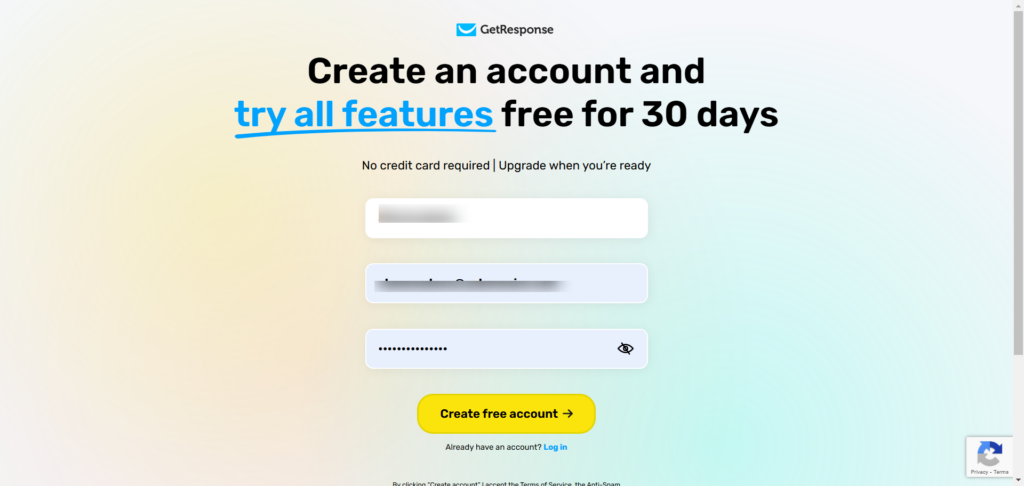
A verification email will be sent to complete the signup process; you must verify your email address.
Once you complete this process, your account is ready to go.
How to Import Your List in GetResponse
If you have an existing mailing list with other marketing solutions, you may first want to import your contact list.
This is easy to complete in GetResponse.
Log in to your account and create your first list. Your list name can be anything you choose. But it’s relevant to the list’s interests.
This will help you remember why you created the list in the future and craft the right message for the right audience.
After creating your first list, click the “Add contact” button on the page.

It will take you to this page, where you have two options for importing your list.
You can manually import your contacts one by one. Or upload a CSV file, use external services, or paste rows.
The next thing is to enter your name and email address on file. Agree to the terms and conditions, and hit the “add contact” button.
Your email subscribers will be added to the list you’ve just created.

Now that your first GetResponse list is ready, you’d want to create a web form to capture more email subscribers.
Right?
Let’s see how easy or difficult it could be to create forms in GetResponse.
How to Create Web Forms in GetResponse?
This is something I like about GetResponse web forms.
It is easy to use and offers many options to create the right web form for your blog message.
As an advanced form builder, GetResponse has a drag-and-drop form builder. The interface is user-friendly and clean, making the process easy to follow, even for beginners.
When writing this line, there are four ways to create your web forms in GetResponse.

The List Builder Wizard is the easiest way to get your forms up and running in minutes. But this is only useful if you’re creating embedded web forms.
The list builder apps are the right tool for creating other forms, like scroll or exit pop-up signup forms.
There are 220 predesigned email form templates ready to use. 180 landing page templates, 700 web form templates, 40 marketing funnel templates, and 5,000 stock photos.
Each of these form templates can be customized to fit your website’s needs. They also come in different sizes, formats, industries, and types.

I have created a couple of web forms for this blog using the GetResponse app.
The sign-up form on this blog’s homepage was created inside GetResponse and the sticky sidebar web form. However, I used another WordPress plugin to make it sticky, which is not a feature of GetResponse.
The web form in the image below was also created with GetResponse. I would have done better because I am not a graphic designer.

List builder apps are more advanced and let you create any web form. Whether you want to create pop-up forms, scroll forms, top-notification bar forms, download boxes, exit pop, shake the box, image boxes, etc.
GetResponse list builder apps let you create marketing forms in minutes. You don’t have to be a tech guru to create these forms.
Everything here is dragging and dropping.

Unlimited Sign-up Forms Per List
There is no restriction on how many sign-up forms you can create per list.
This is a great advantage if you have to create a different sign-up form for the same list on different website pages.
Let’s say you’ve created a list for “website traffic eBook download” in GetResponse.
You want to capture subscribers to this list from your blog homepage. Ideally, you may also want to capture subscribers to the list in relevant blog posts.
This is easy to achieve in GetResponse.
Open the menu by clicking the 9 dots on your user’s account dashboard to reveal the menu panel. From the drop-down menu, click on “Forms and Surveys.”

On the next screen, click on Create Form. From here, create and design your form and assign it to a list of your choice on the settings page.

That’s it…
You can create unlimited web forms for a single list and even duplicate your already-made web forms in minutes.
GetResponse Pricing and Plans
How much does GetResponse cost?
Sure thing, you want to know how competitive the GetResponse pricing is compared to other email marketing platforms.
I will answer that question below, along with the available GetResponse email marketing plans.
The website offers four (4) plans, each with different marketing tools and features, but at a very competitive price compared to its close competitors.
Here are the four plans on the website:
- Email Marketing – Starting at $19/month for 1,000 subscribers.
- Marketing Automation – Starting at $59/month, up to 1,000 contacts.
- Ecommerce Marketing – Starting at $119/month for a 1,000 email list.
- Max – For an extensive contact list. Start at $999 monthly.

The price goes higher as you go beyond 1,000 contacts in your list.
The Max plan is a dedicated pricing plan for an extensive email contact list. You’ll need to contact the GetResponse support team to discuss your needs and list size, request a demo, and negotiate the price.
The promotional $999 monthly rate is the starting price; you can negotiate based on your situation and likely get a fair deal.
Key Differences in Plans and Features
All the GetResponse plans cover the basics of email marketing, which anyone can use. However, marketing, automation, and content monetization features set each plan apart.
You may want to review this to decide what plans best fit your marketing needs.
The core features of the basic plan, which are also covered in the other 3 plans, include the following:
- Email Marketing – Ability to import, export, and grow your email list.
- Autoresponder services – send emails from a preset time after a subscriber joins your mailing list.
- Access to unlimited landing pages.
- A/B testing.
- Access to all email template designs.
- Campaign analytics reports.
- Website Builder
- Access to Survey features.
- RSS – Blog posts to email newsletters.
- List segmentation.
- Social sharing tool.
- File storage.
- Automation.
- Run Paid Advertising – Facebook ads, Instagram ads, and social ad creators.
These are just a few things you can do in the GetResponse basic plan. You can view the complete GetResponse email marketing features on this page.
The key differences between the plans and prices were not the number of contacts but the marketing tools/features available in each plan.
Take another look at the pricing image above. You will notice that all the plans are displayed under the 1,000-contact list number, yet the prices differ.
This tells us it is not just about numbers but the marketing features in each GetResponse plan.
So, let’s look at the significant differences in the plans. For me, the core differences in the plans are:
Conversion Funnel

This is GetResponse’s full set of tools and marketing templates for building automated sales funnels. These tools allow you to move customers from one stage to another in the conversion funnel.
These features are not fully available in the basic plan unless you’re on the “Plus” plan or higher.
In the GetResponse conversion funnel tools, there are 3 types of funnels:
- Lead funnel.
- Webinar Funnel.
- Sales Funnel.
As a GetResponse Basic plan customer, there are no restrictions on your use of the lead funnel. But you’re limited to creating just one sales funnel.
Webinar
In the GetResponse basic plan, you cannot access webinar tools or funnels. The webinar funnels are completely unavailable to customers on the Basic plan.

It is available in the “Plus” plan and higher. It comes with some feature restrictions, even in the Plus plan. You can only host up to 100 attendees; the recording time is capped at 3 hours.
You can’t hold a paid webinar in the Plus plan. Only in the Professional and Max plans can you offer paid webinars to attendees.
Automation
This powerful tool lets you build complex autoresponder email sequences based on user behavior, which is far more than traditional autoresponder email services.
It is a powerful lead-nurturing tool that lets you follow up with your subscribers by sending the right message based on their behavior.
Watch this video to learn more about the GetResponse marketing automation tool.
In the Basic Plan, you have access to the following automation:
- Welcome & thank you emails.
- Drip campaigns.
- Birthday emails: send a personalized birthday message to subscribers on their birthdays.
- Click & open follow-up emails.
- Contact tagging.
But on the Plus plan and higher, you have access to everything in the Basic plan as well as the following:
- Custom workflows.
- Automation builder.
- Contact scoring.
- Abandoned order/cart recovery.
- The site and event tracking.
- Automation segmentation.
- Advanced event tracking.
Support.
Support is limited to 24/7 live chat and email for all GetResponse plans except Max.
There is an additional phone call and dedicated Slack support for customers on the Max plan.
Getresponse Integrations
All the Getresponse Plans support over 150 app integrations, including but not limited to:
- WordPress.
- Shopify.
- PrestaShop.
- WooCommerce.
- Zapier.
- Magento.
- Stripe.
- Joomla.
- PayPal.
- Salesforce.
- Etsy
- Drupal.
How does GetResponse’s Pricing Compare to Others?
GetResponse’s pricing is lower than many rivals’, but that does not mean it offers lower-quality marketing tools.
On the contrary, GetResponse offers more for less. Let’s examine other competitors’ pricing strategies.
AWeber charges $19/month for 500 contact lists. While AWeber offers a 30-day forever-free account for a 500-subscriber base, $19 for 500 contacts is above the industry average for a paid plan.
Active Campaign prices the same 1,000 contact list at $29/month. According to the company’s website, the GetResponse Basic plan outperforms the ActiveCampaign Lite plan.
ConverKit is an email marketing solution that offers a forever-free plan for up to 1,000 subscribers. That’s truly a good marketing offer.
But when you go up the ladder and choose the paid plan, a 1,000-subscriber list costs $29 per month.
MailChimp offers a competitive price over GetResponse, but its marketing tools can’t be compared to GetResponse’s. It is worth noting that MailChimp also charges for subscriber and unsubscribe contacts in your list.
This could be a hidden cost to your marketing budget. Why should anyone be paying for unsubscribing contacts on their list?
GetResponse Core Features
By comparison, GetResponse’s email marketing solutions set it apart from many competitors. And one of the most comprehensive in the industry.
GetResponse constantly improves and expands its marketing features to meet the realities of online marketing.
Let’s take a look at some core email marketing features that make GetResponse what it is today.
Analytics
One of the core features of GetResponse is the campaign analytics dashboard.
These are the basic campaign analytics you’d expect to see in every email marketing solution, such as clicks, open rates, unsubscribe lists, subscribers, etc.
However, GetResponse offers much more than just the basics of email campaign analytics.

You can compare two previously sent emails to learn more about what works. How do your subscribers engage with it?
By clicking the email icon, you can resend a message to any audience segment from the analytics interface.
A/B Split Testing
If you’ve been in marketing for a long time, you know the importance of testing to see what works.
GetResponse A/B testing lets you test up to 5 variants of your copy against each other. You can test the content of your subject line by using fields, email content, and delivery time.
This tool is needed to improve email open rate, clicks, and engagement.

Conversion Funnel
This is a new e-commerce marketing feature recently introduced by GetResponse.
The conversion funnel features help GetResponse go from being only an email marketing solution to something you can practically use for eCommerce.
This is useful if you’re a solo entrepreneur selling something online. The conversion funnel in GetResponse lets you create a full sales funnel without needing an additional marketing app.
This feature is available on all plans. However, the basic plan restricts you to one sales funnel, and you can’t use the user-abandoned cart function.
This feature lets you email customers who add items to the cart but didn’t complete the purchase.
However, you can integrate your GetResponse shop with third-party eCommerce platforms like Shopify, BigCommerce, and Etsy.
Here is a breakdown of GetResponse conversion funnels and how they work.
Double or Single opt-ins?
For beginners, let’s explore what double opt-in and single opt-in are.

In every email marketing solution, adding subscribers to your mailing list requires that users opt in to receive newsletters from you. They need to give you their permission before you can send them email messages.
So, if you use a single opt-in for your email sign-up process, it means that once the user fills in the required information and clicks the CTA (call-to-action), they’re automatically added to your mailing list.
But if you enable the double opt-in process for email signup, users must confirm their email address before joining your mailing list.
Even if there is a gift for subscribing, they won’t be able to access it until their email address is confirmed.
Both sign-up processes have advantages and disadvantages.
The main advantage of a single opt-in process is that it makes it easy to get people on your list. As a result, it grows your list size faster than when double opt-in is enabled.
People don’t have to complete the email verification process to join your newsletter and receive the gift.
The disadvantage is that your contact list can quickly fill up with spam email addresses, bots, and people who aren’t genuinely interested in your message.
Double opt-in ensures that only people with valid email addresses can join your mailing list, and to a degree, it allows only those with a high interest in your teachings to be part of your newsletter.
For me, double opt-in is way better than a single sign-up process.
I have used the single opt-in process a couple of times, but from personal experience, having a small, engaged email list is better than having a large but unengaged subscriber.
In GetResponse, you can choose what best fits your email marketing type.
Switching from single to double opt-in takes just a click of the mouse. And you don’t have to rebuild another form to make this work, an exciting sign-up form.
This function is on-demand in GetResponse, and you can go forward and back through an existing web form as you like.
Email Delivery Rate
If your emails are not hitting your subscribers’ inboxes, they never get read. Simple!
While many email marketing service providers try to hide this aspect of their services, GetResponse is bold enough to discuss it on its website.
Let’s take it directly from the GetResponse website…
At GetResponse we are frequently asked about the quality of our deliverability rate. Because deliverability depends on many factors, including the content of your messages, the deliverability rate could vary for each mailing. For all our customers collectively, however, we are proud to say our overall deliverability rate currently stands at 99%.
To make this statement as transparent to customers as possible, GetResponse provides you with the delivery rate for each outgoing email in the analytics dashboard.
So, if anything in the company’s statement above is false, you’re the first to know.
GetResponse Website Builder
The GetResponse website builder is an AI-driven and code-free way to build your first online presence in minutes.
You can build a website within your GetResponse account and launch your business quickly.
It comes with many personalized templates that make designing your website as easy as possible. And if you love a bit of creativity, you can build a custom website design from scratch.
Also, you can register your domain name from the GetResponse website builder, get a free domain, or connect to an existing one.
The website builder is available to all GetResponse user accounts – Free, Basic, Plus, and Professional.
GetResponse 30-Day Free Trial Offer
The GetResponse 30-day free trial offer is truly generous. No credit card is required; you don’t have to risk anything by signing up for the 30-day free offer.
Why not try GetResponse today for a 30-day offer?
Click the blue link below to start sending the right email to your subscribers.
GetResponse Review: Pros and Cons
Pros
Cons
FAQs
What is GetResponse, and who is it for?
GetResponse is an all-in-one online marketing platform designed for businesses of all sizes. It offers email marketing, automation, landing pages, webinars, course creation and monetization platforms, and e-commerce tools. It is ideal for small business owners, marketers, content creators, e-commerce businesses, and anyone looking to grow their audience and engage customers.
What are the key features of GetResponse?
GetResponse provides several standout features, including:
Email Marketing: Easy-to-use email templates and a drag-and-drop editor.
Marketing Automation: Tools for creating personalized workflows based on customer behavior.
Webinars: An integrated platform to host and promote webinars.
Landing Pages: Builder for high-converting landing pages.
E-commerce Integration: Tools to boost sales, like abandoned cart recovery and product recommendations.
Analytics: Advanced reporting and A/B testing to optimize campaigns.
Content Monetization: Course creators can monetize their knowledge using advanced tools and accept payments via Stripe.
How does GetResponse compare to other email marketing tools?
GetResponse stands out for its versatility and for offering webinars, advanced automation, e-commerce, and content monetization tools on one platform. While platforms like Mailchimp focus primarily on email marketing, GetResponse offers a more comprehensive solution for growing businesses.
Does GetResponse have a free trial?
Yes, GetResponse offers a 30-day free trial with access to most premium features, allowing users to explore its capabilities without commitment.
Is GetResponse beginner-friendly?
Absolutely. GetResponse provides an intuitive interface, drag-and-drop tools, and many tutorials to guide new users. Even beginners can create professional email campaigns and landing pages with ease.
Can I integrate GetResponse with other tools?
Is GetResponse GDPR compliant?
GetResponse is fully GDPR-compliant. They provide tools to help users manage subscriber consent, comply with data protection regulations, and offer resources to maintain user privacy.
Can I migrate my Email list to GetResponse?
GetResponse allows you to import your existing email list via CSV, TXT, XLS, or integrations with other email services. Its support team can also assist with migrations if needed.
Is GetResponse worth it?
For businesses looking for a robust, all-in-one marketing platform with tools for email marketing, automation, webinars, push notifications, live chats, content creators, landing page builders, and e-commerce, GetResponse is definitely worth it. Its pricing aligns well with the features provided, offering great value for growing businesses.
Conclusion – Review of GetResponse
Getresponse has undoubtedly been around for decades in the email marketing service industry. As a result, it has evolved over the years as one of the true email marketing solutions to trust.
GetResponse is one of the few industry companies providing feature-rich email marketing services. It lets you do more than build your list and send emails to your subscribers.
With the recent upgrade in the GetResponse marketing tools, you can host a webinar, send automation messages, sell products, create leads and sales funnels, create beautiful landing pages, and more.
All this while you don’t have to leave the Getresponse website.
Amazing! Right?
Have you ever used GetResponse, or are you still using it? What is your experience? Let us know in the comment box.


Thanks for sharing this article, it’s really helpful. i will be visiting your blog weekly to see your latest post. thanks once more
Thanks Collins,
Glad you like the blog. Hope to see you more often.
Hey SHAMSUDEEN ,
Excellent post with Fabulous work. Your hard-work is truly appreciable.
Glad to say that you have introduced this amazing email marketing tool in an impressive way along with all the crucial & necessary information that are true enough to understand.
Yes i am aware of this great all-in-one email marketing tool and this tool is really helpful that lets user to create mailing list and improving the conversion. Using this tool also helps user for creating beautiful newsletters for subscribers and also capture users data. GetResponse tool also makes it easier for user to track & measure the marketing performance by analyzing the open rate, delivery rate, user-engagement, A/B testing and clicks.
Your included tips to use GetResponse for growing the business, Import list in Getresponse and for creating web forms are also helpful and also providing better understanding as well.
After going through this complete guide i really got helpful ideas and i can undoubtedly say that not only this tool but also its features are incredible. Using this tool will be a great helping hand and According to me this is a perfect guide to know about GetResponse tool.
Eventually thanks for sharing your ideas, knowledge and such an informative post.
Hi Aadarsh,
What can I say?
Thanks for your valuable comment here, and for reading through. I must say you really add more value to the post by going all out on your comment here. Thanks, and I’m glad you find the post useful.
I am in email marketing field . This article is very useful to informative . thank you for this post
You’re welcome, thanks for reading.
Hi Shansudeen,
Great Informative Post. This will be helpful for me to grow my business through email marketing. Thank You so much.
Thank You For Sharing This Article