Email marketing is a low-cost and effective marketing strategy. It is an excellent way to generate leads, convert visitors to customers, and build engagement.
However, you could miss many opportunities to turn profits without exploring the best email marketing practices.
Whether you’re a beginner, intermediate, or expert email marketer, everyone wants the same: a high open and click-through rate. We want to see subscribers engaging with our email campaigns, opening them, and taking action on the CTAs.
This is where knowing which email marketing tactics would help increase engagement and clicks comes in.
Today’s post will teach you the 14 best email marketing techniques to increase list engagement, reduce unsubscribe rates, drive more revenue, and increase sales.
Email Marketing Best Practices
You may only be able to explore some of the 14 ways to newsletter best practices, but considering a good number of them will put you ahead.
Explore the list, note email newsletter best practices and advice suitable to your current situation, and see how you can use them to improve your email marketing campaign.
1. Use Double Opt-in
It is no coincidence that this point comes first on the list of good email marketing techniques.
The quality of your email list is much more important than quantity. Still, many marketers want to avoid losing potential subscribers because they might forget to click the confirmation link.
That’s true, but if someone forgets to confirm their email address after signing up for a newsletter, they probably won’t be an active subscriber.
A list of 1,000 engaged subscribers will deliver more business value and revenue than a list of 3,000 unengaged subscribers.
Focus on quality, not quantity.
Plus, there are other important reasons to use double opt-in for your email signup, which I will discuss in this post.
And if you’re afraid of losing a subscriber due to double opt-in confirmation, check tip #2 for how to get more people to confirm email subscriptions.
2. Use a Thank-You Page
Many marketers ignore creating a custom thank-you page.
They use the default email marketing service provider‘s thank-you page, which could be improved if you want to start building relationships with your email contacts immediately after signup.
There are many benefits to creating a custom thank-you page.
Here is a simple thank-you page instructing you on what to do after completing the web form. The purpose is to get subscribers to confirm the signups (double opt-in).

You can do something similar with your thank-you or success page to get subscribers to perform the desired action after subscribing to your mailing list.
A good thank-you page can help you increase engagement, open, and click-through rates.
For more information on creating the perfect thank-you page, check out this post on the GetResponse blog.
3. Send Welcome Email
I learned this the hard way.
When new subscribers join your mailing list and don’t hear from you for days after signing up, they could easily forget who you are and how they got on your list. This will eventually lower the engagement rate and could increase the number of unsubscribers.
Welcome emails have much higher open and engagement rates than any subsequent email campaign.
According to ActiveCampaign, welcome emails have a 91.43% open rate. No other email broadcasts will have an open rate this high.
You can use welcome emails to connect with your new subscribers, remind them why they joined the list, explain how you can help them achieve marketing success, and reassure them that the signup process was successful.
Depending on your business strategies and goals, you can explore many possibilities with your welcome emails. Some marketers use it to pitch products to new subscribers.
However, if you’re a beginner looking for an email marketing provider with free access to its welcome email features, you will have difficulty finding a suitable option.
Brevo (formerly Sendinblue) is one email service provider that offers a welcome email in its free plan. You can check the features page for more information.
4. Write Compelling Email Subject Lines
As with blog posts, email headlines are crucial to their success rate, and it’s one of the best email marketing practices you shouldn’t ignore.
Whether an email’s content gets read, start with having a clear subject line that moves subscribers to open it.
Generally, your recipient can only see three things for every email you send to decide if it is worth reading.

The email subject line is a more decisive factor affecting the open rate than the other.
The sender’s name lets your email recipient know who it is from, while the preview hints at what it contains.
Even if your subscriber knows who sent it, the subject lines don’t pique curiosity, and it won’t get read. Dead simple.
However, mastering the art of writing powerful email subject lines can be something other than rocket science. Not anymore.
Many email marketing software companies now incorporate AI writing assistants as AI technology advances. Now, you can have AI generate several email subject lines for you in one click, then choose.
GetResponse now uses AI writers to draft email copy and write your subject line. But you have to be on the paid plan to have AI write the copy; the free plan allows AI for the subject line.
You can give it a try by subscribing to a 30-day free trial.
5. Personalize Your Email
The last thing your subscribers want to see is a random email sent to their inbox.
How do you help them resolve that and reassure them that the email was sent to the right person and address?
Personalization.
When you send a newsletter addressed to the recipient by their first name, it feels more personal.
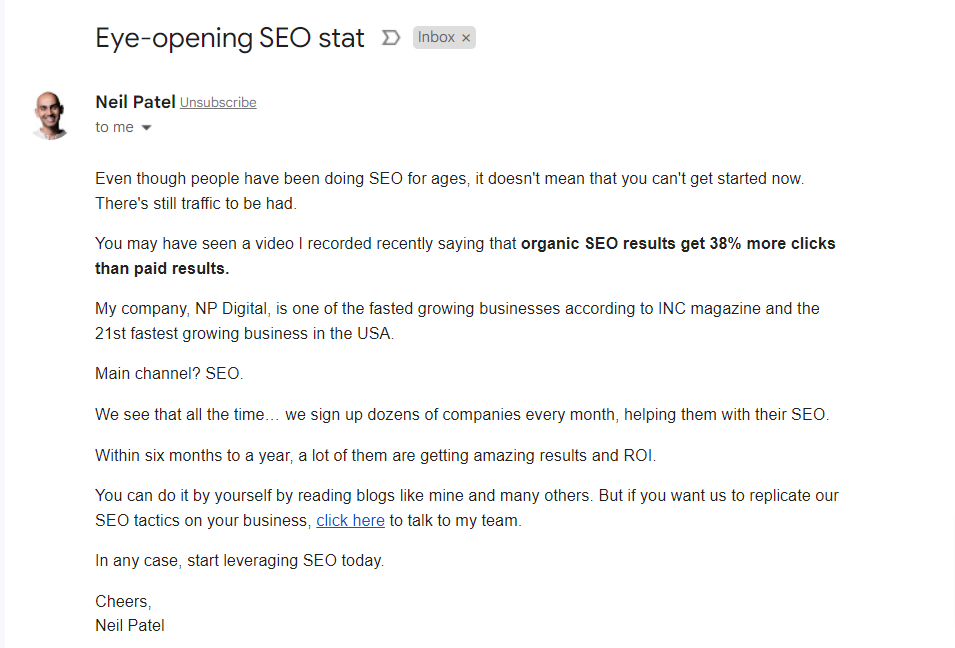
Compare these two newsletters.
And this.

Although Neil Patel is better known as an Internet marketing influencer, I still find it hard to open and click through many of his newsletters. It may be because it is not meant for me.
But look at the second newsletter; I must admit, I feel like the sender is talking to me personally, and I’m the only one he sent it to.
People love being identified by name rather than something like Hi, dear, hey, you, etc.
Email personalization starts with collecting relevant contact details at the point of signup and continues through the email message you’re sending. And the overall user experience you give to your subscribers.
Along with the required email field, ensure your signup form includes a first name field. This way, you can address subscribers automatically by their first name when sending an email campaign.
Most email service providers have this feature, which is undoubtedly one of the basic email marketing features.
6. Write The Way You Speak.
Marketing newsletters are meant to be personal and help establish relationships between a business and its customers; there’s no point complicating things by sounding like a 10th-grade level or a Harvard professor.
Use everyday English words, and communicate with your subscriber in their language.
Make your subscribers feel like you’re part of their community: you understand their pain points and are the best person to solve their problems.
Don’t use industry jargon unnecessarily; even acronyms should be used where they make sense and improve the conversation.
Many of your subscribers are beginners looking up to you for advice and solutions to improve their business. Don’t make it hard for them to follow through and understand basic things that might help them achieve their goals.
An excellent way to write how you speak is to imagine advising a friend or someone standing or sitting in front of you in a room together. Or having a drink together in one of your favorite places.
Talk to that friend in your newsletter; your email content will be good.
7. Make Your Newsletter Valuable.
This is one of the best email marketing tips on this list. This makes the greatest difference, with every other factor held equal.
Your newsletter is another platform to demonstrate your industry knowledge and expertise.
The more valuable and helpful information you share with your newsletter subscribers, the more engaged your list will be.
Why would anyone read your newsletters if you’re not offering value or providing solutions to their marketing challenges? Sure enough, your click-through and engagement rates will nose-dive eventually.
One of the most valuable newsletters I have ever subscribed to is the Smart Passive Income “Unstuck” Newsletter by Pat Flynn.
Pat holds nothing back in every one of his “Unstuck” newsletter editions. There is every chance you will learn a thing or two from reading his emails.
I usually check my inbox for his newsletters.
The Unstuck email series is usually lengthy, but it is worth every minute of reading it.

Don’t make each of your newsletters a message about selling or driving traffic to your website. Give people reasons to stay on your list, genuinely offer them help, and see how your newsletter’s value will soar.
8. Customize Preview Text
An email preview text is like an excerpt for a blog post or a meta description; it gives people a sneak peek of what the email contains.
Though I briefly mentioned the email preview above, it is worth paying attention to, even though it is less effective than the subject line.
And here is why.
Look at the email inbox below.

Even though the subject line conveys a clear message, the email preview text provides more detail about the contents.
From reading the preview text, I can see a 50% discount waiting inside the email.
Now, it depends on whether I’m interested in the tool, but one thing is sure: I know more about the email content. The preview text provides more insight into the email’s content.
How do you write effective email previews or preheader text that increases open rates?
There is no right or wrong answer; you must continue testing, tweaking, and analyzing your data and audience engagement rates.
Discover what works for your audience, industry, and niche, then fine-tune your marketing strategies to align with your discovery.
However, the first few words in your email content automatically become the preview text by default. There are better email marketing practices than this; you must customize the text to fit your message and entice readers to open and read your email.
9. Use Audience Targeting and Segmentation.
Tagging and Segmentation are critical to list management and sending tailored content to the right subscribers. They could be powerful email marketing best practices if utilized to their full potential.
If you’re new to email marketing, understanding tagging and segmenting can be confusing, but here is a simple analogy to help you understand it.
Think of Segmentation like a category, and tagging like just tagging your post.
In WordPress, you can create a content category for social media. Under it, you have published content with relevant tags for social media (SMM, social media tools, Twitter Marketing, Facebook marketing, etc.).
If we want to change the “social media” category, we will handle all tags under it. But what if we want to change just a subsection of that category?
Let’s say all posts with the tag SMM and Facebook marketing.
Now, we can reach our target posts faster than wading through all posts under the “social media” category.
In email marketing, tagging and segments let you organize subscribers, identify entry points and signup forms for each subscriber and interest, and, most importantly, determine which message to send to each subscriber and their interests.
You can use segments to group subscribers who enter your mailing list based on certain conditions. And use tags to identify how they got on your list.
For example, you can segment all subscribers who join your email list via different signup forms or campaigns, and use tags to identify how each subscriber joined.
This process allows you to send highly relevant content to your newsletter subscribers and engage with those who respond.
Here is a helpful guide to list segmentation.
10. Make it Easy to Unsubscribe.
No hard feelings; making it easy to unsubscribe from your mailing list is one of the best email marketing practices.
There are lots of factors that cause people to unsubscribe from mailing lists.
They might no longer want to hear from you, have grown beyond your marketing lessons and advice, or are no longer interested in the topics, etc.
Perhaps they receive too many email marketing newsletters in general. This is one of the most common factors that people unsubscribe from mailing lists.
Whatever the case, making it easy for your contact to unsubscribe from your list is a good email marketing best practice.
And come to think of it, there’s no point or gain in forcing people to remain subscribed to your newsletter when they no longer want to be part of your audience.
Instead, it will harm your sending reputation and lower your email performance score. Some subscribers might even label your newsletter as spam, sending all subsequent email campaigns to the spam folder.
The best thing you can do is make the unsubscribe link visible and present in all marketing emails you send to your subscribers.
Don’t make it difficult to access in your newsletter. It should be in plain sight. Like this:

11. Don’t Use No-Reply
If you care about your subscribers and their honest feedback, stop using the no-reply address in the email’s From field.
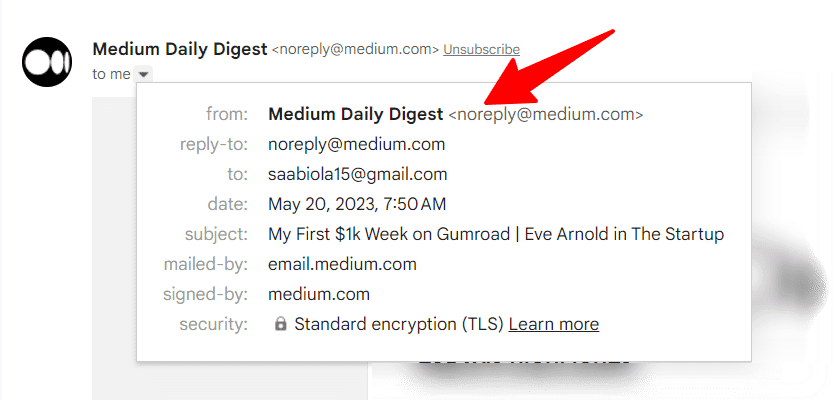
You don’t know who might want to inquire about your services or even show appreciation for your efforts and value.
There are exceptions to this, such as transactional emails for administrative purposes.
E-commerce stores might have many reasons to use the no-reply@business name in the email sender’s field, like password reset, abandoned cart reminder, checkout reminder, purchase receipt, etc.
Still, the cons of using the no-reply outweigh the pros.
One of the basic rules of the CAN-SPAM Act is that commercial emails from businesses must not use misleading or false header information.
The sender originating domain name, “from”, “to”, and “reply-to” fields must be accurate and represent the business or the individual sending the emails.
Using the “no-reply” in your “reply-to” field could translate to non-compliance with the CAN-SPAM Act law, which carries a hefty fine of $50,120.
You don’t want to get on the wrong side of the law for something you can prevent with just a single click.
12. Use Relevant CTA
I have mentioned several times in previous publications that the best way to make someone do something is to tell him to do it.
If you don’t tell your subscribers what to do after they read your email, they might feel lost and not know what to do next.
Including relevant calls to action in your campaign will increase click-through rates and drive more potential sales traffic. This could be a button, text link, image, banner, video, or countdown timer.
Your email content must be clear about the action you want people to take after reading it.
To improve engagement with your CTA, surround it with compelling copy and words that spark curiosity.
For example, here is a simple yet powerful CTA from Namecheap in one of its newsletter campaigns.
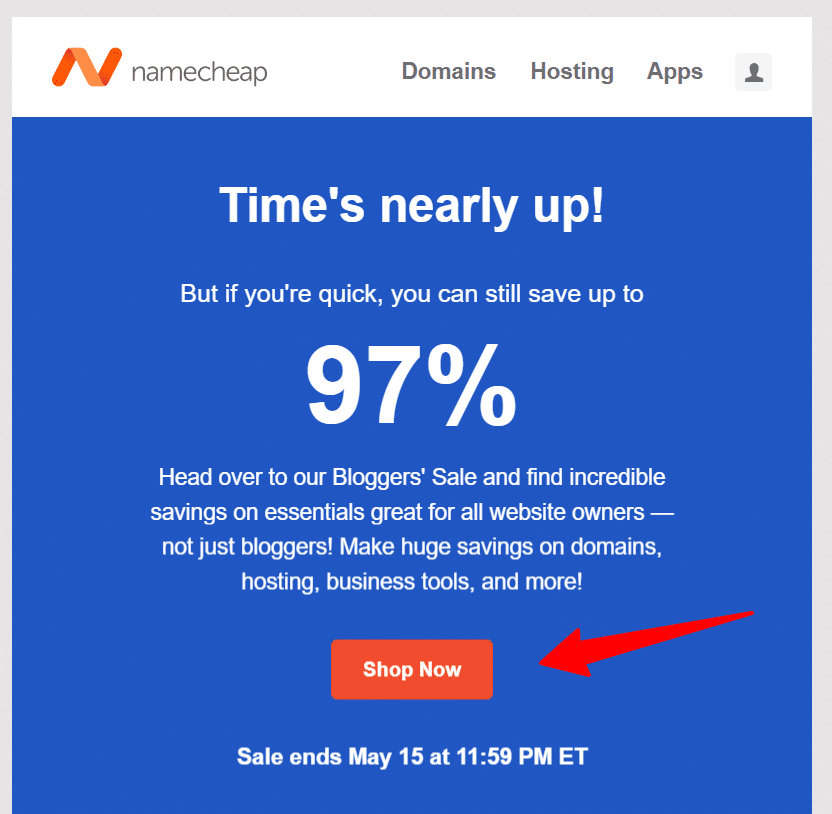
Like this one, you can make your email design and CTA simple and effective.

Your newsletter design is crucial to how your CTA might look in your email.
13. Use Perfect Timing
Perfect timing can be an incredible newsletter best practice, but you must experiment.
It could also make or break email open rates, as your subscribers live in different time zones and locations and have other habits.
According to a recent CoSchedule study, the best time to send marketing emails is between 8 a.m. and 3 p.m. And the best days are Thursdays, Tuesdays, and Wednesdays, in that order.
Saturdays and Sundays are the worst days to send promotional campaigns to subscribers.
And it is no secret that email users check their inboxes first thing in the morning, especially when expecting messages from business partners or loved ones.
If you’re using an email marketing software like GetResponse, you can send your marketing newsletter with the Perfect Timing features.
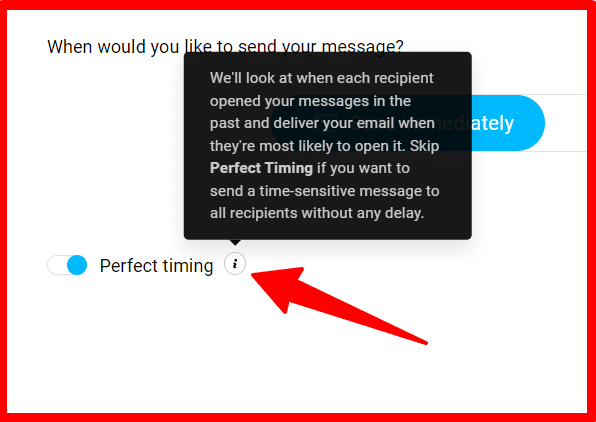
This feature optimizes email campaign sends to your contact list based on their past behavior, such as when they open previous emails.
But if your email marketing solution does not offer similar features, you can always auto-schedule your campaign between 8 a.m. and 3 p.m.
14. A/B Testing Campaign
Testing is what makes you a better marketer.
Ask any SEO professional how they go there. It’s all about testing, failing, getting up, trying again, and again, and again.
A/B testing is something you should always do in email marketing to get the best of your efforts and generate maximum ROI.
In fact, split testing is one of the best email marketing practices you can employ in other marketing areas. It is not reserved solely for email marketing.
From the email subject line to content copy, preview text, and your email list, there are no limits to what you can run split tests on in your marketing.
In email marketing, you can split your subscribers into groups and send different newsletter versions to each group. Then, the results will be collected, and their performance will be analyzed to see what can be improved or modified.
You can send subscriber group A an email copy with a blue CTA button and subscriber group B with a green CTA button.
This is one example of many things you can do with A/B testing.
Conclusion
There are more than a million variables to test in marketing, and even more for email marketing best practices.
You must keep experimenting, testing, and discovering new ways to improve things. This is how you can evolve and stay ahead of the competition, especially in today’s fast-changing technology world.
What worked today might not work tomorrow—or, as expected, it might not work at all. Some marketing tactics were once the rage but no longer hold value today.
You must keep up to date with industry knowledge and try new things.
Email marketing is as old as the internet, yet it remains a critical aspect of digital marketing and communication, even as many channels emerge.
If you’re not doing email marketing, you’re missing many opportunities and leaving money on the table.
Do you enjoy reading this post? Please help us spread the word by sharing it with your followers on your favorite social media platform.
The share buttons are hanging on your left.