

As someone who’s spent years working with online businesses, I’ve seen firsthand that getting paid is, without question, one of the most critical parts of running an e-commerce store.
It might sound obvious, but accepting money from customers online involves several behind-the-scenes steps.
A smooth and reliable payment processing system isn’t just a convenience; it’s the backbone of your online operation. If your customers have trouble paying, they simply won’t complete their purchase, no matter how great your products are.
That is where Shopify Payments comes in. If you’re running your online store on Shopify, you’ve likely encountered it.
It’s Shopify’s built-in payment gateway, designed to make accepting payments as straightforward as possible for merchants like you.
In my experience, it removes many of the typical headaches of setting up separate payment processors. This guide walks you through everything you need to know about Shopify Payments.
We’ll cover what it is, how it works, who can use it, what payment methods it supports, its key features, and both the upsides and potential downsides.
By the end, you should clearly understand whether it’s the right payment solution for your eCommerce business.
What Exactly is Shopify Payments?
Think of Shopify Payments as Shopify’s official, in-house system for handling your online store’s transactions.
Before Shopify Payments, if you wanted to accept credit card payments or other forms of digital money on your Shopify store, you had to sign up for a separate account with a third-party payment processor, often called a payment gateway.
Companies like Stripe or PayPal are well-known examples. You would set up your account with them, get your credentials, and then connect that service to your Shopify store.
Shopify Payments changes this by bringing that core functionality directly into the Shopify platform itself. It acts as both your merchant account and your payment gateway, all rolled into one, seamlessly integrated solution.
For you, the merchant, this means a simpler setup process and less juggling between systems.
With Shopify Payments activated, your customers enter their payment information directly on your Shopify store’s checkout page – they aren’t redirected to an external site to complete the payment, which creates a more professional and trustworthy experience.
All your order and payment information is centralized in your Shopify admin. You can see sales data, payment status, and payout information all in one place.
This level of integration is a major benefit I’ve observed for businesses looking to streamline their operations. It significantly simplifies tracking revenue and managing e-commerce payments.
Payment Processing with Shopify Payments
Understanding how money actually moves from your customer’s hand to your bank account is pretty fundamental. With traditional setups, this often involves complex steps and multiple parties.
What I appreciate about Shopify Payments is how it simplifies the process by handling most of the intricacies for you.
When a customer clicks the “Pay Now” button in your Shopify store’s checkout, here’s a simplified look at what happens behind the scenes with Shopify Payments.
First, there’s the authorization. This is where the system checks whether the customer’s credit card or payment method is valid and whether they have enough funds for the purchase amount.
It’s like getting a pre-approval – the money isn’t taken yet, but it’s reserved.
Once the order is confirmed and you’re ready to fulfill it, the next step is to capture the payment. This is when you take the funds from the customer’s account.
In Shopify, you can set this up to happen automatically when an order is placed or manually, which gives you time to review orders before charging.
After capture, the transaction goes through clearing and funding. This process involves moving money through card networks (like Visa or Mastercard) from the customer’s bank to Shopify’s holding account, and then to your designated business bank account.
Shopify Payments manages these steps internally. You don’t need to interact with separate banks or processors for each part of the transaction lifecycle.
Your role is mainly to manage the orders in your Shopify admin – capturing payments (if manual), processing refunds, or handling disputes.
Now, the question everyone asks: “When do I actually get my money?”
This is about the payout schedule. With Shopify Payments, funds from captured transactions are typically sent to your bank account on a specific schedule. The exact timing varies depending on the country your business is based.
For instance, in some regions, payouts might occur daily, while in others, they could be weekly. There’s also a processing time, often a few business days, between when Shopify sends the payout and when the funds show up in your bank account.
Weekends and public holidays can affect timing, as banks typically process transfers only on business days.
Shopify provides clear reporting in your admin area so you can track your balances and see when your next payout is scheduled. This transparency around the flow of funds is really helpful for managing your business’s cash flow.
It’s also important to understand the fees involved, especially how they relate to payment processing.
When you use Shopify Payments, you pay a processing fee for each transaction. This fee covers the cost of moving the money and involves various network and bank charges.
We’ll look at this in more detail when comparing fees later, but the key point here is that this processing fee is distinct from the transaction fees Shopify charges if you don’t use Shopify Payments and opt for a third-party gateway instead.
With Shopify Payments, those extra transaction fees from Shopify are waived, which is a major financial benefit.
Eligibility and Supported Locations
While Shopify Payments offers significant advantages, it’s not available to every Shopify store owner worldwide.
A key factor in determining if you can use it is your business’s physical location.
Shopify Payments is currently available only to merchants operating in a specific list of countries and regions.
This list has grown over time, but it’s still restricted to places like the United States, Canada, the United Kingdom, Australia, and several countries across Europe and Asia.
Before you get too invested in using Shopify Payments, the first thing I recommend is checking the official Shopify documentation to confirm whether your business is located in a supported region.
Your store’s country setting in your Shopify admin must match the country where your business is legally established and operating.
Beyond location, eligibility also depends on the type of business you run and the products or services you sell on Shopify.
Like most payment processors, Shopify Payments has a list of prohibited businesses and restricted products. These lists exist for various reasons, including regulatory compliance, industry standards, and risk management.
For example, certain high-risk industries or products that require specific licenses or fall under strict regulations might not be supported. Review Shopify Payments’ terms of service for your country to ensure your business activities are compatible.
I’ve seen merchants run into issues later because they didn’t confirm this upfront.
Finally, you need a valid bank account that meets specific criteria to receive payouts.
This account must typically be a full checking or business account (or a current account in some regions like the UK and Ireland) that is located in the same country as your store.
The account needs to be able to accept electronic money transfers. The bank account currency must also match the payout currency for your Shopify Payments account.
For security, Shopify also requires you to set up two-step authentication on your Shopify account before you can fully activate and use Shopify Payments. This adds an extra layer of protection for your store and financial information, which is standard and necessary in today’s online environment.
Meeting these eligibility requirements is the first hurdle to clear before you can begin setting up the service.
Setting Up Shopify Payments – A Step-by-Step Guide
Once you’ve confirmed your business is eligible based on location, business type, and banking requirements, setting up Shopify Payments is straightforward and managed entirely within your Shopify admin.
I’ve guided many merchants through this, and it’s designed to be easy to use, which is a big plus.
Here’s how you generally go about activating it:
You’ll start by logging into your Shopify admin area. On the left-hand menu, you’ll find ‘Settings’ at the bottom.
Click it, then go to the ‘Payments’ section. This is where you manage how your store accepts payments.
In the ‘Payments’ area, you should see a section specifically for Shopify Payments.
If you haven’t set up any credit card payment provider yet, you’ll likely see an option to ‘Complete account setup’ or ‘Activate Shopify Payments’.
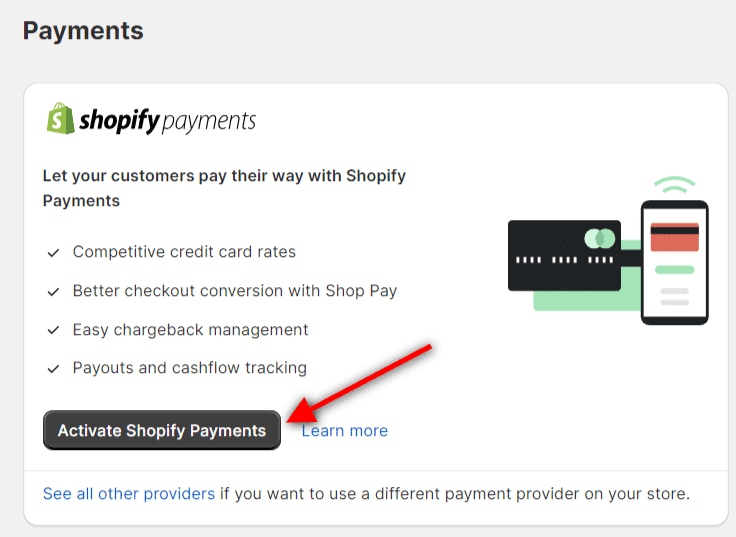
If you’re currently using a different third-party provider for credit card processing (like Stripe or PayPal’s direct credit card processing), activating Shopify Payments here will typically replace that provider for handling credit card transactions.
Shopify will usually give you a clear heads-up if this is the case.
Clicking the activation prompt will take you through a series of steps to provide details about your business and yourself.
You’ll be asked for information that confirms your business identity – things like your legal business name, address, business structure (like a sole proprietorship or a registered company), and potentially a tax ID number.
You’ll also need to provide personal details for an account representative, who is often the store owner or a principal executive.
This requirement comes from the financial partners that power the system and helps verify who is ultimately responsible for the account.
A critical part of the setup involves linking your business bank account where you want to receive payouts. You’ll need to provide your bank name, account number, and sometimes a routing number, depending on your country.
The information you provide must be accurate and match your official business and banking records.
In my experience, discrepancies in names, addresses, or bank details are the most common reasons for delays or verification issues.
After you submit your information, Shopify Payments will review your application. This verification process is a standard procedure to ensure compliance and security.
Occasionally, they might request additional documentation to verify your identity or business details. Be prepared and respond promptly to any requests to keep the process moving.
One important timeframe to be aware of: if you make your first sale before completing the full Shopify Payments setup, you typically have a limited number of days (often around 21) to finalize everything, including banking and business details.
If the setup isn’t completed within this period, payments might be automatically refunded to the customer, so it’s best to get this done as soon as possible after opening your store or deciding to use Shopify Payments.
During or after the initial setup, you’ll also configure details like your payout schedule preferences and what name appears on your customers’ billing statements – choosing something recognizable helps reduce chargebacks. The Shopify admin makes it quite intuitive to manage these settings.
Available Payment Methods
One key advantage of Shopify Payments is the variety of ways it lets customers pay you.
Offering multiple familiar payment options at checkout is crucial for an online store; it reduces friction and builds trust, making visitors more likely to complete their purchase.
From my perspective, limited payment options are a common reason for abandoned carts.
With Shopify Payments activated, your store is automatically set up to accept all major credit and debit cards from around the world. This includes widely recognized networks like Visa, Mastercard, American Express, and Discover.
For most customers globally, paying with one of these cards is standard practice, so covering these basics right away is fundamental.
Beyond traditional card payments, Shopify Payments also integrates seamlessly with accelerated checkout methods. These are designed to make buying faster and easier, especially for shoppers using mobile devices or those who have previously saved their information.
The most prominent of these is Shop Pay, Shopify’s own accelerated checkout.
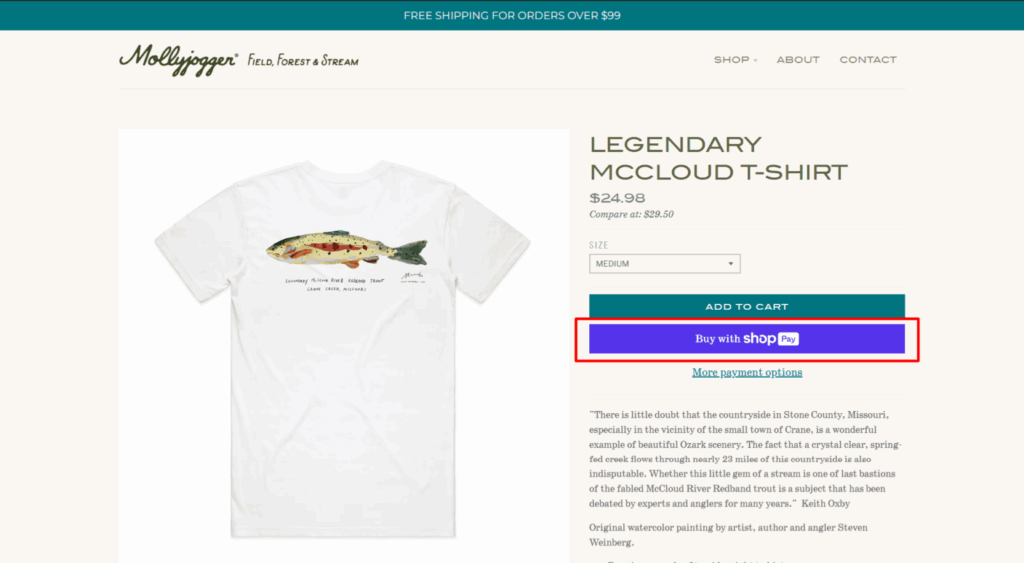
When a customer opts into Shop Pay, their shipping and payment information is securely saved for future purchases on any Shopify store using Shop Pay. This means they can check out in just a few taps without re-entering their details, which is incredibly convenient.
Similarly, integration with digital wallets like Apple Pay and Google Pay lets customers pay with the payment methods stored on their phones or devices, adding another layer of speed and security through biometric authentication.
Depending on where your business is located and where you sell, Shopify Payments can also support various local and alternative payment methods.
These are payment options that are popular or standard practice within specific countries or regions, such as Bancontact in Belgium, iDEAL in the Netherlands, or Sofort in Germany.
Offering these can be vital if you’re selling internationally, as customers often prefer to pay using methods they are familiar with in their own country.
Availability varies, and sometimes you need to enable these local methods individually in your Shopify Payments settings, or they may require additional approval.
The good news is that you can typically manage which of these payment methods are directly active within your Shopify admin settings for Shopify Payments. This allows you to tailor the options presented at checkout to best suit your target audience and where they are shopping from.
This flexibility in how customers pay contributes significantly to a positive shopping experience and can directly impact your conversion rates.
Key Features of Shopify Payments
Beyond simply accepting payments, Shopify Payments includes a suite of features designed to help you manage your money and protect your business.
From my experience working with merchants, having these tools integrated directly into the Shopify platform makes a real difference in day-to-day operations.
One of the most valuable features is the integrated financial reporting and analytics.
Because your payment processing is handled within Shopify, all your sales data, transaction details, fees, and payout information are consolidated in one place.
You can view reports directly in your Shopify admin that give you insights into your revenue, payment methods used, and payout history. This eliminates the need to pull data from separate payment gateway accounts and try to reconcile it with your sales records – a common headache when using third-party processors.
This unified view makes tracking your business’s financial health much simpler.
Shopify Payments also comes with built-in fraud prevention and analysis tools. These tools automatically flag potential fraudulent orders based on various indicators, such as mismatches between the customer’s billing and shipping addresses (AVS checks) or incorrect card verification values (CVV checks).
The system provides risk indicators on orders, giving you information to help you decide whether to fulfill an order or investigate further.
While no fraud tool can catch everything, these automated checks are a crucial first line of defense that I always advise merchants to use.
Handling chargebacks and disputes is an unavoidable part of running an online business.
When a customer disputes a charge with their bank, Shopify Payments provides a process within your admin to manage this. You’ll be notified through Shopify, and you can often submit evidence directly through the system to contest the chargeback.
This central management streamlines a process that can otherwise be quite administrative and time-consuming.
For businesses selling internationally, the multi-currency feature is a major plus. With Shopify Payments, you can set up your store to display prices and accept payments in your customers’ local currencies in supported regions.
While you receive payouts in your currency (with a currency conversion fee), offering local-currency pricing can significantly improve the shopping experience for international buyers and potentially boost cross-border sales.
As mentioned, automated payouts are a key benefit. Once your payout schedule is set, Shopify Payments automatically sends the funds from your available balance to your connected bank account, removing the need for manual transfers. This reliable automation helps ensure consistent cash flow into your business account.
Finally, for merchants who sell both online and in person, Shopify Payments integrates seamlessly with Shopify POS (Point of Sale).
This means that payments accepted in a physical retail location using Shopify POS hardware can be processed through the same system, unifying your sales data and payment reporting across all your sales channels.
Together, these features offer a powerful, integrated solution for managing your business finances and payment operations.
Benefits of Using Shopify Payments
Having worked with numerous e-commerce businesses, I’ve seen that how you accept payments significantly affects operations, costs, and even sales. For eligible merchants, Shopify Payments offers several compelling advantages that streamline the process and can support business growth.
The most immediate benefit is its simplicity of setup and management.
Compared to needing to research, apply for, and integrate a separate third-party payment gateway and potentially a separate merchant account, activating Shopify Payments is done with a few clicks directly within your Shopify admin.
All your payment settings, transaction history, and payout information are right there in one place, removing the need to log into multiple platforms and manage different dashboards. This consolidated approach saves valuable time and reduces administrative overhead.
A major financial advantage is lower transaction fees. Shopify charges a small percentage transaction fee on every sale processed through a third-party payment gateway.
When you use Shopify Payments, Shopify waives the variable transaction fees for orders processed through it.
You still pay a processing fee for each transaction (which covers costs from the card networks and banks), but eliminating Shopify’s extra transaction fee can lead to significant savings, especially as your sales volume increases.
The seamless customer checkout experience is another critical benefit.
When a customer pays using Shopify Payments, they complete their purchase directly on your store’s domain. They aren’t redirected to an external website to finalize the transaction. This keeps the customer within your brand’s environment, builds trust, and provides a faster, smoother checkout flow.
This reduction in friction, combined with accelerated options like Shop Pay, Apple Pay, and Google Pay, often results in fewer abandoned carts and higher conversion rates – something every online business strives for.
While payout times can vary by country, Shopify Payments’ integrated nature often leads to faster, more predictable payouts than some alternative methods.
The system is designed to process funds efficiently and adhere to clear payout schedules, helping you receive your money reliably. Having consistent access to funds is vital for managing inventory, paying suppliers, and reinvesting in your business.
Furthermore, using a payment gateway built directly into Shopify means it adheres to stringent security and compliance standards, including the Payment Card Industry Data Security Standard (PCI DSS).
Handling sensitive customer payment information securely is non-negotiable, and Shopify Payments manages this critical aspect for you, protecting both your business and your customers’ data.
Finally, the unified reporting and reconciliation I mentioned earlier deserves highlighting as a key benefit.
All your transaction data is integrated with your Shopify sales data, making accounting and reconciliation much less of a chore. You have a single source of truth for your sales and payment processing, which simplifies financial tracking and reporting.
These benefits make a strong case for Shopify Payments if you meet the eligibility criteria. It simplifies operations, can reduce costs, enhances the customer experience, and provides a secure, integrated system for managing your online store’s finances.
Now that we’ve covered the Shopify Payments benefits, it’s only fair to look at the flip side – the limitations and considerations you need to be aware of.
Limitations and Considerations of Shopify Payments
While I’ve seen many businesses thrive with Shopify Payments because of its integration and simplicity, it’s crucial to understand its potential limitations. Knowing these upfront helps you make an informed decision and avoid surprises later.
The most significant limitation, as we touched on earlier, is geographic availability. Shopify Payments simply isn’t available everywhere.
If your business is registered and operates from a country not on Shopify’s supported list, like China, Peru, India, and Nigeria, for instance, you won’t be able to use Shopify Payments.
This immediately means you have to rely on third-party payment gateways available in your region, which, as we’ve discussed, come with Shopify’s own transaction fees on top of the third party’s processing fees.
This can present a notable cost hurdle for merchants in unsupported locations.
Another consideration, common across many payment processors but still important to note, is the possibility of funds being held or reserves.
In certain circumstances, Shopify Payments might place a temporary hold on a portion of your payout funds or maintain a reserve account.
This can happen for various reasons, such as if your business is in a higher-risk industry, if you experience a sudden, unusual spike in sales volume, or while a customer dispute or chargeback is being investigated.
While these measures are often part of standard risk management, they can impact your immediate cash flow, so it’s something to be prepared for, especially if you have tight working capital.
It’s also vital to remember that while Shopify’s variable transaction fees are waived when you use Shopify Payments, you are still responsible for the processing fees charged for each transaction.
These fees cover the costs banks and card networks incur when transferring money.
The specific processing rate you pay per transaction with Shopify Payments depends on your Shopify subscription plan – generally, the higher your plan, the lower your processing rate.
So, while you save on Shopify’s extra fee, you still pay a per-transaction cost that affects your margins, especially on lower-priced items or if you are on a basic plan.
Chargeback fees are another potential cost.
If a customer disputes a charge with their bank and a chargeback is initiated, Shopify Payments typically charges you a fee to handle this process, regardless of whether the chargeback is ultimately ruled in your favor.
While hopefully infrequent, these fees can add up and represent a cost associated with accepting card payments online.
Finally, using Shopify Payments means you are tightly integrated with, and dependent on, the Shopify platform for core payment processing.
If you were to decide to move your store to a different eCommerce platform in the future, you would need to transition to a new payment solution, which involves its own setup and integration process.
For businesses committed to the Shopify ecosystem, this isn’t a concern, but it’s a factor in platform lock-in to keep in mind.
Understanding these potential limitations – from geographic barriers to fee structures and fund accessibility – is key to determining if Shopify Payments aligns with your business model and expectations.
Now that we’ve covered both the benefits and the limitations, we’re well-equipped to compare Shopify Payments’ transaction fees with those of other payment gateways, which is often a deciding factor for merchants.
Shopify Payments vs. Other Payment Gateways: Transaction Fees
When evaluating payment solutions, the fees involved are naturally a major part of the equation.
Comparing Shopify Payments to using a separate third-party payment gateway requires looking at a couple of different fee types to get a clear picture.
Here’s the fundamental difference, which I’ve seen confuse merchants: Shopify charges a fee for using its platform to process orders.
This is called a transaction fee, and it’s a percentage of the order value that varies based on your Shopify subscription plan (for example, it might be 2% on the Basic plan, 1% on the Grow plan, and 0.6% on the Advanced plan).
However, and this is the critical point, Shopify waives this variable transaction fee entirely for orders processed through Shopify Payments.
Now, if you are in a country where Shopify Payments isn’t available, or if you choose to use a different payment gateway for credit card processing, even where Shopify Payments is available (like Stripe, PayPal Pro, or others), you will pay two sets of fees for each transaction:
This second point is particularly relevant if your business is based in a region not supported by Shopify Payments.
In that situation, you automatically incur an extra Shopify transaction fee on every sale because you must use a third-party provider.
This immediately adds a cost layer that businesses in supported regions using Shopify Payments don’t face.
For processing fees, Shopify Payments charges rates that are competitive with, and often comparable to, major third-party gateways like Stripe or PayPal.
These rates typically consist of a percentage of the transaction amount plus a small fixed fee (for example, something like 2.9% + USD 0.30 for online transactions on the Basic Shopify plan).
Just like with third-party providers, these processing rates can vary based on factors like the type of card used (e.g., premium cards might have slightly higher rates) and whether the transaction is online or in person (via Shopify POS).
The key distinction is that with Shopify Payments, the processing fee is the only per-transaction fee you pay to Shopify.
When using a third party, you pay their processing fee plus Shopify’s transaction fee. This is where eligible merchants see significant cost savings.
To illustrate, imagine a $100 sale.
As your Shopify plan tier increases, the Shopify Payments processing rate decreases, making it even more cost-effective compared to standard third-party rates.
The processing rates can become very favorable for merchants on Advanced or Plus plans.
Beyond the core per-transaction costs, it’s also worth comparing other fees like chargeback fees (which are typically charged by both Shopify Payments and third parties, often around $15-20 USD) and currency conversion fees for international sales (which also apply with both options, though rates can vary).
In summary, for merchants in supported countries, using Shopify Payments almost always results in lower overall transaction costs because it eliminates Shopify’s variable transaction fee.
For merchants in unsupported countries, that extra Shopify fee when using third parties is a necessary cost of doing business on the platform.
Comparing the specific processing rates of Shopify Payments on your plan against the rates offered by third-party gateways available in your region, while factoring in that extra Shopify fee for third parties, is essential for a true cost analysis.
Pros and Cons of Shopify Payments
Pros of Shopify Payments
Cons of Shopify Payments
Conclusion
Choosing the right way to accept payments is more than just a technical setup; it’s a fundamental business decision that impacts your costs, operations, and customer relationships.
As I’ve seen with many online stores, a smooth and efficient payment process is non-negotiable for success.
For merchants in supported countries, Shopify Payments stands out as a powerful tool mainly because of its deep integration with the Shopify platform and the significant cost advantage of eliminating Shopify’s variable transaction fees.
Streamlined management and unified reporting can simplify running your business and free up time to invest in growth activities.
Regardless of your location, I always advise merchants to perform a detailed calculation based on their projected sales volume and average order value.
Compare the total cost, factoring in processing fees, potential chargeback fees, and currency conversion costs across the options available to you. What looks like a small percentage difference can translate into substantial savings or expenses as your business scales.




This article gives a great summary of Shopify Payments, explaining how it works. It’s a helpful guide for anyone considering using Shopify’s built-in payment system to streamline their online store’s transactions.
Glad you like it.
Hello, Shamsudeen,
Shopify payments is a easy solution for business owners who wants a centralized payments solutions for seamless and easy payments. Applying for different payment options is a daunting and challenging task. Shopify payments do this easily. Thanks for sharing this post
Regards,
Vishwajeet Kumar
Thanks, Vishwajeet.
Glad to read your thought.