I’ve worked with both Pressable (my current web host) and Cloudways (for which I paid two years of invoices before moving to Pressable). While they both fall under the category of “managed hosting,” they take very different approaches.
Pressable focuses entirely on WordPress and WooCommerce, offering a straightforward platform that’s built for speed, security, and ease of use.
Cloudways, on the other hand, is a “semi-managed” cloud hosting platform that gives you more control, flexibility, and options, including access to multiple cloud providers such as DigitalOcean, Linode, Vultr, Google Cloud, and AWS.
If you’re a beginner, an agency owner, or running an online store, you’ve probably come across both names while researching the best hosting for WordPress.
The problem is that, on paper, both look great, but in real-world use, they serve very different user types.
In this comparison of Pressable vs Cloudways, I’ll walk you through how they stack up in performance, features, ease of use, scalability, pricing, and support.
I’ll also share my personal experiences and observations to help you know which hosting is the better fit for your site’s needs.
Note:
Cloudways recently launched its Autonomous hosting, a WordPress-focused managed hosting. But I haven’t tried it, so the focus here is on the Cloudways flexible plan.
With that out of the way, let’s proceed.
Quick Overview of Pressable and Cloudways
What is Pressable?
Pressable is a fully managed WordPress hosting platform owned by Automattic, the company behind WordPress.com and WooCommerce.
That connection is important because it means Pressable is deeply integrated with WordPress at its core.
The hosting environment is built specifically for WordPress sites, so you get server-level optimization without having to tweak anything yourself.
From your user dashboard, you can create new sites, manage staging environments, run backups, and troubleshoot some application-level issues without touching complicated server settings.
Pressable also comes with Jetpack Security Daily pre-installed (free for all sites), which includes Akismet and VaultPress backup, and helps with malware scanning, WAF, and brute-force protection.
It’s designed for people who want a “set it and forget it” approach – bloggers, small business owners, and agencies who prefer stability over constant configuration.
If you’ve ever used WordPress.com’s hosting but wanted more control and the ability to install any plugin or theme, Pressable feels like the next step up.
What is Cloudways?
Cloudways is a managed cloud hosting platform that sits between you and big cloud providers like DigitalOcean, Vultr, AWS, Google Cloud, and Linode.
Instead of renting space on a shared WordPress server, you get a dedicated slice of cloud infrastructure that you can scale up or down based on traffic.
Cloudways handles server setup, security patches, backups, and performance tuning, so you don’t have to manage everything from scratch.
However, compared to Pressable, Cloudways offers you more technical freedom, allowing you to run multiple CMSs, custom apps, and manage server configurations.
That flexibility is a big win for developers, agencies, and e-commerce businesses that expect their hosting needs to grow or change over time.
The trade-off is that Cloudways has a steeper learning curve. While the control panel is beginner-friendly for a cloud platform, it’s still more complex than Pressable’s streamlined dashboard.
Pressable vs Cloudways – Feature Comparison
Here’s a quick side-by-side look at the main features you get with each platform:
Features |
Pressable |
Cloudways |
|---|---|---|
|
Hosting Type |
Managed WordPress |
Managed Cloud Hosting |
|
Supported Platforms |
WordPress & WooCommerce only |
WordPress, WooCommerce, Laravel, Magento, and PHP apps |
|
Data Centers |
4 global locations (Automattic network) |
65+ global locations (varies by provider) |
|
Performance Tools |
Built-in CDN and caching, server optimization for WP Cloud. |
Cloudflare Enterprise CDN (add-on), free Object CachePro, Varnish, Redis, Memcached, Breeze. |
|
Security |
Jetpack Security Daily, WAF, malware scanning, and SSL certificates. |
Dedicated firewalls, bot protection, free SSL, malware removal |
|
Backups |
Daily auto-backups, on-demand, and free Jetpack VaultPress backup |
Daily auto-backups, on-demand, and off-site backup. |
|
Staging Sites |
||
|
Developer Tools |
SSH, SFTP, WP-CLI, Git, and Studio Local. |
SSH, SFTP, WP-CLI, Git, database access |
|
Pricing Model |
Fixed monthly plans |
Pay-as-you-go based on server size |
|
Support |
24/7 chat and ticket support |
24/7 chat, ticket, and optional phone support |
|
Free Trial |
30-Day Money-Back Guarantee |
3-day Free Trial – No Credit Card |
Hosting Type and Supported Platforms
Pressable is strictly managed WordPress hosting. You can’t host other CMSs or custom applications. It’s built only for WordPress and WooCommerce, and that focus allows them to optimize every server setting for those platforms.
Cloudways is more flexible. You can run WordPress, Magento, Laravel, or even custom PHP applications on the same account.
If you’re building multiple types of sites or applications, Cloudways gives you more room to work.
Data Centers and Global Reach
Pressable’s infrastructure is powered by Automattic’s network, with four origin data centers in:
You choose a data center location when setting up a site, which helps with speed for your target audience. While the four origin datacenters seem limited compared to Cloudways’s, Pressable’s 28 PoP edge caching locations compensate for it.
So, even if your website is hosted in one of those data centers, your audiences in Asia and Africa will still experience faster page loads.
Cloudways offers you more data centers to choose from, with over 65 origin data centers. This is due to its partnership with five different cloud service providers, each of which has several data centers.
Depending on your choice of cloud provider (Linode, DigitalOcean, Vultr, Google, or AWS), you can host your website closer to your audience’s location.
This can be advantageous for local businesses that primarily serve a particular region.
Therefore, if you need ultra-specific server locations outside the US, Cloudways comes out ahead.
Performance Tools
Pressable has server-level caching solutions (edge cache, page cache, object caching, and Opcache), a built-in CDN powered by the Edge Cache, and performance optimizations tuned for WordPress.
Aside from that, Pressable plans include 5 PHP workers (512 MB per worker), 5 vCPUs, a geo-redundant high-availability cloud, autoscaling with bursting capabilities, Application Performance Monitoring, a performance report, and a monthly Lighthouse report for Core Web Vitals metrics.
You don’t have to set up anything; all these are ready when your site goes live.
Cloudways also offers caching, but it lets you choose between Varnish, Redis, Memcached, and their own Breeze plugin. Object Cache Pro (worth $95/month) is preinstalled as a drop-in plugin.
Like Pressable, Cloudways also runs an NVMe-based server, but the entry-level plan starts with 1 vCPU, which is lower than Pressable’s 5 vCPUs.
For an e-Commerce store, this can make a big difference in performance.
Another issue is that Cloudways does not publicly disclose how many PHP workers you get in your plan; the assumption is that you get “sufficient” PHP workers as per your plan specs.
You may want to contact sales if the number of workers is important to your business needs.
However, you can add the Cloudflare Enterprise add-on for extra performance and security. This makes Cloudways more customizable, but also more hands-on.
But if I have to choose between Pressable and Cloudways based on out-of-the-box performance for a small personal site, I would go with Pressable.
The built-in multilayer caching mechanism, 5 PHP workers, 5 vCPUs, and HA geo-redundant cloud ensure better performance without requiring much fine-tuning from my end.
Backups and Staging Sites
Both platforms offer daily and on-demand backups, and you can store them offsite for added security. You can download the available backup at any time to your local machine.


Pressable offers 10GB of free storage with its JetPack VaultPress cloud-based backup. This stores a complete backup copy (files and database) of your server, provides a one-click restore point, and lets you go back in time and see every site’s changes.
Staging environments are available on both web hosts as well, allowing you to test changes before pushing them live.
However, Pressable has more test environment options for devs. There are staging, sandbox, development, local, and production environments. With Cloudways, I have only tested in staging environments.
Developer Tools
Pressable supports SSH, SFTP, Git, and WP-CLI for advanced WordPress work. There is Bash Command Execution, which lets you perform bulk operations across multiple sites, such as updating the PHP version, WordPress Core, or custom commands.
There’s also Search & Replace, a helpful tool for editing database data in one click. These features are available in your Pressable user control panel.
Cloudways offers SSH, SFTP, Git, and WP-CLI, along with database management tools and the ability to install server-level software.
However, Pressable’s Studio Local might give it an edge over Cloudways here, especially for developers. Because you can download Studio Local to your local machine and have more control, freedom, and increased productivity.
I think it all comes down to preferences and your needs – if you need deeper, direct server access, Cloudways is a better option. However, if you need a dedicated development tool to enhance your workflow, Pressable is the right choice.
Performance and Speed
When it comes to hosting, performance isn’t just about server specs; it’s about how consistently your site loads fast, even during traffic spikes.
Both Pressable and Cloudways have solid reputations for speed, but they achieve it in different ways.
How Pressable Handles Performance
Pressable uses the NGINX web server, and its infrastructure is fine-tuned for WordPress. Because they only host WordPress and WooCommerce sites, they’ve optimized everything from the PHP version to database queries.
The platform runs on the same network that powers WordPress.com, so you benefit from Automattic’s global infrastructure.
Each site on Pressable has a built-in edge cache CDN to serve static files, such as images, CSS, and JavaScript, from the server closest to the visitor.
Server-level edge caching is always on (Edge Caching), so you don’t need to install separate WordPress caching plugins. In fact, third-party caching plugins are not allowed on Pressable.
But you can also use other caching plugin optimization features, such as file minification, image optimization, lazy loading, and font optimization. Also, Pressable’s object cache is always on, and you can manage site actions that triggered automatic flush or purge with the Pressable Cache Management plugin.
Aside from built-in caching and CDN, Pressable also ensures your site remains 100% online through its high-availability WP cloud and automatic server failover. Pressable offers 100% uptime, backed by Service Level Agreements (SLAs).
Another standout performance feature is the autoscaling of server resources to handle sudden traffic spikes, so even during seasonal sales, you’re not caught by surprise.
In my experience, after moving to Pressable, my site consistently loads in under two seconds and averages 85ms TTFB without any manual optimization. After enabling WP Rocket’s settings, including file, image, font, and other optimization features, the load time for the blog homepage decreased to under 300ms.

This kind of speed is what makes your site’s users and search engine happy, increases conversion, and improves the user experience.
How Cloudways Handles Performance
Cloudways approaches performance differently.
Instead of giving you a single optimized stack, they let you choose your server provider, size, and location.
Performance depends on the cloud provider you choose – DigitalOcean, Linode, and Vultr are known for their high-performance servers, which are renowned for excellent speed. In contrast, AWS and Google Cloud offer more scalability.
Cloudways utilizes a combination of NGINX/Apache web servers, Varnish, Memcached, Redis, and PHP-FPM for its server stack. The Breeze plugin adds front-end caching for WordPress, and you can integrate Cloudflare or a third-party CDN for extra optimization.
Because Cloudways gives you more server-level access, you can fine-tune performance settings, but that also means you’re responsible for making the right adjustments.
On a well-configured Vultr High Frequency server, I’ve seen Cloudways sites load in under two seconds. However, if you choose a smaller server size and don’t configure caching properly, performance can dip.
And because Cloudways does not use a single cloud provider, I can not conclude what kind of performance you’d expect.
From experience, using both DigitalOcean and Vultr HF entry-level plans (1GB RAM and 1 vCPU), my site loads fast, and the average time-to-first byte of 120ms is still acceptable. Based on my site performance, the Vultr High-Frequency Micro plan outperforms the DigitalOcean server.
I tweeted about it then.

I have previously reviewed Cloudways and detailed my experience. You should read that post for a better insight into Cloudways’ hosting infrastructure.
Which One is Better?
There is no right or wrong answer here. It depends on several factors, including your website type, caching setup, traffic level, server resources, and CDN.
From experience with both platforms, the major performance differences on my site after moving from Cloudways to Pressable are faster load times and lower TTFB.
Yes, after moving to Pressable, my site speed increased dramatically, the time-to-first byte reduced to under 85ms on average, and I also noticed a more responsive admin dashboard.
One thing I can tell you is that if server response time is your priority, Pressable is hard to beat. The reliance on WordPress.com infrastructure means your website already benefits from the best-in-class server setup.
However, if you require more control over server applications, such as stopping, restarting, or even upgrading or downgrading them, you’ll love Cloudways.
Ease of Use
The way you interact with your hosting account matters just as much as speed. A fast host that’s a pain to manage can slow you down in other ways.
Pressable and Cloudways both have their own styles of making things “easy,” but my experience with site management on both platforms is very different.
Managing a Site on Pressable
Pressable’s dashboard is clean, simple, and built around WordPress.
As expected, there is no traditional cPanel; instead, you have a fully customized user dashboard. This dashboard provides everything you need to manage your site without requiring a connection to your server.

For example, let’s say your site suddenly encounters a database error after updating a particular plugin or theme, and you can no longer log in to your WordPress admin dashboard. You can easily deactivate such a plugin from your Pressable user dashboard.
You don’t need to touch your database or use an FTP program to connect to your server. Everything about your site can be managed through your MyPressable dashboard.
However, while there are no complex server options to sort through, you can’t change PHP memory limits or install custom server software from the dashboard.
While that might sound like a limitation, it’s actually a time-saver for non-technical users. Pressable handles those optimizations in the background, so you can stay focused on building and managing your business.
If you’ve ever used WordPress.com’s admin area, you’ll find Pressable feels familiar but with more flexibility, things like installing any plugin or theme you want.
For a more detailed explanation about the user dashboard, check my detailed review of Pressable.
Managing a Site on Cloudways
Cloudways control panel is also custom-built and designed to work across multiple cloud providers. You’ll see your servers and the applications installed on them, with options to manage each separately.

One advantage of Cloudways is that you have more control over settings such as PHP versions, memory limits, caching layers, the applications running on the server, and database management. You can also monitor real-time server performance and scale resources on demand.
That’s great if you understand what these settings do, but it can be overwhelming if you’re new to hosting.
For example, if your WooCommerce store suddenly gets a traffic spike during a holiday sale, you can log into Cloudways and scale up your server in minutes.
Unlike Pressable, if you ever need to troubleshoot an issue while you cannot log in to your WordPress admin dashboard, you will need to remotely connect to your website server via an FTP program like FileZilla.
For beginners, this can be a headache or time-consuming compared to Pressable’s simplified user dashboard, which lets you manage these tasks without connecting to the server directly.
I have shared a detailed account of my experience using the Cloudways user dashboard in my review. Read that post for more information about Cloudways’ user experience.
Which is Easier?
If you want a hosting panel that works more like a WordPress site manager – simple, clutter-free, and focused – Pressable is the better fit.
You don’t need to learn server management to use it effectively.
If you’re comfortable with a bit of technical control, or if you work with websites beyond WordPress, Cloudways offers more flexibility.
You’ll need to spend some time learning their system, but the trade-off is deeper customization.
Security Features
Security is one of those things you don’t think about until something goes wrong, and then it becomes all you care about. Pressable and Cloudways both take security seriously, but they handle it differently based on their hosting models.
Pressable’s Security Approach
Pressable is built specifically for WordPress, so its security stack is configured to address common threats in the WordPress ecosystem.
Every site comes with free SSL Certificates and Jetpack Security Daily at no extra cost, which handles malware scanning, brute-force attack protection, and downtime monitoring.
There is a Web Application Firewall (WAF) to block suspicious traffic before it even reaches your site.
Automatic updates for WordPress core are enabled by default, and the server environment is locked down so you can’t accidentally make changes that open up vulnerabilities.
Because Pressable’s infrastructure is managed entirely by their team, you’re not responsible for server-level security.
If something goes wrong, whether it’s a hack attempt or a malware infection, the support team steps in to fix it. Pressable also offers free hack recovery assistant services.
In addition to the built-in security features, you can enable Edge Defensive Mode in your MyPressable dashboard. Edge Defensive Mode lets you filter malicious and bot traffic from accessing your website.
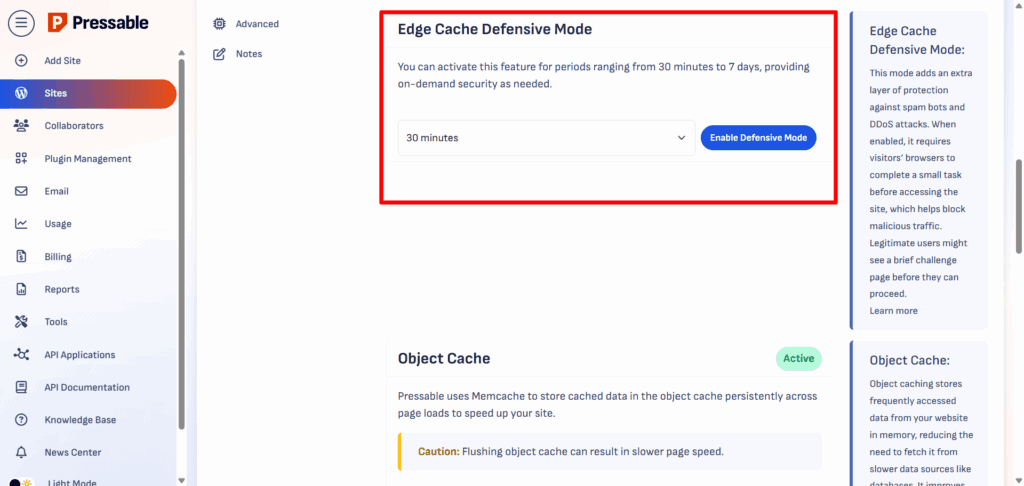
Another security measure is the egress firewall rules. With this, you can set up connections, such as ports, servers, or domains, that your site is allowed to connect to.
Cloudways’ Security Approach
Cloudways offers strong security as well, but with more control in your hands. If you’re not technical, this might be a disadvantage; otherwise, it’s beneficial.
Every server comes with a dedicated firewall, bot protection, and free SSL certificates, just like Pressable. Cloudways also runs regular security patches at the server level, so you don’t have to worry about outdated software creating holes.
For WordPress specifically, Cloudways offers options to limit login attempts, auto-heal, block XML-RPC attacks, and integrate with security plugins such as Wordfence, Imunity360, or iThemes Security.
To add two-factor authentication, IP whitelisting for SSH/SFTP, or custom SSL certificates, you can do so from the control panel.
The difference is that Cloudways’ approach is more modular. You can choose how much security you add and configure it to match your needs.
However, if you don’t take the time to set up these extra layers, your protection may not be as comprehensive as Pressable’s “everything included” model.
Which is More Secure?
For someone who wants their host to handle all WordPress security without extra setup, Pressable is a safer choice.
Everything you need is enabled by default.
If you want the ability to customize your security settings and layer multiple protections, Cloudways gives you that flexibility; just keep in mind you’re responsible for setting it up.
Pricing Comparison
Pressable and Cloudways have very different pricing structures. Pressable uses fixed monthly plans, while Cloudways runs on a pay-as-you-go model.
Which one is better depends on how predictable you want your hosting bill to be and how much flexibility you need.
Pressable Pricing
Pressable’s pricing is straightforward, with no surprises. You select a plan based on the number of sites, monthly visits, and storage requirements.
At the time of writing, Pressable has two main standard hosting plan categories – Signature and Premium.
Signature plans allow you to host one website and up to 100 additional sites. The price starts at $20.83 for one website and increases to $562.50 for 100 sites. This price is for the annual billing cycle. If you opt for monthly billing, you will pay more.
For instance, the Signature plan, which includes 1 website, 20GB storage, and 30,000 monthly visits, costs $25 per month for month-to-month billing. Here is the hosting plan.
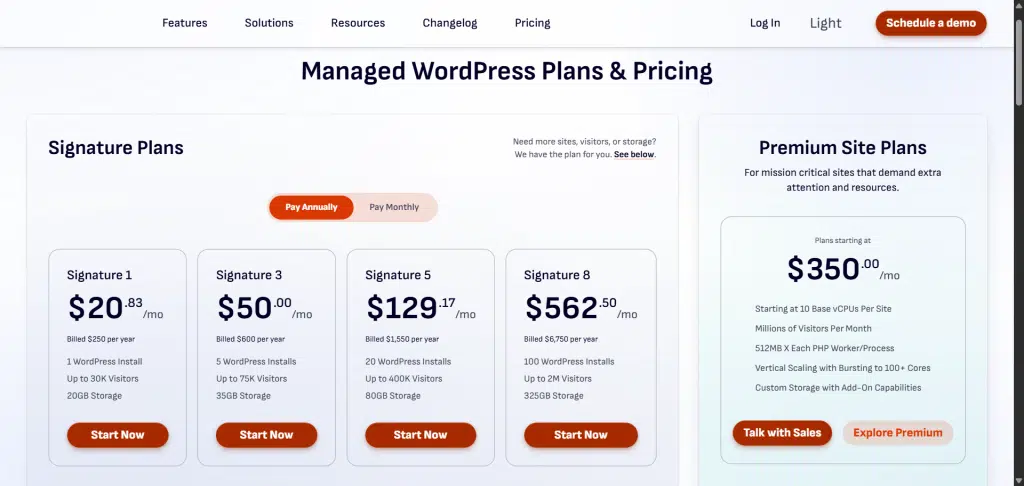
All plans include the same security features, CDN, staging, 5 PHP workers, 5 vCPUs, high-availability cloud, and 24/7 support. You won’t get surprise charges if traffic spikes, but you will need to upgrade if you consistently exceed your plan limits.
For example, if you’re running a single business site with steady traffic, you can stay on the Signature 1 plan for years without worrying about unexpected costs.
Cloudways Pricing
Cloudways’ pricing depends on the cloud provider and server size you choose. You pay by the hour or month for the exact resources you use.
And there are no restrictions on how many sites you can host in a hosting plan. What you’re paying for is the server size, RAM, bandwidth, and CPU.
This means you can host 5, 10, 20, or more sites on any plan, as long as your server resources can handle the combined traffic and assets across all sites.
Here are the monthly costs for Cloudways’ entry-level plans on its five cloud providers:
The catch is that Cloudways pricing doesn’t include extra costs like premium support upgrades, Cloudflare Enterprise, or malware protection. These are add-on products in Cloudways.
However, you can scale your server instantly if you need more power and scale back down when traffic drops, so you’re never locked into paying for resources you’re not using.
For example, if you run a WooCommerce store that’s busy during the holidays but quieter in other months, you can pay for a larger server in December and a smaller one in January.
That flexibility can save money over time.
Which Offers Better Value?
If you want predictable costs, don’t want to pay for a performance add-on, and don’t plan to change server size often, Pressable’s fixed pricing is easier to budget for.
Pressable includes core hosting performance features in its base hosting price.
But if you prefer flexibility, want to pay only for the resources you use, and don’t mind paying for additional performance features, Cloudways is more adaptable and can be cheaper for smaller sites.
The price you pay isn’t really an issue, but what you’re getting for that price.
For example, with Pressable, you won’t need a third-party CDN or a caching plugin. These are built into every Pressable’s site.
On the other hand, you may need to purchase the Cloudflare Enterprise plan as a separate add-on and install a caching plugin, such as WP Rocket or Nitropack, to achieve optimal performance on Cloudways.
Support and Customer Service
Good hosting isn’t just about servers; it’s about knowing there’s help when you need it.
Whether that’s fixing a site outage at midnight or walking you through a configuration issue, reliable support can make a big difference.
Pressable Support
Pressable offers 24/7 live chat and ticket support to all customers, regardless of plan. There’s no extra fee for “priority” access; everyone gets the same level of service.
Because Pressable is WordPress-only, their support team is highly specialized.
They don’t just know how to restart a server; they understand WordPress core, common plugin conflicts, and WooCommerce performance issues.
That means if your site goes down after a plugin update, they can often pinpoint the problem quickly without needing to send you elsewhere.
From my experience, response times on live chat are usually under 4 minutes, and the support team is proactive, helpful, and tends to go the extra mile to resolve issues.

Cloudways Support
Cloudways also offers 24/7 live chat and ticket support, but it has a tiered support system. The standard support included with all accounts covers general troubleshooting and server issues.
If you want faster response times, deeper application-level support, and enhanced support, you’ll need to upgrade to Advanced or Premium Support, which comes at an additional monthly cost.
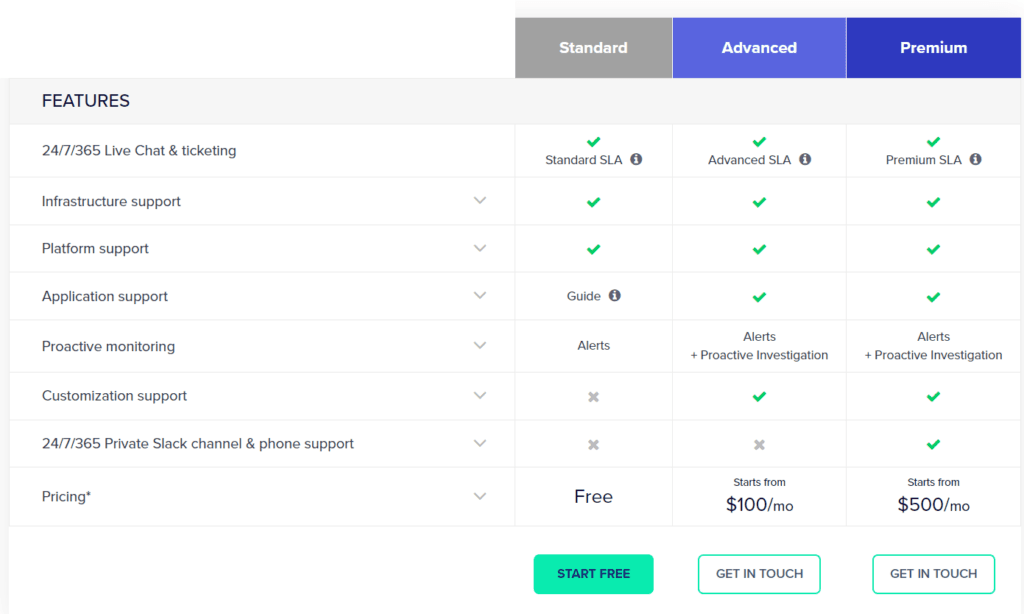
Cloudways’ team has strong server knowledge and can handle a variety of platform issues, not just WordPress.
However, because they cater to many CMSs and custom applications, their WordPress-specific support isn’t as specialized as Pressable’s.
In my experience, Cloudways’ standard chat support is responsive; however, more complex WordPress issues sometimes require additional time or a higher-tier plan to be resolved quickly.
Sometimes, your issue might be escalated to another support representative for a solution. This is not common with Pressable, since every support rep breathes WordPress.
And, Cloudways standard support for all users does not include application-level support. This means if your issue is related to your WordPress application itself (not the server), Cloudways might not be able to help directly; instead, they will redirect you to their help documentation.
Which is Better?
If you want WordPress experts available at all times without paying extra, Pressable’s support model is hard to beat.
If you need broader platform support and don’t mind paying more for advanced help, Cloudways’ tiered system gives you that option.
Pros and Cons of Each Platform
Pressable – Pros
Pressable – Cons
Cloudways – Pros
Cloudways – Cons
Pressable or Cloudways – Which One Should You Choose?
If you want a platform that’s ready to go out of the box for WordPress, Pressable is the safer and simpler choice.
You get predictable pricing, all the essential security and performance features included, and a support team that lives and breathes WordPress.
This makes it perfect for:
- Small businesses that want a hands-off hosting experience.
- Agencies managing multiple WordPress sites for clients.
- WooCommerce store owners who don’t want to spend time on server management.
On the other hand, if you want more control over your hosting environment and no fixed number of installations, Cloudways offers unmatched flexibility.
You can pick your cloud provider, scale resources instantly, and fine-tune server settings to your exact needs. It’s best suited for:
- Developers and freelancers who manage a variety of site types.
- Businesses with fluctuating traffic that need flexible scaling.
- Power users who are comfortable configuring their own security and performance settings.
Conclusion
Pressable and Cloudways are both excellent hosting options, but they cater to different user types and hosting needs.
Pressable works best if you want a hosting provider that’s ready for WordPress from day one. It handles speed, security, backups, and updates without you having to adjust server settings.
The support team is full of WordPress specialists, so you get help that’s directly relevant to your site. It’s ideal for business owners, agencies, and store owners who value simplicity and predictable pricing.
Cloudways is better suited for those who want more control and flexibility. It’s a solid fit for developers, power users, and businesses that run multiple website types beyond WordPress.
Both are capable, but the right choice ultimately depends on whether you prefer “done for you” or “customizable” hosting.