Many web hosts you have used require upfront payments, either month-to-month or annually.
You pay for a 12-month or multi-year hosting contract, which is allocated with capped hosting resources (RAM, CPU, bandwidth, and traffic) and other add-on charges.
Cloudways’ pricing structure is different. You don’t pay upfront, and there are no caps on website or traffic.
RAM, processor, bandwidth, and server provider are the main differentiators of Cloudways’ hosting packages.
How do these help you grow your business?
This post answers questions about Cloudways’ hosting costs and billing structure.
Cloudways Pricing Overview
Cloudways’ pricing is entirely different from what you might be used to. It uses a pay-as-you-go billing model, where website owners only pay for the server resources used each month.
Unlike traditional hosting providers, Cloudways doesn’t charge a fixed monthly or annual hosting fee or lock you into a long-term contract. This flexibility lets you manage and plan your hosting budget more efficiently.
You know how much to allocate to monthly hosting bills and what you’re paying for.
One advantage of Cloudways’ pricing structure is that you can quickly switch hosts if you are unsatisfied with their services. You can easily move your blog to another host without going back and forth to customer care for prorated refunds.
How Cloudways Pricing Works in Summary.
Cloudways will send you an invoice for the server resources used at the end of the month. This invoice is expected to be paid within the first week of the following month.
Failure to make a payment might temporarily stop your server until the invoice is cleared. In a nutshell, here is how Cloudway hosting prices work.
What’s Included in Cloudways Hosting Plan
Cloudways offers high-quality hosting services from five top-tier cloud providers. Across all cloud providers, every Cloudways hosting plan includes essential and advanced features.
Here are some notable mentions:
Beyond these features, Cloudways offers no surprises. This means there are no hidden charges beyond what is advertised on the website.
Cloudways does not charge for traffic spikes, CPU overuse, PHP workers, or the number of websites allowed on a server. The additional costs or add-ons are clearly stated on the website and are entirely optional.
There’s no gimmick to trick you into buying any additional services. Your website is working efficiently without any add-on service.
For example, you can use the Cloudflare free plan instead of the integrated Cloudflare Enterprise add-on in your Cloudways account, which costs $4.99 monthly.
NOTE:
Cloudways now offers AI Agent Hosting as a separate product, with a 50% lifetime discount available for a limited time.
Cloudways Hosting Plans and Costs
Cloudways hosting plans and costs vary depending on the cloud service provider you choose. Each provider offers tiered plans based on server specifications such as processor, RAM, and bandwidth.
Server location also depends on the provider. DigitalOcean, the most budget-friendly Cloudways hosting plan, has nine data centers. Vultr has 30, Linode has 25, and Google Compute Engine and AWS each have 28.
This variety gives you plenty of options to host your website closer to your audience, reducing latency, improving time to first byte (TTFB), and boosting overall performance.
Below is the breakdown of Cloudways’ hosting plan prices for each provider. Note: We can’t review each provider’s hosting plan; the table shows their basic or entry-level plan.
| Provider | Basic Price | RAM | Processor | Storage | Bandwidth |
|---|---|---|---|---|---|
| DigitalOcean | $14/month | 1 GB | 1 Core | 25GB | 1TB |
| Vultr | $14 or $16/mon | 1GB | 1 Core | 32GB | 1TB |
| Linode | $14/mon | 1GB | 1 Core | 25GB | 1TB |
| Google Compute | $37.45/mon | 1.75GB | 1 Core | 20GB | 2GB |
| Amazon Web Services | $20.56 | 1GB | 2 Core | 20GB | 2GB |
NOTE:
The DigitalOcean Premium server starts at $14 per month, while the Vultr High-Frequency server starts at $16 per month. Google Cloud and Amazon Web Services do not offer a free trial.
Before selecting the right Cloudways hosting for you, here’s what you need to know.
DigitalOcean, Vultr, and Linode are more affordable than Google Compute Engine and Amazon Web Services. If you have a small business website with decent traffic and a moderate need for high-performance managed cloud hosting, choose one of these three.
Of the three, I have used DigitalOcean and Vultr. Both are good; they offer high-performance servers with a 99.9% uptime guarantee, but you must consider your audience’s location/region before choosing a server provider and a data center.
As mentioned above, DigitalOcean has nine data centers, while Vultr has 30. This could be a significant factor if you do business globally. In my experience, server location is a major bottleneck to improving TTFB.
The closer the web server is to your primary audience, the quicker it can transfer data to the client browser.
After moving this website from the DigitalOcean premium server to a Vultr high-frequency plan with more data centers, my TTFB improved from an average of 65% to 97% in Speed Vitals and other testing tools.
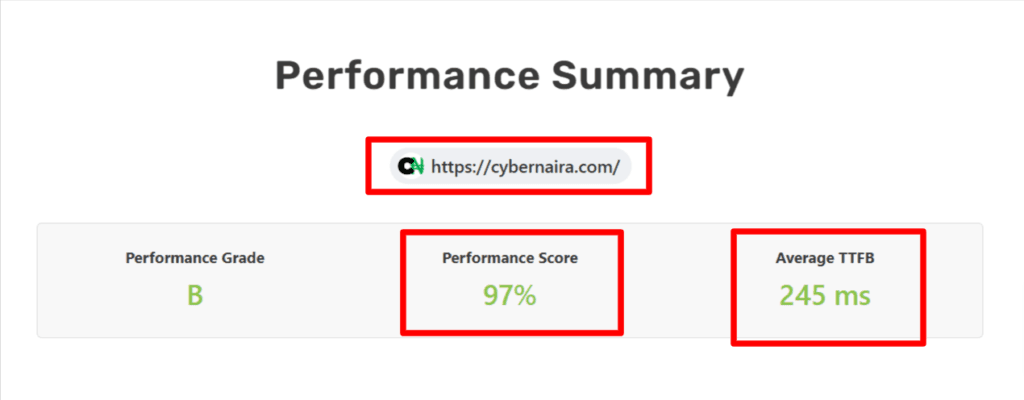
On DigitalOcean, my TTFB was very poor in Asia Pacific (where most of my audience comes from) and Africa. Since moving to the Vultr high-frequency server, TTFB has improved significantly across all regions, including Europe, America, Asia Pacific, and Africa.
Whichever provider you choose, subscribe to their premium server, DigitalOcean Premium or Vultr High Frequency.
Google Cloud and Amazon Web Services (AWS) suit enterprises seeking high-performance cloud hosting. These platforms offer top-tier, optimized virtual machines with state-of-the-art security and enterprise-grade solutions.
DigitalOcean, Vultr, and Linode are good choices for most small- to medium-sized businesses.
Cloudways Add-Ons and Extra Costs
Cloudways offers several add-ons to improve hosting performance, security, and overall experience. They are not included in the base plan but can be added and managed within your account dashboard.
Here are my favorite Cloudways add-ons.
Cloudways Free Trial and Discounts
Cloudways offers a free 3-day trial for its DigitalOcean, Linode, and Vultr servers. This lets you test its hosting service, features, and server performance before committing to a paid plan.
The Google and AWS clouds are unavailable for the trial offer. These providers require direct billing to enable their services.
I published a detailed guide on the Cloudways free trial to help you understand the process better. I covered its limitations, what to expect, and how to make the most of the trial period.
Beyond Black Friday and Cyber Monday, Cloudways frequently offers discounts. This discount lets you subscribe to a hosting plan at a fraction of the cost. You can also get a $50 hosting credit if you subscribe via this website link.
Current Cloudways Discount Offer
Cloudways Pricing vs. Competitors
Cloudways competes with popular cloud-managed hosting providers such as WP Engine, Kinsta, SiteGround, Nexcess, and Liquid Web.
These web hosts also offer excellent services on high-performance infrastructure, but Cloudways’ competitive price for the same value is hard to beat.
Check my Cloudways vs WP Engine and Kinsta vs Cloudways comparisons to see which web host offers the best value for your marketing situation and budget.
That said, let’s compare features, plans, and prices to see whether Cloudways is right for you.
| Features | Cloudways | WP Engine | Kinsta |
|---|---|---|---|
| Starting Pricing | $11/month (DO) | $25/month | $30/month |
| Hosting Type | Managed Cloud | (Shared) Managed WordPress | Free 24/7 high priority for all users |
| Cloud Providers | DO, Vultr, Google, Linode, AWS | Google, Azure, and AWS. | Google Cloud Platform only |
| Performance | No email hosting (Paid add-on) | Custom Control Panel | High-Performance servers |
| Control Panel | Custom Control Panel | Custom Control Panel | Custom cPanel |
| Scalability | Yes (Vertical scaling) | Yes | Yes (Contact Support) |
| Traffic Limits | No limits | Capped/plan | Capped/plan |
| CDN | Integrated Cloudflare Enterprise (Paid) | Free Cloudflare CDN | Free Cloudflare CDN |
| DataCenters | 65 Datacenters | 19 Data centers | 37 data centers |
| SSL Certificate | Free (Let’s Encrypt) | Managed WordPress (Containerized) | Free (Let’s Encrypt) |
| Email Hosting | No email hosting (Paid add-on) | No | No |
| Disk | NVMe | SSD | SSD |
| Stagin | Yes – One click | Yes – one click | Yes – One click |
| Application Monitoring | Yes (Free) | No (Optional Add-on) | Yes (Free) |
| Customer Support | 24/7 Standard support (Upgrade for priority access) | 24/7 Expert support | Free 24/7 high priority for all users |
| Backup | Free daily automated + Offsite (paid) | Automated daily backup | Automated backup, paid offsite. ($2/mon) |
| Built-in Caching | Varnish, Redis, Memcached, and Nginx. | Yes (EverCache) | Yes |
| Money Back Guarantee | No (Pay-as-you-go plan) | 60 days | 30 days |
Is Cloudways Worth the Price?
Cloudways is worth every penny you invest in its hosting platform.
It is a powerful managed cloud hosting platform that delivers excellent service and performance. However, like any service, it might not be for everyone.
For most beginners starting a brand-new site, Cloudways is not your ideal web host. You have better options, such as Namecheap, Hostinger, and HostGator. These hosts are more affordable and offer essential features that deliver better value.
Who Can Benefit From Cloudways Hosting
Cloudways is ideal for bloggers and content creators who need fast, scalable, managed cloud hosting. If you need semi-managed cloud hosting, easy scalability, no traffic limits, and a high-performance server, Cloudways is the go-to web host.
The pay-as-you-go plan and flexible cloud providers offer cost-effective solutions for online stores, small businesses, SaaS platforms, and agencies.
For developers and agencies that need full control over their hosting environment and server specifications, Cloudways offers tools like Git deployment, a Staging environment, PHP version control, and SSH access to simplify project management.
Cloudways suits businesses with diverse content management needs beyond WordPress. Because you can host other CMS platforms like Magento, Joomla, PHP, and Laravel, Cloudways is ideal for different project needs.
Who Might Want an Alternative to Cloudways?
If you need scalable, high-performance managed cloud hosting, Cloudways is an excellent choice. However, a traditional shared host may be better if you prefer cPanel, built-in email, or ultra-low pricing.
Conclusion
Cloudways is a popular cloud hosting platform. It uses NVMe disks, which are faster than SSD-based disks. It stands out as a top-tier hosting company known for its easy scalability and high-performance server infrastructure.
Choosing from five cloud providers gives it an edge over direct competitors like WP Engine, Kinsta, Nexcess, and SiteGround.
Like most services, Cloudways targets a specific audience, so its pricing structure and billing options are tailored to that market. The pay-as-you-go plan gives its target audience more value and transparent pricing.
If your business needs faster servers, managed cloud hosting, and easy scalability, consider Cloudways.