

WPForms vs Gravity Forms is frequently debated among website owners as one of the best WordPress drag-and-drop form builder plugins.
Both plugins can make a legitimate case for the best form builder WordPress plugin.
For the veteran online marketer, deciding which plugin to choose for web form needs could be hard.
Both form builder plugins offered advanced features that let you create any type of web form.
However, if you’re still deciding which WordPress contact form plugin is right for you, this article answers your questions.
Gravity Forms vs. WPForms Review
In this best form builder comparison post, I’ll help you break down the core differences between the two WordPress form plugins. What makes one better than the other for your WordPress site?
Pricing is another thing to consider since both plugins are priced differently and have unique features.
But first, let’s start with the basics…
Availability of Free Plugins
For many WordPress plugin developers, having a freemium version helps build awareness and increase downloads, user base, and premium customers.
However, a few WordPress plugins do not have a free version; let’s see how both plugins perform in this area.
WPForms
Regarding the freemium version of its plugin, WPForms is generous.
For beginners with limited needs for web forms, the free version of WPForms is enough to serve your needs.
You have access to twenty-one pre-built templates and eight form fields. You can get started with creating your form in minutes.
The WPForms lite version is available for download at the WordPress.org plugins repository.
Gravity Forms
Unlike many competitors, Gravity Forms does not offer a free version of its plugin. You have to buy the basic plan to see how the plugin works.
To put it straight, Gravity Forms is a premium WordPress contact form plugin. Sorry, no free lunch here; you’ll have to buy yourself a snack.
But there is a 7-day free demo account to try the premium features. No credit card is required.
The demo account allows you to assess Gravity Form’s features and determine whether it’s the right web form builder for you.
You can access the demo account from this link.
Pre-Built Forms Templates
Reinventing the wheel or starting from nothing could be time-consuming and draining. Having a working template to build upon could lead to success quickly, save time, and more productivity.
Especially if you have one from a proven track record and people who have been successful in your field.
WPForms
With hundreds of pre-built form templates, WPForms has you covered. You can build any type of web form quickly.
You can customize these templates to fit your brand identity and message. The form builder panel makes it easy to edit any part of the form field and customize it to suit your business needs.
WPForms has done an excellent job in this regard. It makes it easy to build any web form without coding knowledge.
You need only select the right form template, customize it, make it yours, and then use it.
You have guides for all kinds of web forms in most industries. According to the website’s figure, WPForms has over three hundred templates.
Here are a couple of web forms available in WPForms:
When you use any of these templates, you can import with one click. Add or remove a form field, customize it, and add conditional logic with smart tags.
You can also customize the notification settings and form submission button and publish your form without writing code.
If you like to test your creativity, you can start with a blank screen and build your web form from scratch.
Check out this page for a list of all the available templates for WPForms.
Gravity Forms
Gravity Forms also has some excellent pre-built templates for making your own. But in terms of quantity, it cannot rival WPForms.
At the time of writing, there are thirteen. When you compare this number to what’s available in WPForms, it’s obvious that Gravity Forms lost the fight here.
Another thing to consider is that you cannot access the template directly from your user dashboard.
You need to download the JSON file to your computer and upload it before you can use it.
With WPForms, they are readily available through your WPForms dashboard.
For Gravity Forms, here are the thirteen pre-made contact form templates now.
If you’re creating a web form outside these templates, you must start with a blank canvas. Drag and drop the form file onto the area.
How Easy Is It to Create Web Forms?
One primary reason for buying a WordPress contact form plugin is to make it effortlessly easy to create web forms. The plugin also simplifies the process and makes it easy to publish your forms.
So, in this WPForms vs Gravity Forms, we will look at the user experience when creating a form. How easy is it to develop and publish your forms?
We will examine the user interface, design process, and overall experience.
As someone with first-hand experience with contact form plugins, I can tell you that WPForms is easier for beginners to use. But don’t just take me for it.
Let’s explore the steps.
Note: To read more about WPForms, read my extensive review here.
WPForms
First, the WPForms user interface is modern and combines simplicity with ease of use. Navigating the form builder panel will not be difficult for a first-time user.
When creating a form, you will first see the form template options. To get started quickly, you must select the prebuilt form option.

What’s available will vary depending on your WPForms license. However, for most WPForms plans, there are over 150 packs you can choose from.
However, the basic plan doesn’t give you access to the payment forms. If you need the payment features, you either use the Pro or Elite plan.
Let’s see how you can create a web form in WPForms.
On the options page, select the template best suited for your web forms and give your form a name. Then, you’ll be launched to the form builder panel.
Here, you’ll see the settings option on the left and the form preview panel on the right.

Like Gravity Forms, to edit a form field, click on it to open its settings on the left menu.
This is where you can configure form settings like conditional logic, label, and form-level settings.
To add a new form field or re-arrange the existing one, move the required field from the left panel to your form field.
The settings tab allows you to configure confirmation messages and notifications. But you can do more here, depending on the add-ons in your account.
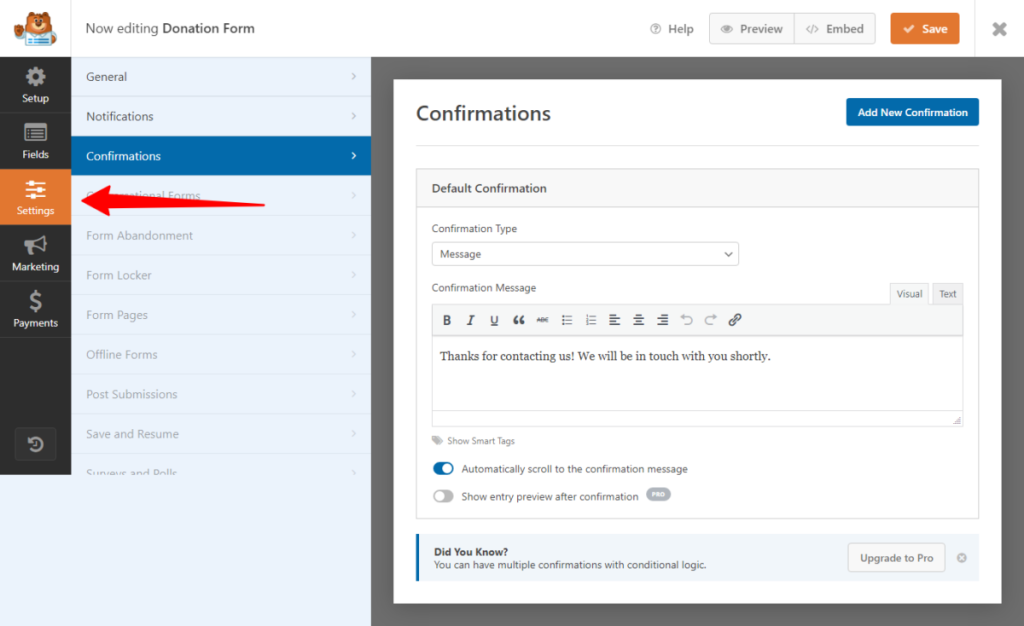
And you can also disable notifications if you don’t want to get disturbed. But I don’t see why you’d want to do that.
For the Pro account and above, you can set up conditional logic for email notifications and messages based on the situation.
WPForms integrates with lots of services and tools.
In the marketing tab, you have a list of email services and customer relationship management (CRM) you can integrate.

If you can’t find your service on the list, use the all-catch Zapier integration.
Alternatively, you can contact WPForms to suggest your service provider’s inclusion on the list.
Depending on your WPForms license, the payment tab allows you to integrate with the following payment gateways – PayPal Standard, Stripe, Authorize.net, and Square.

Once you’re done configuring your web forms, it’s time to publish it.
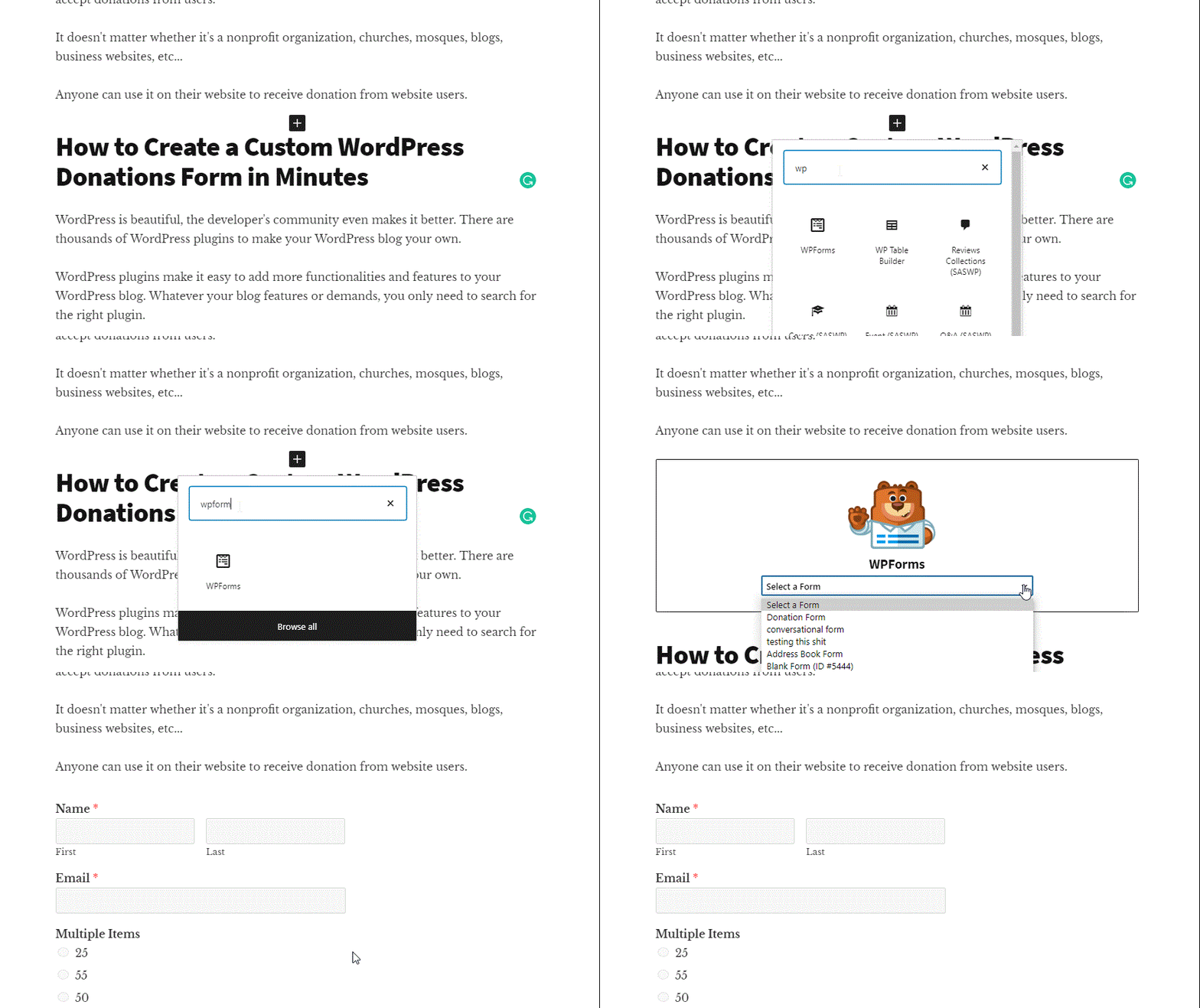
You can use an embed shortcode or the dedicated Gutenberg block editor to publish your form. Either way works fine.
Here is how to publish your web form using the dedicated Gutenberg block editor:
To manage form entries, navigate to your WordPress admin dashboard, hover your mouse over WPForms, and click “Entries.” You will then see a list of your web form entries from users.
This is also one of the Pro license features in WPForms. Users on the Lite version can’t see their form entry info.
If you want to use the full features of WPForms, upgrade to a Pro version.
Gravity Forms
When logging into your Gravity Forms dashboard, you only see a blank screen and a setting panel on the right.
Unlike WPForms, Gravity Forms do not include pre-built templates in the user dashboard.
You have two choices: start with a blank screen or download the pre-built form in JSON file to your computer.
Here are a typical Gravity Forms user dashboard (Gravity Forms 2.5)

However, to download the JSON file, click the “import/export” link from the admin menu on the left. Choose the template you want. Or, rather, you can just download everything to save for future use.
Next, upload the JSON file to your Gravity Forms dashboard using the import feature. It’s not a complex process but not as beginner-friendly as with WPForms.

Now, you can begin editing to fit your requirements.
To edit any form field, click on it to open its settings on the right. This will allow you to edit and configure basic settings like label and validation rules.
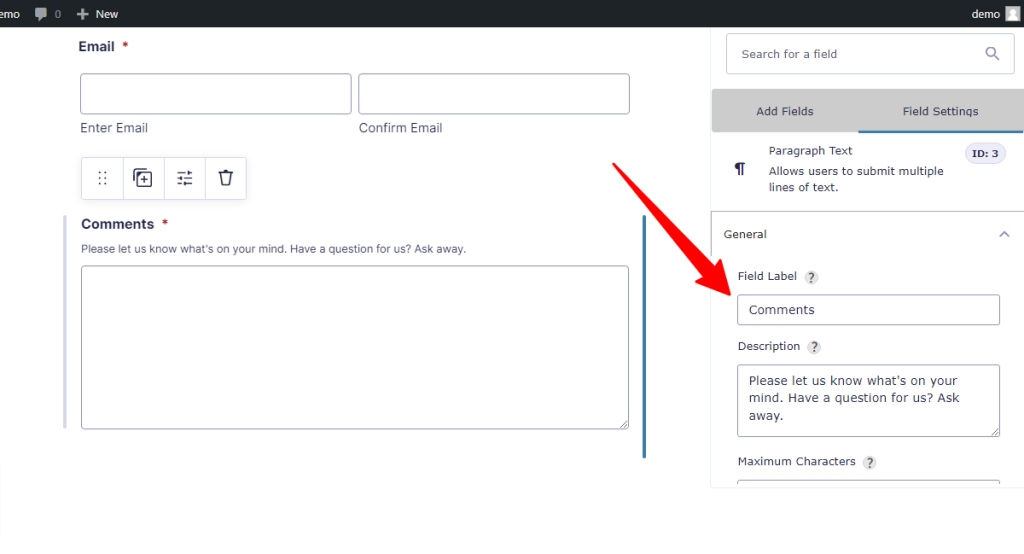
You can enable conditional logic to set the rules for the form behavior based on user selection.
When enabled, you get a slide-out panel to configure the rules.

If you’re happy with your form layout and field, the next is to go over the settings page to fine-tune the form-level setting further.
What you see here will depend on your installed addons.
But there are four settings to configure. You can configure basic form-level settings such as button text, form restriction, security, and form layout here.

In the restriction section, you can define the form entry number. They required users to log in before they could use the web form. And schedule form visibility on the front end.
In the confirmation area, you can configure the confirmation message the user sees after form submission.
You can also use conditional logic to create messages based on user input.
You can play with many settings here, depending on the add-ons in your plan. The left side panel shows a list of settings based on the add-ons.
One important setting not to ignore is the personal setting tab.

On this page, you can set the user data your form collects and stores. This is good for complying with the existing GDPR privacy policy law.
If you’re satisfied with your form, you can embed it with a shortcode or use the dedicated Gutenberg block.
Now, your form is live on the blog for use.
You can view the submission on your WordPress admin dashboard as you receive entries from your web forms.
Add-ons
As a small business owner, you use many tools and services to grow your business. These services include email marketing, payment services, customer support, CRM, and analytics.
For example, WPForms allows you to add leads to your Getresponse email list from your web forms.
Both WordPress plugins have an extensive list of native add-ons to add more functionalities to your web forms.
You will find many native add-ons to integrate with your web forms based on your business needs. However, in this aspect, Gravity Forms are ahead of WPForms.
There is an extensive list of native add-ons on the Gravity Forms features page than you see on WPForms.
Let’s explore this list.
WPForms
The available add-ons in your WPForms account will depend on the license you purchase. For a list of available add-ons, I suggest you see the WPForms add-on feature page.
But let’s briefly walk through what’s in each WPForms license.
The Basic license does not offer such value in terms of available add-ons. You can only access the multi-page addon, conditional logic, custom CAPTCHA, and constant contact form add-on.
The WPForms Plus license allows you to access add-ons from email services providers such as Getresponse, Aweber, MailChimp, Campaign Monitor, and Drip Forms.
The WPForms Pro license allows you to access payment processor features like PayPal, Stripe, and Square.
You also have add-on features like offline forms, form abandonment, signature, Zapier, save and resume, geolocation, etc.
The WPForms Elite license gives you full access to all the features and add-ons.
You can integrate with Authorize.net payment gateway, webhooks, salesforce, Hubspot CRM, and ActiveCampaign forms.
Also, the WPForms save and continue feature is available in the Elite plan.
Gravity Forms
Gravity Forms have a more extensive list of add-ons you can integrate with your web forms.
While both WordPress form builders integrate with the most popular payment gateways, Gravity Forms goes the extra mile to connect with 2checkout.
Gravity Forms Basic License gives you access to email marketing services such as Getresponse, Madmini, Mailgun, HubSpot, iContact, Postmark, reCAPTCHA, and Sendgrid.
The Pro License offers add-ons such as Breeze, Trello, Slack, Pipe Video recording, Capsule CRM, Freshbook, Helpscout, Zoho CRM, etc.
It also gives you access to Payment add-ons – PayPal Checkout, Square, and Stripe,
The Gravity Forms Elite license gives you full access to all the add-ons and form features.
In addition to all the payment processors available in the Pro license, you can integrate with 2checkout and Authorize.net.
For a full list of Gravity form add-ons, see this page.
Integrations With Third-Party Services
Gravity Forms and WPForms are exceptionally good at what they do, but obviously, they can’t provide customers with everything they need.
That’s impossible for any business or organization to do.
This is where integration with third-party services comes into play.
I agree that WPForms and Gravity Forms must do more in this area. They need to encourage developers to contribute to the functionalities of their web forms.
However, Gravity Forms have a slight edge over WPForms based on what’s on the ground today.
Some third-party extensions are needed to further integrate with your Gravity forms.
However, many of them are built by the Rocketgenuis staff, which is quite understandable.
If you search WordPress.org, you will find a few WPForms third-party extensions. These are plugins created by other Dev to bring more features to your WPForms.
For example, this plugin add-on lets you style contact forms created with WPForms, bringing beauty to your form.

You can design stylish webforms with it. Change the background color and button color, and add images, radios, border, font size, font family, etc.
On the other hand, Gravity Forms has a page on the website for third-party extensions and WordPress.org.
You will find many extensions created by other devs to work with the plugin. For a quick view, here are some I find helpful.
Gravity Forms Constant Contact – Add leads to your list when users submit a form.
Event Tracking For Gravity Forms – Track events with Google Analytics. The plugins support GA4 and GTM (Google Tag Manager).

WPForms vs Gravity Forms Pricing
When it comes to pricing, there are several options you need to investigate before making a choice.
You must put your options against your business needs to make the right decision. For example, do you want to create a conversational form, add spam protection, file uploads, etc
WPForms offers forever-free options for those who need a simple contact form. However, it comes with limited form features.
If all you need is a simple Contact Us form with email, website, name, and text area field, WPForms has the edge.
However, for the premium version of Gravity Forms and WPForms, one must think it through before buying.
Let’s walk through some of the options…
WPForms
The WPForms website offers four standard plans or licenses, each with unique features.
Here they are:
Basic License—The WPForms basic license, priced at $39 for the first year, gives you access to premium basic features like conditional logic, file upload, and multi-page forms.
Plus License – In the WPForms Plus license, priced at $59 for the first year, you can access more premium form features like Captcha spam protection.
Pro License—This plan, priced at $199 for the first year, offers premium features like Zapier integration, payment gateways, conversational form, offline form, signature, and more.
Elite License – Priced at $299 the first year, it gives you access to every WPForms feature and additional tools like Salesforce integration, HubSpot form, webhooks, Authorise.net, and active campaign form.
Note all the prices above are for promotional sales and come at a 50% discount. You’ll pay the regular price if you renew for the second year.
Here are the full WPForms pricing details.
Gravity Forms
Gravity Forms offers three pricing plans. Each plan has what makes it different from the others.
For example, the Gravity Forms Basic plan can only be used on one website.
The Pro license allows the use of up to three websites. In comparison, the Elite license gives you unlimited installation of Gravity forms on any WordPress blog.
Here is a brief breakdown of what’s available in each license.
Basic License – For $59 per year, you get access to basic web form features like conditional logic, multi-page forms, automatic updates, file upload, and standard Gravity Forms customer support services.
You also have access to email services and CRM to collect leads.
Pro License – The Pro License costs $159 annually on three websites.
You can access more advanced features like PayPal checkout, Stripe payment, dropbox, Zapier integration, Slack, CRM, and more.
Elite License—This Gravity Forms top-tier license gives access to unlimited website use and costs $159 per year.
You can access features such as webhooks, Authorise.net payment gateway, 2checkout, Quiz, Poll, signature, etc.
Unlike WPForms, the Gravity Forms price above is the same as the renewal. If you decide to renew your Gravity Forms license for the second year, you’ll pay the same entry-level price.
When you look at the pricing from what’s available in the starter plans, WPForms seems a bit cheaper in the first year. But if you choose to renew your license, Gravity Forms are cheaper than WPForms.
To have the same features offered by Gravity Forms’ basic license in WPForms, you must purchase the slightly costlier WPForms Plus license.
If email marketing is one of the reasons you’re deciding between WPForms and Gravity Forms, Gravity Forms wins here.
WPForms’ basic license only offered constant contact integration. If you want to integrate with other marketing services, you need the WPForms Plus license.
Money-Back Guarantee Policy
Sometimes, the product won’t fit in for unknown reasons, no matter how good.
You need to be sure that if you don’t like the product, it does not work for you, or it is not exactly what you’re looking for, you can get your money back.
How do WPForms and Gravity Forms manage customers’ refund requests? What sort of refund policy do they offer?
Let’s find out…
WPForms
No questions asked about the 14-day money-back guarantee policy. WPForms offers a 100% full refund within the first 14 days of your purchases.
To request a refund, go to the WPForms support page and choose my account from the options. Describe the reasons or nature of your request and submit it.
A support rep will respond to your request with the steps to get your money back.
Gravity Forms
There is a 30-day refund policy window. You can request a full refund for a new purchase, renewal, or upgrade account.
So, you have 30 days to try out Gravity Forms if it’s the perfect WordPress form builder for your business.
You have nothing to lose but all to gain.
However, when requesting a refund for upgrade accounts outside of the 30-day window, only the upgrade fee will be returned.
Refund requests are processed within seven business days.
Conclusion…WPForms vs. Gravity Forms
All being said, choosing between the two WordPress form builders depends on your business needs.
Therefore, you have to carefully look at the available features in each plugin before making a buying decision.
If you need a basic WordPress contact form, the WPForms Lite plugin is sufficient.
However, if your business requirements include advanced features like payment gateways, user selection, surveys, and polls, both Gravity Forms and WPForms are exceptionally good options to try.
Your take will depend on the budget, features, and ease of use.


I think the best and the one I want to use is wpforms. Its easy to use and useful for all beginners. Thanks for sharing what the difference of wpforms and gravity forms and what the best they can work or help on us. Keep sharing.
Hi Malik,
Thanks for sharing your thoughts. I agree with you – WPForms is more beginner’s friendly and easy to use.
Very well explained blog. Thanks for sharing this blog. According to my experience, I preferred wp forms.
Hi Jatin,
Thanks for sharing your thoughts with us. It will help other readers make better marketing decision.
It is based on personal usage but WPForms comes with free and premium versions. So newbie generally used more of WPForms.
Hi Amit,
Thanks for your input. Yes, having a freemium version gives WPForms an edge. It allows beginners the opportunity to use it before deciding on upgrades.