

I have been on and off with Namecheap since 2015, moving between shared hosting and EasyWP-managed WordPress over the years.
Most recently, I put the Stellar shared hosting plan through a proper test on one of my own live sites, tracking server behavior, cPanel features, SSL setup, and real TTFB numbers across 40 global test locations, rather than relying on a single speed check from one city.
This Namecheap hosting review pulls from that firsthand testing. I am not going to repeat the generic “Namecheap is cheap and beginner-friendly” line you can find on every other hosting blog.
Instead, I am going to walk you through exactly what you get in cPanel, where the SSL setup can quietly cost you money in year two, what the server actually does under load, and which of the three Stellar plans makes sense depending on what you are building.
By the end, you should know whether Stellar shared hosting is the right call for your project or whether you are better off looking elsewhere.
NameCheap

Namecheap is one of the oldest and most popular domain name registrars and web hosts, known for its affordable hosting plans. But is it the right option for you? Find out all the answers in this in-depth review of Namecheap hosting from personal experience.
Price: 1.78
Price Currency: USD
Operating System: Web
Application Category: BusinessApplication
4.01
Quick Verdict
Namecheap’s Stellar shared hosting is a solid, budget-friendly starting point for a small site, a portfolio, or a first blog, especially now that you can try it free for 30 days before paying anything.
Where it falls short is performance out of the box. There is no built-in caching layer, and without a CDN in front of your site, TTFB is on the slow side, particularly for visitors outside North America.
If you are technical enough to layer a CDN on top and manage your own SSL renewal, Stellar is genuinely good value. If you want fast performance the moment you sign up, with zero extra configuration, you will want to budget for a CDN add-on from day one, or consider a managed WordPress host instead.
The 30-Day Free Trial and How Namecheap’s Plans Are Structured
The biggest change since I last reviewed Namecheap in depth is the free trial.
Namecheap now lets you test its shared hosting free for 30 days before you commit a dollar. That is a meaningful shift from the old model, where you had to buy in advance and rely on a money-back guarantee if things did not work out.
With the trial, you can see your site running on Namecheap’s infrastructure in your cPanel account before any billing kicks in.
Once the trial period ends, you choose how you want to pay: monthly, annually, or every two years (biannual). Paying monthly gives you the most flexibility if you are not sure you want to stay long-term, but it also comes with the highest effective rate.
Paying annually or biannually locks in a lower monthly cost but ties you in for longer, so weigh that against how confident you are in the platform before you commit to a multi-year term.
Namecheap sells three tiers of Stellar shared hosting: Stellar, Stellar Plus, and Stellar Business. I will break down the pricing and the differences in detail further down, but the short version is that they are built for different stages of a website’s life, not just different budgets.
The cPanel and Software Experience
Namecheap’s shared hosting runs on the LiteSpeed web server, and that shows up throughout the cPanel experience in ways that matter if you have used other hosts before.
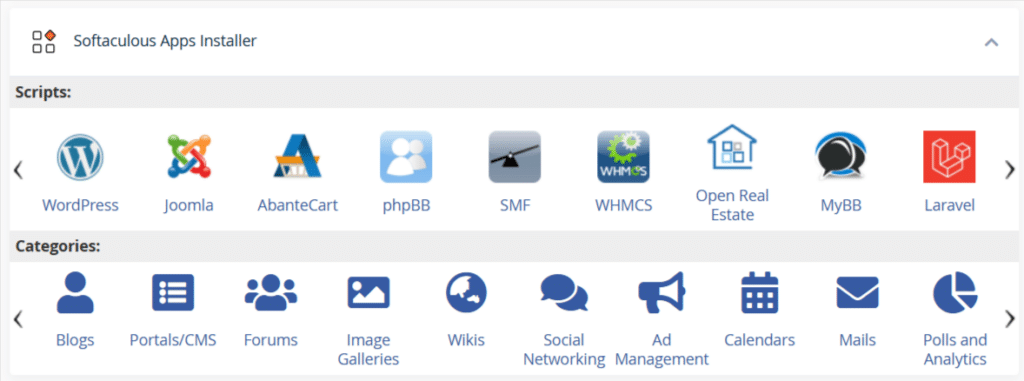
Softaculous is included, which means one-click installs for WordPress and most other common CMS platforms work exactly as you would expect. If you have ever set up a WordPress site in cPanel, there is no learning curve here.
What you will not find is WP Toolkit.
If you’re usued to installing WordPress, controlling updates, staging environments, and site cloning from a single WP Toolkit dashboard on another host, that convenience simply is not part of the Stellar experience.
Namecheap’s Softaculous is also powerful, and include most site management basic tool: staging, clone, update, backup, one-click retore, and more. For me, the difference between WP Toolkit and Softaculous is not which is better, but in philosophy and design.
However, Namecheap does not include built-in Redis support engine on the server. For a personal blog or a small business site, this rarely matters.
But if you are running WooCommerce, a membership site, or anything with heavier database queries and object caching needs, the absence of Redis is worth knowing about before you commit, because you will either need to work around it with a plugin-based caching solution or accept slower dynamic page loads.
Auto-SSL vs Let’s Encrypt
This is where I want to slow down, because it is the part of Namecheap hosting that catches people off guard the most.
Namecheap does not offer free Let’s Encrypt SSL certificates, and I want to be precise about that because it might cause issues later.
What Namecheap installs automatically is its own Auto-SSL certificate, and that Auto-SSL is only free for the first year. After twelve months, it renews as a paid product.
That is a materially different arrangement than hosts that bundle Let’s Encrypt, which stays free indefinitely and auto-renews every 90 days without ever asking you to pay.
The Auto-SSL install works cleanly and automatically if your domain is also registered with Namecheap. Domain and hosting live under the same account, and the certificate gets provisioned without you lifting a finger.
If your domain is registered elsewhere, though, you need a workaround if you don’t want to use Namecheap Auto-SSL. The most reliable fix is to route your site through a CDN that installs SSL, such as Cloudflare or Quick.Cloud.
Both of these will issue and manage SSL for your domain regardless of where it is registered, which sidesteps the Auto-SSL renewal cost entirely and, as a bonus, gets you a CDN layer that Namecheap’s shared hosting does not include out of the box.
My advice: if you plan to stay on Namecheap shared hosting long term, decide on your SSL strategy on day one rather than getting surprised by a renewal charge in year two.
AI Site-Building Tools
One addition since I last covered Namecheap is that its now offer AI-powered site building tools included in cPanel. You get a choice between two:
AI for WordPress is built for anyone who wants a WordPress site without touching a page builder manually. You start from a simple prompt describing your site, the AI generates it, and from there you use AI to edit pages, add content, manage changes, and troubleshoot common WordPress issues.
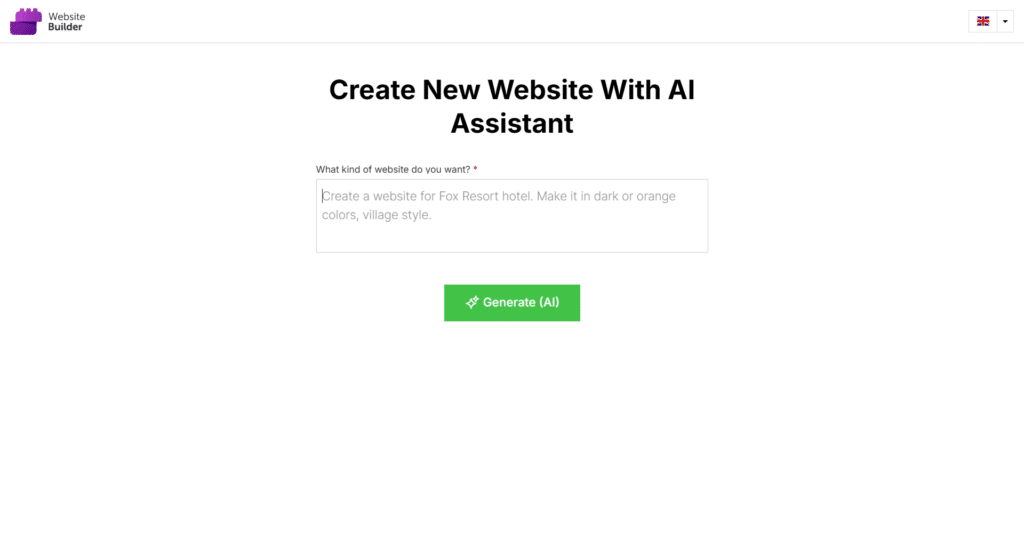
This is the option to pick if you specifically want a WordPress backend under the hood, since it is generating and managing an actual WordPress install rather than a standalone site.
Sitejet AI Website Builder takes a different approach. You choose between starter template selection or the AI website generator option.
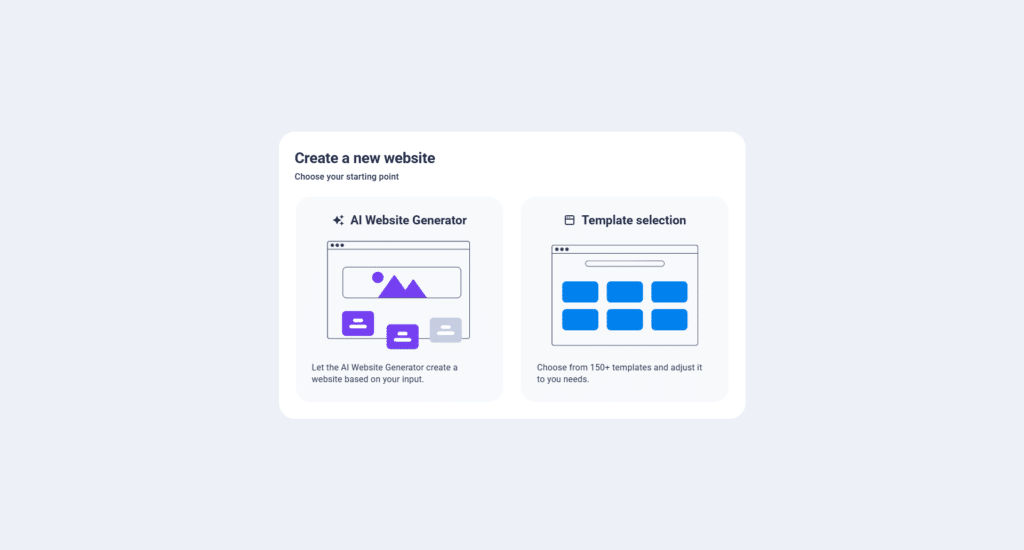
The AI generates your site from prompt, but instead of handing you WordPress, it drops you into a no-code editor where you fine-tune the layout, content, and design yourself.
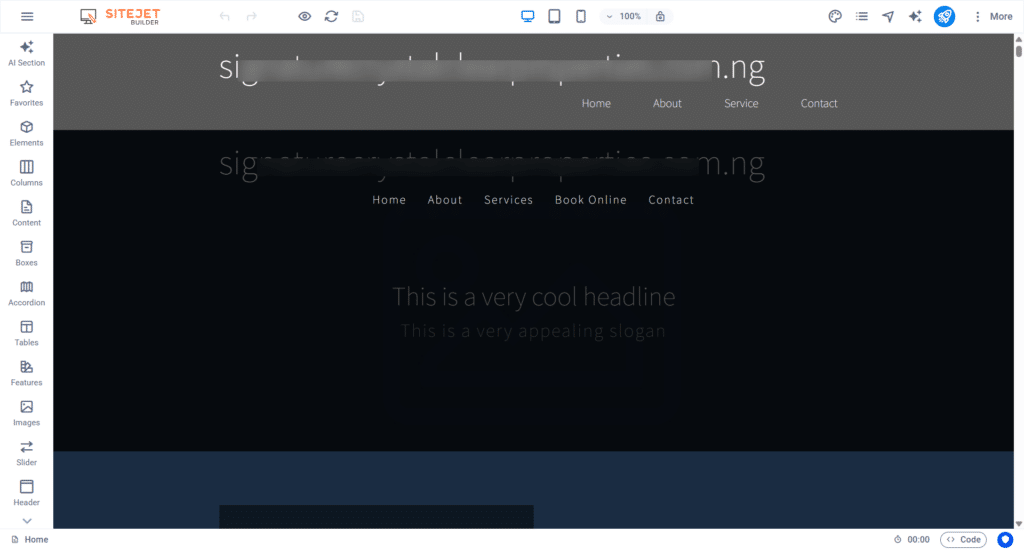
Namecheap positions this as the better fit if you want a more polished business website with more control over design, without needing to manually install WordPress at all. In my experience, both option works great, its just depend on conveniency and how much control you want.
If you are launching a simple site fast and want a real starting point instead of a blank site, having both options built into cPanle is a genuine convenience Namecheap did not offer a couple of years ago.
Performance and TTFB: The Real Numbers
I ran a multi-run TTFB test across 40 global locations using SpeedVitals, on a Namecheap Stellar server with no optimization layered on top, meaning no CDN and no external caching.
This matters, because a lot of Namecheap hosting reviews test with a CDN already in place and then credit the host for speed that is actually coming from Cloudflare or another edge network. I wanted to see what Namecheap’s own server delivers on its own.
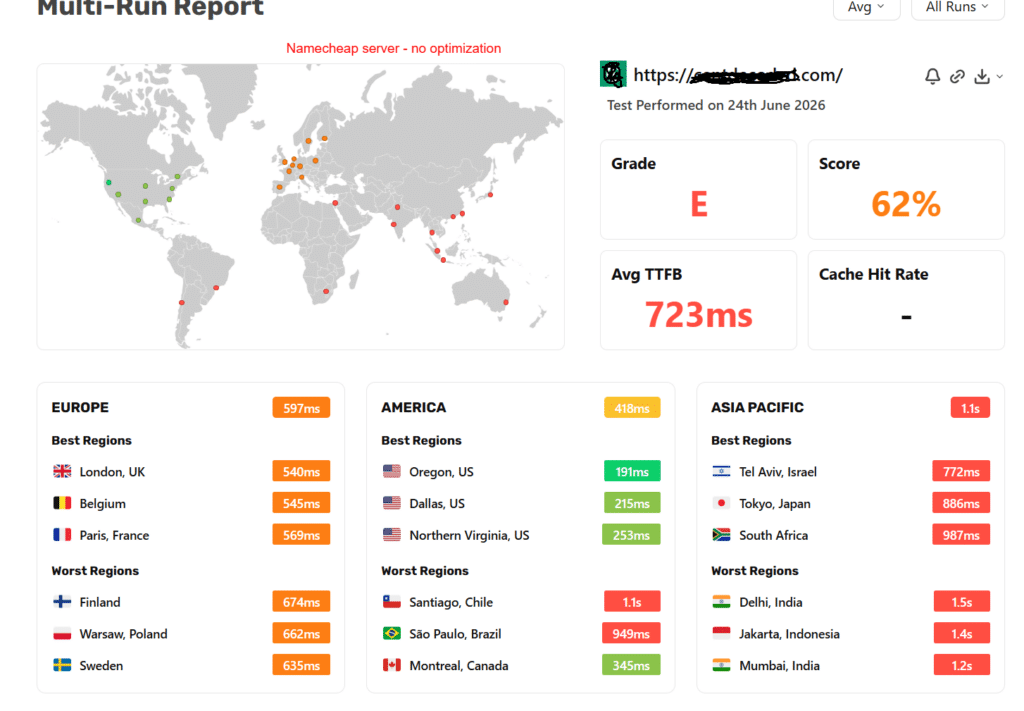
The results:
Broken down by region, the picture gets more specific:
North America averaged 418ms, the fastest region overall. The best-performing locations were Oregon at 191ms, Dallas at 215ms, and Northern Virginia at 253ms, all comfortably fast.
But the region also had weak spots: Santiago, Chile came in at 1.1 seconds and São Paulo, Brazil at 949ms, both far outside acceptable range, while Montreal held a respectable 345ms.
Europe averaged 597ms, solidly in the “needs improvement” zone. London led at 540ms, followed by Belgium at 545ms and Paris at 569ms.
The slower end included Finland at 674ms, Warsaw at 662ms, and Sweden at 635ms. None of these are catastrophic, but none of them are fast either.
Asia Pacific averaged 1.1 seconds, and this is where the server clearly struggles. Even the best-performing locations in the region were slow: Tel Aviv at 772ms, Tokyo at 886ms, and South Africa at 987ms.
The worst regions were brutal: Delhi at 1.5 seconds, Jakarta at 1.4 seconds, and Mumbai at 1.2 seconds.
If your audience is concentrated in North America or Western Europe, these numbers are workable, if not impressive.
If you have any meaningful traffic from South America, South Asia, or Southeast Asia, these TTFB numbers will hurt your bounce rate and your Core Web Vitals scores, and you should plan to add a CDN from the start rather than treating it as optional.
The one genuinely encouraging finding from this test had nothing to do with speed. On the account I was provisioned, server resource usage stayed healthy throughout testing: swap usage held consistently under 5%, and disk usage stayed consistently under 30%.
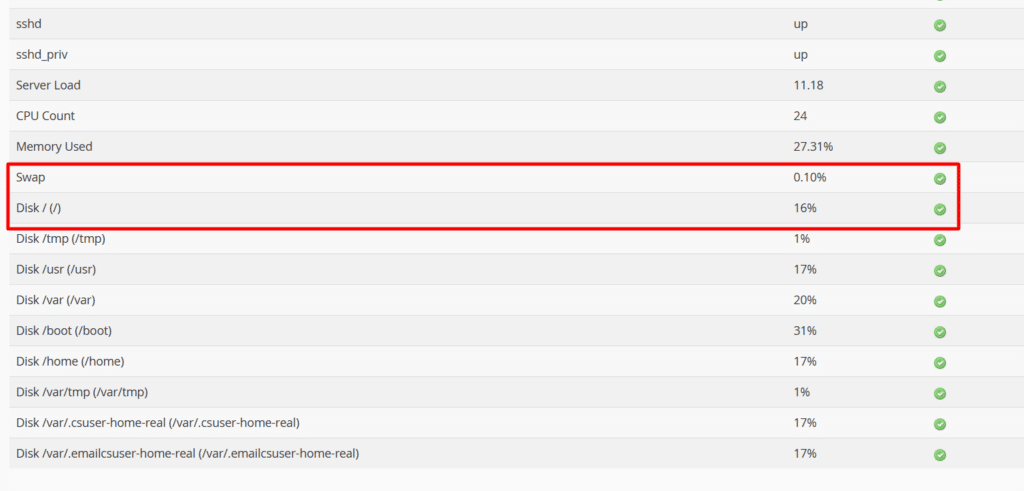
That tells me the server I landed on was not overcrowded with other accounts fighting for the same CPU and RAM, which is a real risk on cheap shared hosting.
I cannot promise every Namecheap server is provisioned this reasonably, but on my account, the “noisy neighbor” problem that plagues a lot of budget shared hosting was not something I ran into.
Security Features
Namecheap’s cPanel ships with a reasonable security stack for a shared hosting plan, and none of it requires a separate purchase or plugin to activate:
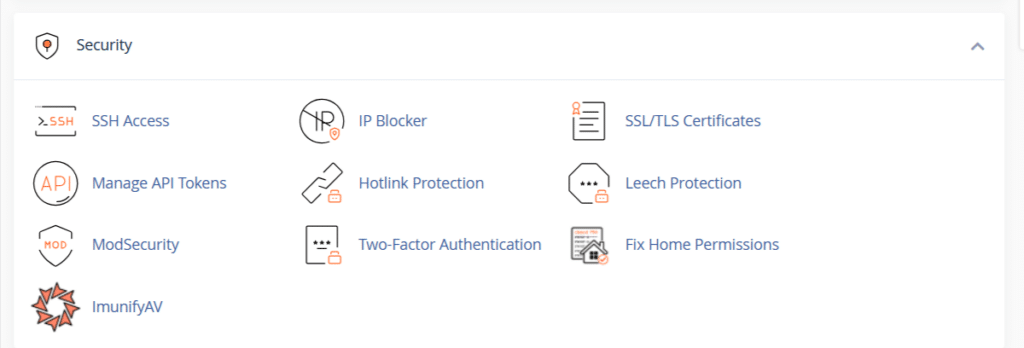
For a shared hosting tier, this is a fair set of tools. It will not match what you get on a managed WordPress platform with a dedicated firewall service, but it covers the basics that most small sites actually need.
Support
Support has consistently been one of Namecheap’s strongest points across every plan I have used, and that holds true here.
Live chat responds almost instantly, day or night, and the reps I have dealt with clearly know the platform rather than reading from a script.
If live chat cannot resolve something on the spot, you can escalate to an email ticket, and those get followed up on rather than disappearing into a queue. For a budget host, this is genuinely above what you would expect.
Pricing: Which Stellar Plan Actually Fits You
Namecheap’s shared hosting comes in three tiers, and the differences go beyond storage. Each one is built for a different kind of project.
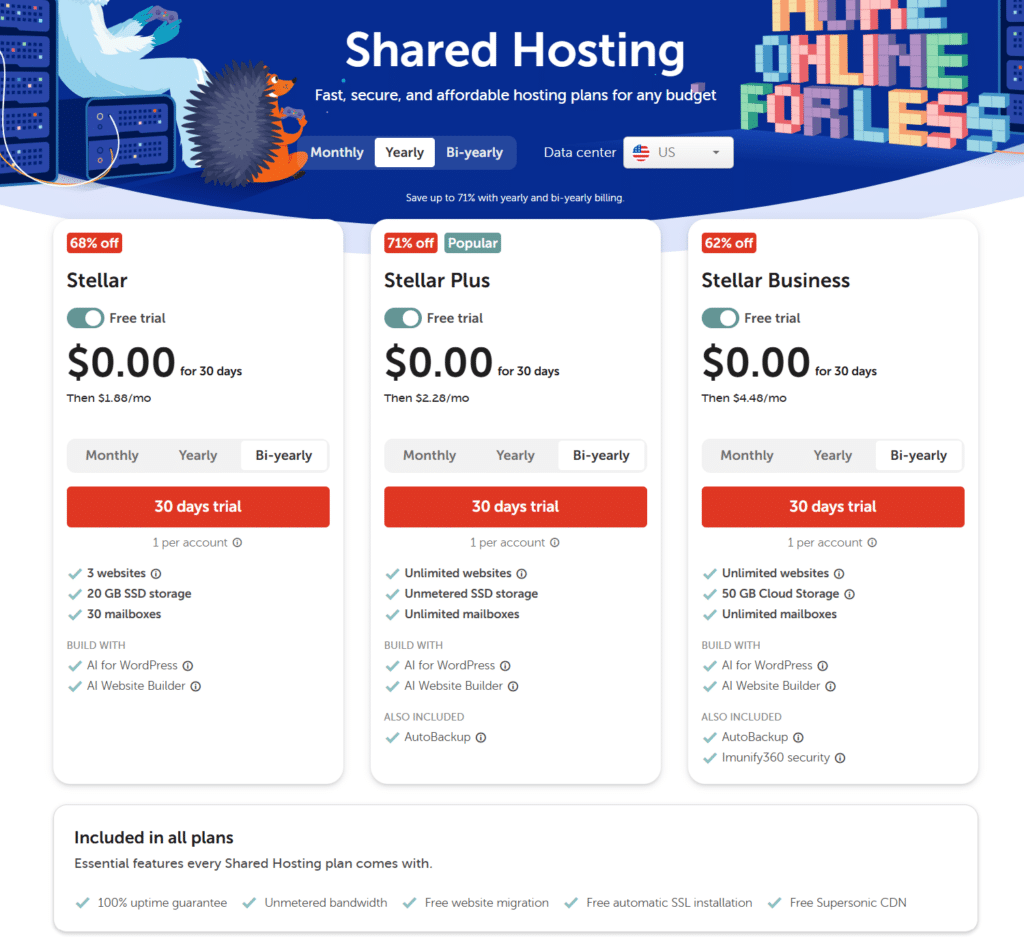
Stellar ($5.88/month, or $55.88/year with annual billing) is built for a single website or a very small handful of sites. It caps you at 3 websites, 20GB of SSD storage, and 30 mailboxes.
If you are launching your first blog, a personal portfolio, or a single small business site and you do not need room to grow multiple domains under one account, this is the plan to start with. It is the plan I tested directly, and for a single-site setup with modest traffic, the resource allocation held up fine.
Stellar Plus ($7.88/month, or $85.44/year with annual billing) removes the caps. You get unlimited websites, unmetered SSD storage, and unlimited mailboxes, plus AutoBackup included, which gives you automated daily, weekly, and monthly backups without configuring a third-party backup tool yourself.
This is the plan that makes sense the moment you are managing more than one site, whether that is your own blog plus a side project, or a small agency setup hosting a few client sites under one account.
The backup inclusion alone is worth the roughly $2 a month jump from Stellar if you are not already backing up manually.
Stellar Business ($11.88/month, or $128.88/year with annual billing) adds 50GB of Cloud Storage instead of standard SSD, along with Imunify360 security bundled in at no extra cost, which layers on real-time malware scanning, automatic patching, and proactive bot and intrusion protection on top of the security stack I listed above.
This tier is aimed at businesses that need better uptime assurances and stronger built-in security without manually piecing together a security stack, and it is the right call if your site handles anything sensitive, like customer data, logins, or e-commerce transactions, even at a small scale.
Across all three tiers, you get some things bundled in regardless of which plan you pick: a 100% uptime guarantee, unmetered bandwidth, free website migration if you are moving from another host, and Namecheap’s own Supersonic CDN included for free.
That last point matters given everything I said above about TTFB and third-party CDN. Namecheap’s Supersonic CDN is available on every Stellar tier, and turning it on is a genuinely smart move, but you must be using Namecheap’s nameservers to activate it.
I haven’t tested their Supersonic CDN yet, since I prefer Cloudflare, due to its extensive network coverage (300+ edge locations) and a wide range of optimizations and security tools.
If you are unsure which Namecheap Stellar plans to start with, my honest advice is this: start with Stellar if you are testing the waters with a single site, but move to Stellar Plus the moment you know you are staying, because the automated backups alone remove a real risk that a lot of new site owners do not think about until it is too late.
Pros and Cons
Pros:
Cons:
FAQs
Final Verdict
Namecheap’s Stellar shared hosting is still what it has always been for me: an affordable, well-supported entry point that requires you to do a bit of homework to get the best out of it.
The free trial makes it lower-risk than ever to test, and the quality of support is genuinely a differentiator from other budget hosts.
But the raw performance numbers tell you exactly what you are paying for. A 723ms average TTFB with no built-in cache is not something you want to launch with and ignore, particularly if your audience is not concentrated in the US.
My recommendation: if you pick Stellar or Stellar Plus, turn on the free Supersonic CDN from day one rather than treating it as a later optimization step, or decide upfront how you are handling SSL if your domain lives with another registrar.
Handle those two things at setup, and Namecheap shared hosting is a genuinely solid, budget-friendly place to run a small site.




This was very informative. Thank you for the in-depth comparison!
Hi Mariam,
Thanks for stopping by, and glad you like this.
Have a nice weekend.
Hi Shamsudeen,
Great to be here again after a while to read yet another review.
You shared a lot of valuable information shared hosting and other hosting aspects.
Great share indeed, I picked a few new lessons from this post. Presently I am hosting on the A2Hosting platform on shared hostings. Its speed and uptime are very good but sometimes I face a resource limit problem. Is it because it is on shared hosting is my doubt. Do I need to shift to managed hosting?
Keep sharing.
I found this post on the pages of IM Platform Growthhackers and I upvoted and commented.
Best Regards
~ Philip
Hi Phillip,
Many thanks for reading through. I’m so glad you find something useful here. As per your observation, all website metrics being equal, managed WordPress hosting is a better option for WordPress blog.
Thanks for your supports, have a nice weekend.
This artcle is very baneficial for me, thnaks to provide it.
Hello Shamsudeen,
I have moved my blog to Namecheap’s shared plan “Stellar Plus” in March 2020. Till then now I never had any issue. Page loading speed is excellent. I am saying it with adding AdSense and other banner ads on my blog. I have also noticed that Enstine muki has also moved to easywp hosting. Thanks for writing this detailed review post.
Regards,
Vishwajeet Kumar
Hi Vishwajeet,
Thanks for sharing your Namecheap hosting experience with us. Yes, Enstine just moved to Easywp recently, and from what I read from him online, he’s experiencing better hosting services.
Thanks, have a nice day.
What about the sites that are made in other platforms. Are those plugins can be integrated in the sites made in other platform.
No, Bimal.
WordPress plugins are meant only for WordPress blogs.
nice information
Thanks for sharing your experience. I always enjoy reading your articles. This article also provided me with awesome ideas. Keep up the good work.
Glad you find the content helpful, Vaibhav. Hope to have you around more often.
This is really an in-depth analysis of Namecheap hosting. Of a truth, I must testify that the author is saying the gospel truth as i once hosted with Namecheap.
Thanks Prince,
I’m glad to read you have a positive experience hosting with Namecheap. Thanks for stopping by.
Hi Shamsudeen, thanks for sharing your experience. I have been looking for the EasyWp review since several months ago and found that it is quite rare.
I am too using EasyWp right now for my blog. I noticed one of thing I don’t like is there is no way to redirect non-WWW to WWW, it is easy to do that in the cpanel web hosting.
However, I like the speed especially if I use lightweight themes.
*typo, I meant redirect from WWW to Non-WWW.
Hi Iqbal,
Easywp is one of the best-managed WordPress WordPress hosting around today. No doubt. You can contact the support center for your case, which should help provide the guide to solve your issue.
Thanks, Iqbal.
Hi Shamsudeen, thanks for sharing your experience. I have been looking for the EasyWp review since several months ago and found that it is quite rare.
Hi, Ashanul,
Thanks for reading through, and glad you find the EasyWP review helpful.
Hello Shamshudeen, Thanks for sharing your experience about namecheap. I always enjoy reading your articles. This article also provided me with awesome ideas. Keep up the good work.
Thanks, Pooja,
Glad I could help.
Thanks for this, I’ve seen namecheap mentioned quite a bit online and often wondered whether their services were also ‘cheap’. You cleared that up!
Hi Ryan,
NameCheap is one of the leaders in the web hosting industry.