If you search “fastest WordPress hosting,” there’s a good chance Cloudways and Kinsta are among the top web hosts. But these web hosts serve different audiences, though there’s overlap. One host is better than others in some specific areas, including server speed.
Cloudways is versatile, lets you choose from five cloud providers, and seems cheaper than Kinsta. On the other hand, Kinsta is WordPress-focused and easier to use, making it the ideal choice for truly managed WordPress hosting.
However, things get complicated when considering ease of use, fully managed hosting, flexibility, and high-performance hosting infrastructure.
Fairly enough, I have used both Kinsta and Cloudways. So, I think it’s best to share my practical experience on which web host is best.
So, let’s begin with how easy it is to navigate their platform and your dashboard.
Check my standalone review of Kinsta, or get more details in my review of Cloudways.
Dashboard and Ease of Use
Both web hosts provide a custom dashboard, which means no cPanel. The dashboard has everything you’ll need to manage your account, servers, database, billing and applications.
From a user’s standpoint, a first-time customer will find navigating the MyKinsta dashboard and hosting features easier than with Cloudways. The Kinsta dashboard is more beginner-friendly and easier to use.
Finding your way around specific hosting features doesn’t require more time to familiarize yourself with the environment.
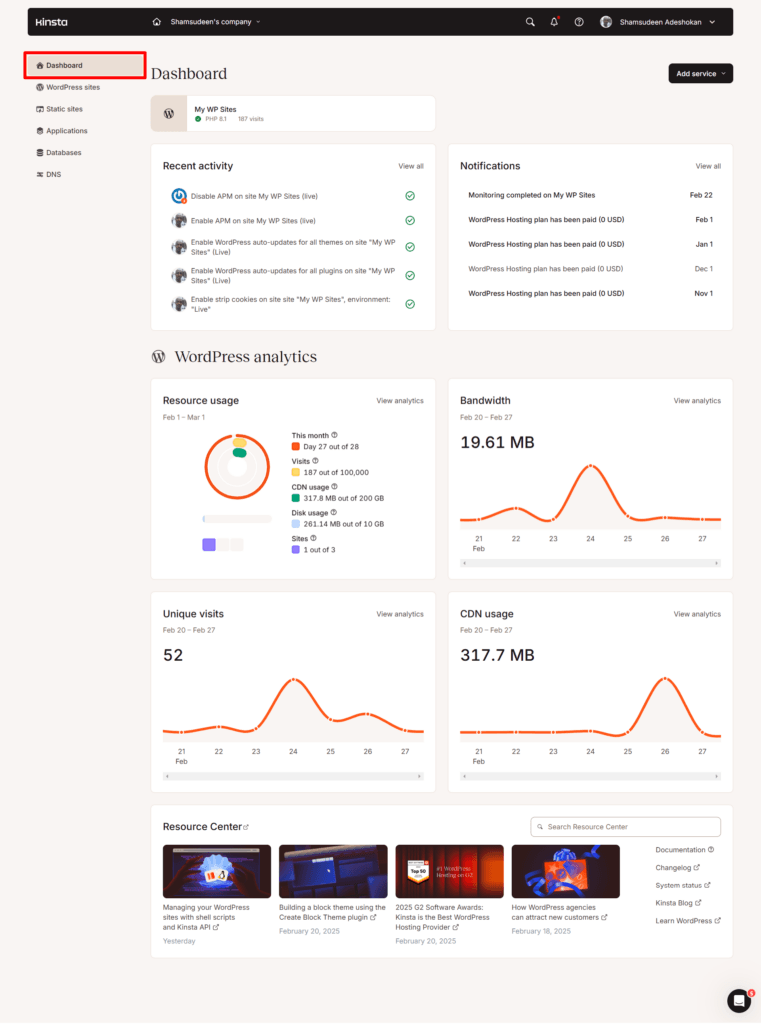
Cloudways has done a good job, too, especially in recent years. Revamping its classic interface to the new look. Still, Kinsta is one step ahead in this regard.
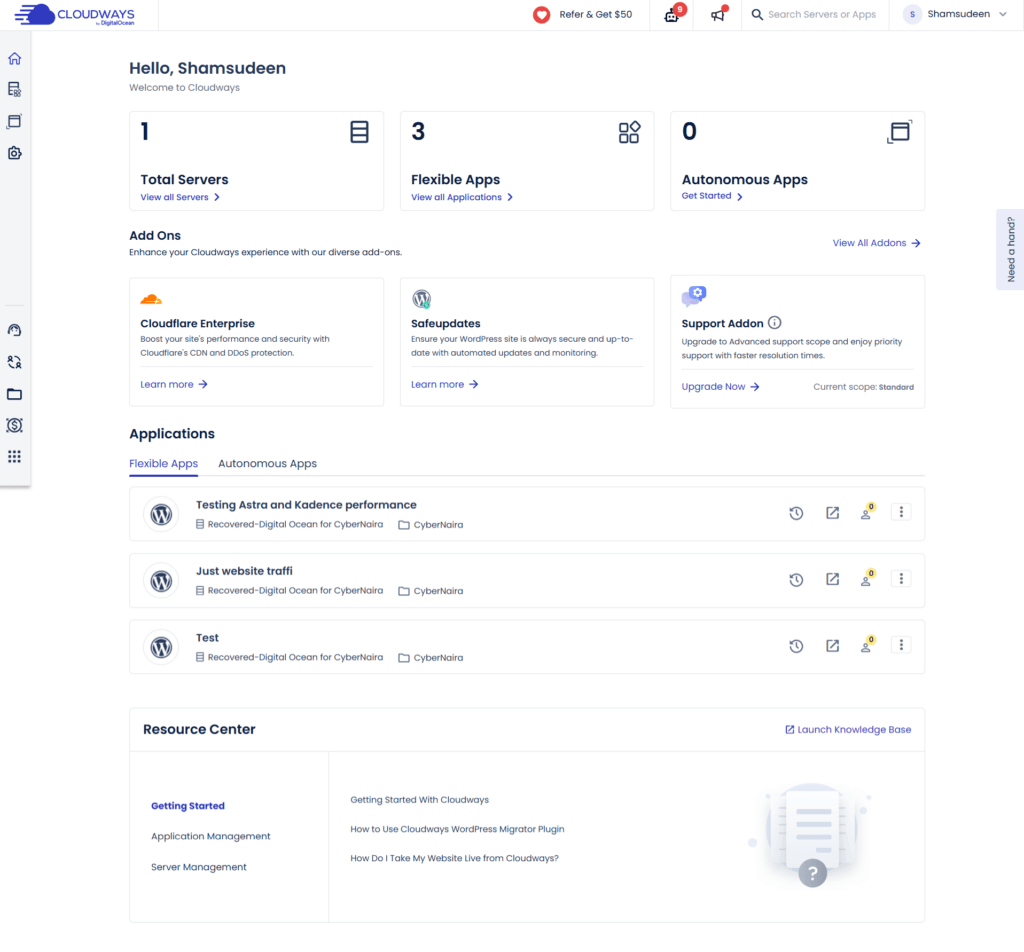
Anyway, both web hosts make it convenient to use their platform. You can easily install WordPress, manage server-side applications, connect to databases, check error logs, monitor hosting performance and resources, invoices, hosting add-ons, etc.
Performance
I’m interested in discussing Cloudways’ and Kinsta’s performance as web hosts that deliver a real-world, high-speed, optimal experience.
I don’t want to go by what both web hosts shared on their websites. You read all the sales pitches and shiny hosting features on their landing pages.
Instead, I set up a demo site and ran basic hosting performance tests. This way, I can show you, with evidence, which web host is the best regarding raw server performance between Kinsta and Cloudways.
NOTE:
I couldn’t run a load test experiment because Kinsta prohibits that on its platform. Read below.

So, I created a test site on the Cloudways DigitalOcean server (1 GB of RAM, 1 core). Then, I set up a test site on the Kinsta platform with 6 PHP threads, 8GB RAM, and 12 CPUs, which are the default for a standard Kinsta site, according to their help doc.
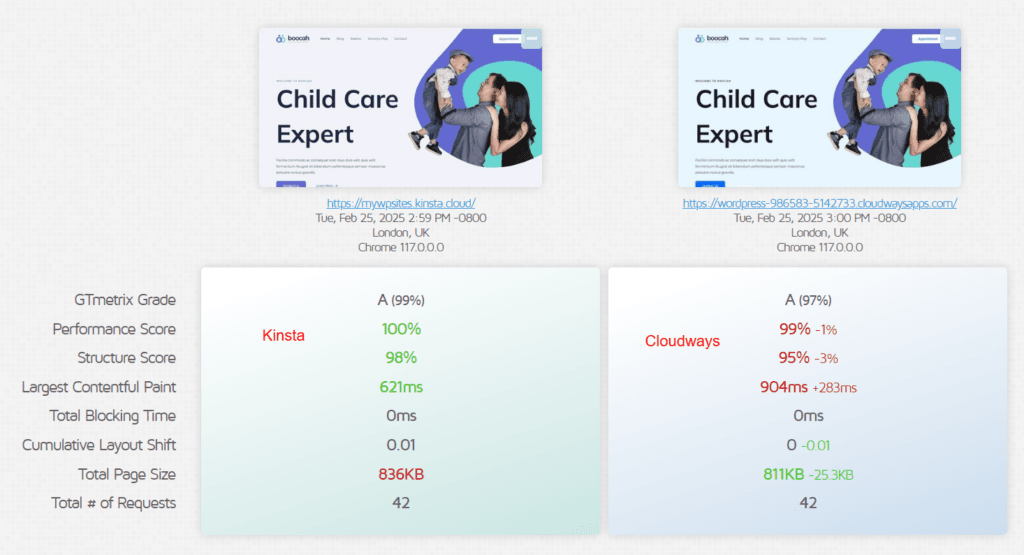
I ensured the test site was identical. Here’s what we have: an Astra theme with starter templates (Boocah theme) and a few known WordPress plugins: Rank Math, Spectra, Kadence Block, SureForms, and HelloDolly.
Here is our demo site for this Kinsta vs Cloudways head-to-head comparison.

NOTE:
This site has Kinsta Caching (edge and server-side) and a CDN active. As per the Cloudways site, we have the Breeze plugin active, as well as Varnish and Object Cache Pro, which are Cloudways’ built-in optimization tools.
Once the site went live, I tested it with GTMetrix, Pingdom, WebPageTest, and SpeedVitals for Time to First Byte. I wanted to see which web host performs better straight out of the box, without many external scripts, visits, or a loaded database.
Here are the results.
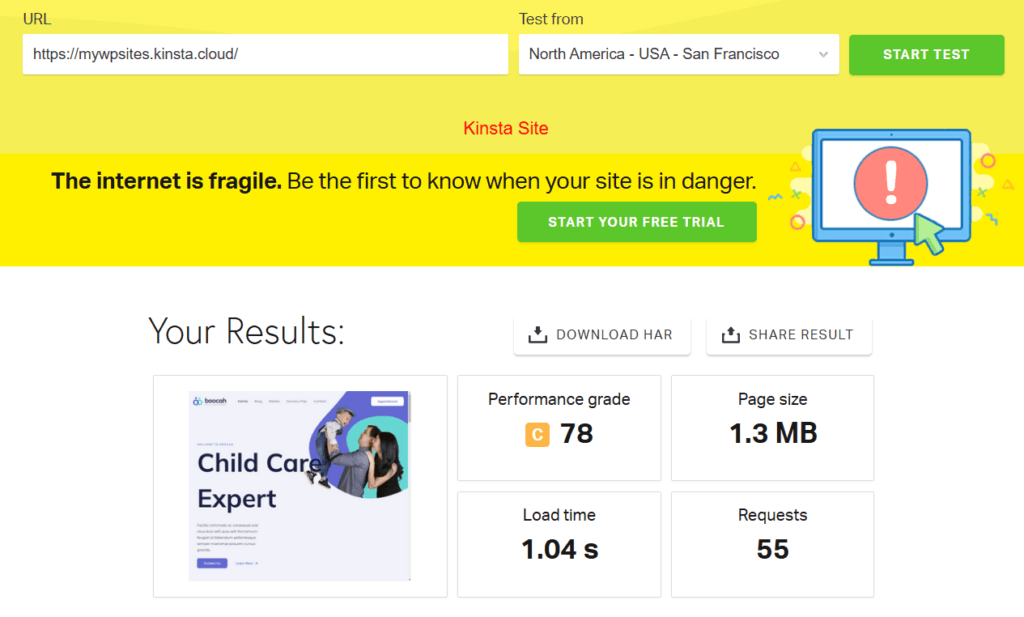
Cloudways – Pingdom result.
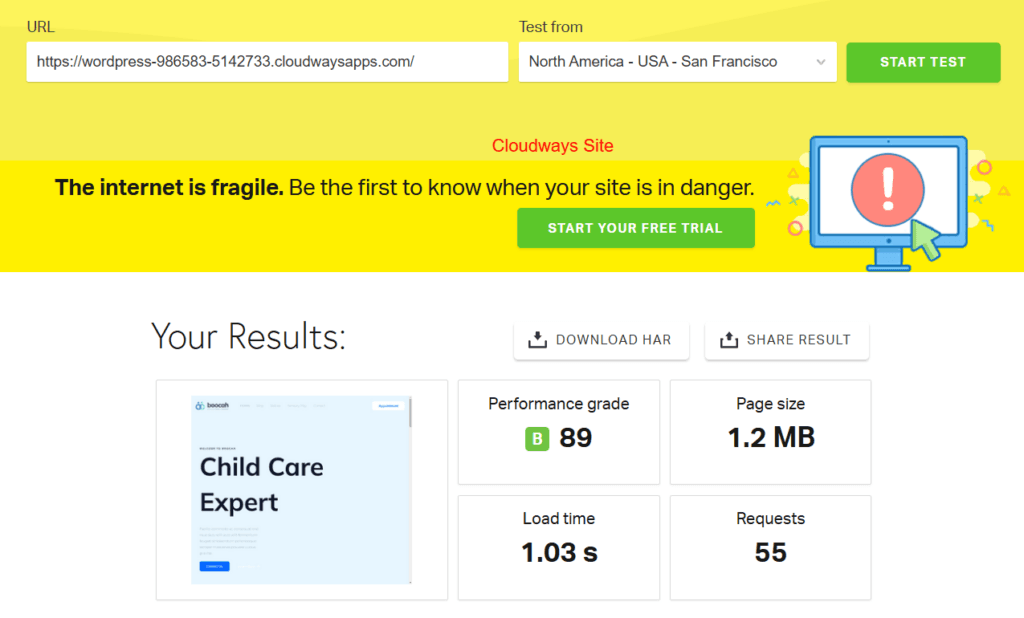
GT Metrix result
Time to First Byte Result with Speed Vitals testing tool

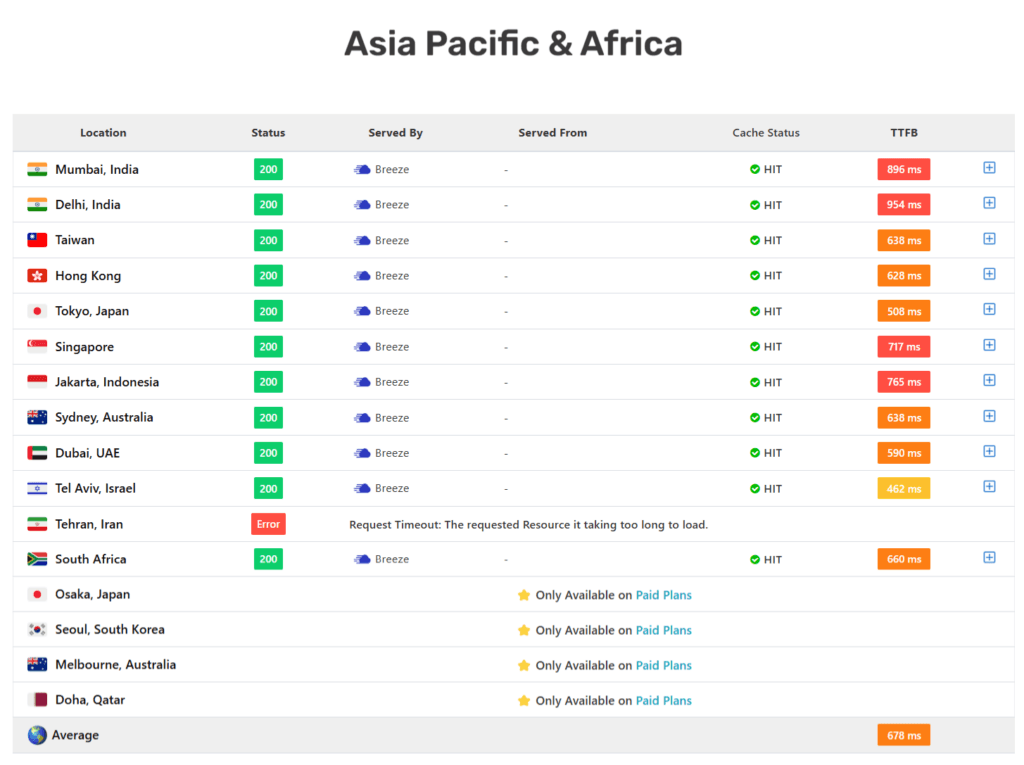
The time-to-First Byte test comparison between Cloudways and Kinsta needs a bit more context or explanation. Though Cloudways offers better TTFB, it’s not as straightforward as you might think. Both web hosts have their coverage regions where they provide better TTFB.
Here is a breakdown of the result.


NOTE:
The above test is run from Cloudways DigitalOcean New York, while the Kinsta site is hosted in its Iowa (US Central) boosted data center. The Cloudways site has no active Cloudflare CDN, but Kinsta CDN is enabled for this test.
Kinsta TTFB result according to SpeedVitals


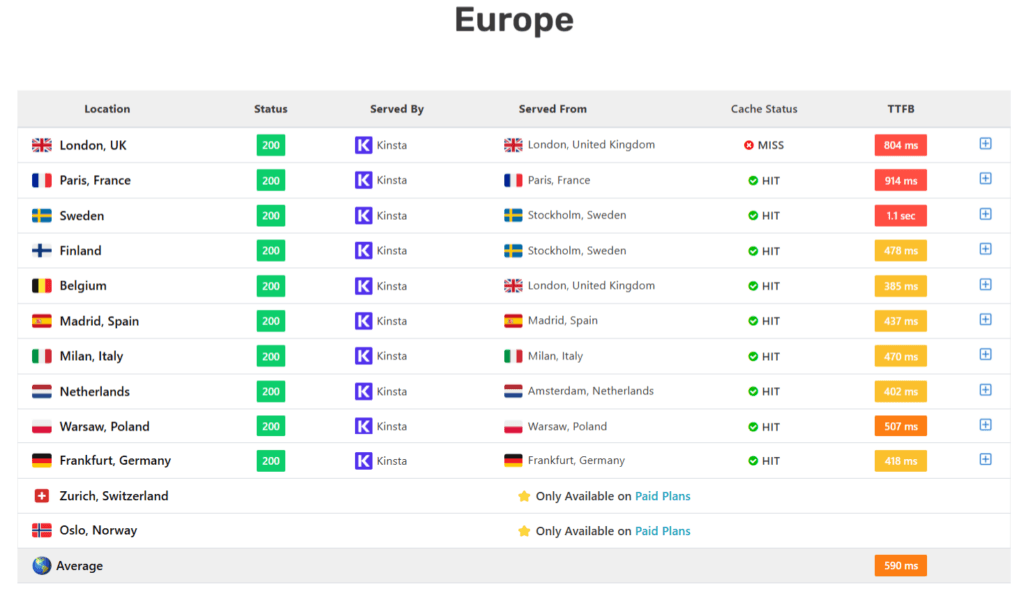
Cloudways and Kinsta have the best TTFB scores in the Americas data centers. Cloudways is the better choice if your traffic is mainly from the European Union.
Both web hosts’ TTFB is poor for users in Asia Pacific and Africa, with Kinsta’s average TTFB at 1.3 seconds and Cloudways’ at 678 ms.
NOTE:
Choose a data center closer to your audience. Cloudways offers 65+ data centers, while Kinsta offers 37.
In addition, I tested the server response time to see which web hosts generate and respond to client requests the faster.
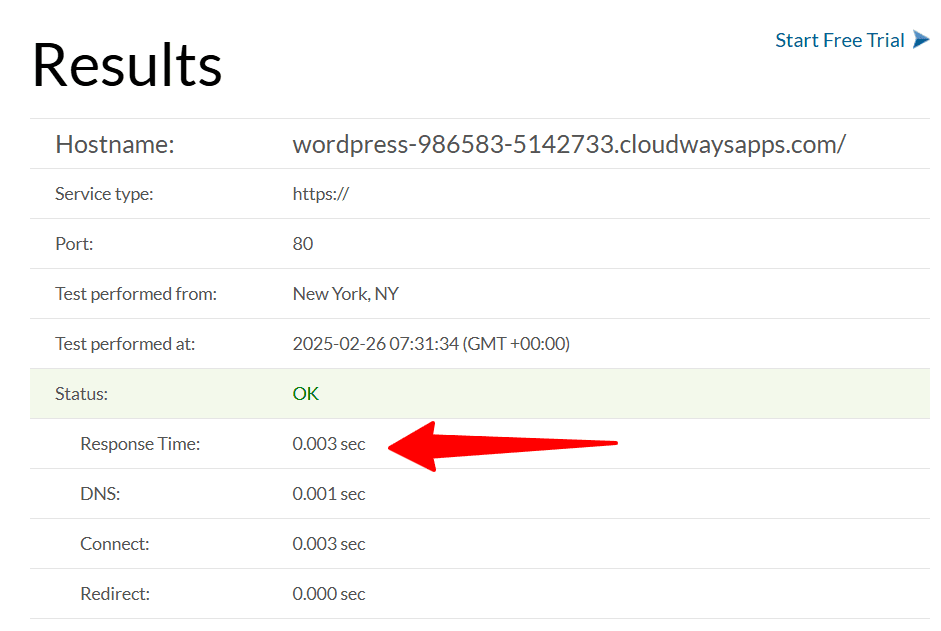
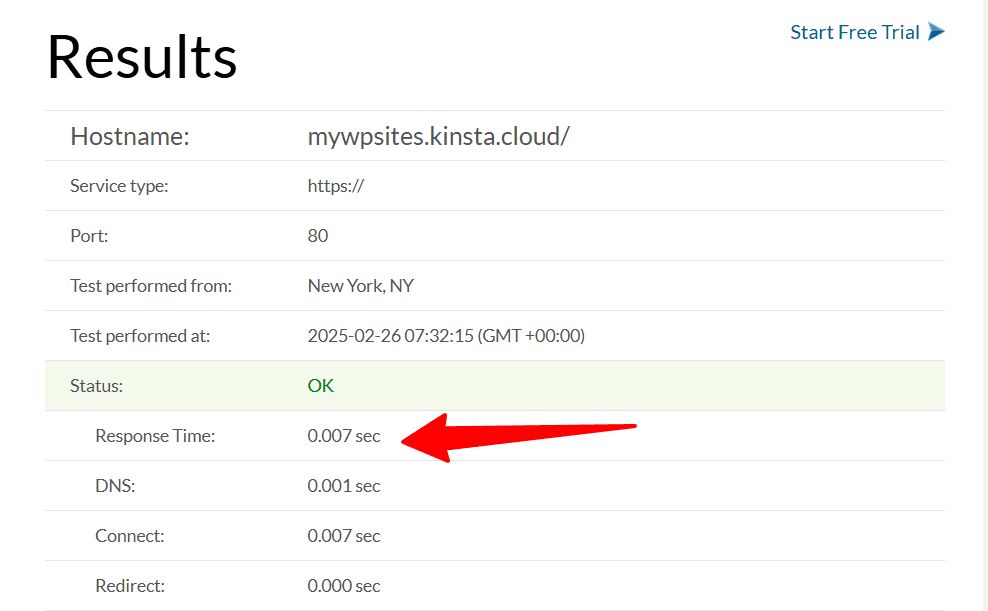
One thing is clear from these tests: Cloudways has an edge over Kinsta in terms of raw server performance.
However, things could take a different direction when you add more resources to your site, like additional plugins, third-party scripts, page builders, eCommerce features, images, etc.
At that time, your web host-optimized server stack foundation could significantly help your optimization efforts.
Hosting Features and Server Options
Kinsta and Cloudways strive to provide innovative hosting features tailored to help you better manage your business.
You have the basic and advanced hosting tools you’d expect, such as site management features, server-level tools, performance optimizations, server monitoring, DNS management, automatic updates, regular automatic backup, security features, one-click staging, dev tools, etc.
Because Kinsta is a WordPress platform first, the hosting features work seamlessly with the WordPress ecosystem. Cloudways is more versatile, allowing you to host other applications such as Drupal, Magento, Laravel, PHP and custom applications.
Both web hosts support WordPress multisite, WooCommerce, static sites, and database hosting.
Unlike Kinsta, which runs entirely on Google’s Cloud Platform, Cloudways works with five providers:
Cloudways’s choice of provider could be a significant advantage in choosing a data center closer to your ideal audience.
For instance, as of this writing, Kinsta offers 37 data centers across the continents—North and South America, Asia, Africa, Europe, Australia, and the Middle East. Cloudways has over 65 data centers in more regions. More cloud providers simply means more data centers.
While Kinsta runs on Google’s compute-optimized C2 and C3D virtual machines and hosts your site in a containerized environment, it uses SSD drives. Compared to Cloudways’ NVMe disc, SSD drives are considered slower, which is another advantage of Cloudways over Kinsta.
The Kinsta and Cloudways server stacks include NGINX, PHP-FPM, MySQL, and MariaDB. In addition, your Cloudways servers run on this setup: Debian 11 (nicknamed bullseye), Varnish, Apache, Imunify 360, and Memcached.
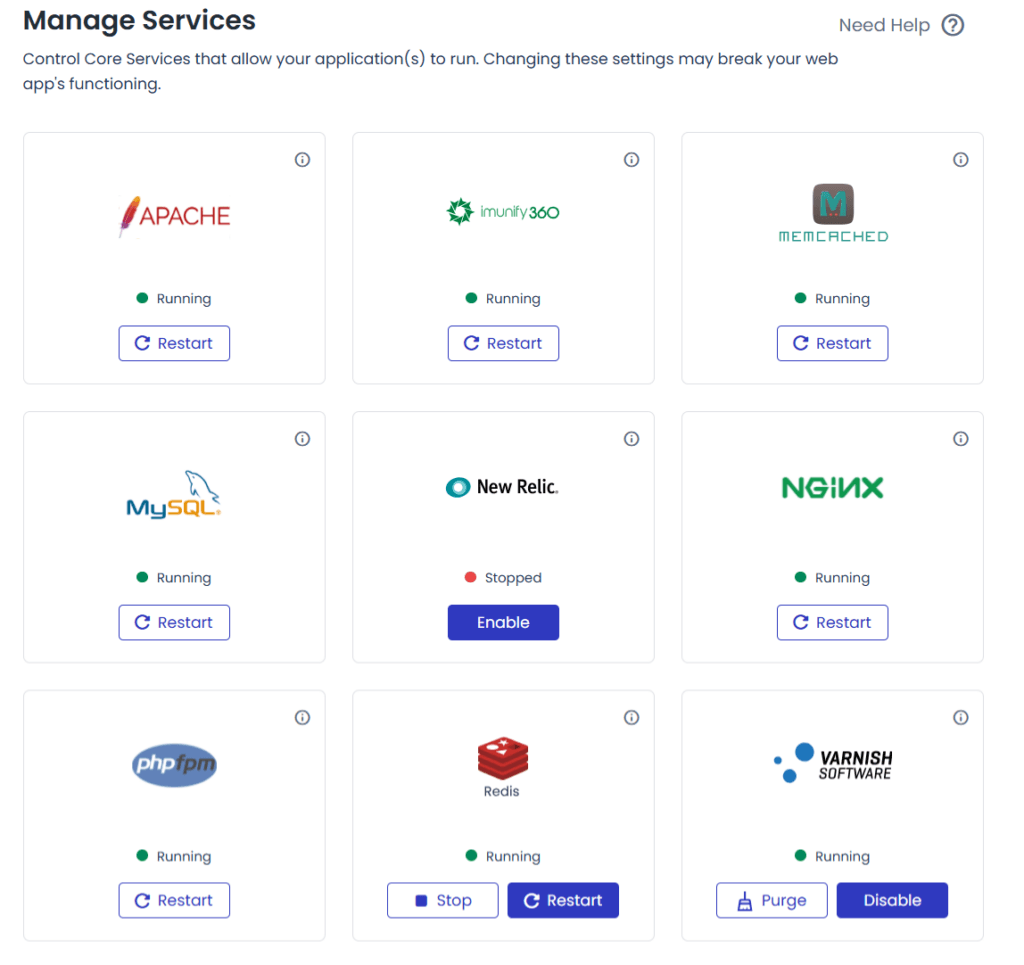
Cloudways is more open about its base server setup.
Cloudways also deploys Object Cache Pro (a database and backend caching plugin) for free with your WordPress installation. However, it costs $95 monthly if you purchase it directly from the developer’s website.
In contrast, Kinsta charges $100 monthly for the Redis add-on, which is less performance-effective than Object Cache Pro.
One of the advantages of Kinsta over Cloudways is its integrated Cloudflare CDN, which is free for all Kinsta sites. Cloudways charges an extra $4.99/month for its Cloudflare Enterprise solution add-on. There’s a reduced price if you host more than 5 sites.
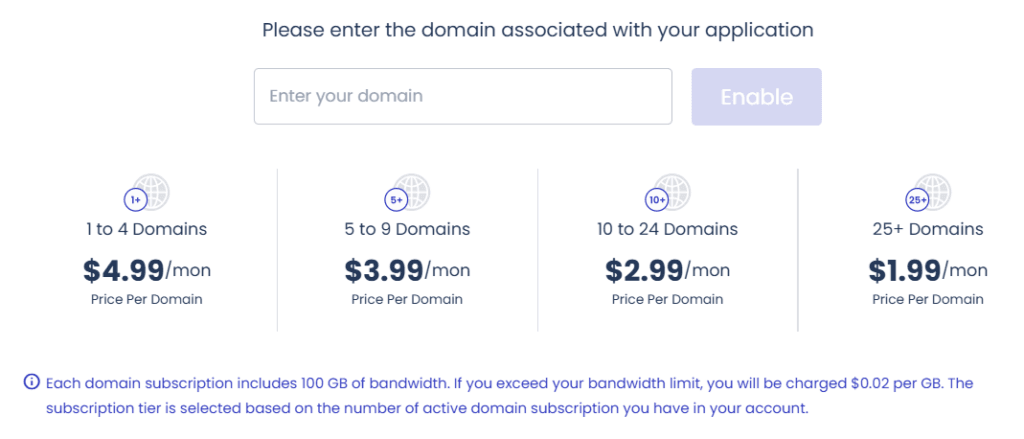
Cloudways offers 100GB of monthly bandwidth, while Kinsta’s Single 35k plan (the basic plan) offers 125 GB of CDN bandwidth monthly. Higher Kinsta plans offer more bandwidth limits.
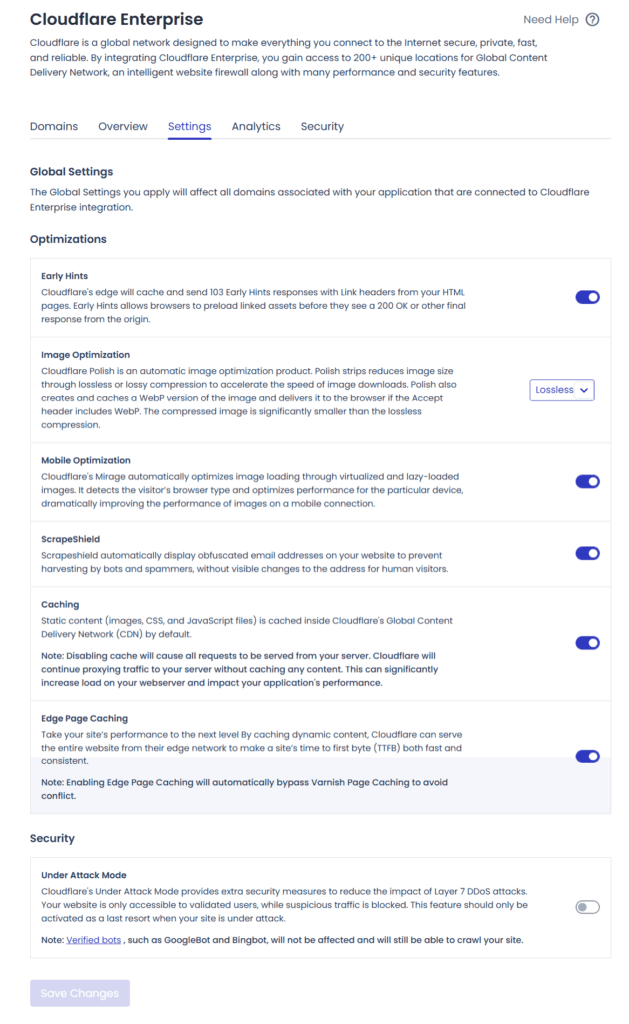
However, it is unclear whether the Kinsta CDN is actually Cloudflare’s “Enterprise solution” or a fine-tuned package missing several key features. Cloudways is open about its Cloudflare Enterprise integration features. You can see what’s available on your Cloudflare settings.
NOTE:
I searched the Kinsta website for verification. I couldn’t find the word Cloudflare followed by Enterprise to the Kinsta + Cloudflare partnership. The best I could find was Cloudflare Integration, which typically didn’t signify the enterprise add-on features from Cloudflare.
Here’s what the Kinsta CDN setting screen looks like.
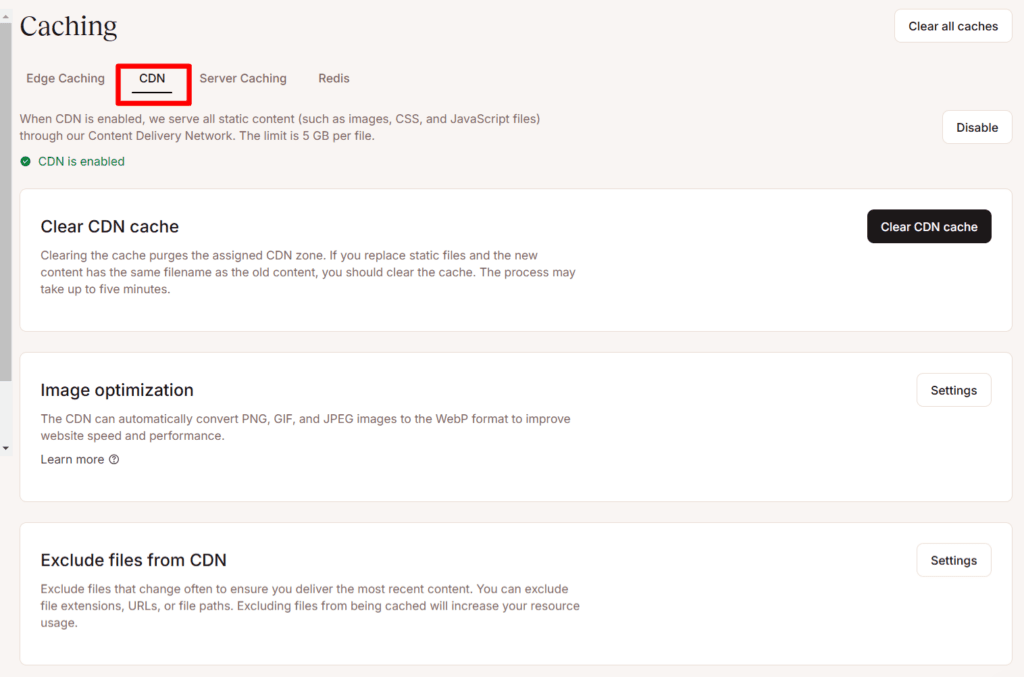
Cloudways CDN setting screen. Note the words Cloudflare Enterprise on the screen.
Another hosting feature worth discussion in this Kinsta vs Cloudways is their backup solutions.
Kinsta takes things to the next level with its backup options.
There are daily automatic backups, hourly backups (6-hour intervals or every hour), system-generated backups, manual downloads, and off-site backups to Amazon S3 and Google Cloud for a small monthly fee of $2.
Cloudways allows you to back up your entire server, which you can run on demand or schedule. The server-level backup consists of all applications on the server.
At the application level, Cloudways automatically runs a daily backup, and you can run an on-demand backup. Off-site backup costs $0.033 per GB.
Kinsta does not allow any backup plugins other than UpDraftPlus. I have not heard of any official list of banned plugins in Cloudways. Check the list of plugins not allowed in the Kinsta platform.
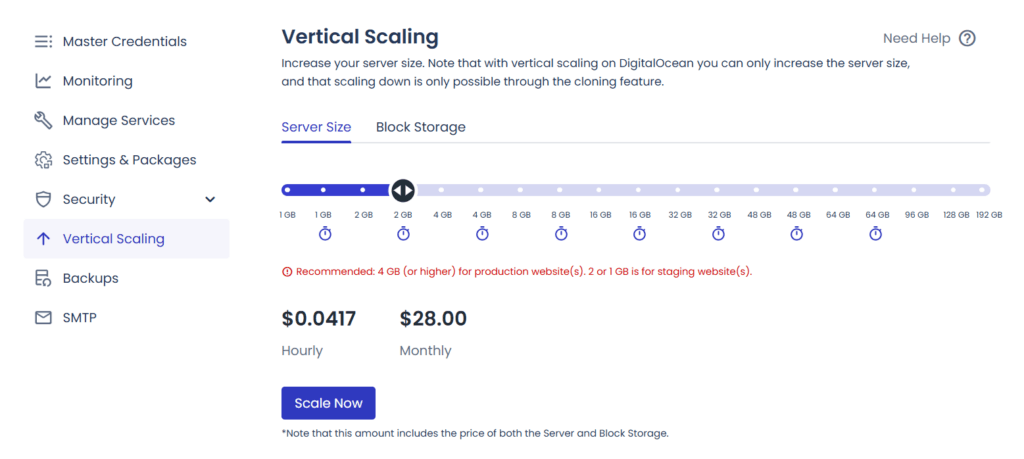
Cloudways is more scalable than Kinsta because you can easily add more server resources (Vertically) without contacting support. From your dashboard, locate the server you want to scale, then select your RAM and server disk sizes accordingly.
NOTE:
Cloudways offers fully managed cloud hosting for WordPress and WooCommerce through its autonomous hosting, powered by Kubernetes. It automatically scales server resources and balances load during high-traffic spikes. It also efficiently automates server maintenance, optimization, and management tasks so you can focus on your business.
But this is a separate hosting product with different hosting prices. Learn more about Cloudways Autonomous.
While Kinsta is also scalable, you need to contact support upfront to discuss increasing your plan’s limits without upgrading to a higher hosting plan. This may not be the best approach for sites that experience sudden traffic spikes or want to take full control of their server resources.
Security
Protecting your site is a priority. This section discusses how Kinsta and Cloudways provide security measures to mitigate attacks and protect your digital assets.
Since both web hosts utilize Cloudflare CDN, your site is protected by a WAF (Web Application Firewall), DDoS protection, WebSockets, a free SSL certificate, comment spam and scraping protection, brute-force protection, bot and malicious traffic protection, etc.
Kinsta is fully managed; it handles automatic updates of plugins, themes, and WordPress core at no extra cost. Cloudways also offers automatic Safe Updates, but you must pay a small fee ($3/month for up to 5 sites, $2/month for 6 sites or more) to enable the add-on.
Malware removal services are free at Kinsta. The support team will clean your site of malware infections at no cost. Cloudways’ malware add-on scans, protects, and removes infections automatically, but it’s not free, unlike Kinsta. The price starts at $4 monthly; the more sites you activate, the lower the price.
Cloudways uses other security tools, such as Fail2ban, Imunify 360 (for server-level firewall), regular security patches and base software updates, a vulnerability scanner with PatchStack, IP management, etc.
Kinsta and Cloudways provide advanced monitoring tools (New Relic) to efficiently analyze server and application health. You can track traffic, cache, resource usage, CDN bandwidth, access error logs, and more. Kinsta has its own free APM (Application Performance Monitoring).
SFTP/SSH, Git, and WP-CLI are all available on Kinsta and Cloudways platforms, allowing developers to manage development, automate tasks, and deploy changes without hassle.
You can switch PHP versions at the server level and update to the latest version at any time. You can also upgrade and downgrade to older versions of PHP. This gives you control over which version works best for your specific development.
Overall, Cloudways and Kinsta have sufficient web security features. They ensure your site is secure from hackers and guarantee 99.9% availability.
Support
Kinsta provides 24/7 expert-level support for all its users, regardless of account level. The Kinsta support team monitors your site 480 times daily, ensuring your application remains active, secure, and always working as expected.
Beyond this, Kinsta is available via various support channels, including email ticketing systems, phone calls, live chat, appointment bookings, social media, and WhatsApp. Plus, the Kinsta community lets you share ideas, collaborate, and get help from other Kinsta users.
Cloudways offers standard support 24/7 for all users. You can access Cloudways’ knowledge base articles, submit tickets, and get help via live chat.
Standard support means Cloudways will resolve any issue affecting your Cloudways platform and its infrastructure. However, if you have issues with your WordPress application, use the knowledge base articles and guides.
If you need Cloudways’ priority support and faster response time for application-level, proactive monitoring and investigation, and customization support, you can choose between the Advanced SLA and Premium SLA support add-ons.
The Advanced SLA support add-on costs $100/month (or 10% of your total invoice). The Premium SLA add-on costs $500/month (or 10% of your total invoice), whichever is higher. Learn more about Cloudways’ support limit.
Kinsta offers more free support than Cloudways.
Pricing
Kinsta operates a tiered plan with capped hosting resources. You pay (upfront) a fixed hosting price based on your subscription. Kinsta hosting plans vary based on traffic limits, storage space, CDN bandwidth, and backup retention availability.
You select the plan that best fits your expected traffic limits and number of installed WordPress sites. If you exceed the resource limits, you pay for the extra usage.
One significant turnoff about Kinsta hosting is the excessive add-on charges.
Kinsta has some add-on charges that are outright unnecessary and simply rip off its customers. For example, the Redis and reverse proxy add-ons. I haven’t seen any other host charge extra for this.
There are other premium Kinsta add-ons available on this page.
Cloudways’ hosting price is more flexible and open. You pay only for the server resources you actually use within the month, and invoices are settled in the first week of the following month.
Unlike Kinsta, Cloudways does not have capped traffic or website limits. Instead, you pay for server space, bandwidth, and the CPU core. This allows you to host as many applications as possible on a single server, provided the resources can accommodate the usage and combined traffic from all applications on the server.
Hosting plan prices vary based on the cloud server provider, RAM size, bandwidth, and CPU processor.
For example, the DigitalOcean premium server with a 25GB NVMe disk, 1GB of RAM, 1 Core processor, and 1TB of bandwidth costs $14 monthly, while the same specification on the standard DigitalOcean server costs $11 monthly.
Kinsta and Cloudways – Starter Plan
Entry-level hosting priceOne advantage of Cloudways’ pricing over Kinsta’s is its pay-as-you-go model. With Cloudways, you can subscribe to the pay-as-you-go plan, which is ideal for seasonal businesses, short-term campaigns, testing and viral marketing campaigns.
Let’s say you want to run a two-week ad campaign for a business. Instead of paying for a full month’s hosting plan, the PAYGO plan gives you absolute control over billing and helps save your budget.
Cloudways does have its add-on charges, such as Safe Updates, Cloudflare Enterprise, Astra Pro add-on, Elastic email, DNS made easy, malware protection, Rackspace email, and application migration add-on.
Some of these add-ons, such as Astra Pro, Cloudflare Enterprise, Rackspace, and Elastic email add-ons, are justified. However, Cloudways could be better for SafeUpdates and application migration.
For context, Kinsta offers unlimited free migration services regardless of site complexity. Your first migration to Cloudways is free; subsequent migrations cost $25 if you request support. However, you can use their migration plugin and won’t need to request assistance from the support team.
Cloudways SafeUpdates extends beyond regular plugin, theme, and WordPress updates. It automates testing updates in a safe Staging hosting environment, detects any security or performance risk, and carefully deploys the updates to your live site if no issues are detected.
It performs thorough testing, including visual regression, HTML and logs, and performance checks. Before this process, it automatically backs up your site and can roll back to the previous state if the update has issues.
For small business owners, spending a few extra dollars could be worth it to protect your asset.
Kinsta vs Cloudways Pros and Cons
| Feature | Kinsta ✅ | Cloudways ✅ |
|---|---|---|
| Pros | ||
| Performance | High-speed hosting powered by Google Cloud Platform (GCP) with premium-tier networking. | Five cloud providers (DigitalOcean, Vultr, Linode, AWS, Google Cloud) give performance flexibility. |
| Ease of Use | Fully managed, hassle-free hosting, scalable, and automatic updates. | Semi-managed: This allows more control over server settings while still simplifying management. |
| Security | Enterprise-level firewall, DDoS protection, daily backups, and free hack fixes. | Multiple layers of firewalls, bot protection, free SSL, daily backup, and powerful security hardening. |
| Support | Free 24/7 premium support from WordPress experts for all users. | 24/7 live chat and ticket support, but some advanced issues may require a higher-tier support add-on. |
| Staging & Development | One-click staging, SSH, WP-CLI, and Git integration for developers. | Multiple staging environments, SSH access, and Git integration with more server-level control. |
| Scalability | Scaling with container-based infrastructure. Best for growing websites; requires contacting support. | Vertical scaling (adjust RAM/CPU manually) is more flexible for sudden traffic spikes but requires manual intervention. |
| Server Location | 35+ Google Cloud locations worldwide. | Vertical scaling (adjust RAM/CPU manually) is more flexible for sudden traffic spikes but requires manual intervention. |
| Cache & CDN | Built-in server-level caching and free Cloudflare CDN. | Built-in caching (Varnish, Redis, Memcached) and integration with Cloudflare Enterprise CDN. |
| Cons | ||
| Pricing | Expensive for small websites. Plans start at $30/month. | More affordable; starts at $11/month for DigitalOcean (but costs vary by cloud provider). |
| Email Hosting | No built-in email hosting; requires third-party services. | No built-in email hosting; needs Rackspace or another provider. |
| Learning Curve | Very easy to use but less flexible for developers. | More complex for beginners due to server management options. |
| Traffic Limits | Monthly visitor limits on plans. Overages cost extra. | No visitor limits, but server resources need manual scaling. |
| Customization | Limited customization due to fully managed environment. No root access. | Full control over server and software configurations |
| Free Trial | First month free | 3 Day Free Trial |
| Refund Policy | 30-Days refund policy | No refund |
Conclusion
Cloudways and Kinsta offer robust security features, advanced hosting tools, and a powerful cloud platform, so whichever option you choose is better.
Regarding pricing, Cloudways is cheaper, more flexible, and offers more hosting resources than Kinsta. Cloudways’ DigitalOcean basic plan (standard server) with 25GB of disk space costs $11 monthly, while Kinsta’s Single 35K plan with 10GB of SSD storage costs $30 monthly.
Cloudways is better performance-wise. Kinsta is not bad either; it’s just that Cloudways’ TTFB and server response time are slightly better.
If support is a priority, Kinsta is the better choice. You can reach out to a Kinsta rep from more sources than Cloudways. In addition, there are no add-on charges for Kinsta support, and every user receives first-class WordPress-led expert assistance.
If you plan on hosting a CMS other than WordPress, choose Cloudways. The platform supports other content management systems and provides tools and support to improve your experience.
Cloudways or Kinsta? You have a choice. I have given you the information you need to make the right decision.