

This article isn’t about declaring a winner between Astra vs Kadence debate. Instead, it highlights their key differences to help you choose the best theme for your project.
Based on my experience using both themes, I’ll discuss the challenges I faced, the advantages and disadvantages of each, and how to get support.
To ensure a fair comparison, we’ll focus solely on the free versions of the Kadence vs Astra theme. Reviewing the pro theme versions would introduce additional variables that could skew the results.
By focusing on the free features available to everyone, we can provide a more accurate and helpful comparison.
Now that we are both clear, let’s dive in!
Kadence vs. Astra WordPress Theme Overviews
Let’s begin our Kadence theme and Astra free comparison with a brief background history.
Doing this will help you learn about the people behind each theme, its popularity, numbers, user base, etc.
Overview of Kadence Theme
Kadence themes enjoy an average of 2,500 daily downloads on WordPress.org, over 180 five-star user ratings, and 200k+ active installations.
It is the flagship WordPress theme of the WP Kadence brand, known for its effective design and speed optimization, often referred to as Kadence WP.
Beyond the Kadence theme, WP Kadence also develops other WordPress products, such as Kadence Block, Kadence Cloud, Kadence Conversion, Kadence Slider Pro, and Kadence WooCommerce Elementor.
You can view a list of all their WordPress product bundle kits on this page.
The Brand, WP Kadence, was acquired by iThemes, a subsidiary of LiquidWeb, in April 2021.
LiquidWeb is a household name in the managed WordPress hosting industry and has acquired several WordPress products, such as iThemes, LearnDash, Restrict Content Pro, The Events Calendar, and GiveWP.
The Kadence theme has several free features you will love. Its free version is sufficient to build a functional website with incredible speed and high performance.
Both Kadence Theme and its associated plugin, Kadence Blocks, work well together, especially in a WordPress environment, and they are efficient in terms of performance optimization and customization options.
Kadence supports WordPress plugins like page builders, AMP, SEO plugins, eCommerce, speed and performance plugins, etc.
Overview of Astra Theme
Astra theme is the brainchild of BrainStorm Force, the same company behind Spectra, Convert Pro, Schema Pro, Ultimate Addon for Elementor, and Ultimate Addon for Beaver Builder.
Astra is the most popular non-default WordPress theme of all time. With an incredible 2 million active downloads and counting, it is also the WordPress theme with the most five-star user ratings—5,000+.
On average, the Astra theme is downloaded 6,000 times daily. Astra is a much-loved and popular theme compared to Kadence’s 2,500 average daily downloads.
Astra integrates seamlessly with WordPress page builders and eCommerce plugins. You can build, design, and ultimately take control of your website design using the Astra theme.
It is a versatile WordPress theme developed to adapt to different website projects and purposes.
Like the Kadence theme, Astra is optimized for speed and performance.
The Astra theme is lightweight and uses Vanilla JavaScript instead of jQuery; this makes the Astra theme incredibly fast and improves the website’s overall performance.
Both themes offer starter templates, making building any website design painless and quicker.
Ease of Use
Both Astra and Kadence provide a better user experience.
You don’t need to be a tech guru or a WordPress expert to download or activate the themes.
Regardless of WordPress experience, anyone should be able to get around activating Astra or Kadence in minutes.
In addition, both themes offer clean and intuitive user interfaces, integrate with the native WordPress customizer, and offer getting-started support, tutorials, and documentation.
Kadence also offers community forum support, where you can interact with other users and find solutions to your issues or questions.
On the other hand, Astra manages a 55k+ private Facebook user community where you can seek help, engage other Astra theme users, ask and answer questions, etc.
Astra and Kadence are built to deliver responsive website design. They offer starter templates, allowing even beginners to build incredible website designs with less effort.
Regarding ease of use, both themes present an easier way to unbox, no steep learning curve, and a user community to resolve technical issues, learn more about features, and share ideas.
Choosing between the Astra and Kadence themes based primarily on their ease of use is a tie, as neither theme requires steep learning or is difficult to customize.
SEO Friendliness
The SEO friendliness of a WordPress theme is crucial in determining its ability to enhance and complement your SEO efforts.
Both Kadence and Astra themes are SEO-friendly but differ in some aspects and approaches.
Kadence theme optimized code structure with a cleaner and more efficient codebase. This optimized code can help improve your site’s loading speed and overall performance, which are critical factors for SEO.
Kadence Intelligent Load optimized user experience by loading scripts and files only when needed on the page. This is like a script manager, ensuring only used CSS and JavaScript files are executed on the page.
Loading Google Font locally, font preloading, and adding microdata schema markup are built-in features in the Kadence and Astra themes. Kadene also preloads CSS files.
Also, even the free version Astra and Kadence themes comply with the Web Content Accessibility Standard Guideline, ensuring your web pages are usable for everyone, including people with impaired eyesight.
Astra is more lightweight, less than 50KB out of the box, which means it uses fewer resources to load your site pages. The Astra core theme can load at an incredible 0.5 seconds on a clean WordPress installation.
Your site will benefit from the performance gain and boost overall speed optimization efforts.
It supports the HTTP/2 protocol and only loads site resources when users actually need them. These features help improve performance metrics like Core Web Vitals and improve SEO.
In terms of which is more SEO-optimized, Astra vs Kadence, I think the two theme developers have done a pretty good job supporting your optimization efforts. Whichever theme you choose improves your WordPress SEO.
Performance
Performance can be a determinant factor when choosing the best WordPress themes suitable for your business.
However, Astra and Kadence are performance-optimized, fast, and lightweight, providing an optimal user experience compared to average WordPress themes.
Still, I need to see how both themes perform straight out of the box, so I set up a blank WordPress installation on the NameCheap Easy WP-managed WordPress hosting server.
No plugin is active, no starter sites are active, and no published posts or widgets are activated; it is just a clean and blank WordPress blog.
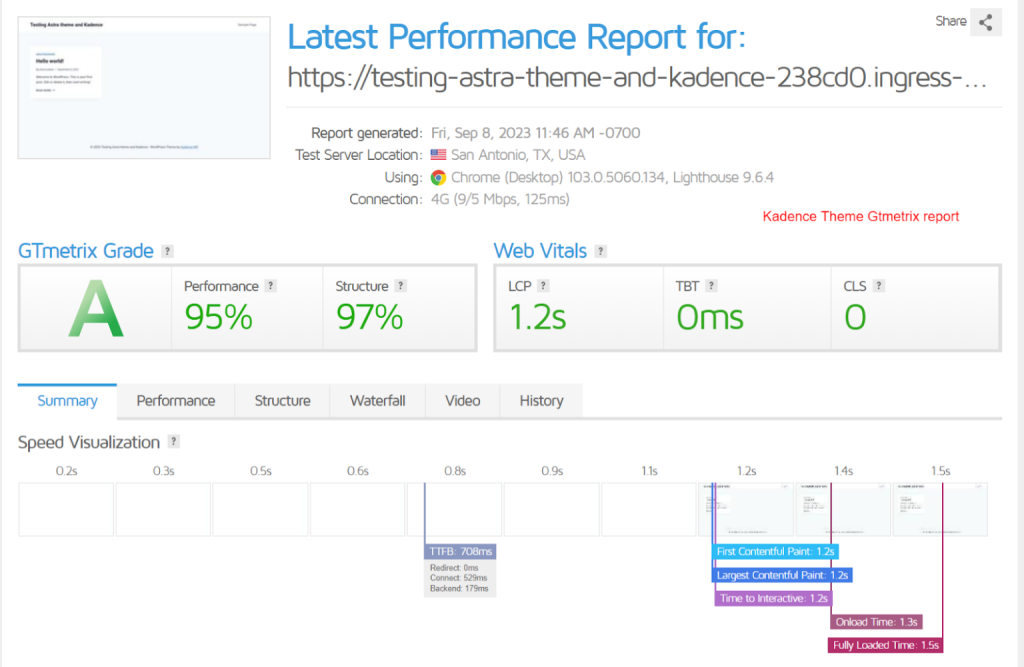
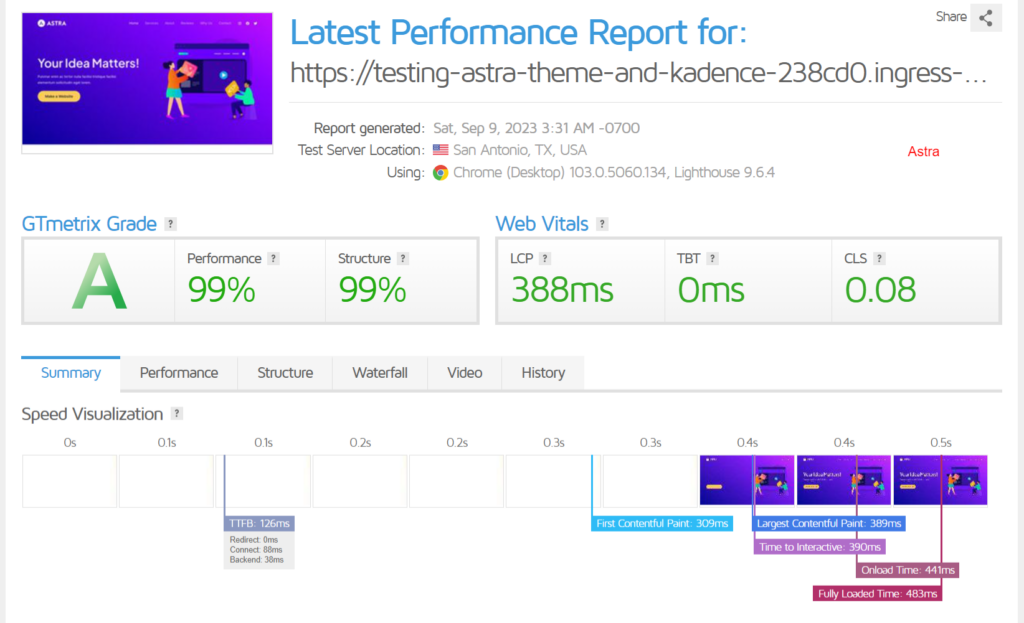
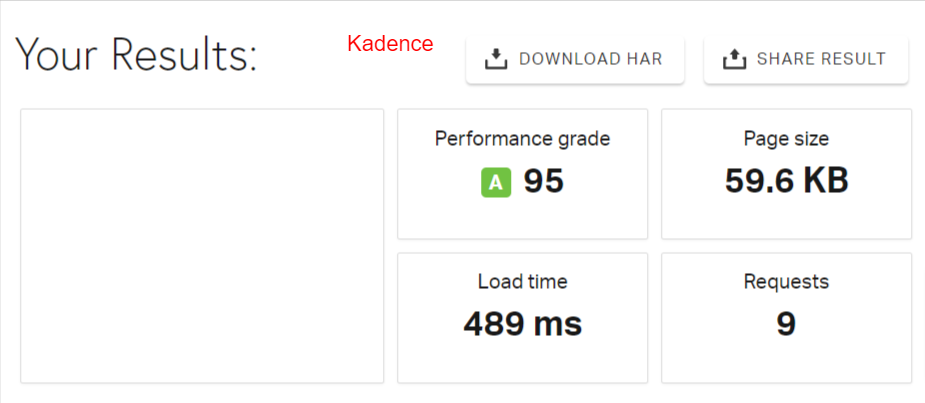
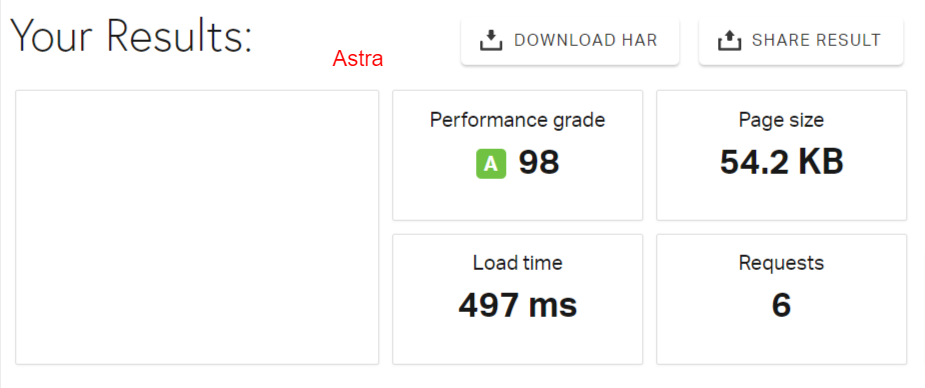
After installing WordPress, I installed the Kadence and Astra themes. Then, I tested with GtMetrix and Pingdom.
Here are the results.
Kadence Gtmetrix result
Astra Gtmetrix results.
Kadence Pingdom test result
Astra Pingdom test result
Though this may not prove a realistic measure or expected performance for a production site, it should give you a clear optimization picture of the Kadence and Astra theme.
When you build your website on a fast-loading WordPress theme optimized for SEO, you’re one step ahead of the competition.
Regarding theme performance, Astra and Kadence did an excellent job ensuring no unnecessary clutter or bloated features slowed down web pages.
Still, one theme performs better to improve Google Core Web Vitals.
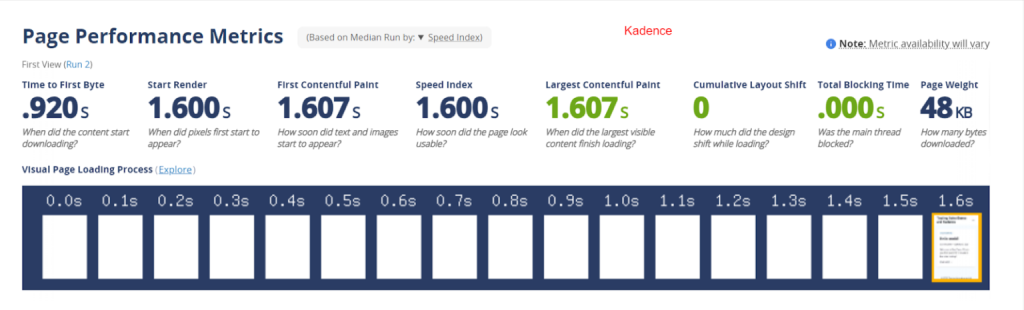
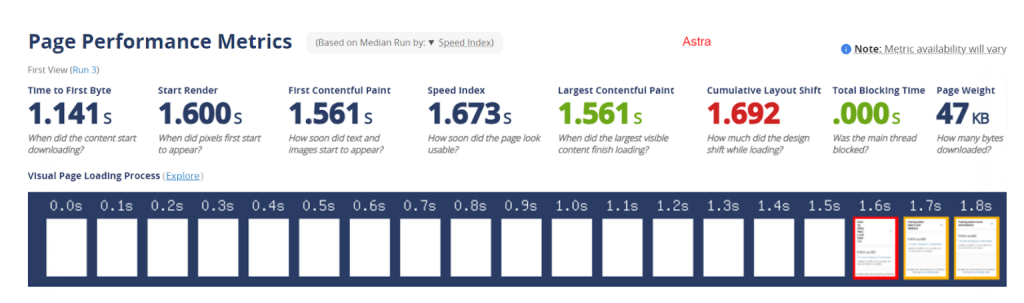
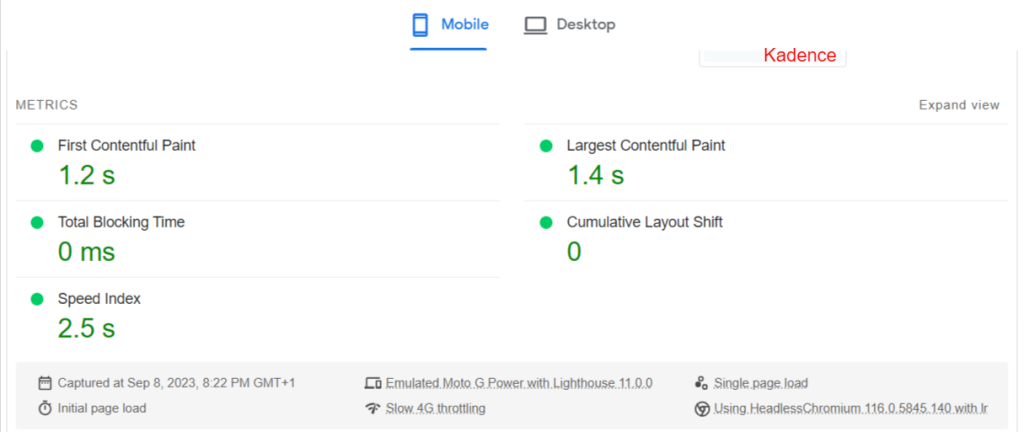
In my testing and from experience using Astra and Kadence on a live WordPress site with 15 plugins, 250+ published posts, and 3k images, Kadence performed better on Core Web Vitals.
To ensure this test is as practical and helpful as possible, I use multiple tools to test Core Web Vitals: Pagespeed Insights, WebPageTest, and GtMetrix.
Here are the Core Web Vitals reports.
Kadence WebPageTest Results
Astra WebPageTest Results
Kadence PageSpeed Insights Mobile Test Results
Astra PageSpeed Insights Mobile Test Results
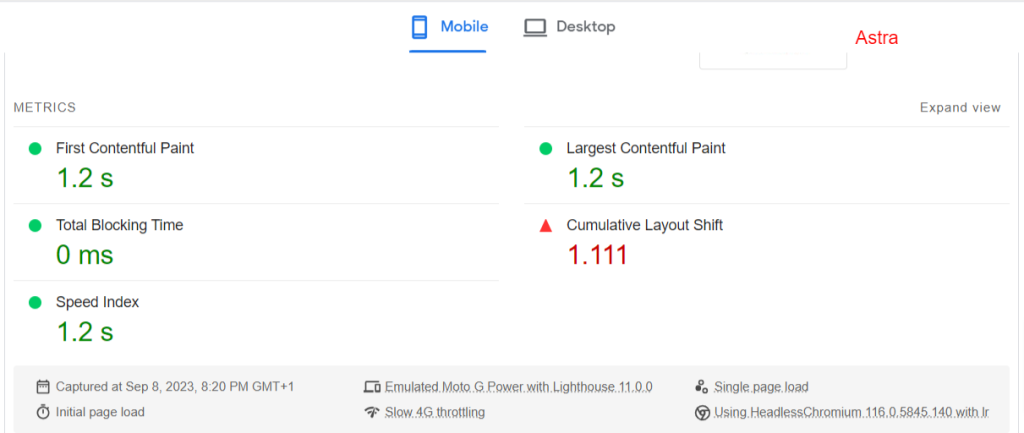
In addition to these results, I experienced a high Cumulative Layout Shift using the Astra theme. The Astra theme must be optimized more for Core Web Vitals, especially CLS.
Note:
These tests are done on a production site. There are a lot of considerations, such as additional scripts, plugin performance, content type, database sizes, etc. So, the results are not typical.
Kadence has the upper hand here, given its performance on Core Web Vitals, particularly Cumulative Layout Shift.
Theme Customization
Honestly, Astra and Kadence themes offer a bunch of design customization options. It’s hard to find fault here; your liking or disliking will depend on your preferences.
Both themes offer extensive customization options and controls, making it impractical to discuss them all in this Kadence vs Astra theme comparison post.
The two themes provide premium features that enhance customization options and flexibility across various paid tiers, significantly improving users’ ability to create unique, efficient website designs.
From designing simple site layouts to creating attractive designs with classic starter templates or AI-powered templates, both themes (Astra vs Kadence) offer incredible features not found in many other WordPress themes.
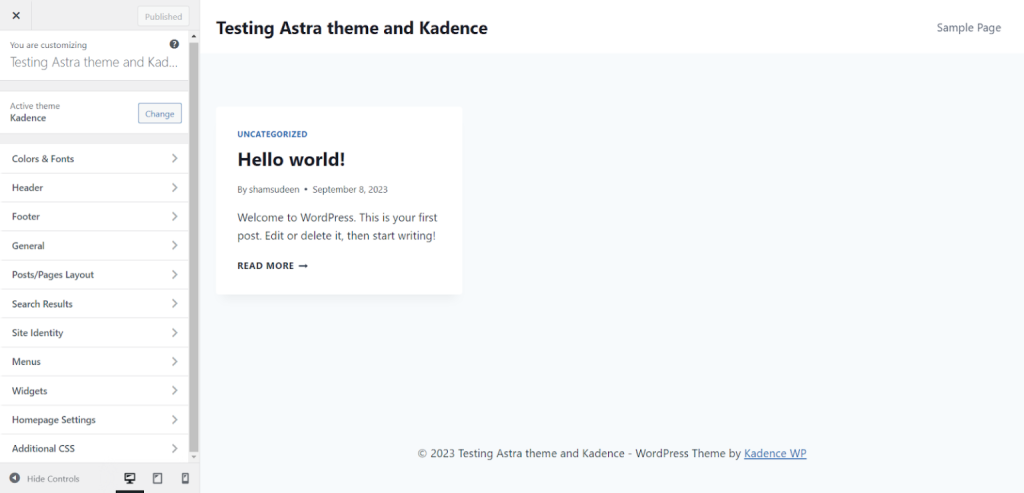
For example, here are the WordPress customizer options for the Kadence theme.
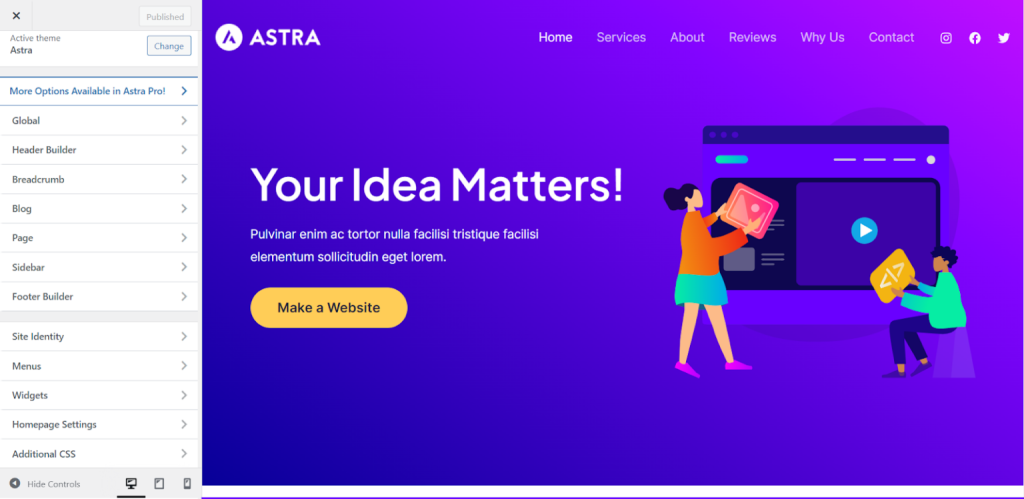
And here is the WordPress customizer panel for the Astra theme.
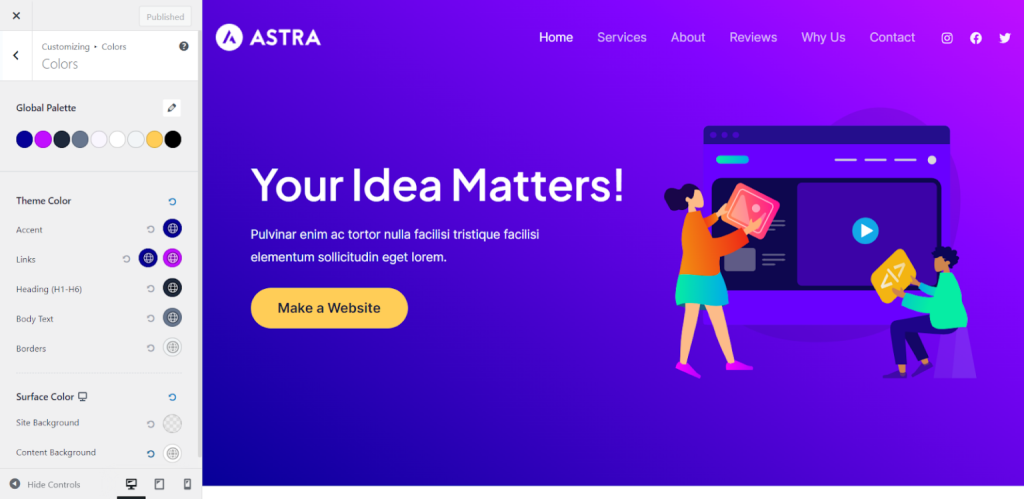
Astra color palette.
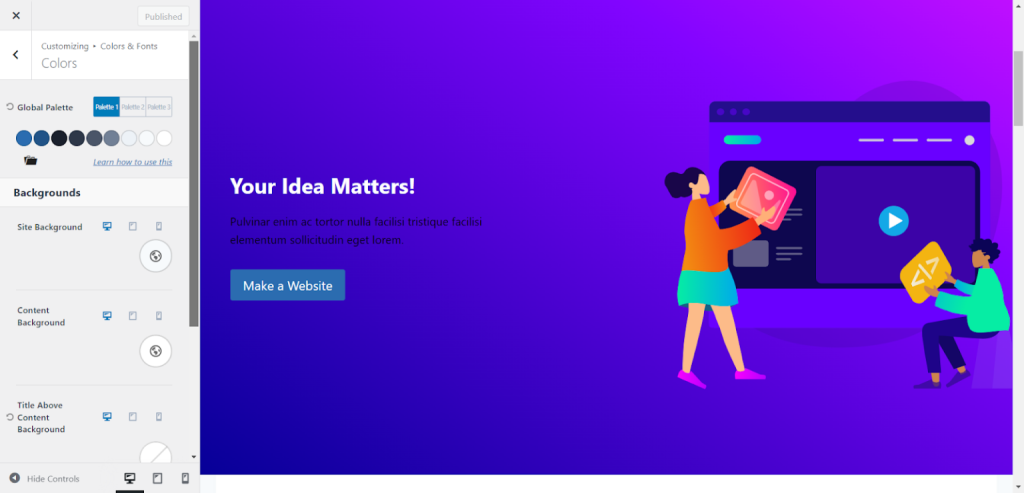
Kadence color Palette
Besides the single post layouts option in both themes, the Kadence free theme has additional features that let you customize the title elements:
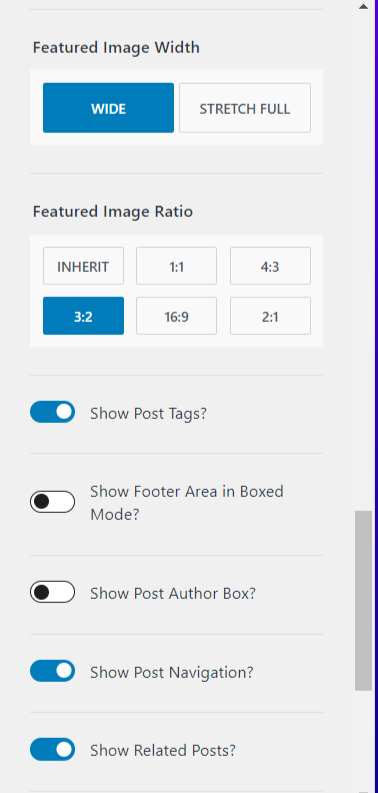
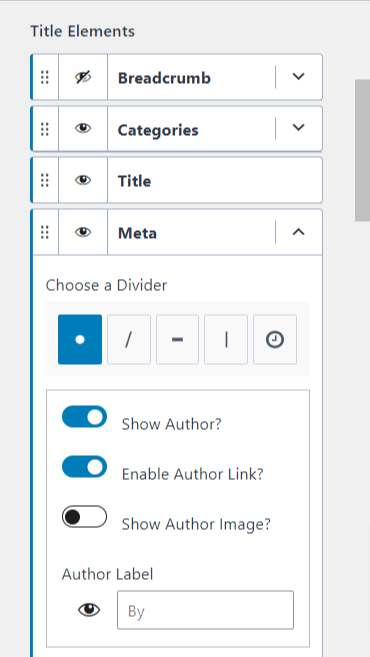
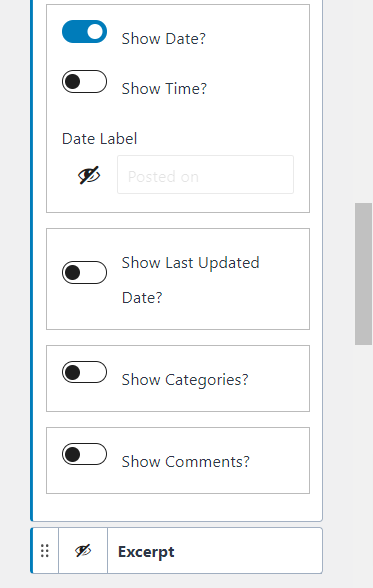
Some of these settings are unavailable in the free Astra theme, giving the Kadence theme another advantage in this comparison post.
For example, Astra does not include the option to disable the comment date, set the author profile image in the post title, or control the featured image aspect ratio.
Customizing a single post in the Astra free version is pretty basic; you need the Pro version of the theme to unlock advanced features that give you full control.
Once again, Kadence WP knocks out the free Astra theme if you look to customize the single post beyond posts and container layouts, sidebar layout styling, and post spacing.
Header/Footer Builder
There aren’t many differences in customizing the header/footer in both Astra and Kadence themes.
The two themes allow you to add the header logo, set a transparent header, add elements, set mobile and desktop headers, choose navigation menus, etc.
The Footer and header builder uses a tri-layer customization option; you can add elements to each layer using drag-and-drop.
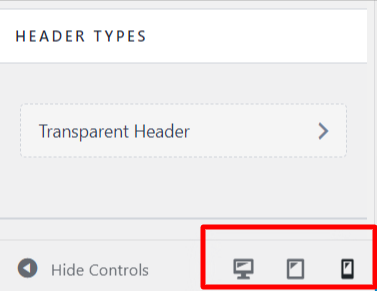
You can switch the customizer to mobile, tablet, or desktop view to see how the header and footer design look in real time on different devices.
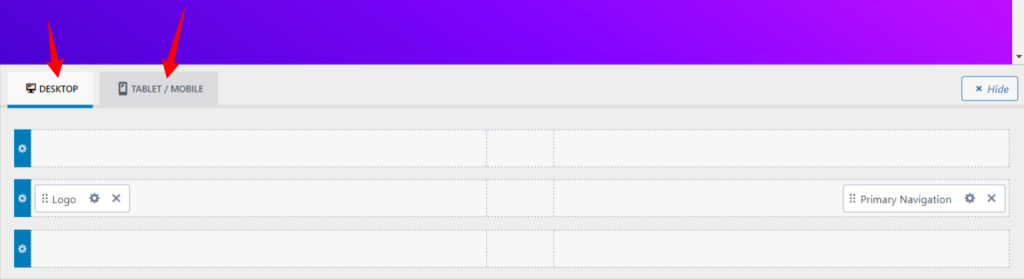
Click the corresponding device icon to switch to a different view in the Astra footer and header builder.
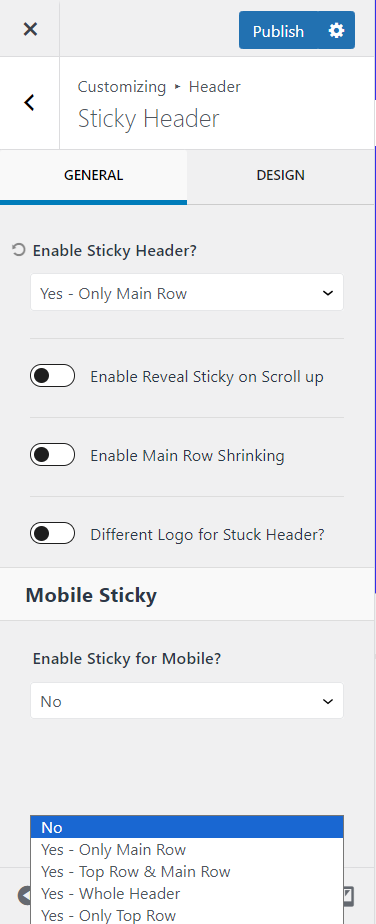
However, the Kadence free version goes further with header customization options.
As a free Kandece theme user, you can enable sticky headers, set different sticky headers for mobile and desktop views, determine which header row to make sticky, and customize their appearances.
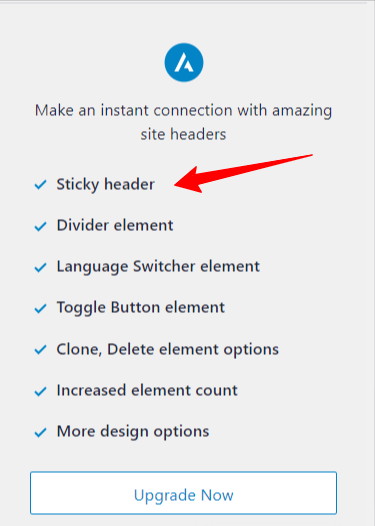
Sticky headers are an Astra Pro feature. You must purchase the Astra Pro plugin add-on to enable this feature and others.
Besides this, everything is the same and straightforward in the free version of the Kadence vs Astra theme.
Considering the freely accessible features in the Kadence theme header and Footer section, Kadence is more generous in its free theme than Astra.
Page-Level Setting Control
Beyond general, post-type, or sitewide customization, Astra and Kadence let you control the layout and styling for individual posts and pages.
This level of control is helpful when using a WordPress page builder or creating unique page layouts for individual posts or pages.
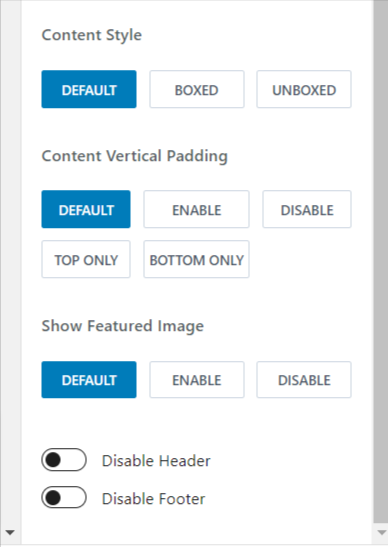
For example, creating a sales or lead landing page will need a different layout. You can disable the header and footer, select different container layouts, control page titles, and more.
Here are Kadence’s free version page-level settings.
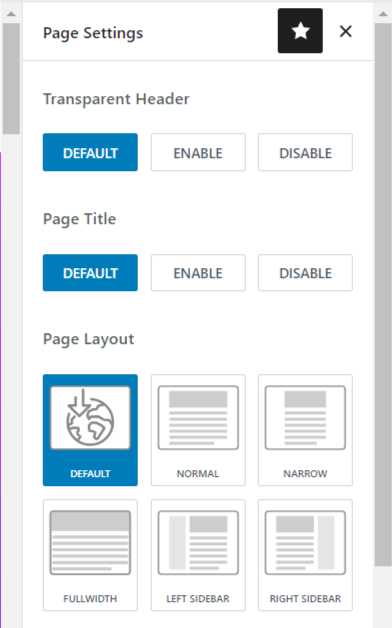
Astra free version page-level setting panel
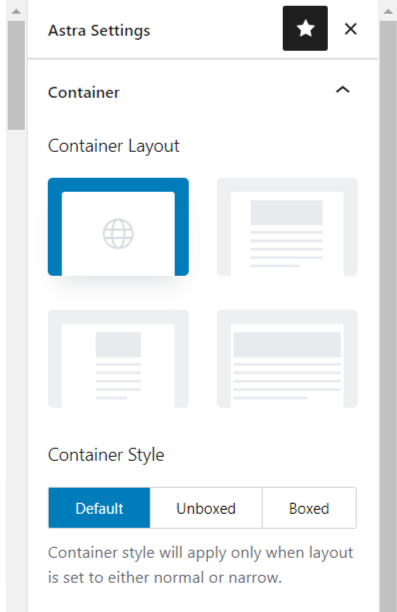
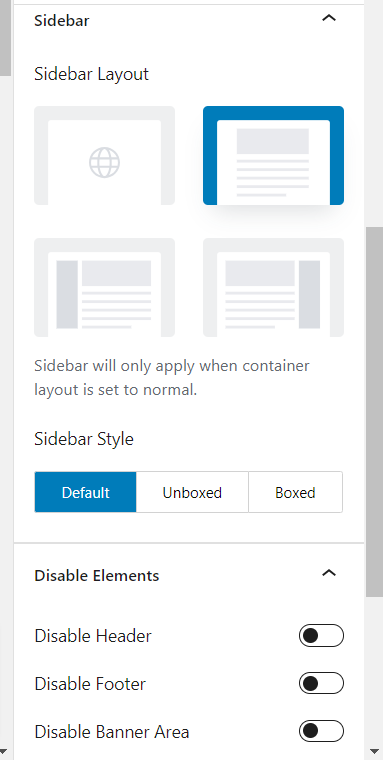
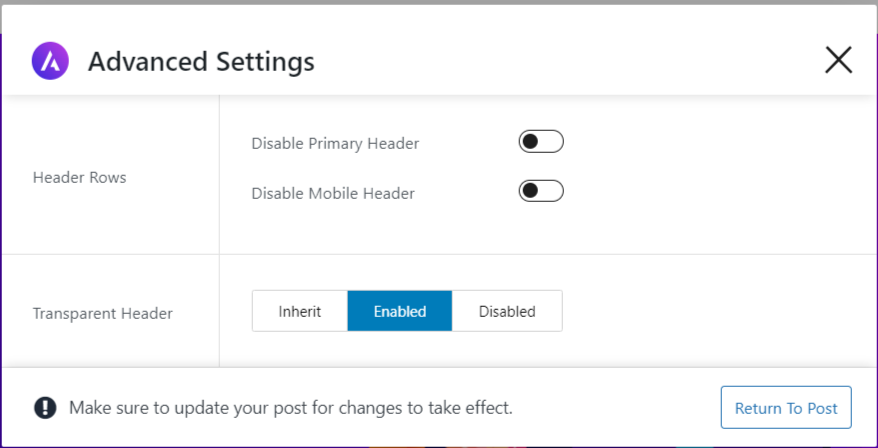
Both themes offer exceptional free page-level features for creating unique designs for individual pages or posts. Their premium plans offer more options.
For example, Astra offers a custom layouts module in its pro version that lets you create unique, stunning designs for footer, header, and body templates. You can add advanced custom CSS scripts with hooks that output on the front end.
Kadence Pro also offers hooked elements functionality, a conditional header builder, and an ultimate menu, which adds a mega menu to add tags, icons, etc.
Starter Templates
Astra and Kadence themes offer free starter templates or demo sites for beginners and website agencies, saving you time building from scratch.
The starter templates are available for several industry niches and are built with different page builders.
Astra starter sites are offered with four-page builders:
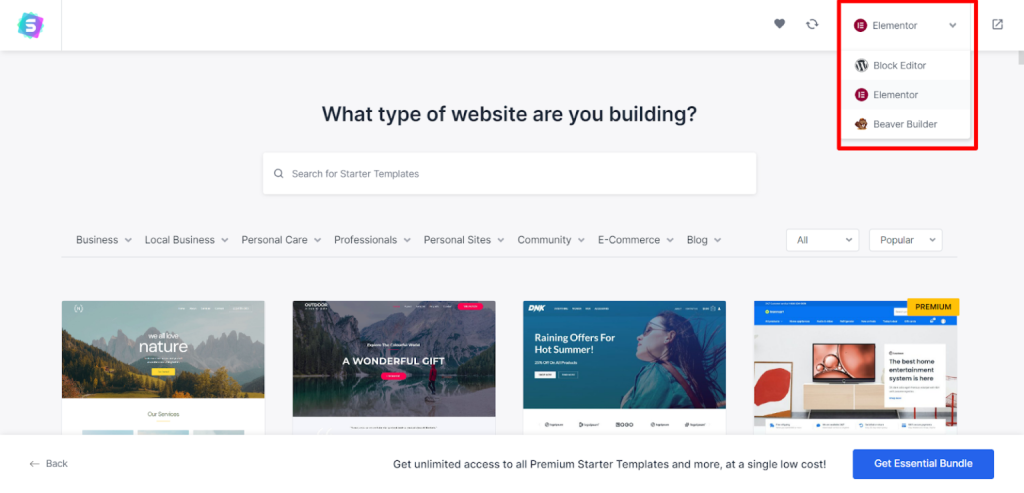
You can choose from any page builder and customize the demo pages with your content. Importing a demo site from the dashboard is just one click, and your entire website is designed instantly.
Kadence also offers free demo sites, allowing you to build incredible website designs effortlessly.
Unlike Astra, Kadence starter templates are created with two-page builders.
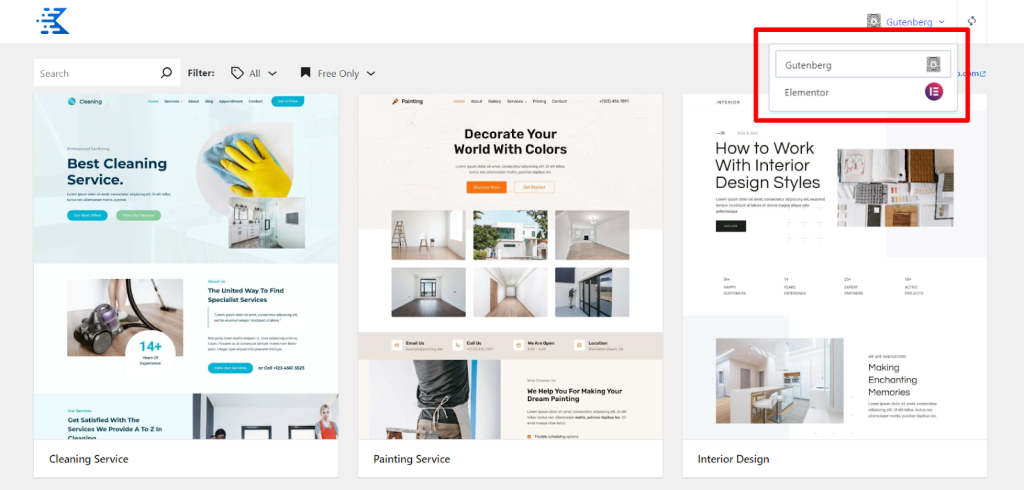
However, Astra offers more starter templates than Kadence. Astra has over 180 free starter templates in the free sites, with more in its premium plans. Moreover, Astra starter templates now include AI-powered starter sites built with ZipWP AI website builder.
Learn more about ZipWP in this post.
Kadence has 68 free starter sites as of writing.
Aside from quantity and additional page builder options in Astra, both themes let you build powerful website features and functions using starter templates (classic theme and AI starter sites).
If you’re a fan of Beaver Builder, you should consider Astra a better option.
Third-Party Plugins & WooCommerce Integrations
Integrating with other WordPress plugins and products is critical for determining a better WordPress theme – Kadence or Astra?
Unsurprisingly, both themes seamlessly integrate with many popular WordPress products and plugins.
If you run an eCommerce or eLearning platform, Astra and Kadence offer native integration with some of the well-known platforms.
First, they offer direct integration with WooCommerce. Once activated, you get additional configuration settings in the customizer.
You can set different layouts for pages and containers and customize the checkout and cart pages. You can also enable the slideout cart feature and select different colors, font options, etc.
However, direct WooCommerce integration is a pro feature in both themes. You must purchase their pro-add-ons to customize your WooCommerce store using any of these themes.
Both themes integrate with page builders like Elementor, Beaver Builder, Gutenberg, and Brizy, as well as eLearning plugins like LearnDash, LifterLMS, Sensei, and more.
Kadence vs Astra – Pro Features
Consider their Pro-add-on features to build a unique website design using one of these themes.
Kadence and Astra offer extensive premium theme features, allowing you to build any website function and features without touching a single line of code.
First, they offer custom layouts and hooks that let you inject custom code, content, or design into any part of your website. For the hooks or custom layouts, you can set display conditions, user roles, post type, disable elements, etc.
In Astra, there are four custom layout templates or options:
Each custom layout option allows you access and control the corresponding section of your website.
The header and Footer allow you to build custom headers or footers for individual pages and posts. 404 lets you create a unique user experience for your 404 pages.
The hook allows you to add custom content code or create unique designs and templates for your page/post, such as an archive and blog page.
Kadence also offers hooked elements, which, like Astra, allows you to add content anywhere on the site.
You could build custom 404 pages, create time-sensitive content, restrict certain blocks of text to user roles, display special content based on conditions, etc.
Kadence has four hooked elements:
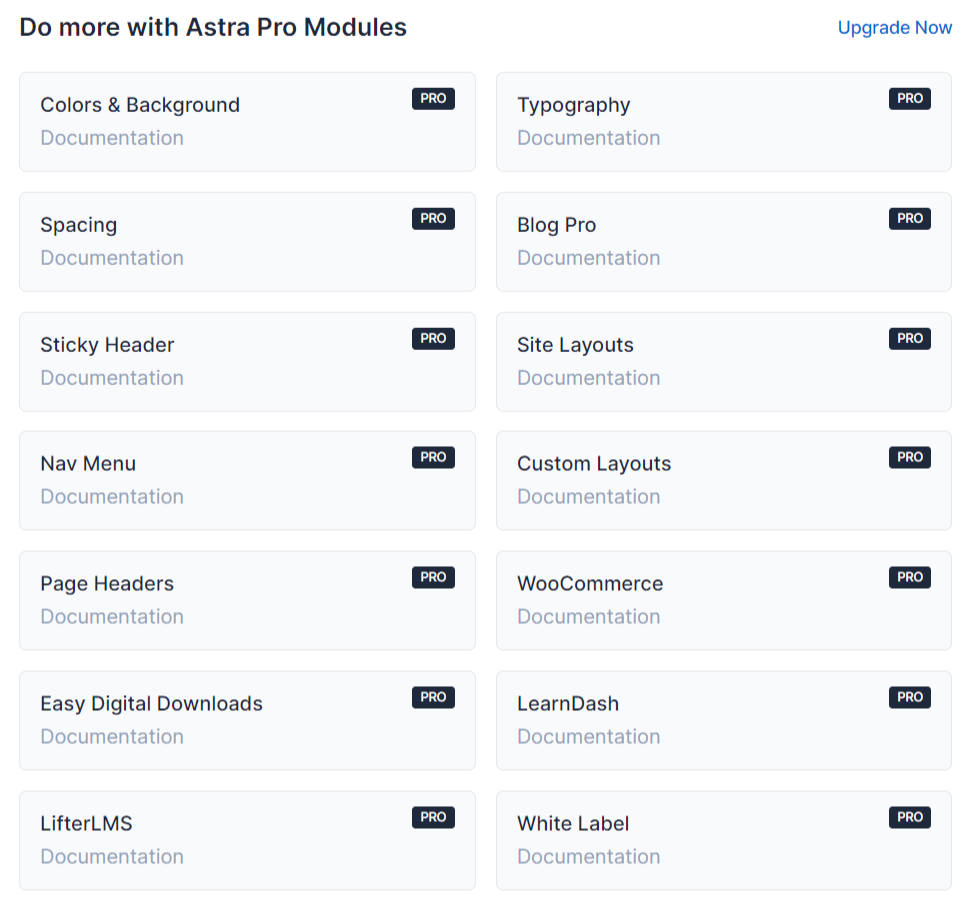
Beyond custom layouts, Astra Pro extends customization for typography, blog/archive pages, navigation menu, spacing, etc.
Here is the complete picture of what’s available in each theme, Pro features.
Astra Pro Features.
Kadence Pro features
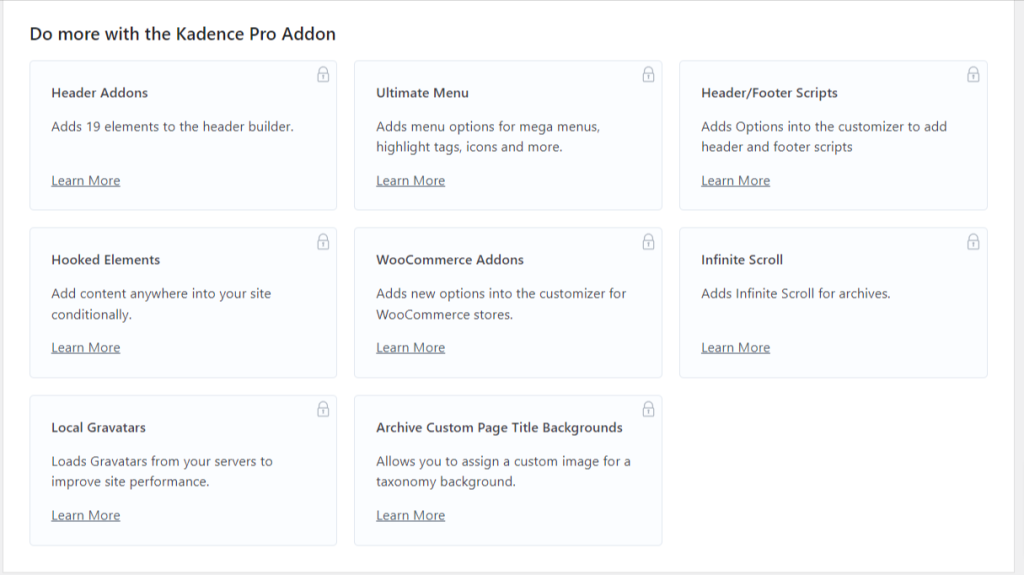
Check the full Kadence theme premium features on this page.
Maintenance and Updates
One of the factors to look for when choosing a WordPress theme is how often it receives updates.
Non-regular updates can indicate abandoned products or a developer not interested in the product.
Thankfully, both Astra and Kadence themes have received regular updates over the years.
On average, the Astra and Kadence themes receive updates 15 times per year, fixing bugs, adding new features, ensuring compatibility with third-party plugins and core WordPress updates, etc.
From all indications, these themes are here to stay for a long time.
The buttons below allow you to check the history of the Astra and Kadence theme changelog.
Support and Documentation
The support and documentation of a WordPress theme are essential in helping users resolve issues and customize their website. Both Kadence and Astra themes have excellent support and documentation.
Both Kadence and Astra themes boast comprehensive documentation, featuring a detailed knowledge base and many tutorials. This extensive documentation is helpful for beginners and advanced users looking to make the most out of the themes.
In terms of community support, Kadence has a more active community with a more significant number of users. This active community can be a valuable resource for troubleshooting, tips, and sharing best practices.
When it comes to support response time, Kadence and Astra offer quick and timely responses depending on your license type. For their premium users, response time is mostly instant, or within a few minutes.
Astra also provides a VIP support system and a dedicated support hotline if you need a faster response time.
Faster response times mean quicker resolutions to any issues you might encounter, allowing you to keep your site running smoothly.
Moreover, both Kadence and Astra have a higher rating on WordPress.org, with an average rating of 4.9 out of five stars. However, Astra seems to have a significant edge here, as its 4.9 rating comes from over 5.9k users, compared to Kadence’s 300 user review.


Anyway, I have requested support from both the Kadence theme and the Astra theme; my experience is good, even as a free Kadence theme user and an Astra free and Pro version user.
Kadence vs Astra Pro Price
Astra and Kadence offer different pricing structures catering to diverse audience needs and license plans. Your option depends on how many sites you intend to use your theme license for and on the premium features you need.
One advantage of purchasing the theme’s premium version is the ability to design custom layouts and integrate deeply with other plugins, such as WooCommerce, e-learning platforms, Elementor, Learndash, Beaver Builder, etc.
Astra Premium License and Price
For Astra Premium, you have options to purchase a single site, 10 sites, or 1,000 sites license. Also, you can buy an annual or lifetime license, which gives you access to future theme updates and lifetime support.
| Plan | License | Annual Price | Lifetime Price |
|---|---|---|---|
| Astra pro | 1 website | $49 (normally $59) | $199 (normally $299) |
| 10 website | $59 (normally $79) | $279 (normally $399) | |
| 1,000 website | $69 (normally $89) | $349 (normally $499) | |
| Essential Toolkits | 1 Website | $79 (normally $99) | $399 (normally $599) |
| 10 Websites | $129 (normally $159) | $599 (normally $899) | |
| 1,000 Websites | $159 (normally $199) | $699 (normally $999) | |
| Businesss Toolkits | 1 Website | $149 (normally $199) | $599 (normally $999) |
| 10 Websites | $169 (normally $229) | $799 (normally $1199) | |
| 1,000 Websites | $199 (normally $269) | $899 (normally $1399) |
Astra Essential plan offers access to premium templates and add-on plugins such as Spectra Pro, Ultimate add-on for Elementor, and premium starter sites built with Elementor Pro and Spectra Pro.
It also includes over 40 unique WordPress website widgets and 200+ pre-designed advanced blocks compatible with Gutenberg editors.
The Business Toolkits offer the biggest value for money, as you will get access to everything in the Astra Essential subscription, plus other Brainstorm Force products, such as Surefeedback Pro, SureTriggered Pro, SureWriter, CartFlow, ZipWP, and access to SkilJet Academy.
Kadence Pro license and Price
Kadence Pro theme offers two standard subscription plans (Essential Bundle and Full Bundle), plus the Lifetime Bundle and the A la Carte plan, for a total of four options to choose from.
| Plan | Annual price | Lifetime Price |
|---|---|---|
| Kadence Essential Bundle | $90 (normally $149) | Not specified |
| Kadence Full Bundle | $132 (normally $219) | $649 (normally $799) |
| A le Carte (Standalone Product) | $49 – $99 | Not Specified |
Kadence Full Bundle offers more features like the Kadence shop kit for WooCommerce, Kadence Insights, Kadence Conversion, Child Theme Builder, reCAPTCHA, and Pattern Hub.
This is in addition to Kadence Block Pro, Custom fonts, over 700 design patterns, and premium starter templates in the Essential Bundle.
One significant advantage of Kadence over Astra is the unlimited website usage. You can use your license on unlimited websites without restrictions. However, I don’t think this is a big deal-breaker for Astra, since it provides up to 1,000 WordPress site licenses.
Unless you’re the internet juggernaut, you probably have fewer than a thousand WordPress sites to manage.
Regarding billing, your license will renew automatically if you enable auto-renewal for the annual license; otherwise, you will need to renew your license manually.
However, if you don’t want to renew, the theme will continue to work, but you will no longer receive updates or premium support. The lifetime license gives you access to lifetime product updates and premium support.
Another thing to consider is that Astra offers a 14-day money-back guarantee, while Kadence provides a full 30-day refund policy.
Though this might not mean much since you’re already convinced before placing your order, it is still good to know. If things didn’t work as expected, you know how long you’re entitled to a refund.
Editor’s Pick – Astra Theme vs Kadence Theme
Is Astra’s theme better than Kadence’s? Or is Kadence better than Astra?
I’ll be honest: both themes are on top of their game and offer excellent features.
However, in terms of performance and features, Kadence is one step ahead of Astra in its free theme version.
While Astra has done a good job of updating its free theme with more features over the past year, it still lacks some essential functions available in Kadence.
Assuming you’re comfortable with the free theme, you will find Kadence more appealing and feature-rich than Astra’s free theme.
Things are not so easy to determine in the Pro versions. Many variables, such as custom functions, features, and individual preferences, play a more significant role in deciding.
Astra Pro and Kadence Pro offer advanced features in their premium versions, such as custom fonts, premium starter templates, Astra custom layouts modules, Kadence Block Pro, and advanced site design controls.
These make it challenging to pick a winner. Your option depends on your preferences, budget, needed features, etc.
Start with the free features (Astra or Kadence), then purchase the Kadence Pro theme or Astra Pro plan. Explore the features that matter to you within the required refund policy window and see how things work.
As someone who has used Astra and Kadence’s free features, I can tell you it is hard to tell which is better or a clear winner.
Both themes are equally good and offer excellent design capability, free features, advanced layouts, performance boost, and SEO optimization. They also help you build quickly using starter templates.
FAQs
Which is better, Kadence or Astra?
Both Kadence and Astra are excellent WordPress themes, but the best choice depends on your needs. Astra is known for its lightweight design, speed, and vast integration with popular page builders. Kadence offers more advanced built-in features, such as a customizable header and footer builder, and is ideal for those who want more functionality out-of-the-box.
Is Kadence faster than Astra?
Both themes are optimized for speed, but Astra generally has a slight edge due to its minimal codebase. However, Kadence is also highly performant and offers robust customization without significantly affecting load times. Your website’s speed will also depend on other factors, such as hosting, plugins, and image optimization.
Can I use Kadence and Astra for free?
Yes, both Kadence and Astra offer free versions with essential features. However, to unlock advanced options such as premium templates, WooCommerce tools, and more extensive customization, you’ll need to purchase their pro plans.
What are the main differences between Kadence and Astra?
The main differences lie in their features, popularity, and flexibility. Kadence offers a free version with more features than Astra. On the other hand, Astra is the most popular non-default WordPress theme, with over 2 million active installations. It is known for its fast speed, advanced customization, extensive premium starter sites, and deep integration with page builders.
Which theme is better for eCommerce, Kadence or Astra?
Both themes support WooCommerce, but Kadence includes advanced eCommerce features like product badges, custom checkout layouts, and additional styling options for free. Astra requires add-ons or Pro plans for similar features. Kadence might be better for online stores requiring built-in functionality.
Are Kadence and Astra compatible with Elementor?
Yes, both themes are fully compatible with Elementor and other page builders like Beaver Builder and Gutenberg. Astra has a slight advantage with its extensive library of Elementor-ready templates, while Kadence focuses more on Gutenberg integration.
Does Kadence offer a lifetime plan like Astra?
Yes, Kadence provides a lifetime plan for its Full Bundle, which costs $649 (normally $799). Astra also offers lifetime pricing for its Pro, Essential Toolkit, and Business Toolkit plans, starting at $199 for a single site.
Which theme is better for beginners?
Both themes are beginner-friendly, but Kadence may have an edge due to its intuitive header/footer builder and more customization features. Astra’s setup process is also straightforward and may appeal to those prioritizing speed and simplicity.
Can I switch from Astra to Kadence or vice versa?
Yes, you can switch between the two themes, but you may need to reconfigure certain settings, layouts, and customizations. It’s a good idea to back up your site before switching to ensure a smooth transition. I have often switched between the two themes and experienced no issues.
Do Kadence and Astra offer white labelling for agencies?
Yes, Astra offers white-labeling with its higher-tier plans like the Business Bundle. Kadence also offers white-labelling for its Full Bundle subscription, allowing you to offer a branded experience for your clients.


Hello, Shamsudeen,
I have used both astra and kadence themes. In my experience, I found Kadence a more power-packed theme that comes with lots of features and customization offers. Even Kadence offers some premium features in their free version which you can’t get in Astra. Thanks for sharing this comparison post.
Regards,
Vishwajeet Kumar
Hi, Vishwajeet,
No doubt, Kadence has more features and customizations than Astra. And it seems a better theme for passing Core Web Vitals.
Thanks for reading through and for the shares.
Thanks Adeshokan for the review, I’ve been using Astra for a few years now and will consider this as I may do a site overhaul in 2024. It is interesting to see how they rank up side by side as you showed us and I read Vishwajeet’s comment too.
Hi, Lisa,
First, I fell in love with Astra then I came across Kadence, tried it, love it. Now I’m sticking with it. Glad you find the comparison helpful.
Thanks for reading through.
Hello, Shamsudeen,
I have used both astra and kadence themes. In my experience, I found Kadence a more power-packed theme that comes with lots of features and customization offers.
Hi, Sak,
Like you, after using both themes – Astra Pro and Kadence – and testing for performance and usability, I go with Kadenece. Aside the customizations and features, Kadence seems to help with Core Web Vitals than Astra.
Thanks for reading.
Which theme do you think offers better design flexibility for blog posts and archive pages?
Astra is ahead of most WordPress themes in terms of design flexibility.
This detailed comparison of Kadence and Astra themes provides valuable insights for choosing the right fit.
Clear, informative, and helpful for WordPress users!
Hi, Nouman,
Thanks for reading through, and glad you find the comparison helpful.
I have tried both theme Astra and Kadence.
Its not easy to pick who is the winner mostly for starters.
I love Kadence in terms of page building.
It gives you full control when designning wordpress page.
Hi, David,
Thanks for your contribution.