It’s been eight months since I began using the Kadence theme (as of writing). At this point, I want to share my experience and offer valuable insights to help you decide whether the Kadence theme is right for you.
This means that in this Kadence theme review, you’re not reading from a salesperson’s perspective but from someone with experience using the products.
But before we get into the details, let me clarify that this review is based on the Kadence free theme. Although I discuss the Kadence theme Pro add-ons in depth, they are not the main highlight of this review.
I had to do this because reviewing the free theme offered a fairground (for everyone) to make the best guess of what you could experience if you eventually upgraded to the Pro theme. The Pro add-on would blow you away if the free theme could offer as much as I would discuss in this review.
We shouldn’t get ahead of ourselves; let’s jump right into today’s Kadence WP theme review.
Kadence Theme

In this Kadence review, I explore why this popular WordPress theme stands out for its speed, flexibility, and user-friendly design options. From its advanced customization tools to seamless integrations, find out if Kadence is the right choice for your website.
Price: 69
Price Currency: USD
Operating System: Web
Application Category: DesignApplication
4.67
Kadence Theme Overview
Kadence is a popular WordPress multipurpose theme that is available for free and with premium licenses. It offers flexibility, ease of use, performance optimization, and many features.
The free theme offers extensive customization and control, including built-in SEO and performance tools, an intuitive interface, a header and footer builder, color palettes, typography control, AI credits, starter templates, Kadence blocks, etc.
It offers more customization and features than many free WordPress themes. To extend its features, you can install the free Kadence block, a page builder plugin with many design elements and controls.
Beyond features and customizations, Kadence is built with clean and well-structured code. This provides a solid foundation for your website’s SEO, optimizes it for core web vitals, and improves search engine visibility.
The premium theme includes several add-ons that extend Kadence theme functionality, allowing you to design a website as you imagine.
Customization
Even with the free theme, Kadence offers unparalleled customization options. It allows you complete control over website design, logo, global color, layouts, typography, page title elements/meta, header and footer, and template parts.
Kadence offers two tabs (General and Design) for each theme design option you want to customize in the customizer.
The General Tab lets you work on an element within a template section, while the Design Tab lets you customize its appearance, such as color, padding, size, margin, border, and style.
You can customize your site using the built-in WordPress customizer, which lets you make design changes and preview them in real time.

The Kadence footer and header builder contains three rows, which allow you to add widgets, social icons, text, HTML elements, search boxes, navigation menus, cart buttons, etc.
The footer builder lets you select the number of columns and the layout of each row. Both layout and columns have five preset options (mobile and tablet devices have six layout options).
Yet Kadence isn’t stopping you there—you can select a column direction and adjust the spacing for the top, bottom, height, widget spacing, and link style.
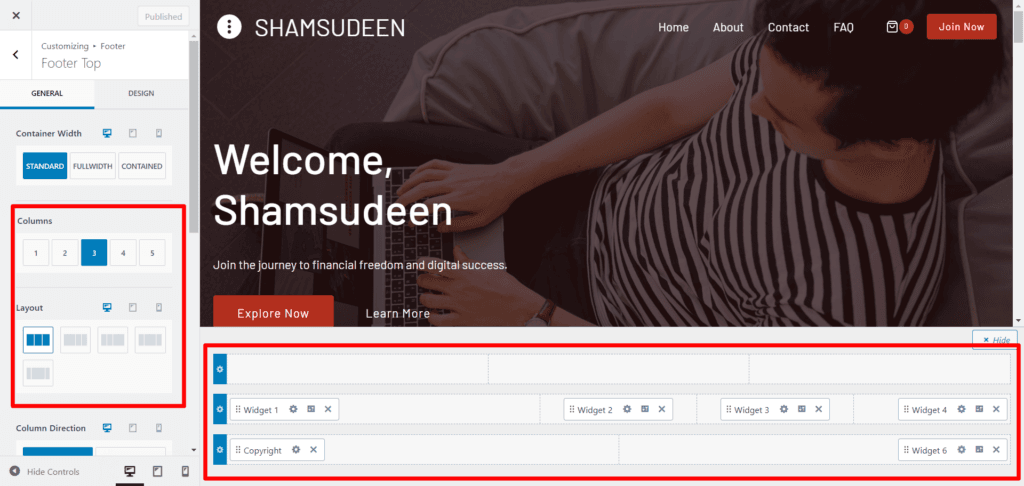
As I mentioned earlier, the content in the header and footer can be customized within the Design Tab, giving you unlimited customization options.
Moreover, the Kadence header builder lets you access and design sticky and transparent headers. These features are accessible in the free Kadence theme. You’ll find features like this in most competitors ‘ premium themes.

Simplicity and ease of use are core principles of the Kadene theme, which offers global settings for color palettes, typography, fonts, and buttons. You can decide the sitewide setting for these elements in the customizer without making changes based on post type.
Note: You can preview your design on desktop, tablet, and mobile devices to see how responsive your site is. You can see how your website looks on different user screens. And even have different layouts and theme customizations for each device user.
You can have the hamburger menu for mobile users while keeping the main menu for desktop users.
Features
Some free features in the Kadence theme are offered behind a paywall in other top WordPress themes.
For instance, the free Kadence theme has built-in related post features that you can customize to match your website design and branding.
You can choose between two-, three-, or four-column layouts for the related posts and customize the title font and background color.
You can also enable “Endlessly Loop Related Carousel.” This feature activates the related post slider, bringing additional content into view.
For the Single post, Page, and Archive pages, Kadence offers some excellent free features, including:

The Single Post layout offers three container width styles – Standard, Full Width, and Contained. Each option provides a different width for the site background and content layout.
The Archive pages offer five layout options – boxed or unboxed content style, four-column options, and total customization control.
While the free theme offers excellent features, the Pro theme goes the extra mile.
Kadence Pro offers hooked element features, allowing you to add custom content anywhere on the site templates. Hooked elements also let you hide/display content based on post type. A feature that might help show relevant content to your audience based on specific conditions.
Also, the Pro theme has a mega menu and access to add header and footer script features. It also includes WooCommerce add-ons, conditional headers, local Gravatar, and header add-ons.
Not only that, there are archive custom page titles, a custom font, Pro Starter templates, a dark mode color switch, Kadence Block Pro, and more.
Check the complete Pro add-on features on this page.
Performance
One of the core reasons I love the Kadence theme is its performance. The theme is built from the ground up to support SEO and, notably, Core Web Vitals.
It is a lightweight theme built with clean and well-structured code.
In my Gtmetrix test, the Kadence theme weighed less than 50 KB and made 9 requests on a fresh WordPress installation with no active plugins, content, or media files.

When tested with PSI (Pagespeed Insights), the theme scores highly across all of Google’s Core Web Vitals metrics. Remember that these scores can be affected by adding more resources, such as media files, plugins, and third-party scripts, to your website.

While this is a single-page load for a user session, Kadence is known to be optimized for CWV, particularly for Cumulative Layout Shift and Largest Contentful Paint.
Kadence includes built-in performance tools that enable preloading critical CSS assets above the fold. If enabled, the Kadence theme will prioritize loading essential CSS files on the page, improving page speed and user experience.
However, if plugins like WP Rocket or JetPack Boost are active on your site, you should disable this feature in the Kadence theme to avoid conflict.
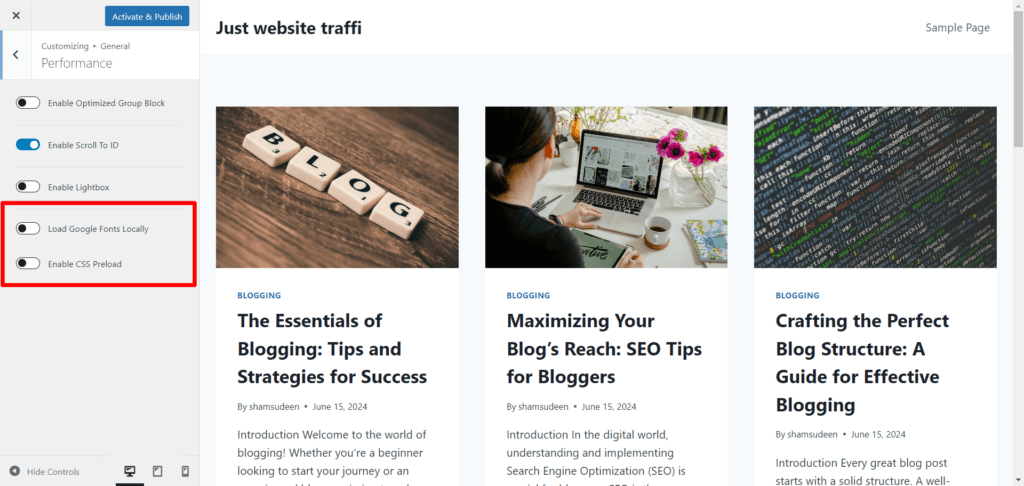
Another helpful performance feature is the “Host Google Font Locally.” By hosting Google Fonts locally, your website reduces the number of DNS HTTPS requests during each website connection lookup.
Instead of downloading the font from Google directly for each request, Kadence will store it on your web server, loading it much faster.
This feature might also eliminate PSI error warnings to “reduce the impact of third-party code” and help improve web page download time.
You can enable these features by going to General > Performance and toggling the option that works best for your situation.
Starter Templates
Kadence Free and Pro themes offer pre-designed starter templates (Classic and AI-powered). With these templates, you can import a complete demo website, including content and media, in minutes. All you have to do next is edit the demo site and make it yours.
These starter templates are available by industry, such as travel, politics, news, hospitality, e-commerce, membership, blog, and technology. etc, which you can browse through and activate on your site.
After installing the Kadence theme, you will be prompted to install the starter templates plugin. Once you install and activate the plugin, it will import the Classic templates on your site.
You can choose your favorite page builder templates – Kadence AI, Elementor, and Gutenberg.
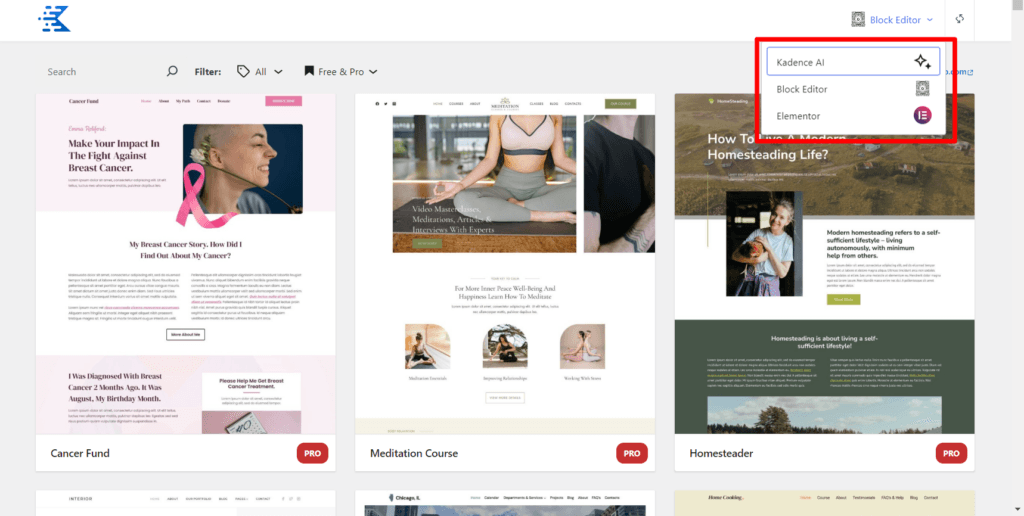
However, Kadence AI starter templates are not installed automatically; you must answer a few questions and follow a few steps. Also, it offers limited access to the Kadence AI website builder and a maximum of 250 AI credits.
You must upgrade your license to get full access to Kadence AI, premium blocks, design patterns, and the design library.
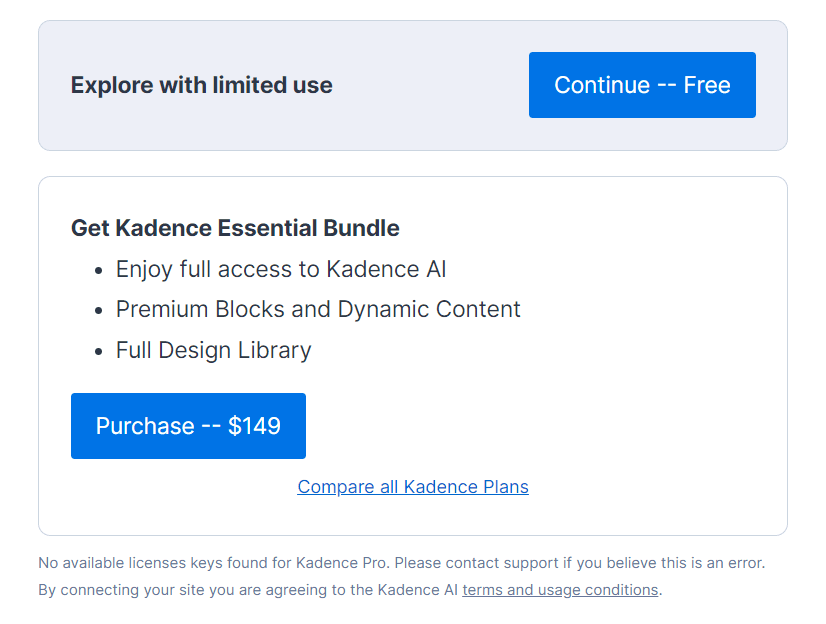
With the Kadence AI theme builder, it only takes six steps to build a complete website with your brand name, base content, background images, essential pages, header, and footer, etc.
After answering a few questions to learn about your business and mission, Kadence AI automatically generates a dozen AI-powered templates from which you can choose.
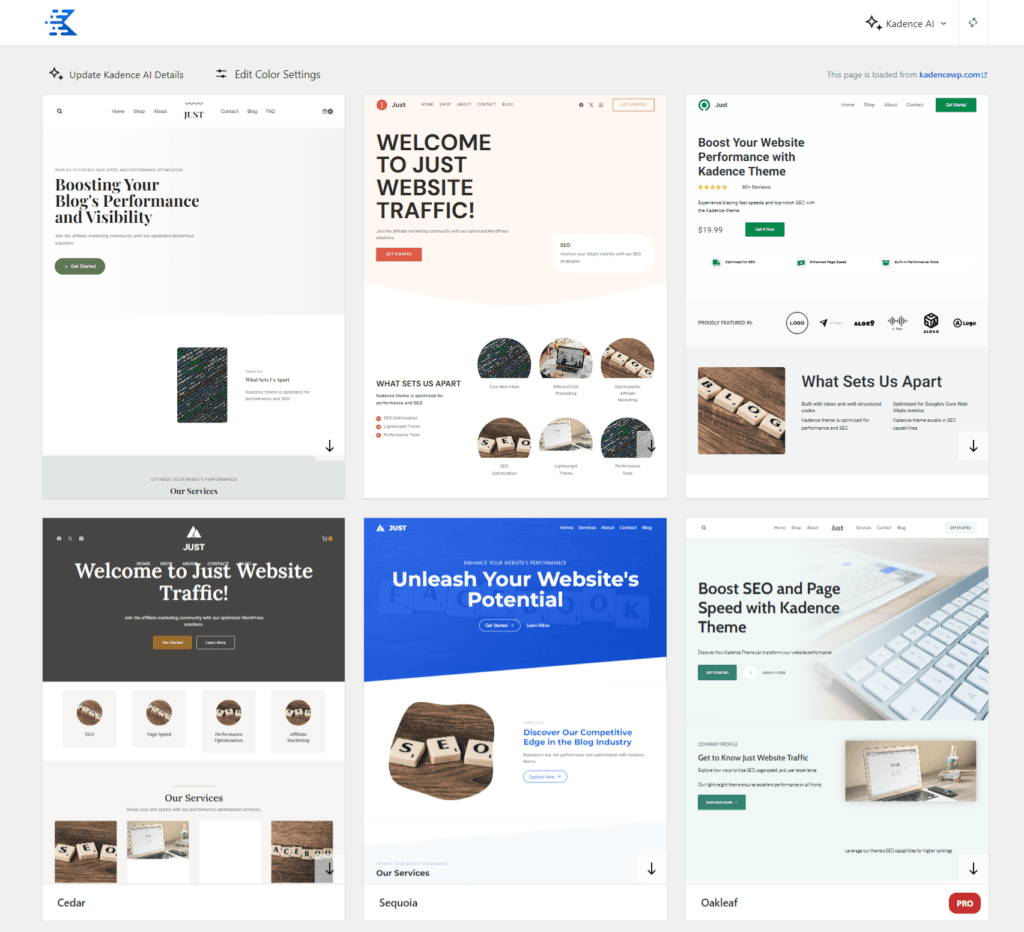
Kadence AI generates these themes. You can see how beautiful and functional they look. Next, select a theme and start customizing by editing the demo content, pages, and images.
Depending on your chosen industry and theme, Kadence AI generates essential pages for each theme, such as About Us, Contact, Service, Pricing, Review, and Mission.
It will also automatically import the footer widget, theme settings, example products, a sample blog post, and the required plugin (this depends on your chosen theme and industry selection during setup).
The AI-powered starter templates are a fantastic tool for agencies and web development teams, enabling them to deploy hundreds of websites in record time and with less effort.
You don’t need design or advanced web development knowledge to build a website. Just answer a few questions, and Kadence AI will handle the rest.
Still, the Kadence AI or classic templates are fully customizable. You can edit template sections from the customizer, giving you complete control over website design, content, and branding.
Integration
Kadence theme offers deep integration with e-learning and e-commerce tools like LearnDash, LifterLMS, and WooCommerce. It is compatible with most page builders, including Elementor, Beaver Builder, Brizy, SiteOrigin, and Gutenberg.
But, sincerely, you might not need to use any of these page builders once you get used to the Kadence Blocks. The Kadence Block is a powerful website page builder that ultimately puts design in your control.
Note that the Kadence Block is not specific to the Kadence theme; it also works with other WordPress themes.
Aside from the free WooCommerce features like header cart, Product layouts features, and Image Archive Swap. Kadence Pro offers additional advanced features with its WooCommerce add-ons, including Side Cart, Open Add to Cart, Ajax Add to Cart, and Sticky to Add to Cart.
To extend its WooCommerce support, Kadence offers Shopkits. The shop kit is a custom module and extension that customizes your WooCommerce store and improves the customer experience.
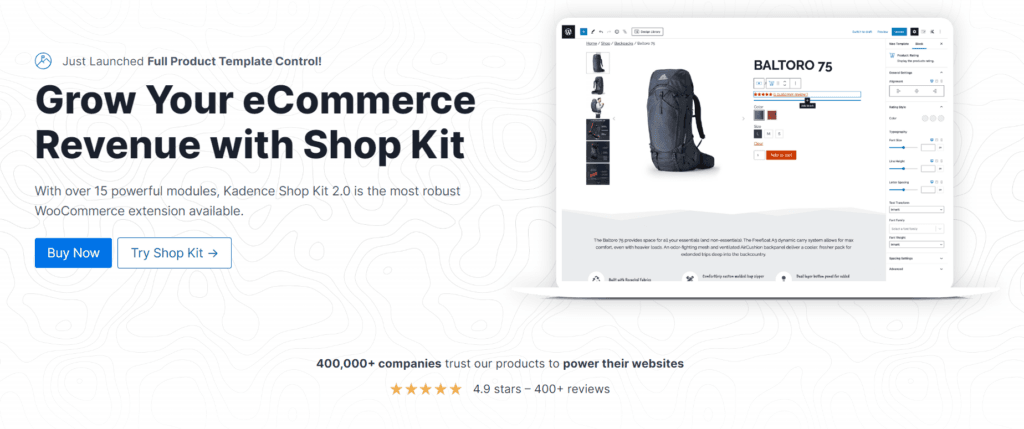
With Shopkit, you can create and customize advanced gallery styles, dynamic product layouts, review modules with voting capabilities, product variation swatches, branded product pages, price variation control, conditional bar, affiliate products, and more.
Since the same company behind the Kadence theme is also responsible for WordPress products like The Event Calendar, SolidWP Pro, GiveWP, LearnDash, and Restrict Content Pro, it explains the deep integration with these plugins.
Pricing
After thoroughly reviewing our Kadence theme review, you’ll agree that this is not your everyday WordPress theme. The level of customization capabilities possible is insane. As you can imagine, the website design can be done using the Kadence theme.
Not surprisingly, the Pro theme is competitively priced at $79 for a 12-month license with support and use on unlimited sites. Here is what you get when you upgrade.
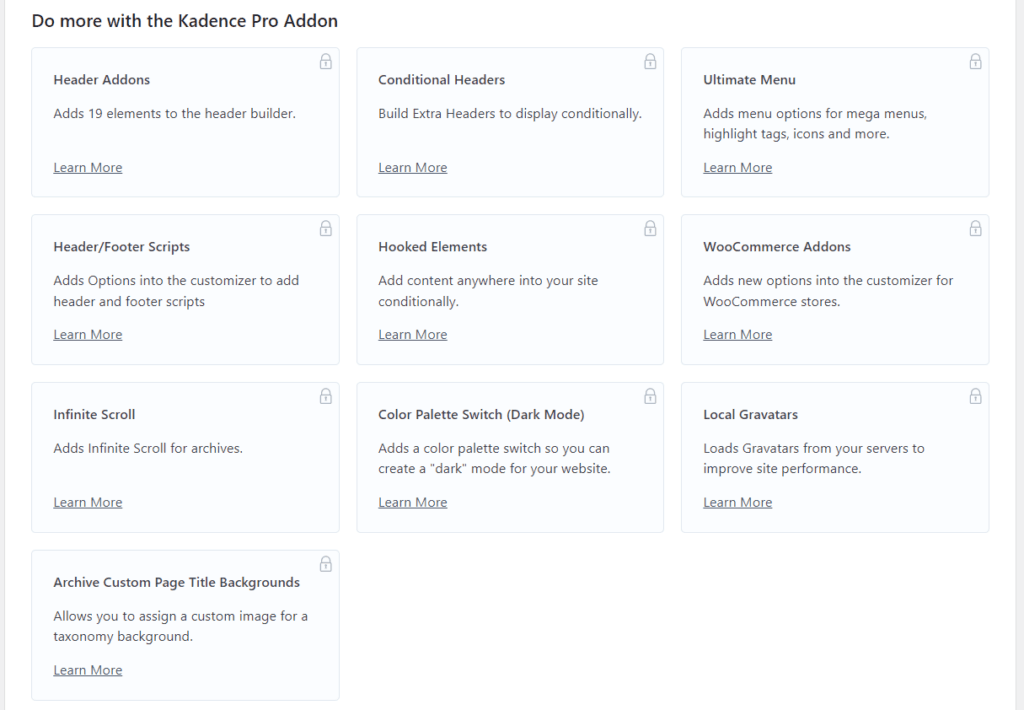
Aside from the Pro theme add-ons, Kadence offers higher license plans with more advanced add-ons and features. For example, the Kadence Essential Bundle ($149) License includes:
The Kadence Full Bundle license ($219) includes more features and access to more products:
Support
What use is a great product without an excellent and responsive customer support system?
But that’s not the case with Kadence. The product isn’t just fantastic; it’s also been supported by a great community and helpful people.
I have had the chance to engage with customer support on different occasions; the service has been excellent.
In one instance, I had a CSS issue with my site design and reached out to Kadence customer support via a ticket. The problems were not only addressed, but the customer rep also took the time to browse my site and analyze the PageSpeed Insights report.
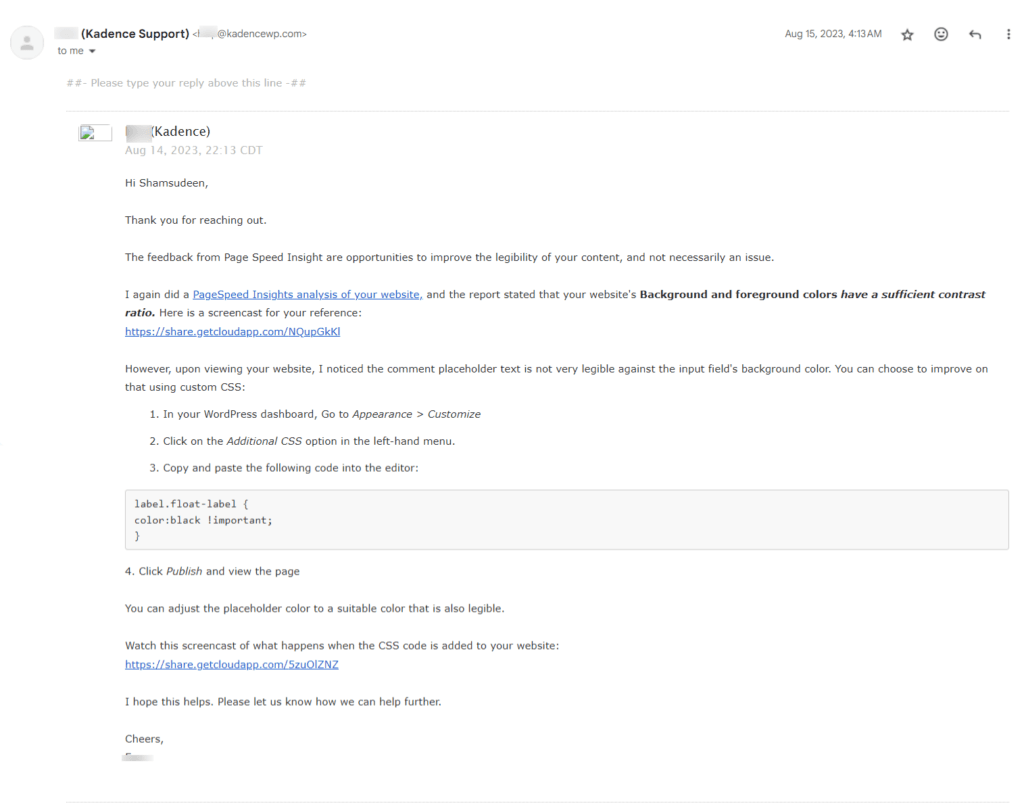
Mind you, I wasn’t even a paid customer. I was using the free theme. So, if customer support could go this extra length to resolve issues for free Kadence theme users, it speaks volumes about what you could expect for premium users with priority support.
Support is available via online ticket submission, forum, knowledge base article, and a thriving community on Facebook.
Pros and Cons
Though I believe Kadence is a flawless WordPress theme, it has one or two drawbacks you must be aware of.
Here are the pros and cons of the Kadence theme worth mentioning (there could be more, but these are the ones I can think of).
Pros
Cons
Kadence Theme Alternatives
If you still think the Kadence theme is not what you want, here are some excellent alternative WordPress themes to consider.
Astra

The first option to consider is the Astra theme. In terms of weight, performance, and theme features, Astra is an excellent alternative to Kadence.
Astra is more popular and has a larger user base than Kadence, but from experience, Kadence is more performance-optimized than Astra.
But if you focus more on design and feature customization and are on a budget (Kadence costs more than Astra), then you should go for Astra.
Check my detailed review of the Astra theme for more insights and guidance. Also, if you want to take Astra theme performance to the next level, check how to combine WP Rocket and Astra Pro themes to achieve a 95+ PageSpeed Insights score.
GeneratePress

GeneratePress is another top alternative to Kadence, but the free GeneratePress theme can not be compared to Kadence. Unless you’re going for a GeneratePress premium license, I don’t see any reason to switch.
It doesn’t make sense (from a performance and design perspective) to opt for the free GeneratePress theme when there’s a theme like Kadence.
However, GeneratePress could be a better choice for premium add-ons because of its more starter-friendly templates and lower price. The GeneratePress basic plan costs $59, compared to $79 for the Kadence Pro Theme.
Neve
Neve is an excellent choice for freelancers, bloggers, and small business owners who want a simple WordPress theme with powerful customization and control.
It has an intuitive interface, a drag-and-drop website builder, and many customization options to control your website design.
Like Kadence, Astra, and GeneratePress, the Neve theme is popular among WordPress users, with over 300k active installations. The theme is actively supported and updated to provide optimal performance, security, and user experience.
Regarding customizations, I think the Neve theme is up there with Kadence. The free Neve theme lets you control page layout, colors, and containers for blog/archives pages, etc.
However, Neve might not be the ideal alternative to Kadence in terms of price. It costs $69 for the introductory first year, but renews at a whopping $139 per year for the Personal license.
The business and Agency licenses cost $149 and $259 for the first 12-month term, respectively. You renew at a higher price.
Conclusion
Kadence is a versatile, multipurpose WordPress theme that suits a wide range of use cases and industries. It can be used for personal, membership, eCommerce, affiliate, and other websites.
It offers free starter templates, Kadence blocks, a design library, and patterns that make building a website easy. Integrating with other popular WordPress tools makes it a top choice if you need a theme that integrates with your workflow.
If your focus is on website performance, speed, and Core Web Vitals, Kadence provides a solid foundation for building a website that search engines and users love.
However, while the free theme is feature-rich and offers extensive customization, it cannot insert custom scripts into the header or footer. It has limited WooCommerce features, Pro starter templates, Pro Blocks, and other advanced add-ons.
The free theme is sufficient if you create a simple personal block without advanced functionality.
For a more complex website setup like eCommerce, adding custom text and elements in specific website sections, header and footer scripts, a mega menu, custom 404 pages, fixed elements, and more, you’ll need to upgrade to the Kadence Pro theme.