
Shopify is undeniably one of the most popular ecommerce platforms, but it’s definitely not the only option. Other Shopify alternatives are worth considering, with similar features, subscription models, and self-hosted options.
I researched other similar eCommerce platforms with notable features, shipping functions, point-of-sales, drag-and-drop, template features, etc.
Whatever ecommerce features you’re looking for, you will find the best Shopify alternatives in today’s post.
Without wasting more time, let’s dive in.
Top Shopify Competitors
Before we begin, note that some of these Shopify alternatives offer a free plan, which lets beginners start an ecommerce shop without the high cost.
For example, Weebly offers features like shopping carts, inventory management, in-store pickup, and automatic tax calculation in its free plan. If you’re a beginner, Weebly makes it easy to start an ecommerce business with minimal cost.
WooCommerce is the best alternative to Shopify if you use WordPress.
You can easily create a blog with your WooCommerce shop, adding SEO advantages that drive organic traffic.
If you need more control over your code or run a large, complex catalog, open-source platforms like Magento and PrestaShop are worth a look too. Both let you self-host and customize every part of your store, though they come with a steeper learning curve than hosted platforms like Shopify.
You can read my extensive review if you want a thorough look at Shopify and how it compares with other eCommerce solutions.
If you are unsure between Shopify and WooCommerce, I reviewed both platforms in this comparison post.
But let’s not get ahead of ourselves; here are the top 7 alternatives to Shopify you should try.
1. BigCommerce
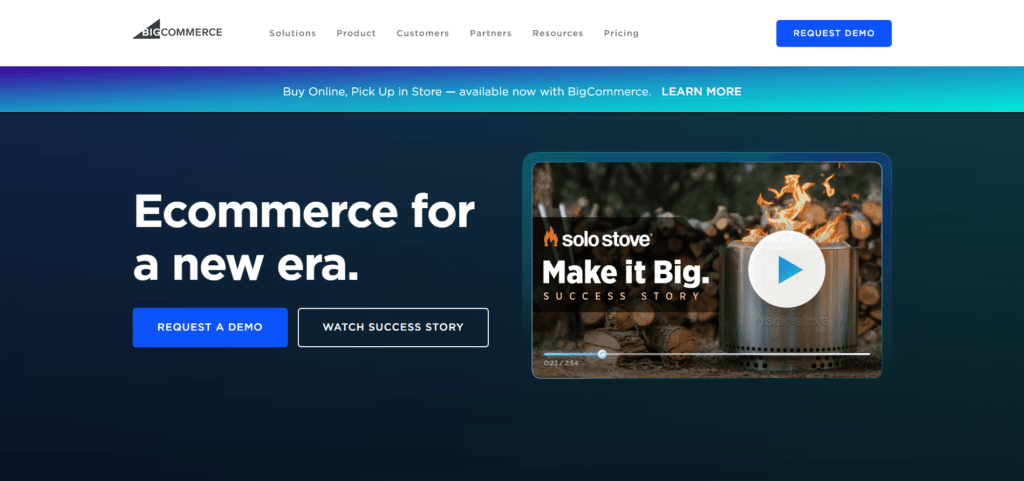
BigCommerce is a comprehensive e-commerce platform for small, medium, and large businesses. With built-in tools and scalability options, BigCommerce empowers entrepreneurs to create and manage their online stores effectively.
Unlike Shopify, BigCommerce offers unlimited staff seats in all its plans. In contrast, Shopify caps staff seats at 2 in Basic, 5 in Shopify, and 15 in the Advanced plan.
BigCommerce lets you sell across channels and connect your store to Amazon, Walmart, and eBay while managing customers’ orders from your store.
Aside from the Standard plan, all BigCommerce plans include cart abandonment features. This lets you send customers an automated incomplete cart reminder notice, encouraging them to complete the checkout.
If you max out your plan limits, additional stores can add up, and BigCommerce is generally cheaper than Shopify. On the BigCommerce Standard plan, each additional storefront costs $30/m; on the Plus plan, it costs $50.
Additional stores on the Pro and Enterprise plans cost $100/m, respectively.
BigCommerce doesn’t offer a free plan, but its feature-rich offerings make it a worthy Shopify contender.
BigCommerce Top Features
BigCommerce Pros and Cons
Pros
Cons
BigCommerce Pricing
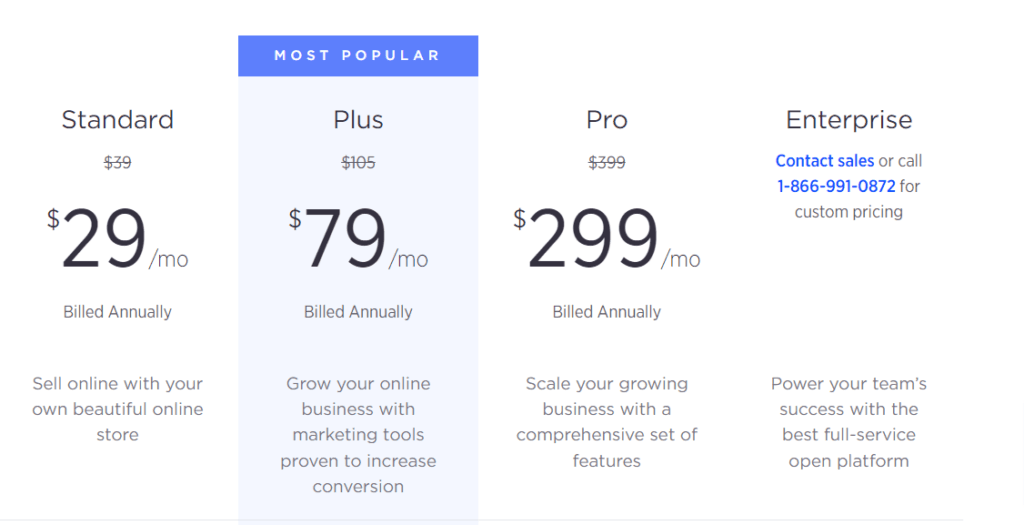
Like Shopify, BigCommerce offers two e-commerce plans for entrepreneurs: Essentials and Enterprise. The Essential plan is ideal for solo e-commerce business owners, individual and small businesses doing less than $400k in annual sales.
The BigCommerce Enterprise plan targets large-scale businesses exceeding $500 in yearly sales. Contact sales for a quote.
Here are the price details for the Essential plans.
2. Weebly
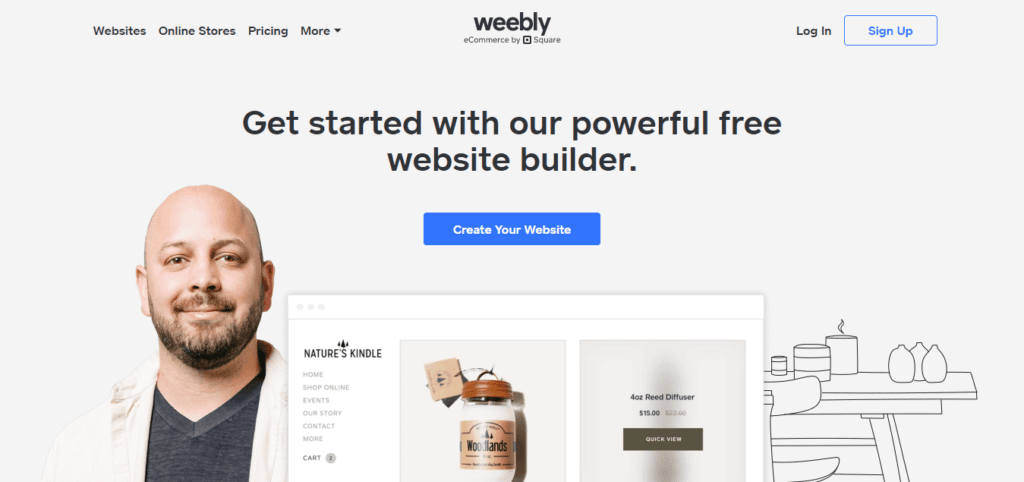
Weebly is a beginner-friendly website builder that also offers e-commerce capabilities. It targets new e-commerce store owners and individuals who want to build websites and online stores with minimal investment.
It provides an intuitive interface and a variety of attractive templates, making it suitable for small businesses and individuals.
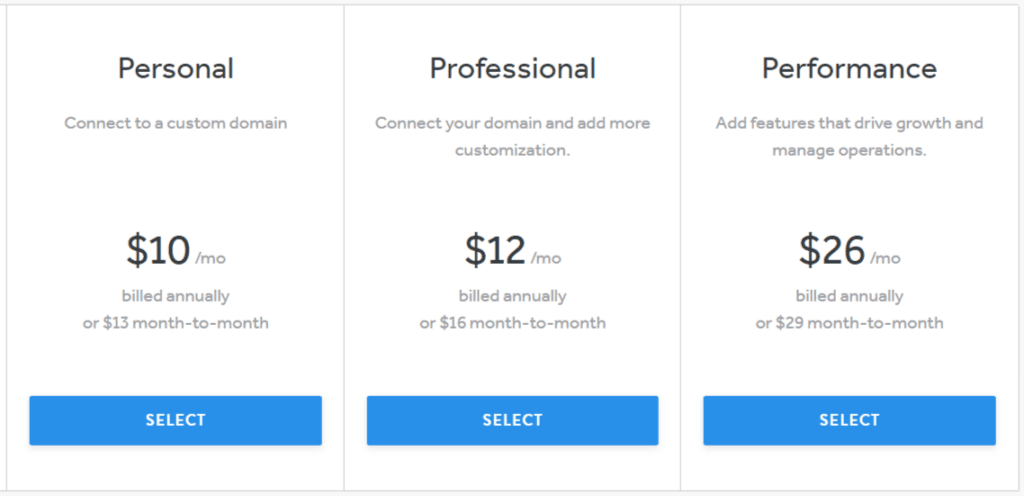
Weebly is one of the cheaper alternatives to Shopify if budget is a factor. The base ecommerce plan starts at $13/month, or $10 with annual billing.
Though not as robust and feature-rich as Shopify, it has all the essential ecommerce features to get you up and running in minutes. It also lets you sell and receive payments worldwide.
Weebly and Shopify are both hosted platforms, so you don’t need to spend extra on hosting your ecommerce store. All the tools and features are built into your Weebly store, so you can focus on selling and promoting your business.
Weebly offers a free plan, although it has limitations and Weebly branding. It’s a quick and easy way for beginners to try e-commerce and learn how to build an online business.
Weebly Top Features
Weebly Pros and Cons
Pros
Cons
Weebly Pricing
Beyond its forever-free plan, Weebly offers three standard plans. Each plan offers different levels of support, features, and store capabilities.
Here is a summary of the Weebly Pricing. Check the pricing page for more information on available features and access levels.
3. Ecwid
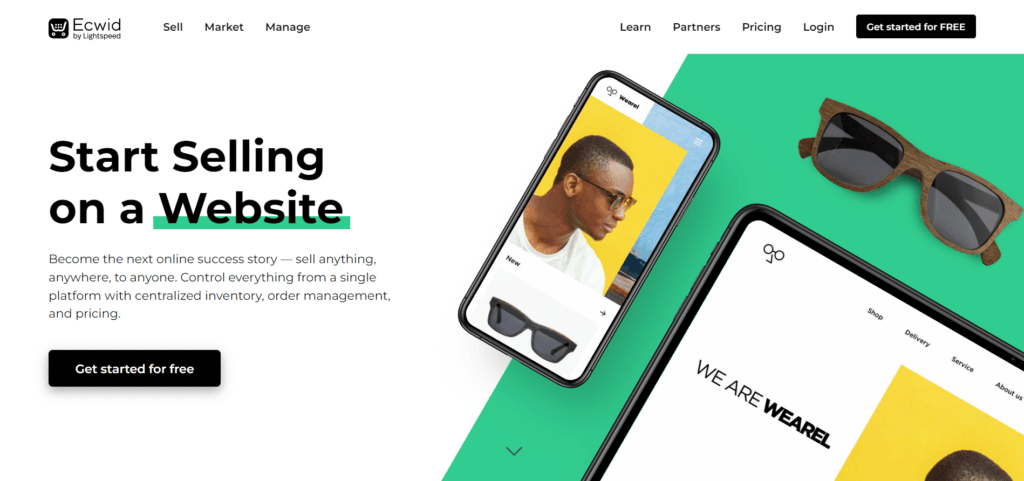
Ecwid is an e-commerce solution that integrates easily into existing websites, marketplaces, or social media platforms.
If you need to sell across the web, Facebook, TikTok, YouTube, Instagram, mobile apps, and websites, Ecwid is a solid Shopify competitor. It also integrates with WhatsApp, so you can market to your contacts and generate more revenue.
The software allows merchants to sell everywhere possible – whether you’re a blogger, YouTuber, content creator, business owner, or vlogger, anyone can start an ecommerce store on Ecwid.
Lightspeed backs the platform, so it uses the Lightspeed Point-of-sale system and Vend, Clover, and Square to sync inventory and customer orders to your online store.
In addition, you can sell and process payments via PayPal, Stripe, and Square from your Ecwid stores.
It offers a user-friendly interface and features suitable for small businesses, bloggers, and individuals.
Ecwid offers a free plan with limitations on features and product listings.
Ecwid Top Features
Ecwid Pros and Cons
Pros
Cons
Ecwid Pricing
You can use the free plan till you’re ready to upgrade.
However, you can only upload a maximum of 5 products, but you have unlimited bandwidth. You can access marketing features like Facebook and Instagram advertising, and sell across multiple stores and channels.
The free plan also allows you to create a free website and add a store with no transaction fees.
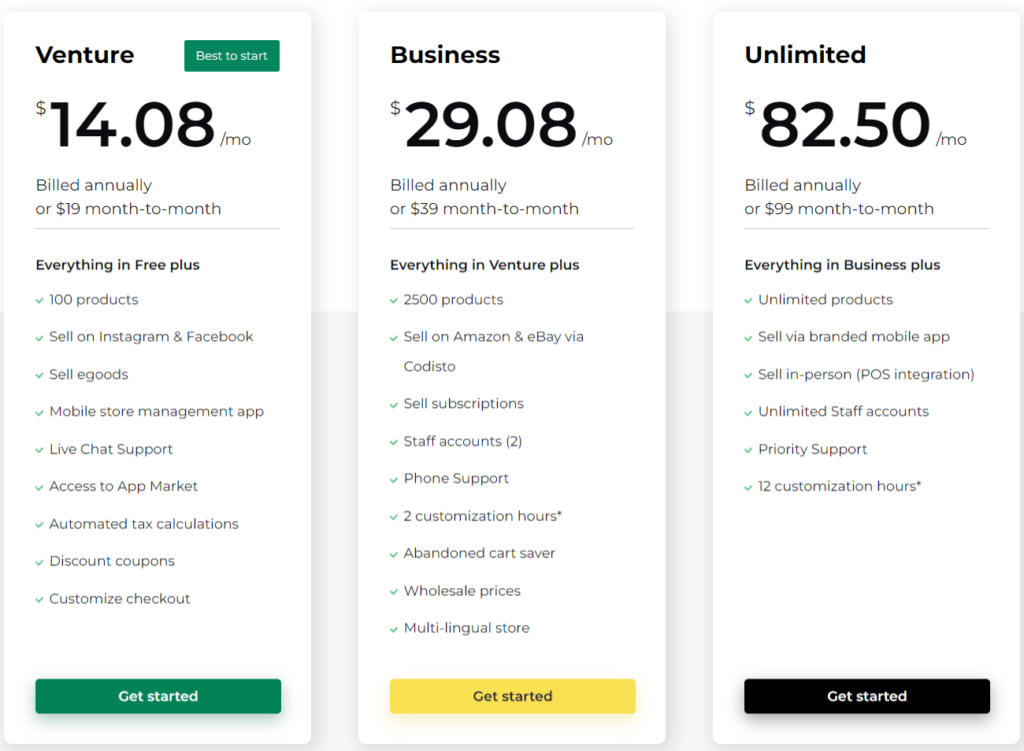
The standard plan includes three options: Venture, Business, and Unlimited.
The Venture plan is ideal for beginners, while Business and Unlimited suit businesses that want to grow. For more Ecwid pricing information, check the page.
4. Squarespace

Squarespace, known for its visually appealing website builder, also offers e-commerce functionality.
It provides an intuitive interface and beautifully designed templates, making it an attractive option for creative professionals and artists.
One of Squarespace’s core features is its template library. It offers a wide range of beautiful pre-built templates that give your store a responsive design and a stunning appearance.
Squarespace offers a responsive single-checkout option, making it easy for customers to purchase effortlessly.
For US merchants only, Squarespace offers its POS features, allowing you to sell in physical stores and offline and synchronize all orders with your online store account.
You can sell via Facebook and Instagram by synchronizing product catalogs, tagging products, adding shops to your profile, or running paid advertising.
While Squarespace doesn’t offer a free plan, its feature set and design capabilities make it a popular choice.
Squarespace Top Features
If you’re struggling to decide between Squarespace and Shopify, check out my extensive comparison post.
Squarespace Pros and Cons
Pros
Cons
Squarespace Pricing
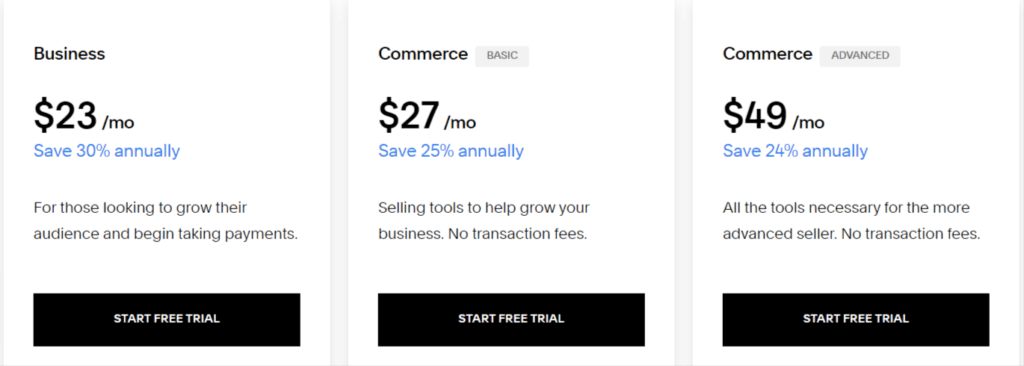
Three standard pricing plans are Business, Commerce Basic, and Commerce Advanced.
Each plan has one year of free domain name registration and a customized checkout domain name experience.
You can have https://yourdomain.com/checkout/ as your checkout page to improve the user experience and maintain consistency across all website pages.
Below are the Squarespace e-commerce pricing plans.
5. WooCommerce
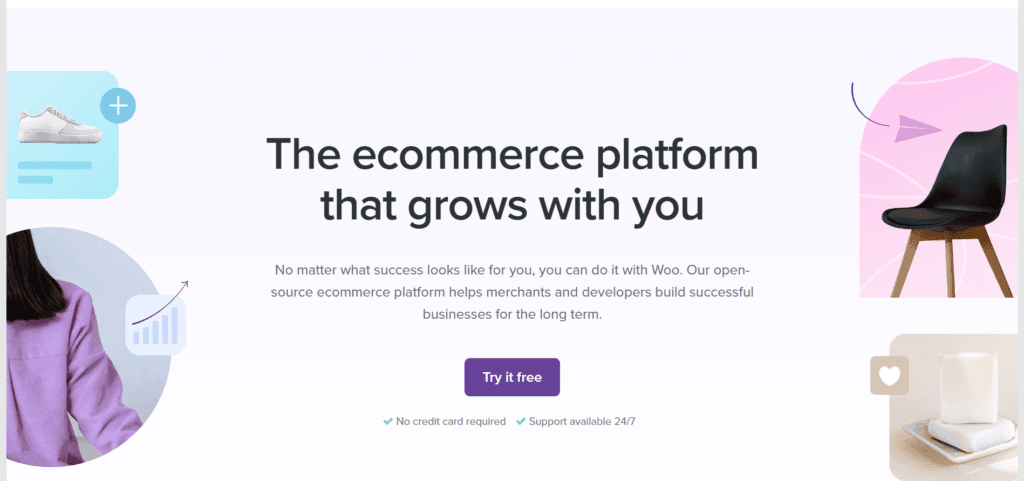
WooCommerce is an open-source platform and a very popular WordPress e-commerce software. It provides a robust e-commerce solution for WordPress users.
With a wide range of extensions and customization options, WooCommerce lets users turn their WordPress sites into feature-rich online stores. The best part is that WooCommerce offers a free plan as a WordPress plugin.
You can also try Woo Express for 14 days to decide whether it is worth the investment. WooCommerce also provides enterprise-level commerce solutions for high-volume merchants, and it’s built for developers, too.
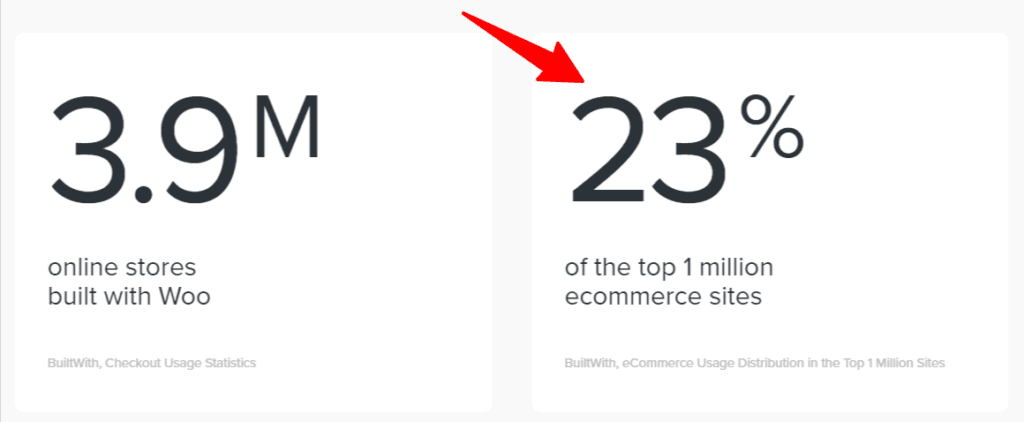
WooCommerce powers over 3 million stores on the WordPress platform, making it one of the most widely used ecommerce software solutions today.
Among the top 1 million ecommerce sites, 23% used WooCommerce as their ecommerce solution.
One of WooCommerce’s core strengths is community support. As a WordPress product, it enjoys developer support from the WordPress community.
WooCommerce is also suitable for dropshipping, with its extensive extensions that work seamlessly with marketplaces like AliExpress and several dropshipping partners.
It has over 800 extensions and 70+ WooCommerce themes to extend store features and functions and customize design extensively.
Whether a beginner, already selling, an ecommerce agency, or a developer, WooCommerce is one of the best Shopify alternatives that is feature-rich, easy to use, and allows flexibility.
WooCommerce Top Features
WooCommerce Pros and Cons
Pros
Cons
WooCommerce Pricing
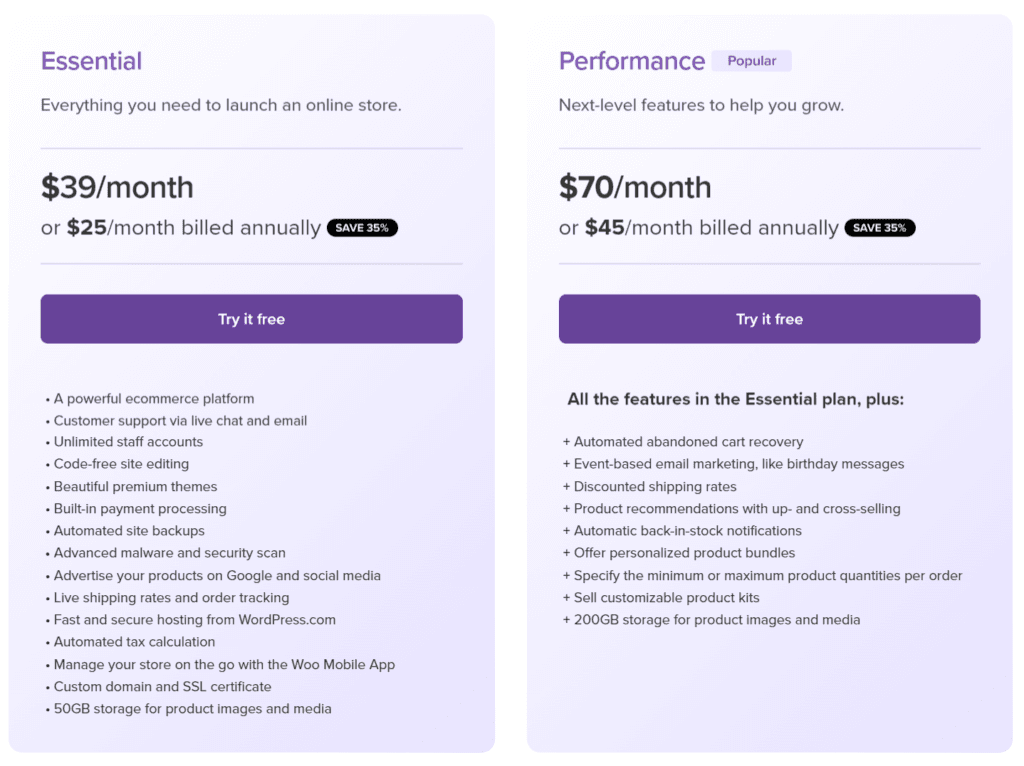
Two standard e-commerce plans are available for WooCommerce: Essential and Performance.
Each plan gives you access to the e-commerce features you need to launch and grow your store. However, the Performance plan is ideal for merchants with higher resource requirements.
Here is a summary of the price and features.
6. Magento

Magento, now officially called Adobe Commerce after Adobe’s 2018 acquisition, is one of the most powerful and flexible ecommerce platforms available. It comes in two flavors: Magento Open Source, which is free and self-hosted, and Adobe Commerce, the enterprise-grade paid edition with built-in AI merchandising and B2B tools.
Unlike Shopify’s all-in-one hosted model, Magento gives developers full control over the codebase. This makes it a favorite for businesses that need deep customization, complex catalogs, or multi-store setups that off-the-shelf platforms can’t handle out of the box.
Magento powers a large share of mid-market and enterprise online stores, and its open architecture means you’re never locked into a single vendor’s ecosystem for themes, extensions, or hosting.
The tradeoff is technical overhead. You’ll need a developer or agency to set up, secure, and maintain a Magento store, and self-hosting requires more server resources than a typical WordPress or Shopify site.
Magento is a strong Shopify alternative if you’re running a large catalog, need advanced B2B pricing rules, or want a platform that scales without switching software as you grow.
Magento Top Features
Magento Pros and Cons
Pros
Cons
Magento Pricing
Magento Open Source is free to download and self-host, though you’ll still pay for hosting, developer time, and any premium extensions you add.
Adobe Commerce, the paid enterprise edition, uses custom quote-based pricing tied to your store’s gross merchandise value. Costs typically start around $22,000 per year for smaller stores and scale up from there, with cloud-hosted plans (Adobe Commerce on Cloud) starting higher since hosting is bundled in.
Because of this pricing structure, Magento tends to suit growing or established businesses rather than beginners on a tight budget.
7. PrestaShop

PrestaShop is a free, open-source ecommerce platform that has powered online stores in over 190 countries. Like Magento, it’s self-hosted, giving you full ownership of your store’s code and data instead of renting space on someone else’s platform.
It’s built for small and medium-sized businesses, offering a balance between the flexibility of open-source software and a more approachable setup than Magento.
PrestaShop includes solid B2B functionality out of the box, such as customer group pricing, bulk discounts, and quote negotiation tools, features that usually cost extra on other platforms.
You can extend your store through the PrestaShop Marketplace, which offers thousands of free and paid modules and themes to add features like advanced SEO tools, marketplace integrations, and custom checkout flows.
Since PrestaShop is self-hosted, you’ll need to choose your own hosting provider and handle updates yourself, though managed PrestaShop hosting plans have made this easier over the years.
PrestaShop Top Features
PrestaShop Pros and Cons
Pros
Cons
PrestaShop Pricing
PrestaShop’s core platform is completely free to download and self-host. Your main costs are hosting (typically $10 to $50 a month for shared or cloud plans) and any premium modules or themes you add from the PrestaShop Marketplace.
There’s no forced subscription tier or revenue-based pricing here, which makes PrestaShop one of the more predictable-cost options on this list if you’re comfortable managing your own store infrastructure.
FAQ
Conclusion
While Shopify remains a popular choice for many small, medium, and Enterprise business owners, exploring alternatives is crucial to finding the best fit for your needs.
The eCommerce platforms mentioned in this article offer a range of features, target different audiences, and come with varying pricing and payment processing fees.
Whether you’re a small business, artist, blogger, drop Shippers or large enterprise, Shopify alternatives provide opportunities to establish and grow your online store.
Consider your requirements, budget, and long-term goals to select the best ecommerce platform for your business vision.