When I first heard about StellarSites, my initial thought was, “Another hosting platform?” But as I dug deeper, it became clear that StellarSites is trying to solve a different problem than traditional WordPress hosting companies.
Instead of a one-size-fits-all managed WordPress hosting platform, StellarSites bundles hosting, advanced security, performance tools, and industry-specific plugins into one package.
It’s designed for people who want the flexibility of WordPress without the hassle of piecing everything together themselves.
If you’ve ever set up a WordPress site from scratch, you know the process can be messy. You buy hosting, install WordPress, pick a theme, add plugins, configure security and performance features, and then hope everything works together without breaking.
StellarSites takes that entire workflow and turns it into something closer to a SaaS builder, like Squarespace or Shopify, but with the open-source power of WordPress.
This StellarSites review walks you through its offerings, plan structures, what sets it apart from standard hosting or DIY WordPress setups, and which types of site owners will benefit most.
Whether you’re a small business owner, a nonprofit, a course creator, an event organizer, or just someone trying to simplify WordPress, I’ll break down the pricing, features, and real-world value so you can decide if it’s the right fit for you.
StellarSites
This StellarSites review walks you through its offerings, plan structures, what sets it apart from standard hosting or DIY WordPress setups, and which types of site owners will benefit most.
Price: 15
Price Currency: USD
Operating System: Web-Based
Application Category: BusinessApplication
3.94
What is StellarSites?

StellarSites is a solution-based WordPress platform that combines hosting, website design tools, and security and performance features into a single subscription.
It was built by the StellarWP team, the same group behind well-known WordPress products such as Kadence, LearnDash, GiveWP, and The Events Calendar.
Under the hood, StellarSites runs on Liquid Web and Nexcess’s infrastructure, which means you’re getting reliable hosting performance backed by providers with over 25 years of experience in the hosting industry.
What sets StellarSites apart is the way it bundles everything together.
Instead of signing up for hosting, then searching for a theme, then adding separate plugins for security and performance, you get all of this out of the box.
Each site includes a specific Kadence WP plan (Express, Plus, or Ultimate), SolidWP for security and backups, daily site monitoring, and access to industry-specific tools, depending on the plan family you choose.
For example, a nonprofit website can integrate GiveWP for fundraising, while an online educator can integrate LearnDash for courses.
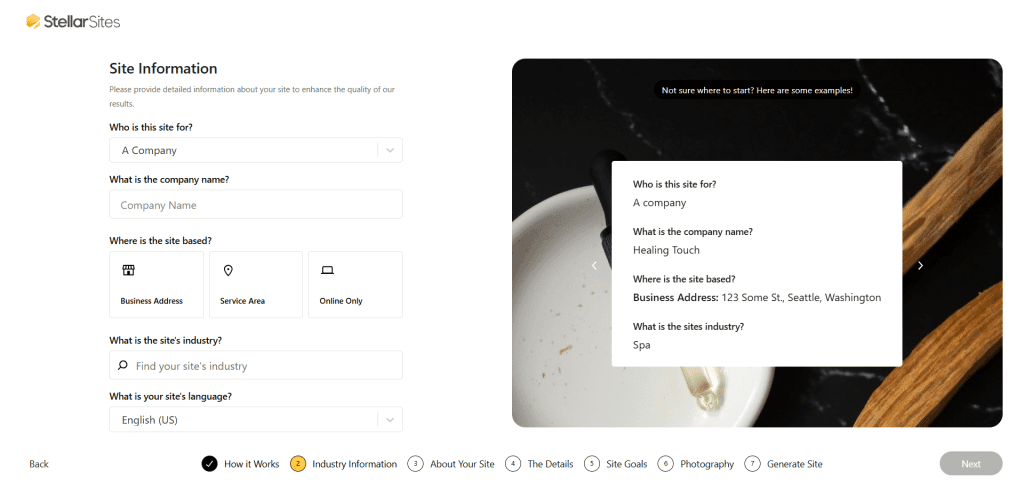
Another standout feature is the Kadence AI Website Wizard, which helps you generate a first version of your site in minutes. It doesn’t lock you into a rigid template the way some SaaS builders do.
Instead, it gives you an auto-generated draft website based on your information, including business name, niche keywords, target audience, location, etc.
You can fully customize the site just as you would with any WordPress site. You can choose the site color, typography, and layouts, and set padding and margins for design elements such as buttons and the sidebar.
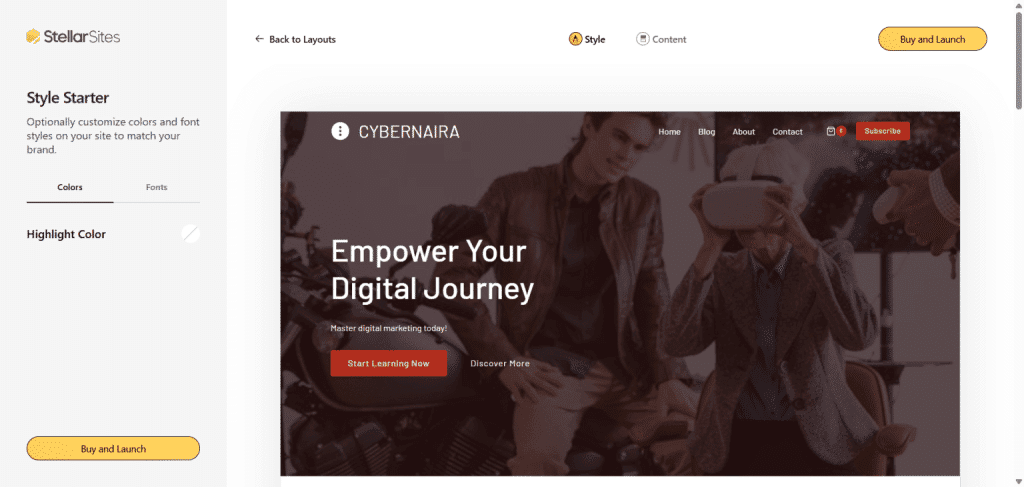
This makes it a beginner-friendly hosting platform while still leaving room for experienced users to tweak every detail.
Title
Here is a standalone review of Kadence AI Wizard that walks you through a step-by-step guide to building your first StellarSites without writing a single line of code.
At its core, StellarSites is trying to bridge the gap between SaaS site builders and traditional WordPress hosting. With SaaS platforms, you get ease of use but lose flexibility.
With WordPress hosting, you have complete control, but you spend a lot of time managing the technical, customization, and design aspects.
StellarSites combines the best of these worlds by packaging WordPress flexibility into a managed solution-based, SaaS-like experience.
StellarSites Plans at a Glance
StellarSites doesn’t take a one-size-fits-all approach. Instead, the platform is split into five different “families” of plans, each designed for a specific type of website: Foundation, Shop, Learning, Fundraising, and Events.
Within each family or category, you can choose between three tiers: Essential, Plus, and Ultimate.
The difference between these tiers mostly comes down to performance limits, additional design and marketing tools, and the number of premium features bundled.
Here’s how the families are structured:
Essential ($15/m)
Include the following:
Plus ($35/m)
Include the following:
Ultimate ($55/m)
Include the following:
Essential ($25/m)
Include the following:
Plus ($49/m)
Include the following:
Ultimate ($69/m)
Include the following:
Essential ($29/m)
Include the following:
Plus ($55/m)
Include the following:
Ultimate ($79/m)
Include the following:
Essential ($29/m)
Include the following
Plus ($55/m)
Include the following
Ultimate ($79/m)
Include the following
Essential ($29/m)
Include the following:
Plus ($55/m)
Include the following:
Ultimate ($79/m)
Include the following:
Based on my analysis of StellarSites pricing, you could save up to $1,000 per year. This calculation assumes you subscribe to the Kadence bundle plan directly on their website.
If you’re hosting your blog elsewhere, such as Pressable, and purchasing each pre-install StellarSites premium plugin at the regular price, you may end up spending more.
For example, Object Cache Pro costs $950/yr, Cloudflare Enterprise CDN costs $240/yr, LearnDash LMS costs $199/yr (one website license and add-ons not included), Kadence Block Pro add-on costs $119, Theme Kit costs $99, Kadence ShopKit costs $119, Kadence Insight costs $99, and Conversion costs $99. All licenses renew yearly.
This is over $1,900 in premium tools bundled with your StellarSites hosting plan, and you don’t pay extra for them. That’s a massive saving while still getting top-of-the-class managed WordPress hosting services.
Features of StellarSites Hosting
When you’re looking at StellarSites, the first thing that stands out is that it’s built specifically for WordPress users.
This isn’t just another generic hosting platform. It’s designed to give WordPress site owners the tools they need without forcing them to deal with the usual technical headaches or irrelevant setup.
Let’s look at the key features that set it apart.
One of the most important features is the managed WordPress hosting experience. That means StellarSites takes care of updates, backups, and security patches for you.
You don’t need to manually update plugins or worry about compatibility issues. The automatic updates with Visual Compare check for errors and design issues, ensuring your site works as expected.
For anyone running a business website or a blog, that kind of peace of mind is huge.
Another highlight is automatic daily backups via Nextgen Solid Backup.
This provides automatic daily incremental backups, free 20GB storage, file and database backups, an optional custom database, and a one-click restore point.
And the best part: backups are included with all plans and run in the background, so you always have a recovery point if something goes wrong.
Performance is another area where StellarSites stands out.
The platform uses a built-in caching system and a global CDN powered by Cloudflare, with 260+ edge locations, which helps pages load faster for visitors, no matter where they’re located.
Your plan also includes Object Cache Pro with Redis, which helps improve database queries and dynamic content optimization, making your site load more efficiently.
Security is also a big part of the StellarSites package.
StellarSites includes malware scanning, firewalls, and brute force protection by default. With WordPress being one of the most targeted platforms by hackers, this is something you don’t want to ignore.
In addition to the standard, your StellarSites include advanced protections such as Apple Touch ID and Face ID, Windows Hello, Google reCAPTCHA, Cloudflare Turnstile, time-based passwords, and support for Biometric and passkey authentication.
Instead of installing multiple security plugins or integrating different services, you get these protections out of the box.
Another interesting feature is the staging environment. If you’ve ever worried about breaking your site while making changes, staging lets you test updates or new designs safely before pushing them live.
This is a must-have for site owners who make frequent updates or run eCommerce stores where downtime can cost money.
Lastly, StellarSites (plan depends) integrates seamlessly with popular third-party tools and services, including Zapier, ThriveCart, MemberPress, bbPress, SamCart, and Easy Digital Downloads.
If you’re already using these tools, hosting them on StellarSites creates a more seamless setup.
Overall, StellarSites isn’t trying to overload you with features you’ll never use. Instead, it focuses on the essentials that matter for your specific WordPress websites – speed, security, plugins, and easy site management.
What You Get on Every Plan (Core Platform)
No matter which StellarSites plan you choose, you’re not just getting space to host your WordPress site; you’re getting a whole platform built to help your site run fast, stay secure, and be easy to manage.
Here’s what’s included across every plan.
First, you get managed WordPress hosting with everything already optimized for performance. This includes WordPress preinstalled, a built-in Cloudflare CDN, and free SSL certificates, so your site loads faster and is bulletproof secure with no additional configuration.
During checkout, you can choose your preferred data center – EU West or US Central. This makes StellarSites ideal for businesses that reside in the US or the European Union.
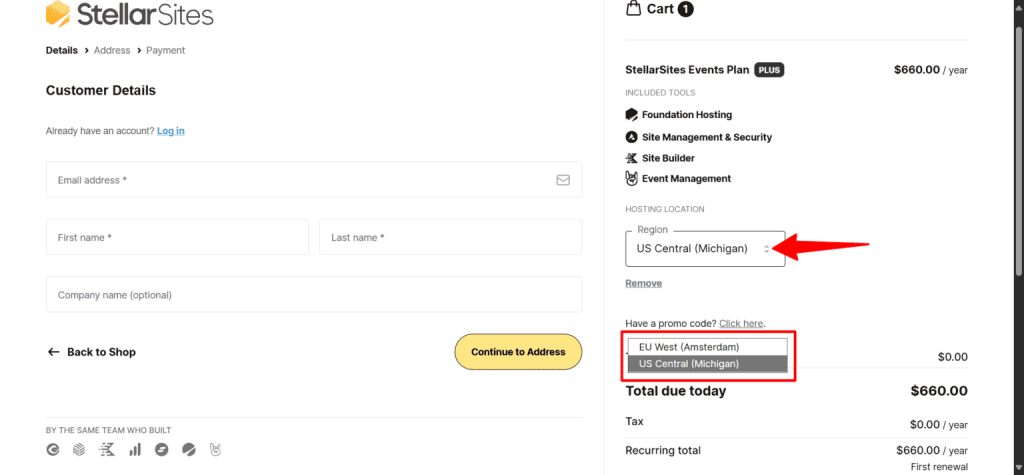
Technically speaking, two origin datacenters are very limited and not something expected from a platform like StellarWP with a global customer.
However, with 260+ Point of Presence Cloudflare Enterprise CDN edge locations, your StellarSites will deliver blazing-fast page load times no matter where your audience resides globally.
StellarSites also uses advanced page caching, Redis-based database caching, and autoscaling, so your site can handle traffic spikes without slowing down, becoming unresponsive, or crashing.
Security is built into the SolidWP platform. Each site is hardened against common attacks, with automatic vulnerability patching and proactive monitoring to keep your site running smoothly.
If anything unusual happens, uptime monitoring alerts the team right away so issues are resolved quickly.
You also have access to 24/7 expert support if you need help.
On the design side, StellarSites gives you access to the Kadence WP theme and the Kadence Block. This includes starter templates, a visual builder, and premium tools to customize your site without coding.
Whether you’re building a business site, a portfolio, or an online store, you have a head start with ready-made layouts and a clean template.
To protect your online assets, daily backups are included with every plan.
If something goes wrong- maybe a plugin update breaks your site, or you accidentally delete something- you can restore your site yourself with the self-service restore option.
This means you don’t have to wait for support to bring your site back online.
Finally, StellarSites offers a refund window if you decide the service isn’t for you.
Annual plans come with a 30-day money-back guarantee, while monthly plans include a 15-day refund period. All prices are billed in USD, keeping the pricing straightforward.
Key Specs by Tier (Performance & Limits)
First, StellarSites runs on the Apache web server with PHP-FPM, MariaDB 10, SSD storage, and the latest PHP 8 version. And it doesn’t just bundle in hosting and design tools with this stack; it also sets clear performance limits for each plan.
These specs matter because they directly affect how fast your site loads, how much traffic it can handle, and whether your visitors enjoy a smooth browsing experience.
Let’s break down what you get at each tier.
Storage & Bandwidth
PHP Workers (Autoscaling)
Each plan includes autoscaling PHP workers, which help your site handle multiple requests at once.
This is especially important if you’re running eCommerce or membership sites where several users interact at the same time.
Performance Enhancements
Page caching is included in all plans, helping speed up load times, improve SEO, and enhance the user experience.
Overall, the performance specs make it clear that StellarSites is not just another shared hosting solution; it’s optimized for speed, scalability, and reliability, with room to grow depending on your plan.
Design & AI Tools (Kadence)
As mentioned earlier, every StellarSites hosting plan comes with the Kadence design tools, which make building a WordPress site much easier, even if you don’t have design experience.
Kadence uses a drag-and-drop block editor with ready-made starter templates (classic) and a pattern library, so you can launch a professional-looking site in less time.
Where it gets even more interesting is with the AI tools. Depending on the plan you choose, you’ll get monthly AI credits that help you generate content and speed up design work:
The Plus and Ultimate tiers also unlock premium Kadence features, including Theme Kit Pro and Blocks Pro, which give you more advanced customization options and design flexibility.
The Ultimate tier plan adds even more premium features, such as ShopKit for WooCommerce, Conversion, Insights, Child theme builder, and Pattern Hub.
This means if you want complete control over layouts, typography, analytics, marketing tools, and custom templates, you’ll find the upgrade worth it.
StellarSites combines managed hosting with Kadence’s AI-driven design tools, so you’re not just getting performance; you’re also saving time and money on building a site that looks great from day one.
Security, Backups, and Maintenance (SolidWP)
StellarSites bundles SolidWP’s SolidSuite to help keep your site secure, backed up, and easy to manage. You don’t have to set up a dozen different plugins; the essentials are already included:
With these tools, you can focus on running your business while StellarSites takes care of the heavy lifting behind security and maintenance.
What Each Plan Family Adds
Depending on the type of site you’re building, you can choose a plan family that comes pre-loaded with the right tools for the job.
Here’s what each one gives you:
Foundation (General Sites)
If you’re running a brochure site, a personal blog, a portfolio, or a small service business, the Foundation plan is all you need. It’s built for speed, clean design, and essential features.
Since these sites don’t need heavy extras like eCommerce or fundraising, Foundation keeps things lean and optimized.
You have access to 40 premium starter templates, over 800 pro pattern designs, the Kadence theme, and the Kadence block.
Shop (eCommerce)
Want to sell products online? The Shop family is built on WooCommerce, already configured and optimized.
You also get StellarPay, a modern checkout experience, plus an email designer for your store.
Learning (Courses & Memberships)
If your business teaches online, the Learning family is centered on the LearnDash LMS, one of the most powerful course-building plugins.
Fundraising (Nonprofits)
For nonprofits, the Fundraising family is powered by GiveWP, the leading donation plugin for WordPress.
Events (Calendars & Tickets)
Running events? The Events family gives you The Events Calendar and Tickets out of the box.
Marketing & Conversion Features
StellarSites also includes tools to help you attract visitors and turn them into paying customers, students, or donors.
If you go with the Ultimate plan, you get access to a full set of marketing and conversion tools.
This includes A/B testing, which lets you compare two versions of a page or offer to see which one performs better.
You also get on-site engagement tools such as pop-ups, slide-ins, and banners. These can be triggered by actions such as exit intent, scroll depth, or time on page.
On top of that, you’ll have conversion analytics, so you can measure what’s working and make improvements.
Forms are another key part of marketing.
With the Essential plan, you can create basic forms for things like contact pages or simple signups.
If you upgrade to Plus or Ultimate, forms become much more powerful. You’ll unlock features like form entry storage, CRM integrations, advanced field types, and form analytics.
This means you can capture leads, track submissions, and connect your forms directly to the tools you already use for email marketing or customer management.
In short, the higher plans give you a clear advantage if you want to actively grow your audience, increase conversions, and understand user behavior without needing a stack of extra plugins.
Domains, Staging, and Site Ownership (What to Know)
When you set up a Stellar Site, you can connect your custom domain right away. If you’d rather buy a domain directly through StellarSites, that option isn’t live yet but is marked as “coming soon” while they’re in Early Access.
For now, you’ll need to connect a domain you already registered elsewhere.
Staging sites are supported, but they aren’t self-serve just yet. Instead, you can reach out to support and request staging when you need a safe space to test changes before pushing them live.
However, I see this as a drawback or a dealbreaker for agencies managing multiple client sites, or for anyone who wants to spin up a test site quickly.
Access to creating a staging environment should be free, without submitting a support ticket or waiting for a response. This is one of the changes I expect to see in the near future with StellarSites.
On the good side, ownership is one of the big pluses with StellarSites. You’re not locked into their ecosystem. If you decide to leave, you can take your backups with you.
StellarSites keeps a 30-day backup archive after cancellation, which gives you time to migrate without stress.
Support & Onboarding
StellarWP makes it easy to get started with StellarSites, even if you’ve never launched a WordPress site before.
Once you sign up, you’ll have access to 24/7 chat and ticket support, so there’s always someone available if you run into an issue.
There’s a knowledge base and tutorials that cover common tasks and troubleshooting steps.
For deeper learning, you can tap into Solid Academy, a resource hub that walks you through everything from site setup to more advanced features.
If you’re moving to an existing site, migration help is available after signup, which saves you the headache of handling it yourself.
This mix of hands-on support and learning resources means you won’t feel left on your own, whether you’re brand-new to WordPress or managing multiple projects.
Who It’s For (and Not For)
StellarWP built StellarSites for people and organizations that want a professional, solution-based, ready-to-go website without going through all the tech headaches.
If you’re a business owner, content creator, nonprofit, or educator, you’ll likely find it fits your needs well.
Event organizers and small shops that need dependable hosting, strong security, and built-in marketing tools will also benefit.
The platform’s mix of hosting, themes, plugins, and site management in one package makes it a solid choice for anyone who wants more time to focus on their work rather than tinkering with servers.
That said, StellarSites isn’t for everyone.
Developers who need full root or server-level control will run into limits, since the platform is managed for simplicity.
Agencies looking to build highly customized sites from the ground up may find it too restrictive.
It also won’t work if you’re not planning to use WordPress at all or if you’re looking for a completely free website option.
StellarSites is designed to provide a polished, complete managed WordPress experience, not bare-bones hosting or a DIY playground.
Pros and Cons of StellarWP StellarSites
No platform is perfect, and StellarSites is no exception. Here’s a balanced look at the advantages and drawbacks so you can decide if it’s the right fit for you.
Pros
Cons
Alternatives to Consider
Before you commit to StellarSites, it helps to see how it stacks up against other options.
StellarSites hits a middle ground: you get the flexibility of WordPress plus bundled vertical tools that you’d usually have to pay extra for elsewhere.
FAQ About StellarSites
Can I install any theme or plugin on StellarSites?
Yes, since StellarSites runs on WordPress, you can install most themes and plugins just like you would on regular WordPress hosting. That said, it’s always smart to test compatibility, especially with resource-heavy plugins or custom-built themes.
Does StellarSites offer a money-back guarantee?
Yes, StellarSites offers a money-back guarantee. Annual plans come with a 30-day refund window, while monthly plans have a 15-day money-back policy. This gives you enough time to try the platform before fully committing.
How do upgrades and downgrades work?
Upgrades and downgrades are flexible; you can switch plans as your needs change. Billing is handled in USD, and changes take effect at the start of your next billing cycle.
How do PHP workers and autoscaling affect StellarSites performance?
StellarSites automatically scales to handle spikes in traffic. PHP workers help process multiple simultaneous requests (like checkout, course logins, or event registrations), so your site won’t freeze during busy periods.
Conclusion
StellarSites is best for people who want WordPress power without having to set everything up themselves.
If you’re a freelancer, small agency, or solo creator, it gives you a solid foundation with built-in tools to serve clients or run projects without installing endless plugins.
Store owners and course creators will benefit from the bundled eCommerce and LMS features that would otherwise take time and extra cost to set up.
Nonprofits and event organizers also get purpose-built workflows right out of the box.
On the other hand, if you’re already happy with your host or deeply invested in custom setups, waiting may make more sense until StellarSites matures further.
Among the tiers, the Plus-level plans tend to hit the sweet spot for most users, offering enough resources and bundled features without the overhead of higher-priced packages.