

From brainstorming creative designs to acquiring customers, selling, and shipping products, this guide covers everything you need to know about starting a print-on-demand Shopify store that sells products you don’t own.
I cover every aspect of the business; you will learn:
- What is print-on-demand?
- How does it work?
- How to come up with a unique product design?
- Where to find print-on-demand suppliers?
- Starting your print-on-demand store on Shopify
- Building your store.
- Collecting payment on your website.
- And lots more.
Without further delay, let’s dive in.
What is Print on Demand (POD)
Print on demand (POD) is a business model in which customized or personalized products, such as t-shirts, mugs, accessories, gadgets, home appliances, and more, are produced only when product orders exist.
In a retail print-on-demand business, you partner with white-label product companies or suppliers to customize their products under your branding and sell them to customers based on pre-orders.
You don’t keep the product in stock, buy upfronts, or handle shipping. You only pay for the product cost, shipping, and other logistics when your customer places an order.
The white label company or print-on-demand supplier is responsible for producing, shipping, and delivering the product to your customers. Your job is to receive orders and forward them to your on-demand products vendor.
How Does a Print-on-Demand Business Work?
Here is a simple diagram from Shopify showing how the print-on-demand e-commerce business works in the real world.
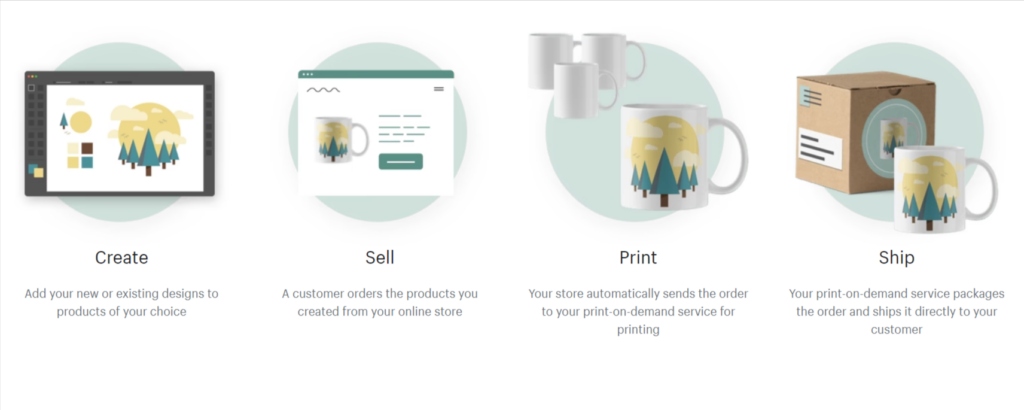
In summary, you create an online store, sign up with a print-on-demand provider, add your design to products, and customers place orders at your store’s price.
Your store automatically forwards orders to your POD partners for processing. Your POD provider produces and ships the item to your customer. You, not the product suppliers, determine the number of products you sell.
7 Tips for a Successful POD Business.
Before we discuss in depth how to start a print-on-demand Shopify shop, I want to share some advice with you.
This advice will help you escape negative POD tactics, prepare your mindset for the challenges ahead, and help position your business for success.
1. Print on Demand is a Business
First, print-on-demand is a legitimate business; you must treat it accordingly.
If what you do is create hundreds of designs and put them on random store products, you’re not likely to make any sales.
Just because the design looks significant to you doesn’t mean others will find it interesting and flock to your store.
You must build a storefront representing a people, culture, or lifestyle. Making money from print-on-demand businesses requires more than creating your store, naming it, and sharing the links.
You must focus on a business strategy that enables you to achieve your goals.
2. Choose a Niche
Regarding business strategy and focus, a print-on-demand business also requires focusing on a specific niche market.
Often, beginners start a POD store selling a wide range of products.
You want to appeal to every potential online shopper, from home decor to smartphone accessories, clothing, fashion, and pet products.
Save yourself the trouble; you’re not Amazon or Walmart. Not AliExpress or Alibaba?
Instead, focus on a segment of a broad market.
For example, clothing is a broad niche or market that appeals to a global audience. However, you don’t have to start a POD store selling clothes.
Instead of selling clothes, a broad term, you can explicitly sell winter clothes, teens wear, jeans, t-shirts, ladies’ wear, etc. Your store product should target one of these markets.
As you show your ads to people, the niche draws their attention and makes the brand resonate.
Ask yourself, what type of clothes should I sell? Who is my target audience? What interests or needs do the clothes serve? Why would someone want to buy these clothes?
There are many questions to ask to get you in the right direction. The more specific you get with your products, the better your chances for success.
3. Don’t Start a Product Line
Print-on-demand is not to be taken as a platform to start a product line business.
It is what it is: to sell products based on customers’ demand orders.
Starting a brand product line requires significant financial investment, paperwork, company, employing workers, production tools, etc.
Alternatively, you can partner with a well-established manufacturer or company to create a single product line under your brand and make the products readily available in local stores, marketplaces, trade shows, etc.
As you can see, this is bigger than selling on-demand products. It is a business created to stand the test of time and substantial growth.
Shopify, Esty, and other print-on-demand platforms are not meant to help you create a product line business but to start and grow small to medium e-commerce shops.
4. Beware of Copyright ©️ and Trademarks ™️
It’s easy to fall into the trap of using trademark and copyright materials in your product design.
You can get into serious legal trouble if you do this, especially in a country with copyright and trademark laws.
Some easy traps are cartoon characters, trademark names, public figures, celebrities, influencers, etc.
Before using any of these in your design, consult with an expert or professionals in the field if you’re unsure if the design concept infringes upon the existing law of your store location.
I have seen businesses get into serious lawsuits for trademark names. Don’t be one of them.
5. Have Cash in the Bank
When customers place orders in your store, the transaction may take a few business days to appear in your bank account. However, you need to process the order immediately.
You have two options: You may wait to receive the money before placing an order with your POD supplier or pay for the order to begin processing immediately.
Waiting for the transaction to reflect in your bank account before proceeding will eventually lead to delays in shipping and customers not getting orders on time.
Having a budget to fund orders immediately after receiving them will help your business grow, improve service delivery, and increase sales. The faster customers receive their orders, the more likely they will buy from you again and recommend your store to others.
6. Learn About the Refund Policy
Even though you’re not producing the products, your customers hold you accountable for quality delivery.
You must learn about your product provider’s refund policy to inform your store policy.
Many POD suppliers have an explicit refund policy that only covers certain conditions.
A good scenario is when the product is damaged, not as described or disliked when the customer receives the package.
The refund policy might only cover shipping, handling, or production damage. It does not cover the customer’s decision to not like or no longer need the product.
You should consider and know more about your product suppliers’ refund policies before setting up your policy page.
Implementing the same refund policy described on your POD suppliers page is probably a better decision.
7. Consider Shipping Rates
Shipping is another aspect of the POD business you don’t get involved in, but you must be upfront and thorough about it.
You should consider the production time frame when calculating shipping times.
When calculating estimated shipping times, add two to three days to allow for unforeseen product production delays.
You should consider your supplier’s shipping policy if you want to give customers free shipping services.
The best option is to absorb shipping costs into product prices or offer a shipping discount for a certain number of orders.
Additionally, consider working with suppliers that ship directly to where most of your customers reside. If most of your customers are from the US, ensure you’re working with print-on-demand suppliers from the US or that ship directly.
8. Place a Test Order
This is the first thing you should do after creating your store.
One of the best ways to test print-on-demand partners’ service delivery and product quality is to order your products.
You want to experience what it is like to order products from your store, produce them, and ship them directly to the customer’s address. Some POD partners allow you to order demo products for your test and even give discounts on shipping.
Aside from testing products and services, having your products is also beneficial for taking photos for your content marketing.
Now that I’ve covered the essentials of starting a print-on-demand dropshipping business, let’s create one on a Shopify store.
The rest of this article is about starting a POD on Shopify; you can use the same description for other e-commerce platforms, too.

Start Selling on Shopify Today.
Get 3 days Free Trial Plus extended 90 days for $1 per month; totalling $3 for using Shopify for 93 days.
Choose a Print on Demand Supplier
Finding reliable product suppliers is critical to starting your print-on-demand business.
Getting customer and design concepts is within your control, but if your business relies on product vendors with poor service delivery, you risk damaging your business’s reputation.
When researching print-on-demand product suppliers, consider your store and customers’ location.
You must work with product providers that offer exceptional shipping rates to customers’ locations. You should also evaluate product quality to pick the best print-on-demand providers.
Here are some of the most popular Shopify print-on-demand product providers you can investigate.
Printify
Printify is a UK/US-based company and one of the popular print-on-demand service providers that ship globally. With over 4 million global sellers, the platform has one of the largest print networks.
Working with print providers from the UK, Canada, Spain, China, Germany, Czech Republic, Latvia, Slovenia, Netherlands, etc.
It gives you access to an extensive network of global vendors offering white-labelling products, such as T-shirts, mugs, Jewelry, clothes, shoes, phone cases, hoodies, mouse pads, Kitchen accessories, and backpacks.

The platform boasts over 800 on-demand customizable products. It offers sellers all the tools to run a smooth printing-on-demand business.
Once you create your unique product design using the free mockup generators and place your order, Printify handles the printing and delivery to your customers.
In addition to Shopify, Printfiy integrates with other popular e-commerce platforms, such as WooCommerce, Walmart, Squarespace, Wix, Etsy, and BigCommerce.
Printify offers a free plan for up to five online stores, unlimited products, free mockup generators, 24/7 customer support, and manual order creation. You are billed for products and shipping costs when you sell via your online store.
The Pro plan starts at $29/month. It offers everything in the free program, allows up to 10 online stores, offers up to 20% off all Printify products, and offers 14% if you subscribe to a yearly plan.
Printful
Printful is another top-choice print-on-demand drop shipping provider, offering high-quality and reliable products for retailers.
It offers a wide range of high-quality products, including apparel, blankets, embroidered T-shirts, books, and home decor. With Printiful, you can sell frames, wall posters, pillows, and more.
On the Shopify apps store, Printful has a 4.6 user rating from over 4.7k reviews, with some users leaving exceptional reviews like this.

The Printful Shopify app is free to install; you only pay for product fulfillment and shipping costs.
If you choose Printful, you should know the product’s cost. Some users have complained about the price.
However, the platform has performed well regarding the quality of services and product delivery, ensuring retailers’ orders are shipped on time and customers get the best delivery and product quality.
Another thing you should be aware of when using Printful is its different printing techniques, which can slightly increase the cost of printing.
Printful uses embroidery, direct-to-garment printing, and cut-and-sew printing, also known as all-over-printing.
Depending on the printing techniques you specify and additional printing or product customization, the total cost of production might increase from the base price.
Gooten
With Gooten, you can choose from over 150 product catalogs, sell globally, and stop worrying about inventory management.
Gooten gives you access to 30+ product manufacturers, allowing you to choose and source products from the best. You can sell fashion, apparel, accessories, office and stationery, pet and baby products, etc.

One advantage of using Gooten is its global network of drop shippers and distributors. This gives you access to competitive product prices and lower shipping rates. It also means there could be many variants or inconsistencies in product quality and shipping time.
Still, the Gooten image editor is intuitive and straightforward to use. By creating your product’s design, you can see how the final product will look and make necessary adjustments.
Like most Shopify Print-on-demand apps, Gooten is free to install. You are billed when you place a printing order.
Create Your Design
The success of your print-on-demand business lies here; whether you make a profit or acquire losses, your product design makes one of the most significant differences.
Millions of shops sell t-shirts; what makes one brand sell more than the others?
It all starts with good design, branding, and marketing. I talked about branding and marketing in this post.
But first, let’s discuss how to ensure that your product design is unique and attractive, which will increase your chances of making sales.
You have several ways to create your product’s design. Your option depends on how competent or skilled you are at working with image editors like Adobe Premiere, Canva, etc., and whether you have the budget to outsource design tasks to professionals.
Here are four possible ways to create your product design.
- Your first option is to do it yourself. This option is excellent for people skilled in image editing tools and Photoshop. You save design costs and possibly increase your profit margin since you’re not spending on a designer.
- Another option is to use AI image creation tools, such as Designs AI and MidJourney. AI-generated images are royalty-free, so you can use them for free. This option also depends on your creativity and the use of these AI tools.
- Next, you can hire professional designers at marketplaces like Fiverr and Upwork if you want a high-quality job. These people are experts in their trade and can guarantee your design availability in different formats, sizes, and colors.
- Another good option is to buy ready-made designs from marketplaces, too. However, this option may not guarantee a unique design for your brand since the same design may be sold to another buyer.
Whatever option suits you, make sure the design is excellent. The success of your business largely depends on product design and quality.
One of the first points of product attraction is the design. People often see the design before checking out other specs, and if those meet their requirements, they place an order.
Your product design should tap into and resonate with your target audience’s emotions and culture.
I can not stress enough the importance of design in your print-on-demand ecommerce business.
Setup Your Shopify Store
Now that we’ve got suppliers for your store products and know how to create the design, it’s time to open your Shopify store for a print-on-demand business.
I have published several guides on this blog detailing how to create a Shopify store for beginners.
These guides are comprehensive enough to take you from sign-up to creating your shop, adding products, installing themes, and creating a blog for your store – everything I have covered in this blog.
Here is one of those guides on starting an online store on Shopify, and another one that teaches you the step-by-step guide on how to do SEO for a Shopify store.
I also published guides on the best Shopify themes for beginners on a budget. These themes are free to use, so you don’t have to spend much on creating your store if you don’t have to.
By reading these posts, you have all the information required to start, grow, and scale a successful print-on-demand Shopify store without the high cost.
Still, to start a print-on-demand Shopify store, let’s list the process below.
- Sign up for a Shopify account here.
- Complete your store setting.
- Add a custom domain name.
- Install Shopify themes and set up your store.
- Install apps.
- Add products to your store.
- Set up payment gateways.
- Customize your checkout page.
- Make a test order.
Connect POD to Shopify
After completing your Shopify store, the next thing is to connect your print on demand suppliers to your Shopify store.
Connecting your print-on-demand provider to your Shopify store is easy, though each POD platform has its own documentation.
Mostly, it requires signing up for an account on your provider website and connecting to your Shopify store.
Whichever platform you choose, ensure your Shopify store is ready, accessible via a custom domain name, and not password-protected.
Here is a short video to connect Printfy to Shopify.
Launch Your Store
If you’re satisfied with how your store functions, its product quality, and overall delivery experience, the next thing is to launch and advertise.
A big part of your marketing tactics revolves around paid advertising.
You must leverage social media and search engine paid marketing to reach more target audiences in the buying mode. This is why having a decent marketing budget is critical to print-on-demand small business owners.
Relying on free marketing channels will not yield significant results and will not allow you to reach a larger audience. There are limits to how far you can promote products in this way.
Here are some proven marketing tactics for print-on-demand business owners.
- Pinterest – Pinterest is a photo-sharing site with over 460 million monthly active users, making it a perfect place to share product images, mockups, and designs with a link back to your website. Pinterest’s target audience is primarily the older generation between the age of 40 and 50 looking for exciting and inspirational information. Promoting your products here can be of great advantage and exposure.
- Facebook Advertising – With over 2.5 billion active monthly users, Facebook remains the platform to beat for small business advertising and brand awareness. But you must commit to regular advertising on the platform to gain traction and reach a wider audience.
- Google Ads – If you want to meet customers at the beginning of their online journey, Google Ads is the number one channel. Though it costs more to advertise on Google than most advertising platforms, you get the highest conversion rate and value for money. And possibly, Google Ads may earn you the highest ROI in terms of average order value versus advertising cost.
Conclusion – Start Print on Demand Shopify
Starting a print-on-demand Shopify shop isn’t difficult; following the process and advice in this guide will help you at every step of the journey.
This guide covers most of the information you need to succeed, from finding reliable POD partners to creating your storefront, designing, and adding products and promotions. You have all the information and tools to start and grow your business successfully.
If you want to test new ideas or products in an emerging market, the print-on-demand business model offers an accessible platform for experimentation. You don’t have to hold inventory or create products, so you can focus more on growth.


Notice:
Your comment will end up in the trash folder if you spam our comment box. Use your real name, write meaningful and genuine comments. Avoid using keywords or brand name in the name filed and keep your comment relevant to the topic. Thank you.