
If you have looked into print on demand at all, you have run into Printify. It is one of the two names (Printful is the other) that usually come up in almost every “how to start a POD business” conversation.
If you are looking at Printify from the outside, or trying to decide which POD option is a good fit, this review will help you make the right decision.
I signed up for a Printify account, walked through the onboarding flow, and built a real product from scratch to see what it’s like to build a real business with the platform.
This Printify review is based on that firsthand walkthrough, so let’s get into it.
Quick verdict
Printify is a genuinely solid starting point for print on demand, especially if you want to test the waters without paying anything upfront.
The free plan gives you the entire 2,000+ product catalog, the full design tool (including an AI image generator), and access to every print provider on the platform. You only start paying once you want more than 5 stores or want the discounted product pricing that comes with Printify Premium.
Where it gets more complicated is in the details. Printify works with over 90 independent print providers in 12 countries across 4 continents, rather than printing everything in-house. That means prices, shipping costs, and branding options can vary a lot depending on which supplier you pick for a given product.
That flexibility is a double-edged sword. It is great for margins if you are willing to compare providers. It is a bit much if you just want to upload a design and start selling in ten minutes.
Printify

Printify review based on a real user walkthrough with signup, design tools, AI generator, pricing, and fulfillment. See what it’s actually like to use.
Price: 24.99
Price Currency: USD
Operating System: Web-Based
Application Category: BusinessApplication
4.2
What is Printify?
Printify is a print-on-demand platform that connects sellers to a global network of 90+ independent print providers and handles everything after you hit “publish” on a design.
You can upload your artwork or design in the Printify editor to create branded products like t-shirts, books, or mugs, and set your price.
From there, Printify takes care of the rest. When a customer buys, the order routes automatically to one of Printify’s print partners, who print the item, package it, and ship it directly to the customer under your brand name.
You never see, touch, or store the physical product yourself.
That model is why print-on-demand exists as a business category. No upfront inventory to buy, no warehouse to rent, and no unsold stock sitting in a garage if a design flops.
You only pay production costs once an order actually comes in, which makes it realistic to test dozens of design ideas without risking real money on any single one.
Printify also connects you directly to storefronts like Etsy, Shopify, and WooCommerce, or its own no-website Pop-Up store. The platform functions purely as the production and fulfillment (packaging and shipping) engine behind whichever storefront you choose to sell through.
Signing up: built to remove friction, not to sell you something
Getting started takes an email address and a password, or a one-click Google or Apple login if you would rather skip typing altogether.
No credit card, no trial that quietly turns into a subscription. The free plan is more than enough for beginning POD marketers.
Printify lets you build, preview, and even publish real products before you ever hand over a credit card number, which lowers the stakes considerably if you are still deciding whether POD is worth your time.
An 8-step onboarding quiz runs right after signup, asking what your main goal is (starting a business, selling products, ordering for personal use, and so on). It also asks whether you have prior POD experience and how you would describe yourself as a seller (Artist/Designer, Content Creator, Solo Entrepreneur, Business, and a few other categories).
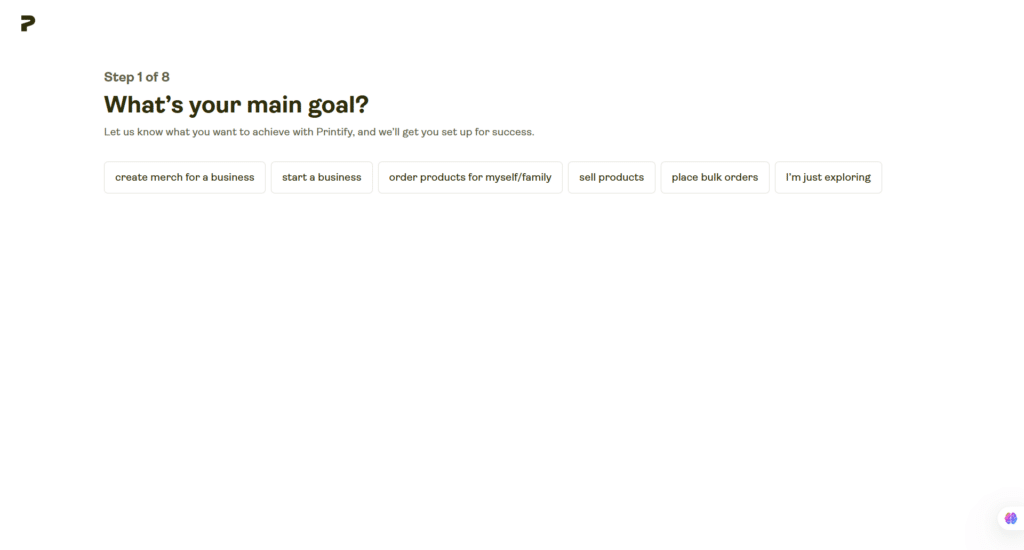
None of it is mandatory, and skipping through it does not lock any features.
For a first-time seller, those steps alone can be reassuring. It signals the tool expects you to not know what you are doing yet, and has already thought about how to guide you.
Choosing your first product
Rather than dropping you straight into a catalog of well over a thousand items, Printify opens with a few bestselling products already picked out for you: a ceramic mug, a Unisex Heavy Blend crewneck sweatshirt, a garment-dyed t-shirt, and a Unisex Heavy Blend hooded sweatshirt, priced from roughly USD 5 to USD 22.
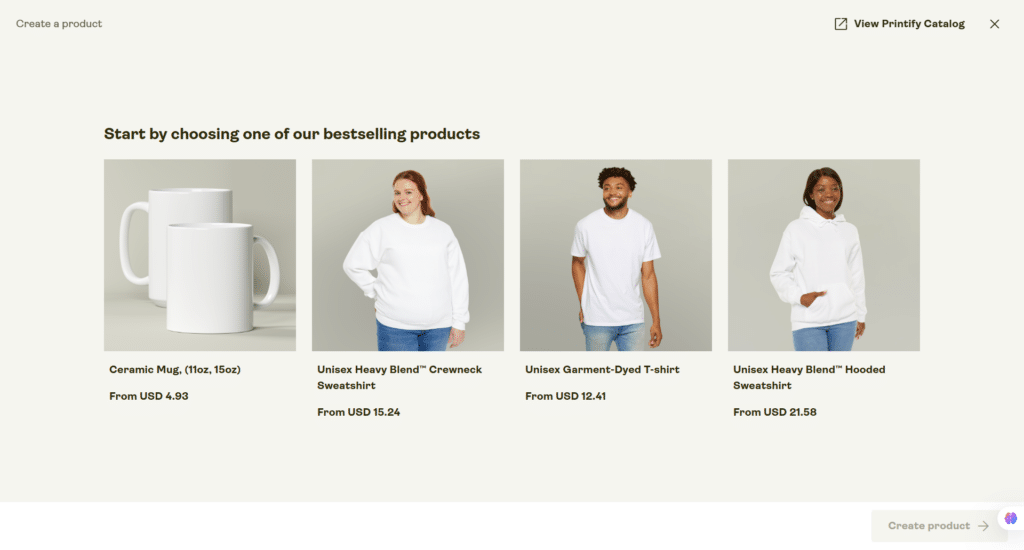
That curation is small, but it saves a genuinely paralyzing first decision. Print-on-demand catalogs are enormous, and knowing that these four are proven sellers takes the guesswork out of picking your very first product to test the platform with.
I went with the crewneck sweatshirt to put the design tool through its paces.
Browsing the wider catalog afterward, under the “For you” tab, showed category shortcuts for Embroidery, T-shirts, Posters, Personalization Picks, and all-over-print clothing, along with a live seasonal promotion nudging sellers toward back-to-school merchandise.
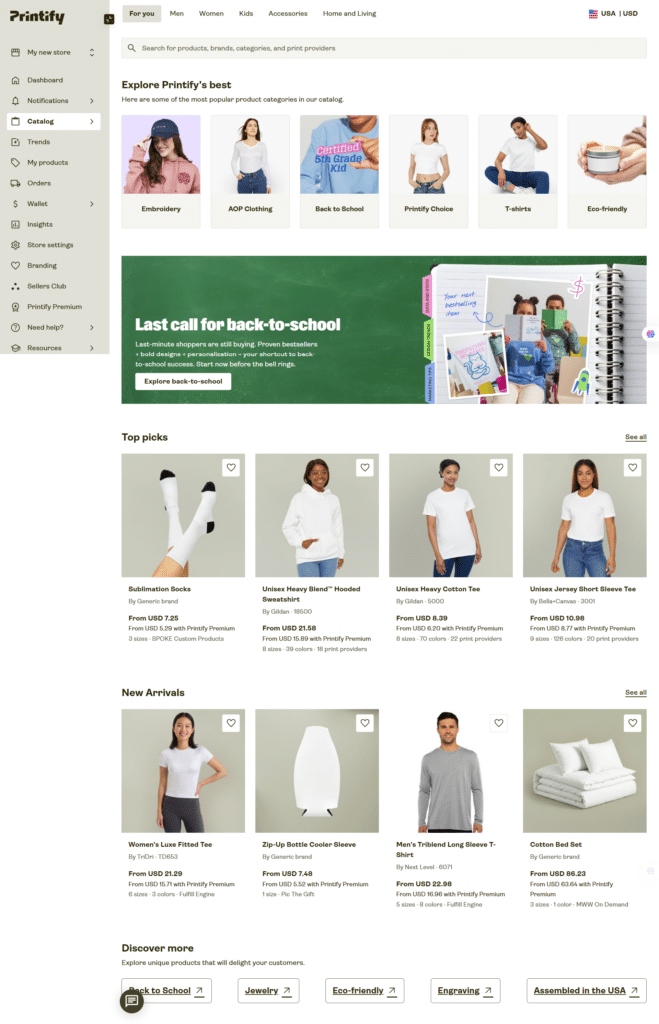
That is a detail worth noting on its own: Printify isn’t just a static catalog; it actively runs seasonal campaigns to point sellers toward what is trending, which is useful if you are not already plugged into ecommerce trend cycles.
The “Top picks” section gave me current, real pricing and provider counts for some of the most popular blanks on the platform:
| Product | Starting price | Premium price | Sizes | Colors | Print providers |
|---|---|---|---|---|---|
| Youth Midweight Tee (Comfort Colors 9018) | USD 15.73 | USD 11.23 | 5 | 28 | 3 |
| Unisex Heavy Cotton Tee (Gildan 5000) | USD 8.39 | USD 6.20 | 8 | 70 | 22 |
| Unisex Jersey Short Sleeve Tee (Bella+Canvas 3001) | USD 10.98 | USD 8.77 | 9 | 126 | 20 |
| Unisex Heavy Blend Crewneck (Gildan 18000) | USD 15.24 | USD 11.22 | 8 | 38 | 18 |
Numbers like these matter more than you might think, because your margin as a seller depends entirely on how close your selling price sits to that base cost. A tee with 22 print provider options gives you room to shop around for a better rate; a product with only 3 gives you far less negotiating power.
Building a product: the design tool
When you pick a product to design, Printify shows you an info panel that tells you exactly what you are working with. This includes production cost range, print area dimensions in pixels, and whether the item is fulfilled through Printify’s own curated “Printify Choice” tier.
You also get a plain-language warning that semi-transparencies and gradients may not print the way they look on screen, because DTF (direct-to-film) printing uses a white underbase that cannot render true transparency.
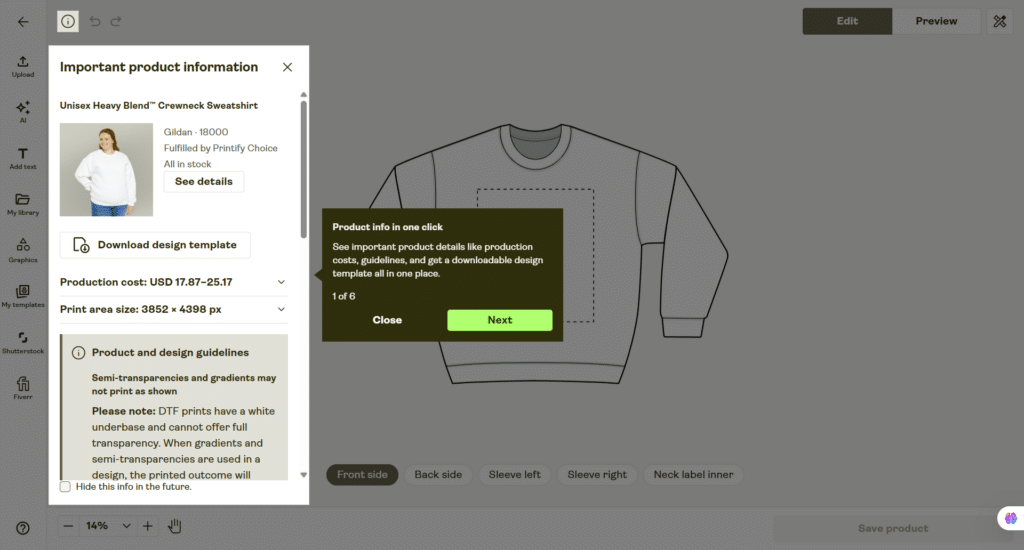
That warning is a genuinely good design feature. Most sellers only discover printing limitations like this after a customer complains about a design that came out looking different from the mockup.
Printify surfaces it before you design anything, which means you can choose your design style with the limitation in mind instead of finding out the hard way.
Text and typography, not just an interface feature
Good apparel design lives or dies on typography, arguably more than on the graphic itself. A clean font choice on a plain background will outsell a busy illustration nine times out of ten, because it is legible from across a room and scales down cleanly onto a small print area.
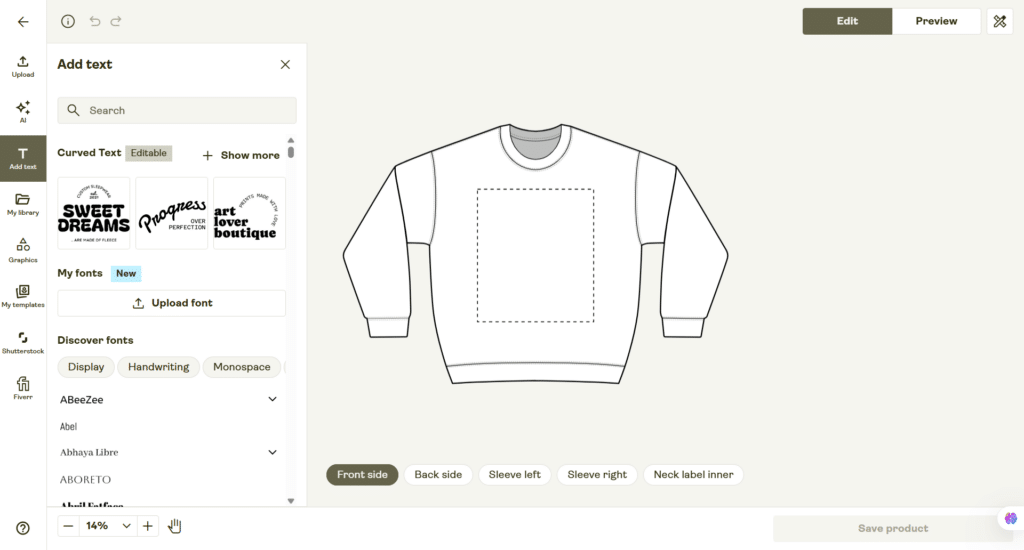
Printify’s text tool leans into this with a curated set of pre-built templates, so if you are not a trained designer, you can start from something that already looks intentional rather than staring at a blank canvas.
Font selection is organized by style category (Display, Handwriting, Monospace, and more), which helps you match a font to your brand’s mood instead of scrolling through an alphabetical list of hundreds of names you don’t recognize.
You can also upload your own font file. That is worth calling out directly, because “you cannot use your own fonts” has been one of the most repeated criticisms of Printify’s design tool.
Based on what I saw in the interface, that limitation appears to have been addressed, which is a meaningful upgrade if you are trying to keep a consistent brand identity across every product you list.
If custom fonts and consistent branding matter to your store, test this directly with your own files before you commit to building an entire product line around it.
The AI image generator: useful, but rationed
Free plan users get 15 AI image generations per day. That is a real, hard limit, not a marketing number. Plan around it if you intend to lean on AI-generated art for a full product catalog rather than a handful of designs.
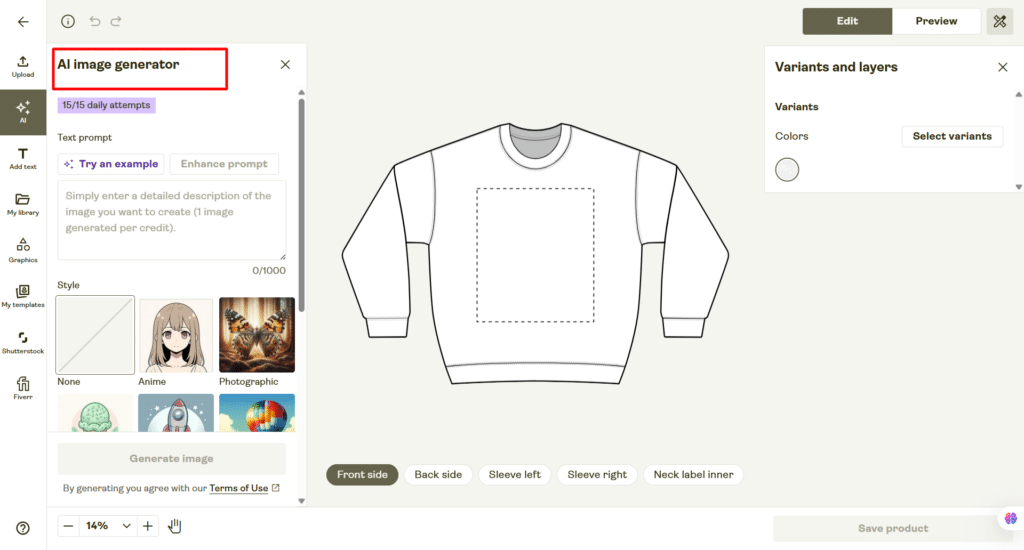
Used well, though, this tool solves a real problem for non-designers.
Coming up with an original, print-ready graphic from scratch is the single biggest bottleneck for most new POD sellers. Hiring an illustrator for every idea is not realistic when you are still testing whether a niche will sell at all.
Being able to type a description, pick a style preset (Anime and Photographic are two of several available), and get a usable starting image significantly lowers that barrier.
It will not replace a skilled illustrator, and 15 generations a day means you need to be deliberate rather than generating dozens of throwaway variations. Instead, it quickly tests whether a design concept works before you invest more time in it; it earns its place in the toolkit.
Layers and editing
Once a design is placed, everything behaves the way you would expect from a modern editor: layers stack in a visible list, each one tagged with its font or asset name, and you can reorder, duplicate, or delete freely.
Printify also walks first-time users through the editor with a short guided tour covering the AI generator, layer editing, background removal, and cropping, which flattens the learning curve for anyone who has never used a design tool before.
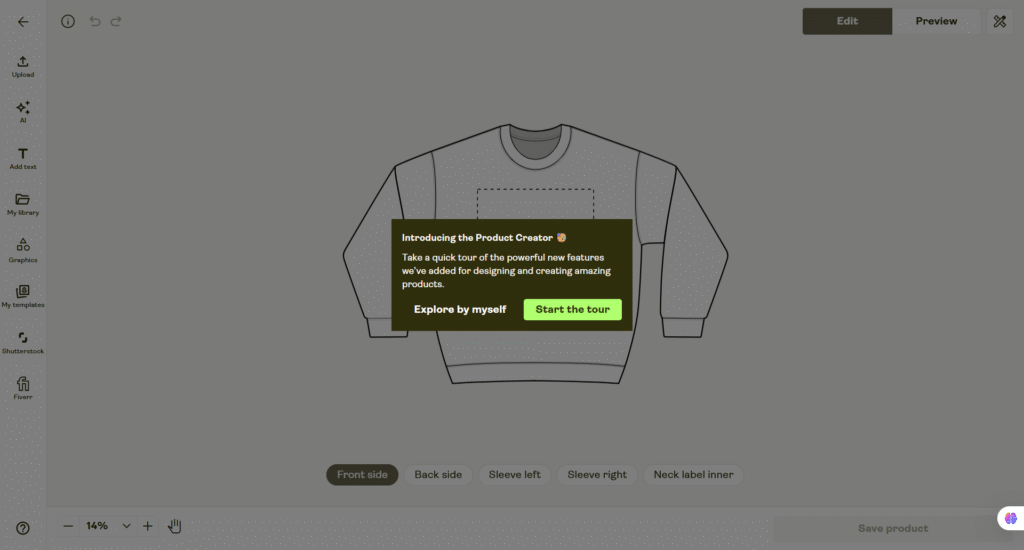
This particular product supports five separate printable placements: front, back, both sleeves, and the inner neck label (for branding).
That range matters if you are trying to build a design that feels complete rather than a single front-of-shirt graphic. A small logo on the sleeve or a branded neck label adds a level of polish customers notice, even if they can’t tell you exactly why the product feels more premium.
Picking a variant and what it actually costs you
Selecting a color and size run for the crewneck (I went with Antique Cherry Red, though several other colors were also available) surfaced a clean price breakdown: USD 17.87 for sizes S through XL, rising to USD 20.57 at 2XL.
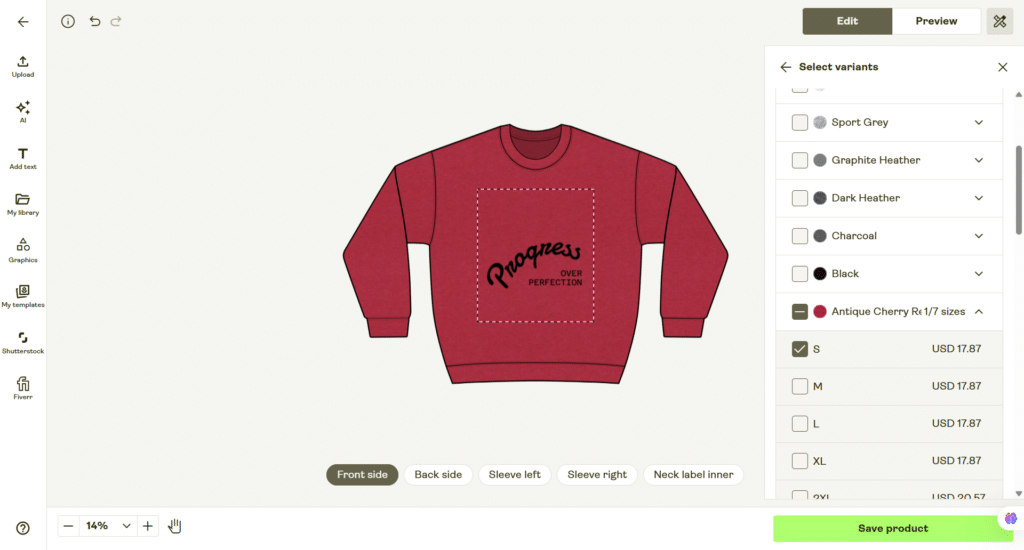
That matched the production cost range shown earlier in the product info panel almost exactly. This is a small but reassuring sign that Printify’s numbers are consistent from screen to screen rather than shifting depending on where you look.
Mockups: seeing the product before a customer does
Once your design is placed, Printify’s preview mode gives you a genuinely solid range of angles to work with, including front, back, folded shots, and both flat lifestyle and on-model photography, with more available if you scroll.
A lifestyle shot I generated for the cherry red crewneck showed a model holding an iced coffee, and that single detail makes a bigger difference than it sounds.
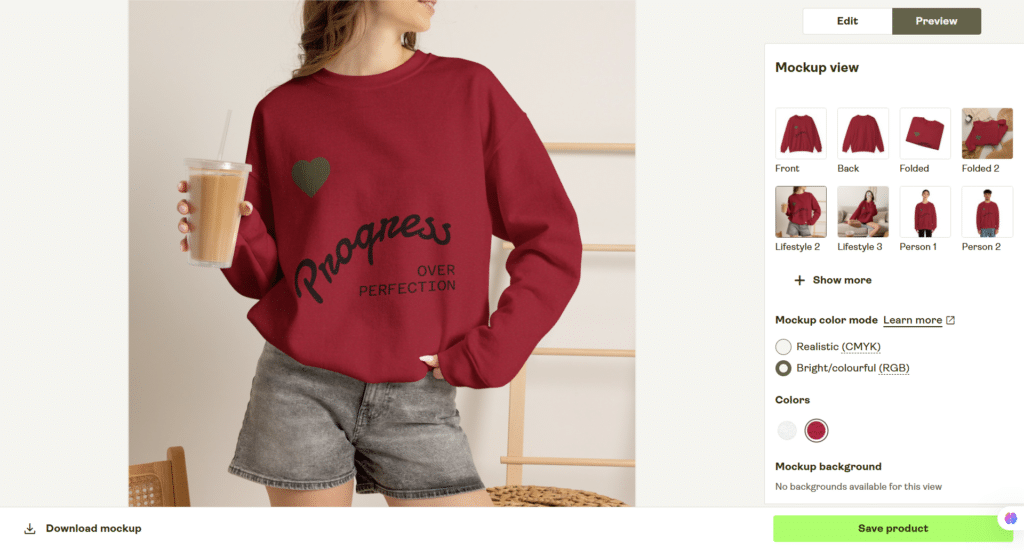
A product photographed in a lived-in, everyday context sells better than a flat mockup on a plain background because it helps a potential buyer picture themselves actually wearing it.
Two smaller features are outstanding because they solve real problems.
First, you can toggle mockup color mode between a realistic CMYK rendering and a brighter RGB version, which matters because CMYK printing genuinely does shift colors compared to what you see on a screen.
Having both options side by side means you can set an accurate expectation for what a customer will actually receive, instead of promising a color that print technology cannot fully deliver.
Second, the preview defaults to a size Large with proportional scaling noted for smaller sizes, so you know exactly what assumption you are looking at before you download anything.
Background customization was not available on every mockup I tried, which is a minor limitation if your brand relies on a very specific, consistent product photography style.
For most sellers just getting started, the built-in variety is more than enough to launch a listing that looks professional without using outside photo-editing software.
Store Settings: more operational depth than expected
This is the part of the Printify review that’s more genuinely useful once you get past the beginner stage.
Let’s walk through each settings option:
Shipping address branding: You can set a custom “ship from” address (for US, UK, or German shipments) instead of defaulting to wherever the item was printed.
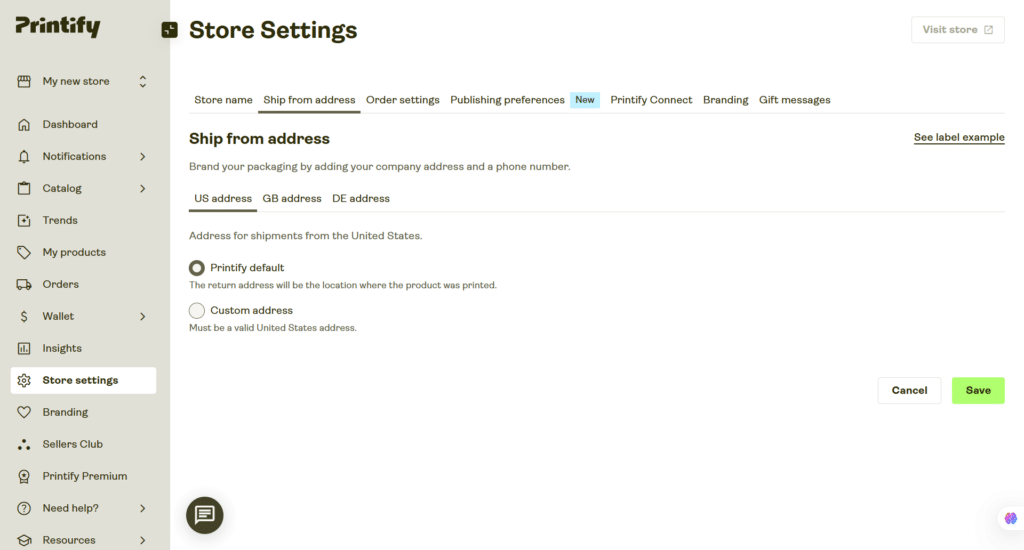
For a seller trying to build a brand rather than an anonymous dropship operation, having your own business name and number appear on the package, rather than a random print facility’s address, is a small but real trust signal for repeat customers.
Order routing: This feature automatically reroutes an order to an alternative print provider if your first choice cannot fulfill it. It aims to protect price, speed, and quality rather than leaving an order stuck.
You control how much extra cost you are willing to tolerate for that flexibility (from USD 2 to USD 100 per item) and whether substitutions have to be an exact product match or can be a similar one.
This is the kind of safety net that matters once you are relying on Printify for real order volume, since a stuck order due to a stockout is a lost sale and an unhappy customer, not just an inconvenience.
Order submission and personalization timing: You choose whether orders submit manually, automatically after a set delay, or at a fixed time each day, with separate rules available for personalized items.
For a solo seller, automating this removes a daily chore. For anyone selling personalized products specifically, keeping manual review in place gives you a last chance to catch a customer’s typo before it becomes a printed and shipped mistake.
Publishing preferences and profit margin: Printify defaults new listings to a 40% profit margin, and advises directly that going lower “can be risky and may leave little buffer for fees or unexpected costs.”
That is a genuinely useful guardrail for a first-time seller who has not yet done the math on how thin margins get once payment processing fees, marketplace fees, and returns are factored in. It will not stop you from underpricing a product if you want to, but it does make sure you cannot do it by accident.
GPSR compliance: If you plan to sell into the EU or UK, Printify has a dedicated toggle for General Product Safety Regulation compliance, letting you either opt in (with Printify handling the regulatory disclosures shown to customers) or restrict sales to those regions entirely.
This is a genuinely recent addition to the platform. If European sales are part of your plan, read this section closely rather than assuming your listings are automatically compliant.
Printify Connect, which lets you hand off customer support to Printify’s own team, is locked behind Premium with no way to preview it on the free plan.
For a solo seller still deciding whether this business is worth pursuing, that is a reasonable feature to hold back, but it is worth knowing upfront rather than discovering it later.
Branding: small details that build repeat customers
Printify groups its branding tools (packing inserts, neck labels, and gift messages) into a single settings hub rather than scattering them across the dashboard. Having them together makes it easy to see the full toolkit for making an order feel less like a generic dropship package.
Packing inserts are 6-by-4-inch cards that ship inside the box, priced at USD 0.25 (USD 0.15 with Premium), available across all stores but limited to a specific list of print providers.
A well-designed insert is one of the cheapest ways to turn a one-time buyer into a repeat customer, whether that is a thank-you note, a discount code for a second purchase, or a nudge to follow your brand on social media.
At a quarter per order, it is hard to argue against including one.
Neck labels let you print your own branding directly into the garment rather than leaving a blank or generic tag, though pricing varies by product and provider rather than being a flat rate.
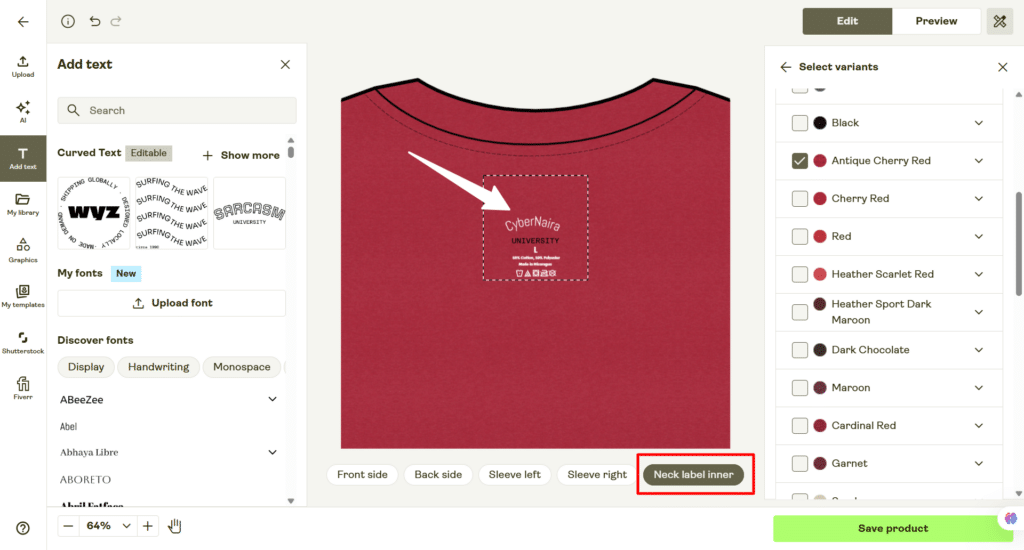
This is the kind of detail that separates a store that feels like a real brand from one that feels like a reseller, since a custom neck label is something a customer notices every time they put the item on.
Gift messages use the same card format and pricing as packing inserts, but carry a buyer-written message instead of a fixed one (up to 200 characters). Currently limited to Etsy orders plus manually created or imported orders on other channels (not available on Express delivery).
This is a smaller feature, but it’s meaningful if a chunk of your sales are gifts, since letting the buyer add their own note without you manually touching the order removes real friction from the gifting experience.
Selling channels: where the product actually goes to sell
Once a product is saved, Printify offers to connect it directly to a sales channel, and the range on offer is genuinely broad: Etsy, Shopify, TikTok US, Amazon, eBay US, Printify’s own Pop-Up store, Big Cartel, Squarespace, Wix, WooCommerce, BigCommerce, PrestaShop, and a general API for custom builds.
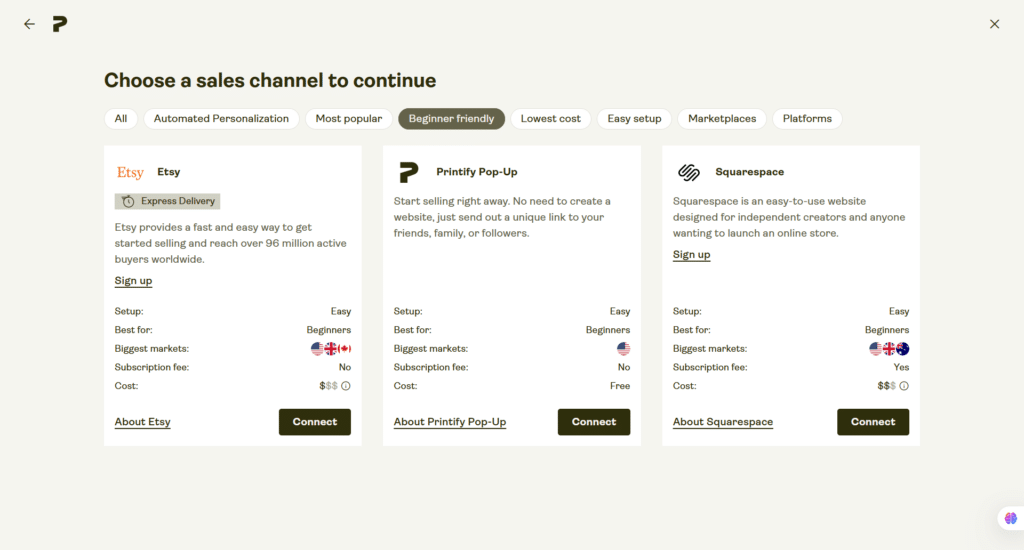
What stood out to me was not just the number of options, but how transparent Printify is about the trade-offs of each one, right there in the picker:
| Channel | Setup | Best for | Subscription fee | Cost |
|---|---|---|---|---|
| Etsy | Easy | Beginners | No | $$ |
| Shopify | Easy | Small businesses | Yes | $$ |
| TikTok US | Requires effort | Small businesses | No | Free |
| Amazon | Requires effort | Small businesses | Yes | $$$ |
| Printify Pop-Up | Easy | Beginners | No | Free |
| eBay US | Requires effort | Small businesses | No | $$$ |
| Big Cartel | Easy | Small businesses | Yes | $$$ |
| Squarespace | Easy | Beginners | Yes | $$$ |
| Wix | Easy | Small businesses | Yes | $$$ |
| WooCommerce | Requires effort | Large retailers | No | $$$ |
| BigCommerce | Requires effort | Small businesses | Yes | $$$ |
| PrestaShop | Requires effort | Large retailers | No | $$$ |
| API | Requires effort | Large retailers | No | $$$ |
If you have no existing storefront, this table effectively makes the decision for you. Etsy and the built-in Pop-Up store are both recommended as easy, beginner-friendly, and free of subscription costs.
This means you can go from a finished design to a live, sellable listing without touching a website builder or committing to a monthly bill.
Etsy in particular is a genuine option, with instant access to over 95 million active shoppers and no monthly fees. It’s the lowest-friction path if your goal is simply to find out whether your designs will sell at all before investing more time or money.
Sellers who already run a Shopify or WooCommerce store, or who plan to build a large, brand-owned storefront rather than sell on a marketplace, will lean toward the “requires effort” channels instead, trading a steeper setup for more control over branding and customer data.
Wallet, payments, and Printify Premium
The Wallet menu covers four distinct areas: Payments, Invoices, Taxes, and a Rewards Center.
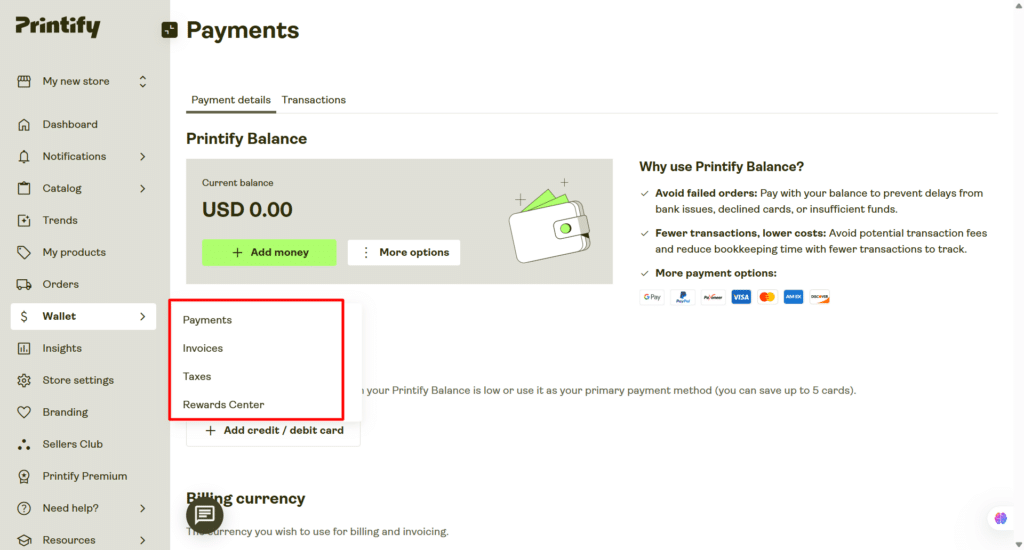
Payments is the hub I described in the design walkthrough. It centers on “Printify Balance,” a prepaid balance you can top up and draw from instead of running every order through a card individually.
The benefits are fewer declined transactions, less bookkeeping overhead, and a wider spread of payment options, including Google Pay, PayPal, Payoneer, and the major card networks.
You can also store up to 5 payment cards here and set your billing currency.
Invoices gives you a searchable log of every invoice generated per order, filterable by type, region, store, and time period, with the option to switch from per-order invoicing to a single monthly invoice
if you would rather reconcile your books once a month instead of after every sale.
Taxes is aimed squarely at anyone selling into the EU, Norway, or the UK, where VAT is applied automatically to orders. This is where you submit your business’s VAT ID so Printify can calculate the correct tax and handle it on your billing, with separate tabs for Canada and the USA as well.
It is also where Printify draws a clear line between VAT ID submission and IOSS numbers, which aren’t the same and are easy to mix up if you are new to selling internationally.
Rewards Center rounds things out with cashback offers, coupons, and a referral program, though my account had no active cashback offers at the time; just a note that Printify would notify me when one becomes available.
None of these four sections demand much time day-to-day once they are set up, but the Taxes tab in particular is worth visiting early if you plan to sell into Europe. Getting your VAT ID submitted before your first international sale is a lot easier than untangling it after the fact.
Insights: you have to earn access
Store analytics are locked until you hit at least 20 orders in a month, because useful statistics simply need a minimum amount of order data to mean anything.
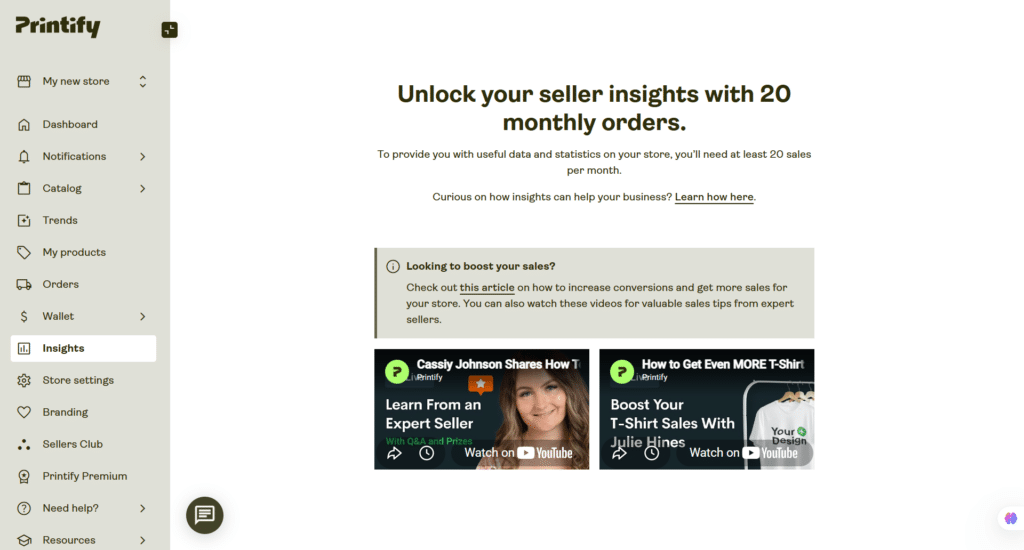
It is a sensible threshold rather than an arbitrary paywall, but it does mean a brand new store is genuinely flying blind on performance data for a while, and you will want to track your own sales manually (a simple spreadsheet works fine) until you cross that line.
Printify Pricing
Printify offers three pricing plans, and the structure is straightforward.
Free ($0/month). Five stores per account, unlimited product designs, the full product creator, integration with Etsy, Shopify, eBay, and the rest of the sales channels, manual order creation, custom order import, and access to Printify’s self-serve help centre and 24/7 merchant support.
Everything I walked through earlier in this review- the design tool, the AI image generator, the mockup builder- was available on this tier with no card on file. For anyone still deciding whether print on demand is worth pursuing, there is genuinely no reason not to start here first.
Premium (from $39/month, or $24.99/month billed annually, a 36% saving). This is where Printify starts actively rewarding volume.
Premium adds a 33% discount on products and custom branding features like neck labels and packing inserts, doubles your store limit to 10, unlocks Printify Connect for outsourced order and customer support, and adds AI-generated mockups plus 1:1 mentorship through Sellers Club PRO.
You also get early access to new features before they roll out to free accounts. If you are placing enough orders that a 33% product discount meaningfully beats the monthly fee, which for most sellers happens well before you are doing huge volume, Premium effectively pays for itself.
Enterprise (custom pricing). Built for merchants with significant daily sales. Unlimited stores, unlimited designs, additional discounts stacked on top of the Premium tier, a dedicated account manager, custom API integration, and branded customer support.
This plan is a direct sales conversation rather than a self-serve signup, and it is clearly aimed at established brands rather than anyone just starting out.
On the free plan specifically, Printify makes its money from the fulfillment cost margin whenever you sell something, not from platform fees, listing fees, or hidden charges. That business model is worth understanding because it means Printify has a direct incentive to help you sell more, rather than lock features behind an unrelated subscription wall.
It also explains why the free plan is genuinely full-featured rather than a stripped-down demo: Printify only earns when you do.
One more thing: you must cancel a paid subscription before your renewal date, since Printify Premium subscriptions are non-refundable once a billing cycle starts.
And if you do decide to downgrade back to Free later, you keep full platform access and every sales channel connection; you just lose the discounted product pricing again.
Reasons I’d use Printify
Reasons I’d think twice
Printify review FAQ
Final thoughts
Going through Printify’s free plan firsthand left a better impression than I expected. It doesn’t hide its complexity. Instead, it surfaces production costs, print area limits, provider options, and pricing tiers right where you need them, when you are making a decision.
That transparency means there is more to learn upfront than with a simpler platform, but it also means fewer unpleasant surprises once you start selling.
If your priority is getting a product live today with zero setup cost, Printify’s free plan, paired with Etsy or the built-in Pop-Up store, is a genuinely low-risk way to start.
If you are already running a store on Shopify or WooCommerce and want deeper analytics or outsourced customer support, budget for Premium once you are past your first handful of sales.