
NitroPack is more expensive than most speed and performance optimization plugins, but not with our discount code, as you’ll discover shortly in this post.
We have the best NitroPack coupon code to save a flat 5% on your next license purchase. It is our branded collaboration effort with NitroPack to offer our website audience a discount using the coupon code “CYBERNAIRA” on any standard license purchase.
Our 5% discount code works on all subscriptions and saves you up to $351.96 on your first 12 months of billing, whether you choose Business, Growth, or Scale NitroPack’s plan.
The good part is that this discount code doesn’t require you to enter it manually on the pricing selection page; it is automatically appended to the link you click on this page.
Don’t worry; I will show you how to activate the discount, discuss NitroPack features and their benefits, and answer any questions you may have.
NitroPack Overview
NitroPack is a cloud-based website performance optimization solution designed to load your website faster. It tackles the technical aspects of website speed and performance, freeing you to focus on creating amazing content and engaging your audience.
Here’s how NitroPack works its magic:
- Caching – NitroPack utilizes advanced caching techniques to store static website elements like images, CSS, and JavaScript. This way, your origin server doesn’t have to download these elements repeatedly for every request, resulting in significantly faster load times.
- Content Delivery Network (CDN) – NitroPack integrates with a global CDN (Cloudflare), ensuring your website content is delivered from geographically distributed servers. This reduces latency and provides visitors worldwide with optimal speed.
- Image Optimization – NitroPack automatically optimizes images on your website, reducing their file size without compromising quality. It automatically lazy-loads and auto-resizes images to fit their container dimensions. This improves loading times and saves bandwidth.
- Minification and Compression – NitroPack minifies and compresses your website’s code (HTML, CSS, JavaScript), removing unnecessary characters and spaces. This reduces overall file size and speeds up page load times.
- Automatic Optimization – NitroPack operates seamlessly in the background, continuously optimizing your website for peak performance. You don’t need extensive technical knowledge to use and reap the benefits.
NitroPack also offers a dedicated connector plugin for WordPress/WooCommerce, Magento, and OpenCart. This plugin allows you to connect NitroPack’s powerful features to your site and start benefiting from its advanced and essential caching and optimization features.
Unlike the dedicated connector/extension caching plugin, NitroPack supports other custom development platforms and developers via its PHP SDK and API access.
In short, NitroPack takes care of all the technical aspects of website speed optimization, allowing you to focus on what matters most – growing your website and running your business. It also works with other content management systems, not just WordPress.
How to Activate NitroPack Coupon
Step 1.
To activate the NitroPack 5% discount offer, follow this link to the branded landing page reserved for the CyberNaira audience.
Look at the image below; you can see that the special 5% coupon code “CYBERNAIRA” has been auto-applied to the price list.
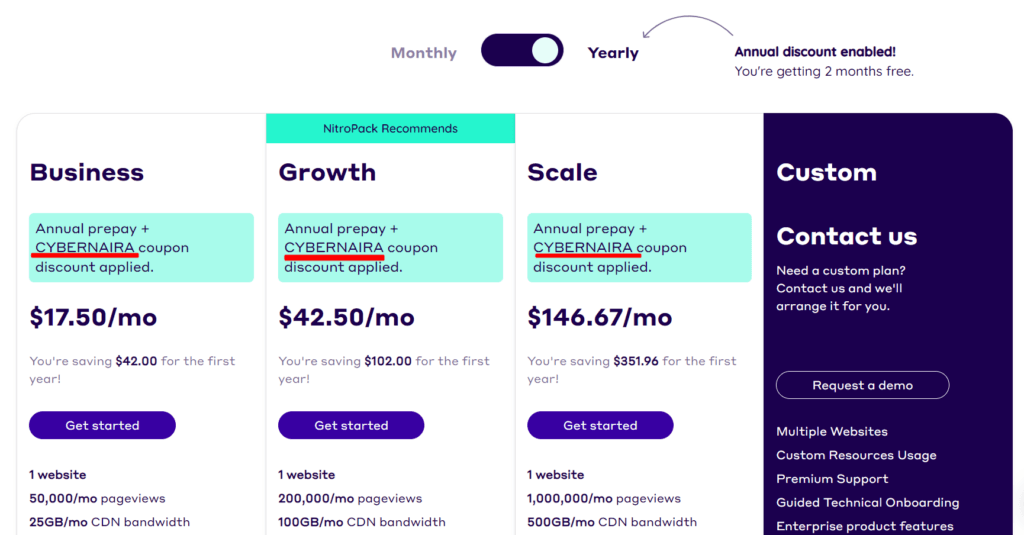
This means you only need to click the link above and complete checkout to save the 5% special offer (equal to two months free with NitroPack).
Step 2.
Review the account limitations for each NitroPack subscription carefully. Consider your website traffic volume and needs when choosing a plan.
If you have small websites with less than 50k monthly pageviews, the NitroPack Business plan is the best option. For sites getting more than that but below 200k pageviews per month, consider the NitroPack Growth plan.
If you’re buying NitroPack for sites that drive massive pageviews, close to a million per month, then the NitroPack Scale plan is the ideal solution for your kind of website.
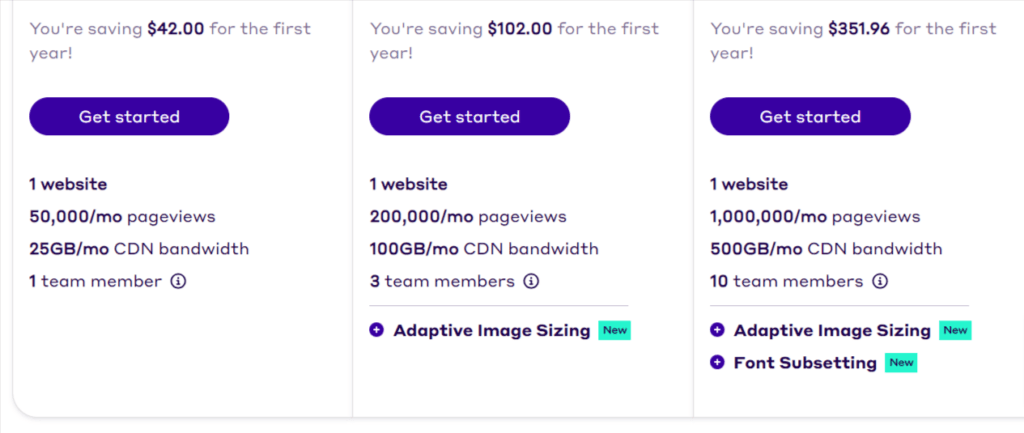
Here is some additional info to consider about each plan.
Each NitroPack account allows for one website only. This means you can only use your license on a single NitroPack-connected site.
However, if you need to install and use NitroPack on multiple sites, you must subscribe to the custom plan and discuss onboarding.
Review your options, then click the “Get Started” button to go to the account signup page.
Step 3.
After completing step 2 above, you’ll be required to create your NitroPack account using your email address and a password.
However, if you’re signing in with your Gmail account, click “Continue With Google” to sign up using your Gmail account. This way, you won’t need to enter a password each time you log into your NitroPack account dashboard.
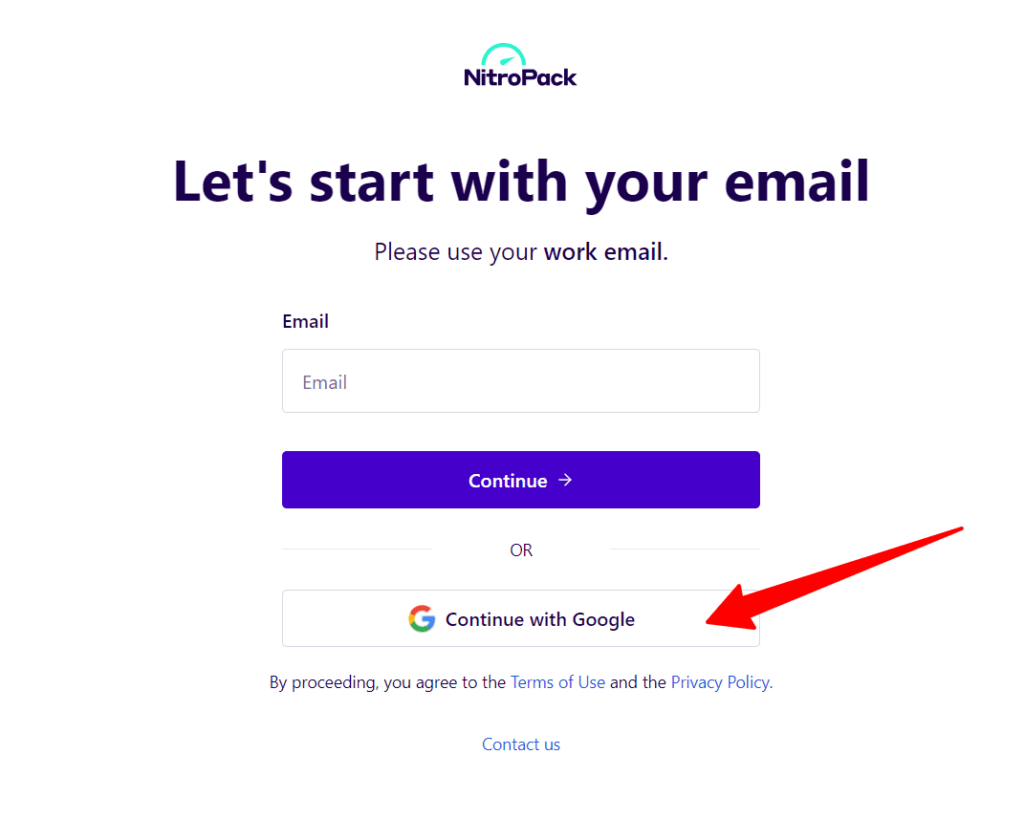
Complete the process and return to the NitroPack pricing page to finalize the payment.
Step 4.
On the checkout page, enter your billing details in each field and review them to ensure they’re correct.
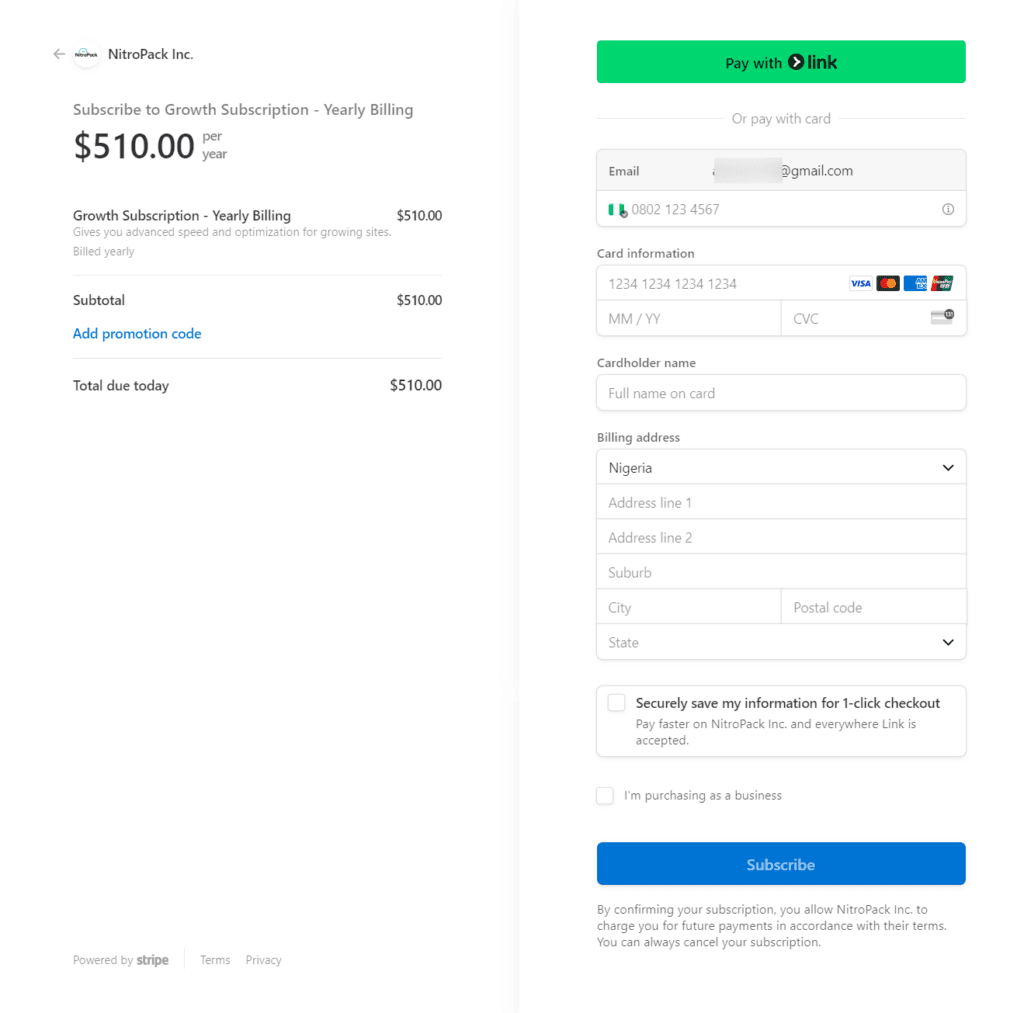
NitroPack uses Stripe secure payment methods, so you’ll need a MasterCard to finalize the transaction.
Note: Make sure you have sufficient funds on your card to cover the cost of the NitroPack plan you’re subscribing to; Otherwise, the transaction will not go through.
Once your payment is processed, your account will be upgraded to unlock NitroPack premium features such as cache warm-up, Google Font optimization, adaptive image resizing, etc.
You can now download the NitroPack WordPress connector plugin and optimize your website for maximum speed and performance.
Log in to your account and configure the NitroPack settings per your website requirements.
Benefits of Using NitroPack
NitroPack isn’t just about improving your website’s page speed; it also unlocks benefits that can significantly improve your online presence. Speed and performance are the direct results of most caching and file-optimization solutions; some benefits come from faster-loading pages.
Here are other benefits of using NitroPack’s most effective features:
- Enhanced User Experience – Visitors encounter a lightning-fast website, leading to a more positive and engaging user experience. Less wait time means happier users who are more likely to explore your content and convert into customers.
- Improved Search Engine Ranking (SEO) – Search engines like Google prioritize websites with fast loading times. NitroPack’s optimization techniques can significantly boost your website’s SEO ranking, making you more visible to potential customers via organic search engine traffic.
- Reduced Bounce Rate – Slow loading times are a major cause of higher bounce rates in most industries. By optimizing speed, NitroPack can drastically reduce bounce rates and keep visitors engaged longer.
- Increased Conversions – Faster loading times mean users can engage more with your content, which can translate into more leads and sales. NitroPack can help you convert website visitors into paying customers by improving their overall site experience.
- Enhanced Mobile Performance – NitroPack ensures your website delivers optimal speed on all devices, including smartphones and tablets. This supports the growing mobile audience and avoids frustrating mobile users with slow load times and low bandwidth.
- Reduced Server Load – NitroPack’s caching and optimization techniques minimize the strain on your server. This reduces bandwidth usage and hosting costs, letting you save on hosting resources or put the savings toward other aspects of the business.
- Improved Website Security – NitroPack integrates with secure CDN services powered by Cloudflare, adding an extra layer of protection against security threats, such as DDoS, brute force, malware, bot traffic, etc. This gives you peace of mind, knowing your website and its visitors are safe.
These are just some of the benefits your website can gain from NitroPack’s powerful caching and performance optimization solution. Your website will load faster, and users will have a better reading experience.
NitroPack Top Features
One of NitroPack’s core strengths is the array of features it offers for cache, image and file optimization. With one click, you can deploy all optimization features to improve your website loading time without much effort.
Depending on your license subscription, NitroPack offers the following optimization features:
- Caching (cart cache for WooCommerce cart optimization and checkout pages)
- Google font optimization to ensure your website minimizes HTTPS requests from third-party domains, leading to a faster server response time and improved Cumulative Layout Shift.
- Implement Lazy loading for images to improve user experience and load time, and help mobile users save bandwidth. With Lazy loading active, the image display will be delayed until the user scrolls into the viewport.
- Automatically size the image preemptively. This feature automatically adds image width and height attributes before the image loads, which helps speed up rendering and reduce layout shifts.
- Automatically lazy load iframe and videos to improve loading time.
- Compress image size by up to 90% or set your custom compression level without affecting image quality.
- Adaptive image sizing automatically resizes images on the fly to fit their container size.
- Activate NitroPack Video Facade features to defer the loading of YouTube, Vista, and Vimeo videos until user interaction.
- Automatically remove render-blocking resources like JavaScript to ensure web browsers can render the page content faster.
- Delay or combine files to improve performance. You can specify which script to delay on the page and combine files to reduce network requests.
- NitroPack automatically generates critical CSS by identifying and inlining high-priority assets on the page for quick rendering before anything else.
- You can remove Unused CSS or combine CSS files to reduce network requests.
- Reduce font size by up to 50% by converting them to WOFF2 format.
- NitroPack can further optimize Google Fonts by hosting them on its global CDN, freeing your server from the workload.
- And more.
Note that available NitroPack features depend on your subscription plan. So, before subscribing, review the feature set and choose the plan that includes the features you want.
Money Back Guarantee
With so much confidence in the product’s performance, NitroPack offers up to 14 days to test the plugin on your website. If you feel that the plugin does not meet your expectations, you can request a full refund of your money within the first 14 days.
That’s how much they trust the product: NitroPack is willing to let you use it risk-free for 14 days (that’s two weeks) and decide whether to keep it or request your money.
There is no question asked. You request. You get your money. But I don’t think you will have any reason to do that.
I have used NitroPack and can vouch for its effectiveness in performance optimization.
The plugin is one of the best WordPress solutions that significantly and instantly optimizes your website for Core Web Vitals. You’ll start seeing NitroPack’s impact on your site performance quickly when you test it with Page Speed Insights.
Once you install the plugin and configure the settings, it starts working on your site and optimizes URLs accordingly.
FAQs
What is NitroPack, and how does it work?
NitroPack is a cloud-based performance and speed optimization platform for CMS like WordPress, Magento, OpenCart and custom-coded websites. It uses caching, CDNs, image optimization, code minification, and other techniques to significantly improve your website’s loading speed and overall performance.
How can I get a NitroPack coupon code?
This article offers an exclusive NitroPack coupon code for 5% off your subscription. You can find the code in the article.
How long is the NitroPack Discount code valid?
Our NitroPack coupon code never expires. However, it is valid for one NitroPack subscription. You can not use it yourself for multiple subscriptions. If you want to apply the coupon multiple times, you must sign up for another NitroPack account using a different account and payment details.
Is there a free trial for NitroPack?
Not really. NitroPack does not explicitly offer a free trial of its premium features. However, it does offer a free subscription plan you can use forever, but with a 5k monthly pageviews limit and access to cache, file, and image optimization features. It will also add NitroPack branding to the website footer.
How do I use the NitroPack coupon code?
Using the links in this article, you don’t need to do anything else to redeem the NitroPack discount offer. The special code is automatically appended to the links you click on this page and applies to your cart on the NitroPack website.
Are there any alternatives to NitroPack?
Yes, several other website performance optimization solutions are available. Some are free, while others offer paid plans with additional features. Researching and comparing different options can help you choose the best solution for your website. Popular alternatives for WordPress cache plugins to NitroPack include WP Rocket, Perfmatters, FlyingPress, and 10Web Page Speed Booster.
Conclusion
NitroPack is one of the most effective WordPress speed and performance optimization plugins available today. Although it costs more than plugins like WP Rocket, it is worth the investment if you can afford it.
With our exclusive 5% NitroPack coupon code, you can save using the link in this article.
Subscribe to the annual plan to make the best of this exclusive offer. This way, you’ll save huge money while getting the best value.