

Finding a genuinely good expired or auction domain has always meant bouncing between too many tabs. You pull a list from an auction site, run it through Ahrefs or Moz for authority, cross-check backlinks somewhere else, then manually scroll the Wayback Machine to see whether the domain has a clean history or a past life as a casino or pharma spam site.
By the time you have vetted ten candidates, an hour is gone, and half of them are already sold.
Karma.Domains was built to collapse that whole workflow into one platform. More recently, it added something that simplifies the process even further: an MCP connector that lets you run that same research inside Claude or ChatGPT, in plain English, in seconds.
I tested both the platform and the AI connector directly to see whether the pitch holds up. But first, let’s start with what Karma.Domains is actually.
Karma.Domains
Read our detailed Karma.Domains review to see how this domain research platform, & its Claude MCP connector, simplifies finding expired & auction domains.
Price: 23.32
Price Currency: USD
Operating System: Web-Based
Application Category: BusinessApplication
4.1
Pros
- Massive Database
- Wayback Machine analysis
- All-in-one platform
- MCP connector
- Free Tools available
Cons
- No free plan
- Not a domain registrar
What Is Karma.Domains?
Karma.Domains is a domain discovery and analytics platform that specializes in expired, backorder, auction, and buy now domains.
Instead of using multiple tools to research your ideal domain (one for initial research, another for SEO vetting, another for traffic history, another for content history), Karma.Domains brings all of that in-house, so you can start and finish your domain-hunting process on one platform.
You don’t need to juggle multiple tools or tabs to find your ideal domain name.
One standout feature of Karma.Domains is its use of Wayback Machine historical data. The tool does not just analyze a domain’s current status; it checks how the domain has evolved over time.
You get to see how the domain’s content and topic changed across the years, whether it picked up spam records at any point, how its backlink profile grew or shrank, what languages it published in, and more, all bundled into a single report with an AI-written summary at the top.
Domain Database and Filters
The scale here is the first thing that stands out. As of this writing, Karma.Domains tracks over 8.7 million domains across its combined databases, with more than 400,000 new domains processed every single day.
That includes roughly 1.16 million expired domains and 7.5 million domains currently sitting in auctions, pulled from more than 40 sources: GoDaddy Auctions, Dynadot, NameJet, Sedo, Namecheap, NameSilo, NicSell, DropCatch, GNAME, and a growing list of regional marketplaces like Aftermarket.pl and WebExpire.
What makes that database usable rather than overwhelming is the filter system: over 90 filters spread across a few logical groups.
For a marketer, this matters for one simple reason: it lets you narrow eight million domains down to the twenty or so worth a second look, without leaving the platform to confirm a single data point.
A domain with a decent DA but a history of casino redirects gets filtered out before you waste time on it. A domain in your exact niche with clean, consistent English content over a decade gets surfaced automatically.
That is the entire value proposition of the platform in one sentence: less manual cross-referencing, more decisions based on complete information.
Using the Karma.Domains Platform
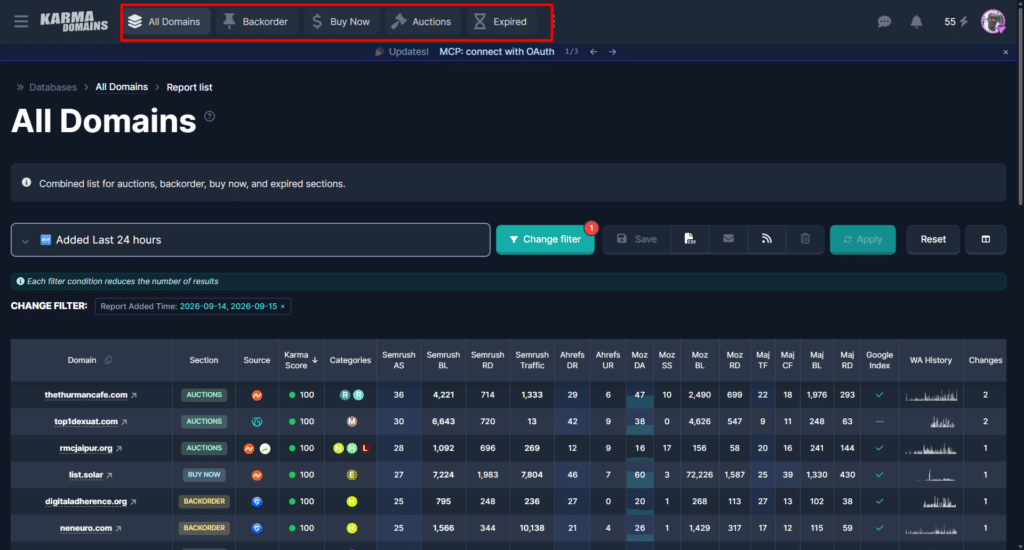
Karma.Domains organizes its inventory into five sections along the top navigation: All Domains, Backorder, Buy Now, Auctions, and Expired. Each pulls from the same underlying database and filter set, just scoped to a different purchase path.
Here is the general workflow, whichever section you start from:
Pick your domain type
If you want a name that has already dropped and is open for direct registration, use Expired. If you want to bid, use Auctions. If you want a fixed price with no bidding, use Buy Now.
If you want to reserve a domain before it becomes publicly available, use Backorder. If you are not sure yet and just want to see everything that matches your criteria, All Domains covers every type in one query.
Build your filter, or start from a preset
You can either open the filter panel and set your own combination (niche category, DA range, domain length, no digits, English content, and so on), or pick one of the preset filters and adjust the values from there.
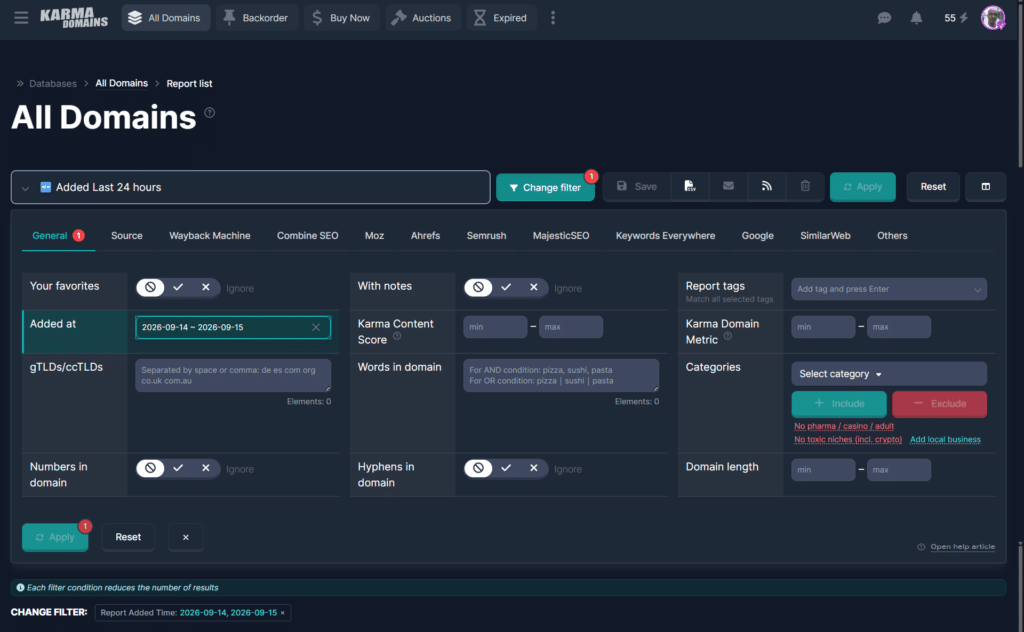
Presets exist for common goals like short brandable names, high-authority picks, or niche-specific auction hunting.
Read the result table before opening anything.
Each row already shows the Karma Score, category tags, Ahrefs DR, Moz DA and Spam Score, Majestic TF and CF, SimilarWeb traffic, Wayback language and age, plus current bid count and price for auction listings.
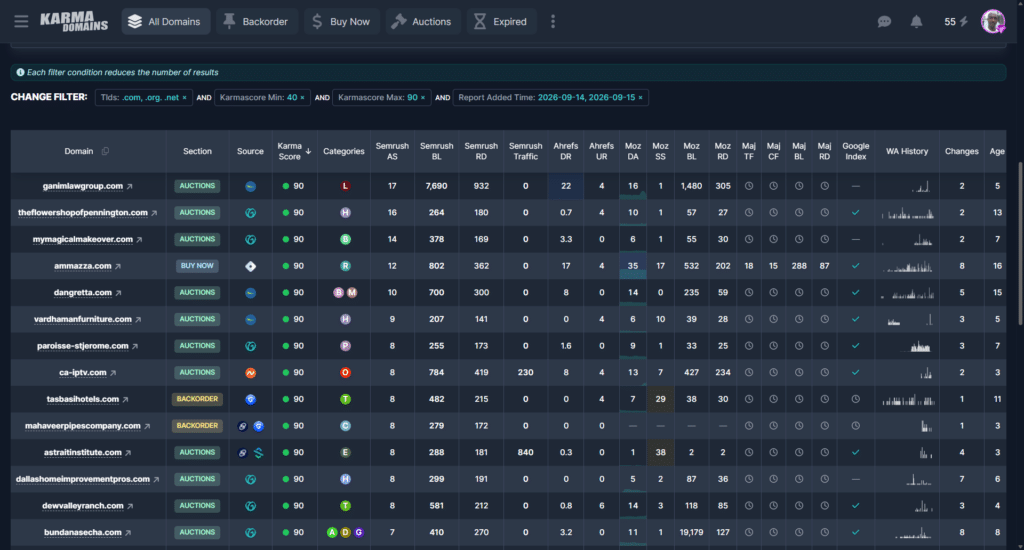
You can sort by any column, so if authority is your priority, sort by DA and scan from the top.
Open the full report on anything promising.
This is where the Wayback Machine research happens. You get an AI-generated summary of the domain’s history, a categorization, a toxic content check (doorway pages, casino, pharma, adult content), a record of 3xx redirects and 4xx or 5xx errors, and a breakdown of backlink sources so you can see if any of them are pointing from something like Wikipedia or a major news outlet.
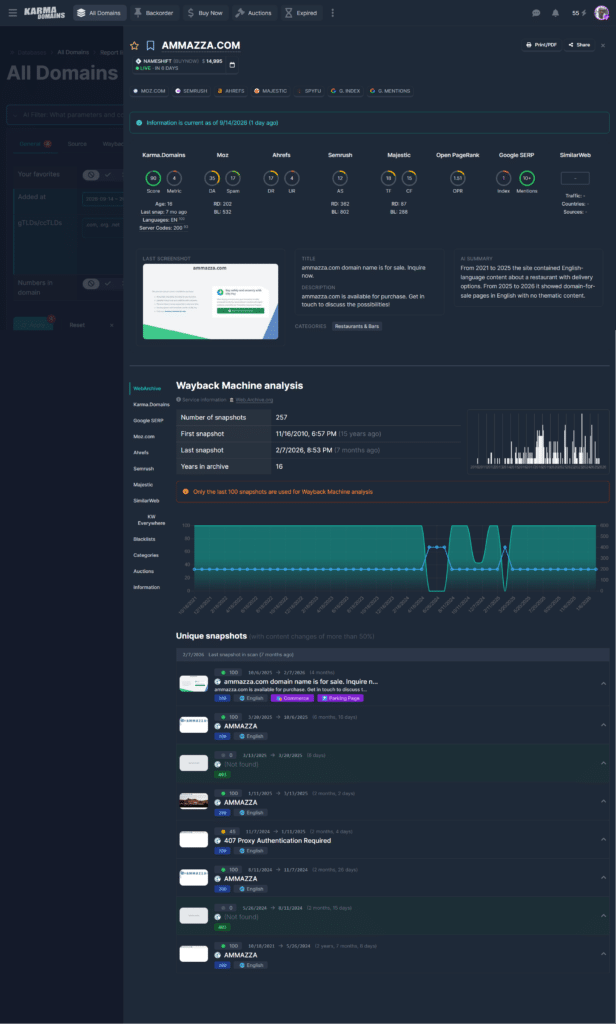
On this page are more useful tools, such as the Google index and Mention link. You can look up what Google currenly indexed about the site and domain mentions across the web.
Save, tag, or share before you decide
Pro users can add a note and tags to a report, print it as a PDF, generate a guest share link for a client who does not have a Karma.Domains account, or set a reminder that fires one hour before an auction closes.
Buy where the domain actually lives.
Karma.Domains does not sell domains itself. It is an aggregator and analytics layer on top of the real marketplaces. Once you have found a domain you want, the report links straight to the domain registrar or vendor: the specific auction page if it is up for bid, or a direct registration link if it is expired and open.
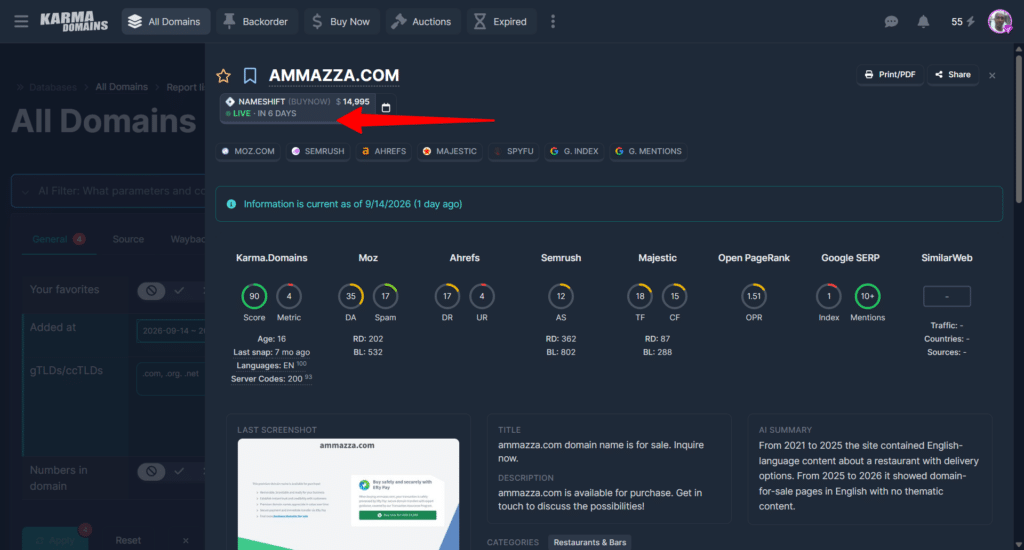
That last point is one of the things I appreciate most about the platform. From the moment you type in your first filter to the moment you click through to buy, you never need to open a second tool.
Using the Karma.Domains MCP Connector
All of the above is already a big improvement over juggling five tools. But if the multi-step filtering process above still sounds like more clicking than you want to do, especially for a quick niche check, there is a faster way: connect Karma.Domains to an AI assistant through its MCP server and just ask for what you want in a sentence.
MCP, or Model Context Protocol, lets an AI assistant like Claude or ChatGPT access an external tool’s live data instead of guessing from training knowledge. Once connected, Claude can call Karma.Domains’ actual search functions in real time, with your account’s access.
Karma.Domains recently added OAuth sign-in, so you no longer have to copy and paste an API key by hand for Claude.ai or ChatGPT. You click Connect and sign in to your Karma.Domains account in a browser tab, approve access, and you are done.
The MCP connector still requires a Karma.Domains Pro plan, since that is what issues the underlying key, but the good news for beginners is that you do not need a paid Claude plan to use it. Claude’s free plan allows one custom connector active at a time, and Karma.Domains fits inside that limit just fine.
Step-by-step: connecting Karma.Domains to Claude
If this is your first time adding a custom connector to Claude, here is the full process.
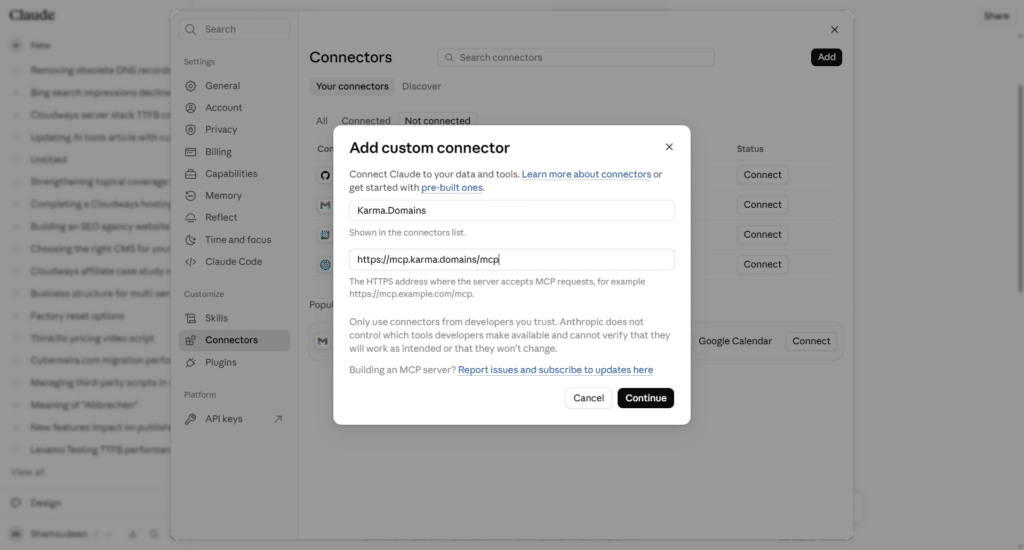
1. Add Karma.Domains as a custom connector: In Claude, go to your profile in the bottom left, then Settings, then Connectors. Click Add, choose Add custom connector, name it Karma.Domains, and paste in the MCP URL: https://mcp.karma.domains/mcp. Click Continue.
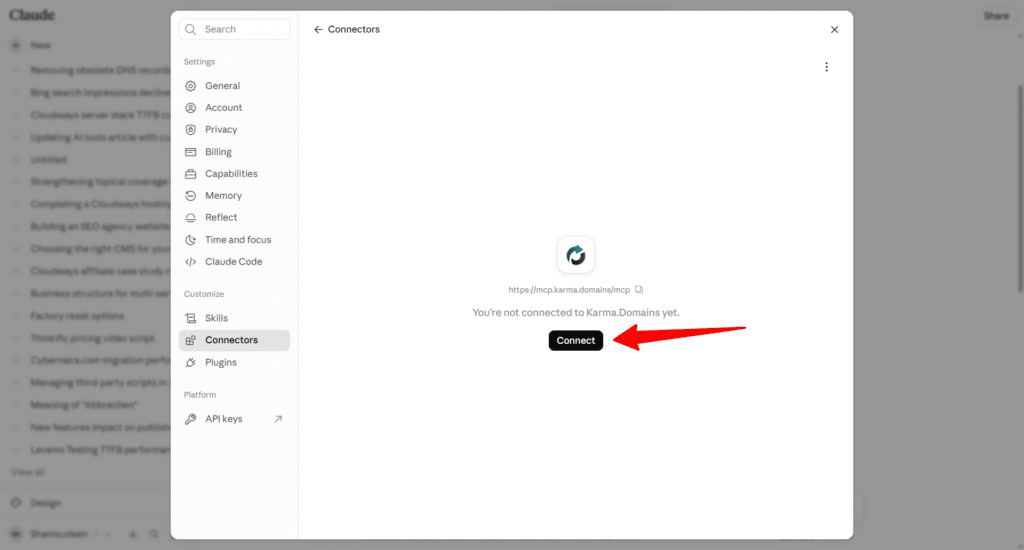
2. Click Connect on the new entry: Karma.Domains will now show up in your connectors list as not yet connected.
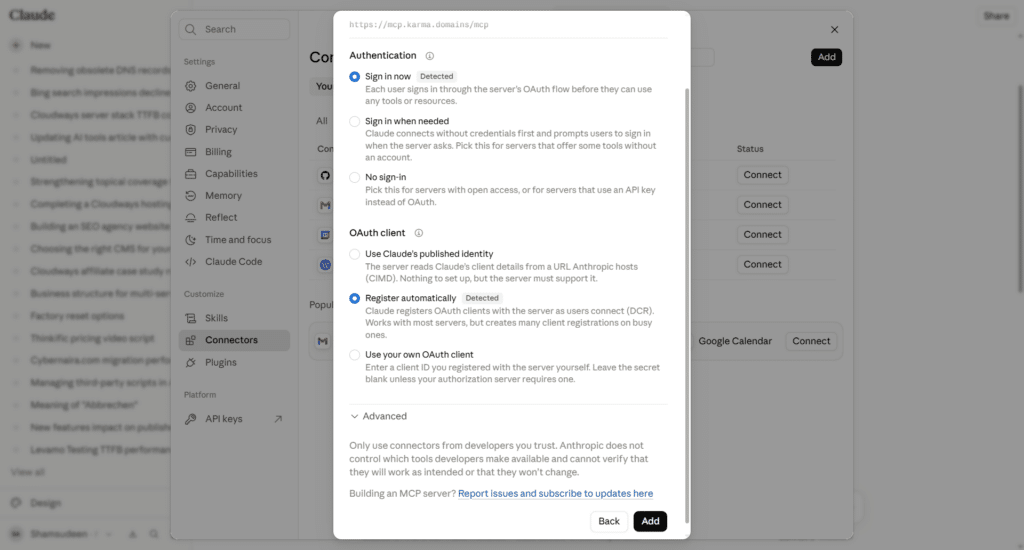
3. Choose Sign in now and leave OAuth client on the default option: Claude will detect that Karma.Domains supports OAuth and automatic registration. You do not need to touch these settings unless you know what you are doing. Click Add.
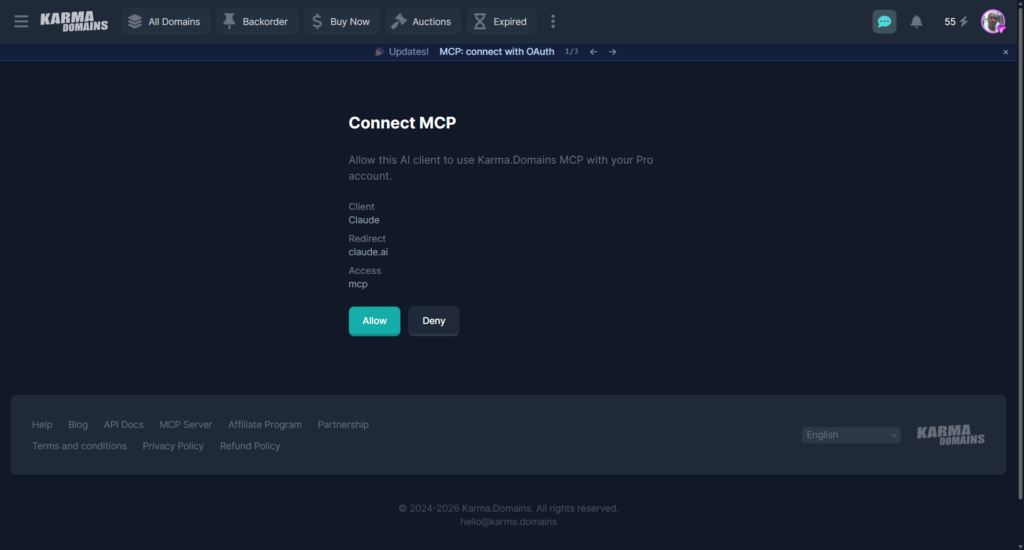
4. Approve access on the Karma.Domains consent screen: A browser tab opens showing Karma.Domains’ own “Connect MCP” page. It confirms the client (Claude), the redirect (claude.ai), and the access level (mcp). Click Allow.
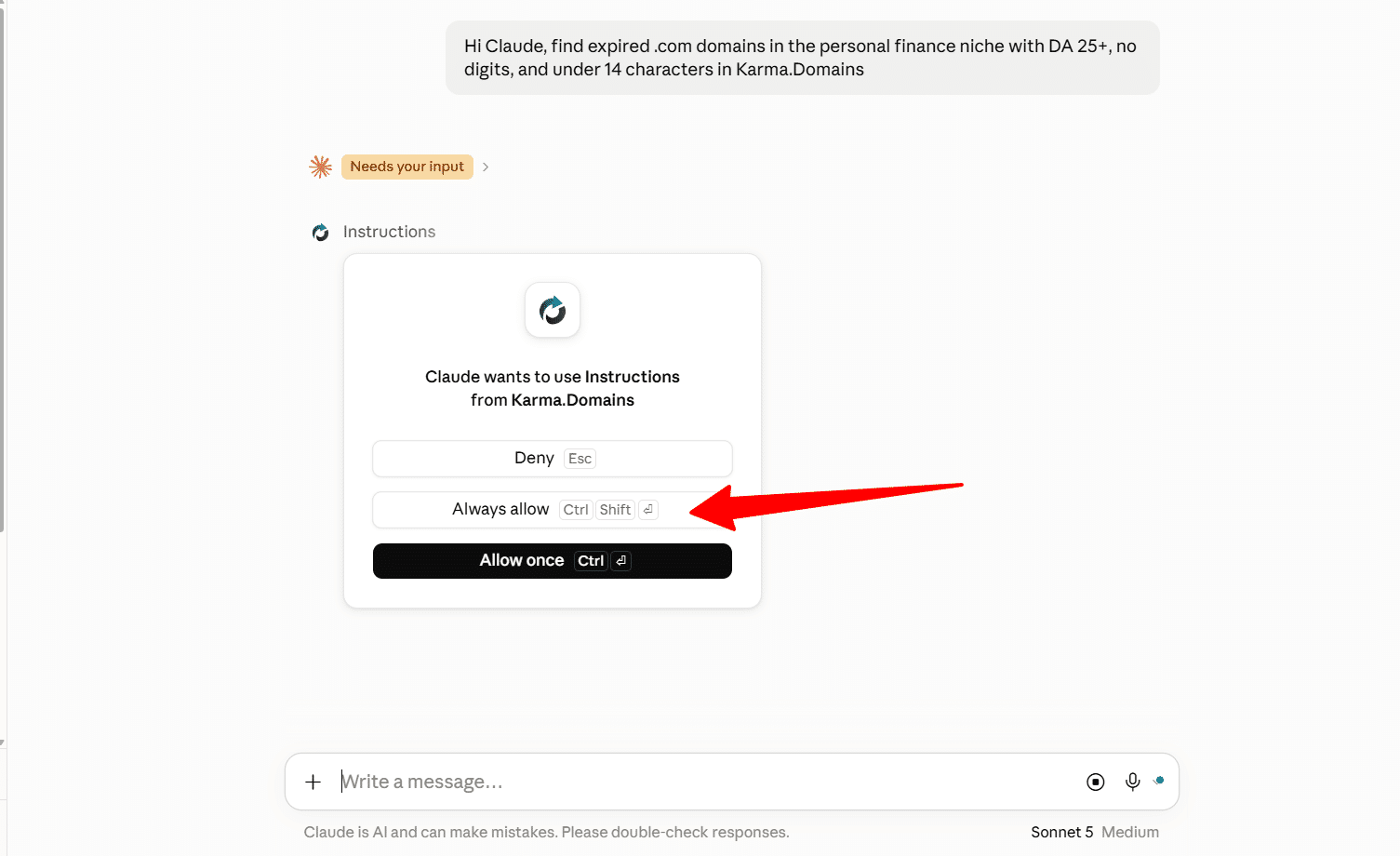
5. Approve the tool the first time Claude uses it in chat: The first time you ask Claude something that requires Karma.Domains, it will ask for permission to use that specific tool. You can allow it once or always allow it for future chats.
That is the whole setup. From here, Claude can search Karma.Domains’ live database, pull full reports, check favorites, and even manage your saved filters, all from a normal conversation.
What it actually looks like in practice
I put this to the test with a direct request: find expired .com domains in the personal finance niche, Moz DA 25 or higher, no digits in the name, under 14 characters.
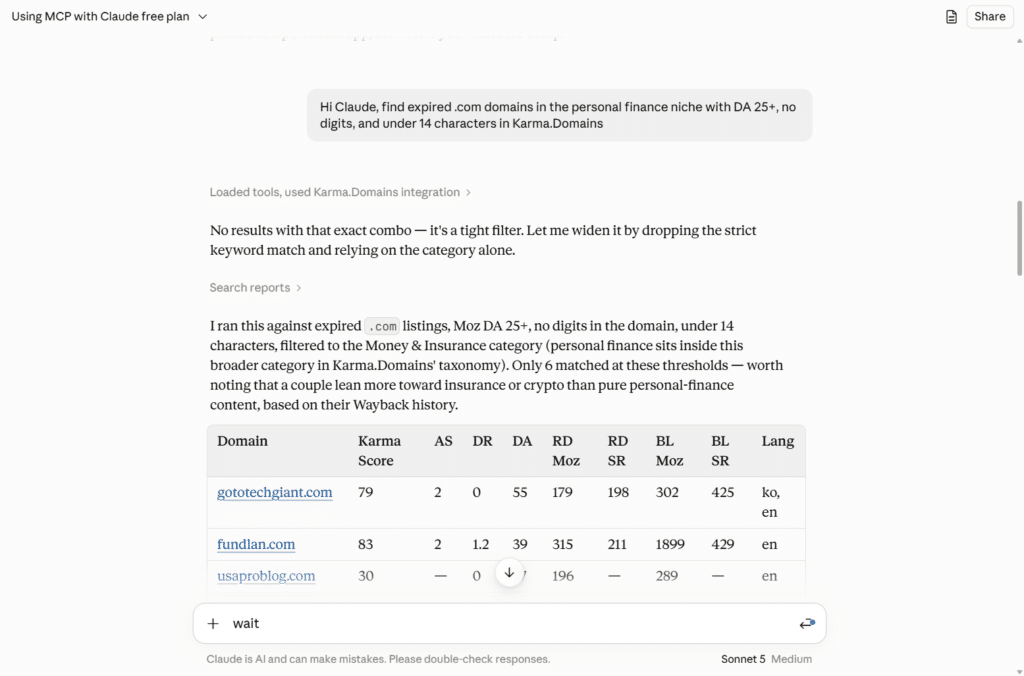
No exact match matched that specific combination. Instead of just returning nothing, Claude widened the search on its own, first by dropping the strict keyword match and relying on the closest matching category instead, then by walking through the tradeoffs of each remaining option so I could see which ones were genuinely relevant and which ones only matched on a technicality (a couple of the results leaned more toward insurance or crypto content than pure personal finance, and Claude flagged that distinction instead of just dumping the list).
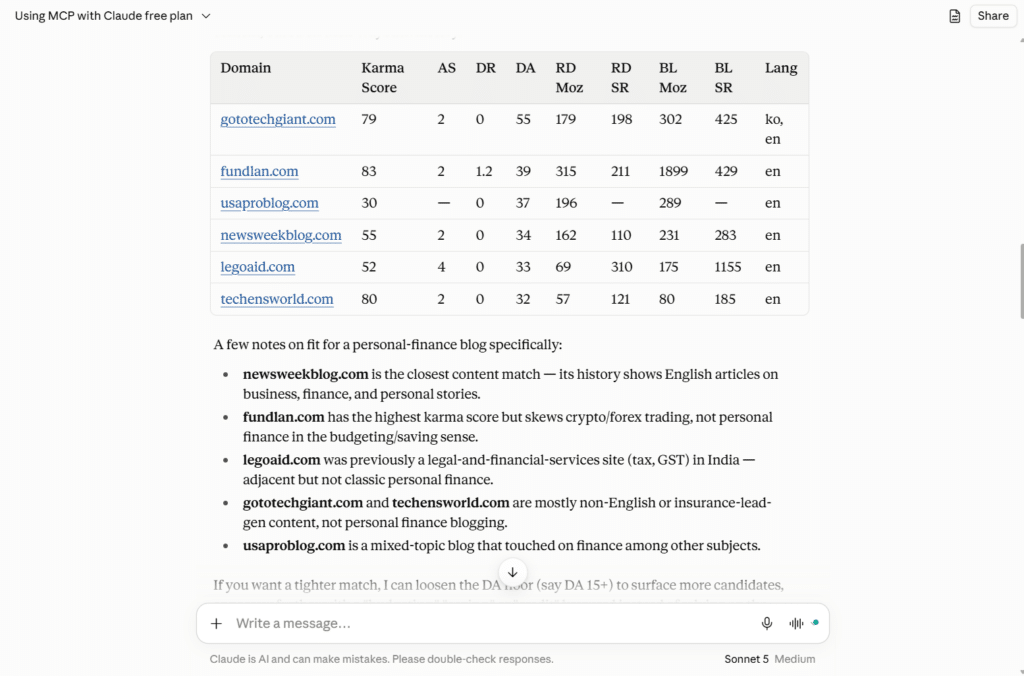
The entire exchange, from typing the request to getting a labeled, sortable table with Karma Score, backlink counts, and content language, took about 20 seconds.
Running the same query manually inside the platform, building the filter and reading through six or seven full reports to check which ones actually fit the niche would have taken me ten minutes at minimum, probably more if I wanted to double-check the Wayback history on each candidate myself.
That is the real value of the MCP connector. It is not that it finds domains the platform could not already find. It removes the manual filter-building and cross-referencing step entirely, and it is honest when a filter is too strict rather than silently showing you a handful of poor matches.
For a working marketer juggling multiple sites, that time saved on research adds up fast across a week of domain hunting. The insights and cross-refrence analysis is another reason to consider the using the MCP connetor.
A few practical notes from testing it directly: the MCP connection shares Karma.Domains’ rate limit is 60 requests per minute with the regular API, and there is a daily quota of 50,000 rows returned and 200 non-cached live checks.
You will not hit either of those in normal use, but it is worth knowing if you are running large batch research sessions in one sitting. The server currently exposes 31 tools, covering not just search but favorites, saved filters, tags and notes, guest share links, and paid SEO metric refreshes, all callable from chat.
Pricing
Karma.Domains runs on three pricing models, and the right one depends entirely on how often you search.
| Plan | Price | What you get |
|---|---|---|
| Credits | $14.99 for 99, $19.99 for 200, or $27.99 for 400 credits | Pay per report you unlock. Credits never expire. No API or MCP access. |
| Unlimited | $27.99 per month | Full access to every report in the database for 30 days, plus 4,800 credits for live checks. No API or MCP access. |
| Pro | $57.99 per month | Everything in Unlimited, plus 9,600 credits, Public API access, MCP server access, and report extras like print/PDF, share links, notes, and tags. |
New accounts get 5 free credits to test the platform before committing to anything, no card required. Credits from the credit packs never expire, which makes them a reasonable low-commitment option if you only research domains occasionally.
If you are checking auctions weekly, Unlimited is the better value. If you want the AI chat workflow described above, or you are running scripts against the Public API, Pro is the only tier that unlocks it.
Karma.Domains Pros and Cons
Pros
Cons
Final Verdict
Karma.Domains earns its “aggregator done right” reputation. The combination of a genuinely large, constantly updated database, deep filtering across every major SEO metrics provider, and Wayback Machine history analysis that actually flags spam and content drift is hard to find bundled this cleanly anywhere else.
For anyone building PBNs, hunting brandable domains, or vetting a domain before a niche site launch, it removes most of the manual cross-referencing that used to eat up an afternoon.
The MCP connector is where it gets genuinely exciting for a working content marketer. Being able to describe a niche and a handful of metrics in plain English and get a vetted, labeled shortlist back in seconds, without opening the platform at all, is a real productivity unlock, not just a gimmick.
It is not flawless (thin inventory in a tight niche is still thin inventory, AI or not), but the honesty in how it handles a no-match query, widening the search and explaining why, makes it trustworthy rather than just fast.
If you are researching domains occasionally, start with a Credits pack or Unlimited and see how the platform itself feels. If you are doing this regularly enough that ten minutes per search adds up across a week, the jump to Pro for MCP access is worth it.
It turned domain research into something closer to a conversation than a chore, and that is not a small thing when you are doing it every day.