

A particular kind of dread comes with watching your blog slowly disappear from Google.
Not a sudden, catastrophic drop. Not a manual penalty with a clear explanation in Search Console. Just a quiet, persistent erosion.
Pages you worked hard on, pages that were bringing in whatever traffic you had left, one by one vanishing from the index with no obvious explanation.
That is what happened to CyberNaira between February and May 2026.
By the time I sat down to properly diagnose the problem, over 25 pages had been deindexed. Then 14 more dropped between April 29 and May 16 alone.
My About page was gone from the index. Pages I had recently rewritten and re-submitted for indexing were still disappearing.
This is the full story of what caused it, everything I tried that did not work, what finally fixed it, and the data that proves the recovery.
Background: Decline in Traffic Before Google Deindexing Pages
To understand the full picture, I need to be clear about something: CyberNaira’s traffic had already been declining before this crisis began. Starting around October 2024, organic traffic was gradually falling.
This is a pattern many affiliate and blogging sites have experienced, likely connected to Google’s ongoing helpful content updates, the impact of AI Overviews on the SERP, and the broader shift in how Google now evaluates content quality.
It was a manageable traffic decline. The kind of situation where you update content, consolidate posts, improve internal linking, and gradually work your way back.
Then I migrated to Verpex hosting in February 2026. What was a manageable situation became a serious crisis almost overnight.
The Migration That Started Everything
On February 23, 2026, I migrated CyberNaira from Pressable (a fully managed WordPress hosting) to Verpex shared hosting.
The migration itself was completed successfully. But the subsequent DNS change caused an outage lasting approximately 8 hours.
DNS propagation took far longer than expected, and during that window, Google was attempting to crawl CyberNaira and getting nowhere.
The GSC crawl stats told the story clearly once I knew where to look. On February 23 and 24, average response time spiked to 5,280ms. Failed crawl requests hit 19.4% in a single day.
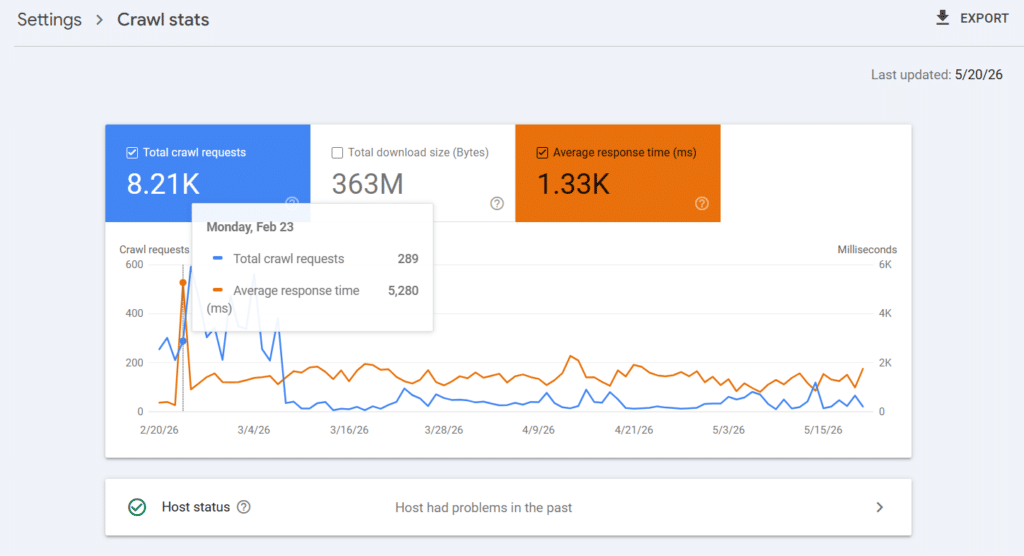
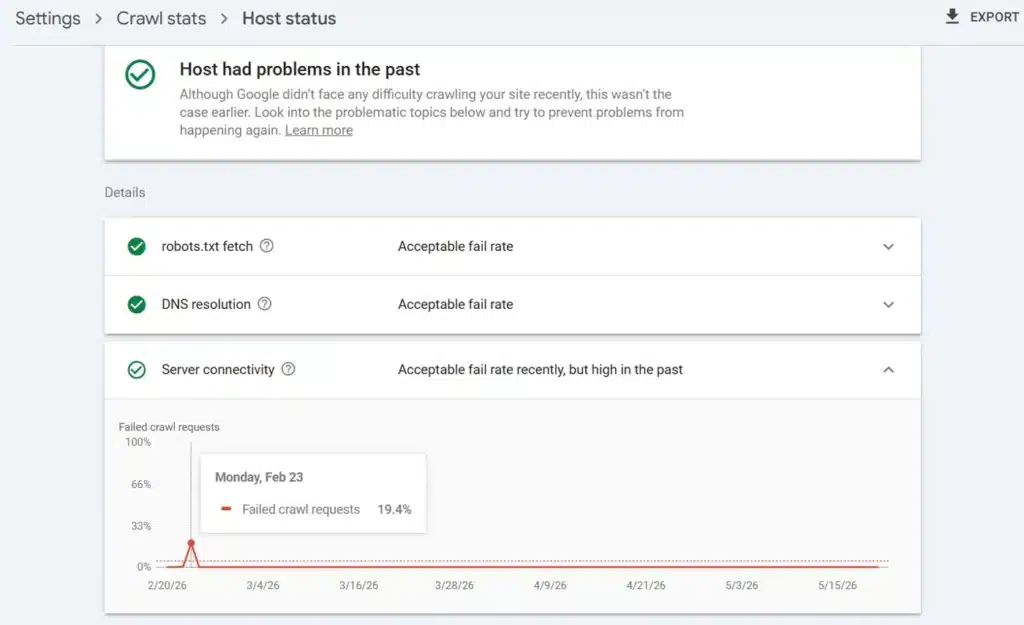
For context: before the migration from Pressable, CyberNaira averaged 255-289 crawl requests per day, with response times between 266ms and 368ms. Googlebot visited regularly and got fast, reliable responses.
After the migration, that changed completely.
By March 7, two weeks after the migration, crawl requests had collapsed from 400-600 per day to under 100 per day. Google had throttled its crawling of CyberNaira in direct response to the unreliable server behavior it encountered during and after the migration. (image below)
And when pages aren’t crawled, they don’t stay indexed.
What “Crawled, Currently Not Indexed” Actually Means
When I pulled up the GSC Pages report and filtered for non-indexed pages, the status was consistent across all the dropped pages: “Crawled, currently not indexed.”
This is a critical distinction that many site owners miss.
“Crawled, currently not indexed” does not mean Google could not reach the page. It means Google visited the page, understood it, and deliberately decided not to include it in the index.
That is a quality judgment. And quality judgments happen at two levels: content quality and technical/server quality. In my case, both were contributing.
The content quality issue was pre-existing (the October 2024 decline). But the server quality issue was new, severe, and something I could actually fix.
Everything I Tried That Did Not Fix the Indexing Problem
Before I get to the solution, I want to be transparent about what didn’t work. Because if you are in the same situation, you have probably tried some of these too.
Content updates and rewrites.
I updated many of the deindexed pages. Some were complete rewrites with new information, updated data, and improved structure.
In some cases, they briefly returned to the index, then disappeared again.
Requesting reindexing via GSC.
I repeatedly submitted URL inspection requests for the dropped pages. Google would acknowledge them, sometimes recrawl, and still not reindex.
When the underlying problem is server quality, reindexing requests are treating symptoms, not causes.
Building internal links.
I added internal links from stronger pages on the site to the deindexed pages.
This is standard SEO practice and the right thing to do. It did not help here because Googlebot’s crawl rate was already suppressed by the server issues.
Technical fixes on Verpex.
Once I started diagnosing the technical side, I found and fixed several real problems.
I will cover these in the next section. But here is the honest truth: none of them moved the needle on crawl rate or reindexing while the site was still hosted on Verpex.
The content work, reindexing requests, internal links, and technical fixes were all the right things to do. They just weren’t enough because the root cause was deeper.
The Technical Diagnosis: What Was Actually Wrong
When I shifted from “what can I fix in WordPress” to “what is happening at the server level,” the real picture started to emerge.
The GSC Crawl Stats Cliff
The most important data was hiding in plain sight in Google Search Console under Settings > Crawl Stats.
The graph showed a healthy crawl rate of 400-600 requests per day on Pressable. Then a vertical drop on March 7, settling into a flat line of under 100 requests per day for months afterward. The average response time across the entire period: 1,330ms.
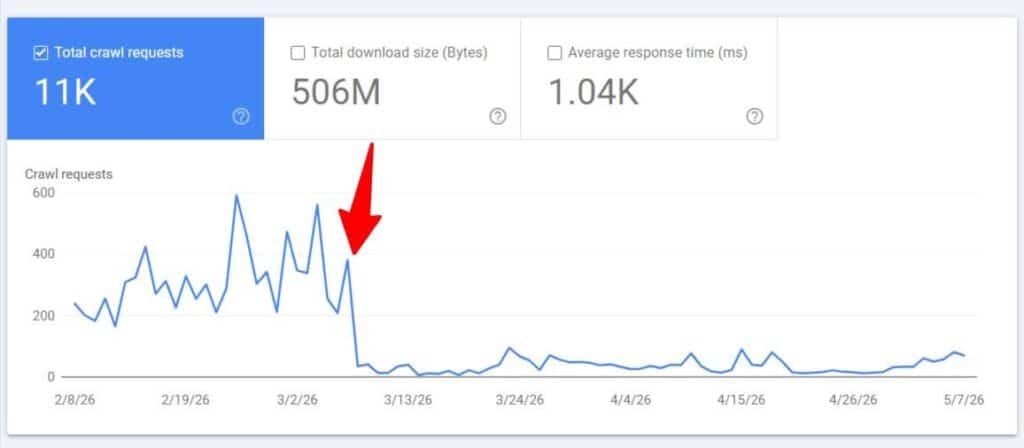
Google’s crawl rate algorithm is directly tied to server response speed. When a server responds slowly or inconsistently, Google reduces its crawl frequency to avoid overloading it.
At an average response time of 1,330ms, Google decided CyberNaira didn’t deserve frequent crawling.
The www vs Non-www Split
When I checked the GSC Crawl Stats hosts section, both cybernaira.com and www.cybernaira.com were showing as separate hosts with separate crawl budgets.
Google was splitting its crawling attention between two versions of the same site.
My best guess is that this happened during the migration; something was misconfigured, causing the www redirect on the new server to be set up improperly.
The .htaccess file needed a server-level redirect, not just WordPress settings pointing to the non-www version.
SpeedyCache Conflicts in .htaccess
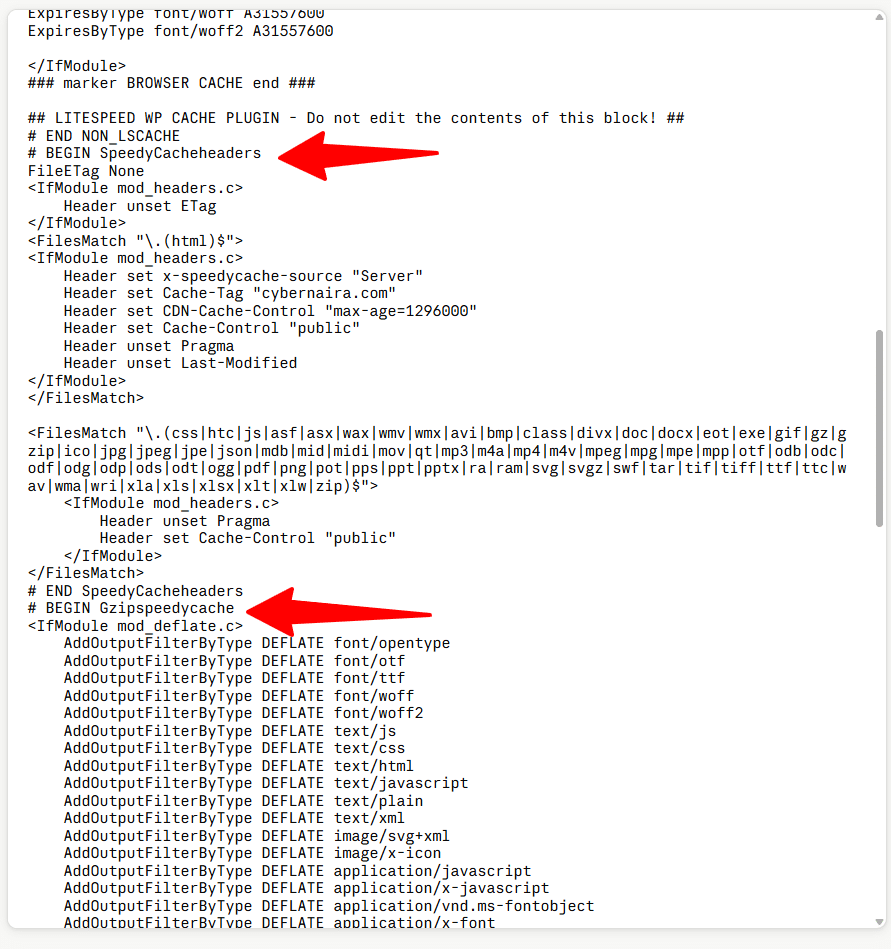
Verpex had a pre-installed SpeedyCache plugin in WordPress. Even though I had never activated it, it had written five separate blocks into my .htaccess file.
These were actively conflicting with LiteSpeed Cache, creating redirect loops that Google encountered during page crawls.
The five blocks were: SpeedyCacheheaders, Gzipspeedycache, LBCspeedycache, WEBPspeedycache, and the main speedycache block. All five needed to be removed.
The advanced-cache.php Drop-in
Regarding the SpeedyCache issue, an advanced-cache.php drop-in file was present in the wp-content directory.
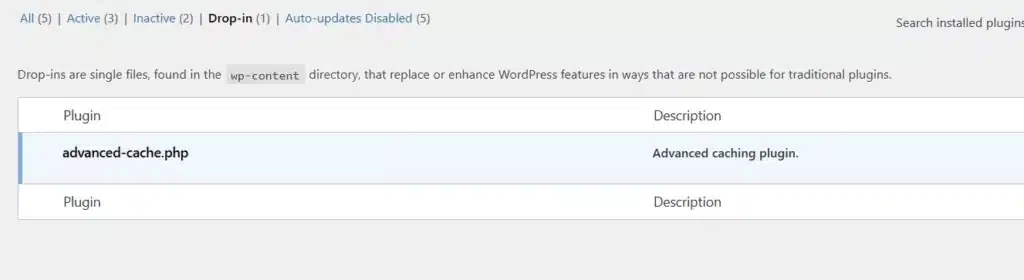
This file is what caching plugins use to intercept requests before WordPress fully loads.
With SpeedyCache installed and LiteSpeed Cache also running, the two were conflicting at the most fundamental level of WordPress caching.
AMP Parameter Duplicate Content
GSC showed URLs such as /check-website-traffic/?amp=1 and /check-website-traffic/?noamp=mobile&=1 in the crawled-not-indexed report.
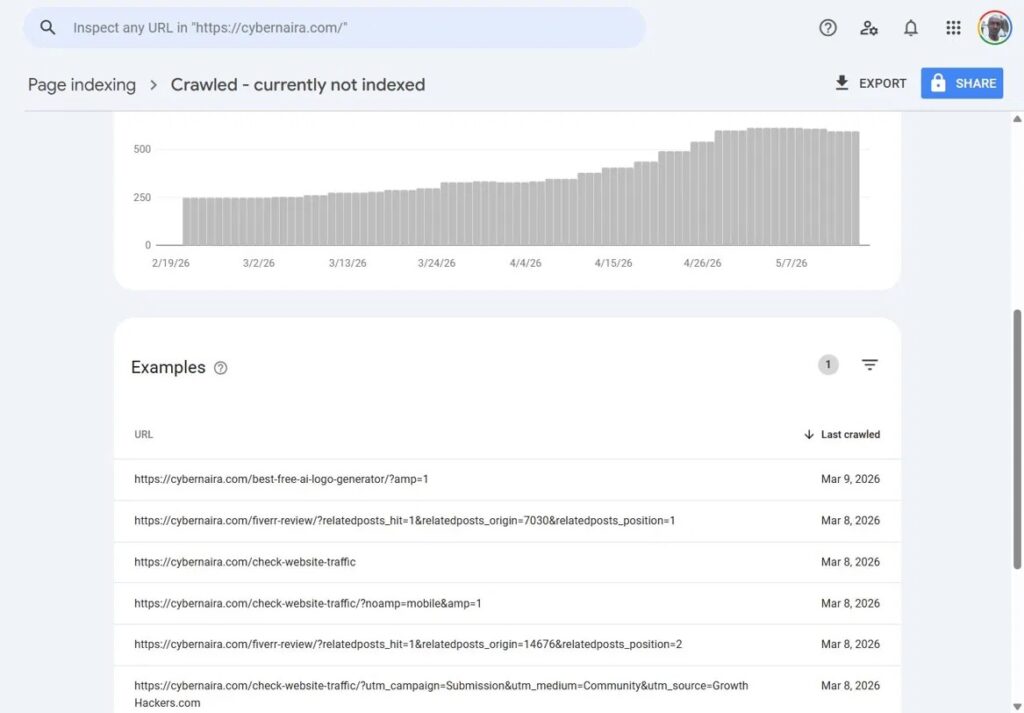
I had used an AMP plugin years ago and removed it, but Google was still crawling those parameter URLs because they remained in its index and were being followed from external links.
These parameter URLs were loading the actual page content, creating duplicate content. Although the canonical tag correctly pointed to the clean URL, the issue still consumed crawl budget and inflated the not-indexed count.
A redirect added to the child theme’s functions.php file resolved this sitewide with a single code snippet.
Jetpack Related Posts Generating Crawlable URLs
Jetpack’s Related Posts feature generates links with parameters like ?relatedposts_hit=1&relatedposts_origin=7030&relatedposts_position=1.
Google was treating these as unique URLs, so it crawled each parameter combination as a separate page.
Disabling the Related Posts feature in Jetpack immediately stopped generating these parameter URLs. Since I use Astra’s built-in Related Posts function, I have no issue deactivating it in Jetpack.
The 404 Problem
The migration had also left 61 URLs returning 404 errors in GSC. Closer analysis reduced the real problem to about 11 actual content URLs that needed 301 redirects, with the rest being comment permalink URLs and wildcard patterns Google tests.
The SpeedVitals Data That Revealed the Real Problem
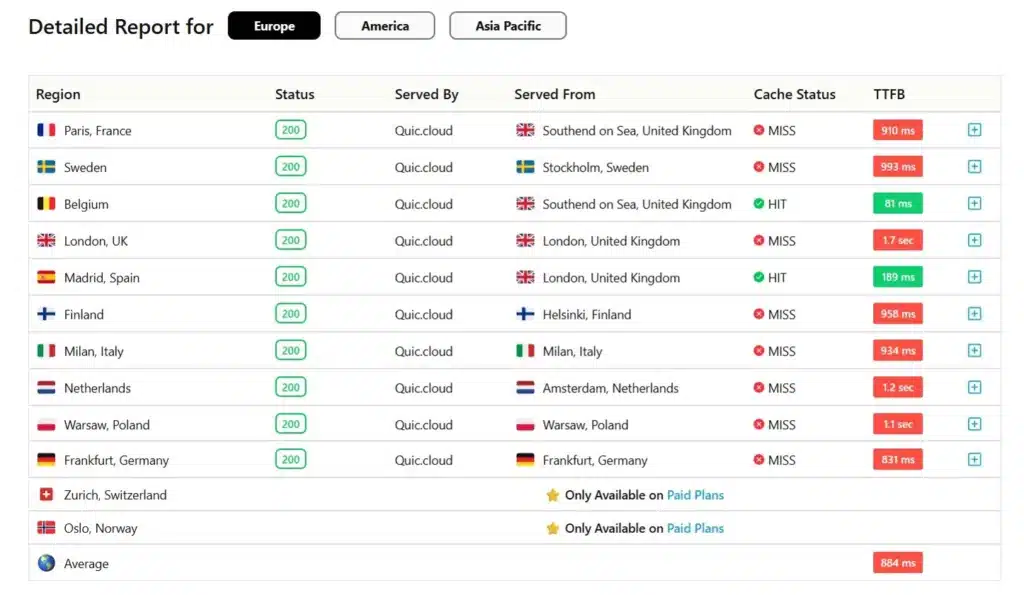
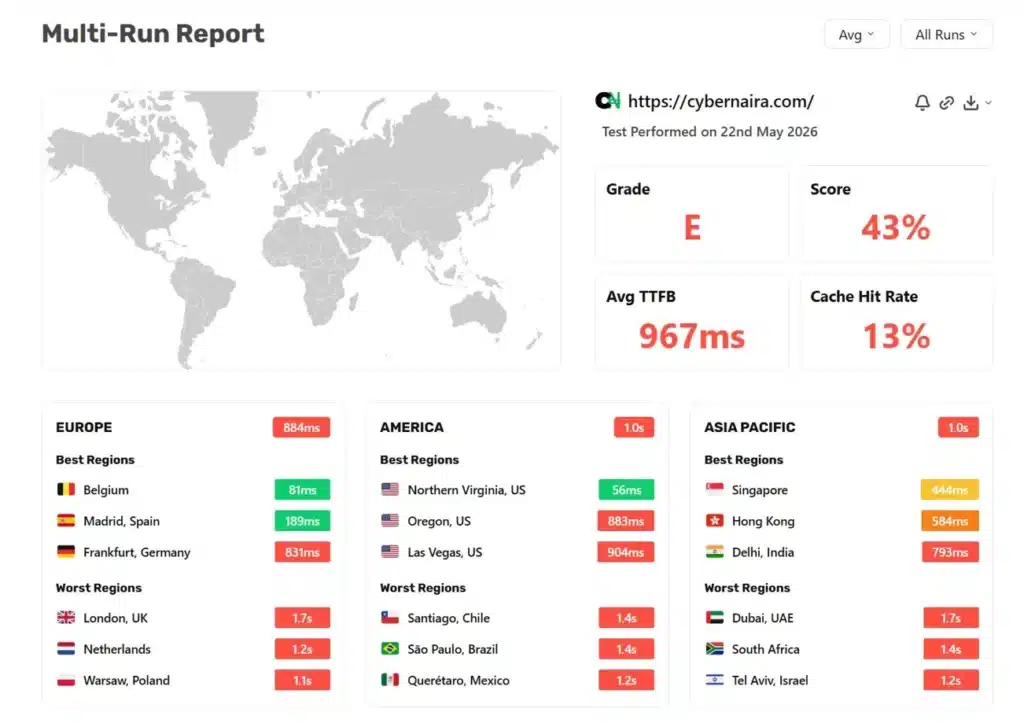
After working through all of those technical fixes, I ran a TTFB test on CyberNaira using SpeedVitals to see where things stood.
The results were poor. But the more revealing comparison came when I ran the same test on a staging version of the site I had set up on Cloudways, before making any DNS changes.
Verpex (live site, Quic.Cloud CDN fully active):
Cloudways staging (no CDN configured, Breeze cache only):
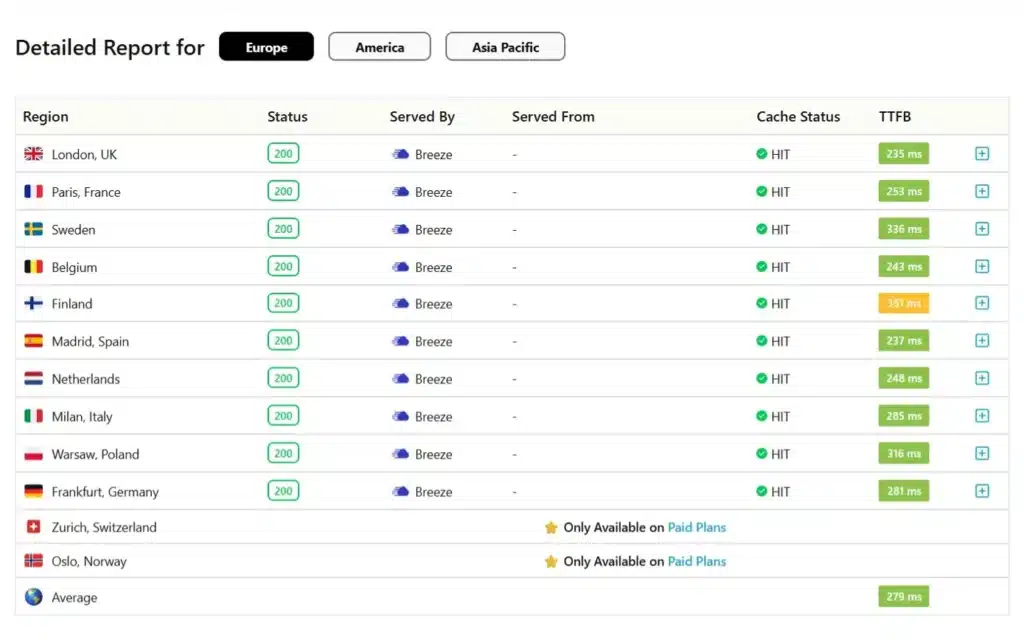
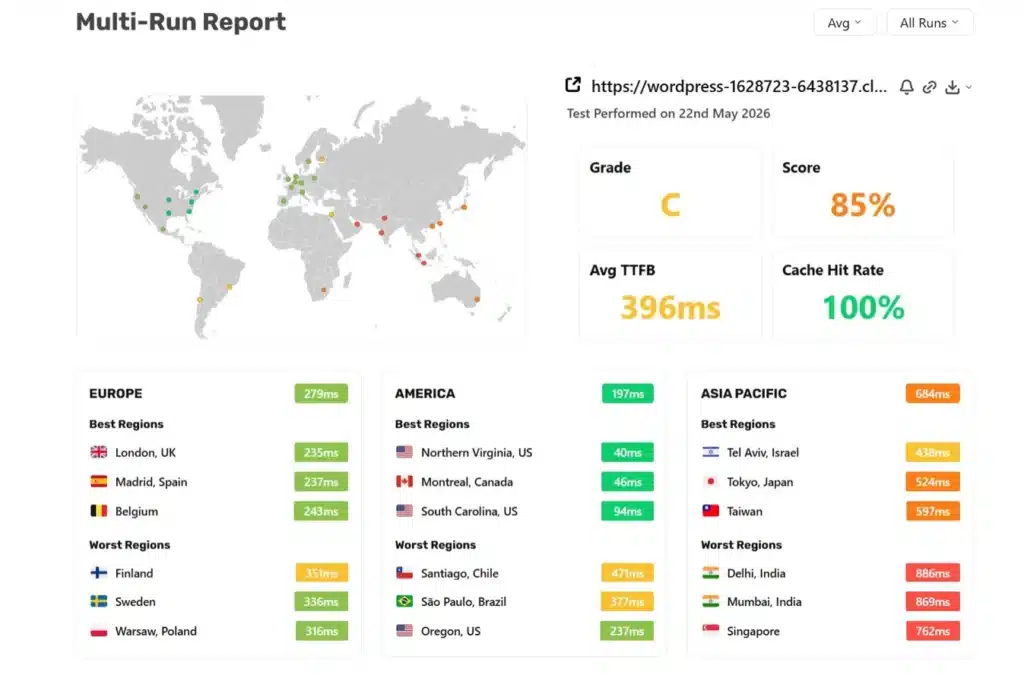
Read that again. Cloudways, with no CDN at all, delivered more than twice the performance of Verpex, which had a full CDN running.
The cache hit rate on Verpex was only 13%, which explains everything.
Quic.Cloud CDN caches pages at edge nodes and serves them to visitors. But to populate those edge-node caches, the CDN must successfully fetch the page from the origin server.
When the origin responds intermittently in 900ms to 2,000ms, the CDN can’t cache reliably. Edge nodes fall back to dynamic origin requests, the cache never fully warms up, and both visitors and Googlebot are hitting a slow origin on most requests.
This is the core problem that no amount of WordPress configuration or .htaccess editing could solve.
The shared Verpex server had fundamental resource constraints: swap memory at 98.89% during peak periods, disk pressure, and response times that couldn’t reliably support CDN cache population.
Googlebot averaged 1,330ms on almost every crawl request. That is why it throttled crawling. That is why pages were getting dropped.
The Fixes Applied on Verpex (Necessary but Not Sufficient)
To be clear about the sequence: we completed all of the following fixes while the site was still on Verpex.
They were the right things to do. They cleaned up real technical problems. But they did not restore the crawl rate or bring back the deindexed pages.
1. www to non-www redirect
Added a 301 redirect at the top of .htaccess, before all other blocks, to redirect www.cybernaira.com to cybernaira.com at the server level.
2. SpeedyCache blocks removed
All five SpeedyCache blocks were manually removed from .htaccess, eliminating the cache plugin conflict.
3. advanced-cache.php deleted
Removed the SpeedyCache drop-in file from wp-content, resolving the core caching conflict.
4. Permalinks saved
WordPress → Settings → Permalinks → Save Changes regenerated the .htaccess rewrite rules cleanly on the new server environment.
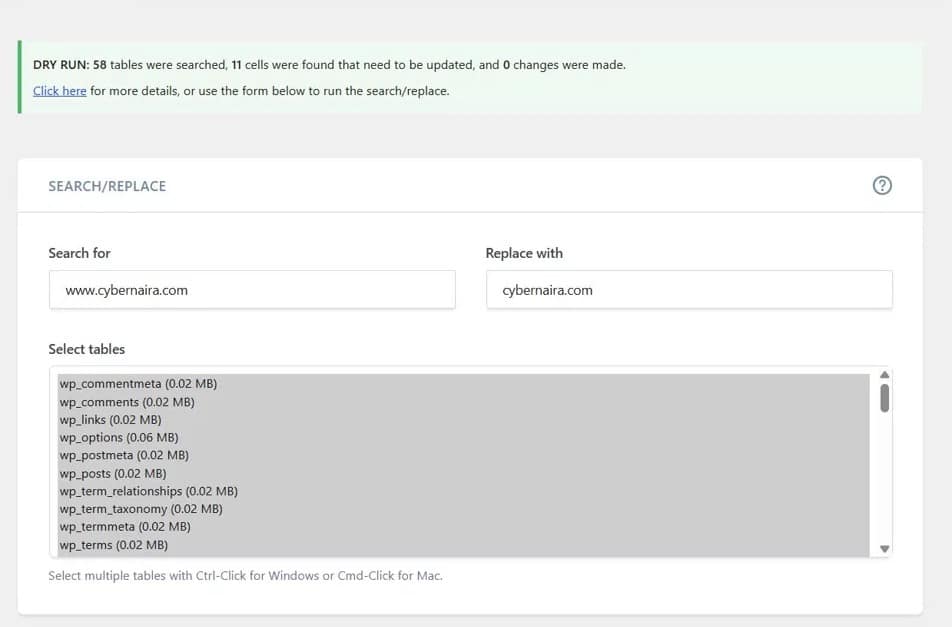
5. Better Search Replace (90 URL fixes)
Running Better Search Replace found and updated 11 www.cybernaira.com references and 79 http://cybernaira.com references in the database, cleaning up URL inconsistencies left by the migration.
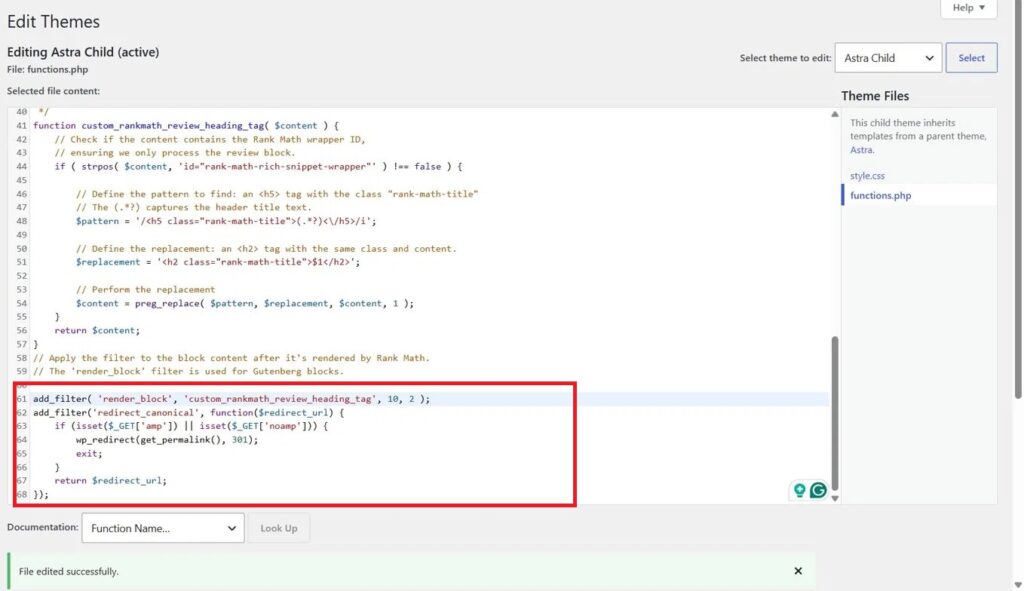
6. AMP redirect via child theme functions.php
A single add_filter snippet added to the child theme’s functions.php redirected all URLs with the ?amp=1 and ?noamp parameters to their canonical clean versions sitewide.
7. Jetpack Related Posts disabled
The Related Posts feature was turned off in Jetpack settings, stopping the generation of parameter-laden crawlable URLs.
These steps eliminated real problems. But the crawl rate stayed suppressed. The deindexed pages stayed out of the index. The root cause, Verpex’s server performance, remained.
The Real Fix: Migrating to Cloudways
On May 23, 2026 (about 90 days with Verpex), I migrated CyberNaira from Verpex to Cloudways Vultr High Frequency server.
This time, the migration was planned carefully to avoid repeating the DNS outage that triggered the original crisis. DNS TTL was lowered to 300 seconds (5 minutes) 48 hours before the migration.
The site was set up and fully verified on staging before any DNS changes were made. The DNS switch occurred during the lowest-traffic window.
Propagation completed in minutes rather than hours. No downtime. No failed crawl requests. No 8-hour outage.
Within 24 hours of the migration, I ran SpeedVitals TTFB again.
Cloudways (live site, Cloudflare CDN active):
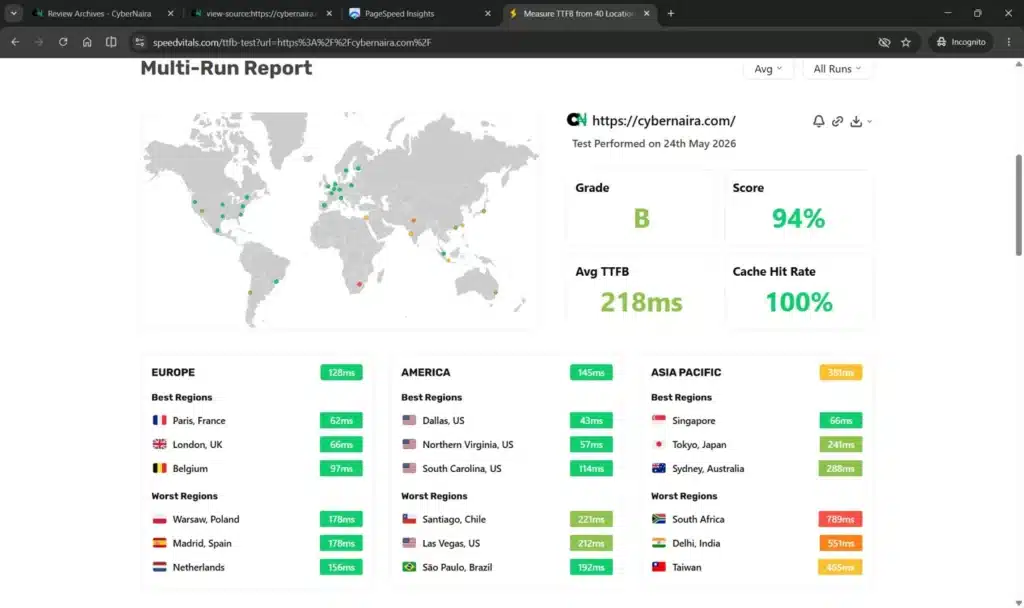
The same site. The same content. The same plugins list. A completely different result because the origin server was now responding fast enough for the CDN to cache reliably on every request.
NOTE:
After activating Cloudflare’s Tiered Cache Topology, the TTFB score reached 100%, and server response times improved.
The Crawl Recovery Data
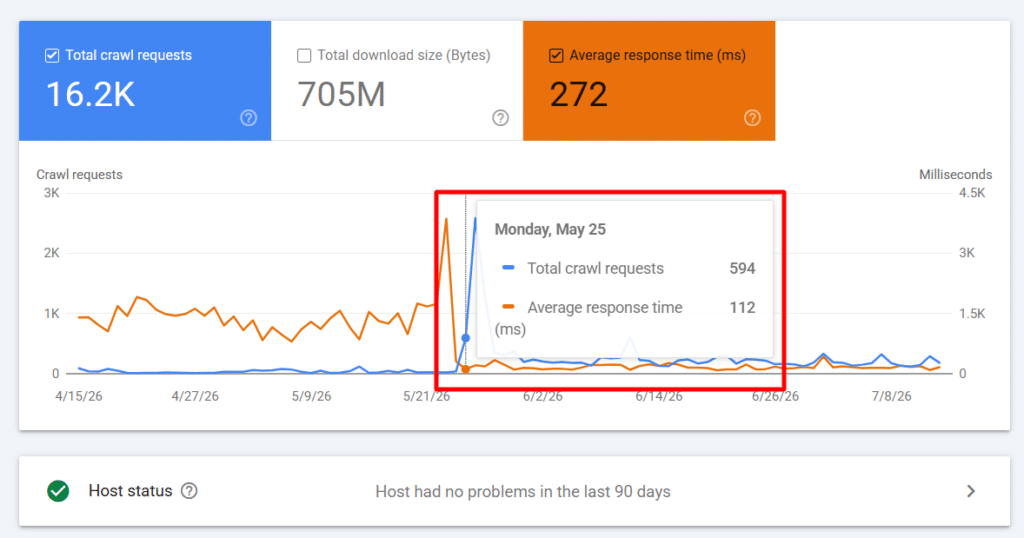
The proof that the migration was the real fix came in the GSC crawl stats over the following 48 hours.
May 25 (Day 1 on Cloudways):
May 26 (Day 2 on Cloudways):
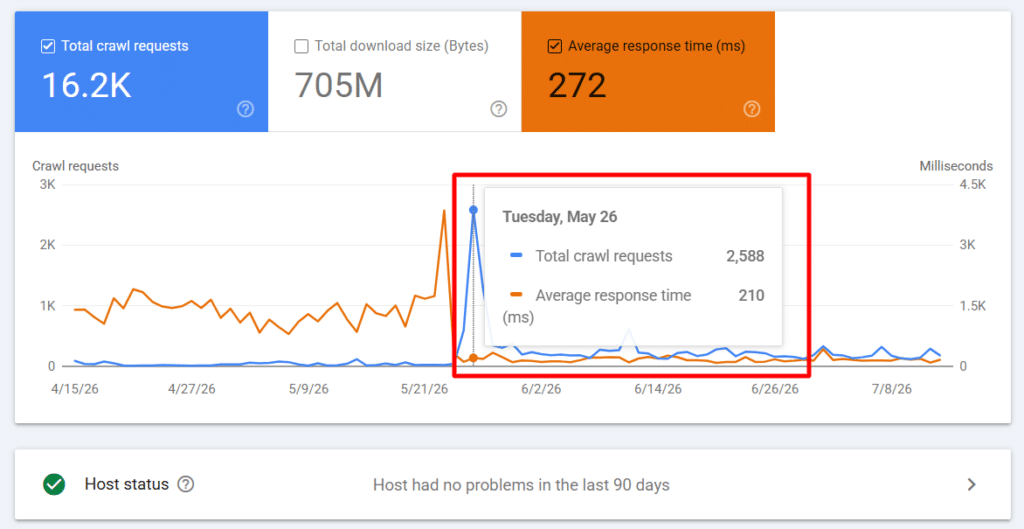
For comparison, the previous months on Verpex averaged fewer than 100 crawl requests per day, with an average response time of 1,330ms.
2,588 crawl requests in a single day is not just a recovery to pre-crisis levels. It is Google launching an aggressive recrawl campaign, systematically revisiting every page it had deprioritized during the months on Verpex.
This is Googlebot’s behavior when it detects a dramatic improvement in server quality after a period of poor performance.
The change in host status is also significant. For months, GSC showed “Host had problems in the past.” By day two on Cloudways, it read “Host had no problems in the last 90 days.” Google had already updated its assessment of the server.
What This Case Study Teaches About Hosting and Indexing
Most bloggers don’t think about the relationship between hosting quality and Google indexing until it is too late.
Here is what I learned.
Googlebot crawl rate is directly tied to server response time.
Google’s algorithm automatically reduces crawl frequency when servers respond slowly.
This is not a penalty. It is an automated resource management decision. But the practical effect is the same: slower crawling leads to less indexing.
CDN performance depends entirely on origin quality.
A CDN can only cache what the origin server successfully delivers. If your origin server is slow or inconsistent, your CDN cache hit rate will be low, and both visitors and Googlebot will regularly hit that slow origin.
This is a compounding problem. Slow origin means poor CDN caching means slow responses for Googlebot means reduced crawl rate means deindexing.
DNS outages during migration are more damaging than most people realize.
A single day with 19.4% failed crawl requests is enough to trigger a crawl rate reduction that can persist for months.
Planning migration timing, lowering DNS TTL in advance, and minimizing outage windows is not optional.
Technical fixes inside WordPress cannot solve a server-level problem.
Everything I fixed in .htaccess, the database, and WordPress configuration was correct and worth doing. But none of it changed the fundamental server response time.
When the hosting itself is the problem, the only real solution is better hosting.
Content quality and technical quality are separate problems that require separate solutions.
CyberNaira had both an existing content quality challenge and a new technical crisis triggered by the migration. The technical crisis was masking the extent of the content issue.
Fixing the technical side first was necessary to get an accurate signal on what the content side actually needed.
The Lesson I Would Have Paid to Learn Earlier
Choosing Verpex was the single biggest mistake in this situation.
Not because Verpex is a bad host in absolute terms. But because I chose it without adequately evaluating whether its shared hosting environment could deliver the server response times CyberNaira’s indexed page count and crawl demands require.
Shared hosting at any price point means your server resources are shared with potentially hundreds of other sites.
When that server is under memory pressure, running swap at near capacity, and delivering inconsistent response times, your site pays the price regardless of how well your WordPress installation is configured.
If you are running a site with significant indexed content that you depend on for traffic and revenue, the hosting decision is an SEO decision. It is not just a cost or convenience decision.
The right question to ask before migrating is not “will my site load on this host?” It is “will this host deliver consistent, fast responses to Googlebot at the crawl frequency my site requires?”
Test it with server response-time tools, such as SpeedVitals, before you commit. Check TTFB from multiple global locations. Look at cache hit rates.
These numbers show what Googlebot experiences, and what Googlebot experiences determines whether your pages stay indexed.
Current Status and What Comes Next
As of this writing, crawl rates have stabilized at healthy levels on Cloudways. The aggressive recrawl campaign Google launched on May 26 signals that the recovery process has begun.
Reindexing of previously dropped pages takes time. Google needs to recrawl each page, reassess it, and make a new indexing decision.
Given the improvements in crawl rate, that process should move significantly faster than it did during the months on Verpex, when Googlebot visited fewer than 100 URLs per day.
The content quality work continues in parallel. Updating, consolidating, and improving pages that were already struggling before the hosting crisis is the longer-term project.
But at least now, that work has a chance of being seen and evaluated by Google, because Googlebot is actually crawling the site again.
If your site has been losing indexed pages and you have tried content updates, reindexing requests, and internal links without success, the answer might not be in your content. It might be on your server.
Check your GSC crawl stats. Look at your average response time. Run a TTFB test. The data might tell you something your WordPress dashboard cannot.

Shamsudeen, thank you for this post. Currently, I am still trying to understand why Google deindexed almost all of my pages. 1 have 680 pages, and only 52 are indexed. Currently, after making some fixes, I am waiting 21 days, which will end on Friday, to know if Google will reindex my website again.
It never even occurred to me that my problem started in August 2025 when I changed my hosting plan. I started noticing the issues a month after that, but I never knew it was a hosting issue. I used SpeedVital to check my site, and the results are not encouraging. I attached it here.
Please, what advice would you give me now? I am using Namecheap shared hosting currently, though I have made up my mind to upgrade to their VPS. What would you advise me to do?
I was not able to attach the image, but I have seen it’s the problem the average TTFB is 910
Grade E
Score 45
Hi Ikenna,
I also have two sites currently on Namecheap Stellar plan and both are using Cloudflare CDN, with the Tiered Cache Topology (Smart Tiered Cache) option activated and custom cache setting in Cloudflare. If you’re not using Cloudflare CDN yet, I suggest you try it before moving to VPS plan. Although both sites are not my primary focus, their response time in GCS is not bad, 350ms average. And Google seems to be crawling and indexing the sites pages as expected, which is the most important issue.
You can check this post (https://cybernaira.com/verpex-hosting-review/) to see what’s possible with Cloudflare CDN on a shared hosting plan.
If you need help with setting up Cloudflare optimization, let me know.
Thanks for sharing this, case studies like this are rare because most people hide their mistakes. After a migration, we always check server response times and robots.txt in Search Console within the first 48 hours. Did Google bring the pages back all at once or gradually?
Hi Lucas,
Gradually, within two weeks. All previously dropped pages returned to the index with no content changes.