

Are you considering starting an ecommerce store on Shopify but don’t know if it’s the right store builder for you? Or if it has all the features you need?
The best way to get the answers to your questions is to subscribe to a free trial of the Shopify eCommerce store plan.
When you subscribe to the Shopify free trial 3-day subscription, which extends to 90 days, for just $3 ($1 each month), you have enough time to test all the features, apps, checkout pages, POS, products, etc.
Whatever features you want to test to determine if the platform is right for you, you can do so within the Shopify 3 months for $1 (monthly).
That’s all you need to start selling on Shopify.
But before you take advantage of the opportunity, there are several things you need to know about the Shopify free trial offer.
Let’s explain them below.
Shopify Free Trial Details
First, two different Shopify trial offers are available for regular users: the Shopify standard free trial and the Shopify Dropshipping Starter kit free trial.

Shopify Standard
Include all the regular eCommerce Shopify features available in its four standard plans: Basic, Grow, Advanced, and Shopify Plus.

Shopify Dropshipping
Shopify Dropshipping Starter Kits offer the regular 3-day trial plus $1/m but also give you access to extra features and tools to help you start dropshipping in the best possible way.
Now that you understand which trial offer is best for you, let’s walk through the sign-up process.
When you sign up for the free trial (anyone), your account is activated for three days, during which you can explore Shopify without commitment.
For these three days, your storefront is password-protected or has a non-functional checkout page. This means you can’t sell products during the free trial.
But you can set up your store, select a theme, design it, install apps, upload products, and do all sorts of things you want. You can even publish to your store.
However, if you want people to find your Shopify store, purchase products, and be able to make payments, you need to subscribe to one of the paid accounts.
Activating any monthly plan will automatically remove the password from your store and activate the checkout function. Now, customers can buy from your store and make payments successfully.
You won’t be charged the total monthly payment for any plan you select during the free trial. In fact, you pay just $1 each month (for a total of three months) to continue with the plan and use Shopify at full capacity.
This is where the Shopify free trial gets interesting. For just $1/month for 3 months each, you could use it for 90 days. Add this to the initial three free days, which means you’re using Shopify for free for a total of 93 days while paying just $3.
Don’t believe me? See it for yourself.
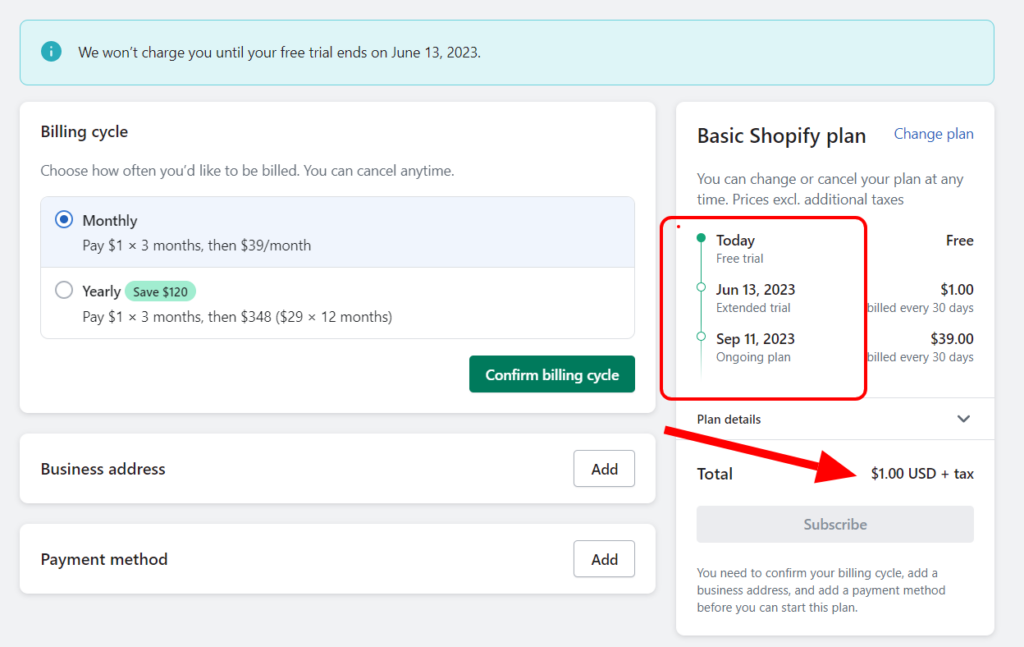
In the image above, assuming the account subscribes to the $1/m free trial on June 12, 2023 (after the initial 3 days expire), it will continue with this amount until September 11, 2023. That’s when the full charge of $39/m begins.
So, from June 12th to September 11th, the account will pay just $3 in total for using Shopify’s Basic plan features.
Upgrade to Starter, Basic, Grow, and Advanced for the $1/m free trial. But if you choose the Starter plan, you will lose access to some features.
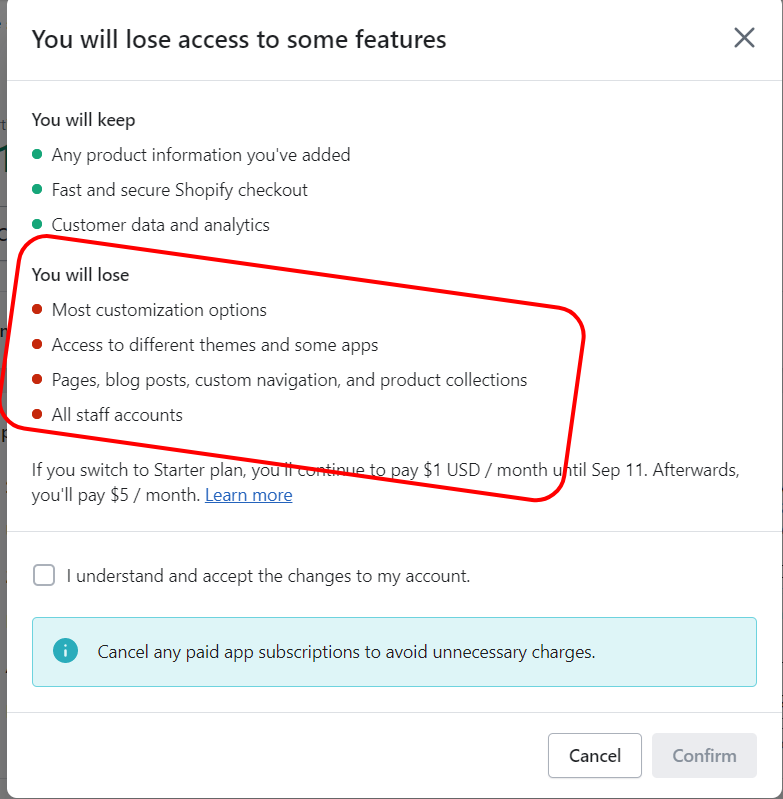
The Starter plan only allows selling through social media, messaging apps, and a buy-now website button. So choose between the Basic, Grow, and Advanced plans for the $1/m offer if you plan to sell via a regular online shop.
Another thing to note about Shopify’s 3-day free trial is that you don’t need to select a plan if you don’t want to be billed after the first three days.
Your account will automatically be paused till you choose a monthly or annual subscription. So, technically, you don’t need to cancel your Shopify free trial registration manually if you don’t want to get charged.
Since you have not picked up any paid plan, you don’t have any payment option or method in your account, so there is nothing to worry about if you don’t want to pay.
For guidance on canceling your account before your Shopify trial period ends, check out our step-by-step guide.
Now, let’s see how you can open Shopify for 3 days plus a 90-day free trial, making 93 days of almost unrestricted access to explore the Shopify eCommerce platform.
How to Activate the Shopify Free Trial
Click this link to activate the Shopify 3-day free trial plus a 90-day extended period.
Once you click through the link, you will arrive at the Shopify sign-up page. There are two options to sign up: click the top bar, sign up now, call to action, or enter your email address in the box and click the “Start Free Trial” button.
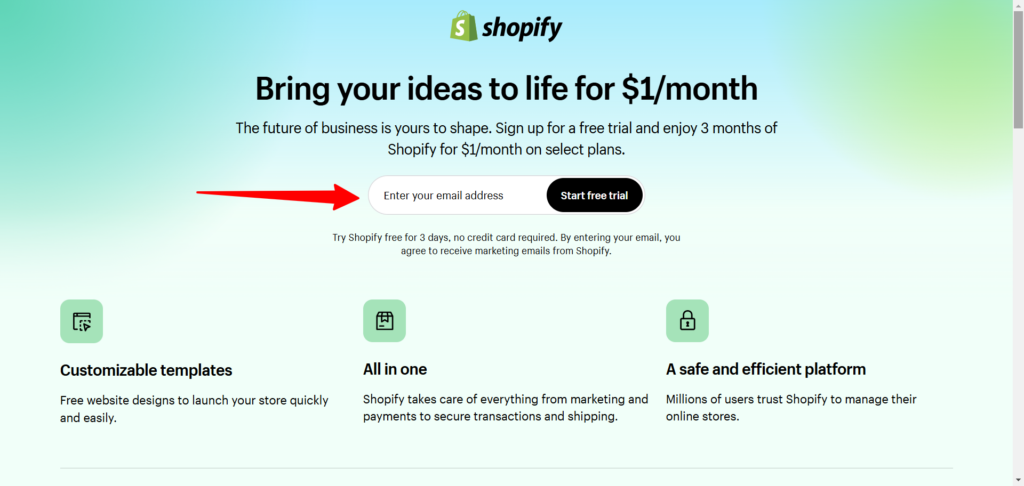
Either way, you will arrive on the sign-up process page.
Next, ensure you complete the questionnaire. Though you can skip all the processes, it will help if you fill them out at this stage.
The questions are easy; they are just surveys to understand your use of Shopify and how to set up your store better to start selling online.
Here are some of the questions you need to answer.

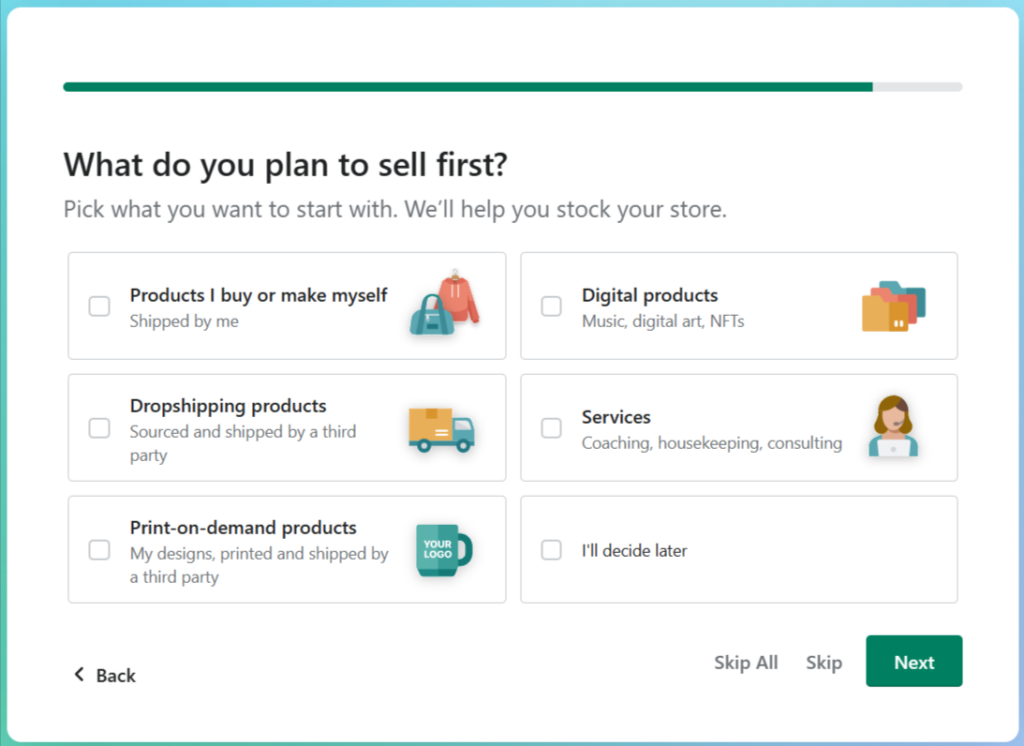
Skip all if you don’t want to answer them at this stage and need to decide later. No rules say you must answer them during the sign-up process before you can sell online with Shopify.
Once you complete the process, a confirmation email will be sent to your registered email address. You need to go back and click the confirmation link in that email.
Clicking on the confirmation link activates your Shopify account automatically. As indicated in the email, the link expires in 10 days, so ensure you confirm your account to add additional security.

Within your first 3-day free trial offers, you can activate the Shopify 3 months for $1 free trial or wait for the three days to expire. But I would advise you not to allow too many days to pass after the initial three days are over before activating the extra 90-day offer.
You might lose access to it, or the offer might no longer apply to your account. To ensure you don’t miss out, take advantage immediately and activate the $1 monthly Shopify plan.

Note: To start free trials for the $1/month for 3 months, you need to enter your credit card details to begin. You can add a custom domain to your store if you pick a Shopify plan and subscribe to a monthly or annual plan after the trial is over.
Shopify Free Trial Options
Shopify offers a standard 3-day free trial for the general public and a 90-day extended trial for $1/month on select plans.
This trial period allows Shopify store owners to explore features and tools, set up their online stores, add products, and prepare them for launch. No credit card information is required to activate the trial, making it a risk-free way to test the platform.
Additionally, Shopify offers a 120-day free trial for Black-owned businesses through its 1 Million Black Businesses (1MBB) program. This initiative aims to support Black entrepreneurs by providing them with the resources and tools needed to succeed in e-commerce.
What is the Shopify Free Trial for 1M Black-Owned Businesses?
The Shopify Free Trial for 1M Black-Owned Businesses is part of Shopify’s partnership with Operation HOPE to support Black entrepreneurs. The goal is to help build, grow, and scale 1 million Black-owned businesses by 2030.
Through this program, eligible Black-owned businesses get free access to Shopify’s platform for a specified period, providing the tools and resources necessary to start and grow an online store.
It offers a more generous free trial period to get your business online without commitment. Instead of the standard of 3 days + 90-day extended trial offer, 1M Black Owned Business eligible participants get the 120-day free trial offer.
This gives you more time to prepare your store, test product variations, access more advanced features, and make the right decision.
During this time, you can learn about Shopify inventory management tools, email marketing campaign features, payment providers, advanced customizations, multiple sales channels, abandoned cart recovery, Shopify supports, etc.
How to Access the Shopify Black-Owned Business Free Trial Options
To access Shopify’s 120-day free trial for 1M Black-owned businesses:
- The business must be Black-owned and operated. Or at least 50% of Black ownership.
- The business must reside in either the US or Canada to be eligible.
- It should be a new (for people starting their first Shopify store) or growing business looking to expand its online presence.
- Next, visit the Shopify program page for Black entrepreneurs.
- Sign up for a Shopify account if you don’t have one.
- Complete the application form to ensure you meet the eligibility requirements.
- Once approved, you’ll receive details about your 120-day free trial access, along with program benefits
This streamlined process helps Shopify identify eligible businesses and provide the best support for success.
Benefits of Shopify 1M Black-Owned Business Program
The Shopify 1M Black-Owned Business Program offers several valuable benefits that make it an attractive option for independent business owners in the black community. Here are some of the notable ones.
- Exclusive Events and Partnership – Enjoy free access to networking events and opportunities to collaborate and learn from like-minded people in the black-owned business community. These events provide mentorship and insights into how to thrive in the eCommerce world.
- Resources and Training – Get access to tools, workshops, webinars, and advanced training sessions to build your skills and master eCommerce business. You’re not left alone from creating your business brand image to exploring different marketing strategies.
- Community Support – Another benefit is the community of people with the same values, culture, and ambition to thrive in the digital eCommerce world. This community provides support, inspiration, and collaboration opportunities with like-minded individuals.
- Business Education – With its partnership with Operation Hope, Shopify provides extensive educational materials and resources aimed at helping you succeed and build a business that supports your dream.
Shopify Free Trials Checklist
Before starting your free Shopify trial, use this checklist to make the most of your online business experience:
- Understand Your Goals – Determine what you want to achieve during the trial. Are you testing Shopify’s online store features, launching an online business to sell unlimited products, or exploring its customization options?
- Prepare Your Business Details – Have your business name, logo, and branding elements ready. This will help you set up your store operation quickly and efficiently.
- Add Your Products – Gather product details like descriptions, images, and pricing. Uploading them during the trial gives you a head start.
- Explore the Features – Test key features like payment integrations, search engine optimization tools, international pricing converters (if selling globally), and Shopify email marketing. Use this time to evaluate how well Shopify meets your needs.
- Experiment with Themes – Shopify offers a range of free and paid themes. Customize a theme to see how your store could look and function.
- Set Up a Payment Gateway – Connect a payment gateway (or Shopify Payments if available) to see how transactions will work for your customers.
- Take Advantage of Resources – Use Shopify’s support and help center, blog, and free webinars to learn about features and best practices.
- Test Your Store – Navigate your store as a customer would to ensure a smooth shopping experience. Fix any issues during the trial.
How to Make The Most of Your Shopify Trial
As a beginner, exploring all Shopify features within three days is challenging. You need more time to use the platform, explore features within your plan, and take full advantage of your free trial.
The 3-month offer for $1 each month is the best option.
Still, how do you ensure you’re learning fast about the Shopify platform, apps, features, payment options, and your store?
Follow the advice below to get the most out of your Shopify free trials.
- Settings Page – The Shopify settings page can be overwhelming for beginners; use this time to familiarize yourself. Some settings are available: checkout, payment options, privacy policies, store language, billing, custom data, store branding, etc.
- Payment Methods – Shopify offers several payment methods, including Shopify Payments, third-party gateways, and offline payments, such as bank deposits and manual payments. Test which payment option is supported in-store, offers minimum transactional fees, and is convenient for your customers.
- Shopify Themes – This is a good time to walk through Shopify themes, test them extensively, try different themes, and see which fits your store’s needs.
- Shopify Apps – Searching through the 8,000+ Shopify apps can be time-consuming and challenging. Use this time to learn about the app store, test different app functionalities, and understand which app you might need.
- Shopify POS – Assuming you sell offline, your trial period is the best time to access the POS feature. You can download the point-of-sale app, run a test sale, order the hardware (POS Go recommended), set up the hardware and features, etc.
- Collection Pages – You must create collection pages to help users find product categories easily on your storefront. If you have hundreds of products, doing this can take time. Using the trial period to set up your product and collection pages can be helpful.
- Upload Products – Adding products can take time, especially if you have hundreds of products or need sources from external marketplaces.
Shopify Pricing and Applicable Fees
Shopify offers multiple pricing plans, and it’s essential to understand not just the subscription cost but also the fees associated with payment processing, shipping, and third-party services.
Here’s a detailed breakdown of Shopify’s paid plan.
| Shopify Plan | Monthly Price | Online Credit Card Fees | In-Person Credit Card Fees | 3rd Party Transaction Fees | Number of Staff Accounts |
|---|---|---|---|---|---|
| Starter | $5/mon | 5% + $0.30 | Not available | 2% | N/A |
| Basic | $24/mon | 2.9% + $0.30 | 2.7% | 2% | N/A |
| Grow | $69/mon | 2.6% + $0.30 | 2.5% | 1% | 5 |
| Advanced | $299/mon | 2.4% + $0.30 | 2.4% | 0.6% | 15 |
| Shopify Plus | $2,300/mon | Negotiable | Negotiable | 0.2% | Unlimited |
Additional Fees to Consider
Besides the primary monthly or annual subscription, there are other associated costs to running an online store that you should consider, which will help you select the correct Shopify plan.
Third-Party Payment Provider Fees
If you use a payment provider or processor other than Shopify Payments, you’ll incur additional transaction fees:
- Starter and Basic Plans – 2% per transaction.
- Grow Plan – 1% per transaction.
- Advanced Plan – 0.6% per transaction
Shipping Fees
Shopify partners with carriers like USPS, UPS, FedEx, and DHL to provide discounted shipping rates. The cost depends on:
- Shipping zones (domestic vs. international).
- Package weight and dimensions
You can calculate real-time rates or set custom flat rates for your store.
Apps and Add-Ons
Many Shopify apps (e.g., for email marketing, SEO, or drop shipping) have subscription fees. Pricing varies by app, with some offering free basic plans or trial periods.
Point-of-sale (POS) Fees
- Shopify POS Lite is included in all plans.
- Shopify POS Pro costs an additional $89/month per location and adds features like staff roles and advanced or custom reporting.
Examples of Total Fees
Example 1: Basic Plan with Shopify Payments
Let’s assume a customer purchases a $100 item from your online store.
- Credit card fee: 2.9% + $0.30 = $3.20.
- No transaction fee is charged since Shopify Payments is used.
Example 2: Basic Plan with PayPal (Third-Party Payment)
Now, let’s assume the same $100 item was purchased with a PayPal payment:
- Credit card fee – PayPal’s standard rate (e.g., 2.9% + $0.30) = $3.20.
- Transaction fee – 2% of $100 = $2.
- Total processing cost – $5.20.
Key Takeaways
- Shopify Payments eliminates third-party transaction fees, making it the most cost-effective payment processing method.
- Higher Shopify plans offer lower credit card rates, making them more suitable for businesses with high sales volumes.
- Factor in shipping and app costs when determining the total cost of running your store and which plan best suits your needs.
FAQ Shopify Free Trials
Can we Sell Products on Shopify for a Free Trial?
Yes, you can sell products with a Shopify free trial, but you need to select a plan to remove the password on your store and activate the checkout page. If you do not subscribe to a plan, you can not sell with a free trial of Shopify.
Does Shopify Charge You After the Free Trial?
No, Shopify does not charge automatically after your free trial expires. You won’t be charged if you don’t subscribe to a paid Shopify plan during your trial period. Unless you choose a plan- Starter, Basic, Grow, or Advanced – you never get billed for using Shopify during the free trial period.
Why is the Shopify Trial Only 3 days?
No, the Shopify trial is not only for three days; you can extend your trial for another 30 days. The first three days are free; there’s no reason or demand to subscribe to a plan. However, if you want to extend your three-day free trial to 90 days, you must choose a plan and pay $1 monthly for the next 3 months.
Do You Need a Credit Card for Shopify’s free trial?
You don’t need a credit card for the free three days of Shopify. After the three days expire, and if you want to extend the free trial to 3 months, you must pick a plan and enter your credit card details. At this stage, Shopify will request your credit card details to activate the $1 monthly subscription fee.
How to Get 1 Dollar for the First Month of Shopify?
Here is the step-by-step guide to getting Shopify for $1 monthly for a three-month subscription fee. From this link, go to Shopify and click the signup button. Enter your email address in the required field, and click the Start Trial or sign-up button. Next, confirm your email address. After this, follow the on-screen process to complete your registration. Your first Shopify store is now ready to launch.
How Long is Shopify’s Free Trial?
Shopify’s free trial lasts 90 days if you select a plan after your first three days of free access expire. You will need payment details to enable the 90-day free trial offer, which is $1/month for the first three months.
Conclusion
Shopify is a fantastic hosted eCommerce platform for beginners, small business owners, and large enterprise businesses. It has all the eCommerce tools and resources to help businesses achieve their maximum potential, sell products, manage inventory, collect payments, and reach a global market.
However, for many new business owners, the Shopify monthly subscription fee can make establishing a solid online presence and turning profits challenging.
Thankfully, the free Shopify trial 3-day offer and one dollar per month for a 3-month subscription plan allow you to experiment, gather more marketing data, and make informed decisions.
You can start with better marketing strategies, invest more, and build a solid business with long-term potential.


Notice:
Your comment will end up in the trash folder if you spam our comment box. Use your real name, write meaningful and genuine comments. Avoid using keywords or brand name in the name filed and keep your comment relevant to the topic. Thank you.