

As of the time I am writing this review, I have been with Pressable for two months. So, technically, this is a hands-on experience from a real user, and not just an affiliate looking to make some money.
In this Pressable review, I’ll share my experience with the platform, covering its features, speed, uptime, customer support, pricing, and where it fits compared to other hosts.
Whether you run a personal blog, an eCommerce store, or an agency managing multiple client sites, I want you to have a clear picture of what you can expect before making a decision.
Pressable

This Pressable review breaks down everything you need to know before choosing it as your managed WordPress hosting provider. I walk you through how Pressable performs in real use, including site speed, uptime, security, and daily backups. You’ll also see how its pricing works, what limits to expect, and how it compares to other premium WordPress hosts.
Price: 20.83
Price Currency: USD
Operating System: WordPress
Application Category: Hosting
4.68
What is Pressable?
Pressable is a “fully managed WordPress hosting” provider that focuses entirely on running WordPress and WooCommerce sites.
That means you can’t use it to host a static HTML site or a Drupal installation (or other CMS).
It is built from the ground up to handle WordPress and only WordPress. This narrow focus allows the company to optimize its servers, software, and support processes around the needs of WordPress site owners.
Pressable started in 2010 as ZippyKid and later rebranded. In 2016, Automattic acquired the company, bringing it into the same family as WordPress.com, WooCommerce, Jetpack, and Akismet.
That’s a big deal because it means Pressable has direct access to WordPress core engineers and infrastructure designed for the platform.
The service is cloud-based, with architecture built for high availability. Sites are hosted across multiple data centers, and traffic can be automatically balanced if there’s a spike or a server issue.
Unlike many budget hosting providers, Pressable manages everything for you. This includes server configuration, updates, caching, security hardening, and performance tuning.
You still get full control of your WordPress dashboard, but you don’t need to touch the server-side of things.
If you’ve ever had to troubleshoot PHP memory limits or deal with a broken plugin update, you know how valuable that can be.
From the start, Pressable has been popular with agencies and e-commerce site owners who need reliable performance and support that actually understands WordPress.
But in recent years, it’s become more beginner-friendly, adding features like free site migrations, automated daily backups, built-in edge caching, and an easy-to-use dashboard.
Key Features of Pressable Hosting
When you’re comparing hosting companies, it’s easy to get lost in long lists of technical terms. With Pressable, the features are designed to solve everyday problems WordPress site owners face.
Whether it’s slow loading times, security worries, or managing multiple sites at once.
Here’s what stands out after 60 days of using and testing their platform.
Performance and Speed
Pressable uses an NVMe server setup that’s tuned specifically for WordPress. Sites are hosted on a high-performance WP cloud infrastructure with built-in caching at the server level, so you don’t have to install extra caching plugins.
Every plan includes a global content delivery network (CDN), which helps speed up delivery of images, CSS, and JavaScript to visitors around the world. Each plan also includes a minimum of 5 vCPU, 5 PHP workers, Object cache, OPcache, page cache, datacenter failover, and high-availability, geo-redundant NVMe servers.
Pressable’s Edge Cache, which caches your website pages at the server level, also acts as a CDN, so you don’t need third-party CDN services like Cloudflare, BonnyCDN, Stackpath, or KeyCDN.
One concern I have with Pressable is the limited choice of data centers. As of writing, there are only four origin data centers. However, Edge Cache CDN mitigates this limitation with its 28 PoP locations, so your content can be hosted near your target audience.
On my hosted Pressable site, I’ve seen noticeably faster load times and TTFB (Time to First Byte) compared to shared hosting and even some other managed providers with more data centers.
Uptime Reliability
Downtime can cost you visitors, sales, and search rankings. Pressable offers a 100% uptime guarantee backed by a service level agreement (SLA).
This doesn’t mean downtime never happens; it’s impossible to avoid entirely, but it means the platform is built for redundancy. And if your site is ever down, the company takes responsibility and compensates accordingly.
And because of its automatic server failover, another server automatically loads your website without any downtime or noticeable disruption to your business operations. So, technically, you never experience downtime.
Strong Security Measures
Security is baked into every Pressable’s site. You get free SSL certificates, free Jetpack Security for malware scanning, WAF (Web Application Firewall), and real-time threat detection.
They also run daily automatic server backups and off-site backups via JetPack VaultPress (free 10GB storage), so if anything goes wrong, you can restore your site with just a few clicks.
This also means you have multiple options to access your site backup and restore it.
Because it’s fully managed hosting, WordPress core, plugins, and theme updates are handled for you, reducing the risk of running outdated software.
Pressable consistently upgrades its security features. The latest are the egress firewall rules. This allows you to control your site’s outbound network traffic connections.
You can specify which network, port, or domain your site is allowed to connect with, giving you a serious high level of protection against unauthorized service connections.
Developer-Friendly Tools
If you’re a developer or agency, Pressable gives you features that make your workflow smoother. This includes staging, sandbox, development, and local sites for testing changes before going live.
You also have Git integration and access to WP-CLI (WordPress Command Line Interface). Pressable also allows you to set how PHP accesses your site files (Read/Write, Read Only, or Read Only when logged into WordPress).
You can also easily clone sites, which is useful for building client sites from a standard template. There’s also the Batch Command, which lets you run bulk operations on your Pressable sites.
Two other excellent features I love are Basic Authentication and Search & Replace.
With Basic Authentication, developers can require credentials before users can access their Pressable site. And with Search & Replace, you can edit database data in one click.
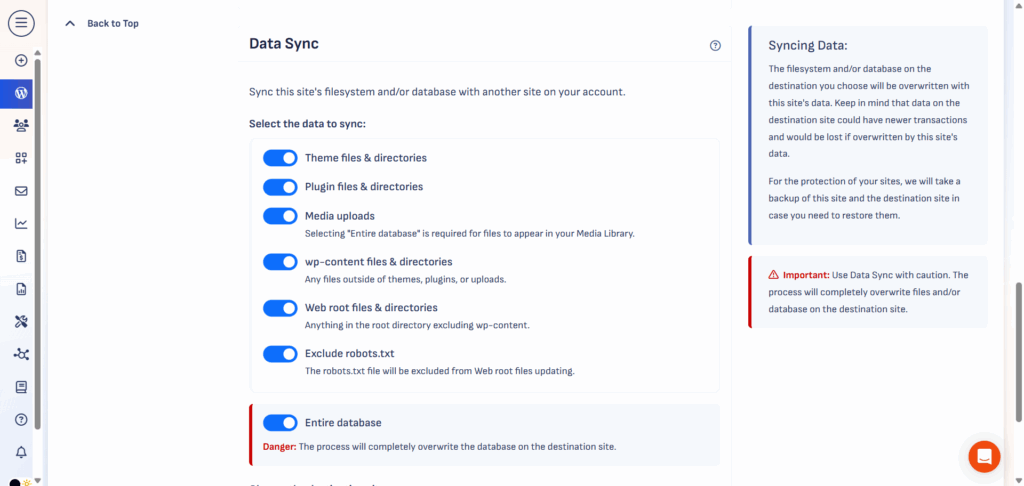
Before I forget, the Data Sync is another helpful feature. You can synchronize data between two Pressable sites. This is like cloning a site, but more like moving a site’s content to another domain.
Then, there’s the Studio Local, an essential development tool that lets you build, manage, and deploy your application from your local machine. This is a powerful tool for seasonal developers to manage workflow and increase productivity.
Team and Client Collaboration
Pressable’s dashboard makes it easy to grant access to team members or clients without sharing your own login details.
You can control who sees what, which is especially useful if you manage sites for others.
You just need their email address, add them to a site, and assign capabilities and permissions. That’s it.
WooCommerce Optimization
If you run an online store, Pressable’s infrastructure is optimized for WooCommerce, even on the entry-level plan, thanks to its minimum of 5 PHP workers (512 MB per worker) per site.
This means faster checkout pages, better handling of large product catalogs, and tools to help manage traffic spikes during sales or promotions.
Since Automattic owns WooCommerce, the integration feels tighter and better supported than most other hosts.
Pressable’s features aren’t about flashy marketing; they’re about making sure your site runs fast, stays secure, and is easy to manage, whether you’re running one site or fifty.
Pressable Hosting Plans and Pricing
Pressable hosting plans are designed for different types of site owners, from a single-site blogger to agencies running dozens of client sites.
There are three main plan categories: Signature, Premium, and Agency.
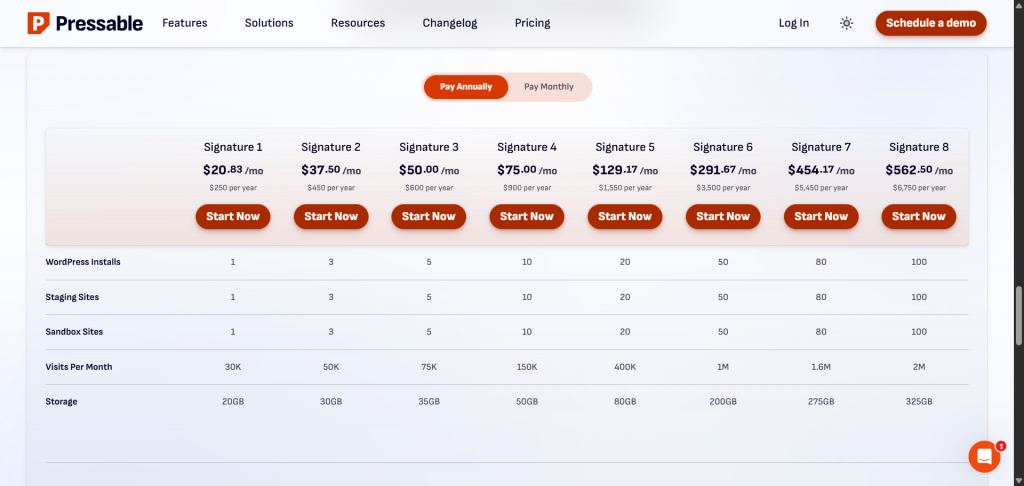
The Signature plans cover a range of user needs, from a single website install to 100 sites.
All Signature hosting plans include the same core features, such as free SSL, daily backups, 5vCPU (5 PHP Workers), free Jetpack Security, malware scanning, staging sites, and 24/7 support.
Each plan also includes a built-in cache mechanism (edge cache, page cache (batcache), Opcache, and Object Cache), a geo-redundant high-availability cloud, Application Performance Monitoring (APM), automatic scaling with bursting capabilities, automatic updates, and more.
The difference comes down to how many sites you can host, the total monthly visits, and storage space.
The price starts at $20.83 per site, up to $562.50 per site per month, when you choose the one-time 12-month billing cycle. If you subscribe to the month-to-month billing option, you will pay a little more each month.
Here is the full Signature hosting plan.
The Premium hosting plan is for mission-critical sites. Businesses that need high availability and scalable hosting require extra attention and virtually unlimited server resources.
Plans start at $350 per month, and you get access to the following features:
While Pressable isn’t the cheapest hosting option, especially compared to shared hosting, it’s priced competitively for managed WordPress hosting.
You’re paying for performance, reliability, and expert-level WordPress support, which makes it a better long-term investment if your site is important to your business or income.
However, there is no free trial; instead, there is a 30-day money-back guarantee. This means you can request a full refund within 30 days if you don’t like the hosting performance or if it’s not for you.
Performance Test Results
One of the biggest reasons people choose managed WordPress hosting is speed. A faster site doesn’t just make visitors happier; it can also improve search rankings and increase conversions.
In my case, page speed, Core Web Vitals, and faster time to first byte (TTFB) are the primary reasons I moved to Pressable. My former host wasn’t doing badly on speed, but I need more.
So, how did Pressable help achieve these goals?
Here are the full details.
First, moving my site to Pressable is painless. I handle the whole process myself using the free Pressable Automated Migration plugin. The process was smooth and beginner-friendly.
Once you follow the instructions, you can move one or even hundreds of sites without needing support help.
When you move a site to Pressblade, it is automatically deployed to a staging environment. This allows you to test changes, check connections and designs, and review everything about your site before going live.
After completing the whole process, the first thing I noticed was a more responsive WordPress admin dashboard. My admin dashboard feels smooth, easier to use, and loads faster.
Especially the WordPress Gutenberg editor. Everything feels more usable than before. The text editor updates in real-time as I type word after word or choose a block.
Previously, I used to experience lags between typing and when the text actually appeared on the screen. But since I don’t often type in the WordPress editor, but in Google Docs, I didn’t bother much about it
However, since moving to Pressable, I can write blog posts in either Google Docs or the WordPress editor at almost the same speed and efficiency.
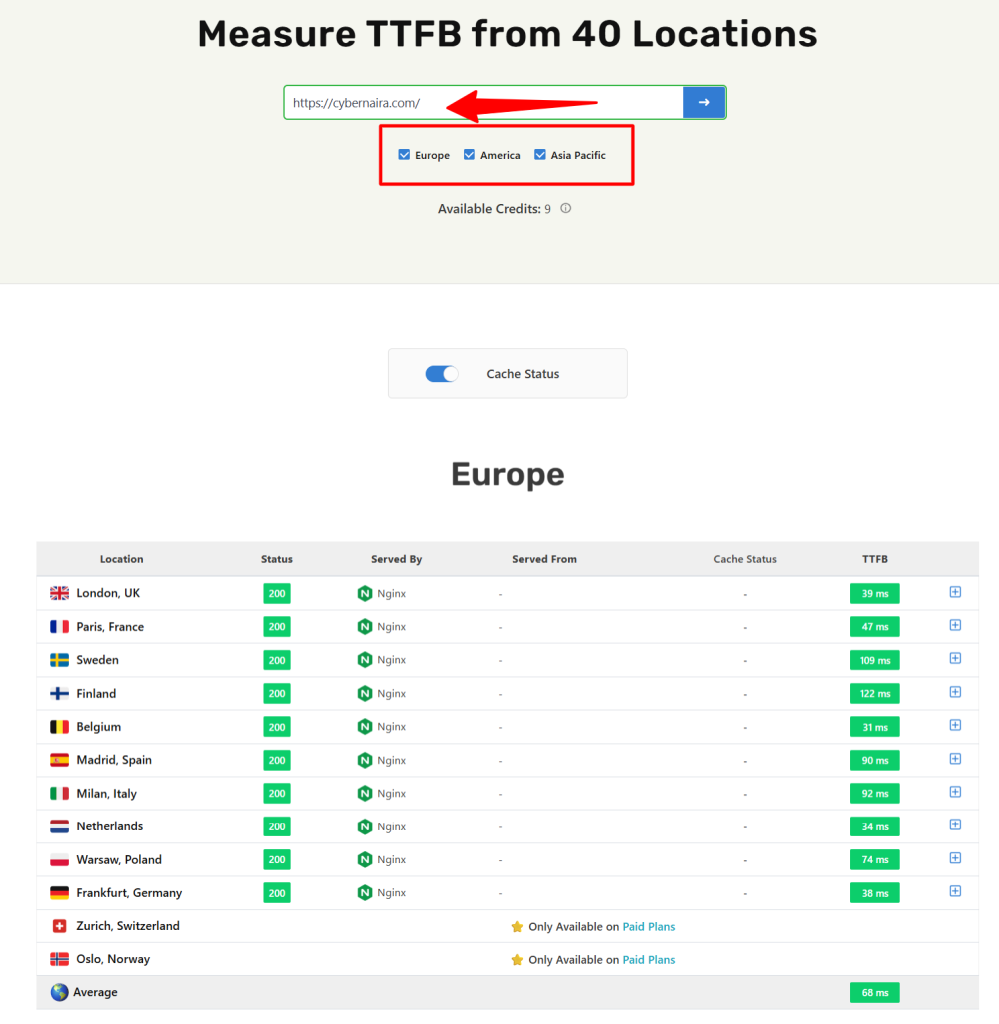
Next, the BIGGEST gain for me is the Time to First Byte (TTFB). On Cloudways, my former web host, I average 120ms time-to-first byte, which is still fast. But with Pressable, my average TTFB is 85ms (test with Speedvitals), which is incredibly faster.
This alone proves that Pressable server response time has helped my site load faster. DNS lookup, connection time, and server processing time all happen within a tenth of a second.
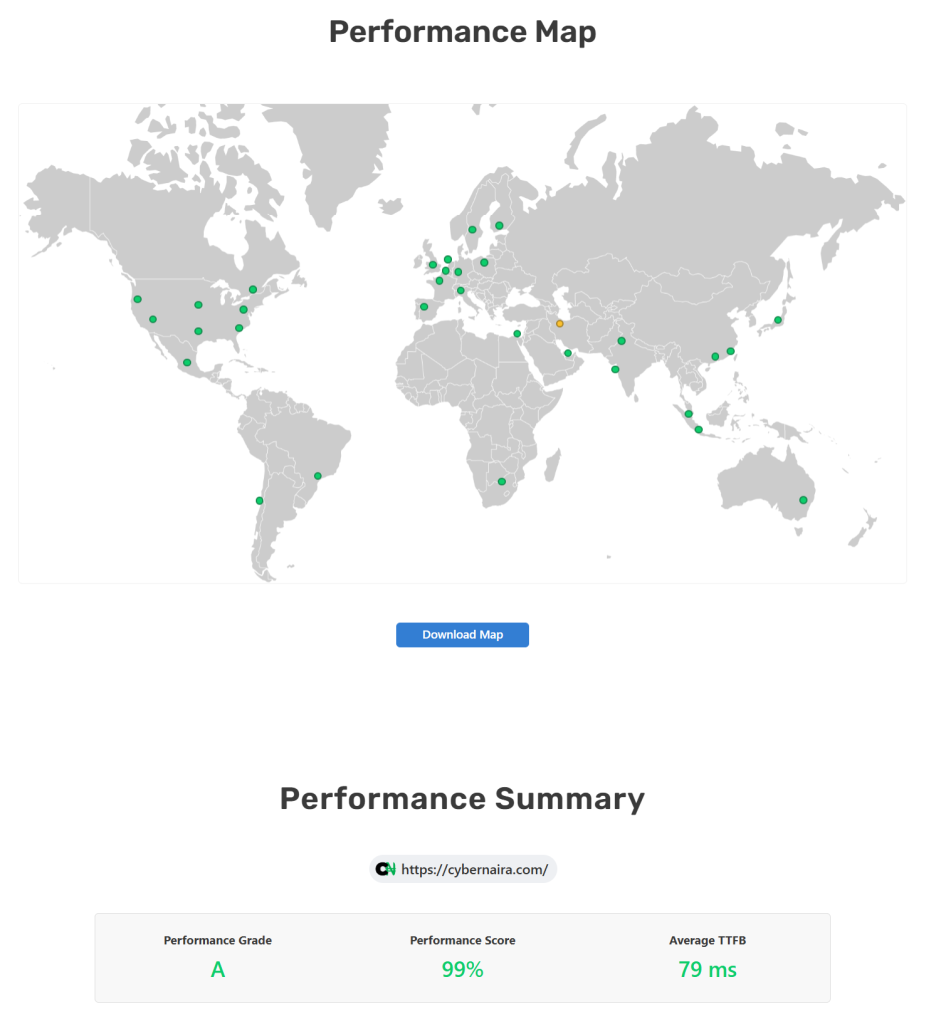
If you want to see the TTFB for individual regions, I have made it easier to review. Below is the average TTFB across nearly 40 areas in Asia, Africa, Europe, and America.
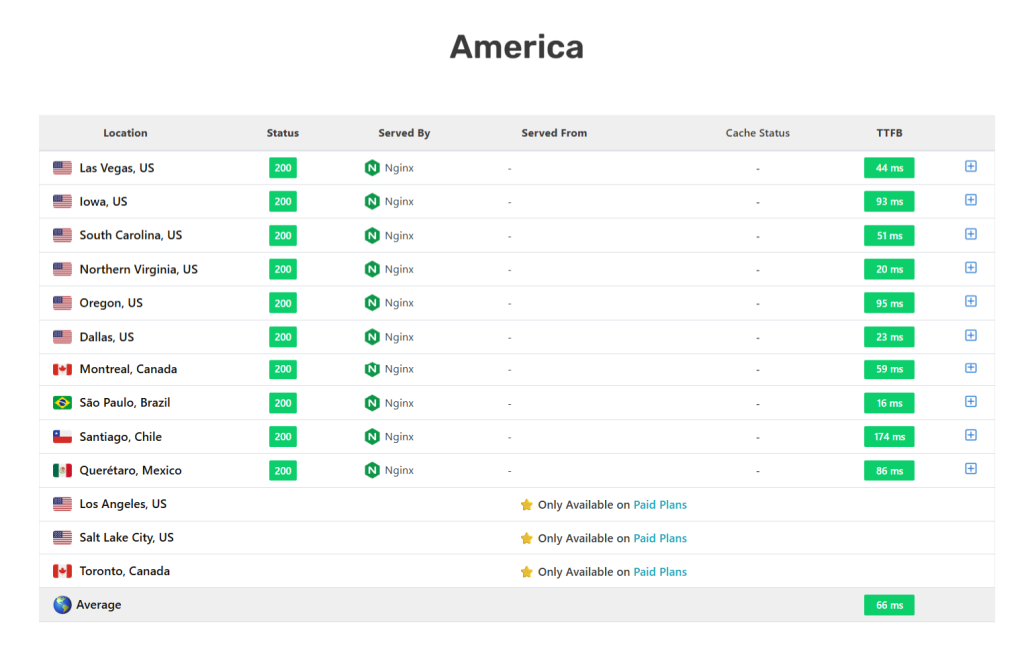

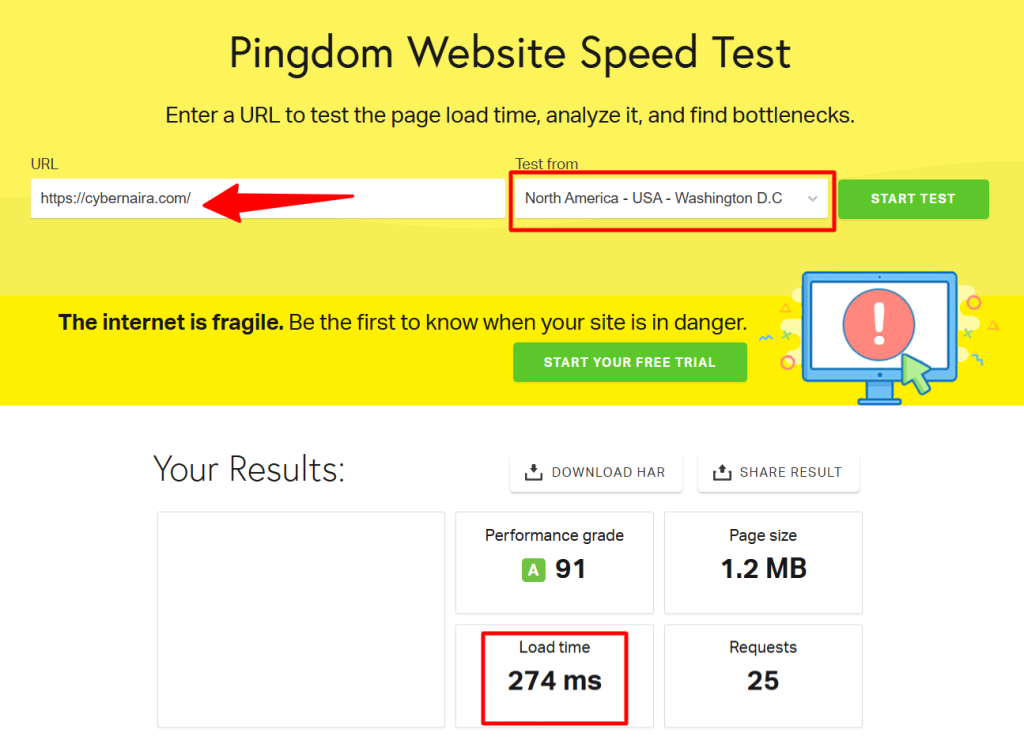
Apart from better TTFB, the average fully loaded time for the blog homepage was under one second for US-based visitors and international traffic. This test is from the Pingdom testing tool.
Note, aside from the Pressable’s built-in caching mechanisms and the edge cache CDN, I have WP Rocket enabled on the site.
While WP Rocket handles file optimization, such as removing unused CSS, optimizing CSS and JS delivery, preloading fonts, image optimization, etc. Its cache function is automatically disabled.
You can only use certain file optimization plugins with Pressable because of the way its server architecture is set up; caching plugins are not allowed. You can check the list of plugins not allowed in Pressable.
Another thing I notice since moving to Pressable is 100% server uptime. I haven’t experienced any downtime whatsoever. My blog is always available. I track this with NewRelic.
From my testing, Pressable delivers the kind of speed and reliability you’d expect from a premium managed WordPress host.
The fact that this performance is consistent without heavy manual optimization makes it appealing for both beginners and busy site owners who don’t have time to tweak settings.
Ease of Use and Dashboard Experience
Several things stood out to me when I first tried Pressable, but the dashboard’s simplicity is just one I cannot forget in a hurry.
Many hosting control panels are cluttered with dozens of buttons and settings you might never use. Pressable takes the opposite approach; you see only what’s relevant to running and managing your WordPress sites.
When you log in, you get a list of your sites with quick links/menus to important actions, such as opening the WordPress admin, OnePressLogin, the site performance report, the PHP version, IP addresses, and the date the site was created.
You have more menus on the left of your screen to open important sections or tools, such as plugin management, usage statistics, billing information, site management tools, API application and documentation, reports, etc.
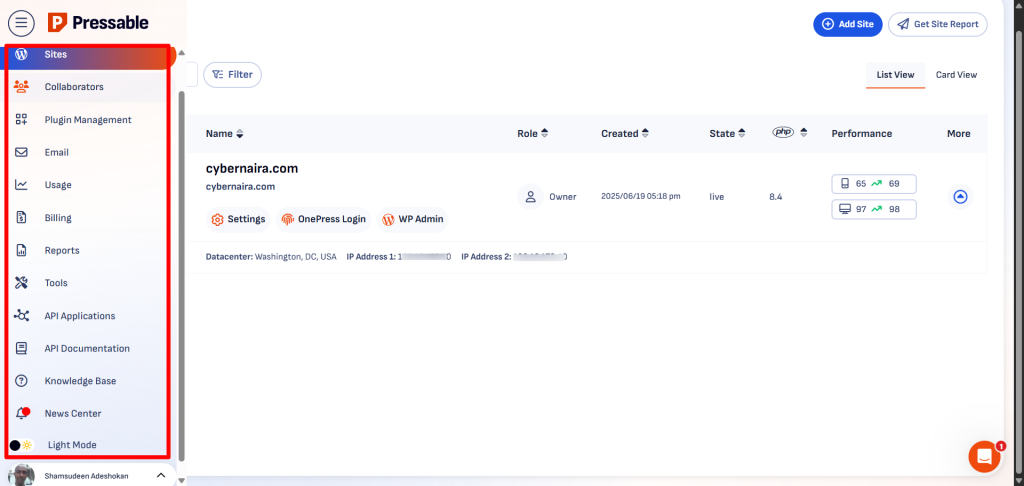
The dashboard has some interesting or helpful features worth discussing in this Pressable review.
Sites Tab
This tab is where you have most of the tools to manage your site. When you click Sites from the main menu, then click Site Settings, it opens a control panel to other tools.
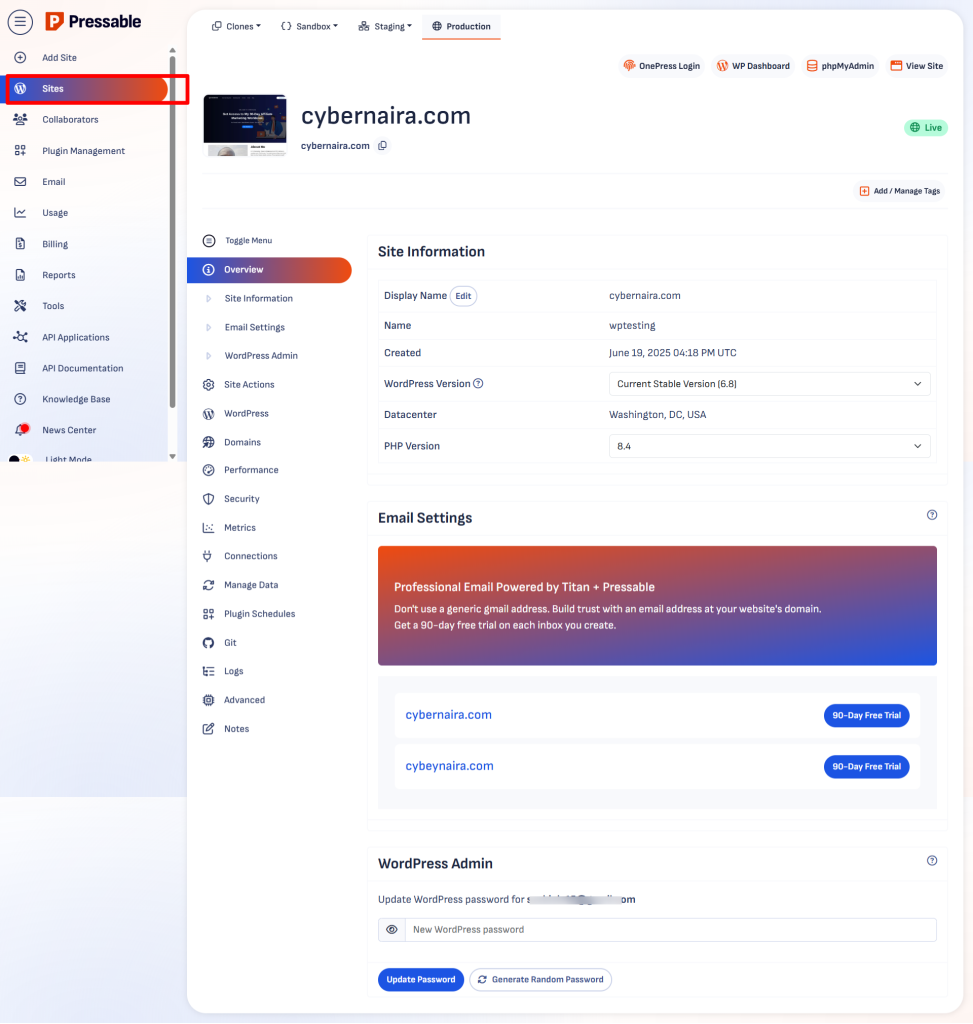
This is where you manage settings for domains and DNS, email, egress firewall rules, backup options, cache management, site performance metrics, server logs, and more.
Application Performance Monitoring
Application Performance Monitoring is a powerful diagnostic tool that lets you track performance issues and bottlenecks that might affect your site’s pages.
The good thing is that Pressable is not charging extra for it; the tool is available for all sites. You can enable it for 5, 10, or 30 minutes. Due to its impact on performance, 30 minutes is not recommended.
After tracking is complete, you can view the performance traces history in a new tab. First, it shows you a list of track pages on your site, with details such as timestamp, loading duration, span, and error log.
Then you can dig into the details by clicking a URL on the list. This gives you the opportunity to analyze the issue more deeply.
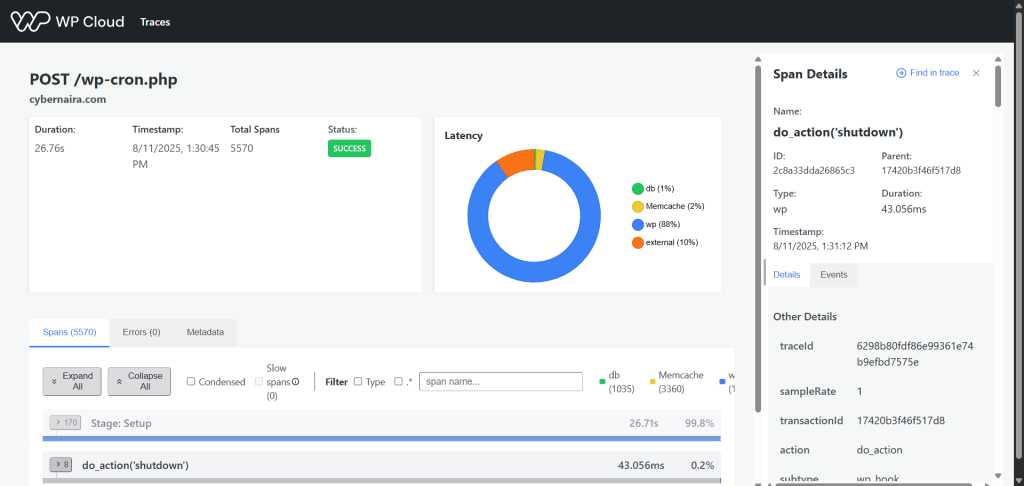
You can spot database queries that are taking longer to respond, plugins that are adding bloat, or loading on pages that are not required.
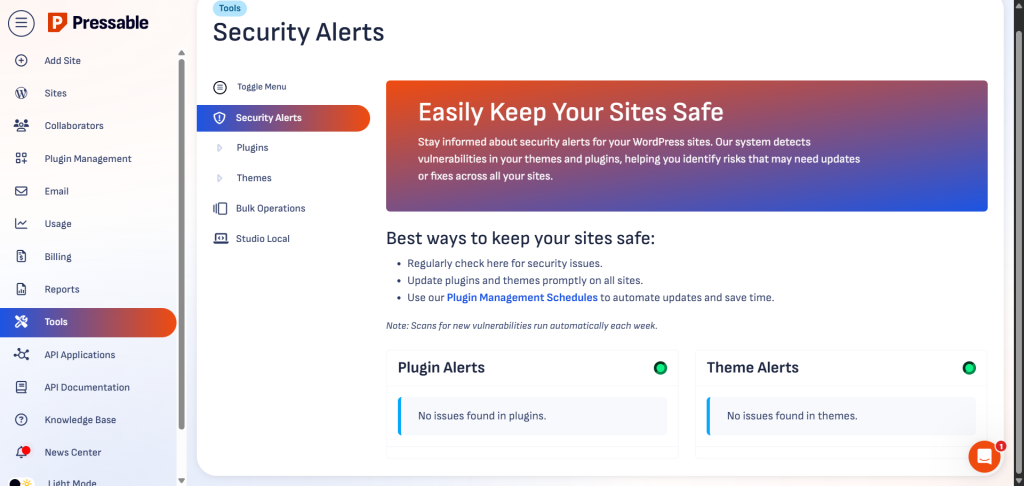
Tools Tab
From the tool tab, you can review the health status of your site’s plugins and themes. If there are any security or compatibility issues with your theme or plugin, you will see them listed here.
Cache Managements
Cache management is another important feature in your Pressable dashboard. You can enable/disable Edge cache, purge it, flush object cache, and even enable Edge Cache Defensive Mode.

The Edge Cache Defensive Mode provides extra security protection against bots and DDoS attacks. When enabled, the user’s browser will go through security checks before processing the page.
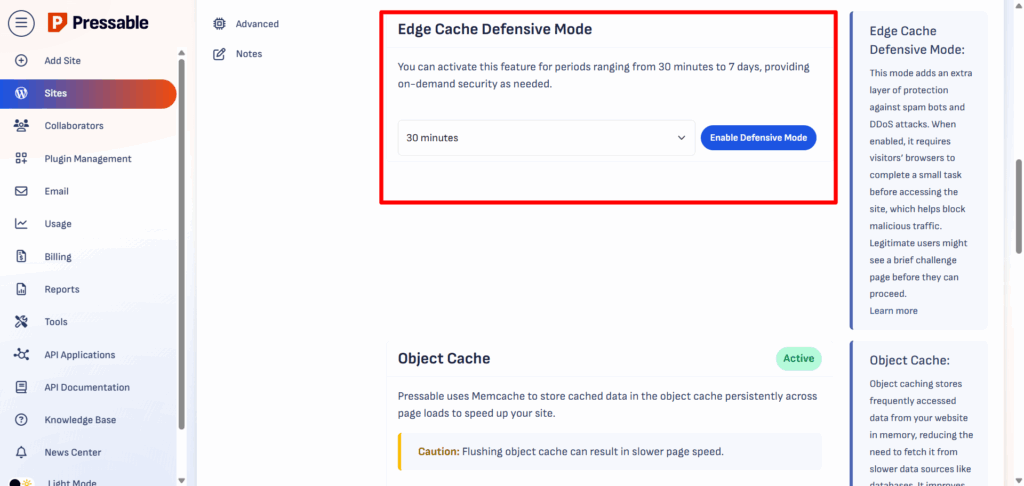
This ensures only legitimate traffic loads your site pages.
If you feel you need more control over cache management, such as monitoring which WordPress site actions triggered cache purging and setting the cache lifespan, you can download the Pressable Cache Management plugin. This plugin gives you more control over the cache settings.
LightHouse Performance Report.
Another highlight of the Pressable dashboard is the monthly LightHouse Performance report. You get a detailed Core Web Vitals report straight from LightHouse data.
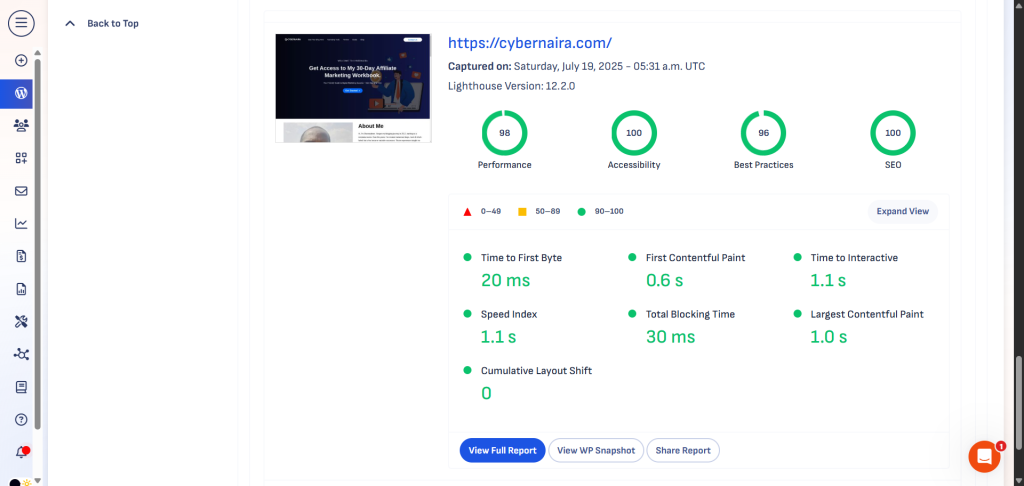
This can help you keep an eye on your speed and performance reports. It’s good to have your web host keep a regular speed and Core Web Vitals report handy.
Honestly, a lot is going on in your user dashboard that I can’t cover in the review of Pressable hosting. You just have to test things yourself.
Everything about the Pressable dashboard feels designed to save time. You don’t get lost digging through menus, and you don’t need technical experience to do everyday tasks.
Even if you’ve never used managed hosting before, you can get comfortable with Pressable’s interface in a single afternoon.
Customer Support Quality
Support is one of the biggest differences between managed WordPress hosting and budget shared hosting. With cheaper hosts, you often end up explaining WordPress issues to someone who mainly knows server basics.
The Pressable support team is made up of WordPress specialists who work with the platform all day. This is expected, since WordPress is owned by Automattic, the same company that owns Pressable.
Support is available 24/7 via live chat and via email follow-ups if needed.
My experience with the support so far is great. First, I’m connected to a real person on average within 4 minutes.
Then, my issues are addressed with the utmost care, and when performance tuning or deeper investigation is needed, the support never hesitates to jump in.
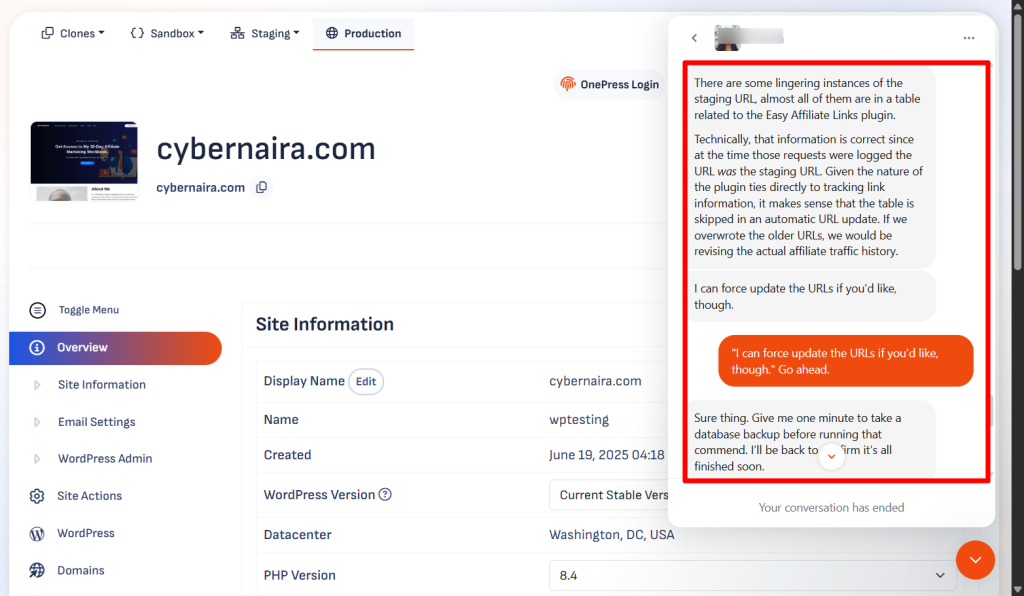
For example, after migration, I have issues with some staging URLs still lingering in the database. I couldn’t clean up everything using the Search & Replace feature.
So I reached out for support. After explaining my situation, they actually offered to help by digging into the database, taking a complete backup, and forcefully cleaning up all instances of the staging URL.
Though I never need this, Pressable offers a hack recovery assistant free services if your site ever gets hacked on their platform.
That alone made all the difference between a completely managed web host and a generic shared hosting platform. If you’ve ever been told “that’s outside our scope” by another host, you’ll appreciate the kind support Pressable provides.
Pressable also offers onboarding support, which is especially useful for agencies or store owners moving multiple sites. During onboarding, you can schedule time with their team to walk through site setup, migrations, or optimization tips.
They maintain a detailed knowledge base with guides on using the dashboard, optimizing WordPress performance, and troubleshooting common issues.
While I prefer live chat for urgent problems, the documentation is well-written and easy to follow when you want to solve something yourself.
Overall, Pressable’s support is responsive, knowledgeable, and genuinely focused on WordPress. If you rely on your site to generate income, having a team that can handle both server and WordPress-level issues quickly is a huge advantage.
Who Should Use Pressable?
Pressable works best for site owners who want managed hosting that handles performance, security, and maintenance without their intervention.
If you run a business website, you’ll benefit from the fast load times and uptime guarantee. Customers are less likely to abandon your site if pages load quickly and always stay online.
Agencies are a perfect fit for Pressable because the platform makes it easy to manage multiple sites from one dashboard. You can give clients access to their own sites without sharing your main login, and you can clone or stage sites quickly when building new projects.
This can save hours when managing a large client list.
If you run a WooCommerce store, Pressable’s infrastructure is built to handle the extra load from shopping carts, checkout pages, and dynamic content.
The ability to stay fast even during traffic spikes means you can run sales without worrying about your site slowing down.
Since Automattic owns both Pressable and WooCommerce, the hosting environment is naturally tuned for online store performance.
Bloggers and content creators who want a hands-off hosting solution will also find Pressable appealing.
You don’t need to worry about server updates, plugin conflicts, or website security patches; the hosting team handles those so that you can focus on publishing content.
However, if you have a small hobby site with no revenue goals, the hosting price might feel high compared to shared hosting. Also, if you prefer to tinker with server settings, Pressable’s simplified setup might feel limiting.
In short, Pressable is best for businesses, agencies, and eCommerce owners who want reliability, speed, and expert WordPress support without managing the technical side themselves.
Pros of Pressable Hosting
Cons Of Pressable Hosting
Pressable Alternatives
While Pressable has a lot going for it, it’s not the only managed WordPress host worth considering. Depending on your budget, technical needs, and the type of site you run, one of these alternatives might suit you better.
WP Engine
WP Engine is one of the most popular names in managed WordPress hosting. Like Pressable, it focuses on speed, security, and expert support.
It offers a wider range of developer tools, more built-in integrations, and a large partner ecosystem.
However, WP Engine’s pricing can be higher for similar resources, especially as your site traffic grows. For a more detailed comparison, check our comprehensive guide on Pressable vs WP Engine.
Kinsta
Kinsta is known for using Google Cloud’s premium-tier network, which gives it excellent global speed. Its dashboard is modern and user-friendly, and it includes advanced features like automatic database optimization and detailed analytics.
Kinsta also offers a broader selection of data center locations than Pressable. That said, its plans tend to be more expensive for smaller site owners.
And despite its more global datacenter and optimized Google C2 and C3 virtual machines, Pressable outperforms Kinsta in our detailed comparison.
Nexcess
Nexcess is another managed WordPress host aimed at small business owners, developers, and agencies. It has a beautifully simple dashboard, free migrations, and easy staging features.
Unlike Pressable, which focuses on WordPress and WooCommerce, Nexcess also offers managed hosting for Magento.
The advantage is that Nexcess offers more free website management tools, such as Astra Pro, iThemes Security, 10 PHP workers, page builders, Object Cache Pro, image compression, lazy loading, and domain email included.
When comparing Pressable to these options, the biggest difference is its close connection to Automattic and its focus on WooCommerce.
If your site is built on WooCommerce or you manage multiple WordPress sites for clients, that integration can make Pressable a better long-term choice.
FAQ – Pressable Hosting
Is Pressable good for beginners?
Yes. Even though it’s used by agencies, small business owners, and developers, Pressable is beginner-friendly. The dashboard is simple, WordPress comes pre-installed, and the support team is ready to help if you get stuck. You don’t need to know server management or advanced settings to run your site here.
Does Pressable offer free email hosting?
No. Pressable doesn’t provide free email hosting with its base hosting plan. You’ll need to use a separate service like PrivateEmail from Namecheap, Elastic Email, or try the Titan email hosting for 90 days via Pressable.
Can I host non-WordPress sites on Pressable?
No. Pressable is a WordPress-only host. If your site runs on another CMS or is a static HTML site, you’ll need a more general hosting provider.
How does Pressable handle traffic spikes?
Pressable’s cloud infrastructure can scale to handle sudden surges in visitors. For WooCommerce stores or sites running promotions, this means you can handle busy periods without slowdowns or outages
Does Pressable have a money-back guarantee?
Yes, Pressable offers a 30-day money-back guarantee on new accounts. If you’re not satisfied within that time, you can cancel and request a full refund.
Is Pressable better than WP Engine or Kinsta?
It depends on your needs. Pressable is especially strong for WooCommerce and multi-site management, thanks to its Automattic connection. WP Engine and Kinsta have their own advantages, like broader developer tools or more global data center locations.
Conclusion – Is Pressable Worth It?
After using and testing Pressable, I see it as a strong choice for anyone who takes their WordPress site seriously.
The speed, uptime, and security are exactly what you’d expect from a premium managed host, and the fact that Automattic owns it gives it a level of WordPress expertise you don’t always find elsewhere.
For business owners, the stability alone is worth the investment. You can run promotions, handle spikes in traffic, and update your site without worrying about slowdowns or downtime.
For agencies, the multi-site management tools and client access options make daily operations smoother and more professional. And for WooCommerce store owners, Pressable’s eCommerce optimization is a real advantage, especially during busy shopping periods.
That said, it’s not for everyone. If your site is just a small personal blog or you want the cheapest hosting possible, the price might not make sense. You also won’t find extras like domain registration or email hosting here; you’ll need separate services for those.
Overall, Pressable is worth it if you want hosting that “just works” for WordPress and you value performance, reliability, and responsive support. It’s not the cheapest option, but in my experience, it delivers the kind of hassle-free hosting that’s hard to put a price on.



Notice:
Your comment will end up in the trash folder if you spam our comment box. Use your real name, write meaningful and genuine comments. Avoid using keywords or brand name in the name filed and keep your comment relevant to the topic. Thank you.