

If you want to build a WordPress blog today, this is one of the most comprehensive and up-to-date how-tos for beginners you’ll ever find online.
After reading through this WordPress tutorial, you’ll be able to use the platform to build your dream business.
Irrespective of your age or technical skill level, this free WordPress tutorial is helpful for anyone looking to build a WordPress blog to run their business.
Here are a couple of things you will learn in this guide:
- How to find and register a near-perfect blog name.
- How to purchase the right web hosting for your blog
- Why WordPress is the right website builder
- What is a Blog Editor
- Working With Blog Editor
- Creating posts and pages
- Installing WordPress Themes and Plugins
- Publishing your first post
- Promoting your post
- WordPress speed optimization
- Free resources to make your post better and error-free
- And more
Building a WordPress blog today is easier compared to the early days of blogging. Unlike in the early 2000s, you no longer need to know a thing about coding to create a website.
Anyone can create a blog and succeed with it using free online resources. You don’t have to be technical or spend thousands of dollars to run an online business.
You can start a blog with less than $100 and grow with it.
For this guide, let’s start with the basics of building a WordPress blog correctly…
What is WordPress?
WordPress is an open-source content management system and website builder that lets you create websites without writing any code.
It is the world’s most popular CMS, with a large community of developers providing support and additional functionality.
WordPress is written in PHP and paired with MySQL and MariaDB. Its features include plugins and themes that let you add additional functionality, designs, and features to your website.
Since its initial release on May 27, 2003, WordPress has undergone numerous updates, making it possible to build any website.
Whether you’re creating a simple blog, business website, e-commerce store, forum, news site, membership site, or anything else, anything is possible with WordPress.
As of October 2021, WordPress powered 42.8% of the world’s top 10 million websites. In the CMS market, WordPress holds a respected 62% share.
Overall, WordPress now powers 43% of the entire web.

Why Should You Consider WordPress Over Other CMS?
Other content management systems, such as Blogger, Wix, Umbraco CMS, Joomla, Drupal, Squarespace, Shopify, Magento, etc… allow you to build and host your websites for free.
So, why are 43% of the world’s websites made with WordPress?
Here is why…
User-Friendly
Nobody wants a complicated theory or learning curve before using a tool. You want to get started as quickly as you can.
WordPress is the most user-friendly CMS out there.
You need only two things to get your WordPress blog up and running—a blog name and Hosting. Getting Hosting and a blog name doesn’t cost a lot.
Adaptation and Flexibility
Initially, WordPress was designed as a blog publishing platform, but thanks to regular updates and advancements, it has evolved over the years to adapt to any website’s needs.
Now, you can build any online business with WordPress. Whatever your website needs, WordPress offers adaptability and flexibility.
Regularly Updated
WordPress core updates usually happen two to three times a year, with several minor updates throughout the year.
The first public release of WordPress was on May 27, 2003.
Since then, WordPress has undergone numerous bug fixes and several major releases.
You can find the WordPress version update history here.
Supports
One of the advantages of WordPress over other content management systems is its community.
WordPress is supported by a large worldwide community of developers. As an open-source project, WordPress version 6.0 has attracted over 500 developers from 58 countries.
Talking of version 6.0, WordPress has been translated into 205 languages by local volunteers.
No other CMS dev community can rival this outstanding achievement.
Customization
WordPress makes it easy to customize. You can build stunning websites quickly with the help of WordPress themes and plugins.
With the new full-site editing features, you can now edit and customize every part of your website without touching your theme files or code.
SEO Friendly
WordPress makes it easy to manage on-page SEO elements that improve the experience for your site visitors.
You can easily manage the permalink structure, metadata, image optimization, and mobile optimization. Also, there are lots of third-party plugins and services to help you with content optimization.
We will get into that in a moment…stay on this page.
Integration
As an online marketer, you probably use many tools for everyday business. Many of these tools rely on third-party access for data analysis, functions, or efficiency.
WordPress integrates seamlessly with most (if not all) online tools.
You probably won’t find a tool that doesn’t allow WordPress integration.
WordPress.com vs. Self-Hosted WordPress
You must have heard of free and paid WordPress sites as a beginner.
Yes, there is a free WordPress blogging platform where you can build and host your website.
There is a self-hosted WordPress platform where you control your website management and ownership.
The option you choose depends on your business needs and goals. There is no right or wrong choice here; it depends on your digital marketing goal.
What you want to achieve with your website will determine whether you choose a free hosting platform or a self-hosted WordPress blog.
Let’s discuss the two blogging options to clarify and understand them.
WordPress.com
WordPress.com is a free platform for building and hosting your blog. It is for people who love hands-on systems to run online businesses.
Think of WordPress.com as a hosting platform for your blog and server management.
Spam filtering, backups, updates, security, and other blog technical tasks are handled in the background for you.
So you can focus on writing and promoting your content.
This is an ideal option for beginners to learn blogging and internet marketing.
However, there are limitations to what you can and cannot do with a free WordPress.com account.
For instance, on a free plan, you can’t install premium themes, you cannot stop the WordPress WordAds serving on your blog, and you cannot redirect a URL.
If you upgrade to the WordPress.com Pro plan, you can install custom themes, remove ads, and install plugins to further extend your blog’s functionalities, design, and features.
Unless you upgrade to a paid plan, your blog address will look something like mywebsitename.wordpress.com.
This is not user-friendly or advisable for a business website.
To remove this ugly-looking URL, purchase a custom domain name and link it to your free WordPress.com blog.
The major disadvantage of hosting with WordPress.com is that you must follow their rules. If you violate the terms of service, your blog might be deleted.
Also, the possibilities of expanding your blog features and functions are pretty limited compared to Self-Hosted WordPress sites.
Self-Hosted WordPress
Self-hosting your WordPress blog means installing WordPress on a host other than WordPress.com.
This gives you many advantages for your blog’s growth and management, allowing you to explore your blog’s features and unlock unlimited possibilities.
Though it also requires more work, it offers many benefits for running a custom, personalized blog business.
If you self-host your WordPress blog, your blog’s growth and expansion are in your hands.
There is absolutely nothing you cannot do with your blog. You have more resources and tools to help you build and grow your online business.
For example, compare a few thousand plugins available on WordPress.com to over 55,000 in the Self-Hosted WordPress.org platform…
You can see why many marketers prefer to host their blog elsewhere than on WordPress.com.
You have absolute control over your blog’s growth, monetization tactics, content, security, customization, marketing, leadership, etc.
If you’re serious about growing an online business long-term, the ideal option is to use a Self-Hosted WordPress site.
How to Build a WordPress Site – Beginner Guide
Now that we’ve discussed the initial steps to follow and understand before creating your WordPress blog, let’s dive into building a functional WordPress blog in 2023.
The rest of this article is based on a Self-Hosted WordPress blog.
I have prepared everything I know about the best WordPress tutorial you’ll ever need in this guide.
Following the advice, you’re one step closer to creating a successful online business.
1. Register Your Domain Name
The first step in building your blog is registering a domain name, or your blog’s address, on the Internet. Think of a domain name as your mobile phone number.
Without it, people can’t reach you by phone. You must purchase a mobile phone number if you want people to contact you via phone.
However, as simple as it may seem, choosing a blog name requires careful thinking and research.
While there are no right or wrong domain names, a short and memorable name will bring more value to your business. A lousy domain name might break your business’s reputation and image.
Let’s briefly walk through how to find the right domain name for your business. Read this comprehensive guide for a more in-depth look at how to name your blog.
How to Choose a Good Domain Name
I follow some rules when choosing a blog domain name: keep it simple, short, and memorable.
Your blog name should be easy to spell, say aloud, and remember and recognize.
If your blog name lacks these attributes, you might need to purchase a new domain name and set up a 301 redirect.
A good rule is to choose a two-word domain name. Three-word domain names are okay if they’re memorable and easy to spell and pronounce.
As a beginner with a limited marketing budget, you won’t find an affordable one-word domain name to purchase.
Those are very expensive and hard to find these days.
Unless you’re ready to bid on premium domain names, you won’t be able to purchase specific domain names like one word.com.
With that said, here are reputable domain name registrars you can patronize today:
2. Purchase Hosting
Without web hosting, your blog has no place to store its files and content on the internet.
Think of hosting as a plot of land you need to build your house. Without land, there is no space to set the concrete/blocks or whatever you need to make that house.
Here is another analogy, if that’s not clear enough…
After purchasing a mobile number, you need an actual phone to insert the SIM card. The phone is the Host that lets you pick up calls when people dial your contact number.
You can store songs, photos, files, apps, and videos in your phone’s storage and access them anytime.
In a nutshell, your phone storage stores everything for on-demand access anytime. This is what Hosting does to your website files and domain name.
Hosting is the online space you need to build your blog, and it becomes accessible when people dial its address. And there are hundreds of web host companies offering different kinds of hosting services and packages.
Your hosting plan will depend on many factors, such as your business needs, skills, budget, and website traffic level.
How to Choose a Good Hosting For Your Website
Your website needs are the first thing you should consider when choosing the right hosting plan.
If you’re starting with a simple blog, your options should be within the entry-level hosting plans.
As your website grows and traffic increases, you might consider moving to a second-tier hosting plan.
For a detailed overview of how to choose the right hosting plan for your WordPress blog, here are some factors to consider:
- Your website needs
- Hosting packages and features
- Add-on features and services
- Introductory pricing and Renewal terms.
- Refund policy and services guarantee
- Server uptime policy and guarantee
- Contract length – monthly subscription or annual
- Storage capacity
- Bandwidth limit
- Support
- cPanel features and availability
- Ease of use
- Built-in optimization features – cache
- Managed WordPress hosting
- Existing website traffic level – if you’re migrating an existing blog.
If you need to decide on the best affordable web host for beginners, here are some recommendations to consider today.
- Namecheap – beginner-friendly and inexpensive web hosting with quality services
- HostGator – affordable and beginner-friendly
- Hostinger – Perfect for low-budget website owners
- InMotion Hosting – A Flexible hosting plan that grows with you
- Liquid Web – Custom solution for a managed hosting plan
- Linode – Developer-friendly, cloud-based hosting solution
- Cloudways – perfect for advanced internet users
Different Types of Web Hosting
There are several types of web hosting services available today.
You can find the perfect hosting service for your business, from shared hosting to dedicated managed hosting.
For beginners, shared Hosting is the ideal option and the default plan to purchase.
Shared Hosting is cheap and easy to manage through a single central cPanel user dashboard.
However, there are downsides to shared hosting resources.
You share hosting resources with other websites on the same server. The features and resources you can use are limited.
For instance, most web hosts place limits on bandwidth usage and storage capacity. Also, you can host only a limited number of websites in a single shared hosting account.
But for most beginners, these limitations are not a concern. The minimum set of shared hosting features might be enough to meet your website’s needs.
As your website grows in traffic, content, and audience, you might consider migrating to a more resourceful hosting plan.
With that said, here are the five different web hosting types;
- Shared Hosting
- Dedicated Server Hosting
- Virtual Private Server hosting
- WordPress Managed Hosting
- Cloud Hosting
Which option is right for you?
You’re in the best position to answer the question.
You decide whether you need a dedicated hosting environment, managed WordPress hosting, or a Virtual Private Server.
Read my step-by-step guide on web hosting costs for more information on the best hosting plan.
3. Install WordPress
After registering your domain name and Hosting, installing WordPress, the blogging software, is next on the agenda.
If you’re on a shared hosting plan, installing WordPress might differ from installing WordPress on managed WordPress hosting.
However, the step will probably look familiar regardless of your hosting type. Since I’m a big fan of managed WordPress hosting, I will use EasyWP Namecheap hosting to show how to install WordPress the easiest way.
Here is a walkthrough video tutorial showing how simple it is to install WordPress on Namecheap EasyWP hosting.
If you prefer more detailed step-by-step instructions, here is my guide on installing WordPress and setting up your blog with the NameCheap EasyWP plan.
4. Choose a Theme
Your WordPress installation has a unique theme that looks plain and simple by default. You can keep it and continue, but…
It might not fit your branding, and your blog design won’t impress first-time visitors. Most importantly, you don’t want your blog to look exactly like everyone else’s.
So, you’d better opt for a custom theme – free or paid – the most important thing is the ability to tweak and the customization possibility.
If a theme gives unrestricted access to tweak and customize every part of the theme, you can make it yours and stand out from the crowd.
As of writing, the self-hosted WordPress has over 4,896 both free and paid themes to choose from.

Search for one that best fits your business goals and brand identity and is compatible with other blogging resources.
5. Install WordPress Plugins
Plugins add functionality and features to your WordPress blog.
It brings the full power of WordPress to the online community.
There is a plugin for any blog function you can think of. This is because there are over 55,000 plugins in the WordPress plugin repository.
There are hundreds of plugins to choose from, covering simple tasks like contact form builder to complex ones like website security, backups, e-commerce, and design.
For every WordPress blog, these plugins are some of the must-haves.
- Yoast SEO – WordPress SEO
- Jetpack – a multi-purpose WordPress plugin
- Akismet spam filtering
- W3 Total Cache
- WPForms
- Contact Form 7
- Gutenberg block editor
As a beginner, the temptation to install many plugins will eventually overwhelm you, and you must resist it.
Too many plugins on your blog are not an excellent on-page SEO best practice.
If you find a plugin that flawlessly executes multiple functions, don’t install separate plugins for each task.
For example, Jetpack is developed to handle multiple blog functions – image optimization, lazy loading, security, related posts, and shares – so you don’t need to install another plugin.
Also, some plugins are poorly coded and might negatively impact your host server.
So, before installing any plugin, read other users’ reviews, check the last update time, and verify compatibility.
6. Set up WordPress Permalink
Your posts and URL are essential to an on-page SEO and provide users with a better on-site experience.
Each page or post on your site MUST have a unique URL that users and search engines will use to access it.
WordPress provides five permalink options, including a custom option.
However, depending on the type of blog you’re running, I mostly use the custom option.
It allows me to define the permalink structure in a more user-friendly way, with better search engine value.
If you choose the custom option, you can define your URL structure using the page’s tags.

Going with /%postname%/ might be the better option for personal blogs that publish evergreen content.
The “Day and Name” permalink structure might be better for sites that publish time-sensitive information.
Other tags, such as author tag, post year, category, etc., can define your URL structure. You can find them on the WordPress permalink setting page.

If you want to read more on WordPress permalinks, here is a complete guide.
7. WordPress Optimization
Optimizing your WordPress blog for speed and performance is one of the most important aspects of blog management.
If your blog does not provide the best user experience, it will affect your search rankings, conversions, revenue, and engagement.
Most users expect a web page to load in under 3 seconds; if it takes longer, you might lose money to your competitors. To top it up, speed is one of the Google ranking factors.
There are lots of things you can do to improve WordPress’s speed and boost performance; here are a few of the known working tactics;
Choose a Quality Hosting Package
There is a reason this point has to come first in this section of this list.
No matter the optimization tactic or strategy, if your server is poorly configured or slow, you won’t benefit much from WordPress optimization.
Your WordPress site can never be faster than your host server’s performance.
So, the first thing to consider is choosing a quality hosting server. I have listed several web hosts on this page.
Review the list again to find the best fit for your needs and the current marketing budget.
If you seek my expert opinion, I will gladly recommend Pressable, Namecheap, Hostinger, Cloudways, or HostGator.
These are quality web hosts at affordable prices.
Always Update WordPress Resources
From WordPress core installation software, Themes, and plugins, always ensure you use the latest version.
Keeping your site up to date ensures you’re running the latest software version from its developer.
This also provides maximum security protection, enhanced performance, and bug fixes.
Your site should also use the latest version of PHP to ensure full compatibility with WordPress core.
If you’re unsure which PHP version you use, ask your web host. Alternatively, you can install the Site Health Check plugin.
Use Cache
The term “cache” might sound too technical for beginners, but it is pretty simple to implement on a WordPress site.
Several WordPress cache plugins automatically implement cache on your site.
You don’t have to do anything other than install, activate, and set it up.
If you’d love to learn more about Caching, here is a complete guide.
However, if you’re on managed WordPress hosting like EasyWP, Pressable, and Cloudways, you don’t need to worry about implementing a cache.
These web hosts build it with your WordPress installation software.
One benefit of having a cache system on your site is that it speeds up content delivery.
If your site implements a cache, WordPress doesn’t have to request information from the server for every request.
It can serve the user a copy of the cached pages.
Here are some of the favorite cache plugins to consider today, both premium and free;
- Jetpack Boost – I use it on this site
- W3 Total Cache – Free
- WP Rocket – Premium
- Litespeed cache – Free
- Super cache – Free
- WP-Optimize – Free
Optimize WordPress Images
Images are one of the biggest culprits for slow WordPress pages and often consume too much bandwidth and storage space.
Though images make your content look great and appealing, they can also slow down your pages.
You need to compress your site images for maximum performance and speed.
Again, there are WordPress image optimization plugins that handle all the heavy lifting and work great in specific environments.
You don’t have to use all of them; find the one that works best with your blog.
Some optimization plugins are not compatible with a particular hosting environment, so you might need to test before finding the right one.
Aside from plugins, there are online solutions that help you optimize images.
These solutions allow you to optimize your images before uploading them to WordPress.
You can resize and save different versions of your photos to your computer.
I highly recommend trying Imagify, an affordable online image optimization tool. It is free and works great for non-WordPress users as well.

For a list of recommended WordPress image optimization plugins, check out the WordPress.org plugins directory. Most of the plugins here are free.
Use CDN Services
Although information has become more digitalized today, the distance between the site user and the host server remains significant.
Content delivery network services like Cloudflare will help you create a consistent and faster experience for your site visitors.
But first, what is a content delivery network?
A content delivery network is a network of proxy servers in multiple locations worldwide that delivers content to users based on the nearest server.
A CDN is not a replacement for hosting; it helps cache content at the network edge to improve website performance.
Cloudflare is today’s most popular CDN. Notable brands like Samsung, Total Oil, and CVS Health Corporation use Cloudflare.
The good news is that a free Cloudflare account is all a beginner like you needs at this stage.
8. Create WordPress pages
Depending on the type of online business you’re running, you need to create several WordPress pages.
For most businesses, these pages are a must-have.
- Contact.
- About us.
- Policy Disclaimer.
- Supports.
Your website will have several pages if you run an online e-commerce business.
The pages you create should serve a purpose and meet the user’s needs.
And each page on your blog should target one keyword to increase its search ranking visibility.
Creating WordPress pages is not complicated; it’s simple.
Here is a step-by-step guide to creating pages in WordPress.
Navigate to the WordPress admin area and hover your mouse over Pages in the side menu. Click Add New to reveal all Pages and Add New menu options.
On the next page, write your page content and title.
After writing your content, editing, and proofreading, click the publish button to make it live on the blog.
In WordPress 6.0, the publish button is at the top-right of the page.
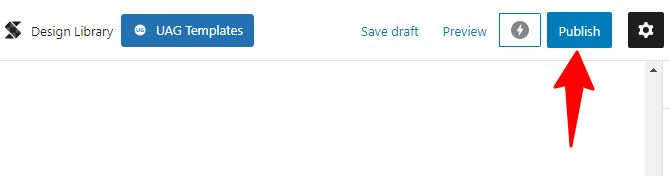
You can preview your content before hitting the publish button. This helps you see how your content looks before it goes live on the blog.
The preview button is right beside the publish button.
9. Publish Your First Post
Everything you’ve gone through is the foundation of running a blog, and the actual task starts when you start creating and publishing posts.
Like pages, log in to the admin area and hover your mouse on posts from the side menu to start creating posts in WordPress.
It will reveal four menu options: All Posts, Add New, Categories, and Tags.
You must click on Add New whenever you create a post in WordPress. The WordPress editor will be displayed on the next page, where you write and structure your content.
While there are no right or wrong ways to write a post, think of your users before publishing any position on your blog.
This is because you’re not writing to yourself but to solve a particular audience problem.
As a rule, always perform keyword research to determine the popularity and profitability of your content keyword. You need to do this before deciding on what to write.
Let keyword research be your guide and an integral part of your content-writing process.
Every piece of content published without keyword intent is a thousand potential free-traffic losses in the long term.
There are many keyword research tools today for everything keyword-related; Semrush Keyword Magic is one of the best.
You can sign up for the Semrush free account here and use the tool for as long as possible.
Publishing in WordPress has changed dramatically since the introduction of the block editor in WordPress 5.0, released in December 2018.
The famous classic editor is no longer available unless you specifically disable the Gutenberg block editor.
The Gutenberg WordPress editor is now the default option in WordPress.
Let’s briefly walk through writing with the WordPress block editor.
How to Use The WordPress Block Editor
The WordPress Block Editor is a new feature that completely changed how publishing on WordPress is.
If you’re not using it yet, it’s time to experience a new writing process that lets you write incredibly faster, more creatively, and more productively.
Now, you can build complex and stunning content designs without being a developer.
WordPress’s blog editor allows you to create, move, edit, and delete any section of the content body effortlessly.
There is a block for every content type you can think of, so you can make it look amazing.
You can have blocks for paragraphs, heading tags, images, videos, bullet lists, pricing tables, comparison tables, countdown timers, etc.
Each block has its own settings panel where you can make individual adjustments, such as changing the color, background image, margins, padding, border, and size.
The best part of the WordPress editor is that developers can create third-party blocks that you can access via plugins.
How to Add a New Block
You can add a new block by clicking the +Plus icon on the editor’s top menu bar or content area.
The +Plus icon on the editor’s satisfied site gives you access to previously used blocks, while the +Plus icon on the top bar gives you access to the entire block library.

Also, each block has its toolbar, which appears at the top.
The content of each block toolbar will vary depending on the block you’re working with.

Each block has a settings panel on the right side of the page. From the panel setting option, you can adjust individual block features.
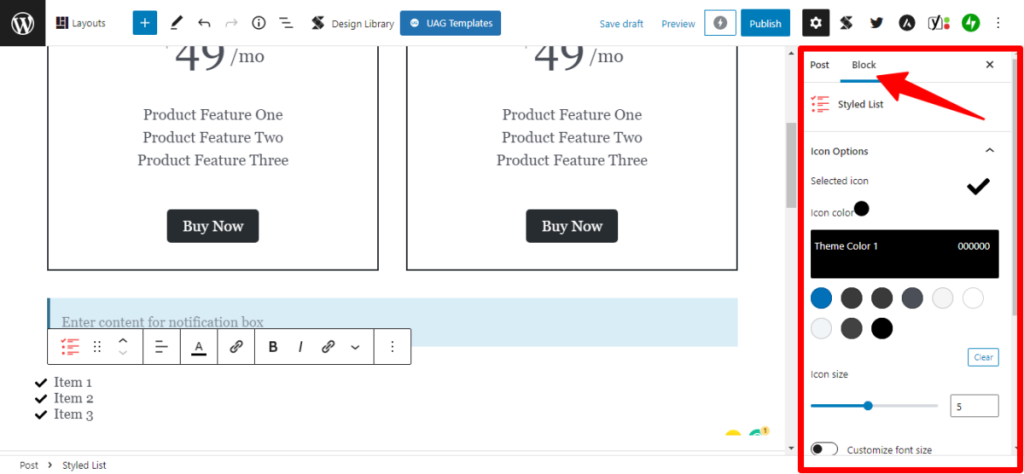
You can move or rearrange blocks in the order you want.
The up and down buttons lets you do that, or drag and drop a deterrent to your desired position.
However, as much as I would love to discuss the block editor in depth, an in-depth tutorial is beyond the scope of this article.
How to use the WordPress editor is a stand-alone tutorial.
Read this comprehensive guide for a more detailed tutorial on how to use the WordPress editor.
10. Promote. Promote. And Promote
If you’re not good at marketing, nothing about your business exists.
Marketing will get your valuable content to the front of your target audience.
If people are not reading, sharing, and engaging with your content, the chances of making money are slim.
Gone are the days when you publish content, and it goes viral on social media and the internet.
In today’s competitive marketing landscape, the fight for attention is intensifying, and marketers struggle to reach their target audience.
Before starting content marketing, you must define a clear strategy or plan.
This is important because content marketing takes time, but planning will help you get results faster.
There are two aspects of content promotion you need to understand and develop to build a successful blog.
The quality of the content and the promotional campaign strategy.
If your content quality is poor, no matter how good your marketing strategy is, it won’t yield better results.
You need to ensure your content meets your audience’s quality standards.
By getting these two aspects right, you can create valuable content for your audience and promote it through the proper marketing channels.
5 Tips to Promote Your Content
Here are five ways to promote your content today for maximum exposure and traffic.
1. Advertising
Advertising is one of the most effective marketing strategies for getting the word out. If you’re serious about building a business with your blog, advertising is one marketing plan you can’t avoid.
You can start with Facebook ads, which are cheaper than Google ads or other forms of PPC marketing.
Facebook allows you to boost a post from your business page and reach a wider audience.
This is a great way to build brand awareness and promote your content for maximum exposure.
2. Email Marketing
An email list is another must-have content marketing tool.
You start by signing up with an email marketing service provider, such as GetResponse, AWeber, or ConstantContact.
Then, you start collecting subscribers’ email lists.
To build an active email list of subscribers, you must offer your audience a relevant opt-in bribe. These could be an ebook, a checklist, content upgrades, a free trial period, etc.
It would be best to offer your target audience whatever is relevant in exchange for an email address.
3. Influencer Marketing
In every industry, influencers with loyal followers listen to and share their content.
If you can find one to collaborate with, it could bring a surge of traffic to your content for a one-time investment.
Influencer marketing is one of the most effective digital marketing strategies. People with loyal followers can be an incredible source of targeted traffic to your blog content.
However, as a beginner, finding influencers willing to collaborate with you can be challenging. You have to keep pushing and trying your luck.
I advise you not to go after big-time celebrities like Kim Kardashian, Cristiano Ronaldo, or Ariana Grande.
At this stage, you probably don’t have what it takes to get the attention of these people.
Go for social media influencers with audiences relevant to your blog topics.
People with a decent follower count but are insignificant to your marketing budget or reach.
Twitter is a perfect platform to get these people, and you can start your search there.
4. Build a Social Media Presence
Social media is an indispensable tool in today’s marketing world. Irrespective of your business type, social marketing is a must.
The question is, which platform will be the best fit for your type of blog business?
Facebook seems to be the default marketing channel for most websites and businesses.
But you don’t have to assume your business will perform better on Facebook; there are other social media platforms, such as LinkedIn, Pinterest, and Reddit.
Establish your presence on these platforms to see which will better fit your marketing and bring the most POI.
The good thing is that you can always track your marketing progress to see where your efforts are paying off.
Conclusion…
Creating a successful blog business is not all about hard work; it involves consistently doing brilliant work and doing the right things.
If you’re a beginner blogger, you have almost every tool and information you need to start your WordPress blog today.
This is one of the best WordPress tutorials you will ever find online.


This is a very detailed and informative blog. I have a blog built on WordPress and fully agree with you that it is worthwhile having a blog. Thank you.
Hi Phillipe,
Thanks for reading through. Glad you like it.
WordPress is by far the number 1 CMS. It’s easy to use and free. Like anything else it requires some practice but once you get the hand of it you really can build a beautiful blog within a few days.
Just be careful of installing too many plugins. I agree with Shamsudeen that you should resist the temptation and only install plugins from trustworthy sources and that are absolutely necessary.
If I may, while I agree with the recommended plugins in this article, I would also like to offer an alternative for SEO that I found extremely good, that is RankMath.
Hi Jon,
RankMath is one of the rivals of the Yoast SEO plugin. It’s popular too and used by many. Thanks for reading through.
Hello Shamsudeen,
Great post as usual. WordPress is no doubt one of the best CMS for blogs. It has huge features and benefits to using it. I am a big fan of WordPress since 2015. You have shared some practicle and helpful tips to start a WordPress Blog.
Regards,
Vishwajeet Kumar
Hi Vishwajeet,
Thanks for reading through and for sharing your thoughts, too. Like you, I’m a big fan of WordPress. It’s been the only CMS I ever built with.