

Website builders like WordPress, Weebly, Wix, and Squarespace are great. They’ve eliminated the complexity of building websites in the 2000s, when you had to be good at coding, use web development programs like Dreamweaver, and spend weeks building a site.
Yet, as advanced as website builders are, AI website builders claim to be more advanced and let users design and launch a production site in less than 10 minutes.
How true or good is that?
No-code website builders with AI claim to simplify design, layout, pages, graphics, and even content creation, offering a fast solution for entrepreneurs, small businesses, and creatives.
However, from experience, I can say that only a handful of the best AI website builders truly achieve this.
This article reviews five AI-powered website builders and how they can help you save time.
Do You Need an AI Website Builder?
Although I’m not a skilled web developer, I’ve created a handful of sites using content management systems like WordPress and Drupal, as well as artificial intelligence website builders like ZipWP, Framer, and Kadence AI.
In my opinion, we are still far from 100% handing over website design to an automated website builder generator.
Most of the AI-powered web design tools I’ve used require significant human input to truly build something worthwhile and unique. However, they’ve really cut the time in half, in some cases, ¼.
Website builders with AI assistant capabilities are designed to help users with minimal tech skills create attractive, functional websites quickly.
They are particularly useful for small businesses, freelancers, and anyone who needs a professional site but lacks the time or budget for custom web development.
Again, AI website generators are useful for web development agencies that need to build dozens of sites for clients as quickly as possible. Then, they spend less time customizing them to add uniqueness and a professional touch.
This has already reduced development time in half and allowed agencies to focus more on marketing and other highly valued aspects of the business.
Overall, don’t expect an automatic website design tool to build you a working site you can run without further customization or rewriting the content.
You’ll still have to customize layouts, edit template parts, rearrange navigation menus, set color schemes, upload relevant images, and launch the site.
What to Look for in an AI Website Builder
Among the things I learned about AI website creation platforms is that they vary in their levels of success, intelligence, and expertise.
Some no-code AI website builders are more powerful and advanced than others.
If you give the same prompt to different AI website design tools to build your site, the outcome will vary significantly.
Some acclaimed top AI website builders are just a frontend for prompt, connected to OpenAI’s API, and use white-label WordPress theme developer services.
In reality, such a process involves editing a standard classic template, uploading stock images, and adding AI-generated content. The outcome will be good, but maybe not quite good enough for what you’re looking for.
A natural language processing tool that claims to build websites shouldn’t just be an AI; it should be a website developer that leverages artificial intelligence technology.
This way, you’ll get the best of both worlds – the speed of AI and the skill and experience of a web developer.
So, what makes the best AI website builder?
Build Custom Site
For an automated website design tool to truly be worth its cost, it should be able to create unique site layouts, which is difficult with template-based themes.
One reason to use AI to design websites is to create unique, jaw-dropping designs without the high cost. The design process should feel more like working with a human developer and creating something that’s not commonly found everywhere.
Build a Professional Website With Ease.
When we are talking about AI technology, the site design generated by AI should reflect concepts that are ahead of their time, not a design concept left behind in the late 2000s.
Also, while the AI site builders generate stunning designs, the process should be as seamless as possible.
Performance and SEO
There’s something that makes WordPress themes such as Astra, Themeisle, Divi, and Kadence so popular: a lightweight design and strong SEO optimization.
AI shouldn’t focus solely on design speed and customization; instead, it should build a site that supports SEO. Basic design practices such as proper use of H tags, clear navigation menus, clean code, schema, and an uncluttered style should be a priority.
Easy to Customize
The whole idea of using a website builder with AI to create a fully functional site centres around simplicity, speed, and an effortless design process.
The first draft or complete AI site generation should be customizable, straightforward to edit, and allow you to change layouts and design elements without having to wander around to figure things out.
There’s no point in spending countless hours modifying AI outputs when you can build the site yourself in less time.
Integration
Some AI site builders directly integrate with the WordPress customizer, making it easier to design your site within WordPress.
However, I have used a few standalone AI website builder platforms that require you to export your AI site generations to your hosting server.
Whatever the process, seamless integration is indeed a crucial factor.
Best AI to Create a Website
As I test other machine learning website builder tools, I will update this list to document my findings and experiences. So, expect the list to change from time to time.
For now, here is my top choice.
1. ZipWP
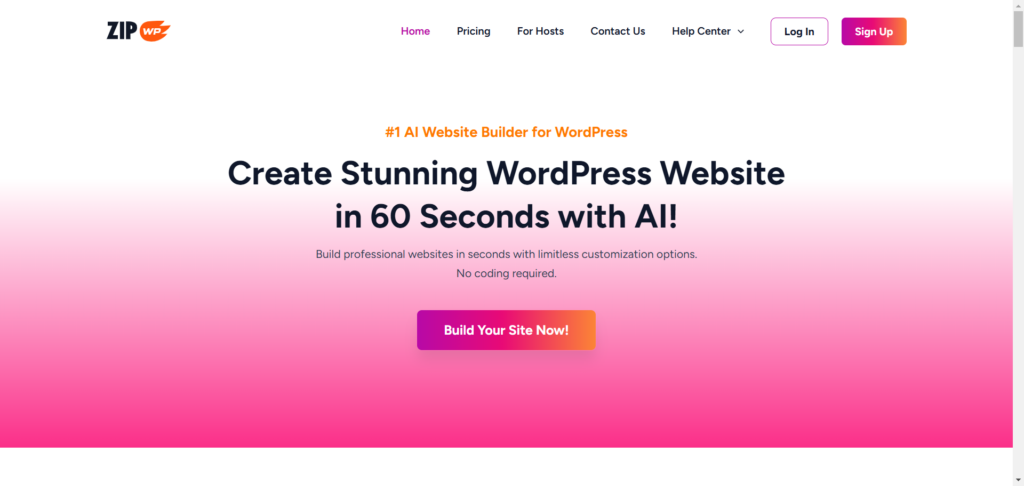
My feelings for ZipWP are love at first sight. It was like, this is the AI website builder I’d been waiting to try.
ZipWP is one of the AI-powered web development tools from Brainstorm Force, the company behind the Astra theme, SureTrigger, SureCart, SureFeedback, and the Spectra page builder.
To build a site with ZipWP, you need to supply a little information about your business, niche, industry, target audience, and more.
This isn’t like prompting AI to generate a generic website design; ZipWP actually builds a site that matches your niche, interests, and color and designs layouts with relevant pages, images, and content.
More than a template editor, ZipWP works with the Astra theme, Starter templates, and Spectra page builder to create professional, unique website designs.
With this combination, ZipWP lets you customize design features such as color palette, typography, layouts, images, and the footer. You can do these during the design process. So, you have a site that matches your imagination.
You can see that from the collection of AI sites it generates. The site design, layouts, visuals, and sections vary from template to template.
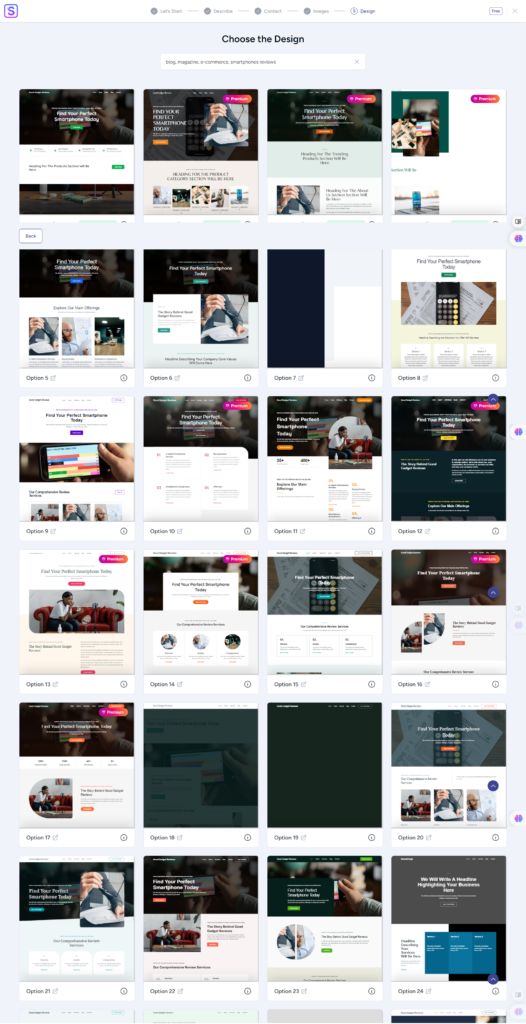
Also, ZipWP considers whether you’re building an e-commerce site, a portfolio, a business website, or a personal blog. ZipWP might recommend installing additional plugins, such as SureCart and SureTrigger, depending on your projects.
These plugins add eCommerce and automation functionality to your site.
Another advantage of using ZipWP’s automated website design tool is that you can create your site in a staging environment. From the ZipWP website, you can make a blank WordPress site with admin access or generate a complete site with ZipWP AI.
When you are ready to launch the site, use the export/import feature to move the complete staging AI site to your hosting server.
ZipWP features that make it a standout AI website builder include 1,000 AI credits for free users, staging sites, SSH/SFTP access, site cloning, PHP version control, and more.
Check the ZipWP website for details on features and subscriptions.
I have reviewed ZipWP in this post, where I go more in-depth and explain things better.
2. Kadence AI
The last time I tested the Kadence no-code website builder, it didn’t really impress me. The AI-generated site doesn’t match the quality of the classic Kadence theme.
However, while researching this post on the best AI website builder for beginners and agencies, I tried the Kadence AI website design tool on a clean WordPress installation.
This time, the AI-generated sites were more polished and refined, with varied layouts, designs, and aesthetics. Still, some of the template graphics look like something built in 2009.

If you want to use Kadence AI to build your site, get the Essential bundle plan. This plan gives you access to Kadence Theme Pro and Kadence Block Pro, Pro templates, and custom fonts.
With this combination, you get stunning AI-powered site templates and advanced control for further customization.
Unlike ZipWP, Kadence AI works directly in WordPress, uses the Kadence theme, and doesn’t require exporting your site to a hosting server.
Plus, you get 250 AI credits for content generation. Kadnece AI uses these credits to generate your website copy during the design process.
Overall, Kadence AI is a good AI website builder for beginners and those looking to quickly design a website on the weekend and launch it on Monday morning without bothering much about unique designs.
Check the full review and my experience building a site with the Kadence AI site design tool.
3. Replit

When I first tried Replit’s AI website builder, I honestly expected something pretty technical – maybe even intimidating. Replit is best known for its coding environment, after all. But this tool? It completely flips the script.
Instead of dragging blocks or picking from stiff templates, you just type in what kind of site you want. Something like: “A sleek personal portfolio with a contact form, three sections, and a bold hero image.”
And in seconds, Replit spins up a working, live site that looks modern and actually functions. Not just placeholders — real code, real structure, and professional layouts.
One thing that caught my attention was how easy it is to tweak the site. You just click on an element – a button, heading, image, anything – and describe the change you want. There’s no sidebar full of settings or tabs to dig through. It’s shockingly fast and kind of addictive.
Replit’s builder also works from your phone, which I thought was a gimmick until I actually used it. You can build and publish a site right from your couch or while you’re waiting in line at the coffee shop.
That’s not something I’ve seen with tools like ZipWP or Kadence AI.
And while it’s 100% no-code, Replit still gives you access to the code if you want it. So if you’re someone who likes a bit more control, or if you have a developer on your team, you can go deeper and customize anything under the hood.
Replit is ideal for quick projects, startup launches, or even client work. You can connect a custom domain, deploy instantly, and iterate as much as you want without messing with hosting or WordPress. It’s like having a personal AI web developer on call 24/7.
It doesn’t replace traditional site builders for everyone, but if you want speed, flexibility, and a better experience than dragging blocks around, Replit might surprise you as it did me.
4. SeedProd AI Website Builder

SeedProd is a popular WordPress theme and page builder plugin. It is well known for its powerful, advanced conversion-focused landing-page drag-and-drop builder. When I first heard of their AI website builder, I was excited to try it out.
It works similarly to ZipWP: you build your site on the SeedProd AI site-creation platform, then export and import it into your WordPress site. This process makes creating the AI site more convenient and ideal.
But does SeedProd compare to ZipWP? I don’t think so.
The SeedProd AI website builder is still in development, and I think the developers are working to address the product’s rough edges.
Though SeedProd generates an AI site in under 20 seconds, the design, graphics, and layout are out of place in today’s modern, user-centric digital world. The site looks like something from the past; it doesn’t meet the demands and expectations of today’s Internet users.
Anyway, SeedProd AI website builder might be a good option for beginners or for those who want to create a simple hobby website.
If you require a more professional business website, consider getting a SeedProd paid license and using the theme or page builder templates for your project.
5. Jimdo

Jimdo is another fantastic website builder that utilizes AI technology to speed up design and customization. Its drag-and-drop page editor makes it easier for beginners to create stunning website designs with AI assistance.
Like most AI website builders, Jimdo asks for relevant details about your business, industry, mission, and design choices. Within a few seconds, your auto-generated AI site has relevant pages, including policy and cookie information pages.
One of the things I love about Jimdo is the ease of customization. You can easily add block sections by just pointing your mouse to where you need to include the element.
For this example, let’s add an element to the top of the page, right under the first header section.
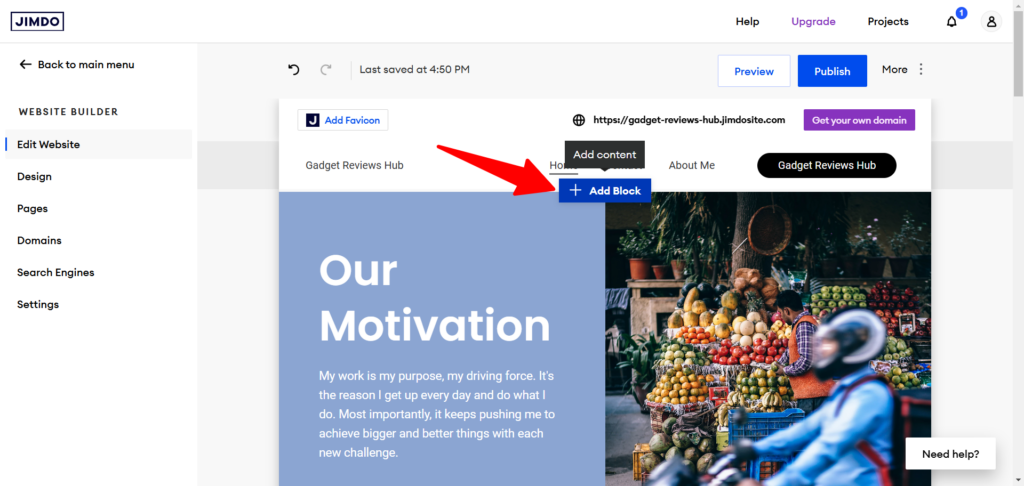
Pointing my computer mouse to the area revealed the + Add Block option. Then I click it to open the Block options on the left.

From here, I can add any block to the design by clicking on it.
Customizing your Jimdo AI site is effortless. You can click on any element to access its controls and options.
Jimdo offers more advanced features, such as Google Analytics integration, an eCommerce site, a 404 page, a pop-up cookie banner, and the option to connect your Jimdo site to a custom domain.
The overall user experience is pleasing, and Jimdo offers a solid foundation for quickly deploying website pages in seconds.
Editor’s Pick
As I said earlier, building a website with AI shouldn’t be like an AI, but a web developer leveraging AI technology to enhance productivity and achieve more in less time.
Using this approach, ZipWP fills the boxes and checks all the marks. When you create a site in ZipWP, you’re not just building a template-based WordPress site, but you’re actually building a website that represents your brand identity.
I love Jimdo’s simplicity in customization, but it’s not up there with ZipWP. You could spend more time customizing the AI site created with Jimdo than you would with ZipWP.
ZipWP tends to create more complete sites that require minor editing before launch.
I wouldn’t recommend Kadence AI for any professional or business website projects. It is better for personal or hobby sites. The classic Kadence theme is a better solution if you’re not concerned about getting a head start using an AI website template.
For comprehensive information about the Kadence classic theme, check my review.
FAQs
What is the best AI to use to create a website?
The best AI website builder for you will depend on factors like ease of use, design options, and specific customization needs. Here are some top AI-powered tools for website creation:
ZipWP – This builder leverages AI to generate a website layout and content almost instantly based on your input. Ideal for users who need a quick setup, ZipWP offers customizable templates to help you personalize the generated website structure.
Kadence AI – Known for its clean, modular designs, Kadence AI integrates with WordPress and helps users create visually appealing sites. It offers customizable options, allowing more control over your website’s look and feel with minimal manual setup.
Hostinger – The Hostinger AI suite includes tools for text generation, image selection, heatmap, SEO, and logo design, making it a versatile option for those who want a well-rounded website builder focusing on branding.
Jimdo – Jimdo’s AI assistant, “Dolphin,” guides users through a series of questions to quickly build a personalized website. This user-friendly tool provides a straightforward experience, especially for small business owners or portfolio sites.
Each of these builders offers unique features tailored to different needs, from quick site generation to more design-focused customization.
Can ChatGPT build a website?
ChatGPT itself cannot build a website directly, but it can be a valuable tool for creating parts of a website, such as generating content, logos, drafting code snippets (HTML, CSS, and JavaScript), and answering questions about web development. You can use ChatGPT to help create a framework or understand certain coding concepts, but you’ll still need a website builder or coding knowledge to assemble the site.
How long does ZipWP AI take to generate a website?
ZipWP AI is designed to generate websites quickly, often within 60 minutes. The platform uses prebuilt templates and AI content generation to create a basic, ready-to-customize website structure, allowing users to get an initial setup quickly.
How can I make a website with AI for free?
Some website builders offer free versions or trials with limited features. For example:
Wix and Weebly offer free plans with AI design tools, although the free versions typically show platform ads and use subdomain URLs. Hostinger’s AI tool offers a free trial with limited customization, making it ideal for testing the platform.
ZipWP also offers limited free options, allowing users to create 2 staging sites and 2 AI-generated websites with 1,000 free credits. However, you won’t be able to export your site, and upgrades are required to enable more advanced features. These tools can create an essential website, but upgrading to paid versions often unlocks more custom features and removes ads.


Notice:
Your comment will end up in the trash folder if you spam our comment box. Use your real name, write meaningful and genuine comments. Avoid using keywords or brand name in the name filed and keep your comment relevant to the topic. Thank you.