

Can AI really design a website from start to finish with minimal human input? The answer is a resounding yes.
If you doubt it, you’re not alone.
I once thought it was impossible for artificial intelligence to design a professional website. Considering all the technicalities and intricate customization options for building functional web pages.
However, the Astra AI website builder, ZipWP – the most powerful AI web designer software on the market – cleared my doubts.
I recently launched a test site and decided to play around with ZipWP. My experience has been nothing short of mind-blowing.
This is why I decided to write this ZipWP review, sharing my detailed experience and how you can quickly build any website using AI.
ZipWP AI

Discover how ZipWP, the AI-powered website builder, simplifies creating professional websites in minutes. In this review, I explore its features, ease of use, and whether it’s the right tool for building stunning sites effortlessly.
Price: 26.99
Price Currency: USD
Operating System: Web
Application Category: Website Builder
4.17
What is ZipWP?
ZipWP is an AI-powered website builder designed to simplify creating WordPress websites.
It automates much of the website design and development process, allowing users to quickly generate a fully functional website by providing minimal input, such as the type of site they want to create or a few preferences.
It integrates with the Astra theme and Spectra page builder, allowing you to effortlessly create a unique website design. With this integration, you can customize further using the WordPress customizer or Spectra design elements.
Key features of ZipWP include:
- AI-Generated Websites – The tool uses AI to create complete WordPress websites in minutes, including design, layout, images, and unique blog content.
- Customization Options – Users can tweak the AI-generated website by editing design elements, content, layouts, and features to suit their needs.
- No Coding Required – ZipWP is designed for users without technical expertise, allowing them to build professional websites without writing code. It also benefits freelancers and web development teams, enabling them to serve more clients, reduce costs, and maximize resources.
- Content Suggestions – The AI provides ready-made content that can be customized to match the user’s brand, speeding up the site launch process.
ZipWP is ideal for businesses, freelancers, and individuals looking to launch websites quickly with minimal effort. Imagine being able to deploy a fully designed and functional WordPress website in a matter of minutes.
Whether it’s an eCommerce site, a business, SaaS, an affiliate website, a membership, etc., ZipWP AI builds it quickly.
I will show you how to build a ready-made WordPress website in under 3 minutes using the Astra WordPress theme and the ZipWP AI website builder.
How to Build a Website with ZipWP
Using the ZipWP AI website builder, you can create a website in two ways. Your choice depends on your specific needs.
You can create directly on your WordPress website or use the ZipWP website.
Using your website allows you to launch immediately, whereas building with the ZipWP website requires moving your ZipWP website to your hosting server once it is finished.
Because ZipWP does not host your website, it is not a dedicated hosting solution for live websites.
ZipWP now includes hosting as part of its plan. You can choose to either subscribe to the website builder plan only or add hosting to your subscription.
I discuss how to go about both options in the next section. So, read on.
Signup for an Account
Whatever option you choose, you must create an account before you can use the ZipWP AI website builder.
So, sign up here for a free account, which gives you 1,000 free AI credits, two AI site creations, and access to create a temporary staging WordPress site that expires in 24 hours.
If you need more AI credits and feature access, ZipWP has a tiered plan you can choose. I discussed them in this post.
Create Your ZipWP Site
Now that you’ve created your ZipWP AI account, it’s time to start building your AI-powered WordPress site with readymade content and assets.
As I said above, if you already have a hosting account, log in to your WordPress admin and download the Astra theme and Astra Starter Templates. Once you activate the Astra Starter templates, you will be taken to this page.

Click the Built With AI button.
On the next page, click “Let’s Get Started. It’s the “Free” button.

You will need to connect your website to your ZipWP AI account. To do so, follow the prompt below and click the Continue button.

Describe Your Business
The next step is to describe your business in great detail. This is where all the magic happens.
You need to be as thorough as possible in feeding the ZipWP AI with as many details as possible about your business. However, you don’t need plenty of text or words to do this.
This whole section requires just five steps to walk through.
In step one, you need to enter a few basic details about your business website.
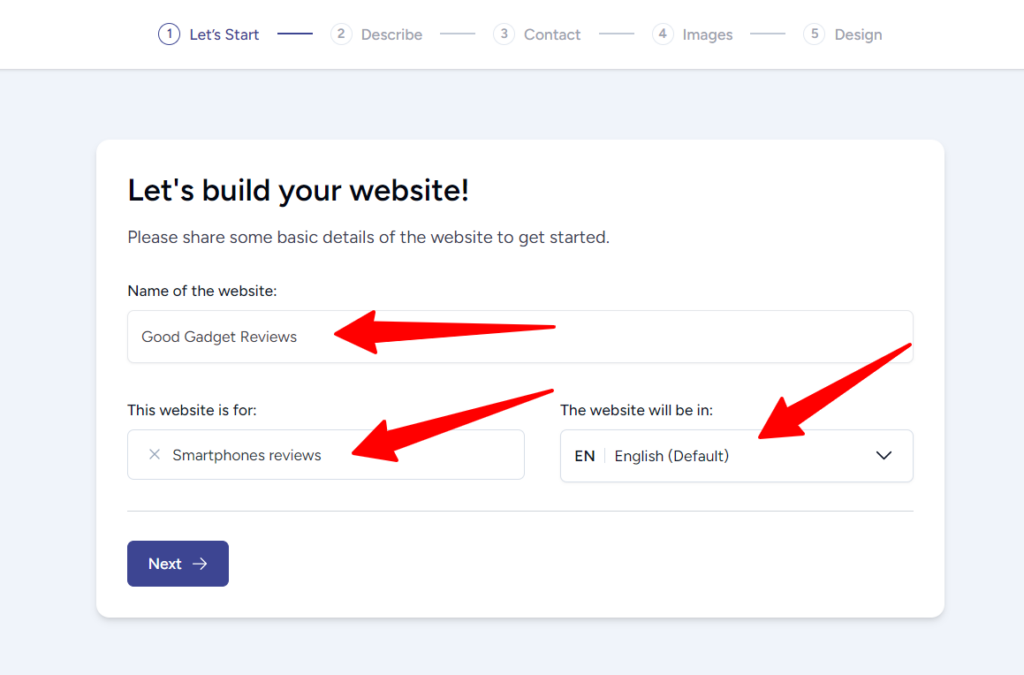
Next, you need to describe the purpose of your website. What you do, why you’re here, and how you serve the market.
There is no right or wrong way to describe your business, but you must understand that your input is what helps ZipWP design a stunning AI website that makes it easy for users to navigate and find your most important content.
In the text below, I enter a few descriptions about my new website, which is about smartphone reviews. Then, I click the “Improve Using AI” button below, and the ZipWP AI now generates the text in the box.

It’s not necessary to improve your website description with AI if you’re good with what you’d describe. Click next when you’re done.
Add Admin and Contact Details
In the next step, you must enter your admin details, such as email, phone number, and address. This step is necessary.
Click the + sign underneath the Social media text if you would like to include links to your social media account.

Click next once finished.
Add Images
You can upload your unique images or let ZipWP generate stock images for you. The good part is that you can search the image library by keywords related to your business objective.
Mind you, the images you select or upload here are what the ZipWP will use to design your blog and include in relevant places. So, choose images you’re proud of and actually want to use in your content and website pages.
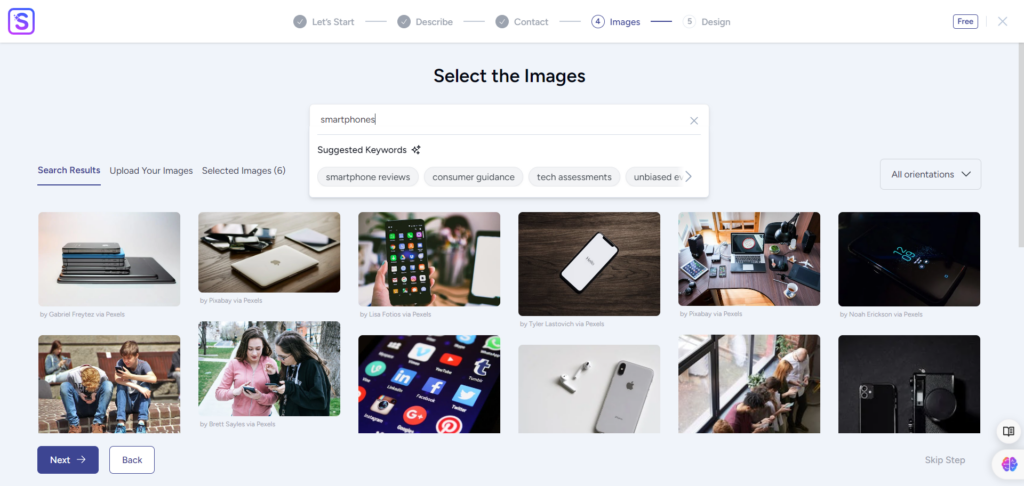
Choose a template
After selecting the images and clicking the next button, ZipWP AI magic begins. It automatically generates AI-powered WordPress website templates for you – in dozens. As you scroll down the page, it pulls more auto-generated AI templates.
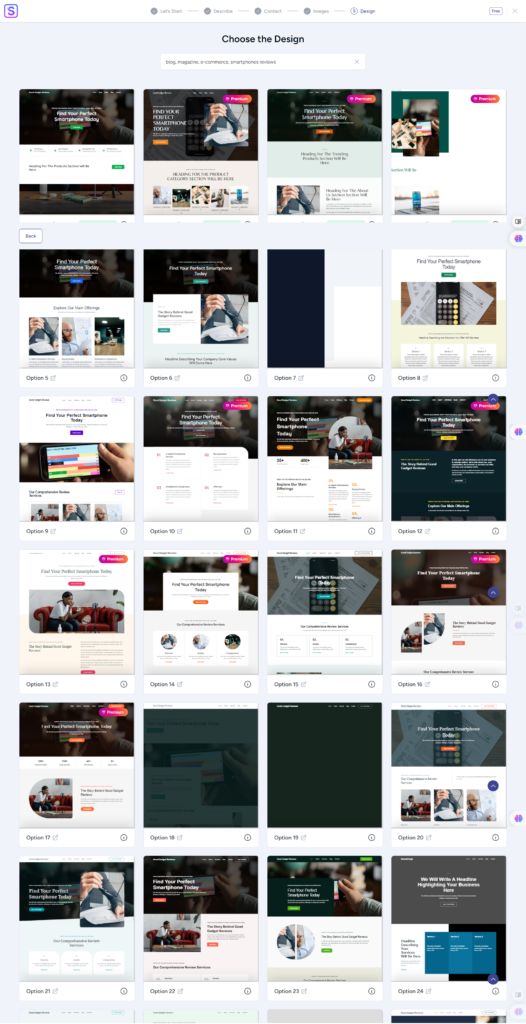
These templates are a mix of premium and free options. You can choose the one you want and proceed to customize further.
However, there is an option to investigate a theme before selecting it.
Let’s say you want to know which pages are created in the theme or need a suitable theme for a specific business type, such as eCommerce.
Underneath each theme is a label indicating whether it is suitable for eCommerce. To check pages, click the tooltip icon beside it, which will reveal the pages that have already been generated.
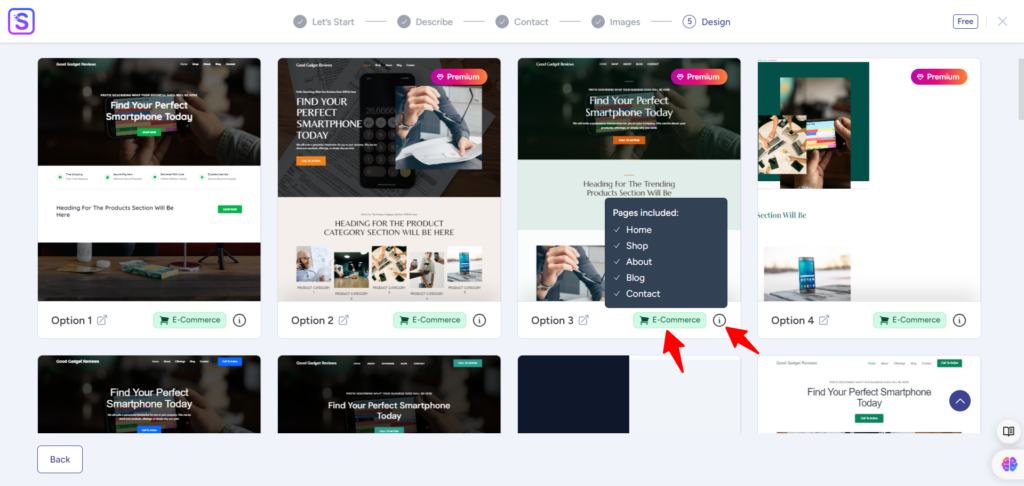
Review each template’s design carefully, and when you find what resonates, click it to open the customizer.
Now that you’re on the template sneak peek view page. You can go back and select another template if you don’t like the current one. You can choose a color scheme and typography and add a site logo while on this page.

On this page, you can also check the templates’ responsiveness across mobile, tablet, and desktop views and click continue if you’re satisfied.
Add Features
Now, you can add features to your website. This step is basically optional.
ZipWP will ask to include a few website features, such as donations, automation, eCommerce, a video player, and more.
These options will install the corresponding WordPress plugins to your site if you choose to add the features.
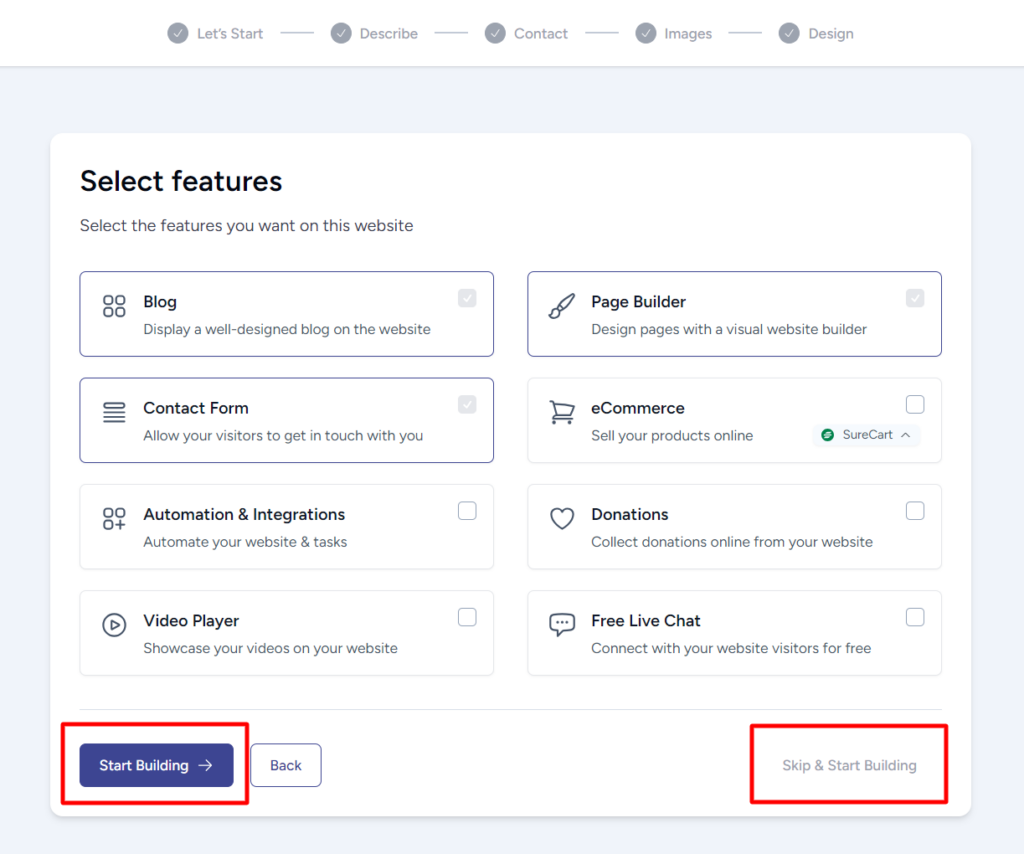
For example, selecting the eCommerce option will install the SureCart plugin, and adding the automation & integration checkbox will also install SureTrigger.
By default, ZipWP uses the Spectra page builder plugin, so it’s automatically installed, and there is no option to exclude it.
Click Start Building or the Skip and Start Building button. Both options will start the process of building your website.
This process takes approximately 50 to 60 seconds – give or take. Once it’s finished building your website, you will see a welcome and joyful message like this:
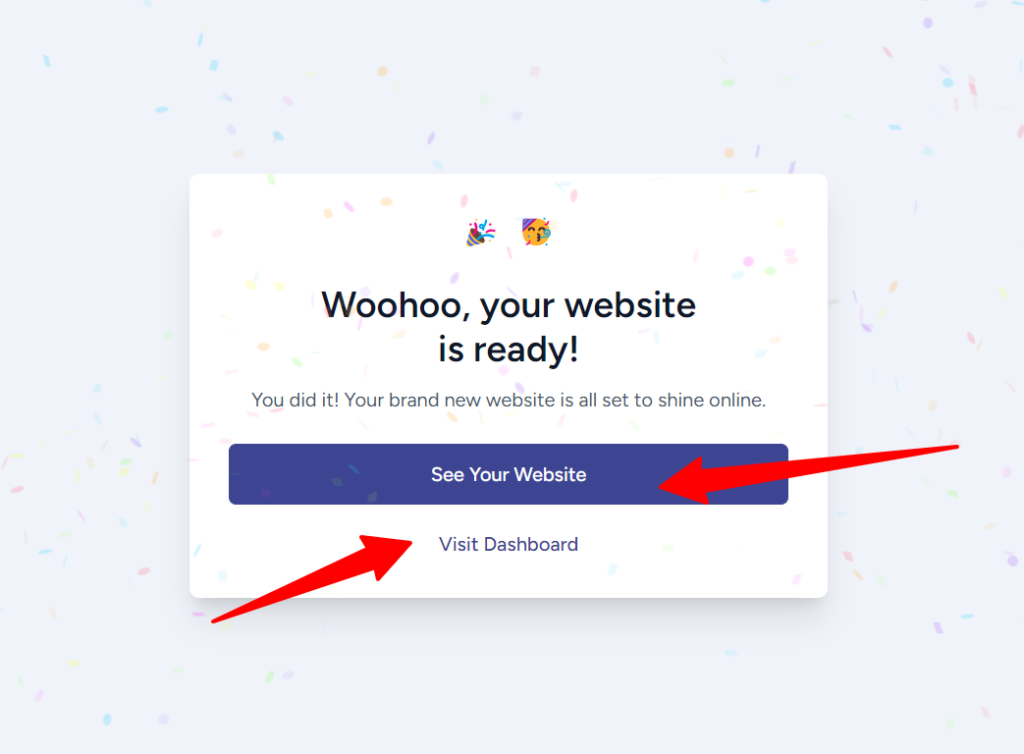
Click the See Your Website button to view the complete website, or click the Visit Dashboard to open the WordPress admin area.
Here is our ZipWP AI website, built in less than 60 seconds.

It couldn’t be any better than this, even if you hire a web designer.
Further Customization
As with any classic WordPress theme, you can customize the ZipWP AI-powered template using the theme customizer.
Open the theme customizer panel, where you can access template sections such as footer, header, sidebars, layout, color, blog and archives page control, and more. This is also where you can further control typography, buttons, widgets, homepage settings, etc.

What you do here depends on the individual website’s preferences, needs, and functionality. Whether you’re using a premium version of the theme for free also determines which features are available in the customizer.
What you should know is that you have full control over the ZipWP AI website and can change things to suit you.
ZipWP accelerates website creation by generating a first design draft, giving you a solid foundation to work from.
Things to Know About ZipWP AI Website Builder.
Certain things or factors must be considered before using ZipWP. I will share them with you in this review.
First, though I have said this before, it is worth reminding you of it.
The ZipWP platform is not meant to host a live site; you can not create a site on the platform and drive traffic to it.
After creating your site using the ZipWP AI website builder, you need to move it to a traditional web hosting platform like Cloudways, Pressable, Kinsta, Namecheap, and the like.
There is an option in your ZipWP dashboard that allows you to move your site to a host of your choice. The process is straightforward.
Next, branded URLs are another feature worth mentioning about ZipWP.
You can customize the domain URL of your ZipWP AI website. This feature might be beneficial for freelancers, agencies, and marketing teams.
Another ZipWP AI feature developers find useful is the ability to control the PHP version of your site.
Even on the free plan, you can upgrade or downgrade to a suitable PHP version for your website project and configure your site’s resource limits, such as memory limits, image upload maximum sizes, and more.

Next, you can create a ZipWP AI site and make it permanently available in your account or create a temporary site that expires in 24 hours. Both options have their benefits and disadvantages.
You may want to give your client a sneak peek into the project; the temporary website comes in handy.

On the other hand, if you need to create a website design template that serves as a foundation for deploying future projects faster, especially on the same design, making the site permanent is a good choice.
Besides, ZipWP AI has a website clone feature that lets you one-click clone a complete version of the site in minutes.

Regarding organization and project control, your dashboard has a few features like the Project, Blueprint, and the ability to add team members for collaboration.
When you create a project, you can assign it to a ZipWP AI site in your dashboard for effective management and streamlining.
Blueprints give you a snapshot of your existing ZipWP AI site, making it quicker to replicate and clone in one click. It also offers some additional benefits for freelancers and agencies.
For example, freelancers can use the ZipWP AI Blueprints feature to collect leads for their web design business, and agencies can use it to offer product demos to potential clients.
Not only that, content creators can also use the Blueprints feature to give their audience a copy of their ZipWP AI website. Think of using this for lead magnets and for building a large target list of followers.
The available features depend on the account plan you subscribe to. If you want to take advantage of ZipWP AI features, the Business plan offers great value for money.
Now, let’s quickly discuss the ZipWP pricing.
ZipWP AI Website Builder Pricing
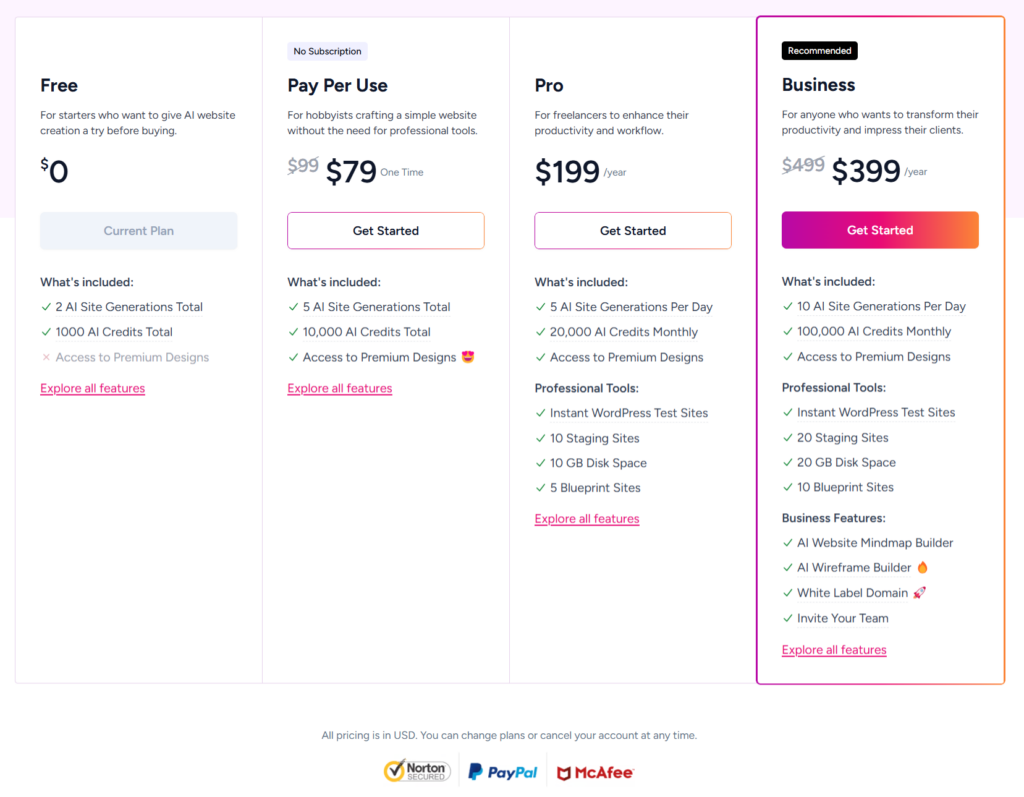
ZipWP AI Website Builder offers four distinct pricing plans, each tailored to different user needs, ranging from casual users to businesses seeking advanced website creation tools.
Free Plan
The Free Plan is perfect for those who want to experiment with the platform’s basic features. It allows users to create up to two AI-generated websites and comes with 1 GB of disk space.
Additionally, users can generate up to two temporary staging websites that are valid for 24 hours, with support for one team member. You also have free 10,000 AI credit limits and no access to premium features.
Pay Per Use
For those who prefer flexibility, the Pay Per Use model offers a one-time payment of $79. This plan allows users to generate up to five AI websites in total and includes 5 GB of disk space.
Temporary sites are valid for 15 days, and users can access premium features. Like the Free Plan, it supports one team member, making it ideal for occasional users, freelancers, and small agency businesses.
Pro Plan
The Pro Plan is designed for more frequent users who need increased capacity and access to premium tools. This plan allows for the generation of five websites per day.
Users also receive 10 GB of disk space, and temporary sites are valid for 15 days, and you can restore them later.
With ten active staging sites and access to premium designs, the Pro Plan is a great option for those seeking more customization, though it is still limited to one team member.
A subscription to the ZipWP AI Pro plan costs $199 yearly. This license allows you to access organization and admin features, such as site cloning, SSH/SFTP access, and project categorization.
This feature allows you to export your site to a hosting choice effortlessly.
Business Plan
Finally, the Business Plan is tailored for businesses or agencies requiring more capacity and collaboration features. This plan offers the ability to generate ten websites per day and provides full access to the beta AI tools for custom WordPress website creation.
It includes advanced features like the AI Website Mind Map Builder, AI Wireframe Builder, and AI Custom Website Generation, all in beta.
Users receive 20 GB of disk space, and temporary sites are valid for 30 days. Additionally, the Business Plan supports multiple workspaces and up to 10 team members, making it ideal for larger teams.
This plan also includes white-label domain features for businesses looking to apply custom branding to their websites.
Learn about all the features and access limits on the ZipWP pricing page.
FAQs
Is ZipWP any good or worth it?
Based on my experience, ZipWP is a powerful and advanced AI website builder compared to some competitor products I tested. However, ZipWP is still growing and learning, so it’s essential to consider your specific requirements and evaluate the quality of the generated websites. It’s recommended that you test it out with a small project to gauge its suitability for your needs.
How does ZipWP work?
ZipWP uses AI to generate website designs, graphics, and relevant content based on user input. You provide information about your website’s purpose, target audience, business details, and desired style, and the AI generates a website framework. You can then customize the design, add content, and fine-tune the website to your liking. It makes website design faster and more streamlined and allows businesses to be more productive.
What is the best AI website builder for WordPress?
There are a few WordPress AI website builders you can try. I have tested Kadence AI and ZipWP, and both work well. However, in our experience, ZipWP outperforms Kadence. You can learn more about how we tested the Kadence AI website builder.
Can I use AI to build a WordPress website?
Yes, you can use AI to build a WordPress website and assist in creating content and images for the website. AI tools can help with tasks such as:
Content generation – Creating blog posts, product descriptions, and other content.
Design element creation – generating images, logos, pages, and other visual elements.
Code generation – Automating repetitive coding tasks.
Is ZipWP free?
ZipWP offers both free and paid plans. The free plan allows you to create basic websites with limited features, while the paid plans offer more advanced features and customization options.
Can AI build me a website for free?
While there are free AI tools available, building a professional-looking website often requires additional services and tools that may incur costs. Some AI website builders offer free plans with limited features, but for more advanced functionalities, you may need to upgrade to a paid plan.
Conclusion
ZipWP’s approach to AI-powered website building is versatile, making it a practical and forward-thinking solution for a variety of users – from businesses aiming for scalability to freelancers looking for adaptable, cost-effective tools.
Gone are the days when you had to spend weeks designing a website. With ZipWP AI website builder, it takes literally 60 seconds to complete the first draft of your website design.
Every site created with ZipWP is completely customizable and flexible and allows you to change elements to match your website tone, layouts, branding, and needs.
Whether you’re a business looking for a robust, AI-driven solution or a freelancer seeking flexibility, ZipWP provides a range of options that can suit different needs and budgets.



Notice:
Your comment will end up in the trash folder if you spam our comment box. Use your real name, write meaningful and genuine comments. Avoid using keywords or brand name in the name filed and keep your comment relevant to the topic. Thank you.