

Mighty Networks is one of the most popular platforms that lets you create a private space where your members can connect, learn, and grow together – all under your brand.
But before you commit to a paid plan, you’re probably wondering: Does Mighty Networks offer a free trial, and what exactly do you get during that period?
That’s what this guide covers.
I’ll walk you through everything you should know about the Mighty Networks free trial – how long it lasts, what features you can access, how to start it, and whether it’s actually worth your time.
By the end, you’ll know exactly what to expect and how to make the most of your trial before deciding if Mighty Networks is the right platform for your community or business.
Does Mighty Networks Offer a Free Trial?
Yes, Mighty Networks does offer a free trial. When you sign up, you get a 14-day free trial to explore the platform and all its core features before committing to a paid plan.
Every Mighty Networks free trial sign-up defaults to the Business Plan. This gives you a solid opportunity to test advanced features, excluding the Mighty Insights tool.
Mighty Insights is an advanced analytics tool that provides in-depth insights into your network’s performance, including engagement, member counts, downloads, and other key metrics.
You actually don’t need it during your free trial. So, this is not a dealbreaker to jump on the risk-free trial offer.
On the good side, there’s no credit card required to start, so you can sign up and start building right away without worrying about getting charged when the trial ends.
During your free trial, you’ll have full access to most of the Business plan features. You can create a community, invite members, build a course, go live, and even host events.
The idea is to give you a complete feel of how Mighty Networks works before deciding if it’s right for your business or brand.
If you like what you see, you can upgrade to a paid plan at any time and continue using everything you’ve built.
Nothing gets deleted when your trial ends – your community setup, content, and member data all stay intact once you subscribe.
What’s Included in the Mighty Networks Free Trial
The Mighty Networks free trial isn’t watered down. It’s a full experience of what the platform can do.
You get access to the same tools paid users rely on to build communities, sell courses, and host events.
Below are the main Business Plan features you can explore during your trial.
a. Community Features
Mighty Networks was built around community first. During your free trial, you can create your own private or public community space where members can connect, share ideas, and engage with your content.
You can:
This setup makes your Mighty Network feel more like a branded social platform than just another online course site.
b. Courses and Memberships
The free trial also lets you explore Mighty Networks’ course and membership features.
You can create online courses, set lesson structures, upload videos, add text lessons, and even schedule live sessions or events.
You’ll also see how paid memberships and bundles work.
While you can’t process real payments until you switch to a paid plan, you can still set everything up and test how it looks for your members.
This part is great for coaches, creators, or educators who want to see how their content will look in a real learning environment.
c. Custom Branding and Design
Your free trial includes the ability to customize your network to reflect your brand.
You can access the AI community builder, which is powered by Community Design and OpenAI’s GPT-4, to quickly create your network without lifting a finger.
This AI asks for your target audience, and turns your answer into a marketing copy to build your network, including your logo, color scheme, landing pages, brand assets, and a basic template.
You can later fine-tune and edit the outcome to better match your needs.
For example, you can:
These design tools help you visualize how your community or course platform would fit into your brand identity, not just a generic site.
d. Mobile App Access
Mighty Networks offers iOS and Android apps, and you can use both during your trial.
This means you can test how your community looks and functions on mobile, including push notifications, post engagement, and event alerts.
Once you invite them, your members can also access your community through the app, making it easy to stay connected even on the go.
e. Analytics and Growth Tools
The free trial gives you access to Mighty Networks’ built-in analytics (different from Mighty Insights).
You can track:
You’ll also gain access to tools for inviting people via email and creating simple onboarding flows, which is helpful if you plan to rapidly grow your community.
Another important thing to note is that you can get help if you need assistance setting up your network or navigating the platform during your free trial.
Within your dashboard, the Customer Advocacy team is just one click away via chat.
Overall, the Mighty Networks free trial is an opportunity to test everything that matters: community engagement, course setup, support, and branding, without paying upfront.
How to Start the Mighty Networks Free Trial (Step-by-Step)
Starting your Mighty Networks free trial is simple and takes only a few minutes.
As mentioned earlier, you don’t need to enter any payment details upfront, which makes it easy to test the platform without commitment.
Here’s how to get started:
Step 1: Visit the Mighty Networks Website
Go to MightyNetworks.com and click the “Start Your Free Trial” button at the top right of the page. You’ll be taken to the sign-up page.

Note: If you click the pricing page, then you can click either the “Start Your 14-Day Free Trial” button or the one at the top. Whichever one you click takes you to the signup page.
Step 2: Create Your Account
You’ll be asked to enter your name, email address, and a password. Alternatively, you can sign up using your Gmail, Apple email or your Facebook and LinkedIn account. This option allows you to register an account without entering a password.

Once you sign up, Mighty Networks will automatically start your 14-day trial.
Check your inbox for a confirmation email and verify your account to unlock full access.
Step 3: Set Up Your Community Name and URL
Next, you’ll name your network. This could be your business name, personal brand, or community idea. Next, choose a unique URL.
Example: yourcommunity.mmn.co
This becomes the main link members use to access and join your community.
Note:
This step is where you enter a few pieces of information about your community and target audience, and the Mighty Networks AI Community Builder handles the rest.
Step 5: Explore the Dashboard
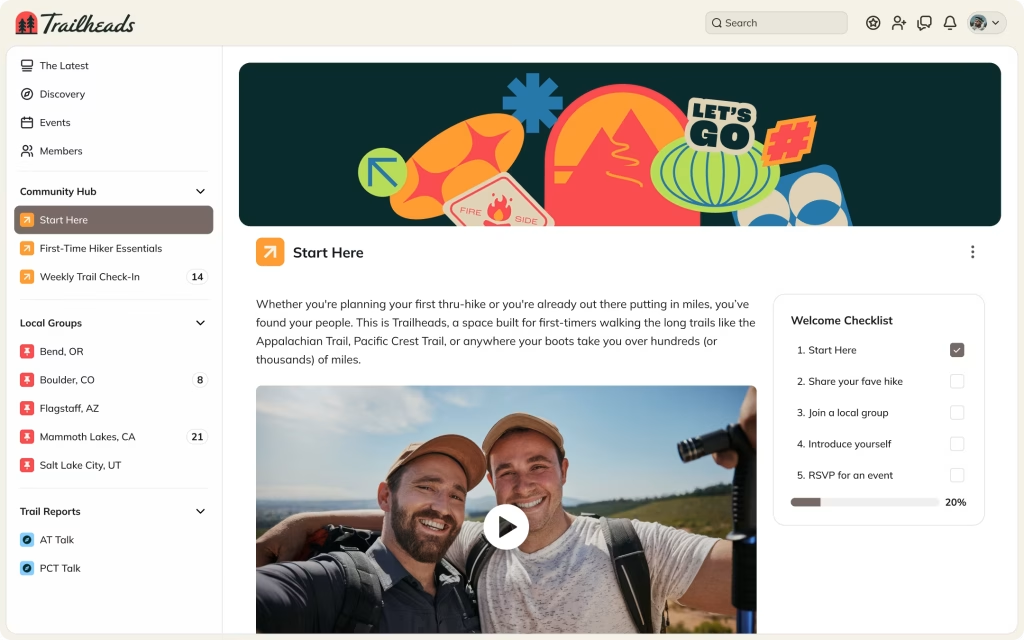
Once you’re in, you’ll land on the Mighty Networks dashboard, where you can:
Actually, you need to spend some time exploring your new platform. The interface is beginner-friendly, allowing you to navigate it easily without any prior technical skills.
Step 5: Invite a Few Members
It’s best to test the platform with real people. Use the Invite feature to send email invites or share your community link.

This helps you see how members join, interact, and engage during your trial.
Step 6: Customize and Experiment
Add your logo, pick your brand colors, and try creating a few posts or lessons. The goal is to experience what your members will see.
You can always reset or delete test content before you go live.
Pro Tip:
Make sure to explore both the web version and the mobile app during your trial. It helps you understand how your community performs across devices, something your future members will appreciate.
Once your trial is active, you’ll get reminder emails before it ends. If you decide to continue, just pick a plan and upgrade. All your content and settings will stay intact.
Note: You can take the 7-day Challenge if you need guidance or a step-by-step process to launch your first community.
What Happens When the Trial Ends
Once your 14-day Mighty Networks free trial runs out, you’ll get the option to either upgrade to a paid plan or let the trial expire.
What happens next depends on what you decide. Let’s break it down so you know exactly what to expect.
If You Upgrade to a Paid Plan
If you like the platform and decide to continue, you can upgrade directly from your dashboard.
Once you pick a plan and enter your payment details:
You can also switch plans later if you find you need more or fewer features.
If You Don’t Upgrade
If you decide not to continue after the trial, Mighty Networks won’t charge you.
Your network will simply downgrade to the Mighty Networks free plan, which offers limited access and basic features.
This free plan also offers unlimited members, spaces, your website, people explorer, and other core features.
However, you’re going to lose access to the advanced features in the Business plan and other actions or tasks you might have created that are only possible with a paid subscription.
If you ever decide to upgrade, you’ll be able to continue from where you left off during the free trial period.
Canceling Before the Trial Ends
Since no credit card is required, there’s technically nothing to cancel.
However, if you want to stop using the platform early, you can simply log out and ignore the upgrade reminders; your trial will expire automatically.
If you entered payment information (for example, if you started with a special offer), you can cancel from your Billing Settings to avoid automatic renewal.
Tip for Creators and Coaches
Before your trial ends, spend time testing every feature you plan to use long-term, especially:
This gives you a real sense of whether Mighty Networks can support your goals before committing to a subscription.
Is the Mighty Networks Free Trial Worth It?
If you’re serious about building a community, teaching online, or growing a membership-based business, the Mighty Networks free trial is definitely worth it.
It gives you hands-on access to the same tools paying users rely on, and you can test them without paying a dime.
Here’s why I believe it’s worth trying, along with a few situations where it may not be suitable for everyone.
Why the Free Trial Is Worth It
1. You get real access, not a demo.
Many platforms limit what you can do in a trial, but Mighty Networks doesn’t.
You can actually build your community, create spaces, set up courses, and invite real people. It’s the full experience.
2. You can test your idea before investing.
Whether you’re a coach, content creator, or small business owner, the trial lets you test your community concept.
You’ll see if people engage, what features you really need, and whether the platform feels right.
3. You can try both desktop and mobile versions.
Mighty Networks offers a strong mobile experience, and during your trial, you can explore both the web dashboard and the app.
That helps you see how your members will use the platform day-to-day.
4. You keep your setup when you upgrade.
Everything you build during your trial stays exactly the same when you move to a paid plan. You won’t have to redo your community or upload content again.
5. No credit card is required.
This one matters. You can start exploring freely without worrying about forgetting to cancel later.
When the Free Trial may not be a perfect fit:
My Take
If you’re planning to build a community around your brand, a paid course, or a membership program, the free trial is the best way to determine if Mighty Networks suits your needs.
You’ll know within a week whether it’s the right place for your audience, and since it’s free, there’s no downside to trying.
Mighty Networks Pricing After the Free Trial
Mighty Networks offers four subscription plans depending on your goals.
From running a simple community to managing a full-scale membership and online course business, there’s a plan to fit everyone’s needs.
Here’s a breakdown of the main plans and what each includes.

The Community Plan ($49/month)
This is the entry-level plan, perfect if your main focus is building a private or public community space.
You can:
It’s a great starting point if you’re just building your first community and don’t need advanced courses or automation tools yet.
The Course Plan ($109/month)
This plan unlocks the course features and lets you host up to 200 participants per livestream view. You get all the benefits and features from the Community plan, including Mighty Insights, Zoom integration, and more.
You can:
For small business owners with a few hundred members and a greater focus on course features, the Courses plan is the ideal choice.
The Business Plan ($189/month)
The Business Plan unlocks more power and flexibility. This is the plan most creators, coaches, and educators go for once they’ve validated their idea during the free trial.
With it, you get everything from the Curses Plan plus:
If you plan to sell digital products, build structured courses, or automate your workflow, this plan will likely be the right fit.
Growth Plan ($360/month)
If you need advanced automation, priority support, and dedicated services, the Growth plan is worth it. You can live stream up to 1,000 viewers at once, create 30 fields, and stream up to 40 hours per month. Besides these, you can:
Mighty Pro (Custom Enterprise Plan)
Mighty Pro is a white-label solution for established brands or creators who want their own branded mobile app and deeper customization.
It includes:
You’ll need to contact Mighty Networks directly for pricing, as it’s customized for each business.
For comprehensive details on the Mighty Networks subscriptions, check my complete review of each plan.
Which Plan Should You Choose After the Trial?
Each plan builds upon the last, allowing you to upgrade as your community grows easily.
Mighty Networks Free Trial vs Competitors
If you’ve researched online community platforms before, you’ve probably seen other popular names like Circle, Skool, and Heartbeat.
Each platform offers its own version of a trial or free experience, but there are some big differences when it comes to what you actually get.
Here’s how the Mighty Networks free trial stacks up against a few of its top competitors.
Mighty Networks vs Circle
Circle offers a 14-day free trial as well, but its focus is more on community discussions, AI workflow, and automation, and less on integrated courses or memberships.
With Mighty Networks, you can build a community and sell courses, memberships, or bundles, all under one roof.
Circle, on the other hand, works best if you already have another platform for your courses (like Teachable or Podia) and just need a clean space for discussions.
Why Mighty Networks wins:
Mighty Networks vs Skool
Skool has a simple, social-style design that many creators love, but it doesn’t offer a free trial; instead, it only offers a $9/ 9/month (Hobby) or $99/month (Pro) plan with a 14-day refund policy.
Mighty Networks’ trial, on the other hand, is completely free and requires no credit card, which makes it easier to test. Plus, Mighty Networks supports more flexible features, including mobile apps, course structures, and advanced analytics.
Why Mighty Networks wins:
Mighty Networks vs Heartbeat
Heartbeat is another solid platform for communities, especially if you want chat-style discussions and automation.
It offers a 14-day free trial, the same as Mighty Networks, but it’s more limited in scope; you won’t find the advanced course and event tools available with Mighty Networks.
Why Mighty Networks wins:
However, if you focus more on the number of members, Heartbeat offers more flexibility in setting membership limits. The Starter plan allows up to 1,000 members, significantly higher than Mighty Networks’ entry-level plan.
When Competitors Might Be Better
If you only need a lightweight chat or forum-based community, Circle or Heartbeat might feel easier to manage.
If you just want a straightforward classroom-style setup, Skool might be a better fit.
But if you want an all-in-one platform that combines community, courses, memberships, and mobile apps, Mighty Networks gives you more to work with during the trial period.
Tips to Make the Most of Your Free Trial
A 14-day free trial might sound short, but you can learn a lot if you use that time wisely. The goal isn’t to build everything perfectly; it’s to understand how Mighty Networks works and whether it fits your goals.
Here are some practical tips to make the most of your trial.
1. Start With a Clear Goal
Before you dive in, decide what you want to learn from the trial.
Ask yourself:
Having a focus helps you spend your time on what truly matters to your business.
2. Set Up a Test Community
Create your first Space and give it a clear purpose, such as “Welcome Group,” “Member Discussions,” or “Course Area.”
Post a few sample discussions, polls, or questions so you can see how it feels when people start engaging.
Even if you don’t have members yet, this setup will help you understand the flow of content and interaction.
3. Invite a Few Test Members
Send invites to a few friends, team members, or early followers. Observing how they join, post, and react provides real feedback on what works.
You’ll also get to test notifications, comments, and member management features.
4. Test the Course Tools
If you plan to sell courses, spend time building at least one short course during or before your trial.
Try adding:
This will show you whether the layout, structure, and tools fit your teaching style.
5. Explore the Mobile App
Download the Mighty Networks mobile app on your phone and log in with your trial account.
Check how your posts look, how easy it is to reply to comments, and how push notifications work.
Many creators underestimate how much users rely on mobile devices, but testing early helps you create a smoother experience.
6. Check the Analytics Dashboard
Use the built-in analytics to track what happens during your trial. Even with a small number of members, you’ll get insights into engagement and activity.
You can view post activity, comments, and new member trends, which gives you a sense of what to expect when you scale up.
7. Customize Your Branding
Add your custom website logo, brand colors, and a friendly welcome message.
This helps you visualize how your network will look when you go live and gives test members a better first impression.
8. Take Notes Before the Trial Ends
As you explore, jot down what you like, what feels confusing, and what you wish were different.
These notes will help you decide whether to upgrade and which plan is the best fit for you.
Pro Tip:
Don’t wait until the last day to explore everything. Spend at least 20–30 minutes a day trying different tools.
For instance, you can set up community posts one day, set up a course the next, and host events the day after. That small daily effort can give you a complete understanding before your trial ends.
FAQs About the Mighty Networks Free Trial
How long is the Mighty Networks free trial?
The Mighty Networks free trial lasts for 14 days. During this period, you can use almost every feature included in the Business Plan — from creating courses and spaces to hosting live streams and customizing your community. You don’t need to enter a credit card to start the trial.
Do I need a credit card to start the free trial?
No, you can start your Mighty Networks free trial without a credit card. Just create an account, name your network, and begin exploring the features right away. This setup makes it completely risk-free; you won’t be charged automatically when the trial ends.
What features are included in the free trial?
The free trial provides access to nearly all Business Plan features, including courses, video uploads, livestreaming, events, Spaces, and chat tools. You can create communities, test content formats, invite members, and design your branding. The only feature not included is Mighty Insights, which offers more in-depth analytics.
What happens when the Mighty Networks free trial ends?
When your trial expires, your network automatically switches to the Free Plan. You’ll still have access to your community, members, and content, but with fewer features. You can continue using the Free Plan for as long as you like or upgrade anytime to unlock premium tools again.
Can I extend the free trial?
Mighty Networks doesn’t officially offer trial extensions. However, you can continue using your account on the Free Plan after the trial ends, so you still have time to explore and keep your community alive until you’re ready to upgrade.
Conclusion
The Mighty Networks free trial is a great way to see what the platform can really do before you invest in a paid plan. You’ll gain hands-on access to community tools, online courses, and live event features, providing everything you need to determine whether it aligns with your goals.
If you’ve been thinking about creating your own community or course, this trial gives you the freedom to experiment.
The best part is that it’s risk-free. No credit card. No surprise charges. Just two weeks to see what’s possible for your brand or business.
If you enjoy the experience and see potential in what you build, upgrading to a paid plan is a smooth next step. And if not, you’ve still learned what tools and setup your future community might need.
Either way, it’s worth taking advantage of the free trial; you might be surprised by how much you can create in just 14 days.


Notice:
Your comment will end up in the trash folder if you spam our comment box. Use your real name, write meaningful and genuine comments. Avoid using keywords or brand name in the name filed and keep your comment relevant to the topic. Thank you.