

Do you want to grow your business faster? Without spending much of your time working on it? Buying gigs on freelance platforms like Fiverr and Upwork can be a great way to do it.
These platforms offer affordable services from talented freelancers you can hire.
If you’re new to these platforms and don’t know how to buy on Fiverr, don’t worry. You’re not alone. Buying gigs is easy. I’ll walk you through the steps, using Fiverr as an example.
Here is what you’ll learn from reading this article:
- How do you register for a Fiverr buyer’s account?
- How to find the right gig.
- How to contact a seller and place your order
- Tips for a successful experience
Let’s get started!
Register Your Account
First things first, you need to create a Fiverr buyer’s account.
By default, all Fiverr user accounts are buyers’ profiles. You can switch to the seller’s profile after your account is approved.
You must be 18 years old to open a Fiverr account. People under 18 but at least 13 can only use the website under a guardian or their parent’s account.
Anyone under 13 cannot sign up for a Fiverr account, even under a guardian’s supervision.
So, if you’re eligible to use Fiverr, click here to sign up.
The process is simple to understand. You need an active email account, name, profile picture, and billing details.
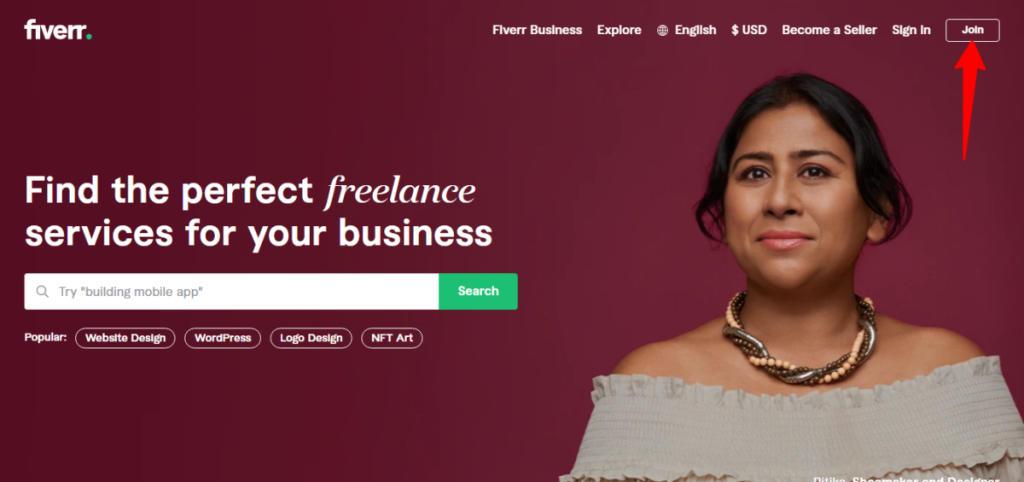
Click the “Join” button at the top right corner of the Fiverr homepage.
Enter your email address on the next page and click the continue button. You can join Fiverr with your Facebook, Google, or Apple accounts.
These are quick ways to complete the sign-up process.
However, I prefer signing up with an email address. You might decide to close your Facebook account tomorrow, but your email address is yours.

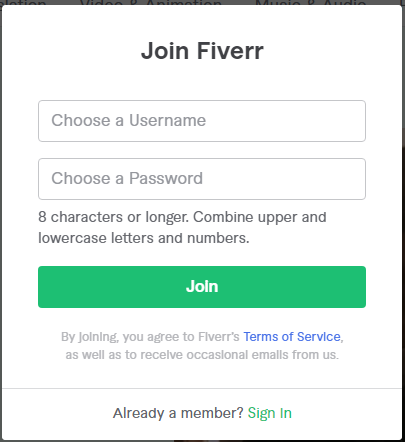
Next, choose your Fiverr username and password. Once you set up your Fiverr account profile, your username cannot be changed in the future, so think hard and long before making a decision.
Click on the “Join” button to complete the sign-up process.
Next, you’ll receive a confirmation email. Open this email and click the “Activate Your Account” button to confirm your email ID and activate your Fiverr profile.
Once your account email is confirmed, you can start exploring the platform and reviewing relevant gigs for your business growth.
Next, let’s walk through the easiest way to buy on Fiverr. We’re focusing on the best ways to find high-quality, relevant gigs on the Fiverr marketplace.
Use The Search Box
Going through the Fiverr marketplace can be overwhelming at first use. There are over 500 service categories on the website.
A single search query can return hundreds (even thousands) of results. As a first-time user, this might confuse you and lead to wasting time.
The simplest way to search through gigs on Fiverr is to use the search box. It will help you find exactly what you’re looking for.
While Fiverr has done a great job simplifying the search process, there is still much to do.
For instance, in the Digital Marketing service category, if you’re looking for specific SEO, finding the service you’re looking for could be a time-consuming task.
I was looking for a link-building gig on the platform using the “Digital Marketing” tab in the navigation menu.
These are the options.
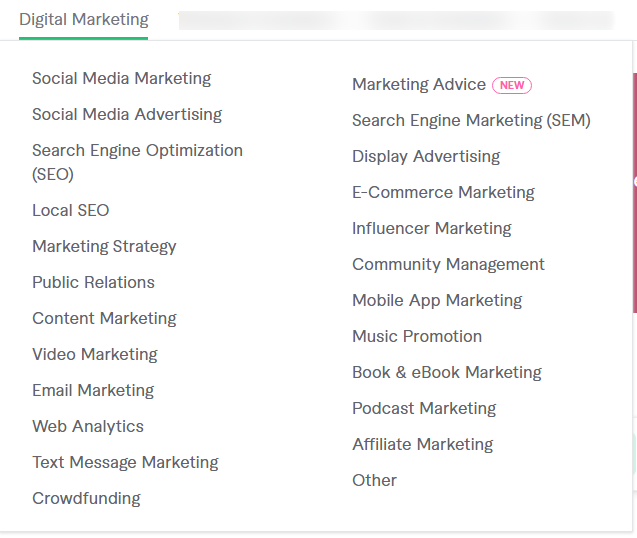
As you can see, this option does not give us exactly what we want.
Instead, use the search box.
The search box provides a better search experience and leads us quickly to the correct freelancer on Fiverr.
I typed “SEO link building” in the search box, and here is the result.

This is a better and quicker process to find relevant gigs on Fiverr.
Now, let’s dive into how you can find the right freelancer or seller on Fiverr.
This process is much harder than you might think. Many sellers or freelancers offer similar services for almost the same price.
How do you filter the results and know which service will improve business value?
This is where it gets tricky and requires due diligence.
However, there are steps you can follow to narrow down your options and hire the right freelancer for the task.
Let’s find out below…
How to Find the Right Gig or Freelancer on Fiverr
There are no right or wrong ways to find freelancers for your project. It depends on your unique experience, vetting process, and sometimes, luck.
Here are some ways to hire the right Fiverr service provider for your task:
Use Fiverr Filter
Fiverr provides many filter options to find relevant gigs on the website. You can search by:
- Tags
- Category
- Seller Details
- Service Option
- Budget
- Delivery Time
- Pro Services – Verified Freelancers for quality service delivery
- Local Seller – Fiverr sellers within your country
- Online Seller – Available Fiverr Seller online
Budget
Your budget plays a crucial role in your search.
It will determine the quality of services you get, the level of seller you can afford to hire, and much more.
Of course, you can get gigs at $5, but that’s not so much of quality.
Most sellers on Fiverr have different gig offerings in different tiers. The better the gig’s value, the higher the price.
To save time, use the budget filtering option to search for gigs within your budget.

Quality of Work
This is obvious and an extension of the above point.
The quality of work you want will determine the category of freelancers you hire.
If you want top-quality service, you need someone with a track record and expertise to handle your project.
Fiverr has done an excellent job of vetting top-rated sellers. These sellers have completed at least 100 orders on time and have a minimum of 4.7 ratings.
These are Fiverr gig sellers with proven work experience and happy customers. You can review their past work to gain insight into what to expect.
This will give you an idea of the quality of service the seller offers.
To quickly find Fiverr’s top-rated sellers, use the “Pro Service” filtering option. Then, sort by “Bestselling” or “New arrival.”
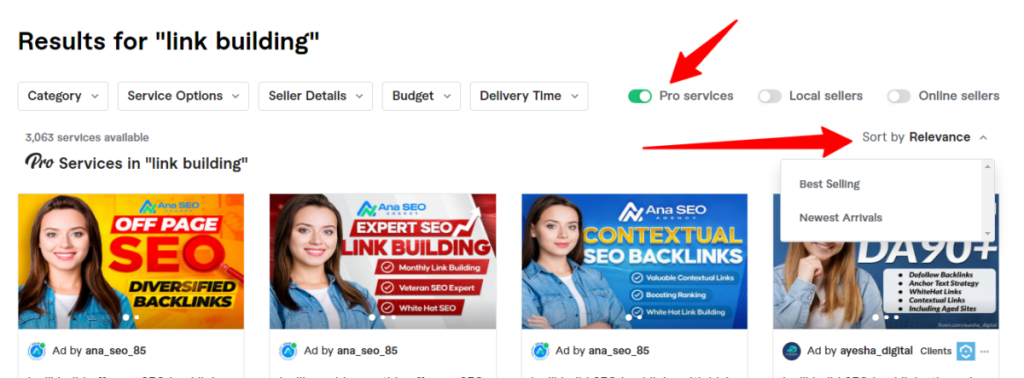
This option will filter the results to your search’s top-rated seller.
If you’re not looking for a specific seller category, you can leave the search filter as it is. The search result will return the most relevant gigs to your search queries.
Gig Description
The gig description is another aspect of Fiverr service listings to consider.
The description should contain every detail about the gig. It should be clear, concise, and free of any ambiguous words. And it should be about the gig and relevant to your search queries.
Read the gig description carefully before contacting the seller. You should contact the seller for clarification if you do not understand anything in the description.
Portfolio
This is a helpful Fiverr buyer’s feature. It helps to see the seller’s work portfolio.
Some sellers have started adding work portfolios to their gig profiles on Fiverr.
While this is not convincing proof that you will get similar results, it makes sense to see the results the seller can achieve.
But trade carefully here, especially if it concerns graphic design, illustration, images, etc. There have been cases of sellers taking other people’s work and adding it to their portfolios.
If you suspect something, ask the seller for more information.
Post a Request
Let’s assume the service you need is complex and requires proper explanation and specifications. Due to the uniqueness of your service, you may need to make a request.
This is one of the times the Post a Request feature is useful.
You can post your job description on Fiverr for interested freelancers to review.
Interested freelancers will contact you via the Fiverr internal communications system. You can now go through the responses to find your best fit.
This article explains how to use the Post a Request features on Fiverr.
Delivery Time
The time frame required to complete the task is one of the most important factors when hiring a freelancer.
Do you want a situation where you’ll be chasing a seller to complete your job?
You should carefully review the gig description. Go through the details to understand the gig delivery time.
You may also need to compare each gig package to see the difference in delivery time and added services.
Most sellers offer three gig packages for one listing – Basic, Standard, and Premium.
Each comes with its turnaround time, features, services, and costs.
Your needs, budget, and business requirements will determine your purchase package.
After going through the vetting process and you’ve selected the best candidate for the task, it’s time to get in touch with the seller.
You probably have a few questions before placing your order.
Contact The Seller
You must contact the seller before placing your order on Fiverr.
Let the seller know what you want from the service. What type of results are you expecting to see?
For instance, I wanted to purchase a link-building gig that promises link placement on a DA 55 news website.
After reviewing the gig, I contacted the seller about possibly sharing the website URL with me.
Yes, he shared the URL with me. Then, I analyze the domain’s SEO metrics.
I was satisfied with the domain SEO metrics; after that, I provided him with the details of what I wanted, the type of article, anchor text, and duration.
Most sellers will gladly share more information with you if you ask. Provided it will help facilitate the deal.
Place Your Fiverr Order
Now that you’ve done all the initial research and found the right seller and gig, it’s time to buy on Fiverr.
Placing your order on Fiverr is simple, easy, and secure.
First, select the package you want from the three available options, then click Continue.
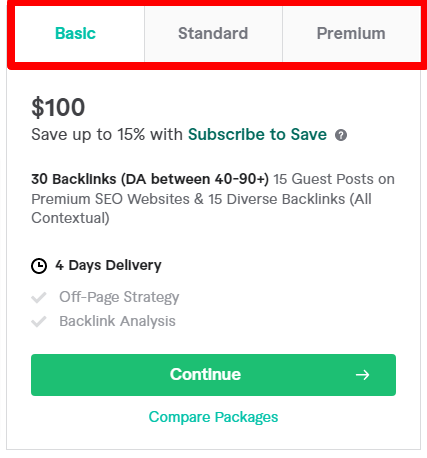
It will open a panel by the right where you can choose whether to make this order a one-time purchase or a monthly subscription offer.
You can save 10% to 15% on your second order if the gig is available in a monthly subscription.
The monthly subscription plans will be locked if you click on the “subscribe to safe” section in the panel.
You can now select the plan you want with the discount offer.
Click on the continue button when you’re done.
It will open a new page to customize your order. Here, you can add relevant gig extras to your purchase.
Adding other gig extras to your order will reflect your payment summary on the right.
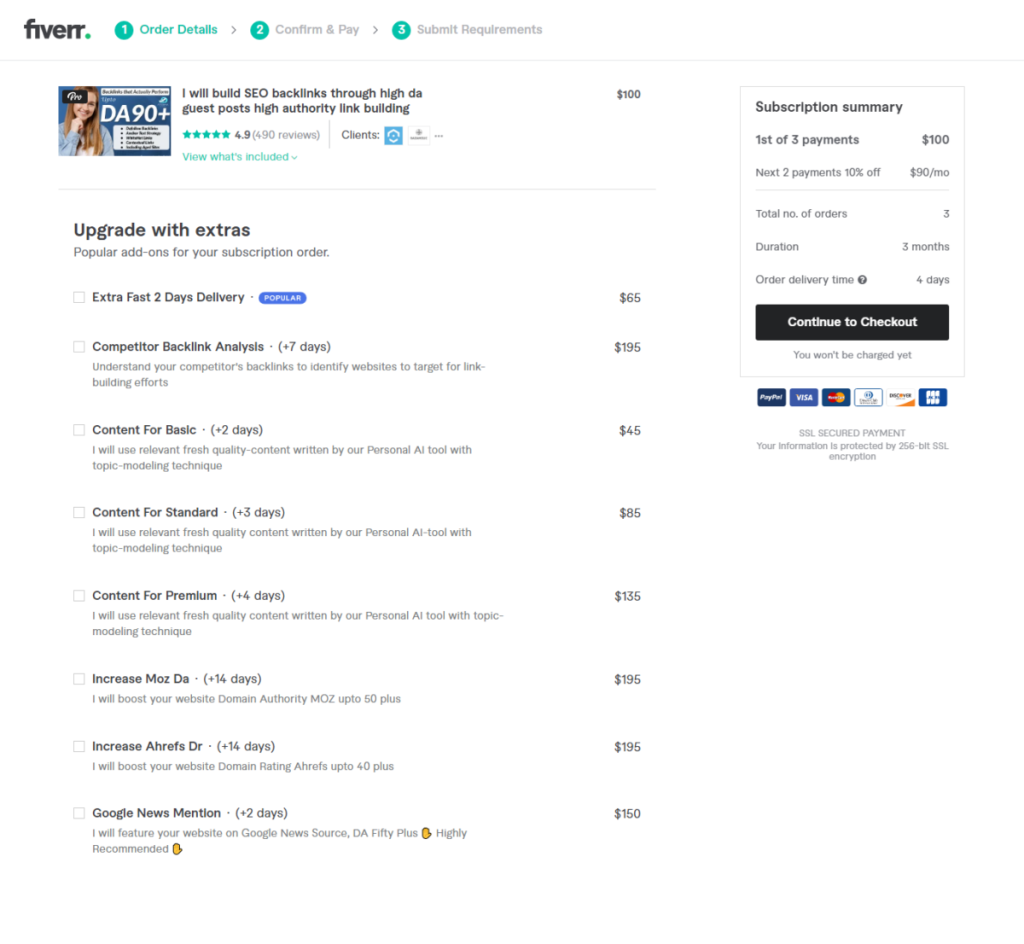
When you’re done, click the “Continue to checkout” button. This action will take you to the payment processing page.
This is where your payment option will be charged, and a purchase receipt will be issued.
Next, you need to submit gig requirements to the seller. Here, you will enter every detail the freelancer needs to begin working on your project.
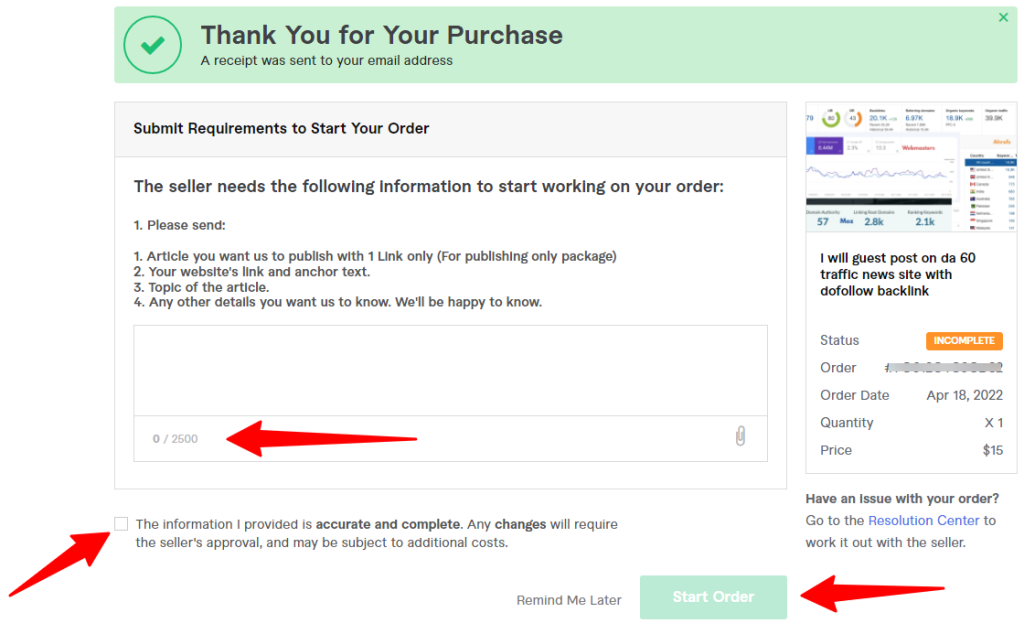
On this page, you should be as thorough as possible. Make your point short, go straight to the point, and be clear in your statement.
You have only 2,500 characters to pass your message across to the seller.
When you’ve written the requirements, check the consent box and click the “Start Order” button.
That’s it; your order is now in progress.
The order summary is on the next page. The summary includes the expected delivery date, payment summary, time of payment, gig order, etc.
Fiverr Payment Methods
Fiverr offers two payment gateway options: PayPal and credit/debit card.
You can connect your preferred method on the payment processing page.
Whether it is PayPal or a credit card, the process is simple.
Fiverr accepts credit or debit card payments from Visa, Mastercard, Discovery Network, Diners Club International, and JCB.
So, rest assured that your favorite payment option will go through on the platform.
FAQ – Buying on Fiverr
Can You Tip on Fiverr
Yes, as a buyer, you can offer a tip on Fiverr after a successful gig delivery and payment. The option to offer a tip will be available for seven days, after which you won’t be able to do so.
However, you can only give a tip after you’ve left a review on the seller’s service delivery. This ensures you’re satisfied with the services to offer a bonus. There is a minimum $5 tip for a gig order under $25 and a maximum of 100% tip for gig orders above $25.
How do I purchase on Fiverr?
Here are the steps for a first-time buyer to purchase on Fiverr. First, you must create and verify an account with an email address and a username. I have discussed the steps extensively in this article.
Next, use the Fiverr search tools to find the proper gig or freelancers. After that, you might need to contact the seller for further clarification. If you’re satisfied with the gig offers, the next thing to do is place your order and make the payment.
Can You Get a Refund on Fiverr?
You can get a refund if an order is canceled for specific reasons. You may request a refund if the gig services are not delivered according to the description on the gig page. However, you can not request a refund for a logo design gig after the services have been delivered and payment has been made.
Also, before you can request a refund, Fiverr encourages buyers and sellers to try to resolve the issue mutually using the resolution center before contacting the customer support department.
A refund request will not be entertained if a buyer has not contacted the seller for a possible resolution. On this page, you can read more about the Fiverr terms and conditions.
Conclusion…
Following the process described in this post, buying on Fiverr is easy and hassle-free.
The most important task is finding the gig that fits your business requirements and budget.
Fiverr is one of the best digital marketing marketplaces for businesses to purchase affordable services.
Please take advantage of it now and build your dream business.


Hey Shamsudeen
A fanstastic and fabouls article. There’s no doubt that that you should written on more about the topic of buying on Fiverr platform. Best wishes!
Thanks, Ramya,
Glad you like it.
Your blog is really awesome and I would like to say thank you to share such good information. A fantastic and fabulous article. Because Fiverr’s mission is to change how the world works together. Fiverr connects businesses with freelancers offering digital services in 500+ categories.
Please keep sharing good articles.
Thanks,
Thank you, Michael.
Glad you like it.
Thanks for sharing such an informative content about Fiverr . I am into it. It help me a lot.
Glad I could help
I love your long articles with great details and insights. I would love to ask if you have a genuine article like this on how to start as a freelancer on Fiverr? Thanks
Hi Ernest,
That will be on our to-do list. Thank you.
Does it accept naira mastercard? Or just dollar?
Naira Mastercard is not allowed for making payment in USD and other foreign currency for now. You should try a card linked to a Dom account in USD currency.
Let me know if you need more help paying for your Fiverr order.
Nice article. I am having issues paying from Nigeria using Paypal. Any idea how this is done? lol
Have you try a card in USD currency?