

First, before anything, I must clarify a misconception about Astra Pro vs Astra free theme.
Astra Pro is not another separate product or theme version of the free Astra theme. Instead, it is an add-on plugin that unlocks more design features, customization elements, and control over the free Astra theme.
While the Astra free version is suitable for beginners, it offers fewer customization options, starter sites, and limited eCommerce features. Upgrading to Astra Pro provides enhanced flexibility and additional functionalities.
When you buy an Astra Pro license, you unlock advanced features of the Astra theme. This license gives you greater control over customization and design elements, allowing more flexibility in site design.
In a nutshell, what Astra Pro does is put the free Astra theme on steroids, so the free theme can do more than you can imagine.
In this article, you will see what I mean by Astra Pro on steroids. And if you want to know if Astra Pro is worth it, you will find your answer in this post.
Astra Free vs Pro
Instead of comparing each feature of the Astra Pro and Astra free themes, I will focus on the features that differentiate Astra Pro from the free Astra theme.
It would be impossible, or even exhaustive, to list every Astra theme design element, feature, and customization option in a single post.
The Astra Pro theme packs many features and website design customizations, so it’s impractical to list them here.
From my experience using the Astra free version and the Pro plugin, I have identified significant features that separate them and listed them below.
What is Astra Theme?
Astra is a popular WordPress theme that offers a range of features and customization options to help users create a professional-looking website.
Designed to be fast, secure, and easy to use, Astra is an ideal choice for both beginners and experienced users.
Whether you’re building a blog, portfolio, or e-commerce site, Astra provides the tools you need to create a stunning and functional website.
Overview of Astra
Astra is a versatile theme suitable for various website projects, including blogs, portfolios, e-commerce sites, and more.
It is compatible with popular page builders like Spectra, Elementor, Beaver Builder, and Gutenberg, making it easy to customize and design your website without coding.
This compatibility ensures you can create a unique, personalized website that meets your specific needs and preferences.
Key Features of Astra Free
The free version of the Astra WordPress theme offers a range of features that make it a powerful and flexible WordPress theme. Some of the key features include:
Key Features of Astra Pro
Astra Pro is the premium version of the Astra theme, offering a range of advanced features that take your website customization to the next level. Some of the key features of the Astra Pro theme include:
By upgrading to Astra Pro, you unlock a wealth of advanced features and customization options to help you create a truly unique and professional website.
Now, let’s dive deep into what separates Astra Free vs Astra Pro add-ons.
Custom Layouts (Now Site Builder)
The Astra WordPress theme is highly popular due to its extensive features, robust security, and ease of customization, especially when comparing the Astra Pro version to the free version.
The custom layout module is one of the most significant features of Astra Pro compared to the free Astra theme.
This module is only available for activation in the Astra Pro add-on plugin via the Astra theme dashboard.
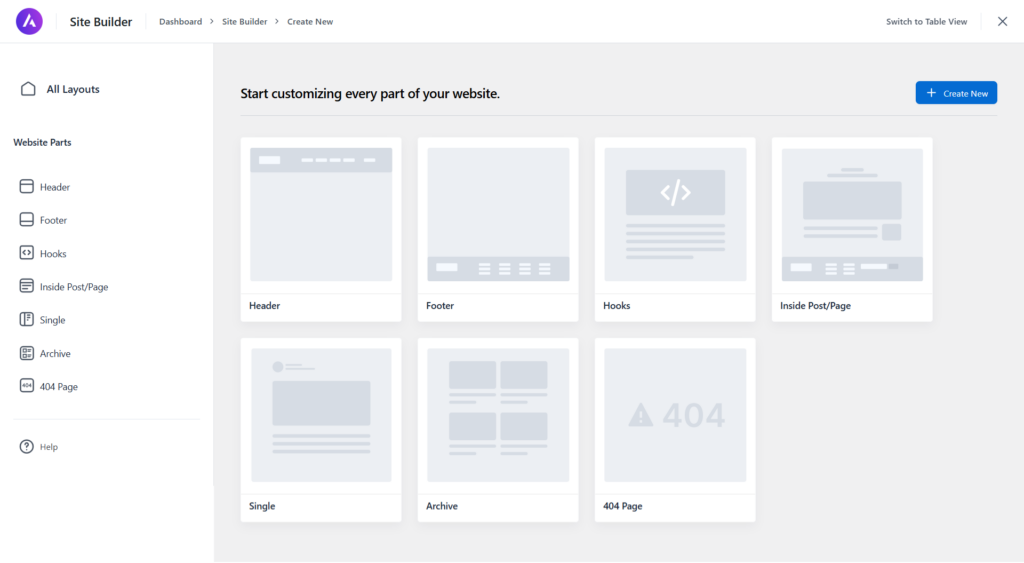
With the Custom Layout (Now Site Builder) module activated, you can create custom layout designs for 404 pages, page headers, and footers. You can also add custom content to the content body via a hook and use conditions to display it on the page.
Furthermore, the Custom Layout module allows you to create custom section layouts using your preferred page builder plugin and import them anywhere on the page.
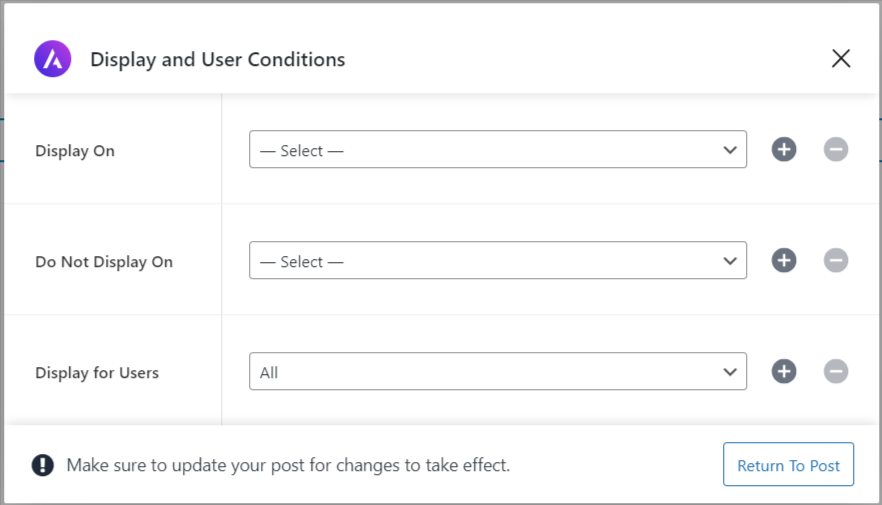
Another helpful feature in the Astra Pro add-on plugin is the display and user conditional setting, which gives you more control over the display of custom content or layouts.
It allows you to set the user role, post/page types, and specific post types, and the custom layout/content will be displayed.
Setting the device visibility display is also available via the WordPress editor sidebar panel. Desktop, Tablet, and Mobile toggle buttons allow you to set device display conditions.

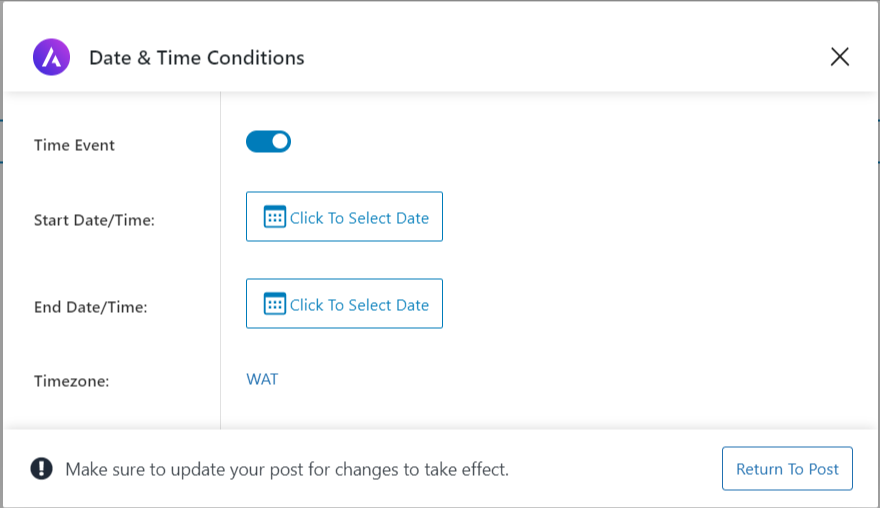
Additionally, Astra Pro lets you create custom, time-sensitive, injectable content within your website’s posts or pages. This feature can be helpful for news and data-aggregated WordPress sites.
So, the Astra Pro add-on plugin makes creating a unique website design, custom layouts, or content hooks painless and swift.
WooCommerce Integration
The free Astra theme integrates with WooCommerce straight out of the box, making it easier to customize colors, web fonts, and typography in the Astra theme customizer.
The Astra starter templates plugin provides a wide range of free and premium starter templates and is compatible with Elementor, Spectra Pro plugin, Beaver Builder, Gutenberg, and Brizy.
However, the Astra Pro theme extends WooCommerce features and store design, bringing more capabilities and styling options to help you design your shop pages.
To use this feature, ensure your site has the WooCommerce and Astra Pro add-ons installed. Then go to Astra > Dashboard > WooCommerce and activate the module.
This action will unlock the Astra e-commerce setting tab in the customizer. The Astra theme design options and WooCommerce default settings are under the same tab.
Now, you can customize eCommerce pages like:
LearnDash Integration
In addition to the WooCommerce integration, Astra Pro integrates directly with LearnDash, an e-learning management system.
LearnDash allows course creators to organize online courses effectively, manage students’ profiles, create course materials and assignments, and increase sales through their hard work and knowledge.
With LearnDash integration and Astra Pro, course creators can customize and design unique landing pages, improving students’ learning experience.
Customize the learning environments, create optimized checkout pages and beautiful classrooms, organize the sidebar, and design a powerful eLearning website that helps you build your business.
Astra Pro addon includes premade course themes, enabling course creators to design quickly.
Additionally, Astra offers over 100 free starter templates as part of its WordPress themes, compatible with popular page builders.
These free themes offer customizable options, such as different color schemes and fonts, making it easier to create a unique and professional-looking website.
Easy Digital Downloads
If you plan to sell digital products using the Easy Digital Download (EDD) WordPress plugin, doing so with the Astra Pro EDD add-on can be rewarding.
Astra Pro further customizes and provides styling options to product pages, archives, checkout, single product pages, site design, and content elements.
The Astra Pro theme EDD add-on offers more options to customize elements such as colors, typography, background design, titles, fonts, cart icons, etc.
It also gives you more control over site layout, off-canvas sidebar, catalog appearance, spacing, margins, borders, and buttons.
Also, Astra Pro has premade premium templates specifically built to sell digital downloadable products, making it quick to build your storefront.
You have access to more than 180 premium starter templates, which promise advanced features, extensive customization options, and seamless integration with WordPress page builders.
These templates cater to both beginners and professionals seeking comprehensive design solutions.
LifterLMS
LifterLMS is an eLearning WordPress plugin that provides a seamless learning experience between course creators and students.
Astra Pro LifterLMS add-on gives you more styling options, making it easier to design stunning course pages in the LifterLMS platform.
The benefits include creating clutter-free checkout pages, customizing profile pictures, managing the appearance of catalog pages with columns, customizing user personal account pages, and more.
With the LifterLMS add-on and Astra premium version, you can manage lesson and course page layouts, enable featured images, add course meta info, add a progress bar, enable instructor details, and more.
In addition, Astra Pro lets you manage other elements, such as button styles, link appearance, border width, margins and spacing, profile links, and more.
Blog/Archive Page
When comparing blog/archive page customization in the Astra Pro theme to that in the Astra Free theme, one quickly notices that the free theme offers only basic features and customization.
Astra’s free theme lets you set the blog/archive page container layout, style, and sidebar layout and style.
You can customize the blog/archive post structures, including titles, featured images, comments, postdates, breadcrumbs, and container widths, but that’s it.
Astra Pro takes the blog/archives page customization to another level with the Blog Pro Module.
Go to Astra > dashboard, then activate the Blog Pro Module from the list.
The Blog Pro Module features include an archive blog layouts option, which is available in three types:
Each layout option opens a different set of customization settings in the customizer.
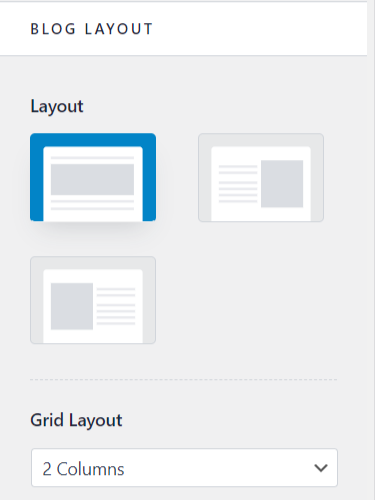
Depending on which blog page layout option you select, you can enable the date box, set the masonry layout, add space between posts, and remove padding for featured images.
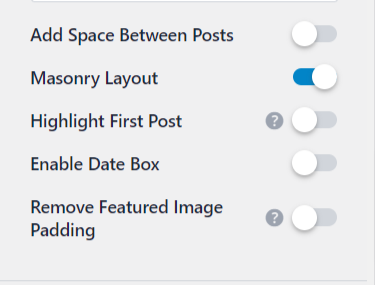
Astra Pro gives you more styling options to customize the blog page. You can customize excerpt characters’ length, disable read more links, and set featured image size.
And that’s not all; you can enable infinite scroll or pagination with a number and set post-pagination styling.
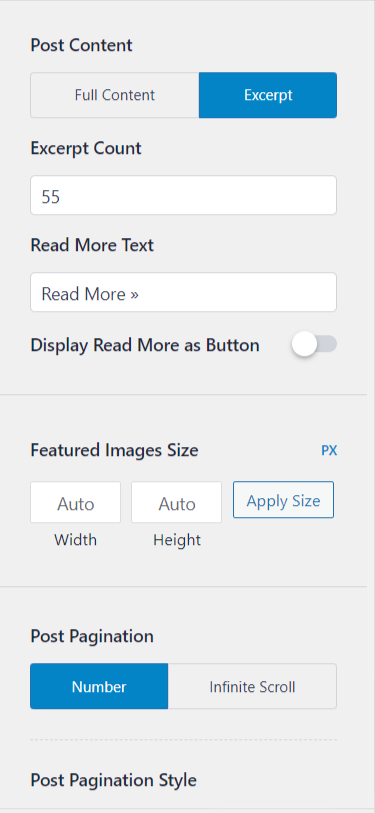
Switching to the design tab unlocks more customization for elements.

Here, you can customize design elements like content color, post-title font, meta fonts, pagination font, set post spacing – inside and outside – and set pagination.
Page Headers
The page header feature is part of the Astra Pro modules and can be activated from the Astra main dashboard. Reviewing the Page Headers is worth a standalone section in this Astra Pro vs Astra free theme review.
First, the page header lets you create custom header designs for individual posts, pages, all posts, post types, taxonomies, category pages, etc.
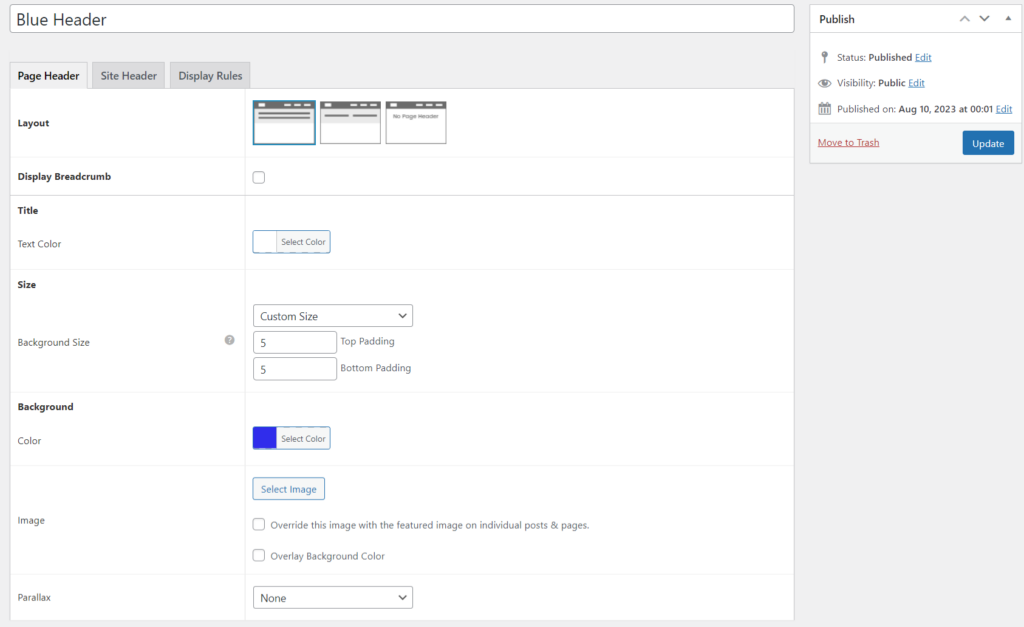
It also lets you set page/post exclusion lists and select the user role to trigger the page header Display on the front end.
You can add site header elements like breadcrumbs and navigation menus, and merge the site header with the page header.
You can also add background images and enable parallax scrolling. It lets you customize the title colour, set the font size, add feature images, and add a background overlay style.
When you create a post or page in the Gutenberg editor, you can add your custom page header to the current post.
If you’ve built a custom page header, you need to click the Astra icon in the Gutenberg editor. This will reveal the Astra sidebar panel setting on the editor page.
Select Page Header from the sidebar panel and choose your custom-built page header from the dropdown list.
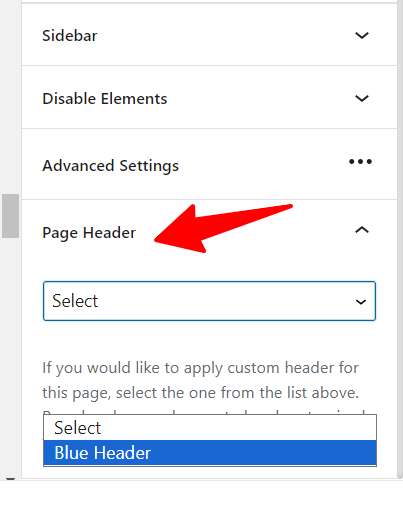
When you hit the publish button, your selected custom page header will be active on that specific page and override the default site header.
The page header feature lets you create custom header designs for different pages, posts, or sections on your website.
Header Customization
In addition to adding the site logo, title, primary menu, and transparent header and adjusting margins and width in the free theme, Astra Pro goes into overdrive with header customization.
Astra Pro extends things here with a Sticky header option, a language switcher, and many options to customize header elements to fit your website design and brand image.
More header customization includes site search, an off-Canvas menu, a toggle button, a mega menu, clone and delete elements, and more.

Single Post Customization
Within the Single Post General tab, Astra Pro and Astra Free offer container layout options, container styles, sidebar layout options, and sidebar styles.
Also, you can set the width of the content area to your liking.
However, Astra Pro uses single-post customization on steroids; it is one of the vital differences between Astra Pro and Astra Free Theme.
With the Astra Pro plugin enabled on your WordPress site, additional features such as Astra’s built-in social sharing buttons, disabling post pagination links, auto-loading previous posts, an author info box, and the option to remove featured images on single post view are available.

More settings, such as customizing the featured image, enabling a single post-read time feature, and adjusting post spacing, elevate the single post layout/design to a higher level.
In the Design tab, the Astra paid version lets you further customize the social sharing button.
You can choose between the official social sharing button color type or customize it to fit your blog design. Set the background color, icon spacing, and more.
Premium Themes
Alongside the free starter templates, the Astra Essential and Business toolkit license includes over 240 prebuilt WordPress premium themes through the Astra premium starter templates, offering various design options for most industries.
The premium themes are built with Elementor, Brizy, Beaver Builder, and Gutenberg page builders and are compatible with the WordPress customizer.

So, you can pick your favorite premade theme based on the preferred page builder plugin.
Astra premium starter themes can help web development agencies save time on design, build faster, improve creativity, and generate more income.
The free Astra theme also includes starter templates; they offer limited customization options and basic design features.
Site Layouts
Another big difference between Astra Pro and Astra Free Theme is the site layout.
Astra’s free theme provides minimal settings for container layout only, with no customization option to specify container spacing.
Whereas Astra Pro offers a more advanced site layout feature alongside the container layout option.
Astra Pro and Astra Free versions let you set the container style (boxed or unboxed) and adjust its width. Still, Astra Pro takes it one step further by allowing you to set container top and bottom margins.
For your site layout, you can choose Fluid, Padded, Full-width, or a maximum width. In the design tab, you can customize the spacing between the inside and outside containers.
Full and Maximum widths are straightforward to understand; let’s see how Fluid and Padded design affect site layout.
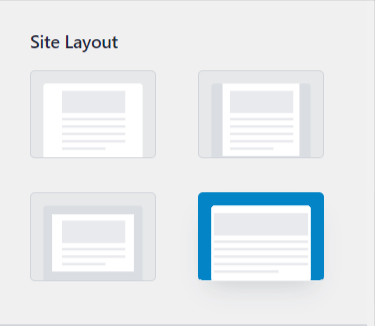
Padded
The padded design works with the full-width site layout. It gives a frame-like design across the edges of the website, making the content background area stand out on the page.
Moreover, you can set the device visibility for the padded layout; this gives you more control over the website user experience based on device type.
Fluid
When enabled, the Fluid site layout lets the entire site design display edge-to-edge on all device browsers, from the header, footer, and content area.
The entire site design will span the user’s device screen.
This display is suitable for content-heavy sites such as news sites, service-based websites, and more. Technically, the Fluid layout lets you use the entire site container area to display the website design.
Sidebar Customization
In addition to the option to set the sidebar layout, style, and widths in the free theme, Astra Pro unlocks the design tab and adds more advanced customization elements to the sidebar.
Now you can set the typography and colors for the sidebar widgets’ titles, spacing, and content.
Additionally, you can set the sidebar background color, customize the sidebar title font and widgets font size, and adjust the inner and outside spacing.
White labeling
White-labeling the Astra theme and add-on plugins under your brand name is a Pro feature.
This feature removes any instances of Astra links to the WP Astra website and rebrands the Astra dashboard, theme, and plugins with your agency branding.
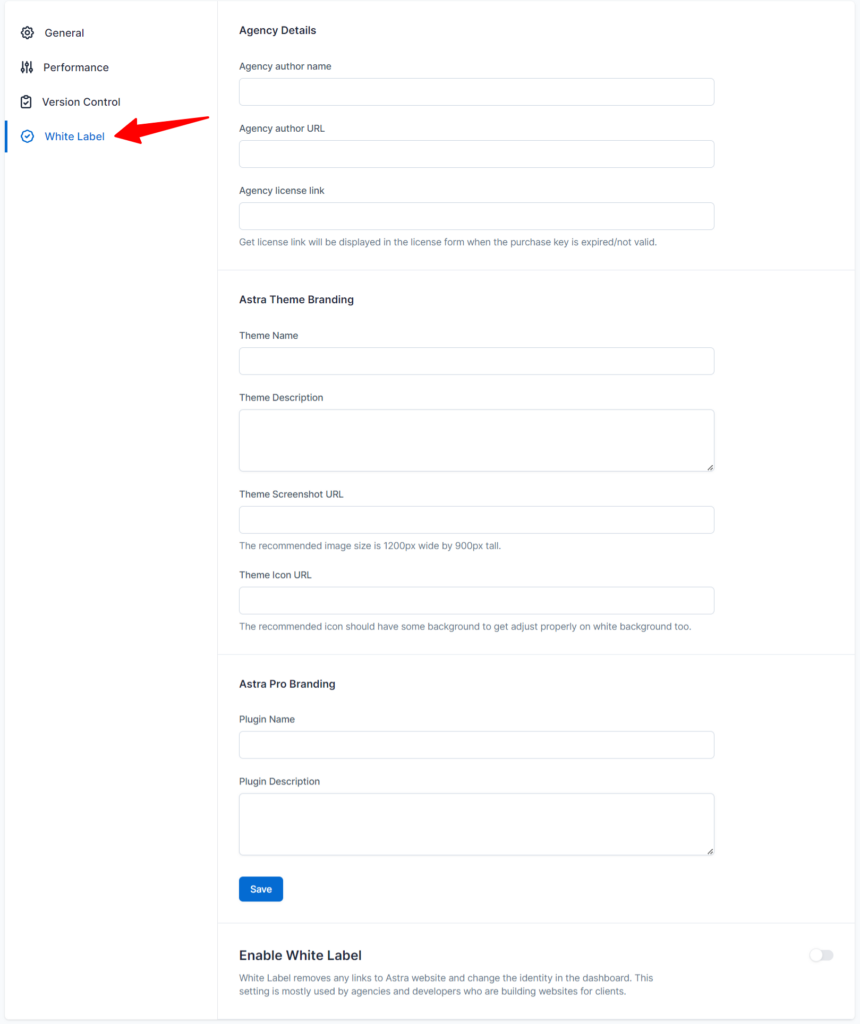
Web development agencies can sign up through the Astra dashboard via the WordPress admin. And assumes the role of the developer of the best WordPress theme (Astra) and add-on plugin while serving clients’ needs.
Astra Pro License and Price
The premium features of the Astra theme come in three licenses: Astra Pro, Essential, and Business Toolkit.
Each license gives you access to specific premium features, other Astra Pro plugins, and customization options, with more details available on the Astra pricing page.
In summary, here is what you pay for each Astra Pro license.
Note:
These prices are for one website license. The price changes significantly if you select 10 or 1,000 website licenses. Please check the Astra theme pricing page for more details.
The Essential toolkits include your choice of a one-page builder plugin, the Ultimate add-on for Beaver Builder or Elementor, a WP Portfolio plugin, and more than 180 premium themes.
Business Toolkit lets you access both ultimate add-ons for Elementor and Beaver Builder, as well as Spectra Pro.
All Astra Pro licenses give you access to premium support, a 14-day money-back guarantee, and extensive product support training. Essential and Business Toolkits give you access to premium templates.
Should You Get Astra Pro?
You can best answer this question. Only you can decide whether you need the Astra Pro.
However, buying an Astra Pro license is worth considering if you want more control, flexibility, and advanced customization features over your website design.
Also, if building unique website designs will help your business grow, improve user experience, and drive more conversions, buying Astra Pro is a good decision.
Conclusion…
Which option should you take?
Well, if you’re a beginner starting your blog and still not earning a decent income from blogging, I advise you to go with the free Astra theme.
It has sufficient design, features, and customization options to woo your audience with a stunning website. I used the free theme before going Pro, and that was when I had reasons to do so.
However, if you lack the features or elements needed to design your website, it may be time to consider the Astra Pro plugin add-on. The price you pay depends on which license type you need.


Wow, this article really breaks down the differences between Astra Pro and Astra Free Theme. I had no idea Astra Pro was more of an add-on plugin, enhancing the free theme’s design and customization. The features like custom layouts, WooCommerce and LearnDash integration, and enhanced single post customization are impressive. The pricing details help me weigh the options too. As someone in this field, I’m seriously considering upgrading to Astra Pro for more control over my site’s design. Thanks for the thorough comparison!
Hi, Sarah,
Thanks for reading through.
Glad to read you discover something new from reading this post, and it helps you learn more about the different Astra license prices.
Thanks.