

Are you looking for a valid WP Engine coupon code this month?
You’re on the right page…
Starting today through March 31, new WP Engine customers can save up to 25% off the annual hosting license (which is equal to three months of free hosting) or 10% off the monthly hosting subscription.
This is a perfect opportunity if you’re on a tight budget but want to start an online business and get more value for your web hosting purchase. Whether you subscribe to the monthly or annual plan, you save BIG.
To make this WP Engine discount code even sweeter, you don’t need to enter any coupon on the checkout page. The annual discount (three months’ worth of free hosting) auto-applies to your account when you check out through the links on this page.
Use this link to open the official WP Engine three-month special offer hosting landing page.
Here is the offer summary…

How to Activate a WP Engine Coupon Code
To activate the WP Engine discount sale, click this link. It will open a new browser window on your computer. This will be the exclusive WP Engine hosting landing page.
Go through the hosting package and features that suit your website and business needs on the landing page. To recap, here are the hosting plans eligible for the annual and the WP Engine promo code discount (free 3 months hosting) savings:
Review their hosting features limits, such as the amount of traffic allowed monthly and website installs.

Once you’ve picked your preferred hosting plan, click the “Buy Now” button to proceed to the checkout page.
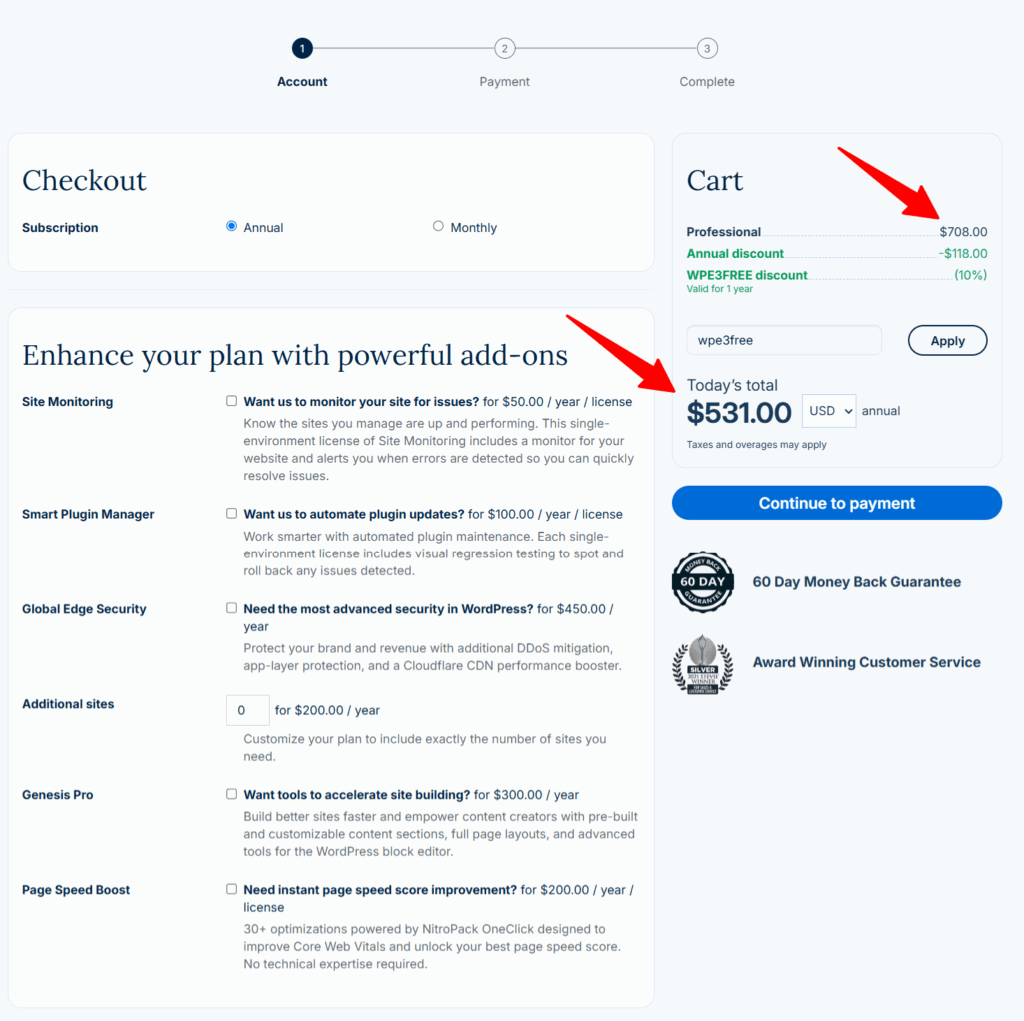
The 25% saving (annual discount + 10% promo on 12-month plan) automatically applies to your purchase when you use the links on this page and subscribe to the annual plan. However, if you don’t need to commit to a more extended hosting plan, switch to the monthly subscription and enjoy a 10% discount.
The only action you need to take next is to click the “Apply” button on the checkout page.
As you’ve seen in the image below…
Note:
Instead of the regular $708/yr price for the WP Engine Startup annual plan, I’m billed $531.00 for the first 12 months, thanks to this page’s discount code (WPE3FREE).
Now that you’re on the checkout page, take a moment to review the additional hosting features, such as Site Monitoring, Page Speed Boost, Global Edge Security, Smart Plugin Manager, Genesis Pro, and more.
You can add these WP Engine add-ons to your cart only if you’re convinced it will benefit your business and increase growth, security, and performance.
Note that adding any of these hosting features automatically increases your total bill. So, you should only consider a feature if you need it.
Once you’ve selected it, fill in the account information to proceed to the final step, where you must enter your billing details to finalize the purchase.
In the final step, enter your payment details to complete the order and log into your account.
If the payment is successful, your WP Engine account will be set up, and order confirmation details will be sent to the email address on file.
Now, you can log in to install WordPress, access free premium themes from StudioPress, and add other essential hosting features from WP Engine.
WP Engine Hosting Plan and Details
As a truely managed WordPress hosting provider, WP Engine only offers WordPress hosting solutions tailored to make your business operation easier, more efficient, and performance optimized.
So, if your website is created with other content management systems, such as Drupal, Joomla, Magento, Prestashop, etc., WP Engine web hosting is not for you.
There are five basic WP Engine hosting plans available now.
Note:
All the WP Engine eCommerce and WordPress hosting plans below come with free SSL and SSH, a one-click staging site, ten premium StudioPress themes, daily backup, a 60-day money-back guarantee, and free automated migration services.
Startup
The WP Engine Startup shared hosting plan is ideal for beginners.
Starting at $30/month, billed at $360/yr, with a maximum of one WordPress installation. Twenty-five thousand monthly visits, 10GB local storage, and 50GB bandwidth per month.
This hosting plan is perfect for low-traffic blogs and can only host one website.
Professional
The WP Engine Professional hosting plan is ideal for boosting sales and traffic for mid-size and growing websites. Costs $59 monthly or $708 for the 12-month billing cycle.
However, if you purchase this month and pay far less than you should, you can save four months of hosting.
This plan gives you access to multi-site options after you complete the sign-up.
One-click store creation, ten premium optimized WordPress themes, staging hosting environments, and up to 75,000 monthly visits.
Also, it gives you access to host up to three websites.
Growth
The WP Engine Growth hosting plan is next.
This plan allows up to 10 websites,100,000 monthly visits, 20GB local storage, and 200GB monthly bandwidth.
Starting at $115/month, billed $1,380/yr, this might be a good option for your website if it drives a large volume of traffic.
This plan includes 20GB of local storage, up to 200GB of bandwidth usage, and every feature WP Engine offers customers.
Scale
The WP Engine Scale plan is ideal for high-traffic websites with 400,000 monthly visits. It includes all the hosting features in the Startup and Professional plans.
It starts at $290/month and is billed at $3,480 yearly, but for this month’s promo code, the cost is $2,800/year.
It includes up to 400,000 monthly visits, 50GB of local storage, 500GB of bandwidth, and up to 30 websites.
The custom hosting plans are for large businesses and mission-critical sites.
It’s a dedicated hosting environment that delivers a super-fast, high-performance website experience.
You also get the fastest WP Engine support response time.
The custom plan is ideal for websites with millions of monthly visitors. It comes with 100GB -1 TB local storage, 400GB bandwidth, and up to 30 website installations.
But you must call and speak with a sales specialist to order this hosting plan.
WP Engine Hosting Features
WP Engine comes fully loaded with fantastic web hosting features that set it apart from its competitors.
You can explore the WP Engine hosting features below.

1. Free CDN and SSL certificate
WP Engine makes it super easy to use CDN services in your hosting plan.
It also provides free SSL certificates from Let’s Encrypt and RapidSSL Wildcard.
2. Auto Migration Services
Moving your existing WordPress blog from another host to WP Engine is as simple as a one-click install.
WP Engine has partnered with Blogvault to create an automatic WordPress migration plugin that does all the heavy lifting for you.
The plugin handles all the migration tasks, so you don’t have to worry about database import.
3. One-Click Legacy Staging
Quickly and easily create a copy of your live website for testing purposes.
This is one advantage of hosting with WP Engine. You can copy the staging site back to your live site anytime.
This is good for testing plugins, themes, designs, custom codes, etc., outside your live WordPress blogs.
4. WordPress Core Updates
You don’t have to worry about manually updating WordPress core files.
WP Engine automatically handles all major WordPress core updates and tests them before deploying them onto your website.
After these updates, WP Engine “smoke test” your website for compatibility issues.
After this “smoke test” is done, anything other than a 200 ok or 401 unauthorized status code is returned, and WP Engine will attempt to roll back the update to its previous version.
5. Onboarding Services
For custom hosting solutions, a dedicated account management and technical team ensures a smooth start and guides you.
You get WP Engine’s faster response team of dedicated WordPress experts.
6. 24/7/365 Support
The WP Engine support system is tailored to meet each customer’s needs and account type.
The WP Engine offers a premium support team of dedicated account managers for customers with high-level services and gives access to the most experienced support staff.
With three support location centers globally, WP Engine delivers one of the industry’s fastest and best customer care experiences.
7. SSH
WP Engine’s SSH (Secure Shell) gateway helps you efficiently set up and manage multiple WordPress sites through the command line. It uses tools like WP-CLI, rsync, and MySQL.
You can automate and scale all your WordPress site administration tasks through the command line. This is an ideal option for developers who manage many WordPress sites.
8. WordPress Multi-Site Conversion
WP Engine lets you quickly set up and deactivate multisite in the user portal.
WordPress’s multi-site conversion is a feature that lets you create a subdomain from your WordPress main domain.
This feature is only available for growth, scale, and dedicated hosting plans. So, if you’re on the Startup plan, this feature is unavailable.
9. Automated Daily Backups
WP Engine has the option for both manual and automated backup services.
This backup option is available on all WP Engine environments by default:
The backups are stored on Amazon’s Simple Storage Service (S3).
Up to 40 backup restore points are available for either restoration or download in the WP Engine user portal at any time.
If you require an older backup, contact support for a backup of up to 60 restore points.
10. Geo-Targeting
Create and publish personalized content based on visitors’ demographics, locations, IP addresses, etc.
This feature allows you to create content super-targeted to visitors from a specific geographical location.
Such as displaying product prices in the $ sign to users in the United States and having the pound currency sign displayed to users from Great Britain.
This is an ideal hosting feature for business websites.
WP Engine Money-Back Guarantee
The company posted this message on its website, as seen in the image below…

WP Engine offers a 60-day money-back guarantee that protects your money.
If you are unsatisfied with the hosting services within 60 days of hosting with WP Engine, you can request a refund.
So, whether you subscribe to the monthly or annual WP Engine hosting package, you’re not locked into a long-term contract.
FAQ
Is There a WP Engine Coupon Currently?
Yes, WP Engine is offering a 25% discount code until the end of this month, March 31. The link on this page opens the promo page. The offer is available for shared hosting plans and new customers only.
How do I Get a Coupon Code for The WP Engine Hosting Plan?
By checking this page regularly, you can always get the latest valid WP Engine promo offer on my website. Every month, WP Engine releases its special offer package; we do our best to update the page with new coupons and a complete step-by-step guide to take advantage of the free hosting plans.
How Do I Apply a WP Engine Coupon Code?
If you click through to the WP Engine website from this page, you don’t need to enter the codes manually. The links on this page are preset with the corresponding WP Engine current offer codes, so manually entering them is unnecessary.
Does WP Engine offer a Free Trial Besides Coupons?
Unfortunately, WP Engine does not offer a free trial of its hosting plan. However, there is a 60-day money-back guarantee policy, which means you can test the hosting quality for two months after you have made payment. If you’re not satisfied with the quality of service, you can request account cancellation along with your money. WP Engine will refund you the base hosting fee as soon as possible.
Conclusion…WP Engine Coupon
WP Engine is the ideal web host for budget-sized businesses.
With the WP Engine 25% coupon code offer, there is no excuse not to start your online business this year. Do not forget that no coupon code is needed at checkout for four months of free hosting from WP Engine.
If starting with WordPress with a limited marketing budget, you may want to consider other web hosting companies.
Though these other web hosts may be cheaper than WP Engine, that does not mean they offer less value or quality services.
The thing is, some premium hosting features in WP Engine are not what every blog needs. Choose your web host based on your blog’s needs and wants.


Enjoyed reading the blog , it is very interesting and well written. Thank you and good luck for the upcoming articles.
Thanks James.
Great blog post ….enjoyed reading it….keep up the good work
thanks for your valuable information. i really love this types of content.
great work. keep writing this type of content for us.