If you’ve been searching for an honest Verpex hosting review from someone who actually uses it – not a reviewer who signed up yesterday for an affiliate commission – you’re in the right place.
I currently host two WordPress sites on Verpex: WPrBlogger.com (since 2022) and CyberNaira.com (migrated in late February 2026).
In this review, I’ll share real performance data, uptime records, support experiences, and an honest breakdown of what Verpex does well and where it falls short.
Let’s get into it.
Verpex

I’ve hosted two WordPress sites on Verpex since 2022. Here’s my honest review covering real TTFB data, uptime records, support experience, pricing, and one storage issue you need to know before signing up.
Price: 10
Price Currency: USD
Operating System: Web
Application Category: Hosting
4.1
What Is Verpex Hosting?
Verpex is a web hosting company that positions itself as a premium yet affordable option for WordPress sites.
It offers shared hosting, cloud hosting, WordPress hosting, OpenClaw, and reseller plans built on LiteSpeed servers with high-end NVMe SSD storage.
Unlike many budget hosts that cut corners on infrastructure, Verpex uses enterprise-grade hardware across all shared plans, which explains its performance numbers (more on this shortly)
It offers data centers across 9 regions. This includes US East and West, Canada, Singapore, Australia, London, India, Central Europe, and South America. This gives you the flexibility to choose a server location closer to your ideal audience.
Verpex Plans and Pricing
As mentioned above, Verpex offers several hosting types. Each of these hosting types has three-tier pricing plans. However, I’m on the Plus plan for WordPress hosting, so I will focus on that in this Verpex hosting review.
Here’s what makes the Plus plan pricing interesting:
Important note on storage:
The 100GB on the Plus plan sounds generous, but by default, backups are stored directly on the server. Depending on your database size, if you run multiple backups without cleaning them up, you can fill that space faster than you expect.
I’ll cover this in the pain points section.
The $0.99 entry offer is genuinely useful if you want to test the service before committing. The $10/month renewal is competitive given what you get: NVMe storage, LiteSpeed servers, free migrations, and a bundle of free Pro plugins (covered below).
For comparison, I was previously on Pressable, which costs significantly more ($25/month for the Signature1 plan). Verpex delivers better TTFB for less than half the price.
Performance: Real TTFB Data from SpeedVitals
This is where Verpex genuinely surprised me.
After migrating CyberNaira.com from Pressable to Verpex, I ran TTFB tests on SpeedVitals across 40 global locations to compare performance.
Here’s what I found:
CyberNaira.com TTFB After Migration


That’s a 25% improvement in average TTFB — moving from 76ms down to 57ms.
NOTE:
I left Pressable not because of a performance issue, but I discovered I was paying for resources I actually don’t need. CyberNaira has seen significant declines in traffic since the rollout of the Google AI overview. So there is no justification for paying for a premium managed WordPress host when a simple shared hosting plan is all I need.
What makes these TTFB performance reports more remarkable is the setup on each host:
On Pressable, I use WP Rocket, Imagify, Pressable’s Edge Cache, and their built-in CDN. That’s four performance layers.
On Verpex, I use LiteSpeed Cache + Quic.cloud CDN. That’s two.
Using LiteSpeed Cache alone (handling caching, image optimization, and CDN through Quic.cloud) produced better results than a more complex multi-plugin stack.
I attribute this to two things:
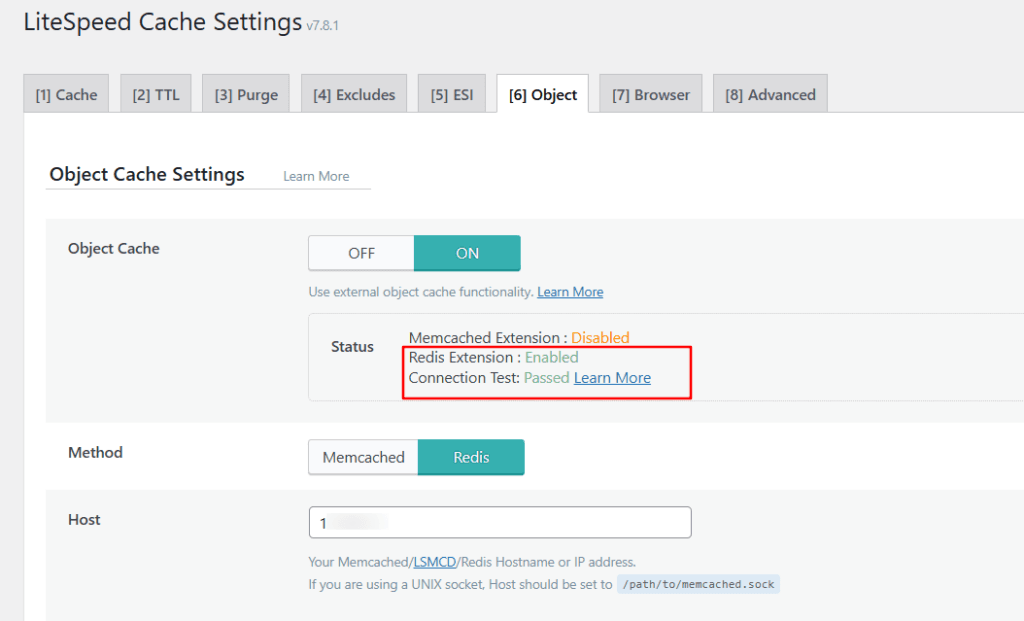
The 100% cache hit rate on the Verpex test (versus an unmeasured rate on Pressable) also suggests that Quic.cloud CDN was serving cached responses consistently across all test locations.
For context:
A TTFB under 200ms is considered excellent by Google. Under 100ms is exceptional. CyberNaira.com, with an average of 57ms globally, puts it in elite territory for a shared hosting plan. And that also means Pressable delivers elite TTFB across regions, especially in Europe and the Americas.
Uptime: My Real Data Over 3+ Years
Uptime is where many budget hosting reviews get vague.
Remember, I told you earlier that I’ve hosted a site on Verpex since 2022, so I had actual Jetpack downtime alert data spanning 3 years.
WPrBlogger.com (on Verpex since 2022)
Over roughly 3+ years, Jetpack sent 9 downtime alerts:
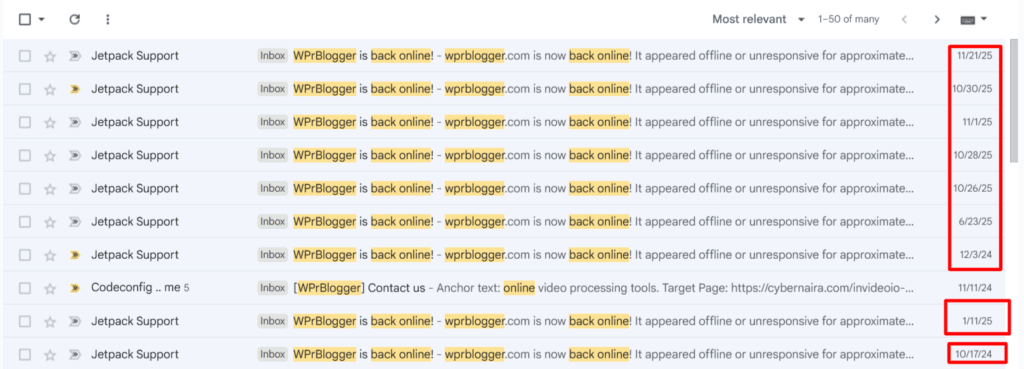
9 incidents over 2+ years, each lasting around 3 minutes, amount to roughly 29 minutes of total downtime across the period. For a shared hosting plan, that’s a strong uptime record.
One pattern worth noting:
Four of those alerts clustered within a six-day window between October 26 and November 1, 2025. Each was brief, and the site recovered automatically each time. So this appears to be a temporary server-side instability (or something accidentally breaks due to a site admin error) rather than a persistent reliability problem. Outside that cluster, incidents were spread across months with no recurring pattern.
In my opinion, this is not something to worry about, especially for a content-driven website. Also, for a shared hosting plan at $10/month, 30 minutes of total downtime over the recorded period is a strong uptime result.
CyberNaira.com (on Verpex since February 2026)
No server downtime alerts to date — with one exception tied to a storage issue I caused myself, which I’ll explain below.
Support Experience: Tickets vs. Live Chat
Verpex offers both ticket-based support and live chat. Here’s my honest experience with both.
Support Ticket Response time in my experience: approximately 3 minutes. That’s fast for a ticket system.
However, 3 minutes feels like a long time when your site is down.
Live Chat: This is where Verpex earns its reputation. When CyberNaira.com went down with an HTTP 500 error, I first opened a support ticket, waited a few minutes, then switched to live chat.
The chat opens with an AI assistant (named Orbi) for initial triage. After requesting a human rep, I was transferred to a support agent.
The rep immediately asked for the domain, ran independent checks on the server side, reviewed wp-config, and suggested deactivating all plugins as a troubleshooting step. He then independently verified that the site was accessible before closing the session.
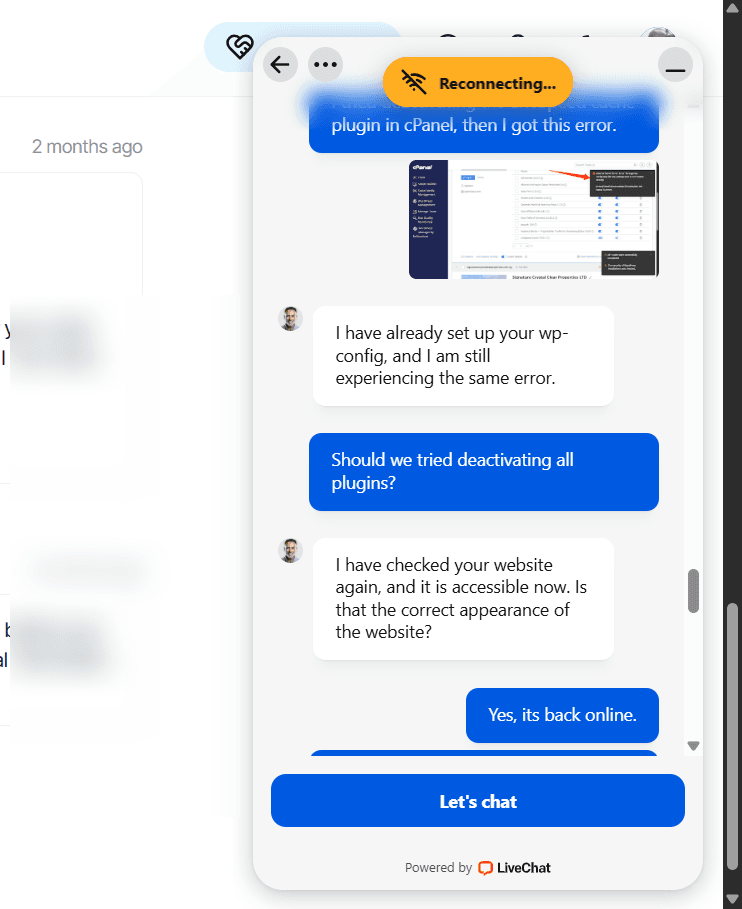
The entire troubleshooting flow was collaborative. He handled the server side while guiding me through the steps on my end. The site was back online within the session.
My takeaway: Use tickets for non-urgent questions. Use live chat the moment your site is down. The live chat team is responsive, knowledgeable, and effective under pressure.
Onboarding and Migration
The sign-up process was smooth with one exception: payment verification.
After completing my order, the Verpex system flagged it for a routine review before activation. I received a support ticket from their team confirming they hadn’t received the invoice payment and asking me to verify it had been processed on my end.
Once I confirmed, they handled the rest and activated the account promptly.
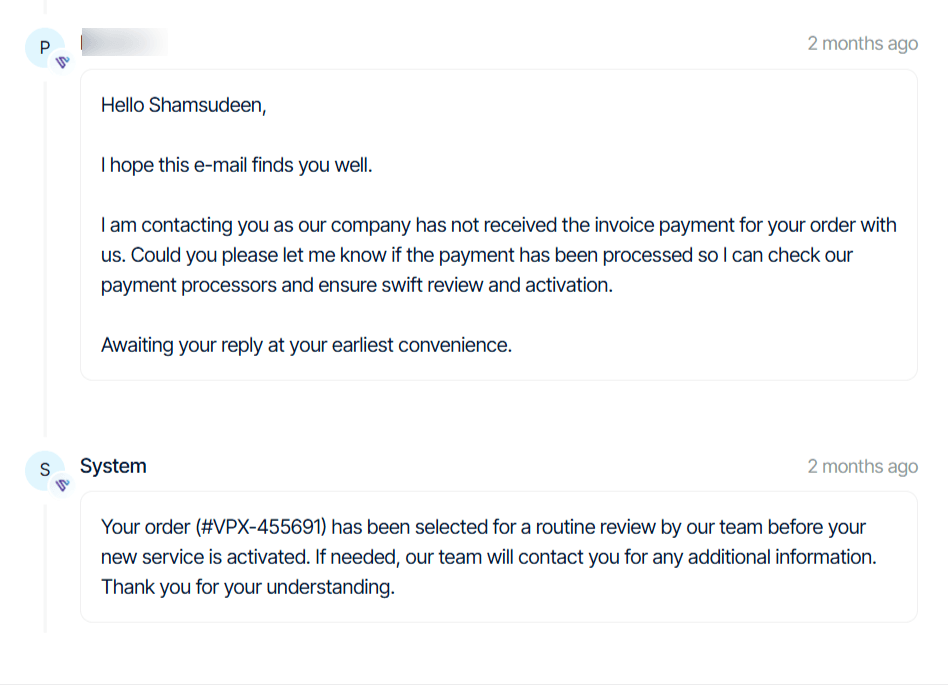
This is clearly an anti-fraud or payment processor check, not a sign of anything wrong. It added a minor delay but was straightforward to resolve. Worth knowing if you’re signing up for the first time and expecting instant activation.
Migration was handled entirely by Verpex’s team. No forms to fill out. I opened a support ticket, submitted my WP Admin credentials, and they took care of everything, completing the migration within an hour.
Next, they gave me a preview link to browse through the site and ensure everything works as expected before changing the DNS to the Verpex server IP.
That’s about as frictionless as it gets.
Control Panel and Features
Verpex uses cPanel, which is the industry standard and something most WordPress users are already familiar with.
Inside cPanel, you get access to Softaculous and WP Toolkit — WordPress management tools that lets you manage updates, cloning, staging, and security from one dashboard.
Free Pro Plugins via Softaculous
Here’s something I don’t see mentioned in most Verpex review posts: when you access WordPress through Softaculous (Verpex’s app installer), you get a bundle of Pro plugin licenses at no extra cost.
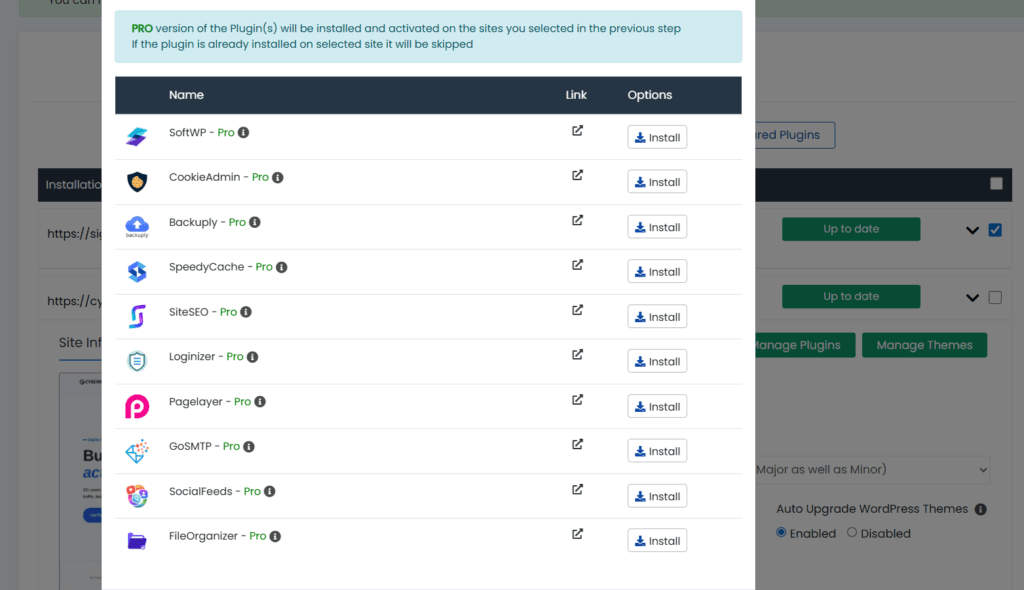
The bundle includes:
That’s 10 Pro plugins included with your hosting plan. Even if you don’t use all of them, having Backuply Pro, SiteSEO Pro, and Loginizer Pro alone would typically cost you extra on other hosts. For a budget hosting plan, this is a significant value addition.
The Storage Pain Point (An Honest Warning)
Verpex offers NVMe storage with generous allocations, but there’s a catch worth understanding before you sign up.
Backups are stored directly on the server by default. If you run automated backups and don’t actively manage them, those files accumulate and can quickly push you over your storage quota.
This is exactly what happened to me with CyberNaira.com. My cPanel statistics showed disk usage at 118.89GB against a 97.66GB limit – 121.74% capacity, flagged with a warning icon.
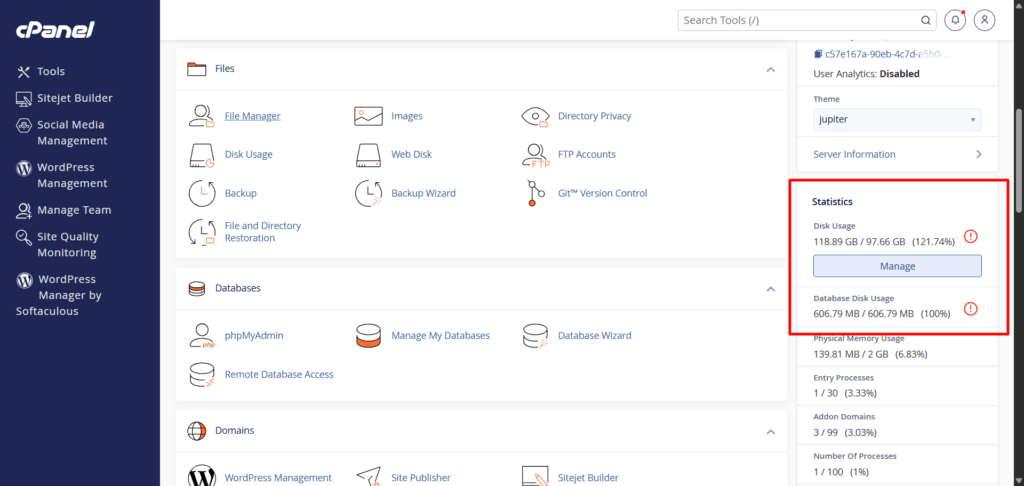
Three backups sitting on the server were the culprit. The site first stopped publishing posts, then eventually went offline with an HTTP 500 error.
The fix was straightforward once the support rep identified the issue, but the downtime lasted approximately one hour – an uncomfortable reminder to monitor storage actively.
The solution:
Either store backups externally (cloud storage like Google Drive or Dropbox), schedule automatic cleanup of old backup files, or upgrade to a higher storage plan if you’re running multiple sites or large databases.
This isn’t a dealbreaker. It’s a management habit. But it’s something Verpex could communicate more prominently during onboarding.
What I Like About Verpex
What Could Be Better
FAQs
Is Verpex good for WordPress?
Yes. Verpex is a good web host for WordPress sites. Using LiteSpeed servers with NVMe storage and Redis object caching significantly improves WordPress performance. You have access to premium bundle plugins that further enhance the security, performance, and customization of your WordPress site.
Is Verpex reliable?
Based on my experience hosting multiple sites, Verpex is a reliable web host with remarkable uptime, security, and enterprise-grade infrastructure. The platform is built to host most types of website needs.
Does Verpex offer free migration?
Yes. Verpex handles migrations at no extra cost. You open a support ticket, share your credentials, and their team completes the migration, typically within minutes.
What control panel does Verpex use?
Verpex uses cPanel with WP Toolkit included. This lets you manage your WordPress site effectively on the server. It also provides access to 10 Pro plugin licenses through Softaculous at no additional cost.
What is the price of the Verpex Plus plan?
The Plus plan starts at $0.99 for the first month and renews at $10/month. It includes 100GB NVMe storage, unmetered bandwidth, and unlimited email accounts.
Is Verpex cheap?
Yes, especially relative to what it offers. NVMe storage, LiteSpeed servers, free migrations, unlimited email, and a Pro plugin bundle at $10/month make it one of the better value propositions in shared WordPress hosting.
Is Verpex Good? My Honest Verdict
After running WPrBlogger.com on Verpex for over four years and CyberNaira.com for several months, my answer is yes, but with one important caveat.
Verpex delivers performance that rivals premium managed WordPress hosts like Pressable, at a price point that’s accessible to bloggers and small site owners.
The LiteSpeed stack, NVMe storage, Redis support, and free plugin bundle make it genuinely competitive. Support is reliable. Uptime is solid for a shared host.
The caveat: you need to actively manage your storage, especially backups. This is a shared hosting reality, not a Verpex-specific flaw, but it’s worth knowing before you sign up.
For WordPress beginners and intermediate users looking for affordable hosting without compromising speed. Verpex is one of the better options available right now.
Overall Rating: 4.1 / 5