

Instagram has become a cornerstone of social media, allowing users to share moments and connect with others.
While the platform offers various features to enhance the user experience, privacy concerns have led many to seek ways to hide their Instagram following list.
This guide will explore practical methods to manage and hide followers on Instagram.
By the end, you’ll be equipped to make informed decisions about protecting your personal information on the platform.
By understanding the nuances of Instagram’s privacy settings and exploring potential solutions, you can take control of your digital footprint and protect your personal information.
Why You Need to Hide Instagram Followers
Let’s face it: Instagram can be a pressure cooker. From the relentless pursuit of likes to the constant comparison game, it’s easy to feel overwhelmed. One aspect that often contributes to this pressure is the public display of your follower count.
Hiding your follower list can be a strategic move for several reasons. First, it can help you maintain a sense of privacy.
Not everyone wants a detailed record of who follows them.
Second, it can reduce social comparison. Seeing a large follower count can create unrealistic expectations and unnecessary stress, especially among family and friends.
There is the belief that a large social media following automatically translates into revenue, which is not always the case.
Suppose you’re worried about your immediate family and close friends spying on your social media activities and using that to gauge your financial abilities. In that case, you want to hide your list of followers from them.
Finally, it can deter potential stalkers or unwanted attention.
Ultimately, the decision to hide your followers is a personal one. By understanding the potential benefits and drawbacks, you can make an informed choice about what’s best for you and your Instagram experience.
3 Methods to Hide Your Instagram Followers
While Instagram does not have a direct step-by-step process for hiding your followers, there are ways to do it on the platform.
However, these methods do not provide absolute foolproof methods to hide your followers completely; to some extent, you can conceal your followers’ visibility.
Let’s walk through the three methods to hide Instagram followers’ visibility.
Making Your Account Private
The most straightforward way to conceal your follower list is by switching your Instagram account to private. Only approved followers can see your posts and follower list when your account is private.
Other Instagram users viewing your account won’t be able to see or access your follower list. Until they send you a request and it is accepted, your Instagram followers list is hidden from them.
Here’s how to make your Instagram private:
- Go to your Instagram profile.

- Tap the three horizontal lines in the top right corner to access settings. Note that if you’re on the Instagram Professional account, you may not see the setting; instead, scroll down to “Account Privacy” and click it.
- Select “Account Privacy.”

- Toggle the “Private Account” option to on.
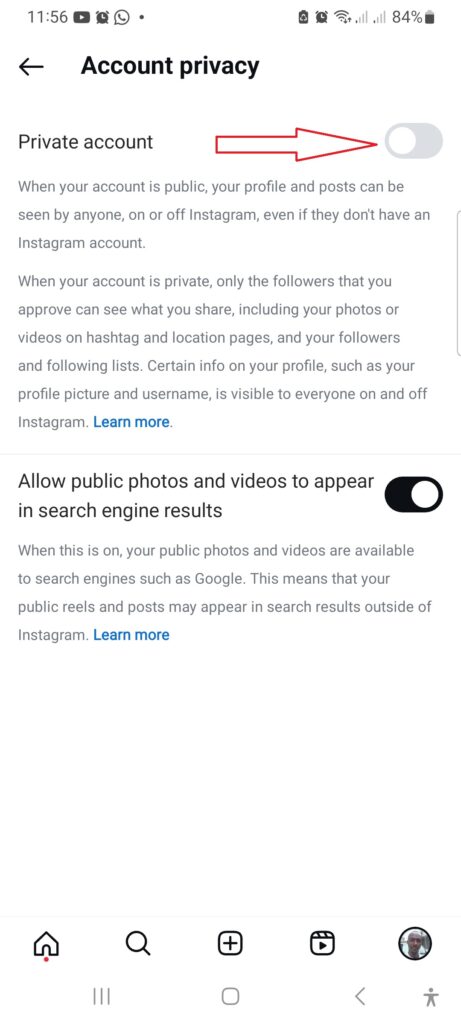
From now on, your Instagram followers list will be hidden from anyone who isn’t on your follow list, and you’re not following.
Remember that you must approve every follow-up request by making your account private. While this method effectively hides followers on Instagram, it limits who can see your content.
However, your profile picture and username are visible to anyone on or off the Instagram platform. You should take note of that.
Blocking Specific Users
While making your entire account private is practical, it might not be ideal if you want to keep your profile public.
If you’re a digital marketer, making your entire account profile private isn’t ideal, and the potential downsides might outweigh the benefits.
In this case, blocking specific users can be a targeted solution, especially if you want to hide followers on Instagram to avoid certain people, such as family members, close associates, or acquaintances.
Here’s how to block a user on Instagram:
- Go to the user profile you want to block. Tap the three dots in the top right corner of their profile.

- Select Block from the options.

- Click the “Block” button again to confirm you want to make the request

Once you click the block confirmation button, the user can no longer see your Instagram profile, send you messages, or view any of your posts.
Remember, blocking someone prevents them from seeing your profile, posts, and follower list. They also won’t be able to follow you or send you direct messages.
This method is ideal for disassociating with people with whom your social interests do not align or with whom you don’t want to be found on Instagram.
It’s important to note that blocking users is a permanent action, so consider it carefully.
Removing Specific Followers From Your List
Another method is to remove a specific user from your followers list. While Instagram allows you to remove users from your list, it’s not the best option.
Though it offers a more granular approach to managing your follower visibility without resorting to blocking users, it may not offer the extent of privacy you want.
To remove a follower, go to your followers list and tap the “Remove” button next to their username.
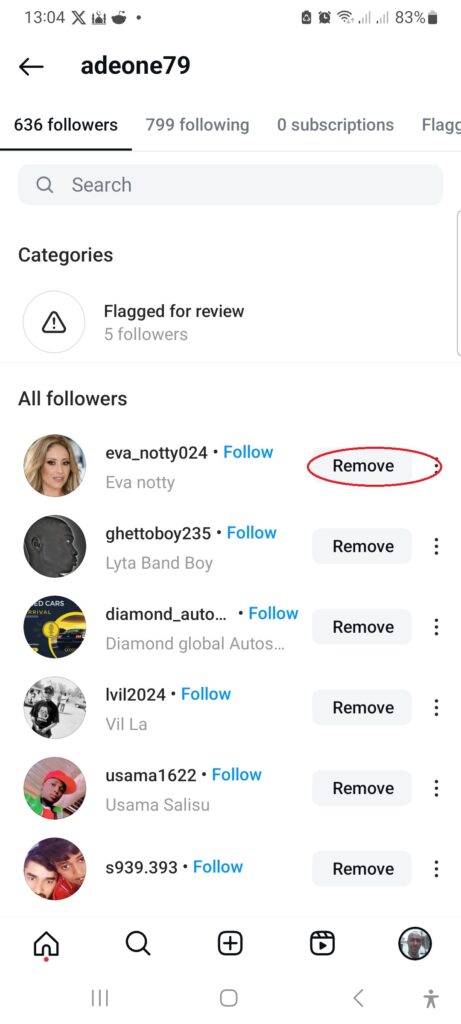
- Next, click the “Remove” button on the pop-up.
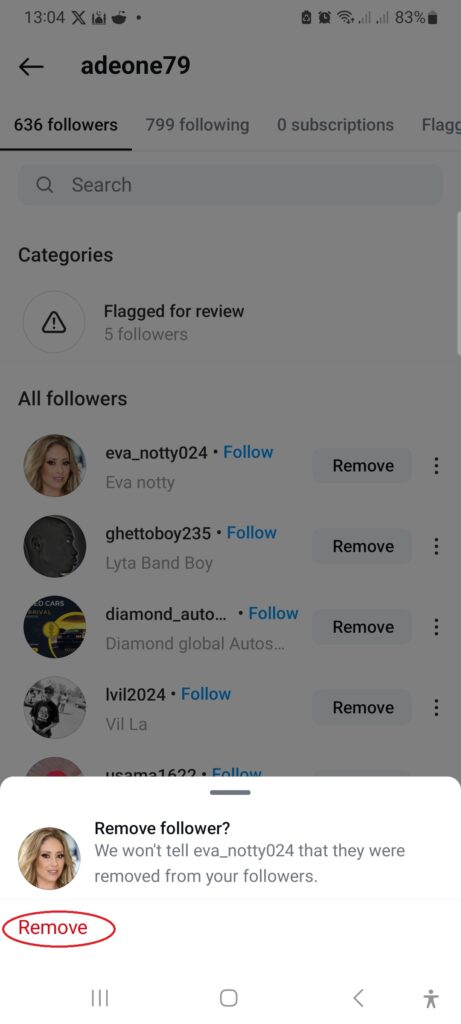
Instagram will remove the user from your list, and they will no longer be able to follow or see your post.
The good thing about this feature is that the user you removed will not be notified that you removed them. So you can confidently remove anyone without them getting upset or questioning why you did it.
Limitations of Removing Followers on Instagram
While removing a follower from your Instagram follower list might seem like a straightforward way to control who sees your follower count, there are some limitations to consider:
However, you must understand that removing followers is more of a user management tool than a privacy measure. Making your account private or blocking specific users might be more effective for more robust privacy controls.
The Downsides of Making Your Account Private, Blocking, and Removing Users.
While making your account private or blocking and removing specific users can help conceal your follower list, these methods come with trade-offs.
Let’s review some factors you should be aware of.
The Impact of a Private Account
Switching your Instagram account to private offers a straightforward way to conceal your follower list. However, this method comes with several drawbacks.
The Implications of Blocking and Removing Users
While blocking specific users can effectively hide your follower list from those individuals, it’s essential to consider the consequences.
Here are some disadvantages you should know.
Understanding these drawbacks is crucial in deciding the best approach to managing your followers’ Instagram privacy.
Alternative Methods to Hide Your Instagram Followers
While making your account private or blocking specific users are the most direct approaches to concealing your follower list, they often come with trade-offs.
Fortunately, there are alternative strategies to explore.
Restricting Accounts is an option worth considering.
This feature allows you to limit interactions with specific users without completely blocking them. Restricted accounts won’t be able to see when you’re active, and their comments on your posts will be hidden from public view.
Regularly reviewing your followers is another proactive step.
Instagram allows you to remove followers without blocking them. If you notice accounts you don’t recognize or want to hide from your follower list, you can remove them.
It’s crucial to remember that there’s no foolproof method to completely hide your follower list without significant limitations. These alternative approaches offer more flexibility while maintaining a degree of privacy.
Regular Privacy Checks and Additional Tips
To maintain optimal privacy on Instagram, you must regularly check your follower list and overall account settings.
Periodically review your followers to ensure you’re comfortable with those who can see your content.
Beyond hiding your follower list, consider these additional privacy measures:
By implementing these tips and regularly reviewing your privacy settings, you can enhance your overall Instagram experience while maintaining control over your personal information.
Conclusion
Several factors might make you want to hide your Instagram following list from the public, but you need to understand the implications and potential drawbacks.
First, activating private account mode might be okay if you use Instagram to find fun and exciting stuff.
However, I already mentioned that if you’re using Instagram for marketing, you must consider the pros and cons of hiding followers on Instagram before taking the step.
Regularly reviewing your privacy settings and staying informed about Instagram’s updates is essential. You can enjoy a more secure and personalized Instagram experience by taking proactive steps to safeguard your information.
Ultimately, the level of privacy you desire is a personal choice. By carefully considering the options, you can find the best approach to protect your follower list and control your digital footprint.


Hello, Shamsudeen,
Instagram is a popular social networking site among young generation. Private accounts not only help you to hide your followers but also help you to get some genuine followers. It’s a great feature to hide your profile and maintain privacy.
Regards,
Vishwajeet Kumar