

Before subscribing to a paid plan, I used the Cloudways free trial account twice. I have vast experience with the platform and its hosting features.
You can read about my six-month experience using Cloudways hosting in this post. It is a detailed account of my firsthand experience with the Cloudways platform.
I will help you navigate the 3-day Cloudways trial account setup process in today’s guide.
You will learn the trial account hosting limitations. What to expect, things to consider, and how to make the best of your trial period.
Cloudways doesn’t require a credit card to sign up for the free trial. You can start a free trial immediately with your email and mobile ID.
Let’s walk through it.
What is Cloudways Hosting?
Cloudways is a managed cloud hosting platform that allows users to easily deploy, manage, and scale web applications on various cloud infrastructure providers.
With Cloudways, you can choose from multiple cloud server providers like Google Cloud, DigitalOcean, Vultr, Amazon Web Services, and Linode.
The platform offers a user-friendly interface that simplifies managing your hosting environment, making it accessible even for those without extensive technical knowledge.
Whether running a small blog or a large e-commerce site, Cloudways provides the tools and flexibility to optimize your hosting experience.
Overview of Cloudways Managed Cloud Hosting
Cloudways managed cloud hosting combines the flexibility of cloud computing with expert management. This means you get the benefits of cloud infrastructure on a fully optimized stack without the hassle of server setup or maintenance.
Cloudways handles everything from server setup and maintenance to advanced security updates and performance optimization.
This type of hosting is perfect for businesses that want powerful hosting solutions without needing a large IT team.
With managed cloud hosting, you can focus on growing your online business while Cloudways handles the technical details.
Cloudways delivers a smooth user experience for your website even during high traffic spikes, thanks to its autonomous hosting, which automates server resource scaling – both vertical and horizontal.
Key Features and Benefits
Cloudways offers a range of features and benefits designed to enhance your hosting experience. Here are some top features that make Cloudways a reliable and high-performance cloud-managed hosting provider.
- Managed Cloud Hosting on Multiple Cloud Providers – Choose from top providers like Google Cloud, DigitalOcean, Vultr, Amazon Web Services, and Linode.
- Free SSL Certificates – Protect your visitors’ data with free SSL certificates for all your sites.
- Advanced Caching Techniques – Improve site performance with Varnish Cache, Memcached, and Redis.
- Cloudflare Enterprise CDN – Ensure faster content delivery with Cloudflare Enterprise CDN.
- Object Cache Pro – Optimize WordPress database queries for better performance.
- Server-Level Optimizations – Benefit from PHP, MySQL, and Apache/Nginx optimizations.
- Autoscaling and Server Management – Handle peak traffic periods effortlessly with autoscaling and robust server management.
- Robust Security Measures – Enjoy dedicated firewalls, regular security patches, optimized servers, and timely updates.
- Automated Backups and Easy Restoration – Protect your website data with automated backups and easy restoration options.
- Affordable Prices – Enjoy competitive hosting pricing plans and choose your billing preferences, whether hourly, monthly, or even pay-as-you-go.
Cloudways Free Trial – Getting Started.
First, Cloudways offers 3 days of free access to its cloud hosting plans. After the initial three days are over, you can decide to upgrade or cancel your account.
One of the best things about Cloudways is that you don’t need a credit card to sign up for the free trial. This makes the trial risk-free, as your account won’t be charged when it ends.
You can explore the platform and test its features without committing to a paid subscription. This approach allows you to decide whether Cloudways is the right hosting solution for you.
Let’s walk through the steps of creating your Cloudways hosting trial account together.
Step #1.
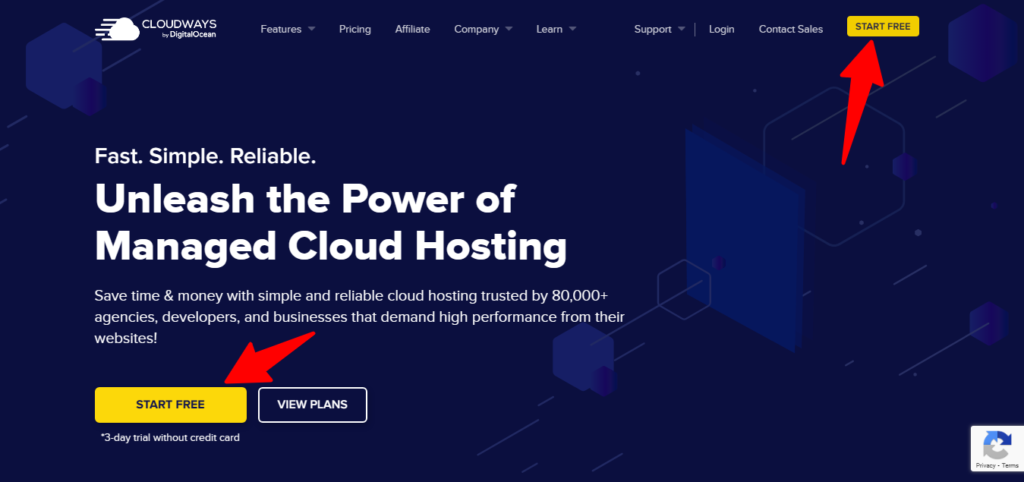
Sign up from this link. The link will take you directly to the Cloudways free trial landing page.
On the landing page, click the “Start Free” button.
The page has two buttons; whichever you click takes you to the signup page.
Step #2.
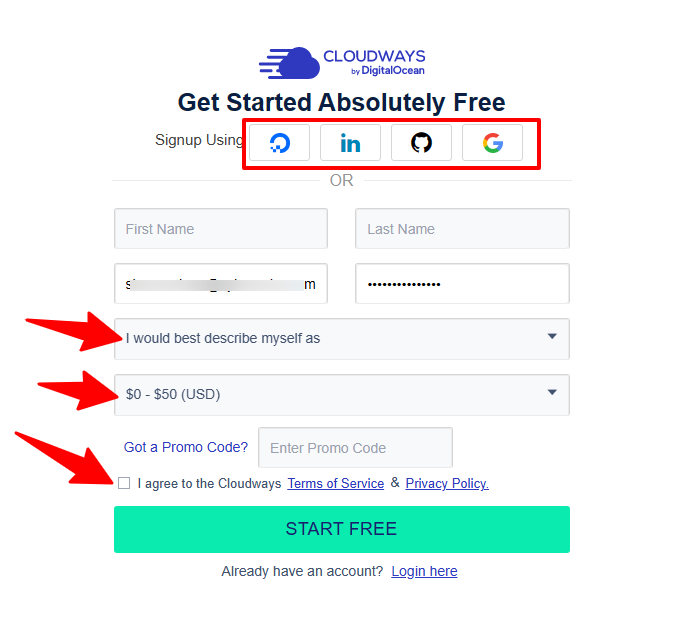
Now that you’re on the signup page, enter your details in the form.
You must enter your email address, first name, last name, and monthly hosting spend limits and select what best describes you from the dropdown menu.
After filling in this information, you must agree to the terms of service to continue using Cloudways.
Note: You can sign up using your other accounts, such as Gmail, LinkedIn, Github, and DigitalOcean accounts, which are available.
Step #3.
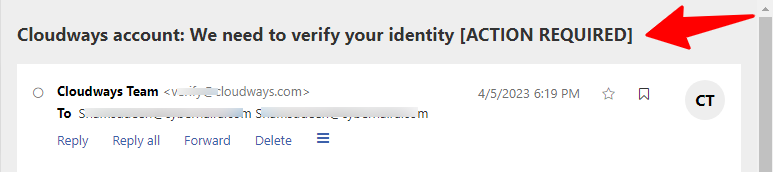
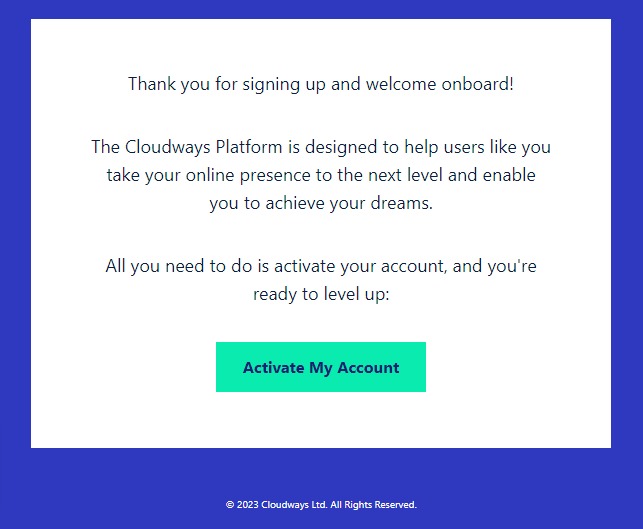
After completing the above step, you will get an email notification to verify your identity. This process is required to verify you’re human and not a bot trying to create an account.
So, log into your inbox and look for an email from Cloudways with a similar subject line like this:
Here’s what is contained in the email.
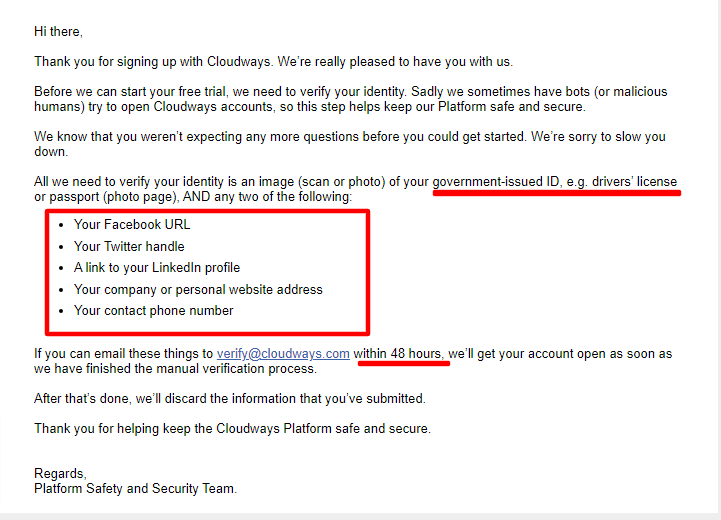
You must provide a government-issued ID and a link to two social media accounts to verify your identity.
Cloudways says this process helps keep the platform safe and secure for everyone.
So, if you’re not trying to do something shady or fraudulent, this is not an issue to bother you.
Also, you must provide this information within 48 hours to get verified; otherwise, you might need to restart the signup process.
Step #4.
If you provide the required document and links to two social media accounts, and your identity is verified, you have one step to complete before using your account.
Log into your Cloudways user dashboard and click the “Verify Your Account” button at the top of the page.
This is a two-step account verification process.
You’ll need to verify your phone number and email address.
You will receive a one-time code via SMS for phone number verification and an email notification to verify your email address.
Once you complete these processes, your 3-day Cloudways free trial account is activated.
Now, you can select your cloud server size and location, install your blogging application in just a few clicks, and start blogging.
Note: Your application will be deployed in a staging hosting environment. This gives you more time to work on your site before connecting it to your primary domain.
And if you want to migrate an existing blog to Cloudways, here is a complete tutorial you can go through.
Free Trial Limitation
Your Cloudways free trial comes with some limitations. Before signing up for the trial offer, you must know about these hosting feature restrictions.
Despite these limitations, users can still experience the effectiveness of a managed cloud server during the trial.
Here are the limitations of the Cloudways 3-day free trial hosting features you should know about.
Server Choice Restriction
First, Google Compute Engine and the Amazon Web Services cloud servers are unavailable for free trials.
You can only select between DigitalOcean, Vultr, and Linode for the trial account.
However, you can deploy multiple website applications for a free trial period at no cost. You can have more websites in one account for the free trial.
You can also set up applications on multiple servers to test how server infrastructure affects application performance. For example, you can install a WordPress application on DigitalOcean and a Linode server to see better performance.
No Access to Astra Pro
Another limitation is the Astra Pro theme.
Astra Pro’s 1-year license is offered for free when you subscribe to the Cloudways hosting plan.
However, with the Cloudways 3-day free trial account, you cannot access the Astra Pro add-on plugin.
Cloudflare Enterprises Locked
The Cloudflare Enterprises add-on is also locked behind upgrades.
You must upgrade your account to gain access to Cloudflare add-on features, such as WAF, mobile and image optimization, DDoS protection, etc.
No Free migration service from support.
You can not request free migration services for a free trial account.
This is a great concern if you want to move your blog to Cloudways without technical knowledge about the migration process.
Cloudways has made the migration process easy and seamless for anyone to walk through.
With its Cloudways Migration plugin, you can safely move your WordPress blog to the Cloudways server in a few steps.
Cloudways offers unbeatable managed WordPress hosting, allowing you to focus on running your online business while you forget about server management and maintenance.
I linked above to a video tutorial on migrating a WordPress blog to Cloudways.
Hosting Features in The Free Trial
Now that we’ve discussed hosting restrictions, let’s discuss the features you can access when you start the free trial.
Backup and Restore.
The automatic backup feature is available to Cloudways trial users. It is accessible via your application user dashboard.
These features allow you to back up and restore your application files and database in one click.
You can also perform on-demand application backups before changing your Cloudways website.
This is a helpful feature to ensure you don’t lose your data during the free trial if you want to upgrade your account.
Server Management
During the free trial of the Cloudways platform, you can access your server and manage settings like PHP versions, memory limits, file upload size, request execution time limit, etc.
If you need something specific about your server or application set-up that you’re unsure of its availability, you can ask the Cloudways support team during the sign-up process.
Staging Environment.
As a free user, you can test codes, plugins, themes, and applications on staging sites before you deploy them on a live website.
You can also update the staging site with content and data from the live site. This is a feature not commonly found in many web hosts.
Migration Tool
The migration tool allows users to move a WordPress blog database to Cloudways.
You can download the plugin from your Cloudways account or via the WordPress admin area on your current website.
The process is easy, effortless, and well-explained. It takes a few steps to complete.
Breeze – Caching Plugin
Cloudways has its caching plugin, a powerful speed and performance solution for WordPress sites.
I highly recommend you download and test this plugin during your free trial.
Play around with its settings and see what works for your blog.
Though the plugin is built to work with Cloudways hosting infrastructure, another hosting platform can use it.
Support
If you need help getting around your new hosting environment, the support reps are available 24/7.
With Cloudways managed hosting, you benefit from a fully managed cloud hosting solution that simplifies user server management. This solution includes features like automatic backups, security management, and expert support.
Whether you run a free trial account or a premium one, you can access live chat support and a ticket system.
Though premium users have higher priority access, it’s good to get help when needed. The online live chat app is accessible within your user dashboard. If you’re stuck, remember to use it.
Bot Protection
This feature protects your Cloudways sites against harmful requests to your server, such as hackers and malicious traffic.
You can enable the security feature and access its data during your free trial.
Cron Job Management
You have unrestricted access to set up cron jobs for your application. And manage their activities during the free trials.
So, even in the 3-day free trial of Cloudways hosting, you can set up an automation that runs at the scheduled time.
SSL certificate from Let’s Encrypt
Cloudways provides an SSL certificate from Let’s Encrypt that is freely available to all users.
The installation process is so easy; anyone can do it within a few seconds.
Analytics Monitoring
This helpful feature is available to all users, allowing you to monitor several performance and application metrics on your server.
You can monitor and analyze PHP performance, run cron jobs, CPU usage, bandwidth, RAM, storage space, logs, traffic, etc.
Team Member
Cloudways allows account administrators to add additional users to their accounts.
This feature is available to free trial users.
How to Upgrade After the Free Trial Ends
If you decide to upgrade your account, follow these steps.
Visit Cloudways, click the “Upgrade my Account” button at the top, and enter your address details on the next page.
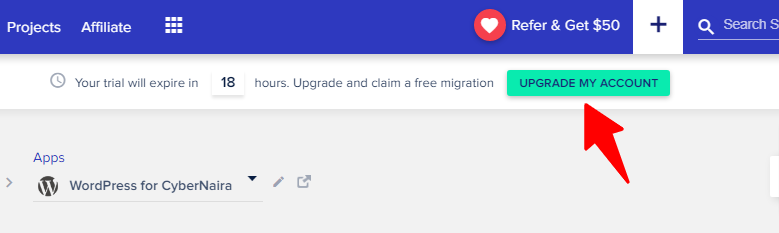
Complete the form correctly and click the “Proceed to Payment Gateway” button.

Fill out your credit card details on the payment page and click the “Authorize” button.

The only action required is to authorize the payments to go through.
Once the payment is successful, your account will be upgraded to unlock all hosting features and access.
You can now unlock all the Cloudways hosting features, go beyond limits, and enjoy high-speed performance with a fully optimized stack that offers a smooth user experience for your website audience.
Note:
Note: If you need an exclusive Cloudways coupon code to save on your next hosting invoice, check this article, in which I regularly share Cloudways promo code availability.
Cloudways Free Trial FAQs
Is Cloudways only for WordPress?
No, Cloudways is not limited to WordPress hosting. It supports various applications and content management systems (CMS), including Laravel, Magento, Joomla, Drupal, WooCommerce, and more. You can also deploy custom applications on Cloudways.
How long does the Cloudways free trial last?
Cloudways offers new users a three-day free trial. This gives them ample time to test the platform’s features and performance before committing to a paid plan.
How can I get Cloudways hosting for free?
You cannot get free hosting from Cloudways other than the 3-day free trial period. If you need more time to test-drive the platform, you can speak to support.
To get started with a free trial offer for Cloudways, visit their website and sign up for an account. You’ll be prompted to choose a server location, application, and plan. Once you’ve completed the setup process, your free trial will begin.
Is Cloudways better than GoDaddy?
Cloudways generally offers a more flexible and scalable hosting solution than GoDaddy. Cloudways provides greater control over your server resources, advanced features like managed caching and CDN, and a user-friendly interface. However, your best choice will depend on your specific needs and preferences.
Does Cloudways offer a pay-as-you-go plan?
Yes, Cloudways offers a flexible pay-as-you-go pricing model that allows you to pay for the resources you consume. This means you only pay for your server resources, making it a cost-effective option for many users.
Does Cloudways offer domain registration?
While Cloudways doesn’t directly offer domain registration services, you can easily purchase a domain through popular domain registrars like Namecheap and HostGator. Once you’ve purchased a domain, you can connect it to your Cloudways server via their DNS management tool.
Conclusion
Cloudways is a trusted and reliable top cloud provider in the industry. Its server infrastructure is built on the latest and fastest responsive hosting technology, ensuring top performance and guaranteed 99.99% uptime.
If you’re new to hosting and want to try a few options before paying, the Cloudways free trial offer is right.
You have three days to access to test some of its essential hosting features so you can make informed decisions based on data.
However, if three days of free trial isn’t enough for you, we have published web hosts that offer up to 30 days of free trial hosting.



Notice:
Your comment will end up in the trash folder if you spam our comment box. Use your real name, write meaningful and genuine comments. Avoid using keywords or brand name in the name filed and keep your comment relevant to the topic. Thank you.